Language
Setting the language
To set the language on the Control Display:1."Settings"2."Language/Units"3."Language:"4.Select the desired language.
Settings are stored for the profile currently in
use.
Setting the voice dialog
Voice dialog for the voice activation system,
refer to page 28.
Units of measure
Setting the units of measure
To set the units for fuel consumption, route/
distance and temperature:
1."Settings"2."Language/Units"3.Select the desired menu item.4.Select the desired unit.
Settings are stored for the profile currently in
use.
Brightness
Setting the brightness
To set the brightness of the Control Display:
1."Settings"2."Control display"3."Brightness"4.Turn the controller until the desired bright‐
ness is set.5.Press the controller.
Settings are stored for the profile currently in
use.
Depending on the light conditions, the bright‐
ness settings may not be clearly visible.
Assist system information
Display on the Control Display Information on the Assist system can be dis‐
played by activating Assist on the Control Dis‐
play.1."Settings"2."Control display"3."Driver assistance info"
Head-up Display
The concept
This system projects important information
into the driver's field of vision, e.g., the speed.
The driver can get information without averting
his or her eyes from the road.
Display visibility The visibility of the displays in the Head-up
Display is influenced by the following factors:
▷Certain sitting positions.▷Objects on the cover of the Head-up Dis‐
play.▷Sunglasses with certain polarization filters.▷Wet roads.▷Unfavorable light conditions.Seite 90ControlsDisplays90
Online Edition for Part no. 01 40 2 960 440 - II/15
Breakdown assistanceVehicle features and options
This chapter describes all standard, country-
specific and optional features offered with the
series. It also describes features that are not
necessarily available in your car, e. g., due to
the selected options or country versions. This
also applies to safety-related functions and
systems. The respectively applicable country
provisions must be observed when using the
respective features and systems.
Hazard warning flashers
The button is located in the center console.
Intelligent Emergency
Request
The concept In case of an emergency, an Emergency Re‐
quest can be made through this system.
General information
Only press the SOS button in an emergency.
Hints
Emergency Request not guaranteed
For technical reasons, the Emergency
Request cannot be guaranteed under unfavor‐
able conditions.◀
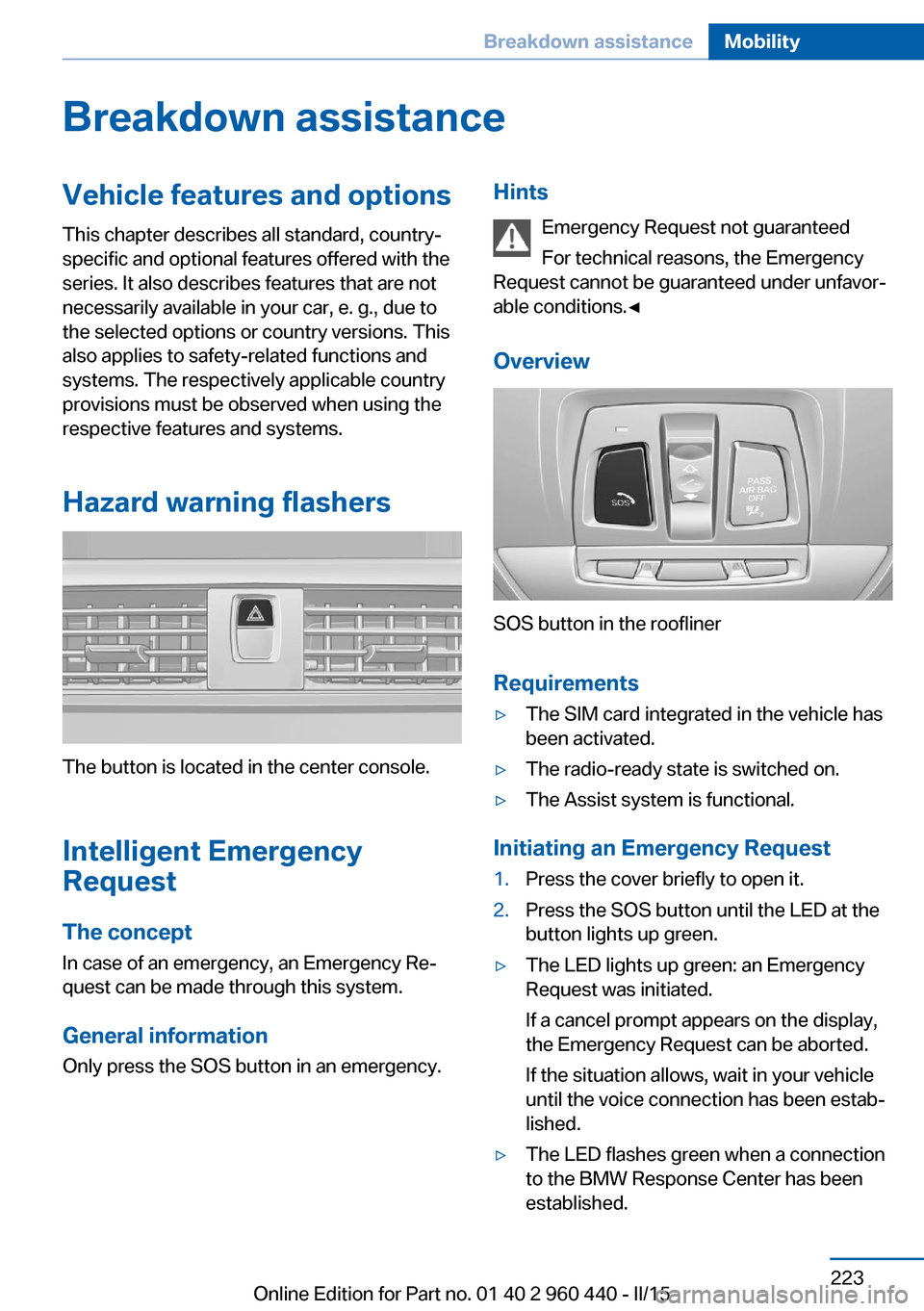
Overview
SOS button in the roofliner
Requirements
▷The SIM card integrated in the vehicle has
been activated.▷The radio-ready state is switched on.▷The Assist system is functional.
Initiating an Emergency Request
1.Press the cover briefly to open it.2.Press the SOS button until the LED at the
button lights up green.▷The LED lights up green: an Emergency
Request was initiated.
If a cancel prompt appears on the display,
the Emergency Request can be aborted.
If the situation allows, wait in your vehicle
until the voice connection has been estab‐
lished.▷The LED flashes green when a connection
to the BMW Response Center has been
established.Seite 223Breakdown assistanceMobility223
Online Edition for Part no. 01 40 2 960 440 - II/15
Temperature display for ex‐ternal temperature 82
Temperature, engine oil 81
Tempomat, refer to Active Cruise Control 124
Terminal, starting aid 225
Text message, supplemen‐ tary 81
Theft alarm system, refer to Alarm system 44
Thigh support 52
Through-loading system 158
Tilt alarm sensor 45
Time of arrival 88
Tire damage 197
Tire identification marks 195
Tire inflation pressure 189
Tire inflation pressure moni‐ tor, refer to FTM 104
Tire Pressure Monitor TPM 100
Tires, changing 197
Tire sealant 199
Tires, everything on wheels and tires 189
Tires, run-flat tires 199
Tire tread 197
Tone, see user's manual for Navigation, Entertainment
and Communication
Tool 212
Top View 138
Total vehicle weight 236
Touchpad 21
Tow fitting 227
Towing 226
Tow lug, see Tow fitting 227
Tow-starting 226
Tow truck 226
TPM Tire Pressure Moni‐ tor 100
Traction control 120
TRACTION, driving dynam‐ ics 120
Transmission lock, electronic unlocking 75 Transmission, manual trans‐
mission 72
Transmission, Steptronic transmission 72
Transporting children safely 60
Tread, tires 197
Trip computer 88
Triple turn signal activa‐ tion 69
Trip odometer 82
Truck for tow-starting/ towing 226
Trunk lid closing 40
Trunk lid, emergency unlock‐ ing 41
Trunk lid, hotel function 41
Trunk lid opening 40
Trunk lid, opening with no- touch activation 42
Trunk lid via remote con‐ trol 38
Turning circle 236
Turning circle lines, rearview camera 136
Turn signals, operation 69
U Unintentional alarm 45
Units of measure 90
Universal remote control 152
Unlock button, Steptronic transmission 73
Unlocking/locking via door lock 39
Unlocking/locking with re‐ mote control 37
Unlocking, settings 43
Updates made after the edito‐ rial deadline 7
Upholstery care 231
USB interface 157 V
Vanity mirror 156
Variable sport steering 121
Vehicle battery 220
Vehicle battery, replac‐ ing 221
Vehicle, break-in 166
Vehicle care 230
Vehicle features and op‐ tions 6
Vehicle identification num‐ ber 9
Vehicle jack 220
Vehicle paint 230
Vehicle storage 232
Vehicle wash 229
Ventilation 150
Ventilation, refer to Parked- car ventilation 151
VIN, see vehicle identification number 9
Voice activation system 27
W Warning and indicator lamps, see Check Control 78
Warning displays, see Check Control 78
Warning messages, see Check Control 78
Warning triangle 224
Warranty 7
Washer fluid 71
Washer nozzles, wind‐ shield 71
Washer system 69
Washing, vehicle 229
Water on roads 167
Weights 236
Welcome lamps during un‐ locking 37
Welcome lights 92
Wheel base, vehicle 236
Wheel cleaner 231 Seite 250ReferenceEverything from A to Z250
Online Edition for Part no. 01 40 2 960 440 - II/15