2015 AUDI S3 SEDAN instrument cluster
[x] Cancel search: instrument clusterPage 33 of 282

....,
N
0 > co
rl I.O
"'
"'
"'
rl
temperature may be higher if there is heavy en
gin e load and high temperatures outside. This is
not a cause for concern as long as the.
¢page 19 orllll ¢page23 indicator lights in the
display do not blink.
A WARNING
Your focus should always be on driving your
vehicle safely . As the dr iver, you have com
plete responsibility for safety in traffic . Only
use the functions such as the lap timer in such
a way that you a lways maintain complete con
trol over your vehicle in all traffic situations .
(D Tips
You can retr ieve information from the tr ip
computer while the lap timer stopwatch is
r u nning.
Opening the lap timer and measuring time
Applies to vehicles: with lap timer (5 models)
Fig. 15 Multifunction steer ing wheel: controls
Fig. 16 Instrument cluster: lap timer
Opening th e lap timer
-
"'Press the button @ on the multifunction steer
ing wheel and turn the thumbwheel @
¢fig. 15 unt il Lap timer ¢fig. 16 appea rs.
Dr iver inform atio n sy stem
.. Press the thumbwheel @ to confirm the selec
tion.
T im ing laps
"' To sta rt timing, press the thumbwheel @ while
on the menu item
Lap 1 - pre ss OK . The time
measurement is shown in line @
r=:> fig. 16.
.. To measure the lap time, press the thumb
wheel @ again while on the men u item
New
lap -pre ss O K. This also starts timing the next
round. The last time measurement moves up to
the top line
(D . Line ® contains the current lap
time .
If the symbol
ri) is green during the current lap
t ime measurement, the current time is faster
than the previous best time. If the symbol. is
red, the current time is slower @.
Displaying split time and pausing tim ing
.. To display a split time
[~l turn the thumb-
wheel @until
Split time appears in line @.
Press the thumbwheel @ to confirm the selec
tion. The split time appears for approximately 10 seconds in line @. The timing of the current
lap conti nues.
If you would like to insert a pause
m immediate
ly after the split t ime, first press the thumb
wheel @and then the menu item
Pr ess OK to go
back to confirm .
"' To insert a pause, turn the thumbwheel @ until
Pau se appears in the line @. Press the thumb
wheel @ to confirm the se lec tion . Th e pause
symbo l
m appears in line @ .
.. To continue timing, press the thumbwhee l@ .
If timing is paused , you can continue it la ter even
i f you sw itch the ignition off.
Mean ing of the indicators in the center d isp lay
¢ fig . 16:
CD Disp lay of last time measurement
@ Symbols:
-
[O]: Begin ning of time measuremen t
- . : Slowest time
- . : Fastest time
- [~]: Split time
-m : Pause
31
Page 46 of 282

Light and Vision
When switched on, adaptive light adjusts to
curves depending on the vehicle speed and steer·
ing wheel angle . This provides better lighting
through the curve. The system operates in a
speed range from approximately 6 mph (10 km/
h) to 68 mph (110 km/h).
Static cornering light* (vehicles with adaptive
light)· the cornering light switches on automati
cally when the steering wheel is turned at acer
tain ang le at speeds up to approximately 44 mph
(70 km/h) and whe n the turn signal is activated
at speeds up to approximately 25 mph (40 km/
h). The area to the side of the vehicle is illuminat
ed better when tu rning.
Speed depend ent light distribution* -The speed
dependent light distribution adapts the light in
towns and on highways or expressways. In tersec
tions can also be illum inated on veh icles with a
navigat ion system*.
Highway light function*
(Vehicles with adaptive light or LED headlights) -
This function adapts the light ing for highway
driving based on vehicle speed .
..&, WARNING
-Automatic headlights* are only int ended to
assist the driver. They do not relieve the
driver of his responsibility to check the
headlights and to turn them on manually
according to the current light and visibi lity
condit ions. For example, fog cannot be de·
tected by the light sensors . So always switch
on the low beam under these weather con
ditions and when driving in the dark
io.
- Accidents could occur if you can not see the
road ahead of you well and if others on the
road cannot see you . Always switch your
head lightsonsothatyoucanseetheroad
ahead of you and others can see your vehicle
from behind.
- Please observe legal regulations when using
the lighting systems described .
44
(D Note
The rear fog lights shou ld only be turned on in
accordance with traffic regulation, as the lights are bright for following traffic.
@ Tips
-The light sensor for the automatic head
lights * is in the rearview mirror mount.
Therefore, do not place any stickers in this
area on the windshield.
- Some functions of the exterior lighting can
be adjusted
c> page 45.
- If you turn off the ignition whi le the exterior
lights are on and open the door, you will
hear a warning tone.
- In some market-specific versions, the tail
lights do not turn on when switching on the
daytime running lights.
- In cool or damp weather, the inside of the headlights, turn signals and taillights can
fog over due to the temperature difference
between the inside and outside . They will
clear shortly after switching them on. This
does not affect the serv ice life of the light
ing .
- A message will appear in the instrument
cluster if there is a malfunction in the light
sensor
c> page 24.
Emergency flasher
Fig. 32 Ins trumen t panel : em ergenc y flasher bu tton
The emergency flashers makes other dr ivers
aware of your vehicle in dangerous s ituations .
.. Press the~ button to switch the emergency
flashers on or off.
Page 49 of 282
....,
N
0 > co
rl I.O
"'
"'
"'
rl
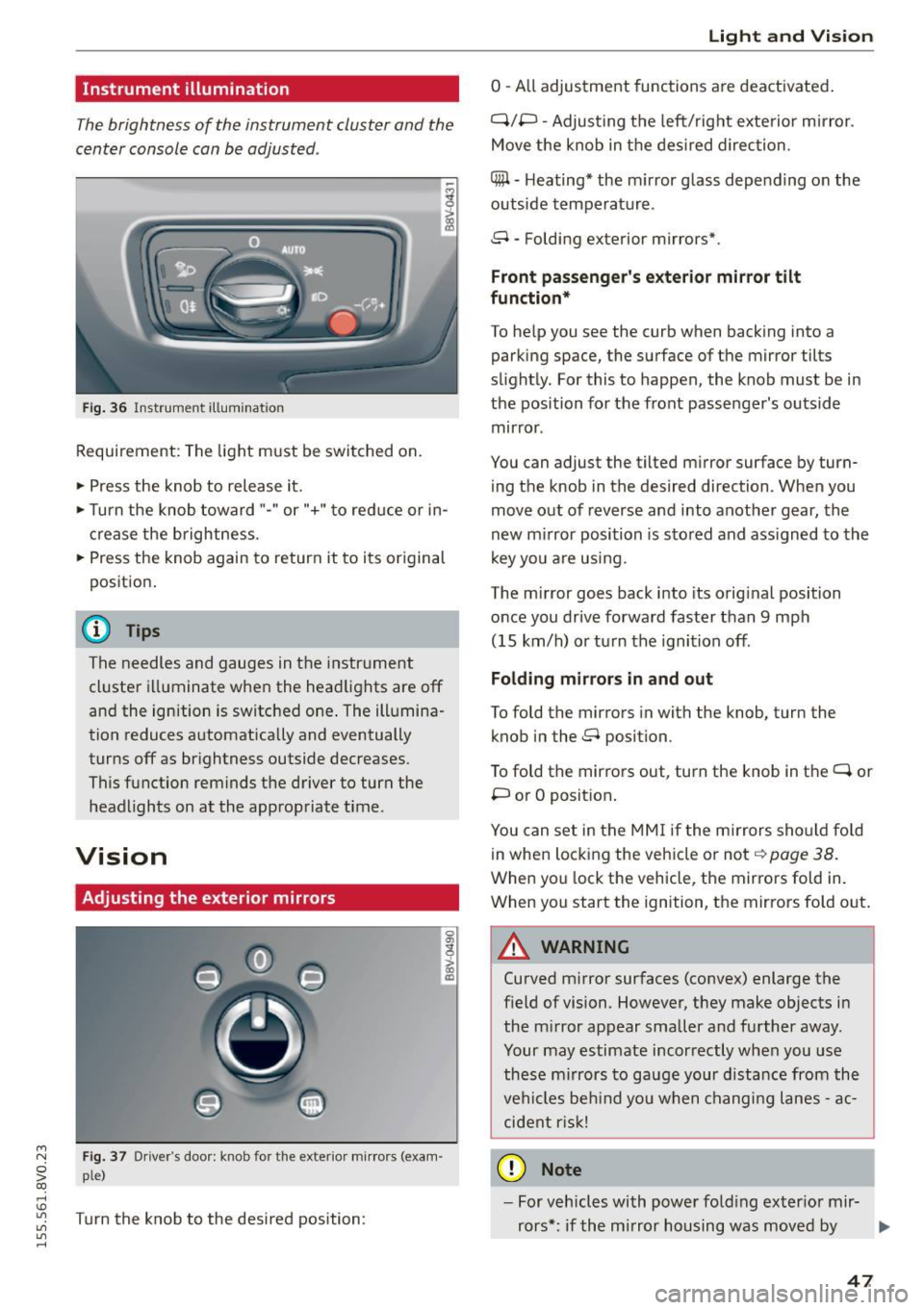
Instrument illumination
The brightness of the instrument cluster and the
center console can be adjusted .
Fig. 36 Instrument illum ination
Requirement: The light must be switched on.
.. Press the knob to release it.
.. Turn the knob toward"-" or"+" to red uce or in
crease the brightness.
.. Press the knob again to return it to its original
posit ion .
@ Tips
The needles and gauges in the instrument
cluster illuminate when the headlights are off
and the ignition is switched one . The illumina·
tion reduces automatically and eventually
turns off as br ightness outside decreases.
This function reminds the driver to turn the
headlights on at the appropriate time .
Vision
Adjusting the exterior mirrors
Fig. 37 Driver's door: knob for the exterior mirrors (exam
ple)
Turn the knob to the desired position:
0
g
> a, (X)
Light and Visio n
0 -A ll adjustment functions are deactivated .
Q/P -Adjusting the left/rig ht exterior mirror.
Move the knob in the des ired direction.
C@ · Heating* the m irror glass depending on the
outside temperature.
8 • Folding exterior mirrors*.
Front pa ss e ng er's ex te rior mirror tilt
functio n*
To help you see the curb when backing into a
parking space, the surface of the mirror tilts
slight ly. For this to happen, the knob must be in
the position for the front passenger's outside
mirror .
You can adjust the tilted mirror surface by turn·
i ng the knob in the desired direction . When you
move out of reverse and into another gear, the
new m irror position is stored and ass igned to the
key yo u are us ing .
The mirror goes back into its orig inal position
once you drive forward faster than 9 mph
(15 km/h) o r turn the ignition off.
Folding m ir rors in and out
To fold the mirrors in with the knob, turn the
knob in the 8 position.
To fold the mirrors out, turn the knob in the
q or
P or O posit ion .
You can set in the MM I if the mirrors sho uld fo ld
in when locking the vehicle or not
q page 38.
When you lock the vehicle, the mirrors fold in.
When you start the ignition, the mirrors fold out.
A WARNING -,.
Curved m irror surfaces (convex) enlarge the
field of vision. However, they make objects in
the m irror appear smaller and further away.
Your may estimate incorrectly when you use
these m irrors to gauge your d istance from the
vehi cles be hind you when changi ng lanes -ac·
cident risk!
@ Note
- For vehicles with power fo ld ing exter ior mir·
rors*: if the mirror housing was moved by
IJI,-
47
Page 81 of 282

M N
0 > co ,...., \!) 1.1'1
1.1'1
1.1'1
,....,
brake provides various convenience and safety
functions.
When starting from rest
- The integral hill start assist helps you when
driving by automatically releasing the parking
brake ¢
page 80 , Starting from a stop.
- When starting on inclines, the hill start assist
prevents the vehicle from unintentionally roll
ing back. The braking force of the parking brake
is not r eleased until sufficient driving forc e has
b ee n built up at the wh eels.
Emergency brake function
An emergency braking functions ensures that the
vehicle can be slowed down even if the
normal
brakes fail¢ page 80, Emergency braking func
tion.
A WARNING
- Do not press the accelerator pedal inadver
tently if the vehicle is stationary but the en gine is running and a gear is selected . Other
wise the vehicle will start to move immedi
ately and could result in a crash.
-If the power supply fails, the released park
ing brake can no longer engage. In this case,
park the vehicle on level ground and secure
it by placing the selector lever in the P posi
tion. See an authorized Audi dealer or au
thorized Audi Service Facility for assistance.
(D Note
If the . or 1111 (USA models)/ . (Canada
models) indicator light in the instrument clus
ter blinks , there is a malfunction in the brake
system. Refer to the detailed description of
the indicator lights¢
page 17.
-If the - (USA models)/ . (Cana-
da models) or
Ill indicator light turns on,
there is a malfunction in the parking brake
¢ page 18.
(D Tips
-If the parking brake is set while the ignition
is switched
off, thP l<@) indicator light in the
button and in the instrument cluster dis
play - (USA models) /. (Canada mod-
Driving
els) will turn off after a certain amount of
time.
- If driver's door is opened while the ignition
is switched on, the parking brake sets auto
matically. This prevents unintended rolling
of the vehicle.
- Occasional noises when the parking brake is
applied and released are normal and are not
a cause for concern.
- When the vehicle is parked, the parking
brake goes through a self-test cycle at regu
lar intervals. Any noises associated with this
are normal.
- If there is a power failure, the parking brake will not set if it is released, and it will not
release if it is set¢&. See an authorized
Audi dealer or authorized Audi Service Fa
cility for assistance .
Parking
.. Press the brake pedal to stop the vehicle.
.. Pull the switch@¢
page 78, fig . 71 to set the
parking brake.
.. Place the selector lever in the P position.
.. Turn th e engine off¢,& .
.. Turn the steering wheel when pa rking on in
clines so that the wheels will roll into the curb
if the vehicle starts moving .
A WARNING
--Always take the vehicle key with you when
leaving the vehicle, even for a short period
of time. This applies particularly when chil
dren remain in the vehicle. Otherwise the
children could start the engine , release the
parking brake or operate electrical equip
ment (e.g. power windows). There is the risk
of an accident.
- When the vehicle is locked, no one -particu
larly not children should remain in the vehi
cle. Locked doors make it more difficult for
emergency workers to get into the vehicle,
which puts lives at risk.
79
Page 84 of 282
Automatic transmi ssion
Automatic transmission
S tronic
Introduction
Applies to veh icles: w ith S tro nic transmiss ion
Your vehicle is equ ipped w ith an electronically
contro lled DSG transmission ca lled S tronic. Two
independent clutches transfer the power be
tween the eng ine and t ransmission. It a llows the
vehicle to accelerate without a noticeable inter
ruption in tract ion .
The transmission upshifts or downsh ifts auto
matica lly. The driv ing style contin uously influen
ces the se lection of the driving program .
When a
mod era te driving style is used, the
transmiss ion se lects the mos t econom ica l driving
mode. The transmission upsh ifts at a lower RPM
and downshifts at a higher RPM to improve fuel
efficiency .
The transmission swit ches to a sporty mode after
a kick-down or when the driver uses a
s po rty driv
ing sty le
characterized by quick accelerator pedal
movements, heavy acceleration, frequent
changes in speed and t raveling at the maximum
speed.
If desired, the drive r can a lso se lect the gears
manually ( tiptronic mode) ¢ page 87, Shift ing
manually (tiptronic mode) .
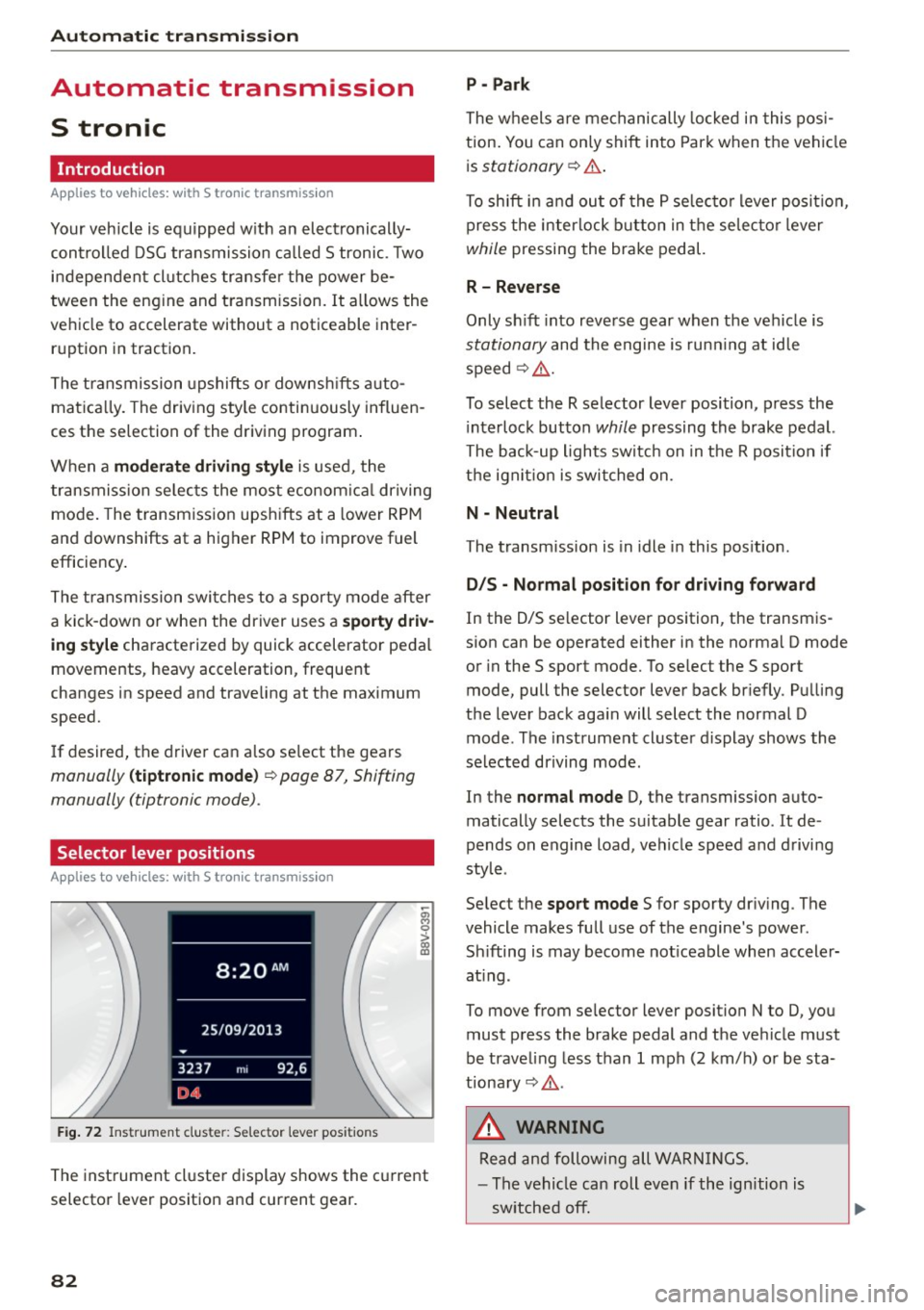
Selector lever positions
Applies to vehicles: w ith S tro nic transmiss ion
F ig. 72 In strum ent clus te r: S electo r lev er pos it io ns
-~ 0 > a, ID
The inst rument cl uste r display shows the c urrent
selector lever position and current gear.
82
P - Park
The wheels a re mechanically locked i n this pos i
tion . You can on ly shift into Par k when the vehi cle
i s
stationary ¢.&. .
To shift i n and ou t of the P se lec to r lever posit io n,
press the interlock button in the selec tor lever
while pressing the brake pedal.
R - Reverse
Only sh ift into reve rse gear when the vehicle is
stationary and the engine is run ning at id le
speed¢ .&..
To select the R selector lever position, p ress the
i nterlock button
while pressing the brake pedal.
The back-up lights switc h on in the R posit ion if
the ign it io n is switched on.
N - Neutral
The transm ission is in idle in this pos ition .
D/S - Normal po sit ion fo r dri ving f orward
In the D/S se lector lever position , the transm is
s ion can be operated either in the norma l D mode
or in the S sport mode. To se lect the S sport
mode, pull the selector lever back br iefly . Pu lling
the lever back aga in will select the normal D
mode . The instrument cluster display shows the
selected driving mode .
In the
normal mode D, the transmission auto
matically selects the suitable gear ratio. It de
pends on engine load, vehicle speed and d rivi ng
style .
Se lect the
sport mode S for sporty dr iv ing . The
vehicle makes fu ll use of the engine 's power.
Sh ifting is may become not iceable when accele r
at ing .
To move from se lec tor lever position N to D, you
must p ress the brake pedal and the ve hicle must
be traveling less than 1 mph (2 km/h) o r be sta
tiona ry¢ .&..
&, WARNING
Read and following all WA RN IN GS.
- The vehicle can roll even if the ignition is
sw itched off.
Page 89 of 282
....,
N
0 > co
rl I.O
"'
"'
"'
rl
Shifting manually (tiptronic mode)
Applies to vehicles: with 5 tronic transmiss ion/ shi ft padd les
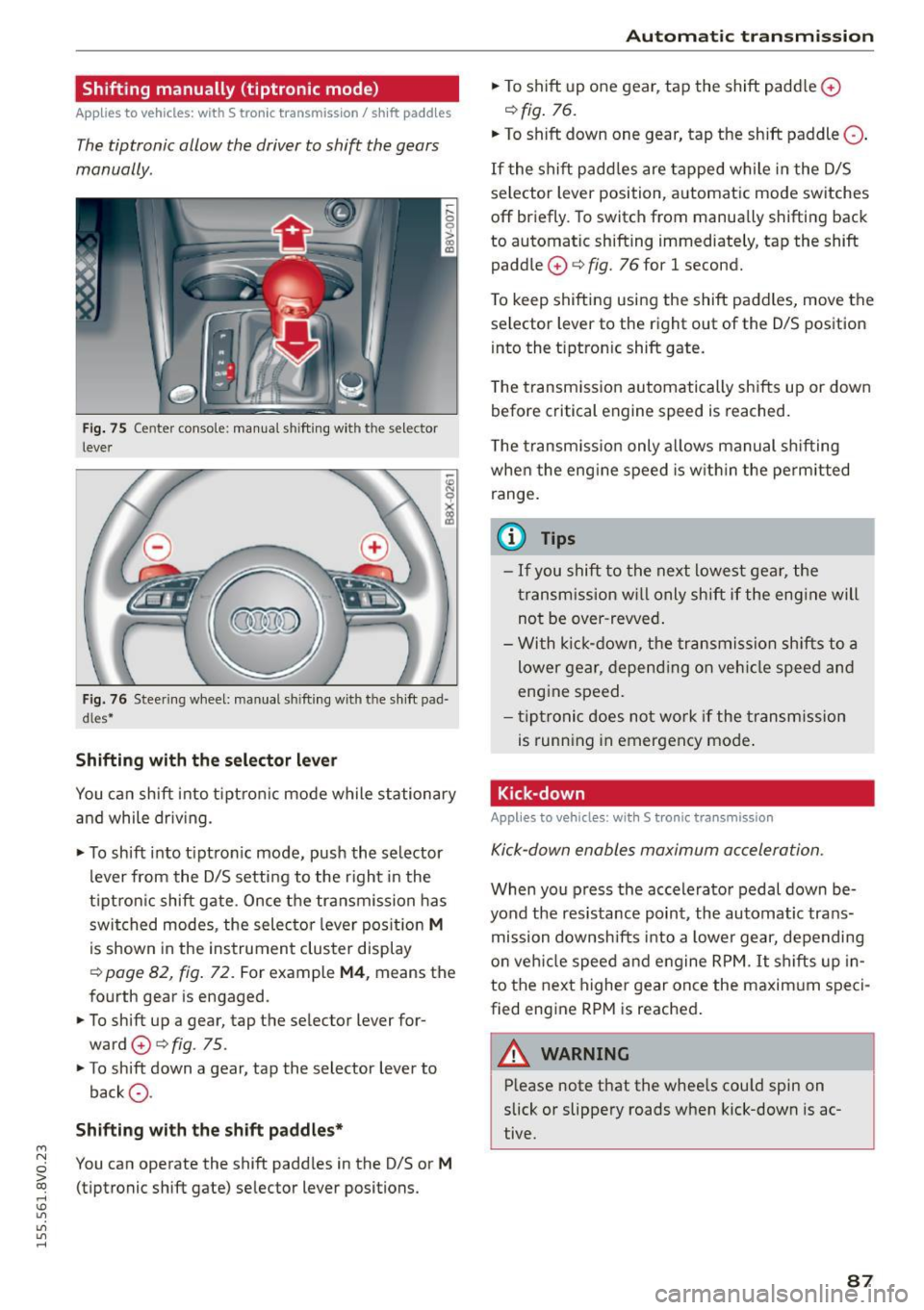
The tiptronic allow the driver to shift the gears
manually.
Fig. 75 Center c_onso le: manual shi fting wi th the selec tor
lever
Fig. 76 Steering wheel: manual shi fting with t he shift pad
d les*
Shifting with the selector lever
You can shift into tiptronic mode while stationary
and while driv ing.
• To shift into tip tron ic mode, push the selector
lever from the D/S setting to the right in the
tiptron ic shift gate. Once the transmission has
switched modes, the selecto r lever position
M
is shown in the instrument cluster display
r:::> page 82, fig. 72 . For example M4, means the
fourth gear is engaged.
• To shift up a gear, tap the selector lever for
ward
0 r:::> fig . 75.
• To shift down a gear, tap the selector lever to
back
0 -
Shifting with the shift paddles*
You can operate the shift paddles in the D/S or M
(tiptronic shift gate) selector lever positions.
Automatic transmission
• To shift up one gear, tap the shift padd le 0
r:::> fig. 76.
• To shift down one gear, tap the shift paddle 0 -
If the shift paddles are tapped while in the D/S
selector lever position, automatic mode switches
off briefly. To switch from manually shifting back
to automatic shifting immediately, tap the shift paddle
0 ¢ fig. 76 for 1 second.
To keep shifting using the shift paddles, move the
selector lever to the right out of the D/S position
into the t iptron ic shift gate.
T he transmission automatically shifts up or down
before critical engine speed is reached.
The transmission only allows manual shifting
whe n the engine speed is within the permitted
range.
(0 Tips
- If you shift to the next lowest gear, the
transmission will only shift if the engine will
not be over-revved.
- With kick-down, the transmission shifts to a
lower gear, depending on vehicle speed and
engine speed.
- tiptronic does not work if the transmission
is running in emergency mode .
Kick-down
Applies to vehicles: wit h S tronic transm issio n
Kick-down enables maximum acceleration.
When you press the accelerator pedal down be
yond the resistance point , the automatic trans
mission downsh ifts into a lower gear, depending
on veh icle speed and engine RPM.
It shifts up in
to the next higher gear once the maxim um speci
fied eng ine RPM is reached.
A WARNING ~
Please note that the whee ls cou ld spin on
slick or slippery roads when kick-down is ac
tive .
-
87
Page 90 of 282
Automatic transmission
Launch Control-Program
Applie s to v ehi cles: w ith launch control
The Launch Control Program enables maximum
acceleration .
Requirement: The engine must be at operating
temperature and t he steering wheel must not be
turned.
.,. With the engine running, press the
!~OFFI but
ton briefly one time
l) .
.,. Pull the selector lever back out of the O/S posi
tion briefly to select the S position, or press it
toward the right into the tiptronic position or
select the
Dynamic driving mode in drive se
lect*
~page 112.
.,. Press the brake pedal firmly with your left foot
and hold it all the way down for at least 1 sec
ond.
.,. At the same time, press the gas pedal all the
way down with your right foot until the engine
reaches and stays at a high RPM level.
.,. Remove your left foot from the brake.
_.&. WARNING
- Always adapt your driving to the traffic flow.
- Only use Launch Control when road and traf-
fic conditions allow it and other drivers will
not be endangered or impacted by your driv
ing and the vehicle's acceleration.
- Please note that the drive wheels can spin
and the vehicle can break away when sport
mode is switched on, especially when the
road is slippery.
- Once the vehicle has started moving, press
the
l .1'3 OFF ! button briefly to turn the sport
mode off.
(D Tips
- The transmission temperature may increase
significantly after using the launch control program. If that happens, the program may
1l In vehicles w ith a d rive r infor matio n syste m, a n ESC light
in t he instrument clus ter s tays o n co ntinuo usly and t he
message
Stabilization control (ESC): sport. Warning! Re·
stricted stability
appears temporarily.
88
not be available for a few minutes. It will be
available again after a cool-down period.
- When accelerating using the launch control
program, all vehicle parts are subject to
heavy loads. This can lead to increased wear.
Emergency mode
App lies to vehicles : wi th S t ro ni c t ra nsmi ssio n
In the event of a system malfunction, there is an
emergency program .
If all of the selector lever positions are highlight
ed with a light background in the instrument
cluster display, there is a system malfunction and
the S tronic transmission is running in the emer
gency program. The vehicle can still be driven in
emergency mode, but only with reduced speed
and not in all gears. In some cases, the vehicle
cannot drive in reverse .
(D Note
If the transmission runs in emergency mode,
drive to an authorized Audi dealer or author
ized Audi Service Facility immediately to have
the malfunction corrected.
Transmission malfunction
• Transmission malfunction! Please stop the
vehicle and select P
There is a malfunction in the transmission. Park
the vehicle securely and do not continue driving.
See an authorized Audi dealer or authorized Audi
Service Facility for assistance.
• Transmission overheating! Please stop the
vehicle!
The transmission is too hot and can become dam
aged. Stop and let the transmission cool with the
engine running (at idle) in the P selector lever po
sition. Then the indicator light and the message
turn off, drive to an authorized Audi dealer or au
thorized Audi Service Facility immediately to have.,.
Page 96 of 282

Assist
Assist Electronic speed limiter*
Applies to veh icles: with electronic speed limiter
Your vehicle may be factory equipped with ti res
that are rated for a maximum speed of 130 mph
(210 km/h) . T his is less than the maximum speed
of your vehicle . To reduce the risk of sudden tire
failure and loss of control if the vehicle is operat
ed at excessive speeds, your vehicle also has an
electronic speed limiter. The electronic speed
limiter prevents your vehicle from going faster
than the tir e speed rat ing . For more information
~page 221.
If the engine control unit receives faulty vehicle
road speed signals, the Malfunction Indicator
Lamp (MIL)
¢4 will illuminate . If this occurs,
contact the nearest a utho rized Audi dealer for as
sistance .
A WARNING
Always observe the posted speed limits and
adjust your speed to suit prevailing road, traf
fic and weather conditions . Never drive your
vehicle faster than the maximum speed rating of the tires installed.
Speed warning system
Introduction
The speed warning system helps you to stay un
der a specified maximum speed.
-
The speed warning system warns you if you are
exceeding the maximum speed that you have set .
You will hear a warning tone when your speed ex
ceeds the stored value by approximately 3 mph
(3 km/h) . Th e. (USA models)/. (Canada
models) indicator light and the message
Speed
limit exceeded!
appear in the instrument cluster
disp lay at the same time . The ./. indicator
light turns off when the speed decreases below
the stored maximum speed.
Setting a thresho ld is recommended if you would
like to be reminded when you re ach a certain
maximum speed. Situations where you may want
to do so include driving in a country with a gener-
94
al speed limit or if there is a specified maximum
speed for winter tires.
(D Tips
Regardless of the speed warning system, you
should always monitor your speed using the
speedometer and make sure you are following
the legal speed limit .
Setting the threshold
You can set, change and delete the threshold in
the MMI.
.. Select: the I MENU I button >Car> Systems*
contro l button > Driver assistance > Speed
warning.
You can set any threshold between 20 mph
(30 km/h) and 150 mph (240 km/h) . Settings
can each be adjusted in increments of 6 mph
(10 km/h).
Cruise control system
· Description
Applies to vehicles: with cruise control system
The cruise control system makes it poss ible to
drive at a constant speed starting at 15 mph
(20 km/h).
The speed is kept constant by modify ing engine
power or through an act ive brake intervention.
A WARNING
- Always pay attention to the traffic around
you when the cruise control is in operation.
You are a lways responsible for your speed
and the distance between your vehicle and
other vehicles.
- For reasons of safety, cruise contro l should
not be used in the city, in stop-and-go traf
fic, on winding roads and when road condi tions are poor (such as ice, fog, gravel,
heavy rain and hydroplaning) -you could
have an accident .
- Switch the cruise control off temporarily
when driv ing in turning lanes, highway exits
or in construction zones .
-