2015 AUDI RS5 COUPE instrument cluster
[x] Cancel search: instrument clusterPage 95 of 254

"' N
0:: loo
rl I.O
"' N
"' rl
Audi adaptive cruise control and braking guard
~--- ~-Distance 3: This setting corresponds
to a distance of 164 feet/SO meters when travel
ing at 62 mph (100 km/h), or a t ime interval of
1.8 seconds.
~ ---- ~ Distance 4: This setting corresponds
to a distance of 210 feet/64 meters when trave l
ing at 62 mph (100 km/h), or a t ime interval of
2 .3 seconds.
A WARNING
Following other vehicles too closely increases
the risk of collisions and ser ious personal in
jury.
- Setting short distances to the traffic ahead
reduces the time and distance available to
br ing your vehicle to a safe stop and makes
it even more necessary to pay close atten
tion to traffic.
- Always obey applicable traffic laws, use
good judgment, and select a safe following
distance for the traffic, road and weather
conditions.
¢j) Tips
- Distance 3
is set automatically each time
you switch the ignition on.
- Your standa rd settings are automatically
stored and assigned to the remote control
ke y being used.
Setting the driving program
Applies to vehicles: with Audi adaptive cruise control
Depending on the selected dr iv ing program and
distance, driving behavior when accelerating will
vary from dynamic to comfortab le .
Setting the driving program for vehicles
without Audi drive select*
~ In the radio/MMI*, select: !CAR !function but
ton >
Adaptive cruise control > Driving prog. >
comfort, standard or dynamic . Or
~ Select : !CAR I function button> Car systems*
co ntrol button > Driver assist > Adaptive cruise
control
> Driving program* > Comfort, Stand
ard
or Dynamic . Setting the driving mode for vehicles with
Audi drive
select*
Refer to ¢ page 102.
(D Tips
Your settings are automatical ly stored and as
signed to the remote control key being used.
Request for driver intervention
Applies to vehicles: with Audi adaptive cruise control
Fig. 99 Instrume nt cluster: request fo r drive r in te rvention
In certain situations, the system w ill prompt you
to take action. This could happen, for example, if
braking by the adaptive cruise control system is
not enough to maintain enough distance to the
vehicle ahead.
The instrument cluster will warn you about the danger ¢
fig. 99:
-A red vehicle is pictured in the display.
- The text
DISTANCE! appears in the status bar.
- The red indicator light. blinks.
- In addition , a warni ng tone sounds.
93
Page 96 of 254

Audi adaptive cruise control and braking guard
Audi braking guard
Description
Applies to veh icles: w ith Audi adaptive cruise co ntrol
F ig. 100 Instrument cluster : approach warn ing
Braking guard uses a radar sensor. It also func
tions within the limits of the system when adap
tive cruise control is switched off.
What can Audi braking guard do?
When detected in time, the system can assess
situations when a vehicle ahead brakes suddenly
or if your own vehicle is traveling at a high speed
and approaching a vehicle up ahead that is mov
ing more slowly . Braking guard does not react if it
cannot detect the situation .
The system advises you of various situations:
- The
distance warning is given if you are too
close to the vehicle ahead for a long time. If the
vehicle ahead brakes sharply, you will not be
able to avoid a collision. The indicator light.
in the display comes on .
- The
approach warning is given when a detected
vehicle up ahead in your lane is moving much
more slowly than you are or if it brakes sharply .
When this warning is given, it may only be pos
s ib le to avoid a collision by swerving or braking
sharply. The indicator light . and indicato r in
the display will wa rn you about the danger
¢ fig. 100 . You will also hear an acoustic signa l.
If you do not react fast enough or do not react at
all to the situation, Braking guard will intervene
by braking and the message
braking guard inter
vention
will appear.
ll Thi s is not available in so me c oun tries.
94
- If a co llision is imminent, the system wi ll first
provide an
acute warning by br iefly and sharply
app ly in g the brakes.
- If you do not react to the acute warning, brak
ing guard can brake within the limits of the sys
tem. This reduces the vehicle speed in the event
of a collision.
- At speeds under 20 mph (30 km/h), the system
can initiate a complete deceleration shortly be
fore a collisionl l_
-If the braking guard senses that you are not
braking hard enough when a collision is immi
nent, it can increase the braking force.
Which functions can be controlled?
You can switch braking guard and the distance/
approach warning on or off in the radio or MMI
c> page 95, Settings in the radio/MM!.
A WARNING
Lack of attent ion can cause collisions, other
accidents and ser ious personal injuries. The
braking guard is an assist system and cannot
prevent a coll is ion by itself. The dr iver must
always intervene. The driver is always respon
sib le for braking at the correct time.
- Always pay close attent ion to traffic, even
when the braking guard is switched on. Be
ready to intervene and be ready to take com
plete control whenever necessary. Always
keep the safe and legal distance between
your vehicle and vehicles up ahead.
- Braking guard works within limits and will
not respond outside the system limits, for
examp le when approaching a stopped vehi
cle or stationary obstacle (end of a traffic
jam or vehicle that has broken down in traf
fic).
- Always remember that the radar sensor for
the braking guard works only w ith in defined
detection and range limits that may prevent
the proper detection of other vehicles.
- The radar sensor's function and range can
be reduced by rain, snow and heavy spray.
Moving vehicles up ahead may not be
-
Page 102 of 254

Audi side assist
(D Tips
-Side assist is not active while you are mak
ing the adjustment.
- Your settings are automatically stored and
assigned to the remote control key being
used.
Driver messages
Applies to veh icles: w ith Aud i side ass ist
If side assist switches off by itself, the LED in the
button turns
off and a message will appear in the
instrument cluster display:
Audi side assist unavailable: Sensors blocked
The radar sensors' vision is affected. Do not cover
the area in front of the sensors with bike wheels,
stickers, dirt or other objects. Clean the area in
front of the sensors, if necessary ¢
page 98,
fig. 104.
Audi side assist: Currently unavailable
Side assist cannot be switched on temporarily be
cause there is a malfunction (for example, the
battery charge level may be too low).
Audi side assist: System fault!
The system cannot guarantee that it will detect
vehicles correctly and it is switched off . The sen
sors have been displaced or are faulty. Have the
system checked by an authorized Audi dealer or
authorized Audi Service Facility soon.
100
Page 104 of 254
Audi drive select
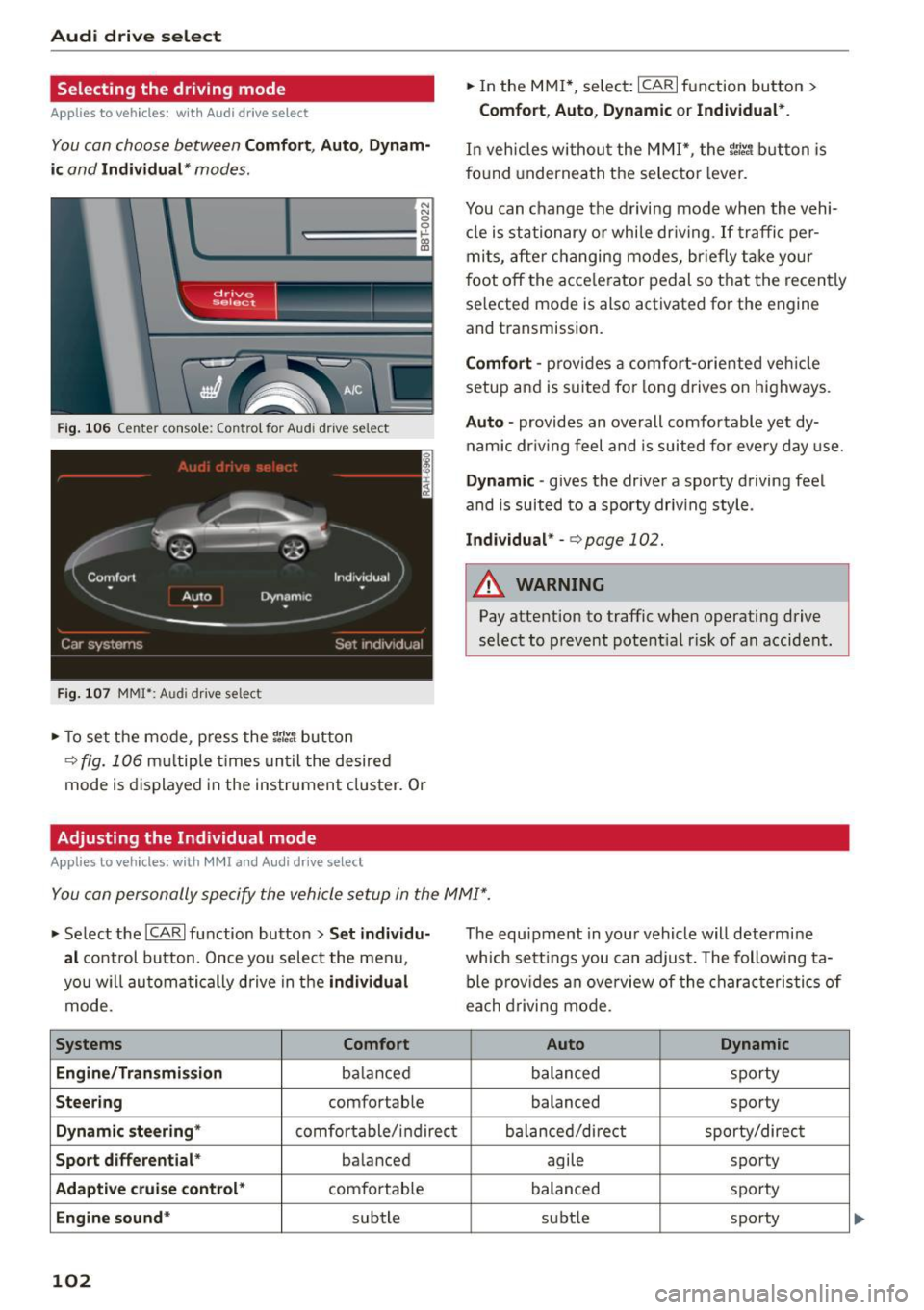
Selecting the driving mode
Applies to vehicles: with Audi drive select
You can choose between Comfort, Auto, Dynam
ic
and Individual * modes.
N
N
0
0
c:====::::· ~ ID
Fig. 106 Cente r console : Con trol fo r Aud i drive se lect
F ig . 107 MM!*: Audi dr ive se lec t
... To set the mode , press the ~:i:r. 1 button
¢fig. 106 multiple times until the desired
mode is displayed in the instrument cluster. Or
Adjusting the Individual mode
Applies to vehicles: with MMI and Audi drive select
.,. In the MMI*, select: ICARI function button >
Comfort, Auto, Dynamic or Individual *.
In vehicles withou t the MMI*, the ~:i:r.1 button is
f o und underneath the selecto r lever.
You can c hange the driving mode when the vehi
cl e is stationary or while dr iving . If traffic per
mits, after changing modes, briefly take your
foot
off the acce lerator pedal so that the recently
selected mode is also activated for the engine
and transmission.
Comfort -pro vides a comfort-oriented vehicle
setup and is suited for long drives on highways.
Auto -provides an overall comfortable yet dy
namic driv in g feel and is suited for every day use.
Dynamic -gives the driver a sporty driving feel
and is suited to a sporty driv ing style .
Individual * -<=> page 102.
A WARNING
Pay attention to traffic when operating drive
select to prevent potential risk of an accident.
You can personally specify the vehicle setup in the MMI" .
.,. Se lect the ICAR I function button > Set individu
al
control button. Once you select the menu ,
you w ill automatically drive in the
individual
mode.
Systems Comfort
Eng i ne/Tra nsm ission
ba lan ced
Steering comfortable
Dynamic steering* comfortable/ indirect
Sport differential * balanced
Adaptive cruise control* comfortable
Engine sound* subtle
102
The equipment in your vehicle will determine
wh ich sett ings you can adjust. The following ta
ble provides an overview of the characteristics of
ea ch driving mode.
Auto Dynamic
balanced sporty
balanced sporty
balanced/direct sporty/direct
agile sporty
balanced sporty
subt le sporty
Page 122 of 254

Safety belt s
Safety belts
General information
Always wear safety belts!
Wearing safety belts correctly saves lives!
This chapter explain s why safety be lts are neces
sary, how they work and how to adjust and wear
them correctly.
.. Read all the information that fo llows and heed
all of the instructions and WARNINGS.
&_ WARNING
Not wearing safety belts or wearing them im
properly increases the risk of serious personal
injury and death.
- Safety belts are the single most effective
means available to reduce the risk of serious
injury and death in automobile accidents.
For your protection and that of your passen
gers, always correct ly wear safety belts
when the vehicle is moving.
- Pregnant women, injured, or physically im
paired persons must also use safety belts.
L ik e all veh icle occupants, they are more
likely to be seriously injured if they do not
wear safety be lts . The best way to protect a
fetus is to protect the mother - throughout
the ent ire pregnancy.
Number of seats
Your Audi has a total of four seating positions:
two in the front and two in the rear. Each seating
position has a safety belt .
&_ WARNING
Not wearing safety belts or wearing them im
properly increases the risk of serious personal
injury and death.
- Never strap more than one person, includ
ing small ch ildren, into any belt. It is espe
cially dangerous to place a safety belt over a
child sitting on your lap.
- Never let more people ride in the vehicle
than there are safety belts available.
120
-Be sure everyone riding in the vehicle is
properly restrained with a separate safety
belt or child restraint.
Safety belt warning light
Your vehicle has a warning system for the driver
and (on USA models only) front seat passenger
to remind you about the importance of buckling
up .
Fig. 121 Safety belt warning light in the instrument cl us
ter -enlarged
Before driving off, always:
.. Fas ten your safety belt and make sure you are
wearing it properly.
(0
"'
"' 0 N
and properly wear the ir safety belts .
.. Protect your children w ith a child restraint sys
tem appropriate for the siz e and age of the chil
dren.
The . warn ing light in the instrument cluster
lights up when the ign it ion is switched on as a re
minder to fasten the safety be lts. In addit io n,
you w ill hear a warning tone for a certain period
of time.
Fasten your safety belt now and make sure that
your passengers also properly put on their safe
ty belts.
Page 137 of 254

M N
0:: loo ,...., \!) 1.1'1
N 1.1'1 ,....,
detail below . Because the front passenger seat
contains important parts of the Advanced Airbag
System, yo u must take care to prevent it from be
ing damaged. Damage to the seat may prevent
the Advanced Airbag for the front passenger seat
from do ing its job in a crash .
The front Ad vanced Airb ag S ystem con sis ts
of the following :
-Crash sensors in the front of the vehicle that
measure veh icle acceleration/deceleration to
provide information to the Advanced Airbag
System about the severity of the crash .
- An electronic control unit, with integrated
crash sensors for front and side impacts . The
control unit "decides" whether to fire the front
airbags based on the information received from
the crash sensors . T he control un it also "de
cides" whether the safety be lt pretensioners
sho uld be activated.
- An Advanced Airbag with gas generator and
control valve for the driver inside the steering
whee l hub.
- An Advanced Airbag with gas generator and
control valve inside the instrument panel for
t h e front passenger.
- A weig ht-sensing mat under the upholstery
padding of the front passenger seat cushion
that meas ures the tota l weight on the seat. The
information registered is sent contin uous ly to
the electronic control unit to regulate deploy
ment of the front Advanced Airbag on the pas
senger side.
- An airbag monitoring system and indicator
light in the instrument cluster
¢ page 138.
-A sensor in each front seat registers the dis
tance between the respect ive seat and the
steering wheel or instrument panel. The infor
mation registered is sent cont inuously to the
elect ron ic cont ro l unit to regulate deployment
of the front Advanced Airbags.
- T he
PASSENGER AIR BAG OFF light comes on
and stays on in the center of the i nstrument
pane l¢
page 138, fig . 134 and tells you when
the front Advanced Ai rbag on the passenger
side has been turned
off .
-A sensor below the safety belt la tch fo r the
front seat passenge r to measure the tension on
Airbag syste m
the sa fe ty belt. The tens ion on the safety be lt
and the weight registered by the weight -sens
ing mat he lp the control unit "decide" whether
the front a irbag for the front passenger seat
should be turned
off or not¢ page 129, Child
restraints on the front seat- some important
things to know.
- A sensor in the safety belt latch for the driver
and for the front seat passenger that senses
whether that safety belt is latched or not and
transm its this informat ion to the elect ro nic
cont ro l unit.
A WARNING
D amage to the fron t passenger seat can pre
vent the fron t air bag from working prope rly.
- Imp roper repai r or d isassembly of the front
passenger and driver sea t will prevent the
Advanced Airbag System from functioning properly .
- Repairs to the front passenge r seat must be
performed by qualified and p roperly trained
workshop personne l.
- Never remove the front passenger or driver seat from the vehicle .
- Never remove the upho lstery from the front
passenger seat.
- Never d isassemble o r remove par ts from the
seat or disconnect w ires from it.
- Never carry sh arp objects in yo ur po ckets or
p la ce them on t he seat.
If the weight-sens
ing mat in the passenger seat is punctu red
it cannot work properly .
- Never carry things on yo ur lap or carry ob
jects on the passenger seat. S uch items can
increase the we ight registe red by the
weight-sensing mat and send the wrong in
formation to the airbag control unit.
- Never store items under the front passenger
seat . Parts of the Advanced Airbag System
under the passenger seat could be dam
aged, p reventing them and the airbag sys
tem from wo rking prope rly.
- Never p lace seat covers or rep lacement up
holstery that have not been specifically ap
p roved by Aud i on the front seats.
- Seat cove rs can prevent the Advanced Air
bag Sys tem from recogniz ing child
1 3 5
Page 142 of 254

Airbag syste m
his or her back up against the backrest and the
backrest is not reclined ¢
page 112, Correct
passenger seating positions,
- the adu lt is not taking weight off the seat by
holding on to the passenger assist handle
above the front passenger door or supporting
their weight on the armrest,
- the safety belt is being properly worn and that
there is not a lot of slack in the safety belt web
bing,
- accessory seat covers or cushions or other
things that may cause an incorrect reading or impression on the weight-sens ing mat under
the upholstery of the seat have been removed
from the front passenger seat,
- a safety be lt extender has not been left in the
safety belt latch for the front passenger seat .
In addition to the
P ASS ENGER AIR BA G OF F
light in the center of the instrument panel, the
message
PASSE NGER A IR BAG OFF or PASSEN
GER AIR BAG ON
will briefly appear in the instru
ment cluster display . Thi s is to inform the driver
of the current front passenger airbag status.
Important safety instructions on
monitoring the Advanced Airbag System
A WARNING
An airbag system that is not funct ion ing prop
erly cannot prov ide supplementa l protect ion
in a frontal crash.
- If the airbag indicator light ¢
page 19
comes when the vehicle is being used, have
the system inspected immediate ly by your
authorized Aud i dealer.
It is possible that
the a irbag will inflate when it is not s up
posed to, or wi ll not inflate when it should.
A WARNING
If the front airbag in flates, a chi ld without a
child restraint, in a rearward-facing child safe
ty seat or in a forward-facing child restraint
that has not been proper ly installed will be
ser iously injured and can be killed.
- Even though your veh icle is equipped with
an Advanced Airbag System, make certa in
that all ch ildren, especially 12 yea rs and
140
younger, a lways ride on the back seat prop
erly restrained for their age and size.
- Always install forward or rear-facing child
safety seats on the rear seat -even with an
Advanced A irbag System.
- If you must install a rearward-facing child
safety seat on the front passenger seat be
cause of exceptiona l circumstances and the
PASSENGER AIR BAG OFF light does not
appear and stay on, immediately insta ll the
rea r-facing chi ld safety seat in a rear seating
position and have the airbag system inspect
ed by your authori zed Audi dealer .
- A t ight tether or other s trap on a rea rward
facing chi ld restraint attached to the front
p assenger sea t can put too much pressure
on the weight-sens ing mat in the seat and
reg ister more weight than is actually on the
seat. The heavier weight registered can make the system work as though an adult
were on the seat and deploy the Advanced Airbag when it must be suppressed caus ing
serious or even fatal injury to the child .
- If, in exceptiona l circumstances, you must
install a forward-facing child restraint on
the front passenger seat, always move the seat into i ts rearmost pos ition in the seat's
fore and aft ad justmen t range, as fa r away
from the airbag as possib le. The backrest
m ust be adjusted to an upr ight position.
Make sure that the
PASSENGER AIR BAG
OFF
li ght comes on and stays on all the time
whenever the ignit ion is switched on.
A WARNING
- If the PASS ENGER AIR BAG OF F light does
not go out when an adult is s itting on the
front passenger seat after tak ing the steps
described above, make sure the adult is
prope rly seated and restra ined at one of the
rea r seat ing pos itions.
- Have the airbag system inspected by your
author ized Audi dealer befo re transpo rting
anyone on t he fro nt passenger seat.
Page 171 of 254

M N
0:: loo ,...., \!) 1.1"1
N 1.1"1 ,....,
shared, please see your contract with the
wireless telecommunications provider and the
"About Aud i connect" tab in your vehicle's
MMI*:
IMENU I button> Audi connect > About
Audi connect .
Electronic Stabilization
Control (ESC)
Description
ESC helps to improve road holding and vehicle
dynamics to help reduce the probability of skid
ding and loss of vehicle control. It works only
when the engine is running. ESC detects certain
d ifficu lt driving situations, including when the ve
hicle is beginn ing to spin (yaw) out of control and
helps you to get the vehicle back under control by
selectively braking the whee ls, and/or reducing
engine power and prov iding steer ing ass istance
to help hold the vehicle on the driver's intended
course. The indicator light
Bl in the instrument
cluster blinks when ESC is taking action to help
you control the veh icle.
ESC has limitations.
It is important to remember
that ESC cannot overcome the laws of physics. It
will not always be able to help out under all con
ditions you may come up against. For example, ESC may not always be able to help you master
situations where there is a sudden change in the
coefficient of frict ion of the road surface . Whe n
there is a section of dry road that is suddenly cov
ered with water, slush or snow, ESC cannot per
form the same way it wou ld on the dry surface. If
the vehicle hydroplanes (rides on a cushion of wa
ter instead of the road surface), ESC will not be
ab le to he lp you steer the vehicle because contact
with the pavement has been interrupted and the
vehicle cannot be braked or steered . During fast
cornering, particularly on winding roads, ESC
cannot always deal as effectively with difficult
driving situations than at lower speeds. Whe n
tow ing a trailer, ESC is not able to help you regain
con trol as it wou ld if you were no t towing a trail
er .
A lways adjust your speed and dr iving sty le to
road, traffic and weather conditions. ESC cannot
override the vehicle's physical limits, increase the
Smart Technology
available traction, or keep a vehicle on the road i f
road departure is a result of driver inattention.
Instead, ESC improves the possibility of keeping
the vehicle under control and on the road dur ing
extreme maneuvers by using the driver's steering
inputs to help keep the vehicle go ing in the in
tended direction. If you are traveling at a speed
that causes you to run off the road before ESC
can prov ide any assistance, you may not expe ri
ence the benefits of ESC.
ESC is switched on all the time . In certain situa
t ions when you need less traction, you can switch
off ASR by pressing the button
[ru ~ page 170,
fig. 152 or ~page 170, fig . 153. Be sure to
switch ASR on again when you no longer need
less traction.
T he following systems are integrated in the ESC:
Anti-lock braking system (ABS)
ABS prevents the wheels from locking up when braking. The vehicle can still be steered even dur
i ng hard braki ng. Apply steady pressure to the
brake pedal. Do not pump the pedal. A pulsing in
the brake pedal indicates that the system is he lp
ing you to brake the vehicle.
Brake assist system
The brake ass ist system can decrease braking dis
tance . It increases braking power when the driver
presses the brake peda l quickly in emergency sit
u at ions. You must press and hold the brake pedal
until t he situat ion is over. In vehicles with adap
tive cruise control*, the brake assist system is
more sensitive if the distance detected to the ve
hicle ahead is too sma ll.
Anti-slip regulation (ASR)
ASR red uces eng ine power when the drive wheels
begin to spin and adapts the force to the road
conditions. This makes it easier to start, acce le r
ate and drive up hills.
Electronic differential lock (EDL)
T he EDL brakes whee ls that are spinning and
transfers the drive power to the other wheels.
T his function is available up to about 60 mph
(100 km/h).
169