2015 AUDI R8 SPYDER steering
[x] Cancel search: steeringPage 71 of 232

..... N
r-N "': ..... \!) ..,.,
N ..,., .....
A WARNING
-=
Always release t he parkin g brake completely.
A part ially engaged brake will over heat th e
rear brakes, reduce their effect iveness and
cause excess ive wear. This could lead to brake
fai lure and an accident.
([) Note
Only after the ve hicle has come to complete
stop, sho uld you firmly set the parking brake
and move the gearshift lever into a gear.
Parking
Parking
~ Stop t he vehicle using the brake pedal.
~ Set the parking b ra ke firmly.
~ Swi tch off the engine.
~ Move t he se lecto r lever into the P pos ition ( au
tomatic t ransmis sion )
or move the gearshift
lever into 1st . gear
(manual transmission )
c:>.&_ .
~ When on incl ines or declines, turn the steering
whee l so that t he vehicle w ill roll into the curb
if it beg ins to move .
A WARNING
This is how yo u can reduce the risk of in jury
w hen leav ing you r vehicle.
-
- Never park the vehicle whe re it ca n come i n
co ntact wi th dry g rass, spilled fuel or a ny
other flammable mater ials.
- Never allow anyone - especially small chi l
dre n -to remai n in t he vehicle when it is
locked. Locke d doors ma ke i t mo re d iff icult
for rescuers to access the passenger com
partment in the event of an emergency .
Dange r to life!
- Never leave c hildren unsupervised in the ve
hicle. C hildren cou ld re lease the par king
brake or move the gearshift lever out of
gear. The vehicle could sta rt to roll away and
cause an accident .
- No matter what the season is, the tempera
ture in a parked veh icle can reach dangerous
levels.
On th e road
Starting on hills
Applies to vehicles: wit h hill ho ld assist
Hill ho ld assist makes it eas ier to sta rt on hills.
The system is activated when the brake peda l is
depressed
for a few seconds .
After releasing the brake pedal, the b rake power
is he ld for a
brief moment to prevent the vehicle
from rol ling back when starting . At this time, you
can eas ily beg in to move your vehicle.
A WARNING
- I f you did not begin moving imme diate ly af
ter re leasi ng the b ra ke peda l, unde r ce rtain
cir cumstan ces, the vehicle w ould beg in to
roll bac kward. Depress t he brake pe dal im
mediately or engage the hand brake.
- Should t he e ngine sta ll, dep ress the brake
pe dal immed iately or enga ge the hand
b rake.
- I n or der to preven t the vehicle from roll ing
back unintentionally when s tarting in s top
and-go traffic, keep the brake pe dal de
pressed for a few seconds before driving off.
(D Tips
You can find o ut if yo ur vehicle is eq uipped
wi th "Hill hold ass ist" at an autho riz ed Au di
d ealersh ip.
Speed warning system
Speed warning system
The speed warning system helps you to keep your
driving speed below a set speed limit .
The speed warn ing system warns the driver if he
exceeds a previously stored max imum speed. A
warning tone will sound as soon as the veh icle
speed exceeds the set speed by about
3 mph
(3 km/h) . At the same t ime, a warning symbo l
appea rs i n the display .
The speed warn ing system has
two warn ing
thre sholds
tha t function independe ntly of each
othe r and t hat have somewhat d iffe rent pu rpos
es:
69
Page 76 of 232

Transmission
Transmission Manual transmission
Gearshift lever
Applies to vehicles: with manua l transmission
The clutch pedal must be depressed all the way
before you can start the engine .
The manual transmission in your Audi is equipped
with an
interlock-feature.
• Depress the clutch pedal all the way.
• Start the engine with the gearshift lever in Neu
tral and the clutch pedal depressed.
(D Note
Always depress the clutch pedal fully when
changing gears. Do not hold the vehicle on a
hill with the clutch pedal partially depressed.
This may cause premature clutch wear or
damage.
(D Tips
- Resting your hand on the gearshift lever
knob while driving will cause premature
wear in the transmission.
- The back-up lights go on when you shift into
Reverse with the ignition on.
Gearshift pattern (6-speed manual
transmission)
App lies to vehicles: with 6-speed manual transmission
Fig. 83 Gearshift pattern: 6-speed manual transm iss ion
Drive in 6th gear for optimum fuel economy
when cruising. However, if more acceleration is
required (when passing, for examp le), sh ift
down.
74
Engaging reverse gear (R)
• Move the shift lever all the way to the left,
press it down, then push it backward.
Especially after driving forward, stop the vehicle
completely, shift into
Neutral and rest the shift
l ever briefly in Neutral before shifting into
Re
verse.
Launch Control Program
Applies to vehicles : wit h VlO engin e and manual t ra nsmissio n
The Launch Control Program enables maximum
acceleration.
Requirement: The engine must be at operat ing
temperature and the steering wheel must not be
turned.
• With the engine running, press the button
l:fil
one time. The ESC indicator light II in the
Dr iver Informat ion System display illum inat es
and the message
ESC sport -Warning! Re
stricted stability appears .
• Press the clutch and hold it down.
• Engage the first gear.
• Press the accelerator pedal all the way down
until the engine speed remains steady at 6500
RPM .
• Release the clutch carefully~,&. .
A WARNING
- Always adapt your driving to the traffic flow.
- Only use Launch Control when road and traf-
fic conditions allow it and other drivers will
not be endange red or annoyed by your driv
ing and the vehicle's acceleration .
- Please note that the driving wheels can spin
and the vehicle can break away when ESC is
sw itched off, especially when the road is
slippery .
- Once you have accelerated, you should
switch the ESC back on by pressing the but
ton
00 .
(D Tips
- When accelerating using the Launch Control
program, all vehicle parts are subject to .,..
Page 77 of 232

.... N
l'
N "1: .... I.O
"' N
"' ....
heavy loads. This can result in increased
wear .
- The Launch Control Program only funct ions
when the parking brake is released and the
vehicle speed is less than 3 mph (5 km/h).
S tronic
Description
Applies to vehicles: with S tronic
Fig. 84 Shift pattern
Fig. 85 Display : selected gea rs
Your vehicle is equipped with an electronically
controlled manual transmission called S tronic .
Two independent clutches transfer the power be
tween the eng ine and transmission. They replace
the torque converter used in conventional auto
mat ic transmissions and allow the vehicle to ac
celerate without a noticeable interruption in trac
tion .
The selected mode of operation, the gear engag ed and the sport function are shown in the Dr iver
Information System display ¢
fig. 85.
M -Manual operation
In this operating mode, you shift the forward
gears using the selector lever
r=>v page 76 or the
Transmission
shift paddles on the multifunction steering wheel
¢ page 78.
A - Automatic operation
In this operating mode, the forward gears are
shifted up or down depending on engine load and
vehicle speed
¢ page 77.
R- Reverse
Only s hift into reverse gear when the vehicle is
stationary and the engine is runn ing at idle
speed ¢
Li')...
To engage reverse gear, you have to press the
brake pedal, move the selector lever to the right
and t ip it towards
R. In reverse gear, the backup
lights illuminate when the ignition is on .
N -Neutral
To engage neutral, you have to move the selector
lever to the left or to the right . If reverse gear is
engaged,
move the selector lever to the left . If a
forward gea r is engaged, move the selector lever
to the right.
Sport function
The sport function is switched on by pressing the
I SPORT ! button on the selector lever cover . Up
shifting at a higher RPM makes full use of the en
gine's power . Shift time is decreased and acceler
ator pedal response is improved . In addition, in
manua l operation the engine does
not shift au to
matically into the next gear before it has reached
the maximum permissible engine speed. In auto
matic operation, upshifting continues automati
cally.
P -Automatic parking lock
The automatic parking lock is engaged immedi
ately after you remove the key. The automatic
parking lock is also engaged if you turn off the
engine while in the A, R, or manual mode posi
tions .
If you turn off the engine while in the N position
and leave the vehicle key in the ignition, the
transmission remains in the N position for ap proximately 20 minutes and then activates the
automatic parking lock . If vehicle movement is
detected within that 20 minutes based on
IIJI.
75
Page 79 of 232

..... N
r-N "': ..... \!) ..,.,
N ..,., .....
(D Note
If you must stop on an incline, always hold
the vehicle in p lace with the foot brake to pre
vent it from rolling back. Do not try to prevent the vehicle from rolling back when the gear is
engaged by increasing speed, as this may
damage the clutch.
Automatic mode
Applies to vehicles: with S tronic
St arting fro m a stop
"' Press and hold the brake pedal.
"' Tap the se lector lever towards A.
"' Re lease the brake pedal and press the accelera-
tor pedal
¢ ,&. in Manual mode on page 76.
Under certain circumstances (driving in the
mounta ins for example), it can be beneficia l to
switch temporarily to the manual shift program
¢
page 76 in order to adjust the gear ratios to
driving conditions
manually.
Kick-down
Applies to vehicles: with S tronic
When you depress the accelerator pedal beyond
the resistance point, S tronic downsh ifts into a
lower gear, depending on vehicle speed and en
g ine rpm. It shifts up into the next higher gear
once the maximum specified engine RPM is reached . Exception: you have activated the sport
function.
.&, WARNING
Please note that the wheels could spin on
slic k or slippery roads when kick-down is ac
tive.
l) Market -spec ifi c
-
Tra nsm issio n
Launch control program
Applies to vehicles: with S tronic
The Launch Control Program enables maximum
acceleration.
Requirement: The engine must be at operat ing
temperature and the steering wheel must not be
turned.
"' With the engine running, press the
I!]!
!ESC OFFjll button one time . The Ill indicator
light and the message
ESC S port - Cau tion!
Limi ted stabil ity! appears in the driver infor
mation system display.
"' Press the brake pedal with your left foot and
hold it down.
"' Engage a gear.
"' Press the
I SPORT ! button on the selecto r lever
cover.
"' Press the accelerator pedal at the same time
with your right foot unti l the engine has
reached a constant speed.
"' Remove your left foot from the brake¢.&_ .
A WARNING
--
- Always adapt your dr iving to the traffic flow.
- Only use the Launch control program when
road and traffic cond itions allow it and oth
er drivers will not be endangered or both
ered by your driving and the vehicle's accel
eration.
- Please note that the driving wheels can spin
and the vehicle can b reak away when ESC is
sw itched off, espec ial ly when the road is
slippery .
- Once you have accelerated, you sho uld
sw itch the ESC back on by pressing the
[fil
but ton.
(D Tips
- The tra nsmission temperature may increase
signif icant ly afte r using the Launch Contro l
Program. If that happens, the program may
not be availab le for a few minutes . It wi ll be
available again after a cool-down period .
77
Page 80 of 232

Transmission
-When acce le rat ing using the Launch Cont ro l
program, all vehicle pa rts are subject to
heavy loads. T his can result in increased
wear.
Steering wheel with shift paddles
App lies to veh icles: with S tron ic
The shift paddles allow you to select gears man
ually on the steering wheel.
F ig . 8 6 Steer ing w heel: shi ft padd les
• To downshift, press t he paddle on the left 0 -
• To upsh ift, p ress the padd le on the right G) .
You ca n continue to use the manual s hift pro
g ram with the se lector lever in the cente r con
sole.
Transmission malfunction
Applies to vehicles : with S tro nic
l'§J Transmis sion : please press the brake pedal
and select the position again
Press th e brake pedal a nd se lect the desi red se
lec to r l eve r pos it io n aga in. Yo u can then continue
d riving.
[O] Transmission too hot: please modify driving
style
The transmission temperature has increased sig n ificant ly due to the spo rty dr iv ing man ner . Drive
i n a less sporty manner u nti l t h e temperature re
t ur ns to the normal rang e and the indicator light
sw itches of.
[i1 Transmi ssion : System malfunction! You may
continue driving
There is a system ma lfunction in the transmis
sion . You may continue driving. Drive to your au-
78
thorized Audi dea ler or q ua lif ied repa ir facility
soon to have the malfunction corrected .
[o.Jij Transmission: Sy stem malfunction ! You
may continue driving in A until you turn the en
gine off .
There is a system malfunc tion i n the trans mis
s io n. The tran sm iss ion i s swi tchi ng to eme rgency
mode. Drive to your author ized A udi dealer or
q ualified repair facili ty imme diate ly to have the
malfunction corrected.
l'§J Transmission : System malfunction ! Driving
ability is restricted
There is a system malfunct ion in the t ransmis
s io n. The t ransm iss ion is swit ching to eme rgency
m ode. Thi s mo de onl y shifts in to ce rtain ge ars or
will no l onger shi ft at all. The eng ine may st all.
D rive to your au thori zed A udi dealer or qualified
repair fac ility immediately to have t he malfunc
tion corrected.
[oJ;j Transmission: System malfunction ! Driv
ing ability is restricted. No reverse gear
There is a system malfun ction i n the trans mis
s ion . The tran sm iss ion i s swi tchi ng t o em ergency
mode. T his mode o nly shifts in to cer tain gears or
will no longer shift at all . The eng ine may stall.
You cannot e ngage the reverse gea r. Drive to yo ur
aut ho rized Aud i dea ler or q ualified repa ir facility
i mmediately t o have the malfunct ion corrected.
[i1 Risk of rolling! P not pos sible. Please set the
parking brake
- Th e parking lo ck was re le ase d using the eme r
gency rele ase
~ page 7 9 . O r
- Th e parking lo ck can no l onge r be engage d.
Dr ive t o your authoriz ed Audi de aler or q uali
fie d repair f acili ty immedia tely to have the ma l
fu nction cor rected.
• Transmission : System malfunction ! Stop
the vehicle
Do no t con tinue dr iving . Tur n off the ignition and
contact your nea rest author ized Audi d eal er for
ass ista nce.
There is a serious system malfunct ion. Continu -
i ng to dr ive could result in s ubsequent damage. .,.
Page 85 of 232

.... N
l'
N "1: .... I.O
"' N
"' ....
Reverse parking
Applies to vehicles: with parking system advanced
Parking mode 1 can be used when parking in a
garage or into a parking space .
Fig. 95 Navigation system display : Aiming at a p arkin g
spot
Fig. 96 Naviga tion sy ste m display: Al ig ni ng t he ve hicle
"'Switch the navigation system and the display of
the navigation system on.
"'Select the reverse gear.
"'Turn the steering wheel until the orange orien
tation lines(!) appear in the parking spot
c> fig. 95. Use the markings @to help you esti
mate the distance from an obstacle. Each mark
ing represents 3
ft. (1 m). The blue area repre
sents an extension of the vehicle's outline by
approximately 16
ft. (5 m) to the rear .
"'While driving in reverse gear, adjust the steer
ing wheel angle to fit the parking spot with the
aid of the orange orientation lines
c> 0 . ®
marks the rear bumper. Stop the vehicle once
the red orientation line@ touches an object
¢&, .
_& WARNING
-The rearview camera does not show the en
tire area behind the vehicle
c> page 80,
Parking system
fig. 92. Watch out especially for small chil
dren and animals. The rear view camera can
not always detect them, posing risk of an
accident!
- Please note that objects not touching the
ground can appear to be farther away than
they really are (for example, the bumper of
a vehicle or the rear of a truck). In this case,
you should not use the orientation lines to
help with parking, which poses danger of an
accident!
(D Note
In the navigation system display, the direction
of travel of the vehicle rear is represented de pending on the steering wheel angle. The ve
hicle front swings out more than the vehicle
rear. Maintain plenty of distance so that your
outside mirror or a corner of your vehicle does
not collide with any obstacles. This can dam
age to your vehicle.
83
Page 86 of 232
Parking system
Parallel parking
Applies to vehicles: with parking system advanced
Use parking mode 2 to help you parallel park
along the side of a street.
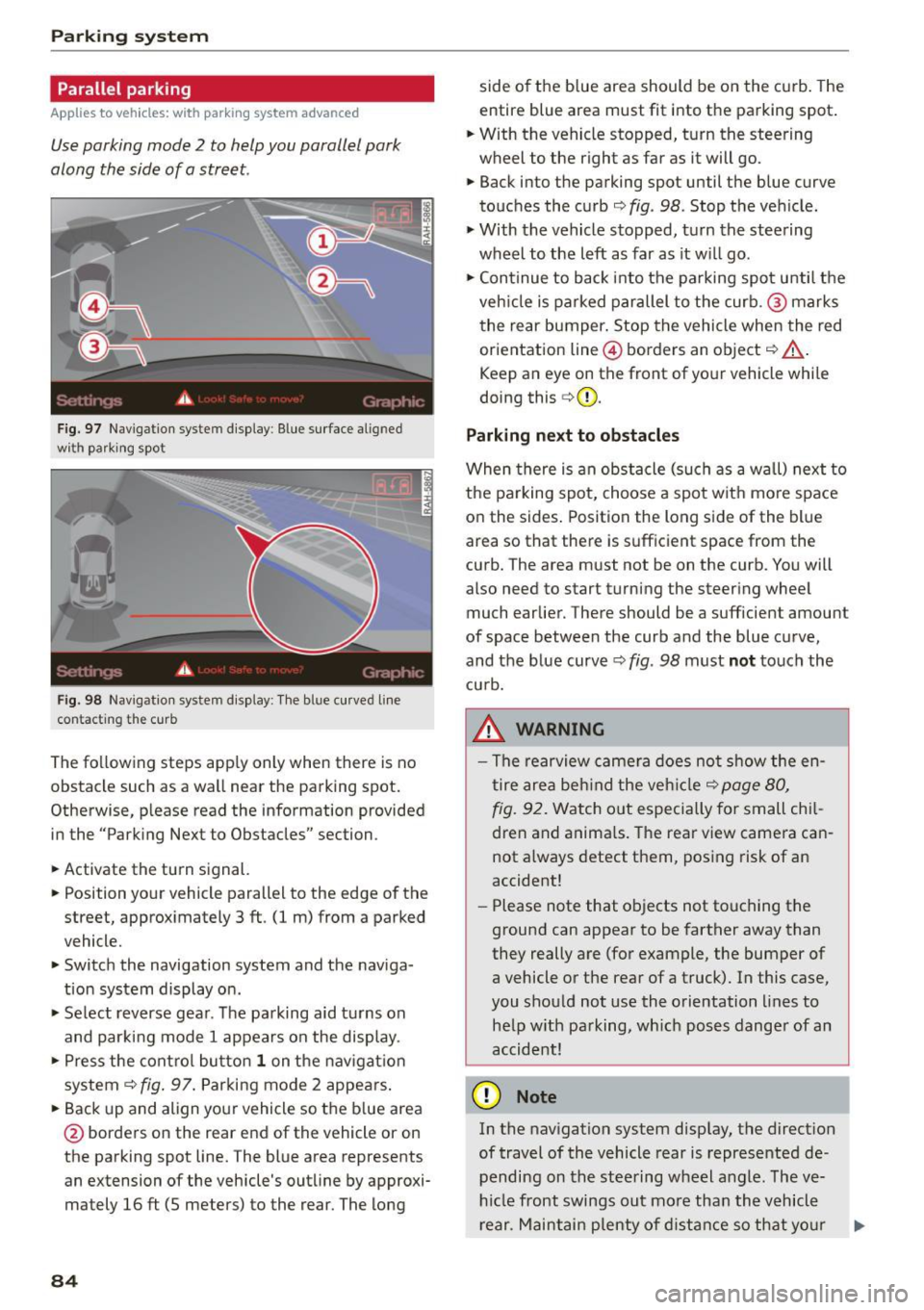
Fig . 97 Na vigation system d isplay : Blue sur face aligned
wit h parking spot
0
-
Fig. 98 Navigatio n system display: The blue cu rved line
contacting the curb
The following steps app ly only when there is no
obstacle such as a wall near the parking spot.
Otherwise, please read the information provided
in the "Parking Next to Obstacles" section .
• Activate the turn signal.
• Position your vehicle parallel to the edge of the
street, approximately 3 ft . (1 m) from a parked
vehicle.
" Switch the navigation system and the naviga
tion system display on .
• Se lect reverse gear. The parking aid t urns on
and parki ng mode 1 appears on the display.
• Press the control button
1 on the navigat ion
system
9fig . 97. Parking mode 2 appears.
•B ackup and align your vehicle so the blue area
@ borde rs on the rear end of the vehicle or on
the parking spot line. The blue area represents
an extension of the vehicle's outline by approxi
mately 16 ft (5 meters) to the rear. The long
84
side o f the b lue area should be on the curb . The
entire blue area must fit into the parking spot .
"W ith the vehicle stopped, turn the steering
wheel to the right as far as it will go.
• Back into the parking spot until the blue curve
touches the curb
9 fig . 98. Stop the veh icle .
" With the vehicle stopped, turn the steering
wheel to the left as far as it wi ll go .
• Con tinue to back into the parking spot until the
veh icle is parked parallel to the curb .@ marks
the rear bumper. Stop the vehicle when the red
orientation line@ borders an object
9 ,&.
Keep an eye on the front of yo ur vehicle while
doing this
c> (D.
Parking next to obstacles
When there is an obstacle (such as a wall) next to
the parking spot, choose a spot with more space
on the sides . Position the long side of the blue
area so that there is sufficient space from the
curb. The area must not be on the curb . You will
also need to start turning the steering wheel
much earlier. There should be a sufficient amoun t
of space between the curb and the blue curve,
and the blue curve¢
fig. 98 must not touch the
cu rb.
_& WARNING
- The rearview camera does not show the en
tire area behind the vehicle
c> page 80,
fig .
92. Watch out especially for small chil
dren and animals. Th e rear view camera can
not a lways detect them, posing risk of an
accident!
- Please note that objects not touching the
ground can appear to be farther away than
they really are (for example, the bumper of
a vehicle or the rear of a truck). In this case,
you should not use the orientation lines to
he lp with parking, wh ich poses danger of an
accident!
(D Note
In the navigation system disp lay, the direction
of travel of the vehicle rear is represented de
pending on the steering wheel angle. The ve
hicl e front swings out more than the vehicle
rear . Maintain plenty of distance so that your
lllJ,,
Page 88 of 232

Driving Sa fel y
Driving Safely
General notes
Safe driving habits
Please remember -safety first!
This chapter contains important information,
tips, instructions and warnings that you need to
read and observe for your own safety, the safety
of your passengers and others. We have summar
ized here what you need to know about safety
be lts, airbags, chi ld restraints as well as child
safety. Your safety is for us
priority number 1 . Al
ways observe the informat ion and warn ings in
t his section - for your own safety as well as for
that of your passengers.
The information i n this section applies to all
model ve rsions of your vehicle . Some of the fea
t ures des cribed in this sect ion may be standard
equipment on some models, or may be optional
eq uipment on others . If you are not sure, ask
your author ized Audi dealer.
A WARNING
-Make certain that you fo llow the instruc
t ions and heed the WARNINGS in this Man
ual. It is in your interest and in the interest
of your passengers .
- Always keep the complete owner's literature
in your Audi when you lend or se ll you r vehi
cle so that this important information will
always be ava ilable to the driver and passen
gers.
- Always keep the owner's literature handy so
that you can find it easily if you have ques
ti ons.
Safety equipment
The safety features are part of the occupant re
straint system and work together to help reduce
the risk of injury in a wide variety of occident si t
uations.
Your safety and the safety of yo ur passengers
should not be left to chance. Advances in tec h
nology have made a var iety of f eatures av ailable
to help re duce the r isk of inj ury in an accident.
86
The following is a listing o f just a few o f the safe
ty features in yo ur Audi:
- sophis tica ted s afety be lts for drive r and a ll pas-
senger sea ting pos itions,
- safety belt p rete nsio ners,
- front airbags,
- knee airbags,
- side airbags in the seats
- adjustab le head restraints,
- adjustab le steering column .
These ind iv idual safety featu res can wor k togeth
er as a sys tem to he lp pro tect you a nd your pas
sengers in a wide range of accidents . These fea
tures cannot work as a system if th ey are not al
ways proper ly adjusted and prope rly used!
Safety i s everyb ody' s re sponsibilit y!
Important things to do before driving
Safety is everybody's job! Vehicle and occupant
safety always depends on the informed and care
ful driver.
Fo r you r safety and the safety of your passen
gers,
before driving always:
.,. Make sure that all lights and signals are operat
ing correctly .
.,. Make sure that the tire pressu re is co rrect.
.,. Ma ke s ure that all w indows are clean and affo rd
good visibility to the outs ide.
.,. Secure a ll luggage and o ther items caref ully
r=;,page 59 .
.,. Make s ure that nothing can interfere with the
pedals.
.,. Adjust front seat, head restraint and mirrors
correctly for your height.
.,. Instruct passengers to adjust the head re
straints according to the ir height .
.,. Make su re to use the r ight child restraint cor
rec tly to p rotect ch ild ren
r=;, page 122, Child
Safety.
.,. Sit p roperly in your seat and ma ke su re that
your passengers do the same
c::> page 56, Gen
eral recommendations.
.,. Fasten your safety belt and wear it properly. A l
so instruct your passengers to fasten their safe
ty belts proper ly
c::> page 95 .