2015 AUDI R8 SPYDER radio
[x] Cancel search: radioPage 173 of 232

(D Note
- Please note that summer and
winter t ires are designed for
the conditions that are typical in those seasons . Audi recom
mends using winter tires dur
ing the winter months . Low
temperatures significantly de
crease the elasticity of summ
er tires, which affects traction
and braking ability. If summer
tires are used in very cold tem peratures, cracks can form on
the tread bars, resulting in
Tires and wheels
permanent tire damage that
can cause loud driving noise
and unbalanced tires . Audi is
not responsible for this type
of damage.
- Burnished, polished or
chromed rims must not be
used in winter road condi
tions . The surface of the rims
does not have sufficient corro
sion protection for this and
could be permanently dam aged by road salt or similar
substances .
Glossary of tire and loading terminology
Accessory weight
means the combined weight (in
excess of those standard items
which may be replaced) of auto
matic transmission, power steer
ing, power brakes, power win
dows , powe r seats , radio , and
heater , to the extent that these
items a re available as factory-in
stalled equipment (whether in
stalled or not).
Aspect ratio
means the ratio of the height to
;:;: the width of the tire in percent .
" ~ Numbers of 55 or lower indicate a ...
~ low sidewall for improved steer -
"' ....
ing response and better overall
handling on dry pavement.
Bead
means the part of the tire that is
made of steel wires, wrapped or
reinforced by ply cords and that is
shaped to f it the rim .
Bead separation
means a breakdown of the bond
between components in the bead .
Cord
means the strands forming the
plies in the tire.
17 1
...
Page 200 of 232

Tires and wheels
and tires are compatible with the tire pres
sure monitoring system. Otherwise the sys
tem will register a malfunction and a fault message will be displayed. For more infor
mation, contact your authorized Audi deal
er.
- For Declaration of Compliance to United
States FCC and Industry Canada regulations
c:> page 218.
Programming a new set of tires
Applies to veh icles: w ith tire pressure monitoring syste m
When driving with a new set of tires, you can pro
gram them to the tire pressure monitoring sys
tem using the menu disp lay.
.,. Turn the ignition on .
.,. Select the menu:
Set> Tire pressure > Wheel
change.
.,. Confirm that you would like to begin the pro
gramming process . The message
Wheel sen
sors are being initialised. This may take a few
minutes ...
appears in the instrument cluster
display.
You can switch between programmed tire sets at
any time without reinitializing the system.
(D Tips
- If the programming process was not com
pleted successfully, the message
Wheel
sensors could not be initialised
appears in
the display and them indicator light
turns on. If this happens, repeat the proce
dure.
- Do not store the tire pressure if there are
snow chains on the tire.
TPMS Tire pressure monitoring system
malfunction
A malfunction can have various causes.
If the [I] warning light in the instrument cluster
flashes for approximately one minute and then
remains continuously illuminated and additional
ly
the m symbol appears in the display, the tire
pressure monitoring system is not available. The
198
text Tire pressure! System malfunction appears
in the display. This can have various causes.
- A wheel sensor or other component may have
fai led.
- During initialization the system has detected
more than 4 wheels on the vehicle, for example
while driving next to another car with a tire pressure monitoring system.
- Audi replacement parts were not used.
- If snow cha ins are being used, system function
can be compromised due to the shielding prop
erties of the chains .
- The tire pressure monitoring system may not
be available because of a rad io malfunction.
- Transmitters with the same frequency, such as
radio headphones in the vehicle or radio equip
ment, can cause a temporary disruption of the
system through excessive electromagnetic
fields .
- Eliminate the interference if you can and then
proceed as follows: Turn off the engine for 20
minutes. Then drive another 10 minutes.
If the
warning light comes on again, you should con
tact your authorized Audi dealer immediately
to have the problem corrected.
- Do not use commercially available tire sealants.
Otherwise, the electrical components of the
tire pressure monitoring system will no longer
work properly and the sensor for the tire pres
sure monitoring system will have to be replaced
by a qualified workshop.
Page 209 of 232

.... N
l'
N "1: rl I.O
"' N
"' ....
(D Note
-Applying a higher vo ltage booster battery
will cause expensive damage to sensitive electronic components, such as control
units, relays, radio, etc.
- T here m ust be no e lectrica l contact between
the vehicles as otherwise current could al
ready start to flow as soon as the pos itive
(+) terminals are connected .
@ Tips
-The discharged battery must be properly
con nected to the vehicle's electrical system.
- Switch
off any car phone, or follow the car
phone instruct ions for this situation.
Use of jumper cables
Make sure to connect the jumper coble clomps in
exa ctly the order described below!
F ig . 161 Luggag e comp artm ent: conn ectors fo r a charg er
an d jump start cab les
®
Fig . 162 Jump start using th e batte ry in a not her ve hicl e: A
• Fe male sock et, B • D isch arge
The batte ry is located in the luggage compart
ment ~
page 166 . The front lid can be opened in
a n emergency
r=;, poge 33.
What do I do no w?
Do not connect the negative cable d irect ly to the
n egat ive terminal on the battery . Connect it to a
jump start pin instead r=;, fig. 161.
Connect the po sitive cable (r e d ) to the
po sitive terminal
1. Connect one end of the red jumper cab le
r=;, fig . 162 (D to th e positive t erminal of dis
charged battery @.
2. Connect the o ther end of the red jumper ca
ble to the positive term inal @ofthe booster
battery @.
Conne ct the neg ative c able (bl ack ) to the
neg ativ e terminal
3. Connect one end of the b lack jumper cable @
to the negative term inal of the booster bat
tery @.
4. Secu re the other end to the jump start pin@
for the d isc harged battery @.
Starting the engine
"'Start the engine of the veh icle provid ing assis
tance and allow it to run at idle .
"' Now sta rt the engine of the vehicle with the
d ischa rged ba ttery.
"'I f the engine does not star t: Stop trying afte r
10 seconds and then try again after about 30
seconds .
"' Disconnect the cable while the engine is run-
ning in exact ly
reverse orde r to that described.
T he bat tery is vented to the outside to p reven t
gases from entering the vehicle interior . Make
s u re that th e jumper clamps ar e well connect ed
with their
metal ports in full contact with the
battery terminals.
A WARNING .
To avoid se rious personal injury and damage
to the veh icle , heed all warnings and ins truc
tions of the jumper cable manufacture r. If in
doubt, call for road service.
- Ju mpe r cables m ust be long eno ugh so that
the vehicles do not touch .
- When connecting jumper cables, make sure
that they can not g et caug ht in any moving
parts in the eng ine compartment. ..,.
207
Page 213 of 232
..... N
r-N "': ..... \!) 1.1'1
N 1.1'1 .....
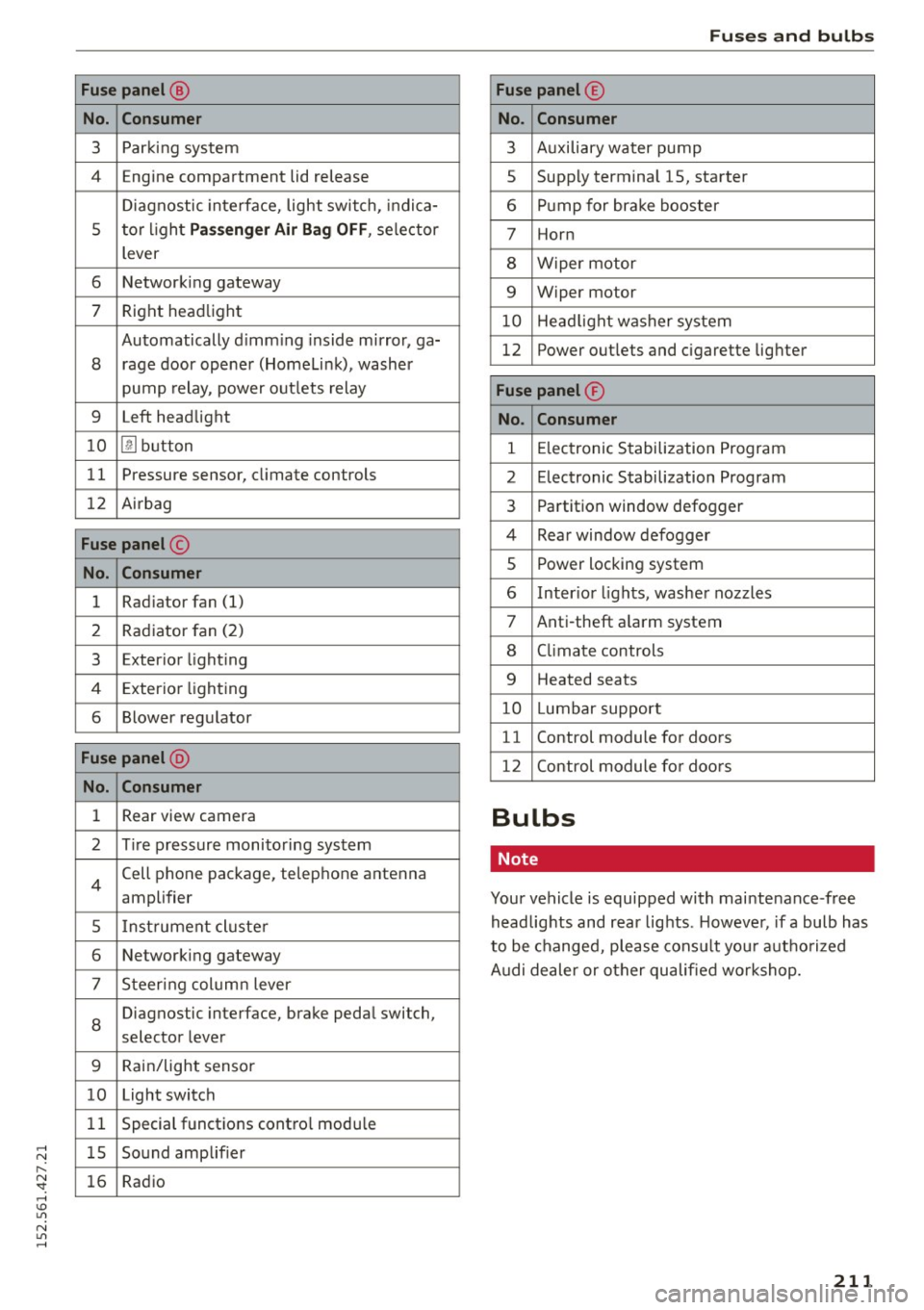
Fuse panel @
No. Con sume r
3 Parking system
4 Engine compartment lid release
Diagnostic interface, light switch, indica-
5 tor l ight
P asse nger A ir Bag OFF , selector
lever
6 Networking gateway
7 Right headlight
Automatically d imm ing inside mirror, ga-
8 rage door opener (Homelink), washer
pump relay, power outlets relay
9 Left headlight
1 0
[!] button
11 Pressure sensor,
climate controls
12 Airbag
Fuse panel @
No. Consumer
1 Radiator
fan (1)
2 Rad
iator fan (2)
3 Exterior lighting
4 Exterior lighting
6 Blower regulator
Fuse pan el @
No. Con sumer
1 Rear view camera
2 Tire pressure monitoring system
4
Cell phone package, telephone antenna
amplifier
5 Instrument cluste r
6 Networking gateway
7 Steering column lever
8
Diagnostic
interface, brake pedal switch,
selector lever
9 Rain/light sensor
10 Light switch
1 1 Special functions contro
l modu le
1 5 Sound amplifier
16 Radio
Fu ses a nd bulb s
Fuse panel @
No . Con sumer
3 Auxiliary water pump
5 Supply terminal
15, starter
6 Pump for brake booster
7 Horn
8 Wiper motor
9 Wiper motor
10 Head light washer system
12 Power
outlets and cigarette lighter
Fuse panel ®
No . Con sumer
1 E lectronic Stabilization Program
2 Electronic Stabilization Program
3 Partition window defogger
4 Rear window defogger
5 Power locking system
6 Inter ior lights, washer nozzles
7 Anti-theft a larm system
8 Climate controls
9 Heated seats
10 Lumbar support
11 Control
module for doors
12 Control module fo r doors
Bulbs
Note
Your vehicle is equipped with maintenance -free
headlights and rear lights . Howeve r, if a bulb has
to be changed, please consult your autho rized
Audi dealer or other qualified workshop.
21 1
Page 220 of 232

Consumer Information
Author ized Audi dealers will perform this work in
a professional and competent manner or, in spe
cial cases, refer you to a professional company
that spec iali zes in such modifications.
A WARNING
Improper repairs and modifications can
change the way vehicle systems wo rk and
cause damage to the veh icle and ser ious per
sonal i njury .
(D Note
If emergency repairs must be performed e lse
where, have the veh icle examined by an au
thorized Audi dealersh ip as soon as poss ible.
Declaration of Compliance, Telecommuni
cation or Electronic Systems
Radio Frequ ency Devices and Radiocommunica
tion Equipment User Manual Notice.
The manufacturer is not respons ible fo r any radio
or TV interference caused by unautho rized modi
fications to this eq uipment.
De vices
The fo llow ing devices each comp ly w ith FCC Part
15.19, FCC Part 15.21 and RSS -Gen Issue 1:
- Ce ll phone package
- Electronic immob ilizer
- Garage door opener ( Homelink)
- Remote con tro l key
- Tire pressure mo nitor ing system
FCC Part 15 .19
This device comp lies with pa rt 15 of the FCC
Rules. Operation is subject to the following two
conditions:
(1) Th is device may not cause harmfu l interfer
ence, and
(2) th is device must accept any interference re
ceived, including interference that may ca use un
des ired ope ration .
FCC Part 15.21
CAUTIO N:
218
Changes or modifications not expressly approved
by the party responsible for compliance could
vo id the user's a uthority to operate the equip
ment .
RSS-Gen Issue 1
Operation is sub ject to the fo llow ing two condi
tions:
(1) this dev ice may not cause interference, and
(2) this device must accept any i nterference, in
clud ing interference that may cause undesired
operation of the devic e.