2015 AUDI A8 mirror
[x] Cancel search: mirrorPage 124 of 312

122 Parking systems
If the distance to an obstacle remains con
stant, the volume of the distance warning
gradually drops after about four seconds (this
does not apply in the continuous tone range).
Rear view camera
The rear view camera is located above the rear
license plate bracket. Make sure that the lens
for the parking system
c:> fig. 132 is not cov
ered by deposits or any other obstructions be
cause this can affect the function of the park
ing system. For information on clean ing, refer
to
c:> page 214.
The rear view camera coverage area includes
(D ¢fig . 131. Only this area is shown in the
Infotainment display. Objects that are outside
of this area @are not displayed.
The accuracy of the orientation lines and the
blue surfaces is reduced if the adaptive air
suspens ion* is faulty, if the vehicle is lifted or
if the
dynamic mode is activated c;, page 108.
A WARNING
-Always read and follow the applicable
warnings
c:> &. in General information on
page 120.
- If the position and the installation angle
of the rear view camera was changed, for
example, after a collision, do not contin
ue to use the system for safety reasons.
Have it checked by your authorized Audi
dealership or authorized repair facility.
- Only use the rear view camera to assist
you if it shows a good, clear picture. For example, the image may be affected by
the sun shining into the lens, dirt on the
lens or if there is a system fault.
- Use the rear view camera only if the lug
gage compartment lid is completely
closed. Make sure any objects you may
have mounted on the luggage compart
ment lid do not block the rear view cam
era.
- The camera lens enlarges and distorts
the field of vision . The object appears
both altered and inaccurate on the
screen. -
In certain situations, people or objects in
the display appear closer or further
away:
- objects that do not touch the ground,
such as the bumper of a parked vehicle,
a trailer hitch or the rear of a truck. Do
not use the help lines in this case.
- If driven from a level surface onto an
incline , or a downward slope.
- If driven toward protruding objects.
-If the vehicle is carrying too much load
in the rear.
(D Note
-Always read and follow the applicable
warnings
c:> 0 in General information on
page 120.
- The orange colored orientation lines in
the Infotainment display show the vehi cle path depending on the steering
wheel angle. The front of the vehicle
front swings out more than the rear of
the vehicle. Maintain plenty of distance
so that your outside mirror or a corner of
your vehicle does not collide with any ob
stacles.
Switching on/off
Applies to vehicles : with parking system pl us with rear
v iew camera
Fig . 133 Center console: Parking system sw itch
Switching on
.,. Shift into reverse or
.,. press the
PwA button in the center console
c:> fig. 133 . A short confirmation tone
sounds and the LED in the button turns on. .,..
Page 127 of 312

.... N .... N
0 J:
"". .... I.O
"' ....
"' ....
cameras. Depending on the vehicle equip
ment, you are assisted by vario us views such
as peripheral view, corner views at the front
and rear of the vehicle, and views directly in
front of or behind the vehicle.
General information
App lies to vehicles: with top view camera system
Fig. 138 Location of peripheral cameras
Depending on the vehicle equipment, the pe
ripheral cameras are found in the radiator
grille, in the luggage compartment lid and on
both exterior mirrors
c> fig. 138. Make sure
that the lenses are not covered by deposits or
any other obstructions as it may impair the
system. For information on cleaning, refer to
9page214.
In the top view mode, black corners are
shown in the vehicle silhouette . Objects in
these areas are outside of the camera's field of view and are not detected.
The accuracy of the orientation lines and the
b lue surfaces is reduced if the adaptive air
suspension* is faulty, if the vehicle is lifted or
if the
dynamic mode is activated 9 page 108 .
_& WARNING
-Always read and follow the applicable
warnings
9 .&. in General information on
page 120.
- If the position or the installation angle
of a camera was changed, after a colli
sion for example, do not continue to use
the system for safety reasons. Have it checked by your authorized Audi dealer
ship .
-
Parking systems 125
- Keep in mind that the image in the dis
play is distorted if the exterior mirror
housing has been manually adjusted.
- Use the
rear mode and the corner view
(rear)
mode only when the luggage com
partment lid is fully closed. Otherwise
the image in the display will be distort
ed.
- The vehicle surroundings are shown us
ing the camera images. The vehicle im
age is shown by the system. Objects and
obstacles above the camera are not dis
played.
- Camera lenses enlarge and distort the
field of vision. The objects appear both
altered and inaccurate on the screen.
(D Note
-Always read and follow the applicable
warnings
~CD in General information on
page 120.
- The Infotainment display shows the di
rection in which the rear of the vehicle is
traveling based on the steering wheel
angle. The front of the vehicle front
swings out more than the rear of the ve
hicle. Maintain plenty of distance so that
your outside mirror or a corner of your
vehicle does not collide with any obsta
cles.
@ Tips
If the 8/IT;1J/c:5 symbol appears in the
display and the respective display area is
grayed out, then the power exterior mir rors were folded in or the driver's door/
front passenger's door/luggage compart
ment lid was opened .
Page 135 of 312

,....,
N ,....,
N
0 J:
'SI: ,...., \!) 1.1'1 ,...., 1.1'1 ,....,
Driving Safely
General notes
Safe driving habits
Please remember -safety first!
This chapter contains important information,
tips, instructions and warnings that you need
to read and observe for your own safety, the
safety of your passengers and others . We have
summarized here what you need to know
about safety belts, airbags, ch ild restra ints as
well as child safety. You r safety is for us
priori
ty number 1.
Always observe t he information
a nd warn ings in th is se ct ion - for yo ur own
safety as well as that of your passengers .
The information in this se ction applies to all
model ve rsion s of your veh icle . Some of the
feat ures descr ibed in th is sec tions may be
standa rd equipment on some models, or may
be optional equipment on others . If you are
not sure, ask yo ur authorized Aud i dea ler.
A WARNING
- Always make sure that you follow the in
st ruct ions and heed the WARNINGS i n
this Manual. It is in your interest and in
the inte rest of you r passengers.
- Always keep the complete Owne r's Liter
at ure in your Audi when you lend or sell
yo ur vehicle so that this important info r
mation will always be ava ilable to the
dr iver and passenge rs.
- Always keep the Owner's literature handy
so that you can find i t eas ily if you have
ques tion s.
Safety equipment
The safety features are part of the occupant
restraint syst em and work togeth er to help
redu ce the risk of injury in a wide variety of
accident situations .
Your safety and the safety of your passenge rs
should not be left to chance. Advances in
t echnology have made a var iety o f fea tures
avai lable to he lp red uce the risk of i njury in an
Dr iving Safel y 133
accident . The following is a list of just a few of
the safety features in yo ur Audi :
- sophis tic ated s afety be lts fo r driver and a ll
passenger sea ting posit ions,
- s afety bel t prete nsio ners ,
- safety belt force lim ite rs fo r the front sea ts,
- safety belt he ight adjustment systems for
the front seats ,
- front airbags,
- knee airbags for the front seats - side airbags in the front seats and outer rea r
seats,
- side c urtain airbags ,
- specia l LATCH anchorages for child re-
straints,
- he ad restr aints for each sea ting pos it ion,
- adj ustab le steeri ng colum n.
These ind iv idual safety features, can work to
ge ther as a system to he lp protect you and
you r passenge rs in a wide rang e of accide nts .
T hese features canno t wo rk as a system if
they are not always cor re ct ly adjus ted and co r
re ct ly used.
Safety is everybody's responsibil ity!
Important things to do before driving
Safety is everybody 's job! Vehicle and occu
pant safety always depends on the informed and careful driver .
For yo ur safety and the safety of your passen
gers,
before d riving always:
.. Make s ure that all lig hts and signa ls are op
erating correctly .
.,. Make sure that the tire pressure is correct .
.. Make s ure that all w indows are clean and a f
ford good vis ibility to the outs ide .
.,. Se cure all luggage a nd o ther items caref ully
I::!) page 70, I::!) page 74 .
.. Ma ke s ure that no thing can inte rfere wi th
the peda ls .
.. Adj ust front seat, head restraint and mirrors
correctly for your height.
.. Instruct passengers to adjust the head re-
straints according to the ir height . .,.. •
•
Page 212 of 312

210 Trailer towing
Trailer towing
Driving with a trailer
General information
Your Audi was designed primarily for passen
ger transportation .
If you plan to tow a trai ler, please remember
that the additional load will affect durability,
economy and performance .
Trailer towing not only places more stress on the vehicle, it also calls for more concentra
tion from the driver.
For this reason, always follow the operating
and driving instructions provided and use
common sense.
(D Note
If you are going to tow a trai ler, you must
activate the trailer operation mode
i::> page 210, Operating instructions .
Technical requirements
Trailer hitch
Use a weight-carrying hitch conforming to the
gross trailer weight. The hitch must be suita ble for your vehicle and trailer and must be
mounted securely on the veh icle 's chassis at a
technically sound location . Use only a trailer
hitch with a removable ball mount. A lways
check with the trai le r hitch manufacturer to
make sure that you are using the cor rect
hitch.
Do not use a bumper hitch.
The hitch must be installed in such a way that
it does not interfere with the impact-absorb
ing bumper system. No modifications should
be made to the vehicle exhaust and brake sys
tems. From time to time, check that all hitch
mounting bo lts remain securely fastened.
When you are not towing a trailer, remove the
trailer hitch ball mount. This prevents the
h itch from causing damage should your veh i
cle be struck from behind~ &.
Trailer brakes
If your trailer is equipped with a brak ing sys
tem, check to be sure that it conforms to all
regulations.
T he trailer hydraulic brake system must not be
direc tly connected to the vehicle's hydraulic
brake system .
Safety chains
Always use safety chains between your veh icle
and the tra iler.
Trailer lights
Trailer lights must meet all regulations. Be
sure to check with your Audi dealer for correct
wiring, switches and relays.
Mirrors
If you are unable to see the traffic behind you
using the regular outside mirrors, then you
must install extended mirrors. It is important
that you
always have clear v is ion to the rear .
A WARNING ,~ -
After removing the trailer hitch, do not
store it in your vehicl e. In case of sudden
braking, the hitch could fly forward and in
jure you or your passengers.
Operating instructions
Fig. 189 MMI display : tow ing mode on
Maximum traile r weight
A trai ler for your vehicle is limited to a typical
class 1 or class 2 trailer. .,.
Page 217 of 312

,....,
N ,....,
N
0 J:
'SI: ,...., \!) ..,.,
,...., ..,., ,....,
Vehicl e ca re a nd cl eanin g 215
Rinse the vehicle thoroughly with water. Then
clean using a neutral shampoo and a soft mi
crofiber cloth.
Rinse the vehicle tho roughly again and let it
air dry. Remove any water residue using a
shammy .
A WARNING
-Only wash the vehicle when the ignition
is off and follow the instructions from
the car wash operator to reduce the risk
of accidents .
- To reduce the risk of cuts, protect your
self from sharp metal components when
wash ing the underbody or the inside of
the wheel housings .
- After washing the vehicle, the braking ef
fect may be delayed due to mo isture on
the brake rotors or ice in the winter. The
brakes must be dried first with a few
careful brake applicat ions.
- If you wash the vehicle in an automatic car wash, you must fold the exterior m ir
rors in to reduce the r is k of damage to
the mirrors. Power folding exterior m ir- rors* must only be fo
lded in and out us
ing the power folding fu nction .
- T o prevent paint damage, do not wash
the vehicle in direct sunlight.
- T o reduce the r is k of damage to the sur
face, do not use insect removing spong
es, kitchen sponges or similar items.
- Matte finish painted vehicle compo
nents:
- To reduce the risk of damage to the
surface, do not use polishing agents or hard wax.
- Never use car wash cycles that apply
protective wax. It can destroy the
matte fin ish effect .
- Do not place any stickers or magnet ic
signs on vehicle parts painted w ith
matte fin ish paint. The paint cou ld be
damaged when the stickers o r magnets
a re removed.
@ For the sake of the environment
Only wash the vehicle in facilities spec ially
designed for that p urpose . This will red uce
the r is k of dirty wate r contam inated with
oil from entering the sewer system.
Cleaning and care information
When clea ning and caring for individual vehi
cle components, refer to the fo llow ing tab le.
The information contained there is simp ly rec
ommendations. For questions or for compo -nents that are not listed
, refer to a n author
ized Audi dea ler or a qualified workshop. Also
follow the information found in ¢ .&. .
Cle an ing exte rior
Component Situation Solution
Wipe r blades
Dirty ~ page 54, Cleaning windshield wiper blades
Headlight s/ Dirty Soft sponge with a mild soap solutiona>
tail ligh ts
S en sor s/
Dirty Sensors: soft cloth with a so lvent-free cleaning product
camera le nse s Camera lenses: soft cloth with an alcohol-free cleaning
so lution
Snow/ice Hand brush/so
lvent-free de-icing spray
Wheel s Road salt Water
Brake dust Acid-free special cleaning
solution
•
•
Page 220 of 312

218 Vehicle care and cleaning
- Never clean headlights or tail lights
with a dry cloth or sponge.
- Do not use any cleaning product that
contains alcohol, because they could
cause cracks to form.
-Wheels
- Never use any paint polish or other
abrasive materials.
- Damage to the protective layer on the
rims such as stone chips or scratches
must be repaired immediately.
- Sensors/camera lenses
- Never use warm or hot water to re-
move snow or ice from the camera
lens. This could cause the lens to crack.
- Never use abrasive cleaning materials
or alcohol to clean the camera lens.
This could cause scratches and cracks.
-Windows
- Remove snow and ice on windows and
exterior mirrors with a plastic scraper.
To avoid scratches, move the scraper
only in one direction and not back and
forth.
- Never remove snow or ice from win
dows and mirrors using warm or hot
water because this could cause cracks
to form.
- To avoid damage to the rear window
defogger, do not apply any stickers on
the heating wires on the inside of the
window.
- Decorative parts/trim
- Never use chrome care or cleaning
products.
- Paint
-To reduce the risk of scratches, the ve-
hicle must be free of dirt and dust be
fore polishing or waxing.
- To prevent paint damage, do not polish
or wax the vehicle in direct sunlight.
- To reduce the risk of paint damage, do
not polish away rust film .
- Remove cosmetics and sunblock imme
diately. Otherwise, the paint could be
damaged .
-Trim
- To reduce the risk of damage, do not
treat the trim around the panorama
sunroof with paint polish.
- Decorative decals
-To reduce the risk of damage, do not
use any rough powder or abrasive
cleaning products .
- To reduce the risk of damage, do not
polish decorative parts that have a
matte finish .
-Displays
-To avoid scratches, do not use dry
cleaning methods on displays.
- Controls
- Make sure that no fluids enter the con-
trols, because this could cause dam
age.
- Safety belts
- Do not remove the safety belts to clean
them.
- Never clean safety belts or their com
ponents chemically or with corrosive
fluids or solvents and never allow
sharp objects to come into contact
with the safety belts. This could cause
damage to the belt webbing.
- If there is damage to the webbing, the
connections, the retractors or the buck les, have them replaced by an author
ized Audi dealer or a qualified work
shop.
- Textiles/Vinyl/Alcantara
- Never treat Vinyl/Alcantara with leath-
er care products, solvents, floor polish,
shoe polish, stain remover or similar
products.
- To avoid damage, have stubborn stains
removed by an authorized Audi dealer
or a qualified workshop.
- Never use steam cleaners, brushes,
hard sponges, etc. when cleaning.
- Do not turn on the seat heating* to dry
the seat.
- Objects with sharp edges such as zip
pers, rivets on clothing or belts can
cause damage to the surface.
Page 280 of 312

2 78 Fuses and bulbs
Luggage compartment fuse assignment
Fig. 234 Luggage compartment: fuse pa nel with plastic bracket
Fuse p ane l@ (black) No. Equipment Amps
No . Equ ipm ent Amps
11 E lectromechanical steering 5
ESC button, data logger, di· 12
Selector lever,
BCM-2
5
1 agnostic connector, BCM · 1, 5
13 Audi side ass ist 5
adaptive light ing system
14 Engine control module
5
2 Networking gateway
5
15 Starter 40
3 adaptive air suspension 5
4 Parking system
5 16 Left headlight/Headlight
10/5
range control system
5 Steering column lever
5
6 Suspension control system 5 sensor
Fu
se p an el@ (red )
No. Equipment Amps
7
Belt tensioners, airbag con-
5
trol module
Heated washer fluid nozzles, 1
Left reversible belt
tensioner
2S
2 Right reversible belt
ten-
25
sioner
H ome link (garage door
Starter diagnos is, DC/DC
8 opener), night vision system 5
3 converter (Start-Stop-Sys·
5
control module, sport differ- tern)
ential, ionizer
9
Electromechanical parking 5
brake control module 4
DC/DC converter (Start-
7,5 Stop-System)
5 Image processing
7,5
10 Rear
seat heating, cooler, in· 5 terior rearview mirror
Page 281 of 312
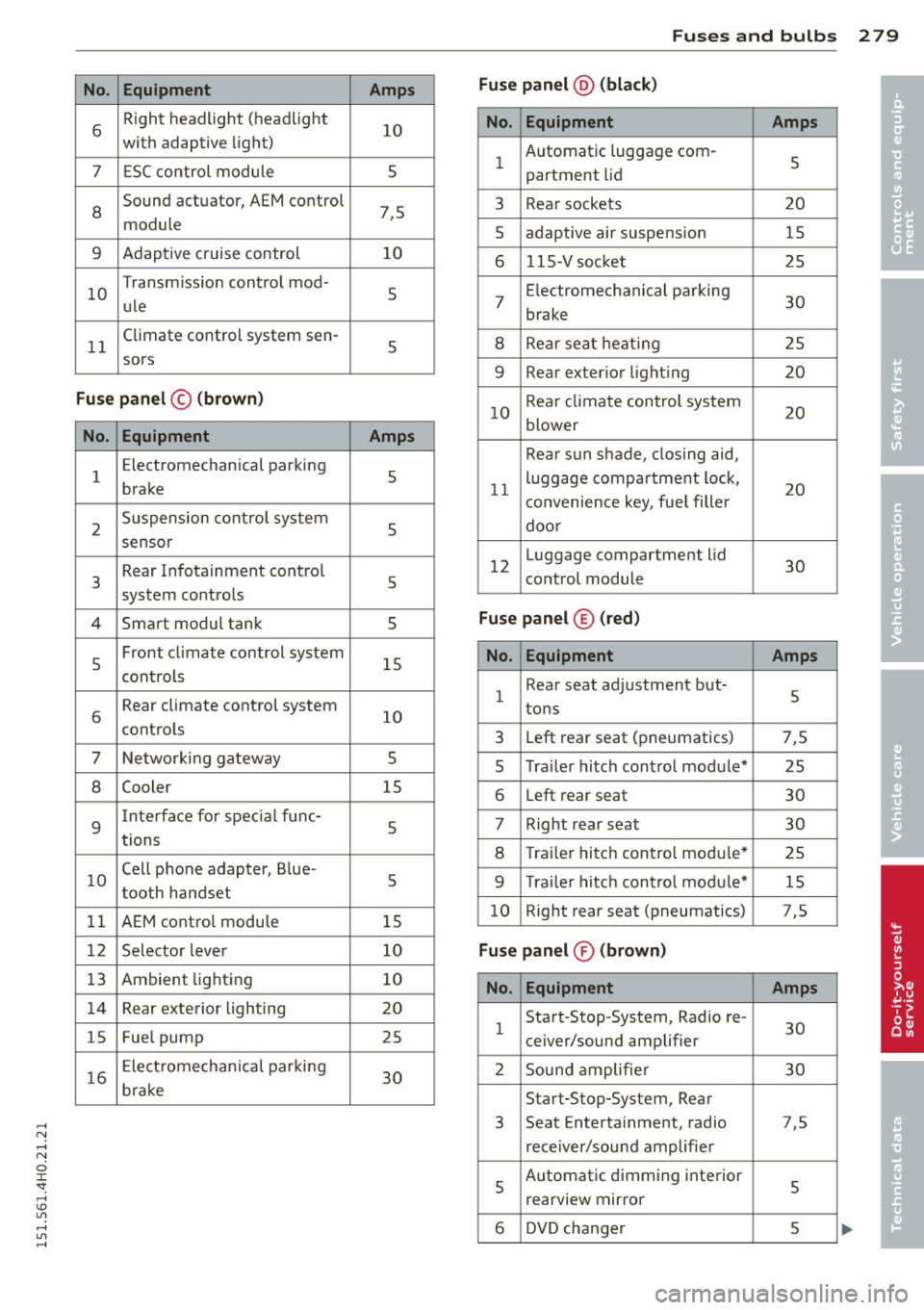
.... N .... N
0 J:
'SI: .... \!) 1.1'1
.... 1.1'1 ,....,
No. Equ ipment
6 R
ight headlight (headlight
with adaptive light)
7 ESC control module
8
Sound actuator, AEM control
module
9 Adaptive cruise control
10 Transmiss
ion control mod-
ule
11 Climate control
system sen-
sors
Fu se pan el© (bro w n)
No. Equipment
1 E
lectromechanical parking
brake
2 Suspension control system
sensor
3 Rear
Infotainment control
system controls
4 Smart modul tank
5 Front
climate control system
contro ls
6 Rear climate control
system
controls
7 Networking gateway
8 Cooler
9
I nterface for specia l func-
tions
10 Cell phone
adapter, Blue-
tooth handset
11 AEM control modu le
1 2 Selector lever
13 Ambient lighting
14 Rear exterior lighting
15 Fuel
pump
16 Electromechanical parking
brake
Amps
10
5
7,5 10
5
5
Amps
5
5
5
5
15
10
s
15
s
5
15
10
10
20
25
30
Fu ses and bulb s 2 79
Fus e pan el@ (bla ck)
•
No. Equipment Amps •
1 Automatic luggage com
-
5
partment lid
3 Rear sockets 20
5 adaptive air suspension
15
6 115-Vsocket 25
7 E
lectromechanical parking
30
brake
8 Rear seat heating 25
9 Rear exterior lighting
20
10 Rear climate control system
20
blower
Rear sun shade, closing aid,
11 luggage
compartment lock,
20
convenience key, fue l filler
door
12 Luggage compartment
lid
30
control module
Fuse panel ® (red)
No. Equipm ent Amps
1 Rear
seat adjustment but-
tons 5
3 Left rear seat (pneumatics) 7,5
5 Tra
iler hitch control module* 25
6 Left rear seat 30
7 Right rear seat 30
8 Trailer hitch contro l modu le*
25
9 Tra ile r hitc h control modu le* 15
10 Right rear
seat (pneumatics) 7,5
Fuse pan el® (brown )
No. Equipment Amps
1 Start-Stop-System,
Radio re-
30
ceiver/sound amplifier
2 Sound amplifie r 30
Start-Stop-System, Rear
3 Seat
Entertainment, radio 7,5
receiver/sound amplifier
5
Automatic dimming interior 5
rearview mirror
6 DVD changer 5