2015 AUDI A6 light
[x] Cancel search: lightPage 35 of 314

M N
0 <.J 'SI: ,...., \!) ..,.,
,...., ..,., ,....,
for another vehicle or a transponder is located on the key ring.
- For Declaration of Compliance to United
States FCC and Industry Canada regula
tions
¢ page 295.
Power locking system
General description
The power locking system locks or unlocks all
doors and the rear lid simultaneously.
You can lock and unlock the vehicle centrally.
You have the following choices:
- Remote master key¢
page 34,
- Door handles with convenience key*
¢page 35 ,
- Lock cylinder at the driver's door
¢page 36, or
- Power locking switch inside¢
page 36.
Selective unlocking
When you lock the vehicle, the power locking
system will lock the doors and the rear lid.
When unlocking, you can set in the MMI
whether only the driver's door or the entire
vehicle should be unlocked
¢page 34.
Automatic locking
The automatic locking feature locks all the ve
hicle doors and the rear lid when you drive
faster than 9 mph (1S km/h).
T he car is unlocked again, when the opening
function in the power locking system switch
or at one of the door levers is actuated .
Anti-theft alarm warning system
If the anti-theft alarm warning system de
tects a break-in into the vehicle, acoustic and
visual warning signals are triggered .
T he anti-theft warning system is activated au
tomatically when you lock the vehicle . It is de
activated when unlocking using the remote key, with the mechanical key, and when you
switch the ignition on.
The alarm also turns off when the alarm cycle has expired .
Opening and closing 33
Turn signals
When you unlock the vehicle, the turn signals
flash twice. When you lock the vehicle the
turn signals flash once. If they do not flash ,
one of the doors, the rear lid or the hood is not locked.
Unintentionally locking yourself out
In the following cases there safeguards to
prevent you locking your remote master key in
the vehicle:
- The vehicle does not lock with the central
locking switch¢
page 36 if the driver's
door is open.
- On vehicles with convenience key*, if the
most recently used master key is in the lug
gage compartment, the rear lid is automati
cally unlocked again after it is closed.
Do not lock your vehicle with the
remote mas
ter key or convenience key*
until all doors
and the rear lid are closed. In this way you
avoid locking yourself out accidentally.
Power side door closer*
The vehicle doors are equipped with a power
side door closer. When closing a door, you on
ly have to let it fall lightly into the latch. The
door will then automatically close by itself
¢..1, .
A WARNING
-
- When you lock your vehicle from outside,
nobody -especially children -should re
main inside the vehicle. Remember,
when you lock the vehicle from the out
side the windows cannot be opened from
the inside.
- When you leave the vehicle, always take
the ignition key with you . This will pre
vent passengers (children, for example) from accidentally being locked in the ve
hicle should they accidentally press the
power locking switch in the doors.
- Do not leave children inside the vehicle
unsupervised. In an emergency it would
be impossible to open the doors from
the outside without the key.
Page 38 of 314

36 Opening and clo sing
- Fo r Declaration of Compliance to United
States FCC and Industry Canada regula
tions
c:> page 295.
Operating locks with the key
In the event of a failure of the power locking
syst em , the driver 's door can be locked and
unlocked at the lack cylinder .
Fig. 22 Key turns fo r openi ng a nd closing.
"" Remove the mechanical key c:> page 32 .
""Turn the mechanical key to posit ion @
c:> fig . 22 to unlock the d river's door.
""T urn the key to position @ to lock the driv
er's door
c:> ,&. .
.&_ WARNING
"' ~ 0 0 c!,
i
-
Read and follow a ll WARNINGS c:> & in
General description on page 33.
Locking and unlocking the vehicle from
inside
Fi g. 2 3 Drive r's door ; pow er lo ckin g sw it c h
F ig. 2 4 Rear powe r loc king sw itc h
"" Press the button~ to lock the vehicle c:> ,&. .
"" Press the b utton @l to un lock the veh icle .
If you lock the vehicle using the power locking
switch, p lease note the followi ng:
- You cannot open the doo rs or the rear lid
from the
ou tside (inc reased security, for ex
ample when you are s topped at a red light).
- The diodes in the power locking switches i l-
lum inate when all the doors are closed and
locked .
- Front doors: you can unlock and open the
doors from the inside by pull ing on the door
handle .
- Rear doors : pull the door hand le
once to re
lease the lock . Pull t he handle
again to open
the door .
- If you have a crash and the airbag is activa t
ed, the doors automatically unlock .
.&_ WARNING
=
-The power loc king swi tch wo rks wi th the
ignit ion off and a utomat ica lly locks the
e nt ire veh icle w hen it is a ctua ted.
- On a v eh icl e locked from the outside t he
power locking system switch is inopera
tive .
- Loc ked doo rs make it more difficult for
emerge ncy worke rs to ge t into the veh i
cle , which pu ts lives at ri sk. Do not leave
an yo ne be hind in t he ve hicle, especi ally
chi ldren .
© Tips
Your ve hicl e is l ocked a utomat ically a t a
s p eed of 9 mp h (15 km/h)
c:> page 33. You
can un lo ck the vehicle again using the ..,.
Page 41 of 314

M N
0 I.J "". rl I.O
"' rl
"' rl
Child safety lock for
the rear doors
The power child safety lock locks the rear win
dows and prevent the rear doors from being
opened from the inside .
Fig. 30 Sectio n fr om driv er' s door : child sa fety lock
b uttons
• To activate the child safety lock for the left/
right rear door, press the left/right button
[!l
in the driver's door¢ fig. 30. The light in the
button w ill turn on.
• To deactivate the child safety lock for the
left/right rear door , press the left/right but
ton [!] in the driver's door. The light in the
button turns off.
The following features are switched off:
- The interior door handles in the rear doors,
- The power windows in the rear doors .
In order to activate the ch ild safety lock on
the left and the right side , press the two safe
ty buttons
[!l in succession .
Power windows
Controls
The driver can control all power windows.
Fig . 31 Sectio n of t he dr iv er 's d oor: Control s
Opening and closing 39
All power window switches are prov ided with
a two-po sition function :
Opening the windows
• Press the switch to the first stop and hold it
until the window reaches the desired posi
tion.
• Press the switch briefly to the
second stop
to automatically open the window.
Closing the windows
• Pull the switch to the first stop and hold it
until the window reaches the desired posi
tion.
• Pull the switch briefly to the
second stop to
automatically close the window.
Power window switches
@ Driver's door
® Passenger's door
© Left rear door
@ Right rear door
& WARNING
-When you leave your vehicle -even if on
ly briefly -always take the ignition key
with you . This applies particularly when
children remain in the vehicle. Otherwise
the children could start the engine or op
erate electrical equipment (e .g . power
windows). The power windows are func
tional until the driver's door or passeng
er's door has been opened.
- Be careful when clos ing the w indows .
Check to see that no one is in the way, or
serious injury could result!
- When locking the vehicle from outside,
the vehicle must be unoccupied since the
windows can no longer be opened in an
emergency.
(D Tips
After the ignition has been switched off,
the windows can still be opened or closed
for about 10 minu tes. The power windows
are not switched off until the driver's door
or passenger's door has been opened.
Page 42 of 314

40 Opening and clo sing
What to do after a malfunction
The one-touch open and close function must
be reactivated if the battery has been discon
nected .
,. Pull and hold the power window switch until
the window is fully closed .
,. Release the switch and then pull it again for
at least one second.
Valet parking
The valet parking feature protects the lug
gage compartment from unauthorized ac cess.
Fig. 32 Luggage compartment : valet park ing button
W ith "valet parking" activated, the rear lid
cannot be opened.
... Remove the mechan ical key
¢ page 32.
"' Open the glove compartment and activate
<=> fig. 32 the "valet parking" feature by
pressing the
I VA LET I button. The ind icator
light in the switch illuminates .
,. Close the glove compartment and lock it
with the mechanica l key .
"' Lock both rea r seatbacks with the mechani
c a l key ¢
page 64.
"' Leave the master key wi th the service per
sonnel for parking and keep the mechanical
key with you.
When the "vale t parking" fea ture is activa ted :
- the u nlocking button for the rear lid c:;, in
the d river's doo r is inactive
- the b utton c:;, on the maste r key is inact ive
- the opening hand le in the rear lid is inactive. T
he vehicle can be driven and locked and un
locked with the master key . Access to the lug
gage compartment is b locked .
When the valet pa rking func tion is switched
on, the message
Valet parking acti vated ap
pears in the instrument cluste r display when
you sw itch the ignition on .
Sliding/tilting sunroof
Operation
Fig . 33 Sect io n of th e headl iner : Sl idi ng/t ilti ng su nroof
but ton
@ Tilting and sliding
,. To t ilt the sunroof completely , press the
sw itch br iefly to the second level b riefly.
"' To close the su nroof comp letely, pull the
sw itch br iefly to the second level¢,& .
"' To select an intermediate pos it ion, press/
pull the switch to the first level until t he de
sired position is reached.
@ Opening /sliding (version 1 )
"'To move the roof into the reduced w ind
noise posit ion, press the button back brief ly
to the second leve l. The roof will ope n all
the way if you press the button back to the second level again .
"' To close the sunroof completely, press the
sw itch forward briefly to the second level
¢ £ .
,. To select an intermediate pos it ion, press/
pull the switch forwa rd/back to the first lev
el unti l the desired posi tion is reached.
@ Opening /sliding (version 2)
"' To open the sunroof completely, p ress the
sw itch back to j ust before the second level. ..,_
Page 43 of 314

M N
0 I.J "". rl I.O
"' rl
"' rl
.. To close the sunroof completely, press the
switch forward briefly to the second level
¢ A .
.. To select an intermediate position, press/
pull the switch forward/back to the first lev
el until the desired position is reached.
The sun shade can be opened and closed by
hand when the sunroof is closed. The solar
protection opens automatically when the sun
roof opens.
You can still close or open the sunroof for up
to ten minutes after you have switched the ig
n ition off. The switch is deactivated once the
driver's or front passenger's door is opened.
A WARNING
Pay careful attention when closing the
sliding/tilting sunroof -otherwise serious
injury could result! A lways take the key
w ith you when leaving the vehicle .
(D Note
-
Always close your sliding/tilting sunroof
when leaving your vehicle. Sudden rain can
cause damage to the interior equipment of
your veh icle, part icu larly the electro nic
equ ipment.
{I) T ips
The sliding/tilt ing s unroof will only open
at temperatures above -4°F (-20°C) .
Emergency closing of the sliding/tilting
sunroof
If the sunroof detects an object in its path
when it is closing, it will open again automati
cally. In this case, you can close the roof with
the power emergency closing function .
.. Within five seconds after the sunroof opens
automatically, pull the switch until the roof
closes .
Openin g an d clos ing 41
Garage door opener
(Homelink)
Description
Applies to veh icles: w ith garage door opener (Homelink)
Fig. 34 Garage door opener : examples of using with
differen t systems
You can activate various systems such as ga
rage doors, security systems and home light
ing from inside your vehicle using the garage
door opener (Homelink). There are three but
tons for this in the vehicle headliner that can
be in used in place of up to three hand-held
transmitters .
To operate systems using the garage door
opener, the three buttons in the roof headlin
er must be programmed first .
A WARNING
Make sure no people or objects are in the
immediate vicin ity of the equipment when
using or p rogramming the garage door
opener. People can be injured and objects
can be damaged if they are caught in the
eq uipment.
(0 Tips
- For security reasons, we recommend that
you clear the programmed b uttons be
fore selling the vehicle .
- For add itiona l information about Home
Link, visit www.homelink.com.
- For Declaration of Comp liance to United
States FCC and Ind ustry Canada reg ula
tions
¢ page 295.
Page 45 of 314

M N
0 I.J "". rl I.O
"' rl
"' rl
Clear vision Lights
Switching the headlights on and off
Fig . 36 Instrument pane l: lig ht sw itc h wit h all -weath
er lights•
The headlights only wo rk when the ignition is
switched on. Wh ile start ing the eng ine o r
when switching off the ign ition, the head
lights will go off and on ly the side marker
lights will be on .
If the system is not operating p rope rly, a
war ning symbol in the dr iver information dis
p lay is d isplayed
c::> page 22 .
Light switch -'tj_ -
Tu rn the switch c::> fig . 36 to the co rrespond ing
position . When the lights a re switched on, the
oD o: symbo l tu rns on .
0 -The lig hts are off or the dayt ime runn ing
lights are on:
- USA models: The day time running lights
will come on automatically when the igni
t ion is on and the light switch
c::> fig . 36 is in
the
O posit ion or the AUTO position (only in
daylight cond itions). The
Daytime running
light s
function can be turned on and off in
the MMI
c::> page44, c::>A .
-Canada model s: The daytime running lig hts
will come on automa tically when the igni
t ion is on and the light swi tch
c::> fig . 36 is in
the
O position, the : Do: pos ition or the AUTO
position (only in daylight conditions) c::> A .
AUTO -Automatic headlights swi tc h on and
off depend ing o n brightness, for example i n
tw ilight, during rain or in tunnels
c::> &. .
:Do: -Side marker lights
io -Low beam headlights
Clear vi sion 43
lm -Fog lights* (vehicles with Xenon p lus
headlights *)
~ -All-weather lights *
@il-Rear fog lights* . When the rear fog lights
are on, the symbol
0$ on the switch will i llu
minate.
All-weather lights*
In vehicles with all-wea ther lights , the front
ligh ts are ad justed au tomatically so that yo u
are less like ly to see glare from your own
head lights , for exam ple when driving on a wet
road.
Automatic headl ight range control*
T he he adlights do not blind on coming traffic
i f the veh icle load changes . The headligh t
range also adj usts automatica lly w hen brak
ing and accelerating .
Light functions
The following light funct io ns are availab le de
pend ing on vehicle equipment and o nly func
tion when t he lig ht switch is in the AUTO posi
tion . You can deactivate these functions in the
MMI under
Audi adaptive light * c::> page 44.
Vehicles with Static corn ering light* : the cor
ner ing ligh t sw itches on a utomat ically when
the steering whee l is turned at a certain angle
at speeds up to approximately 44 mph
( 7 0 km/h) and when the turn signa l is activat
ed at speeds up to approximately 25 mph
(40 km/h) . The area to the side of the vehicle
is illum inated better when turn ing .
Vehicles w ith
Dynamic cu rve light* : the curve
light only functions at speeds between ap
proximately 6 mph (10 km/h) and 68 mph
(110 km/h) and adapts itself to the curves in
the road .
~
Page 46 of 314

44 Clear vision
& WARNING
- Automatic headlights are only intended
to assist the driver . They do not relieve
the driver of his responsibility to check
the headlights and to turn them on man
ually according to the current light and
visibility conditions. For example, fog
cannot be detected by the light sensors.
So always switch on the headlights
io
under these weather conditions and
when driving in the dark.
- Crashes can happen when you cannot see
the road ahead and when you cannot be
seen by other motorists. Always turn on
theheadlightssothatyoucanseeahead and so that others can see your car from
the back .
- The rear fog lights should only be turned
on in accordance with traffic regulation,
as the lights are bright for following traf
fic.
- Please observe legal regulations when using the lighting systems described .
@ Tips
-The light sensor* for automatic head
light range control* is located in the rear
view mirror mount . You should therefore
not apply any st ickers to the windshield
in this area in order to prevent malfunc
tions or failures.
- In the event of a light sensor malfunc
tion, the driver is notified in the instru
ment cluster display
Q page 2 3 .
-You will hear a warning tone if you open
the driver door when the exterior lights
are switched on.
- In cool or damp weather, the inside of
the headlights, turn signa ls and tail
lights can fog over due to the tempera
ture difference between the inside and
outside. They will clear shortly after
switching them on. This does not affect
the service life of the lighting.
Emergency flasher
T he emergency flasher makes other motorists
aware that you or your vehicle are in an emer
gency situation .
Fig. 37 C ente r co nso le: em erg en cy flash er sw it ch
.. Press the switch ~ Q fig. 3 7 to turn the
emergency flashers on or off.
When the emergency flasher is on, all four
turn s ignals blink at the same time. The turn
signal indicator lights
11111 in the instru
ment cluster, as well as the light in the emer
gency flasher switch~ blink likewise. The
emergency flashers also work when the igni
tion is turned off.
The emergency flashers will turn on automati
cally if you are in an accident where the airbag
has deployed.
@ Tips
You should turn on the emergency flashers
when:
- you are the last vehicle standing in a traf
fic jam so that any other vehicles coming
can see you, or when
- your vehicle has broken down or you are
in an emergency situation, or when
-your vehicle is being towed by a tow
truck or if you are towing another vehicle
behind you.
Adjusting the exterior lighting
The settings are adjusted in the MMI.
.. Select: !CARI function button> (Car)* sys
tems
control button > Vehicle setting s > Ex-
terior lighting.
Ill>
Page 47 of 314
M N
0 I.J "". rl I.O
"' rl
"' rl
Automatic headlights
You can adjust the following settings in the
Automatic headlights menu:
Headlights activation time -You can adjust if
the headlights switch on
Early, Med . or Late
according to the sensitivity of the ligh t sensor.
Audi adaptive light* -You can switch adaptive
light
On and Off.
Daytime running lights
USA models:
You can switch the dayt ime run
n ing lights
on and off .
Canada models :
The function cannot be
turned off . It is activated automatically each
time the ignition is switched on. This menu
item is shown "greyed out" .
Coming home, Leaving home
The coming home function illuminates the
area outside the vehicle when you switch the
ignition off and open the driver's door. To turn
the function on, select
Lights when leaving
car > On .
The leaving home function illuminates the
area outside the vehicle when you un lock the
vehicle. To turn the funct ion on, select
Lights
when unlocking car > On .
The coming home and leaving home functions
only operate when it is dark and the light
switch is in the
AUTO position. Clear
vision 45
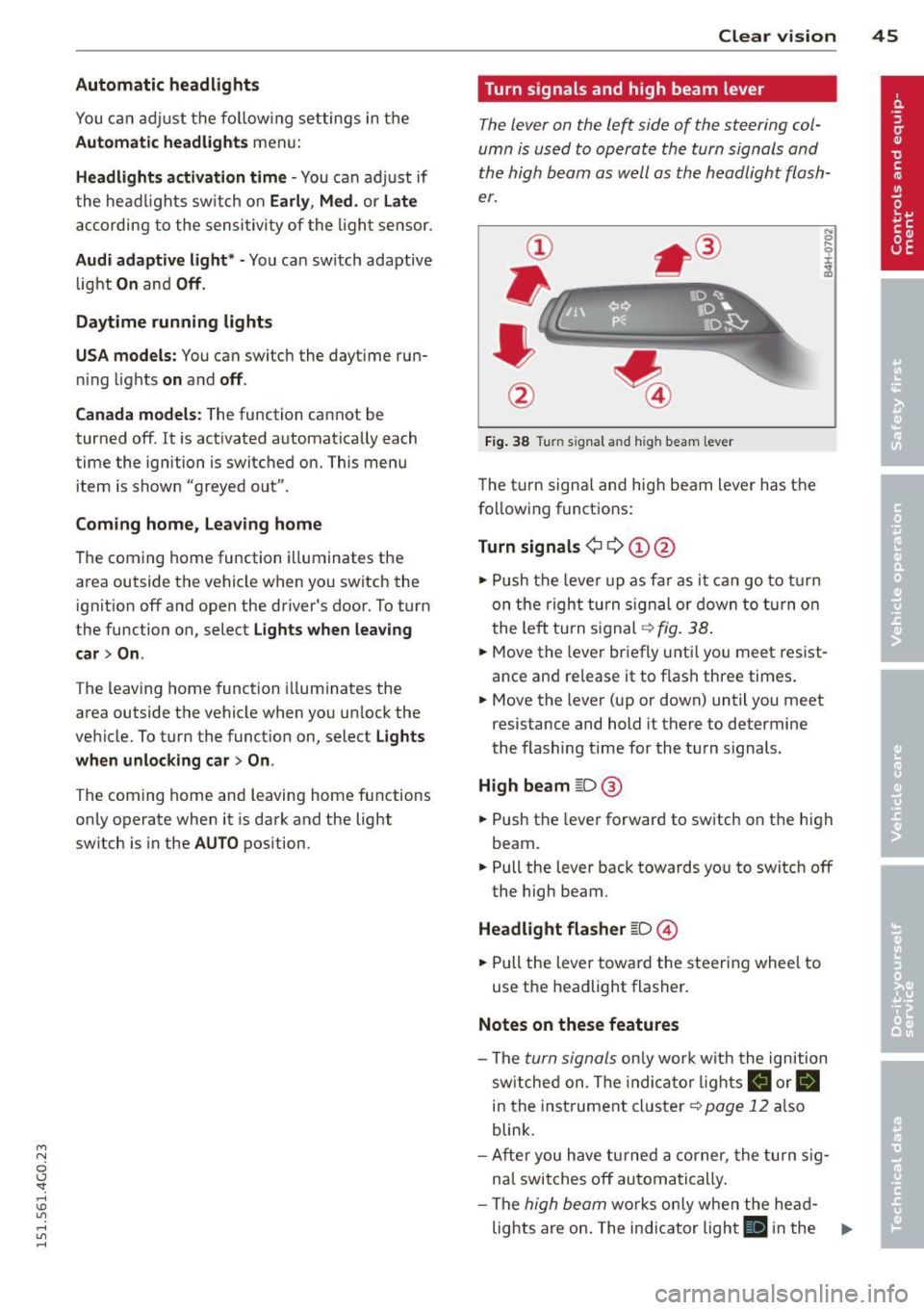
Turn signals and high beam lever
The lever on the left side of the steering col
umn is used to operate the turn signals and
the high beam as well as
the headlight flash
er.
Fig. 38 Tu rn signal and high beam lever
The turn signal and high beam lever has the
following functions:
Turn signals ¢ 9 ©@
.,. Push the lever up as fa r as it can go to turn
on the right turn signa l or down to turn on
the left tu rn s ignal ¢
fig. 38.
.. 0 ....
~
... Move the lever briefly unti l you meet resist
ance and re lease it to flash three times.
.,. Move the lever (up or down) until you meet
resistance and hold it there to determine
the flashing time for the turn signals.
High beam ~D @
... Push the lever forward to switch on the high
beam .
.,. Pull the lever back towards you to switch off
the high beam.
Headlight flasher ~D ©
... Pull the lever toward the steering wheel to
use the headlight flasher.
Notes on these features
-The turn signals on ly work w ith the ignition
sw itched on. The indica tor l ights
a or.
in the instrument cluster¢
page 12 also
blink.
- After you have turned a corner, the turn sig
nal switches off automatically .
- The
high beam works only when the he ad-
lights are on . The indicator light
El in the ..,.