2015 AUDI A4 mirror
[x] Cancel search: mirrorPage 113 of 304
Audi side assist Lane change assistant
Description
Applies to vehicles: with Audi side assist
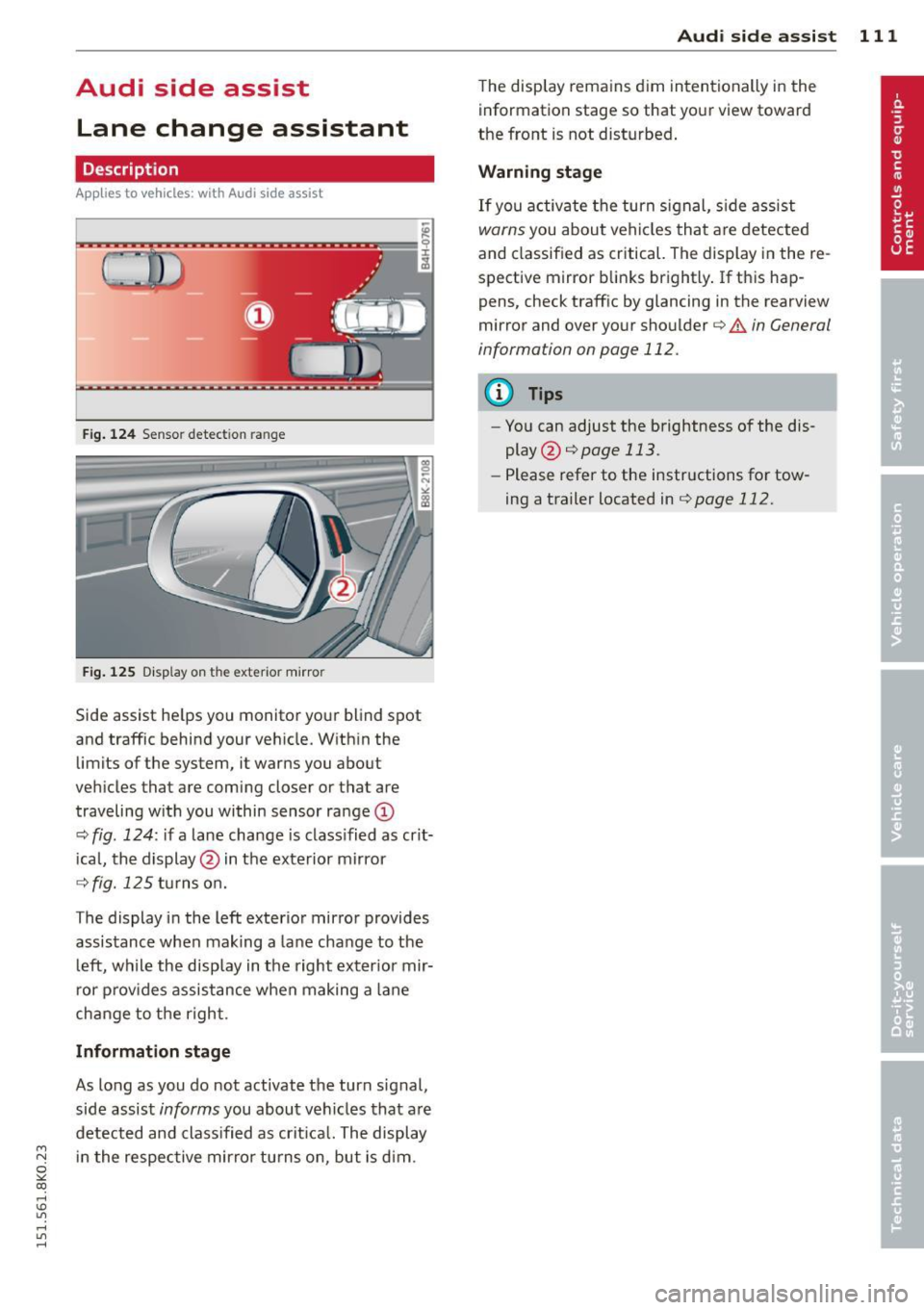
Fig . 124 Sensor dete ction ra n ge
Fig . 12 5 Disp la y on th e e xterio r mirro r
Side assist he lps you mon itor yo ur blind spot
and traffic behind you r veh icle. W ith in the
limits of the system, it warns you about
vehicles that are coming closer or tha t are
traveling w ith you within sensor ra nge
(D
c::, fig . 124 : if a lane change is class ified as crit
ical, the display @ in the exterior mirror
c::> fig. 125 turns on.
The display in the left exterior mirror provides
assistance when making a lane cha nge to t he
l eft, while the display in the right exter ior mir
r or p rov ides assistance when making a lane
change to t he right .
Information stage
As long as you do not activate the turn signal,
side assist
informs you about vehicles that are
detected and class ified as crit ica l. The display
M N in the respec tive mirro r turns o n, but is d im .
~ co
rl I.O
"' rl
"' rl
Aud i side assist 111
The display remains d im intentionally in the
information stage so that your view toward
the front is not disturbed .
Warning st age
If you activate the turn signal, s ide assist
warns you about veh icles that are detected
and classified as critical. The display in the re
spective mirror blinks brightly . If this hap
pens, check traff ic by glanc ing in the rearview
mirror and over your shoulder¢
A in General
information on page 112 .
@ Tips
-You can adjust the brightness of the dis
play @¢
page 113 .
-Please refer to the instructions fo r tow
ing a trailer located in
¢ page 112.
Page 114 of 304

112 Audi side assist
General information
App lies to vehicles: with Audi side assist
®
©
Fig. 126 Driving s it u at ions
AU Dr- l
• •
Fig . 12 7 Rea r of th e ve hicle: pos it io n of t he se nso rs
Side assis t fu nctions at speeds above ap prox i
ma tely 19 mph (30 km/h).
@ V ehicles that are approaching
In certain cases, a vehicle will be classified as
cr itical for a lane change
even if it is still
somewhat far away. The fas ter a vehicle ap
p ro aches, the sooner the disp lay in the exteri
or m irror will t urn on.
@ Vehicles traveling with you
Vehicles traveling w ith you are indicated in the
exterior m irror if they are classified as cr it ical
for a lane change. All vehicles detec ted by
side assis t are in dicated by the time they en
ter your "blind spot", at the latest.
© Vehicles left behind
If you s low ly pass a ve hicl e tha t sid e ass ist has
dete cted ( the difference in s peed between the
vehicle and you r vehicle is less than 9 mph
(15 km/h)), the display in the exter io r mirro r
turns on as soon as the vehicle enters your blind spot.
The disp lay wi ll not t urn on if you quickly pass
a vehicle that s ide assist has detected (t he d if
f erence in speed between the ve hicle and your
vehicle is greater than 9 mph (15 km/h)).
Functional limitations
T he radar senso rs are des igned to detect the
left and right adjacent lanes whe n the road
l anes a re the normal width. In certain situa
t ions, the d isp lay in the exterior mirror may
turn on
even though there is no ve hicle locat
ed in the area that is cr itical fo r a lane cha nge.
For example:
- if the lanes are narrow or if your are driving on the edge of your lane. If this is the case,
the system may have detected the vehicle in
another la ne that is
not adjacent to your
cur rent lane .
- if you a re driving through a c urve . Side assis t
may react to a vehicle that is one lane ove r
from the ad jacent lane .
- if side assist reacts to other objects (such as
high or d isp laced gua rd rails) .
- In poor weather conditions. The side assist fu nctions are limited .
Do not
cover the radar sensors c:;, fig. 127 with
stickers, depos its, bicycle wheels or other ob
jects , because this will affect the funct ion. Do
not use s ide ass ist when tow ing a trail er. For
information on cleaning, refe r to
c:;, page 202 .
&_ WARNING
-Always pay a tten tion t o traffic and to the
ar ea around your ve hicl e. Side a ssist can
no t repla ce a driver's attention. The driv
er a lone is always respons ible fo r lane
cha nges a nd similar driving mane uvers.
Page 115 of 304

M N
~ co
rl I.O
"' rl
"' rl
-Improper reliance on the side assist sys
tem can cause collisions and serious
personal injury:
- Never rely only on side assist when
ch anging lanes.
- Always check rear view mirrors to make
sure that it is safe to change lanes.
- Side ass ist cannot detect a ll vehicles un
der all cond itions- dange r of accident!
- Please note that side assist indicates
ther e ar e approaching vehicles, o r
vehicles in your bli nd spot, o nly afte r
yo ur vehicle has r eached a driving speed
o f at least 19 mph (30 km/h).
- In certain s ituati ons, the system may not
f unc tion or its funct io n may be lim ited.
For example:
- if veh icles are approaching or be ing left
behind very quick ly. The display may
not turn on in time.
- in poor weather condit ions such as
heavy ra in, snow or heavy m ist .
- on very wide lanes, i n tight curves or if
there is a rise in the road surface .
Vehicles in the adjacent lane may not
be detec ted becaus e they are outside
of t he senso r range.
(D Note
The sensors can be displaced by impacts o r
damage to the bumper, whee l housing and
unde rbody. This can affect the system .
Have your author ized Audi dealer or au
t hori zed A udi Service Fa cility check the ir
function.
(D Tips
- If the window g lass in t he d river's doo r
or front passe nger's door h as bee n tint
ed, the disp lay in the exterior m irror may
be misinterpre ted.
- Fo r De clarat ion of Compliance to Uni ted
Sta tes FCC and Indus try Canada regula
tions~
page 286.
Aud i side assist 113
Activating and deactivating
A pp lies to vehicles : wi th Aud i side ass ist
F ig. 128 D river 's doo r: Side ass is t button
.,. Press the b utton ~ A in General informa
tion on page 112
to switch the system on/
off . The LED in the button turns on when
side assist is switched on.
Adjusting the display brightness
A pp lies to vehicles: wi th Audi side ass ist
The signal brightness can be set in the radio
orMMI* .
.,. Select: !CAR ! function button > Audi side as
sist .
.,. Select: I CAR I function button > Car systems *
control button > Driv er a ssist > Audi side
as sis t.
The display br ightness adjusts automatically
to the brig htness of the sur roundings, both in
the info rmation and in the warning stage . In
very dark or very bright su rroundings, the dis
play is already se t to the m inimum or maxi
mum level by t he autom atic adjus tme nt. I n
s uch cases, you may notice no change when
adjusting t he b rig htness, or the change may
only be noticeable once the s urroundings
change.
Adjus t the brightness to a leve l where the dis
play i n the information stage w ill not d is rupt
your view forward . If you change the bright
ness, the display in the exterior mirror will
briefly show the brightness level in the infor
mation stage. The brightness of the warning
stage is linked to the brightness in the i nfor
mation stage and is adjusted along with the
i nformation stage adjustment. ..,_
Page 125 of 304

M N
~ co
rl I.O
"' rl
"' rl
later than when the red orientation line©
abuts an object¢,&.!
A WARNING
- The rear view camera does not show the
entire area behind the vehicle
¢
page 120, fig. 133. Watch out espe
c ially for small children and animals. The
rear view camera cannot always detect
them, posing risk of an accident!
- Please note that objects not touch ing the
ground can appear to be further away
than they really are (for example, the
bumper of a parked vehicle, a trailer
hitch, or the rear of a truck). In this case,
yo u should not use the help lines to he lp
with parking, which poses danger of an
accident!
{[) Note
-Low obstacles already signaled by a
warning can disappear from the system's
detection range as they are approached
and will not continue to be signaled. Ob
j ects such as barrier chains, trailer draw
bars, thin pa inted vertical poles or fen
ces may not be detected by the system, posing risk of damage.
- In the MMI display, the direction of trav
el of the vehicle rear is represented de
pending on the steering wheel angle.
The vehicle front swings out more than
the vehicle rear. Maintain plenty of dis
tance from an obstacle so that your out
s ide mirror or a corner of your vehicle
does not collide with any obstacles -dan
ger of accident!
Park assist 123
Parallel Parking
Applies to vehicles: with parking system (rear, with rear
v iew camera)
Use parking mode 2 to help you park on the
edge of a street.
Fig. 137 MMI Display: blue surface in the parking spot
Fig. 138 MMI Display: Blue curve on the curb
The following steps apply only when there is
no obstacle (such as a wall) near the parking
spot. Otherwise, please read the "Tips on Parking Next to Obstacles"¢
page 124.
.,.. Activate the t urn signa l.
.,.. Position your vehicle parallel to the edge of
the street, approximately 3
ft (1 m) from a
parked vehicle.
.,.. Switch the MMI on and select the reverse
gear. The parking aid turns on and parking
mode 1 appears on the display .
.,.. Press the
Mode ¢ fig. 13 7 (!) control button
on the MMI contro l conso le. Parking mode 2
appears .
.,.. Back up in reverse gear and align your vehi
cle so that the blue area @borders on the
rear end of the vehicle or on the parking
spot line. The blue area represents an exten
sion of the vehicle's outline by approximate-
ly 16
ft (5 m) to the rear. The long side of liJJ,
Page 128 of 304

126 Driving Saf ely
Driving Safely
General notes
Safe driving habits
Please remember -safety first!
This chapter contains important information,
tips, instructions and warnings that you need
to read and observe for your own safety, the
safety of your passengers and others . We have
summarized here what you need to know
about safety belts, a irbags, ch ild restra ints as
well as child safety. Your safety is for us
priori
ty number 1.
Always observe the info rmat ion
and warn ings in th is sect ion -fo r yo ur own
safety as well as that of your passengers .
The information in this se ction app lies to all
model ve rsions of your veh icle . Some of the
feat ures described in this sec tions may be
standard equipment on some models, or may
be optional equipment on others. If you are
not sure, ask your authorized Audi dealer.
A WARNING
-Always make sure that you follow the in
struct ions and heed the WARNINGS in
this Manual. It is in your interest and in
the inte rest of you r passengers.
- Always keep the complete Owner's Liter
ature in your Audi when you lend or sell
your vehicle so that this important info r
mation will always be ava ilable to the
dr iver and passengers.
- Always keep the Owner's literature handy
so that you can find i t eas ily if you have
ques tions.
Safety equipment
The safety features are part of the occupant
restraint system and work together to help
redu ce the risk of injury in a wide variety of
accident situations.
Your safety and the safety of your passenge rs
should not be left to chance. Advances in
technology have made a varie ty o f fea tures
avai la bl e to he lp re duce the risk of injury in an accident
. The following is a list of just a few of
the safety features in your Audi:
- sophis tic ated s afety be lts fo r drive r and a ll
passenger sea ting pos it ions,
- be lt fo rce limi ters fo r the front seats,
- belt p retensioners for the seats,
- head restra ints for each seating positio n,
- front airbags,
- side airbags in the front seats,
- side curtain a irbags,
- specia l LATCH anchorages for child re-
s tr aints,
- ad justab le steer ing colum n.
These ind iv idual safety features, can work to
gether as a system to he lp protect you and
you r passengers in a w ide range of accidents .
T hese fe atures canno t work as a system if
they a re not always correct ly adjusted and co r
rect ly used.
Safety i s everybody' s respon sibility!
Important things to do before driving
Safety is everybody's job! Vehicle and occu
pant safety always depends on the informed and careful driver.
Fo r yo ur safety and the safety of your passen
gers,
before driv ing alway s:
.,. Make sure that all lights and signa ls are op
erati ng correctly .
.,. Make su re that the t ire p ressu re is co rrect .
.,. Make s ure that all windows are clean and af
ford good v is ibili ty to the outs ide.
.,. Sec ure all lugg age and o ther items c aref ully
qpage 66 .
.,. Ma ke s ure that nothing can inte rfere with
the peda ls .
.,. Ad just front seat, head restraint and mirrors
correctly for your height .
.,. Instruct rear seat passengers to adjust the
head restra ints according to their he ight .
.,. Make s ure to use the r ight child restraint
co rrectly to p rotect chi ldren ¢
page 165,
Child Safety. "'
Page 201 of 304

'"" N
0 ::.,: co ,...., \!) ..,.,
,...., ..,., ,....,
Trailer towing Driving with a trailer
General information
Your Audi was designed primarily for passen
ger transportation .
If you plan to tow a tra iler, p lease remember
that the addit ional load will affect durab ility,
economy and performance .
T railer towing not on ly places more stress on
the vehicle, it also calls for more concentra
tion from the driver.
F or this reason, a lways fo llow the operating
and driving instructions provided and use
common sense.
Technical requirements
Traile r hitch
Use a weight-carrying hitch conforming to the
gross trailer we ight. The hitch must be suita
b le for your veh icle and trailer and must be
mounted secure ly on t he veh icle's chassis at a
technically sound location . Use only a t railer
h itch w ith a removab le ball moun t. A lways
check with the tr ailer hitch man ufac tur er to
make sure that you are using the correct
hitch.
Do not use a bumper hitch.
T he hitc h must be installed in such a way that
it does not inte rfe re with the impac t-absorb
i ng b umper syst em. No modifica tions should
be made to the vehicle exhaus t and b rake sys
tems . From t ime to time, check that a ll hitch
mo unt ing bolt s remain securely fas tened.
W hen you are not tow ing a trailer, remove the
trai le r hi tch ball moun t. T h is prevents the
hi tch from causing damage sho uld your ve hi
cle be str uck from be hind
¢ &. .
Trailer brakes
If yo ur tra iler is equ ipped w it h a braking sys
tem, check to be su re that it conforms to a ll
r eg ulat io ns .
Trailer towin g 199
The trailer hyd ra ulic bra ke system must not be
direct ly connected to the vehicle's hydraulic
brake system
¢ &. .
Safety chains
Alw ays use s afety chains between your ve hicle
and t he tra ile r.
Trailer lights
Tra ile r lights m ust meet all reg ulations . Be
su re to check w ith your authorized Audi dealer
fo r c orrec t w iri ng, sw itches, and relays.
Mirrors
If you a re unable to see the traffic behind you
u sing the regula r outside m irrors, then you
must insta ll ext ended mir ro rs. It is important
t h at you
always have clea r vis io n to the rear .
.8, WARNING
- If a trai ler has elec trica l br ake s plea se
no te th at t hese bra kes are not activat ed
by the fa ctory -fit ted control unit -risk of
accident!
- After removing the t railer hi tch, do no t
s to re it in yo ur vehicle . In case of sudden
brak ing, the hitch could fly fo rward and
in ju re you or yo ur passenge rs .
Operating instructions
Maximum traile r we ight
-
A trai ler fo r you r vehicle is limited to a typical
class 1 or class 2 tra iler.
Trailer load distribution
B e sure the lo ad in the tra iler is h eld secure ly
i n p lace to p reven t it from shifting fo rward,
backward or sideways.
Never allow a passenger to ride in a trailer
¢ &. in Driving instru ctions on page 200.
Engine cooling system
T owing a t railer ma kes t he engine wor k hard
er . It is impo rta nt that the cooling system's
perfo rman ce is up to the additional load.
Make sure tha t the coo ling sys tem h as enough
f lu id . .,..
•
•
Page 205 of 304

'"" N
0 ::.,: co ,...., \!) 1.1"1 ,...., 1.1"1 ,....,
Vehicl e ca re a nd cl eanin g 203
& WARNING
-Only wash the vehicle when the ignition
is off and follow the instructions from
the car wash operator to reduce the risk
of accidents.
- To reduce the risk of cuts, protect your
self from sharp meta l components when
washing the underbody or the inside of
the wheel housings.
- After washing the vehicle, the braking ef
fect may be delayed due to moisture on
the brake rotors or ice in the winter . The
brakes must be dried first with a few
careful brake applicat ions .
{[) Note
-If you wash the vehicle in an automatic
car wash, you must fold the exterior m ir
rors in to reduce the r isk of damage to
the mirrors . Power folding exterior m ir
ro rs* must only be folded in and out us
i ng the power folding function.
- To prevent pa int damage, do not wash
the veh icle in direct sunl ight. -
To reduce the r isk of damage to the sur
face, do not use insect removing spong es, kitchen sponges or similar items.
- Matte finish painted vehicle compo
nents :
- To reduce the risk of damage to the
surface, do not use polishing agents or hard wax.
- Never use car wash cycles that apply
protective wax.
It can destroy the
matte fi nish effect.
- Do not place any stickers or magnet ic
signs on vehicle parts painted w ith
matte fi nish paint. The paint cou ld be
damaged when the stickers o r magnets
are removed.
@ For the sake of the environment
Only wash the vehi cle in facilities spec ial ly
designed for that purpose . This will red uce
the risk of dirty water contam inated with
oil from entering the sewer system.
Cleaning and care information
When clean ing and caring for individua l vehi
cle components, refer to the fo llow ing tab les .
The informa tion contained there is s imply rec
ommendations. For questions or for compo- nents that are not listed
, refer to an author
ized Audi dea ler or qua lified workshop. A lso
fol low the information fo und in ¢ ,&. .
Cleanin g exte rior
Component Situation Solution
Wiper blade s
Dirty ¢ page 5 6, Cleaning windshield wiper blades
Hea dlight s/ Dirty Soft sponge with a mild soap solution a>
t a il light s
Sen sors /
Dirty Sensors: soft cloth with a so lvent-free cleaning product
came ra lens es Camera lenses: soft cloth with an alcohol-free cleaning
solution
Snow/ice Hand brush/so
lvent-free de-icing spray
Wheels Road sal t Water
Brake d ust Acid-free special cleaning so
lution
Ex haust tail Road sa lt Water, cleaning solut io n suitable for sta inless steel, if
pipe s necessary
•
•
Page 208 of 304

206 Vehicle care and cleaning
- Never use abrasive cleaning materials
or alcohol to clean the camera lens.
Th is could cause scratches and cracks.
-Windows
- Remove snow and ice on windows and
exterior mirrors with a plastic scraper.
To avoid scratches, move the scraper only in one direction and not back and
forth.
- Never remove snow or ice from win
dows and mirrors using warm or hot
water because this could cause cracks
to form.
- To avoid damage to the rear window
defogger, do not apply any stickers on
the heating wires on the inside of the
window.
- Decorative parts/trim
- Never use chrome care or cleaning
products.
- Paint
-To reduce the risk of scratches, the ve-
hicle must be free of dirt and dust be
fore polishing or waxing.
- To prevent paint damage, do not polish
or wax the vehicle in direct sunlight.
- To reduce the risk of paint damage, do
not polish away rust film .
- Remove cosmetics and sunblock imme
diately. Otherwise, the paint could be
damaged.
-Displays
- To avoid scratches, do not use dry
cleaning methods on displays.
-Controls
- Make sure that no fluids enter the con-
trols, because this could cause dam
age.
- Safety belts
- Do not remove the safety belts to clean
them.
- Never clean safety belts or their com
ponents chemically or with corrosive
fluids or solvents and never allow sharp objects to come into contact
with the safety belts. This could cause damage to the belt webbing. - If there is damage to the webbing, the
connections, the retractors or the buckles, have them replaced by an author
ized Audi dealer or qualified workshop.
- Textiles/Vinyl/Alcantara
- Never treat Vinyl/Alcantara with leath-
er care products, solvents, floor polish,
shoe polish, stain remover or similar products.
- To avoid damage, have stubborn stains
removed by an authorized Audi dealer
or qualified workshop.
- Never use steam cleaners, brushes,
hard sponges, etc. when cleaning.
- Do not turn on the seat heating* to dry
the seat.
- Objects with sharp edges such as zip
pers, rivets on clothing or belts can
cause damage to the surface.
- Open hook and loop fasteners, for ex
ample on clothing, can damage seat
covers. Make sure hook and loop fas
teners are closed.
- Natural leather
- Never treat leather with solvents, floor
polish, shoe polish, stain remover or
similar products.
- Objects with sharp edges such as zip
pers, rivets on clothing or belts can
cause damage to the surface.
- Never use steam cleaners, brushes,
hard sponges, etc. when cleaning.
- Do not turn on the seat heating* to dry
the seat.
- To help prevent the leather from fad
ing, do not leave the vehicle in direct
sunlight for long periods of time. If leaving the vehicle parked for long pe
riods of time, you should cover the
leather to protect it from direct sun
light.
(D Tips
- Insects are easier to remove from paint
that has been freshly waxed.
- Regular waxing can prevent rust film
from forming.