2015 AUDI A3 CABRIOLET brake light
[x] Cancel search: brake lightPage 114 of 302

112 Autom atic tr an smi ssion
position longer than approximately 2 seconds
when th e brake pedal is not pressed.
Inter lock butt on
The interlock button in the selector lever han
d le prevents you from moving the selector
lever inadvertently while in some se lecto r lev
er positions. The positions that require the in
terlock button to be pressed are marked in
color in the illustration
c::> fig. 106 .
Ignition k ey s afe ty inte rloc k*
You can only remove the key from the ignition
after switching the ignition off if the se lector
lever is in the P position. The selector lever
will be locked in the P position as long as the
key is not in the ign ition.
_&. WARNING
Read and following all WARNINGS. c::> .& in
Selector lever positions on page 110.
(D Tips
- If the se lector lever does not engage,
there is a malfunction. The engine is dis
abled to prevent the vehicle from driving
off unintentionally. Press the brake pedal briefly to allow the selector lever lock to
engage aga in .
- If the vehicle does not move forward or
in reverse even though a drive position is
se lected, proceed as follows:
- >If the veh icle does not move in the de
s ired direction, the system may not have
engaged the dr ive position co rrectly.
Press the brake pedal and select the
drive position again.
- >If the veh icle st ill does not move in the
desired direction, there is a system mal
f u nct ion . See an a uthorized Aud i dea ler
or authorized Audi Service Facility for as
sistance to have the system checked.
Driving tips
Applies to vehicles: with S tronic transmission
The transmission shifts up and down auto
matically when in the driving gears .
Fig . 107 Sect io n of the cente r co nsole: se lector leve r
w ith interlock b utto n
The eng ine will only be able start when these
lector lever is in the P or N positions. At low
temperatures (below 14 °F ( -10 °C)), the en
gine can only be started when the selector
lever is in the P pos it ion.
St arting from a stop
.,. Press and hold the brake pedal.
.,. Press and hold the interlock button in the
selector lever handle, select the desired se
lector lever pos ition such as D
c::> page 11 0
and release the lock button.
.,. Wa it a moment until the transmission
shifts . You will notice a slight movement
when the gear engages .
.. Release the b rake peda l and press the acce l
erator pedal
c::> _A .
Stopping t emporarily
.,. Keep the veh icle stat iona ry using the brak
ing pedal, fo r example at traffic lig hts.
.,. Do not press the accelerator peda l when do
ing this.
.,. To prevent the vehicle from ro lling when you
start driv ing, set the parking brake when
stopping on steep inclines
c::> _A .
.,. The parking brake will release automat ically
and the vehicle will start mov ing once you
press the acce lerator pedal. Requ irement:
The driver's safety belt must fastened and
the dr iver's door must be closed . .,._
Page 116 of 302

114 Automatic tran smi ssion
the overload. The ml indicator light
turns on and a message appears
¢ page 116 when the clutch is overload
ed .
- If the engine must run while you are
working in the eng ine compartment with
the hood open, make sure a gear is not
engaged. The selector lever must be
firmly in the
P pos it ion and locked in
place and the pa rking brake must be set
¢ page 214. Otherwise, the veh icle
cou ld beg in moving when the eng ine
speed is high, even with the parking
brake set.
@ Note
- When stopping on an incline, do not try
to hold the vehicle in place by pressing
the accelerator peda l while a driving gear
i s selected. This can cause the automatic
transmission to overheat and can dam
age it. Set the park ing brake or press the
brake pedal to prevent t he veh icle from
r o lli ng .
- Allow ing the vehicle to roll when the en
gine is stopped and the selector lever is
i n the N pos ition will damage the auto
matic transmission beca use it is not lu
bricated unde r those circu mstances.
- The transm ission can ove rheat and be
damaged under certa in driving and traf
fic conditions such as frequent starts,
creeping for a long time, or s top-and -go
traff ic. W hen the
ml or . indicator
li ght turns on, stop the vehicle at the
next oppo rtunity and let the transmis
s ion coo l
¢ page 116 .
- Allow ing the ve hicle to roll when the en
gine is stopped w ill damage the 5 tron ic
transmission because it is not lubricated
¢ page 2 75, Emergency towing with
commercial tow truck.
(D Tips
For safety reasons, the park ing brake re
leases automatically only when the driver's
door is closed and dr iver's safety be lt is
fastened.
Hill descent control
Applies to veh icles: w ith S tronic transm iss io n
Hill descent control assists the driver when
driving down hills .
Hill descent contro l is activated when these
lector lever is in the Dor 5 position and you
press the brake pedal. The transm ission auto
matically selects a gear that is su itab le for the
incl ine. Hill descent cont ro l tries to ma inta in
t h e speed ac hieved at the t ime of b raking,
within physica l and tec hni cal limitations. If
may sti ll be necessary to ad just the speed
with the brakes . Because hill descent control
cannot shift down farther than 3rd gea r, it
may be necessary to sh ift into t iptronic mode
i n very steep areas . In this case, shift into 1st
or 2nd gear in t iptron ic mode to use the en
gine's brak ing force to relieve the brakes .
Hill descent contro l sw itches off once the h ill
levels out or you press the accelerator pedal.
On vehicles with a cruise contro l system*
¢ page 85, hill descent control is also activat
ed when the speed is set.
A WARNING
--
H ill descent control cannot overcome
physical lim itations, so it may not be ab le
to maintain a constant speed unde r a ll
conditions. A lways be ready to apply the
b rakes.
Page 118 of 302

116 Automatic tran smi ssio n
Launch Control-Program
Ap plies to vehicles: with launch co ntrol
The Launch Control Program enables maxi
mum acceleration .
Requirement: The engine must be at operat
ing temperature and the steering wheel must
not be turned .
• With the engine running, press the
l~ OFFI
button briefly one time ll .
• Pull the selector lever back out of the D/S
position briefly to select the S position, or
press it toward the rig ht into the tipt ronic
pos it ion or select the
dynami c driving mode
in drive select*
~ page 107.
• Press the brake peda l firmly with your left
f oot and hold it all the way down for at least
1 second .
.. At the same time, press the gas peda l all the
way down with your right foot unti l the en
gine reaches and stays at a high RPM level.
• Remove your left foot from the brake.
A WARNING
- Always adapt your driving to the traffic
flow.
- Only use Launch Contro l when road and
t raff ic conditions a llow it and othe r driv
ers w ill not be endangered or impacted
by you r driv ing and the veh icle's acceler
ation.
- Please note that the drive whee ls can
spin and the vehicle can brea k away
when sport mode is sw itched on, espe
cially when the road is slippery.
- Once the vehicle has s tarted moving,
press the
I ~ OFF ! button br iefly to turn
the sport mode off.
@ Tips
- The transm ission tempera ture may in
crease significantly after using the
l ) In vehicles with a drive r inform ation system, an ESC
l ig ht in t he in strume nt cl us te r stays on cont inuously
and the m essage
Stabili zatio n co ntrol (ESC): spo rt.
W arn ing! Restricted st ability
appears te mpo rarily.
Launch Control Program . If that hap
pens, the program may not be availab le
for a few minutes . It will be ava ilable
again after a cool-down period.
- When accelerating using the Launch
Contro l Program, all vehicle parts are
subject to heavy loads. Th is can lead to
increased wear.
Emergency mode
Applies to vehicles: wit h S tronic transm issio n
In the event of a system malfunction, there is
an emergency program.
If all of the selector lever positions are high
li ghted with a light background in the instru
ment cluster d isp lay, there is a system mal
funct ion and the S tronic transmission is run
ning in the emergency program . The vehicle
can still be driven in emergency mode, but on
ly w it h reduced speed and not in all gears. In
some cases, the ve hicl e
cann ot driv e in re
v e rs e .
d) Note
If the transmission runs in emergency
mode, drive to your author ized Audi dealer
or q ualified repa ir fa cility immed iate ly to
have the ma lf u nct ion corrected.
Transmission malfunction
• Tran smi ssion m alfu ncti on! Please st op
the vehicle and select P
T he re is a malfunction in the transmiss ion .
Park the ve hicle securely and do not continue
driv ing. See an authorized A udi dealer or au
thorized Audi Service Facility for assistance.
• Tran smi ssion o verheating! Plea se stop
the vehicle!
The transm iss ion is too hot and can become
damaged . Stop and let the t ransmission cool .,.
Page 119 of 302
....,
N
r--. > co
rl I.O
"' rl
"' rl
with the engine running (at id le) in the P se
l ecto r lever positio n. The n the indicator light
and the message turn off , d rive to an author
i z ed A udi dealer or qualified repair facility im
mediately to have the malfunct ion corrected.
If the i ndicator light and the drive r message
do not tur n off, do not cont inue dr iv ing. See
an author ized Audi dealer or authori zed A udi
S ervi ce Fa cility for assis tan ce.
DD Transmiss ion malfunction: you can con
tinue driving
Drive to an authori zed Aud i dea ler or a uthor
ized Audi Service Facility immed iate ly to have
the ma lfunction corrected .
DD Transmission malfunction: no reverse
gear (you can continue driving )
Drive to an aut ho rized Aud i dea le r o r a uthor
ized A udi Service Facility immed iate ly to have
the ma lfunction cor rected .
DD Transmi ssion malfunction: You can con
tinue dri ving in D until engine off
D rive t he ve hicle away from mov ing t raff ic and
par k. See an au thori zed A ud i d ealer or au tho r
iz ed A udi Service Faci lity for assis tance .
DD Transmi ssion overheating! Please adapt
driving style
Continue dr iving moderate ly . W hen t he indi
cator light tur ns off, you can continue dr iving
normally .
DD Transmiss ion : Please press brake pedal
and select gear again
I f the tra nsmission mal functions beca use the
temperature is too high , a message appears
when the transmission is cooled.
Autom atic transm ission 11 7
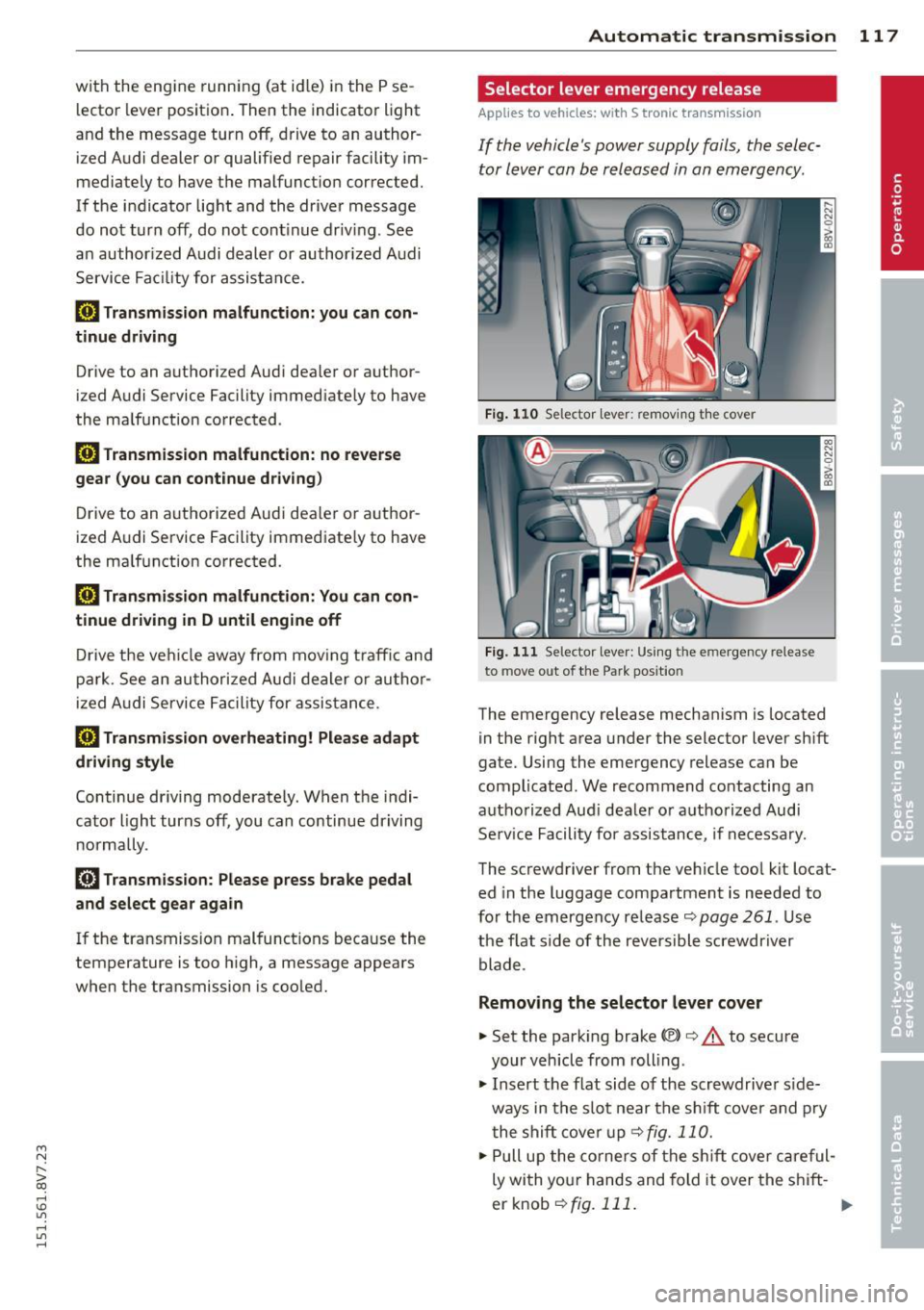
Selector lever emergency release
Applies to vehicles: with S tronic transmission
If the vehicle's power supply fails , the selec
tor lever can be released in an emergency .
Fig. 110 Se lector leve r: remov ing t he cover
Fig . 1 11 Se lector lev er: Us ing t he e mergency re lea se
to move out of the Park pos it io n
The emergency release mechanism is located
in the right area under the selector lever sh ift
gate. Using the emergency release ca n be
complicated. We recommend contacting an
autho rized Aud i dea le r or a uthorized Audi
Se rv ice Facili ty for assistance, if necessa ry.
The screwdriver from the ve hicle too l kit locat
ed in the luggage compa rtment is needed to
fo r the em ergency re lease <=:>
page 261 . Use
the flat side of the reversible screwdriver
blade .
Removing the selector lever cover
... Set the park ing brake «e)) <=:> &. to secure
your veh icle from rolling .
... Insert t he flat side of the scr ewdrive r side
ways in the s lot near the s hift cover a nd p ry
t he shift cove r up
<=>fig. 11 0 .
... Pull u p the co rners of the s hift cove r ca reful
ly wi th yo ur hands and fold it over the s hift-
er knob
r::!) fig. 111 . ..,.
Page 190 of 302

188 Smart Technology
Smart Technology
Information about
data recorded by
vehicle control
modules
Your vehicle is not equipped with a crash data
recorder. This device is insta lled by some vehi
cle manufacturers to record data about crash
es so tha t it can be analy zed later. Crash data
recorders are also called "Event Data Record
ers (EDR)" .
In some legal jurisdictions, it is not permitted
to access or download data recorded by pre
installed crash data recorders in order to eval
uate a crash without clear consent of the vehi
cle owner .
Your veh icle is not equipped with a crash data
recorder. However it does contain a var iety of
e lectronic control modules for various vehicle
systems such as eng ine funct ion, exhaust
treatment or airbags and safety belts .
These electron ic control modules record vehi
cle data during normal driv ing for diagnosis
and repair purposes. The recording capab ility
of the electron ic control modules is lim ited to
data only- no sound is reco rded.
If t he control
mo dule detects a sys tem m alfu nction or other
change in sta tus, a very lim ited amount of da
ta is recorded for an extreme ly sma ll period of
time . Data t hat is recorded in s uch a case may
include veh icle speed, driving direction, the
load on the brakes and head restraints and
performance in the event of an acc iden t or
other change in status . The stored data can
only be read o r down loaded w ith specia l dev i
ces.
Electronic stabilization
control (ESC)
Description
The E lectronic Stabilization Cont rol (ESC) con
tr ibutes to d river safety. It reduces the risk of
slipp ing and improves driving stability. ESC detects critical situations such as the veh
icle
oversteering and understeering or the whee ls
are spinning . The vehicle is stabilized by ap
plying the brakes or reducing engine torq ue.
Once the ESC is activated, the ind icator light
Bl blinks in the instrument cluster .
The following systems are integrated in the ESC:
Anti -lock braking s ystem (ABS)
ABS prevents the whee ls from locking when
braking . The vehicle can still be steered even
during hard braking . App ly steady pressure to
the brake peda l. Do not pump the peda l. A
puls ing in the brake peda l ind icates that the
system is act ing to stabilize the ve hicle.
Brake assi st sy st e m
The brake assist system can decrease braking
distance .
It increases braking power when the
driver presses the brake peda l quickly in emer
gency s ituations. You m ust press and hold the
brake pedal until the dangerous situation is
over . In vehicles with adaptive cruise control*,
the brake assist system is more sens it ive if the
distance detected to the vehicle ahead is too
small.
Anti-slip regu lation (ASR )
ASR reduces engine power when the drive
wheels begin sp inning and adapts the force to
the road conditions. This makes it easier to
sta rt , accelerate and dr ive up inclines .
Electronic differenti al lock (EDL )
The EDL brakes whee ls that are spinning and
transfers the drive power to the other drive
wheel or wheels if the vehicle is equ ipped with
all wheel drive *). This function is not ava ilable
at h igher speeds .
In extreme cases, EDL automatically sw itches
off to keep t he b rake on the braked wheel
from overheat ing. The ve hicle is still working
co rrect ly. EDL w ill switch o n aga in automat i
ca lly when cond itions have ret urned to no r-
mal. .,._
Page 191 of 302

....,
N
r--. > co
rl I.O
"' rl
"' rl
Stee ring re comm endat ion
The ESC helps to stabilize the vehicle by
changing the steering torque.
Selective wheel torqu e control
Select ive wheel torque control is used when
driving on curves . The front wheel on the in
side of the curve or both wheels on the inside
of the curve are braked selective ly as needed.
This a llows more precise driving in curves.
Automatic post -collisi on brakin g system
The "Automatic post-collision braking system "
can help to reduce the risk of slidi ng and of
other coll is ions afte r an accident. I f the airbag
con tro l modu le detects a collision above ace r
tain vehicle speed, the vehicle is braked by the
ESC.
The vehicle does not brake automatically if:
- the driver presses the accelerator pedal, or
- the braking force generated by the pressed
brake pedal is greater than the braking force
that would be initiated by the system, or
- the ESC, the brake system or the vehicle
electrical system are not functioning.
A WARNING
-The ESC and its integrated systems can
not overcome the limits posed by natura l
physical laws. This is especially impor
tant on s lippery or wet roads. If the sys-
Switching on/off
Sm art Te chnol og y 189
terns beg in acting to stabilize your vehi
cle, you should immediately alter your
speed to match the road and traffic con
ditions . Do not let the increased safety
provided tempt you into taking r isks .
This could increase your risk of a co lli
SIOn.
- Please note the r isk of a coll is ion increas
es when driving fast, especially through
curves and on slippery or wet roads, and
when dr iv ing too close to objects ahead.
The ESC and its integrated systems can
not a lways prevent collisions -there is
still a risk of accidents!
- Press the accelerator pedal caref ully
when acce lerating on even, slippery sur
faces such as ice and snow. The drive
wheels can spin even when these control systems are installed and this can affect
driving stability and increase the r isk of a
coll is ion.
@ Tips
-ABS and ASR only function correctly
when all four wheels are equipped w ith
identical tires. Different t ire sizes can
lead to a reduct ion in engine power.
- You may hear noises when the systems
descr ibed are working.
- If the
Bl or [I] indicator light appears,
there may be a malfunction
¢ page 21.
ESC turns on automatically when you start the engine .
Fig. 159 Upper c ente r conso le: ESC button
The ESC is designed to funct ion in levels . De
pend ing on the level that is selected, the sta
bilization funct ion of the ESC is lim ited or
swi tched off . The amoun t of stabilization con
trol wi ll differ depending on the level.
In the follow ing unusual situations it may
make sense to switch the ESC sport mode on
to allow the wheels to sp in:
- Rocking the vehicle to free it when it is stuck
- Driving in deep snow or on loose ground
IJJ-
Page 192 of 302

190 Smart Technology
Sport mode on ESC/ASR off Sport mode off or
ESC/ASR on
Beha vior
The ESC and ASR stabiliza- The stabilization funct ion The full stab ilization f unc-
tion funct ions are lim ited is not ava ilable
c> .&. . ESC tion of the ESC and ASR is
¢ _&. . and ASR are sw itched off. available agai n.
Operation Press the l.i; OFF ! button P ress and hold the 1.i; OFFI Press the l.i; OFF ! button
briefly. button lo
nger than 3 sec-
again.
onds.
Indicator II turns on. II and jf'ill•lH * tu rn on. II turns off or fl and
light s jf 'ill•li~* t ur n off.
Dr iver mes- Stabilization control Stab ilizat ion control Stabilization control
sages (ESC ): sport. Warning! (ESC ): off . Warning! Re- (ESC ): on
R estricted stability stricted stability
_& WARNING
You should only switch spor t mode on o r
switch ESC/ASR o ff if your driving abiliti es
an d road condi tions perm it.
- T he s tabilization func tio n i s limite d
whe n spor t mode is sw itche d on. T he
dr iv ing whee ls co ul d spin an d the vehicle
cou ld swe rve , especia lly on slick or slip
pery road surfaces.
- The re is no vehicle stabilization w hen
ESC/ASR a re switched off .
@ Tips
- ESC/ASR c ann ot b e swi tc h ed off o r spor t
mode canno t be sw itche d on i f the cr uise
control system * or the a dapt ive cr uise
control * is switc hed on .
- Mal func tions in the Audi magne tic ride
may make it impossib le to sw itch t he
ESC/ASR off or to switch sport mo de on.
Brakes
New brake pads
-
N ew brake pads do not achieve their fu ll brak
ing effect d urin g the first
400 km. They must
be "broken i n" first. However, yo u can com
pensate for the slightly reduced braking force
by pressing fi rmly on t he brake pedal. Avo id
heavy brak ing dur ing the break- in period.
Wear
Brake pad
wear is largely dependent on the
way the vehicle is dr iven and on operati ng
condit io ns. This is especially true if you are
driv ing frequent ly in t he ci ty and o n curves or
with a spor ty d rivi ng s tyle.
Operating noise
Noises may occur when bra king depending on
the speed , braking force and outside condi
t ions such as tempe rature and hum id ity.
Effect of water and road salt
In certa in situations, for examp le after dr iv ing
t hr ough water, in heavy rain, after overnight
condensation or after was hing your car, the
braking effect can be reduced by moisture or
ice on the brake rotors and brake pads. The
brakes must be "d rie d" first with a few carefu l
brake applicat ions .
At highe r speeds and with the winds hield wip
ers tu rned on, the brake pads press against
the b rake ro to rs fo r a short a mount of t ime .
T h is act ion which is not felt by the d river hap
pen s at reg ular i nte rvals an d facilit ates a bet
te r rea ction t ime for the br akes in we t we ath
er.
T he bra king effect can a lso be redu ced if you
are dr iv ing o n sal ted roads a nd you do not a p
ply the br akes fo r long periods of time. The
l aye r of sa lt on the b rake roto rs and pads
must be wo rn off first when t he b rakes are ap -
plied. ..,..
Page 193 of 302

M N ,....
> co ,...., \!) 1.1'1 ,...., 1.1'1 ,....,
Corrosion
Leaving the vehicle parked for long periods of
time, low mi leage and avoiding heavy braking
can contribute to corrosion on the brake ro
tors and dirty brake pads.
If you usually avoid heavy braking or if there is
corrosion present, occasiona l heavy braking at
high speeds is recommended to clean the
brake rotors and pads~,& .
Brake system malfunction
if you notice that the brake pedal t ravel has
suddenly gotten larger, then a brake circuit
may have failed . Drive to you r authorized Audi
dealer or qualified repair facility immediately
to have the problem corrected. On the way
there, drive with reduced speed and keep in
mind that a long braking distance and in
creased pressure on the brake pedal will be
necessary .
Low brake fluid level
When the brake fluid level is low, ma lfunc
tions in the brake system may occur . The
brake fluid level is electronically monitored.
Brake booster
The brake booster amplifies the pressure you
apply to the brake pedal. It only works when
the eng ine is running.
A WARNING
-You should on ly perform braking maneu
vers to clean the brakes when the road condit ions perm it . Never put others on
the road at risk -never forget the risk of
acc idents!
- On steep slopes, reduce the speed and
select a lower gear or lower selector lev
er posi tion. Drive as little as possible
wh ile pressing the bra ke peda l and avoid
putt ing your left foot on the brake pedal
whi le driving. This could ca use the brakes
to overheat and impair the efficiency of
the brakes.
- Do not let the brakes "grind" by always
keeping yo ur foot on the brake peda l.
Smart Technolog y 191
This can cause the brakes to overheat in-,
crease wear and increase braking dis
tance unnecessar ily.
- Certain weather and operating condi
tions such as driving through water, driv
ing in heavy rain or driving after washing
your veh icle can impa ir the effectiveness
of the brakes. In the winter, ice may
bui ld up on the brake pads, rotors and
drums . Check these components by brak
ing caref ully. App lying the brakes care
fu lly several times dries the brakes and
removes ice build-up .
- The effic iency of the brakes can also be
impaired by driving for long stretches on
roads covered with salt without using the
brakes. You can remove salt deposits
from the brake rotors and pads by care
fully applying the brakes several times.
- If the front spoiler is damaged or you in
stall another spoiler, make sure the front
wheel brakes are ventilated properly.
Otherwise, the brake system could over heat, wh ich reduces their effectiveness .
- Failure of a brake circuit impa irs braking
performance, wh ich increases braking
d istance . Avoid driving the vehicle and
have it towed it to the nearest author
i z ed Audi dealer or authorized Audi Serv
ice Facility.
- Do not let your veh icle roll w ith the en
gine switched off under any circumstan
ces .
- If the brak e booster is not working, you
wi ll have to press much harder on the
brake peda l to compensate for the lack
of the booster.
(D Note
-Never let the brakes "rub" by pressing
the pedal lightly when braking is not
really necessary. This causes the brakes
to overheat and increases braking dis
tance and causes wear.
- Before driving on a long stretch with
steep s lopes, reduce your speed and shift
to the next lower gear This makes use of
the engine brak ing effect and relieves ..,.
•
•
•