2015 AUDI A3 CABRIOLET park assist
[x] Cancel search: park assistPage 84 of 302

82 Driving
Electromechanical
parking brake
Operating
The electromechanical parking brake replaces
the hand brake.
Fig. 82 Ce nter conso le: Park ing brake
~ Pull the switch@~ fig. 82 to set the park
ing brake . The . (USA models)/ . (Cana
da models) indicator lights in the button
and in the instrument cluster display turn
on .
~ To release the parking brake, press the brake
or acce le rator pedal while the ignit ion is
switched on and press the button @at the
same time. The. (USA models)
I. (Can
ada models) indicator lights in the button
and in the display turn off .
Your veh icle is eq uipped with an electrome
chanical parking brake. The parking brake is
designed to prevent the vehicle from rolling unintentionally and replaces the hand brake.
I n addition to the normal functions of a tradi
tional hand brake, the electromechanical parking brake provides various convenience
and safety functions.
When starting from a stop
- T he integral hill start assist helps you when
dr iving by automatically releasing the park
ing brake ~
page 83, Starting from a
stop .
-When starting on inclines, the hill start as
sist prevents the vehicle from unintentional
l y rolling back. The braking force of the
parking brake is not released until sufficient driving force has been built up at the
wheels.
Emergency brake function
An emergency braking functions ensu res that
the vehicle can be slowed down even if the
normal brakes fail~ page 84, Emergency
braking function.
_.&. WARNING
- Do not press the accelerator pedal inad
vertently when the vehicle is stationary
and the engine is running and a gear is
selected. Otherwise the vehicle will start
to move immediately and could result in
a crash .
- If the power supply fails, the released
parking brake can no longer engage . In
this case, park the vehicle on leve l
g round and secure it by placing these
lecto r lever in the P position. See an au
thorized Audi dealer or authorized Audi
Service Facility for assistance.
(D Note
If the. or. (USA models) I. (Cana
da models) indicator light in the instru
ment cluster blinks, there is a malfunction
i n the brake system. Refer to the detai led
description of the indicator lights
~page 18.
- If the . (USA models) I. (Cana-
da models) or
Ill indicator light turns
on, there is a malfunction in the parking
brake
c> page 19.
(D Tips
- If the electromechanica l parking brake is
set while the ignition is switched off, the
¢@'A indicator light in the button and in
the instrument cluster dis-
play . (USA models) /. (Cana-
da models) will turn off after a certain
amount of time.
- If driver's door is opened while the igni
tion is switched on, the park ing brake
sets automatically. This prevents unin
tended rolling of the vehicle.
Page 85 of 302

M N
" > co ,...., \!) ..,.,
,...., ..,., ,....,
-Occasiona l noises when the parking
brake is set and re leased are norma l and
are not a ca use for concern .
- When the vehicle is parked, the parking
brake goes through a se lf-test cycle at
regular intervals. Any noises associated
with th is are normal.
- If there is a power failure, the parking
brake will not set if it is released, and it
will not release if it is set c::>
,&. See an
authorized Audi dea ler or authorized
Audi Service Facility for assistance .
Parking
"'Press the bra ke peda l to stop the vehicle.
"' Pull the switch@c::>
page 82, fig. 82 to set
t h e parking bra ke.
"' Place the selector lever in the P position .
"'T urn the eng ine
off c::> _& .
"'Turn the steering whee l when parking on in
clines so that the whee ls will ro ll into the
curb if the vehicle starts moving.
A WARNING
-Always take the vehicle key with you when leaving the veh icle, even for a
short per iod of t ime. This applies partic
u larly when ch ild ren remain in the vehi
cl e. Otherwise chi ld ren could sta rt the
engine, re lease the par king brake or op
erate electrical eq uipment such as powe r
w indows, which increases the risk of an
acc ident.
- No one sho uld remain in the vehicle
when it is locked, especia lly children.
Locked doors make it more diffic ult for
emergency workers to get into the vehi
cle, which puts lives at risk.
Dri vin g 83
Starting from a stop
The start assist function ensures that the
parking brake is released automatically upon starting .
Stopping and setting the parking brake
"' Pull the sw itch @c::> page 82 , fig. 82 to set
the parking brake.
Sta rting and automatically rel easi ng the
parking brake
Req uirement: The dr iver's door must be
locked and the driver's safety belt must be
fastened.
"' When you press the accelerator peda l, the
parking brake is automatically re leased and
your vehicle begins to move.
When stopping at a traffic signal or stopping in city traff ic, the parking brake can be ap
plied . The vehicle does not have to be held
with the brake pedal. The parking brake elimi nates the tendency to creep when a selector
lever pos it io n is engaged. As soon as you
press the accelerato r peda l, the par king b rake
r eleases a utomat ica lly and the vehicle starts
to move.
Starting on slopes
When sta rting on incl ines, the hill start assist
prevents the vehicle from un intent ionally roll
i ng ba ck. The bra kin g fo rce of the par kin g
brake is not re leased unt il su ff ic ient d riving
f o rce has been built up a t the wheels.
(D Tips
Fo r safety reaso ns, t he pa rking bra ke is re
l eased automatic ally o nly when the d riv
er's safety bel t is fa stened an d the driver's
d oor is locked.
•
Page 116 of 302

114 Automatic tran smi ssion
the overload. The ml indicator light
turns on and a message appears
¢ page 116 when the clutch is overload
ed .
- If the engine must run while you are
working in the eng ine compartment with
the hood open, make sure a gear is not
engaged. The selector lever must be
firmly in the
P pos it ion and locked in
place and the pa rking brake must be set
¢ page 214. Otherwise, the veh icle
cou ld beg in moving when the eng ine
speed is high, even with the parking
brake set.
@ Note
- When stopping on an incline, do not try
to hold the vehicle in place by pressing
the accelerator peda l while a driving gear
i s selected. This can cause the automatic
transmission to overheat and can dam
age it. Set the park ing brake or press the
brake pedal to prevent t he veh icle from
r o lli ng .
- Allow ing the vehicle to roll when the en
gine is stopped and the selector lever is
i n the N pos ition will damage the auto
matic transmission beca use it is not lu
bricated unde r those circu mstances.
- The transm ission can ove rheat and be
damaged under certa in driving and traf
fic conditions such as frequent starts,
creeping for a long time, or s top-and -go
traff ic. W hen the
ml or . indicator
li ght turns on, stop the vehicle at the
next oppo rtunity and let the transmis
s ion coo l
¢ page 116 .
- Allow ing the ve hicle to roll when the en
gine is stopped w ill damage the 5 tron ic
transmission because it is not lubricated
¢ page 2 75, Emergency towing with
commercial tow truck.
(D Tips
For safety reasons, the park ing brake re
leases automatically only when the driver's
door is closed and dr iver's safety be lt is
fastened.
Hill descent control
Applies to veh icles: w ith S tronic transm iss io n
Hill descent control assists the driver when
driving down hills .
Hill descent contro l is activated when these
lector lever is in the Dor 5 position and you
press the brake pedal. The transm ission auto
matically selects a gear that is su itab le for the
incl ine. Hill descent cont ro l tries to ma inta in
t h e speed ac hieved at the t ime of b raking,
within physica l and tec hni cal limitations. If
may sti ll be necessary to ad just the speed
with the brakes . Because hill descent control
cannot shift down farther than 3rd gea r, it
may be necessary to sh ift into t iptronic mode
i n very steep areas . In this case, shift into 1st
or 2nd gear in t iptron ic mode to use the en
gine's brak ing force to relieve the brakes .
Hill descent contro l sw itches off once the h ill
levels out or you press the accelerator pedal.
On vehicles with a cruise contro l system*
¢ page 85, hill descent control is also activat
ed when the speed is set.
A WARNING
--
H ill descent control cannot overcome
physical lim itations, so it may not be ab le
to maintain a constant speed unde r a ll
conditions. A lways be ready to apply the
b rakes.
Page 118 of 302

116 Automatic tran smi ssio n
Launch Control-Program
Ap plies to vehicles: with launch co ntrol
The Launch Control Program enables maxi
mum acceleration .
Requirement: The engine must be at operat
ing temperature and the steering wheel must
not be turned .
• With the engine running, press the
l~ OFFI
button briefly one time ll .
• Pull the selector lever back out of the D/S
position briefly to select the S position, or
press it toward the rig ht into the tipt ronic
pos it ion or select the
dynami c driving mode
in drive select*
~ page 107.
• Press the brake peda l firmly with your left
f oot and hold it all the way down for at least
1 second .
.. At the same time, press the gas peda l all the
way down with your right foot unti l the en
gine reaches and stays at a high RPM level.
• Remove your left foot from the brake.
A WARNING
- Always adapt your driving to the traffic
flow.
- Only use Launch Contro l when road and
t raff ic conditions a llow it and othe r driv
ers w ill not be endangered or impacted
by you r driv ing and the veh icle's acceler
ation.
- Please note that the drive whee ls can
spin and the vehicle can brea k away
when sport mode is sw itched on, espe
cially when the road is slippery.
- Once the vehicle has s tarted moving,
press the
I ~ OFF ! button br iefly to turn
the sport mode off.
@ Tips
- The transm ission tempera ture may in
crease significantly after using the
l ) In vehicles with a drive r inform ation system, an ESC
l ig ht in t he in strume nt cl us te r stays on cont inuously
and the m essage
Stabili zatio n co ntrol (ESC): spo rt.
W arn ing! Restricted st ability
appears te mpo rarily.
Launch Control Program . If that hap
pens, the program may not be availab le
for a few minutes . It will be ava ilable
again after a cool-down period.
- When accelerating using the Launch
Contro l Program, all vehicle parts are
subject to heavy loads. Th is can lead to
increased wear.
Emergency mode
Applies to vehicles: wit h S tronic transm issio n
In the event of a system malfunction, there is
an emergency program.
If all of the selector lever positions are high
li ghted with a light background in the instru
ment cluster d isp lay, there is a system mal
funct ion and the S tronic transmission is run
ning in the emergency program . The vehicle
can still be driven in emergency mode, but on
ly w it h reduced speed and not in all gears. In
some cases, the ve hicl e
cann ot driv e in re
v e rs e .
d) Note
If the transmission runs in emergency
mode, drive to your author ized Audi dealer
or q ualified repa ir fa cility immed iate ly to
have the ma lf u nct ion corrected.
Transmission malfunction
• Tran smi ssion m alfu ncti on! Please st op
the vehicle and select P
T he re is a malfunction in the transmiss ion .
Park the ve hicle securely and do not continue
driv ing. See an authorized A udi dealer or au
thorized Audi Service Facility for assistance.
• Tran smi ssion o verheating! Plea se stop
the vehicle!
The transm iss ion is too hot and can become
damaged . Stop and let the t ransmission cool .,.
Page 119 of 302
....,
N
r--. > co
rl I.O
"' rl
"' rl
with the engine running (at id le) in the P se
l ecto r lever positio n. The n the indicator light
and the message turn off , d rive to an author
i z ed A udi dealer or qualified repair facility im
mediately to have the malfunct ion corrected.
If the i ndicator light and the drive r message
do not tur n off, do not cont inue dr iv ing. See
an author ized Audi dealer or authori zed A udi
S ervi ce Fa cility for assis tan ce.
DD Transmiss ion malfunction: you can con
tinue driving
Drive to an authori zed Aud i dea ler or a uthor
ized Audi Service Facility immed iate ly to have
the ma lfunction corrected .
DD Transmission malfunction: no reverse
gear (you can continue driving )
Drive to an aut ho rized Aud i dea le r o r a uthor
ized A udi Service Facility immed iate ly to have
the ma lfunction cor rected .
DD Transmi ssion malfunction: You can con
tinue dri ving in D until engine off
D rive t he ve hicle away from mov ing t raff ic and
par k. See an au thori zed A ud i d ealer or au tho r
iz ed A udi Service Faci lity for assis tance .
DD Transmi ssion overheating! Please adapt
driving style
Continue dr iving moderate ly . W hen t he indi
cator light tur ns off, you can continue dr iving
normally .
DD Transmiss ion : Please press brake pedal
and select gear again
I f the tra nsmission mal functions beca use the
temperature is too high , a message appears
when the transmission is cooled.
Autom atic transm ission 11 7
Selector lever emergency release
Applies to vehicles: with S tronic transmission
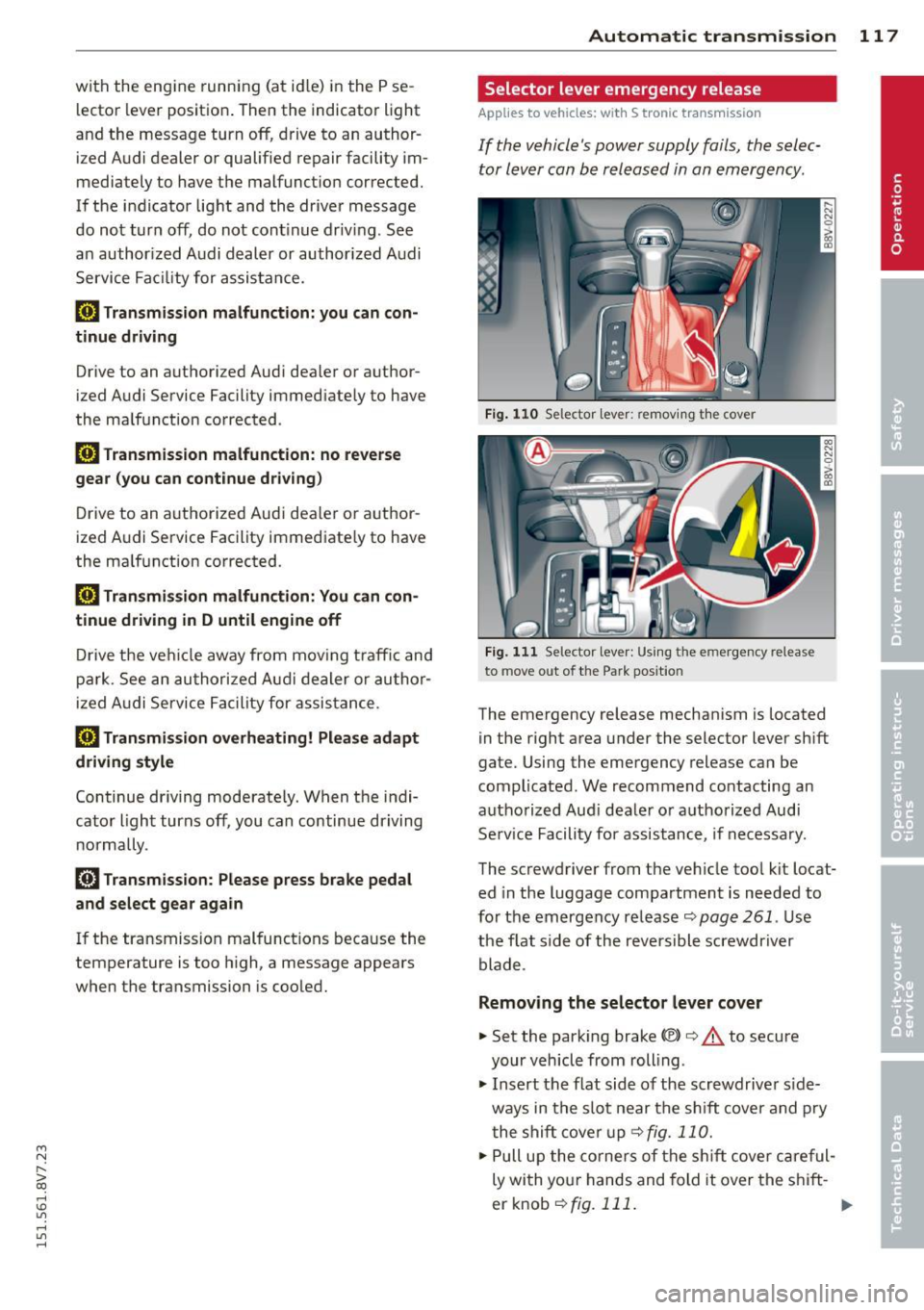
If the vehicle's power supply fails , the selec
tor lever can be released in an emergency .
Fig. 110 Se lector leve r: remov ing t he cover
Fig . 1 11 Se lector lev er: Us ing t he e mergency re lea se
to move out of the Park pos it io n
The emergency release mechanism is located
in the right area under the selector lever sh ift
gate. Using the emergency release ca n be
complicated. We recommend contacting an
autho rized Aud i dea le r or a uthorized Audi
Se rv ice Facili ty for assistance, if necessa ry.
The screwdriver from the ve hicle too l kit locat
ed in the luggage compa rtment is needed to
fo r the em ergency re lease <=:>
page 261 . Use
the flat side of the reversible screwdriver
blade .
Removing the selector lever cover
... Set the park ing brake «e)) <=:> &. to secure
your veh icle from rolling .
... Insert t he flat side of the scr ewdrive r side
ways in the s lot near the s hift cover a nd p ry
t he shift cove r up
<=>fig. 11 0 .
... Pull u p the co rners of the s hift cove r ca reful
ly wi th yo ur hands and fold it over the s hift-
er knob
r::!) fig. 111 . ..,.
Page 121 of 302
M N ,....
> co ,...., \!) 1.1"1 ,...., 1.1"1 ,....,
Parking systems
General information
Appl ies to vehicles: with rea r parking sys te m s/park ing
system pl us/rearv iew camera
Depending on your vehicle's equipment, vari
ous parking aids w ill help you when parking
and maneuvering.
The
r ea r p arking sys te m is an audible parking
aid that warns you of obstacles
behind the ve
hicle
~ page 120 .
T he
p ar kin g syste m plus assists you when
parking by audibly and visually indicat ing ob
jects detected
in front of and behind the vehi
cle
~ page 120.
T he
re ar view came ra shows the area behind
the veh icle in the MMI display . This display as
sists you when you are cross or para llel park
ing. The park ing system plus functions are al
so available
r::!;> page 121.
A WARNING ,-
- Always look for traff ic and check the area
around your vehicle by looking at it di
rectly as well. The parking system cannot
replace the driver 's attent ion. The driver
is always respons ible when entering or
leaving a parking space and during simi
lar maneuvers .
- Please note that some surfaces, such as
clothing, are not detected by the system .
- Sensors and cameras have blind spots in
wh ich people and objects cannot be de
tected . Be especially cautious of small
children and animals.
- Always pay attention to the area around
the vehicle -using the rearview mirror,
too .
- The sensors can be displaced by impacts
or damage to the radiator grille, bumper ,
wheel housing and the unde rbody . The
par king system may become impai red as
a result. Have an authorized Aud i dealer
or authorized Audi Service Facility check
their function .
Parking system s 119
-Make sure the sensors are not obstructed
by st ickers, deposits or other materials.
If they are, the sensor function could be impaired. For additional information on
cleaning, refer to~
page 204 .
(D Note
-Some objects are not detected or dis
played by the system under certain cir
cumstances:
- Objects such as ba rrier chains, trailer
draw bars, vertical po les or fences
- Objects above the senso rs such as wall
extensions
- Objects w ith specific surfaces or st ruc
tures such as chain link fences or pow der snow
- If you continue d riving closer to a low-ly
ing object, it may disappear from the
sensor range . Note that you wi ll no lon
ger be warned about this obstacle.
- T he sensors can be displaced by impacts
or damage to the radiato r grille, bumper,
wheel housing and the underbody. The park ing system may become impaired as
a result. Have an authori zed Audi dealer
or authorized Audi Service Facility check
their function .
{!) Tips
- The system may provide a warning even
though there are no obstacles in the cov
erage area in some situations, such as:
- certain road su rfaces or for long grass.
- externa l ult rason ic sources e.g. from
clean ing vehicles.
- heavy ra in , snow, or thick vehicle ex
haust.
- We recommend that you practice park
ing in a traff ic-free location or par king
lot to become familiar w ith the system.
When doing this , the re should be good
light and weather cond itions.
- Yo u can change the vo lume and pitch of
the signals as we ll as the disp lay
r::!;> page 125.
Page 122 of 302
120 Park in g s ystems
- What appears in the MM I display is
somewhat time -de layed .
- The sensors must be kept clean and free
of snow and ice for the park assist to op
erate.
Rear parking system
Description
App lies to vehicles: wit h rear parking system
The rear parking system is an audible parking
aid .
Descri pti on
There is a sensor in the rear bumper cover. If
these detect an obstacle, audible signals warn
you.
Make sure the sensors are not covered by
stickers, deposits or any other obstructions as it may impair the sensor function. For infor
mat ion on cleaning, refer to
c:::> page 204.
The range at which the sensors begin to meas
ure is approximately:
S ide rear 3 ft (0.90
m)
Side center 5.2 ft (1.60 m)
The closer you get to the obstacle, the shorter
the interval between the audib le signals. A
continuous tone sounds when the obstacle is
l ess than approximate ly
l foot (0.30 meters)
away. Do not cont inue backing up
c:::> & in Gen
eral information on page 119,
c:::> (D in General
information on page 119!
If the distance to an obstacle remains con
stant, the volume of the d istance warning
gradually drops after about four seconds (th is
is not apply in the continuous tone range).
Act ivating
The parking system activates automatically
when the reverse gear is selected . You will
hear a brief confirmation tone.
Parking system plus
Description
Applies to veh icles: w ith park ing system pl us
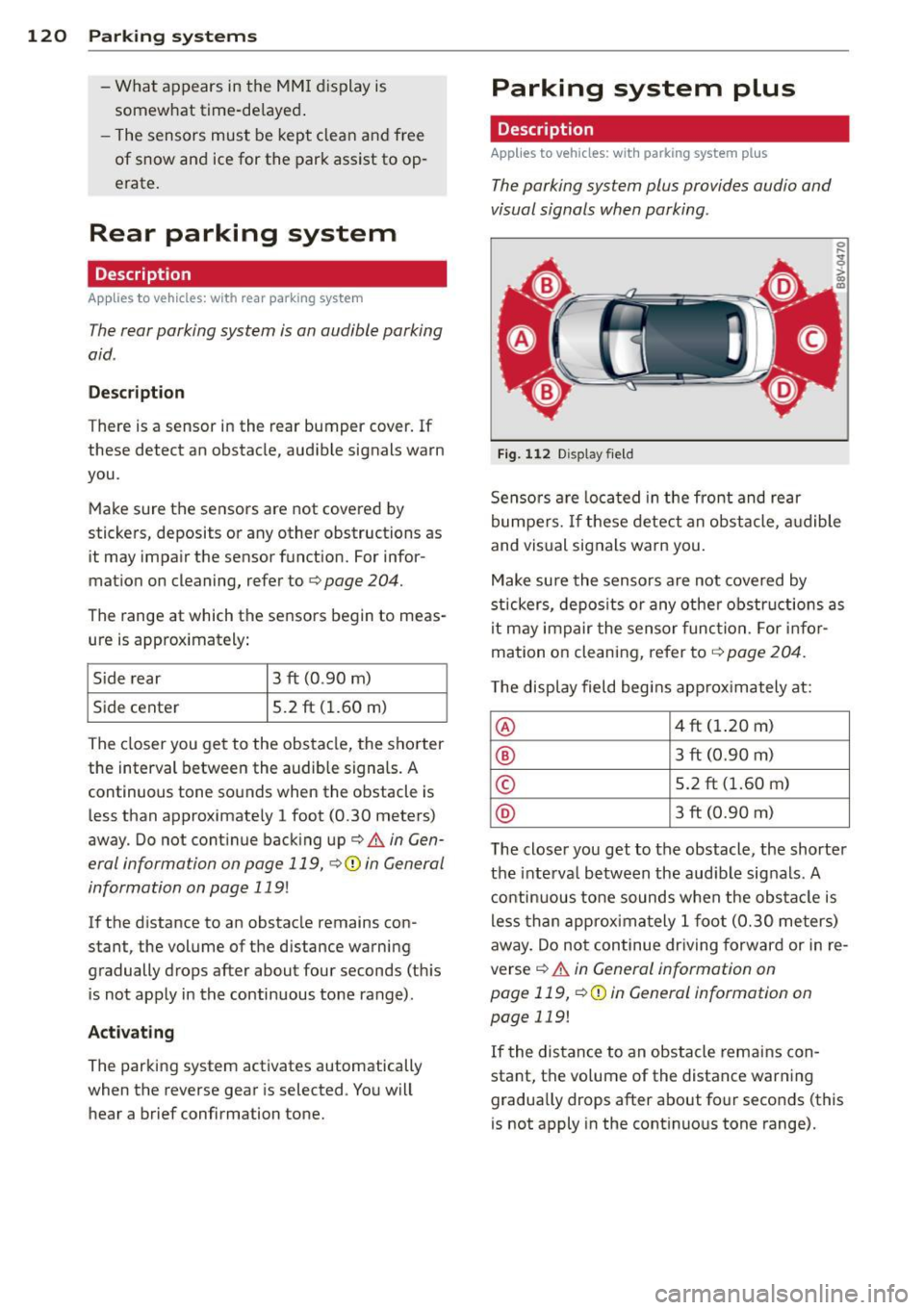
The parking system plus provides audio and
visual signals when parking.
Fig. 112 Display fie ld
Senso rs a re loca ted in the front and rear
bumpers. If these detect an obstacle, a udible
and vis ual signals warn you.
Make su re the sensors are not covered by
stickers, depos its o r any othe r obstructions as
it may impair the sensor func tion. For infor
mation on cleaning, refer to
c:::> page 204 .
The display field begins app rox imately at:
@ 4 ft (1.20 m)
® 3 ft (0.90 m)
© 5.2 ft (1.60 m)
@ 3 ft (0.90 m)
T he close r you get to the obstacle, the shorte r
the interva l between the audible sig nals . A
c ontinuous to ne sounds when the obs ta cl e is
less than approxima tely
l foot (0.30 me ters)
away. Do not continue dr iving forward or in re
verse
c:::> & in General information on
page 119,
c:::> Q) in General information on
page 119!
If the distance to an obstacle remains con
stant, the vo lume of the distance war ning
gradua lly drops after about four seconds (this
is not apply in the cont inuous tone range).
Page 124 of 302

122 Parking systems
General information
Applies to vehicles: with par king system p lus w it h rear
view ca mera
Fig. 117 Area covered
(D and area not covered @by
the rea rview camera (example)
Fig. 118 Rear lid : locat ion of the rearview camera (ex
ample)
0
-8 > "' m
"' §
> «> m
The rearview camera is located above the rear
license plate bracket . Make sure that the lens
for the parking system ¢
fig. 118 is not cov
ered by deposits or any other obstructions be
cause this can affect the function of the park
ing system. For information on clean ing, refer
to
¢ page 204.
The rearview camera coverage area includes
(D ¢ fig. 117. Only this area is displayed in
the MMI. Objects that are outside of this area
@ are not displayed.
The accuracy of the orientation lines and blue
surfaces diminishes if
dynamic mode is acti
vated
¢ page 107 .
_&. WARNING
-Always read and follow the applicable
warnings¢
& in General information on
page
119.
- If the position and the installation ang le
of the rearview camera was changed, for
example, after a collision, do not contin-
-
ue to use the system for safety reasons.
Have it checked by your authorized Audi
dealership.
- Only use the rearview camera to assist
you if it shows a good, clear picture . For
example, the image may be affected by
the sun shining into the lens, dirt on the lens or if there is a defect .
- Use the rearview camera only if the lug
gage compartment lid is completely
closed.
If the luggage compartment lid
is open the orientation lines and blue
surfaces are hidden. Make sure any ob
jects you may have mounted on the lug
gage compartment lid do not block the
rearview camera.
- The camera lens enlarges and distorts
the field of vision. The object appears
both altered and inaccurate on the
screen.
- In certain situations, people or objects in
the display appear closer or farther
away:
- For objects that do not touch the
ground, such as the bumper of a
parked vehicle, a trailer hitch or the
rear of a truck. Do not use the help
lines in this case.
-If driven from a level surface onto an
incline, or a downward slope.
- If driven toward protruding objects.
- If the vehicle is carrying too much load
in the rear.
Q) Note
- Always read and follow the applicable
warnings
¢ (D in General information on
page
119.
- The orange colored orientation lines in
the MMI display show the direction of
travel of the vehicle rear depending on
the steering wheel angle. The front of
the vehicle front swings out more than
the rear of the vehicle. Maintain plenty
of distance so that your outside mirror or
a corner of your vehicle does not collide
with any obstacles.