2015 AUDI A3 CABRIOLET brakes
[x] Cancel search: brakesPage 94 of 302

92 Audi adaptive cruise control
• press the brake peda l.
• To resume the stored speed, move the lever
i nto position @.
Interrupting cruise control when stopped
• Push the lever away from you into position
@. The message ACC : standby appears .
• To resume cru ise control, press the brake
pedal and pull the lever toward you into po
sition @.
A WARNING
It is dangerous to activate cruise control
and resume the stored speed when the
current road, traffic or weather conditions
do not permit th is . Th is could result in a
crash .
Setting the distance
Applies to vehicles: wit h Audi adapt ive cru ise co ntrol
Fig. 92 Operat ing lever : Sett ing t he dist ance
-
• Tap the swit ch to display the current set dis
t ance
¢f ig. 92.
• To increase or reduce the distance in incre
ments, tap the switch again to the right or
left . The distance between the two vehicles
will change in the instrument cluster dis
play.
When approaching an object detected ahead,
the adaptive cruise con trol system brakes to
match that object's speed and then reg ulates
to the stored distance . If the object detected
ahead acce lerates, adapt ive cruise control will
a lso acce lerate up to the stored speed .
The highe r the speed, the greater the distance
in meters
c::;, & . The Distance 3 setting is rec
ommended. That is equal to the general rec- ommendation of "hal
f the speed shown on
the speedometer".
T he distances provided are example values.
Depending on the driv ing s ituation, the cur
rent speed and the way the object detected
ahead is driving, the actual distance may be
more or less than these target distances.
o:::::::, _o:::::::, ___ Distance 1: This setting cor re-
sponds to a distance of 92 feet
I 28 meters
when traveling at 62 mph (100 km/h), or a
t ime distance of 1 second.
o:::::::, __ o:::::::, __ Distance 2: This setting corre
sponds to a distance o f 118 feet/ 36 meters
when traveling at 62 mph (100 km/h), or a
t ime distance of 1.3 seconds .
o:::::::, ___ o:::::::,_ Distan ce 3: Thi s sett ing corre-
sponds to a distance of 164 feet/ 50 meters
when traveling at 62 mph (100 km/h), or a
t ime distance of 1.8 seconds.
o:::::::, ____ o:::::::, Distance 4: Thi s sett ing corre-
sponds to a distance of 219 feet/ 67 meters
when traveling at 62 mph (100 km/h), or a
t ime distance of 2.4 seconds.
A WARNING
--
- Driving too close to other vehicles in
creases the risk of collisions and ser ious
in jur ies.
- Sett ing short distances to vehicles ahead
reduces the distance and time that you
have to stop your vehicle safe ly . This in
creases the need for you to pay attention
to traffic.
- Always follow applicable traff ic laws , use
common sense and select a distance to
veh icles ahead that takes the current
traffic , road and weather conditions into
account.
{i) Tips
Distance 3
is set automatically each time
you switch the ignition on.
It you would
lik e to have this distance as a basic setting,
you can have the
adaptive cruise control
menu extended/ enabled from an author
ized repair facility .
Page 97 of 302

M N ,....
> co ,...., \!) 1.1'1 ,...., 1.1'1 ,....,
Audi pre sense Introduction
Applies to vehicles: with Audi pre se nse basic or Aud i pre
sense front
W ithin the limits of the system, pre sense ba
sic and pre sense front can initiate steps to
protect vehicle occupants in certa in danger
ous situations.
Critical driving situat ions can be recognized by
the pre sense front via a network of different
veh icle systems and can take steps to prepare
the vehicle occupants for a potentia l co llision.
The pre sense front wo rks with a radar sensor
and a video camera*.
It also functions within
the limits of the system when adaptive cruise
control* is switched off.
General information
General information
Applies to vehicles: with Audi pre sense front or Audi adaptive cruise control
A WARNING
Also follow the general information found
on
~ page 8 7, General information.
Audi pre sense basic
Description
Applies to vehicles : with Audi pre se nse basic
The function of the pre sense basic is activat
ed at a speed of 20 mph (30 km/h) or higher.
The following functions can be triggered un
der certain conditions within the limits of the
system:
- T ensioning of the safety be lts (for example,
during heavy braking) : The front safety belts
have reversible belt pretensioners. If a colli
s ion does not occur, the safety belts loosen
slight ly and are ready to trigger again .
- Closing the windows (for example, if under
or oversteering): The windows close until
there is only a small gap open.
Audi pre sense 95
Audi drive select: The dep loyment time is
adapted in dynamic mode.
A WARNING
The pre sense basic cannot overcome natu ral physical laws. It is a system designed to
assist and it cannot prevent a collis ion. Do
not let the increased safety provided
tempt you into taking risks. This could in
crease your r isk of a collis ion.
- The system can deploy incorrectly due to
system-specific limits.
(D Tips
- Certa in pre sense bas ic functions switch
off when ESC is switched off (sport
mode) or when dr iving in reverse.
- The pre sense basic functions may not be
available if there is a ma lfunction in the
ESC system or the airbag control mod
ule.
- Note that with pre sense bas ic, the rever
sible safety belt pretensioner on the
front passenger's side deactivates when
t he fron t passenger's airbag is deactivat
ed.
Audi pre sense front
Description
Applies to vehicles : wit h Audi pre sense front or Audi
adaptive crui se con trol
Pre sense front informs you if the distance to
the vehicle ahead falls below the safe distance
for an extended period of time. It can warn of
a possible collision and initiate braking ma neuvers, within the limits of the system.
When detected in time, the system can assess
dangerous situat ions where an object ahead
brakes suddenly or if your own veh icle is trav
el ing at a high speed and approaching an ob
ject that is moving more slow ly . If detection is
not poss ible, then pre sense front does not re
act.
•
Page 98 of 302
96 Audi pre sense
Warnings
App lies to vehicles: with Audi pre sense front or Audi
adaptive cruise control
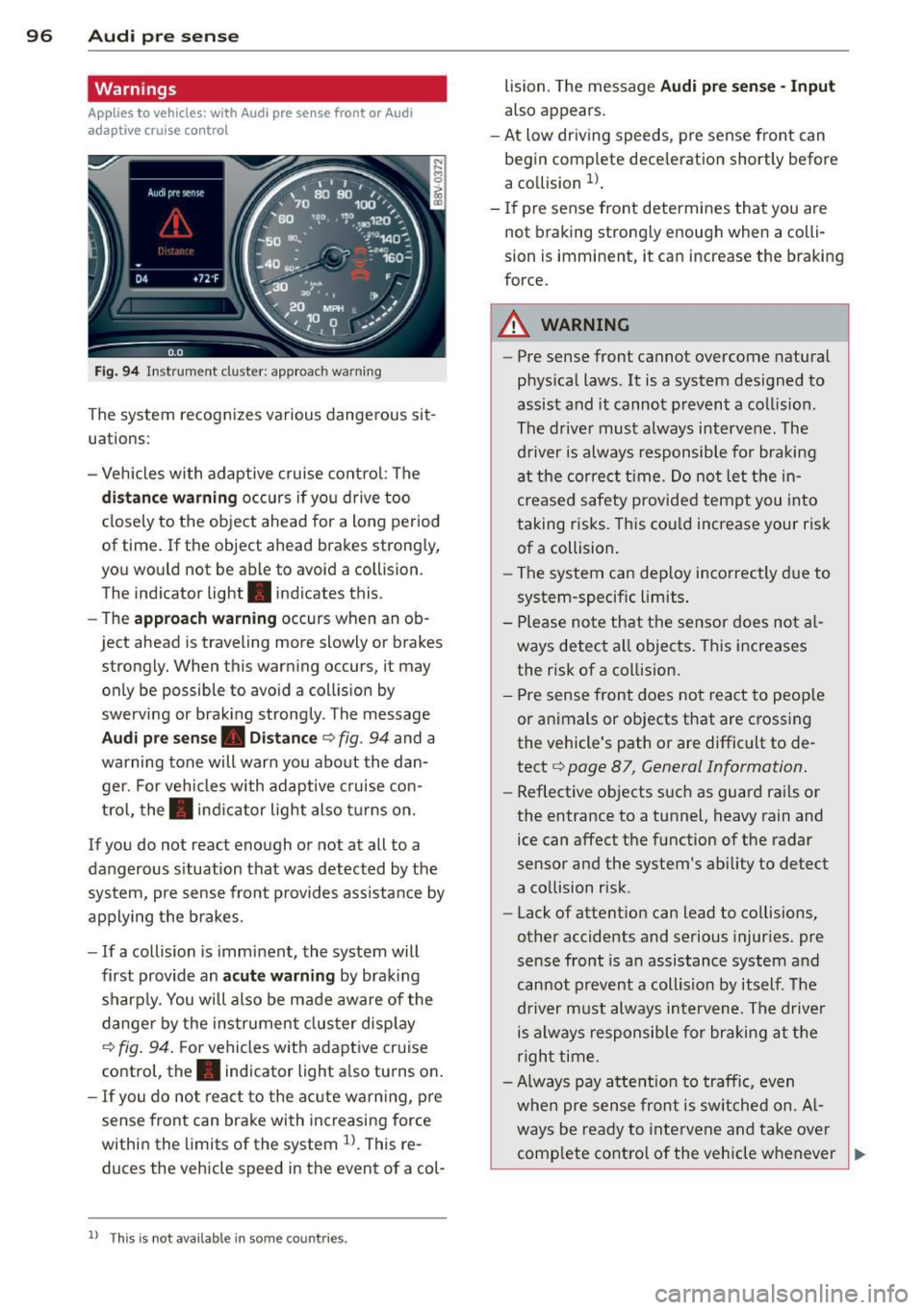
Fig. 94 Instrument cluster: approac h warning
The system recognizes various dangerous sit
uations:
- Vehicles with adaptive cruise control : The
distance warning occurs if you drive too
closely to the object ahead for a long period
of t ime. If the object ahead brakes strongly,
you would not be able to avoid a coll ision.
The indicator light . indicates this.
- The
approach warning occurs when an ob
ject ahead is traveling mo re slowly or brakes
strongly. When this warning occurs, it may only be possible to avoid a collision by
swerving or braking strongly. The message
Audi pre sense. Distance ¢ fig . 94 and a
warning tone will warn you about the dan ger. For vehicles with adaptive cruise con
trol, the. indicator light also turns on.
If you do not react enough or not at all to a
dangerous situation that was detected by the
system, pre sense front provides ass istance by
applying the brakes.
- If a collision is imminent, the system will
first provide an
acute warning by braking
sharply. You will also be made aware of the
danger by the instrument cluster display
¢
fig. 94. F or vehicles with adaptive cruise
control, the. indicator light also turns on.
- If you do not react to the acute warning, pre
sense front can brake with increasing force
within the limits of the system
ll. This re
duc es the vehicle speed in the event of a col-
l l Thi s is not available in som e coun tries .
lision. The message Audi pre sense -Input
also appears.
- At low driving speeds , pre sense front can
begin complete deceleration shortly before
a collision
ll .
- If pre sense front determines that you are
not braking strongly enough when a colli
sion is immin ent, it can increas e the braking
force.
A WARNING
- Pre sense front cannot overcome natural
physical laws. It is a system designed to
assist and it cannot prevent a collision .
The driver must always intervene. The
driver is always responsible for braking
at the correct time. Do not let the in
creased safety provided tempt you into
taking risks. This could increase your risk
of a collision.
- The system can deploy incorrectly due to
system-specific limits .
- Please note that the sensor does not al
ways detect all objects . This increases
the risk of a collision.
- Pre sense front does not react to people
or animals or objects that are crossing
the vehicle's path or are difficult to de
tect ¢
page 87, General Information.
-Reflective objects such as guard rails or
the entrance to a tunnel, heavy rain and
ice can affect the function of the radar
sensor and the system 's ability to detect
a collision risk .
- Lack of attention can lead to collisions,
other accidents and serious injuries. pre
sense front is an assistance system and
cannot prevent a collision by itself . The
driver must always intervene. The driver
is always responsible for braking at the
right time.
- Always pay attention to traffic, even
when pre sense front is switched on. Al-
ways be ready to intervene and take over
complete control of the vehicle whenever
~
Page 115 of 302

Stopping /p ar kin g
If the se lector lever is not in the P position
when you open the driver's door, the vehicle
could ro ll. In vehicles with a convenience key* ,
the following message appears:
S hift to P,
othe rwise veh icle c an roll away. Door s do not
lock if leve r is not in P .
You will also hear a
warn ing tone.
~ Press and ho ld the brake pedal c:> _& .
~ Set the parking brake.
~ Select the P selector lever pos ition.
Stopp ing on an inclin e
~ Always press the brake pedal to hold the ve
hicle in p lace and prevent it from "rolling
back"
c:> _& . Do not try to prevent the vehi
cle from "rolling back" when a gear is en
gaged by increasing the eng ine speed
c:> Q).
Starting on an incline in vehicle s wi thout
Hill Hold*
~ Set the parking brake.
~ With the driving gear se lected, press the ac
celerator pedal carefully. The parking brake
will release automat ically if your safety belt
is fastened .
Starting on an incline i n vehicle s with Hill
Hold*
~ With the driving gear selected, remove your
foot from the brake pedal and press the ac
celerato r pedal
c:> page 84, Hill hold.
Under certain circumstances, (such as driving
in the mountains or towing a tra iler), it may
be usefu l to switch temporarily to the manual
shift p rogram in order to adjust the gears to
the dr iving condit ions by hand
c:> page 115.
When parking on a level surface, simply place
the selector leve r in the P pos ition. On in
clines, activate the parking bra ke first and
then move the selector lever to the P posit ion
q page 82. This prevents the loc king mecha
nism from being loaded too heavily and wi ll
~ make it easier to move the selector lever out
" iii of the P position.
,...., \!) 1.1"1 ,...., 1.1"1 ,....,
Automa tic tran sm iss ion 113
A WARNING
- The vehicle can roll even when the en
gine is sw itched off.
- Unintended vehicle movement can lead
to serious injuries.
- Never leave your vehicle with the engine running while in gear. If you must leave
your veh icle when the engine is running,
set the parking brake and move these
lector lever to the P position.
- Power is still transferred to the wheels
when the engine is running at idle . To
prevent the vehicle from "c reeping", you
must keep your foot on the brake when
the engine is running and the se lector
lever is in the D, Sor R position or "tip
tronic" mode is selected .
- Do not inadvertently press the accelera
tor peda l when the vehicle is stationary.
Otherwise the vehicle wi ll start to move
immed iate ly, even if the parking brake is
set. Th is could resu lt in a crash.
- Do not press the accelerator pedal when
changing the selector lever position
while the vehicle is stationary and the engine is running.
- Never engage the R or P selector leve l
positions while dr iv ing. It could cause a
crash.
- Before driving down a steep slope, re
duce your speed and shift into a lower
gear with "tiptronic". -
- Do not ride the brakes or press the brake
pedal too often or too long when driving
downhill . Constant braking causes the
brakes to overheat and substantially re
duces braking pe rformance, increases
b ra ki ng distance or causes complete fa il
ure of the brake system.
- I f you must stop on an in cl ine, always
hold the vehicle in place with the foot
bra ke or parking brake to p reven t it from
rolling back .
- Neve r hold the vehicle on an incline with
a slipping clutch . The clutch opens a uto -
matica lly when it becomes too hot from
~
•
Page 116 of 302

114 Automatic tran smi ssion
the overload. The ml indicator light
turns on and a message appears
¢ page 116 when the clutch is overload
ed .
- If the engine must run while you are
working in the eng ine compartment with
the hood open, make sure a gear is not
engaged. The selector lever must be
firmly in the
P pos it ion and locked in
place and the pa rking brake must be set
¢ page 214. Otherwise, the veh icle
cou ld beg in moving when the eng ine
speed is high, even with the parking
brake set.
@ Note
- When stopping on an incline, do not try
to hold the vehicle in place by pressing
the accelerator peda l while a driving gear
i s selected. This can cause the automatic
transmission to overheat and can dam
age it. Set the park ing brake or press the
brake pedal to prevent t he veh icle from
r o lli ng .
- Allow ing the vehicle to roll when the en
gine is stopped and the selector lever is
i n the N pos ition will damage the auto
matic transmission beca use it is not lu
bricated unde r those circu mstances.
- The transm ission can ove rheat and be
damaged under certa in driving and traf
fic conditions such as frequent starts,
creeping for a long time, or s top-and -go
traff ic. W hen the
ml or . indicator
li ght turns on, stop the vehicle at the
next oppo rtunity and let the transmis
s ion coo l
¢ page 116 .
- Allow ing the ve hicle to roll when the en
gine is stopped w ill damage the 5 tron ic
transmission because it is not lubricated
¢ page 2 75, Emergency towing with
commercial tow truck.
(D Tips
For safety reasons, the park ing brake re
leases automatically only when the driver's
door is closed and dr iver's safety be lt is
fastened.
Hill descent control
Applies to veh icles: w ith S tronic transm iss io n
Hill descent control assists the driver when
driving down hills .
Hill descent contro l is activated when these
lector lever is in the Dor 5 position and you
press the brake pedal. The transm ission auto
matically selects a gear that is su itab le for the
incl ine. Hill descent cont ro l tries to ma inta in
t h e speed ac hieved at the t ime of b raking,
within physica l and tec hni cal limitations. If
may sti ll be necessary to ad just the speed
with the brakes . Because hill descent control
cannot shift down farther than 3rd gea r, it
may be necessary to sh ift into t iptronic mode
i n very steep areas . In this case, shift into 1st
or 2nd gear in t iptron ic mode to use the en
gine's brak ing force to relieve the brakes .
Hill descent contro l sw itches off once the h ill
levels out or you press the accelerator pedal.
On vehicles with a cruise contro l system*
¢ page 85, hill descent control is also activat
ed when the speed is set.
A WARNING
--
H ill descent control cannot overcome
physical lim itations, so it may not be ab le
to maintain a constant speed unde r a ll
conditions. A lways be ready to apply the
b rakes.
Page 190 of 302

188 Smart Technology
Smart Technology
Information about
data recorded by
vehicle control
modules
Your vehicle is not equipped with a crash data
recorder. This device is insta lled by some vehi
cle manufacturers to record data about crash
es so tha t it can be analy zed later. Crash data
recorders are also called "Event Data Record
ers (EDR)" .
In some legal jurisdictions, it is not permitted
to access or download data recorded by pre
installed crash data recorders in order to eval
uate a crash without clear consent of the vehi
cle owner .
Your veh icle is not equipped with a crash data
recorder. However it does contain a var iety of
e lectronic control modules for various vehicle
systems such as eng ine funct ion, exhaust
treatment or airbags and safety belts .
These electron ic control modules record vehi
cle data during normal driv ing for diagnosis
and repair purposes. The recording capab ility
of the electron ic control modules is lim ited to
data only- no sound is reco rded.
If t he control
mo dule detects a sys tem m alfu nction or other
change in sta tus, a very lim ited amount of da
ta is recorded for an extreme ly sma ll period of
time . Data t hat is recorded in s uch a case may
include veh icle speed, driving direction, the
load on the brakes and head restraints and
performance in the event of an acc iden t or
other change in status . The stored data can
only be read o r down loaded w ith specia l dev i
ces.
Electronic stabilization
control (ESC)
Description
The E lectronic Stabilization Cont rol (ESC) con
tr ibutes to d river safety. It reduces the risk of
slipp ing and improves driving stability. ESC detects critical situations such as the veh
icle
oversteering and understeering or the whee ls
are spinning . The vehicle is stabilized by ap
plying the brakes or reducing engine torq ue.
Once the ESC is activated, the ind icator light
Bl blinks in the instrument cluster .
The following systems are integrated in the ESC:
Anti -lock braking s ystem (ABS)
ABS prevents the whee ls from locking when
braking . The vehicle can still be steered even
during hard braking . App ly steady pressure to
the brake peda l. Do not pump the peda l. A
puls ing in the brake peda l ind icates that the
system is act ing to stabilize the ve hicle.
Brake assi st sy st e m
The brake assist system can decrease braking
distance .
It increases braking power when the
driver presses the brake peda l quickly in emer
gency s ituations. You m ust press and hold the
brake pedal until the dangerous situation is
over . In vehicles with adaptive cruise control*,
the brake assist system is more sens it ive if the
distance detected to the vehicle ahead is too
small.
Anti-slip regu lation (ASR )
ASR reduces engine power when the drive
wheels begin sp inning and adapts the force to
the road conditions. This makes it easier to
sta rt , accelerate and dr ive up inclines .
Electronic differenti al lock (EDL )
The EDL brakes whee ls that are spinning and
transfers the drive power to the other drive
wheel or wheels if the vehicle is equ ipped with
all wheel drive *). This function is not ava ilable
at h igher speeds .
In extreme cases, EDL automatically sw itches
off to keep t he b rake on the braked wheel
from overheat ing. The ve hicle is still working
co rrect ly. EDL w ill switch o n aga in automat i
ca lly when cond itions have ret urned to no r-
mal. .,._
Page 192 of 302

190 Smart Technology
Sport mode on ESC/ASR off Sport mode off or
ESC/ASR on
Beha vior
The ESC and ASR stabiliza- The stabilization funct ion The full stab ilization f unc-
tion funct ions are lim ited is not ava ilable
c> .&. . ESC tion of the ESC and ASR is
¢ _&. . and ASR are sw itched off. available agai n.
Operation Press the l.i; OFF ! button P ress and hold the 1.i; OFFI Press the l.i; OFF ! button
briefly. button lo
nger than 3 sec-
again.
onds.
Indicator II turns on. II and jf'ill•lH * tu rn on. II turns off or fl and
light s jf 'ill•li~* t ur n off.
Dr iver mes- Stabilization control Stab ilizat ion control Stabilization control
sages (ESC ): sport. Warning! (ESC ): off . Warning! Re- (ESC ): on
R estricted stability stricted stability
_& WARNING
You should only switch spor t mode on o r
switch ESC/ASR o ff if your driving abiliti es
an d road condi tions perm it.
- T he s tabilization func tio n i s limite d
whe n spor t mode is sw itche d on. T he
dr iv ing whee ls co ul d spin an d the vehicle
cou ld swe rve , especia lly on slick or slip
pery road surfaces.
- The re is no vehicle stabilization w hen
ESC/ASR a re switched off .
@ Tips
- ESC/ASR c ann ot b e swi tc h ed off o r spor t
mode canno t be sw itche d on i f the cr uise
control system * or the a dapt ive cr uise
control * is switc hed on .
- Mal func tions in the Audi magne tic ride
may make it impossib le to sw itch t he
ESC/ASR off or to switch sport mo de on.
Brakes
New brake pads
-
N ew brake pads do not achieve their fu ll brak
ing effect d urin g the first
400 km. They must
be "broken i n" first. However, yo u can com
pensate for the slightly reduced braking force
by pressing fi rmly on t he brake pedal. Avo id
heavy brak ing dur ing the break- in period.
Wear
Brake pad
wear is largely dependent on the
way the vehicle is dr iven and on operati ng
condit io ns. This is especially true if you are
driv ing frequent ly in t he ci ty and o n curves or
with a spor ty d rivi ng s tyle.
Operating noise
Noises may occur when bra king depending on
the speed , braking force and outside condi
t ions such as tempe rature and hum id ity.
Effect of water and road salt
In certa in situations, for examp le after dr iv ing
t hr ough water, in heavy rain, after overnight
condensation or after was hing your car, the
braking effect can be reduced by moisture or
ice on the brake rotors and brake pads. The
brakes must be "d rie d" first with a few carefu l
brake applicat ions .
At highe r speeds and with the winds hield wip
ers tu rned on, the brake pads press against
the b rake ro to rs fo r a short a mount of t ime .
T h is act ion which is not felt by the d river hap
pen s at reg ular i nte rvals an d facilit ates a bet
te r rea ction t ime for the br akes in we t we ath
er.
T he bra king effect can a lso be redu ced if you
are dr iv ing o n sal ted roads a nd you do not a p
ply the br akes fo r long periods of time. The
l aye r of sa lt on the b rake roto rs and pads
must be wo rn off first when t he b rakes are ap -
plied. ..,..
Page 193 of 302

M N ,....
> co ,...., \!) 1.1'1 ,...., 1.1'1 ,....,
Corrosion
Leaving the vehicle parked for long periods of
time, low mi leage and avoiding heavy braking
can contribute to corrosion on the brake ro
tors and dirty brake pads.
If you usually avoid heavy braking or if there is
corrosion present, occasiona l heavy braking at
high speeds is recommended to clean the
brake rotors and pads~,& .
Brake system malfunction
if you notice that the brake pedal t ravel has
suddenly gotten larger, then a brake circuit
may have failed . Drive to you r authorized Audi
dealer or qualified repair facility immediately
to have the problem corrected. On the way
there, drive with reduced speed and keep in
mind that a long braking distance and in
creased pressure on the brake pedal will be
necessary .
Low brake fluid level
When the brake fluid level is low, ma lfunc
tions in the brake system may occur . The
brake fluid level is electronically monitored.
Brake booster
The brake booster amplifies the pressure you
apply to the brake pedal. It only works when
the eng ine is running.
A WARNING
-You should on ly perform braking maneu
vers to clean the brakes when the road condit ions perm it . Never put others on
the road at risk -never forget the risk of
acc idents!
- On steep slopes, reduce the speed and
select a lower gear or lower selector lev
er posi tion. Drive as little as possible
wh ile pressing the bra ke peda l and avoid
putt ing your left foot on the brake pedal
whi le driving. This could ca use the brakes
to overheat and impair the efficiency of
the brakes.
- Do not let the brakes "grind" by always
keeping yo ur foot on the brake peda l.
Smart Technolog y 191
This can cause the brakes to overheat in-,
crease wear and increase braking dis
tance unnecessar ily.
- Certain weather and operating condi
tions such as driving through water, driv
ing in heavy rain or driving after washing
your veh icle can impa ir the effectiveness
of the brakes. In the winter, ice may
bui ld up on the brake pads, rotors and
drums . Check these components by brak
ing caref ully. App lying the brakes care
fu lly several times dries the brakes and
removes ice build-up .
- The effic iency of the brakes can also be
impaired by driving for long stretches on
roads covered with salt without using the
brakes. You can remove salt deposits
from the brake rotors and pads by care
fully applying the brakes several times.
- If the front spoiler is damaged or you in
stall another spoiler, make sure the front
wheel brakes are ventilated properly.
Otherwise, the brake system could over heat, wh ich reduces their effectiveness .
- Failure of a brake circuit impa irs braking
performance, wh ich increases braking
d istance . Avoid driving the vehicle and
have it towed it to the nearest author
i z ed Audi dealer or authorized Audi Serv
ice Facility.
- Do not let your veh icle roll w ith the en
gine switched off under any circumstan
ces .
- If the brak e booster is not working, you
wi ll have to press much harder on the
brake peda l to compensate for the lack
of the booster.
(D Note
-Never let the brakes "rub" by pressing
the pedal lightly when braking is not
really necessary. This causes the brakes
to overheat and increases braking dis
tance and causes wear.
- Before driving on a long stretch with
steep s lopes, reduce your speed and shift
to the next lower gear This makes use of
the engine brak ing effect and relieves ..,.
•
•
•