Page 4 of 545

Contents
Child Safety P. 54Exhaust Gas Hazard P. 66Safety Labels P. 67Opening and Closing the Trunk P. 152 Security System P. 155 Opening and Closing the Windows P. 158
Operating the Switches Around the Steering Wheel P. 161 Adjusting the Mirrors P. 177
Interior Lights/Interior Convenience Items P. 187 Climate Control System P. 199Audio Error Messages P. 250General Information on the Audio System P. 255
Bluetooth® HandsFreeLink ® P. 279 Compass
* P. 313
When Driving P. 322 Braking P. 396Parking Your Vehicle P. 411
Fuel Economy P. 422 Accessories and Modifications P. 423Maintenance Under the Hood P. 434 Replacing Light Bulbs P. 447
Checking and Maintaining Tires P. 456 Battery P. 465 Remote Transmitter Care P. 467
Cleaning P. 470Engine Does Not Start P. 495 Jump Starting P. 498 Shift Lever Does Not Move P. 502
Fuses P. 510 Emergency Towing P. 515 When You Cannot Unlock the Fuel Fill Door P. 516
Refueling P. 518Devices that Emit Radio Waves P. 525 Reporting Safety Defects P. 526
Authorized Manuals P. 531 Client Service Information P. 532
Quick Reference Guide
P. 4
Safe Driving
P. 27
Instrument Panel
P. 69
Controls
P. 137
Features
P. 209
Driving
P. 315
Maintenance
P. 425
Handling the Unexpected
P. 475
Information
P. 519
Index
P. 534
Page 5 of 545
4Quick Reference Guide
Quick Reference GuideVisual Index
❙System Indicators (P70)❙Gauges
(P117)
❙Multi-Information
Display
(P118)
❙Steering Wheel Adjustments
(P176)
❙ENGINE START/STOP Button
(P161)
❙Hazard Warning Button❙Rear Window Defogger/Heated Door
Mirror Button
(P173)
Canadian models❙
(Vehicle Stability Assist (VSA ®) System
OFF) Button
(P387)
❙Lane Departure Warning (LDW) Button
* (P372)
❙Parking Sensor System Button
* (P413)
❙Collision Mitigation Braking System
TM
(CMBS
TM) OFF Button
* (P407)
❙Headlight Washer Button
* (P171)
❙Heated Windshield Button
* (P173)
❙Road Departure Mitigation (RDM) Button
*
(P377)❙On Demand Multi-Use Display
TM (P216)
❙Audio System
(P210)
❙Climate Control System
(P199)
❙Trunk Release
(P152)
❙Fuel Fill Door Release Button
(P421)
Canadian models❙Navigation System
*
() See the Navigation System Manual❙Audio/Information Screen
(P222)
Page 7 of 545
Visual Index
6Quick Reference Guide
❙Power Window Switches
(P158)
❙Driver’s Front Airbag
(P42)
❙Driver’s Knee Airbag
(P46)
❙Door Mirror Controls
(P178)
❙Power Door Lock Master Switch
(P150)
❙Accessory Power Socket
(P193)
❙Auxiliary Input Jack
(P212)
❙Accessory Power Socket
(P193)
❙USB Port
(P211)
❙Rearview Mirror
(P177)
❙Hood Release Handle
(P436)
❙Memory Buttons
(P175)
❙SET Button
(P175)
❙Glove Box
(P189)
❙Passenger’s Front Airbag
(P42)
❙Driver’s Side Interior Fuse Boxes
(P512)
❙Electric Parking Brake Switch (P396)❙IDS Button
(P346)
❙Shift Button
*
Electronic Gear Selector
(P331)
❙Automatic Brake Hold Button (P400)❙Shift Lever
*
Dual Clutch Transmission
(P338)
❙Auto Idle Stop OFF Button
* (P342)
Page 9 of 545
Visual Index
8Quick Reference Guide
❙Maintenance Under the Hood
(P434)
❙Windshield Wipers
(P169, 454)
❙Tires
(P456, 477)
❙Door Lock/Unlock Control
(P142)
❙Power Door Mirrors
(P178)
❙Headlights
(P165, 447)
❙How to Refuel
(P421)
❙High-Mount Brake Light
(P453)
❙Emergency Trunk Release Lever
(P154)
❙Opening/Closing the Trunk
(P153)
❙Multi-View Rear Camera
(P419)
❙Rear Side Marker Lights
(P451)
❙Brake/Taillights
(P451)
❙Rear Turn Signal Lights
(P450)
❙Back-Up Lights
(P452)
❙Rear License Plate Lights
(P453)
❙Brake/Taillights
(P451)
❙Fog Lights
* (P168, 447)
❙Trunk Release Button
(P152)
❙Front Turn Signal Lights
(P164, 448)
❙Front Side Marker/Parking Lights
(P165, 447)
Page 12 of 545
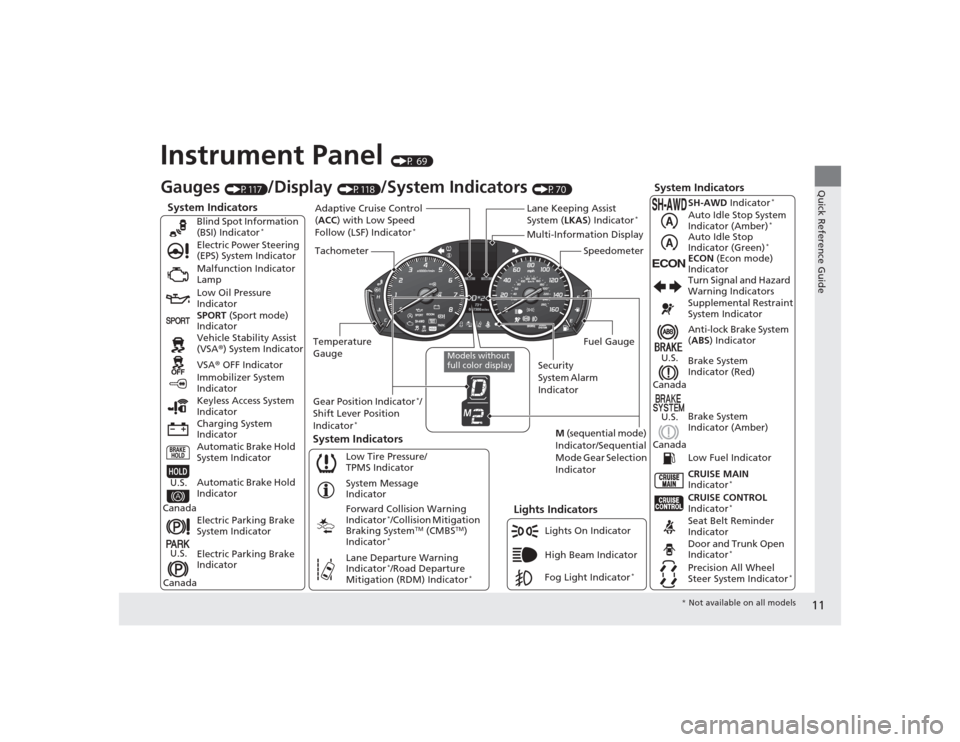
11Quick Reference Guide
Instrument Panel
(P 69)
System Indicators
Malfunction Indicator
Lamp
Low Oil Pressure
Indicator
Charging System
Indicator Vehicle Stability Assist
(VSA®) System Indicator
VSA ® OFF Indicator
Electric Power Steering
(EPS) System Indicator
Lights Indicators
Lights On Indicator
High Beam Indicator
Immobilizer System
Indicator
System Indicators
System Message
Indicator
Gauges
(P117)
/Display
(P118)
/System Indicators
(P70)
Low Tire Pressure/
TPMS Indicator
Keyless Access System
Indicator
Electric Parking Brake
System Indicator
Electric Parking Brake
Indicator Automatic Brake Hold
System Indicator SPORT
(Sport mode)
Indicator Blind Spot Information
(BSI) Indicator
*
Forward Collision Warning
Indicator
*/Collision Mitigation
Braking System
TM (CMBS
TM)
Indicator
*
Lane Departure Warning
Indicator
*/Road Departure
Mitigation (RDM) Indicator
*
Automatic Brake Hold
Indicator
U.S.
CanadaU.S.
Canada
Fog Light Indicator
*
Temperature
Gauge Security
System Alarm
IndicatorFuel Gauge
Tachometer
Multi-Information Display
Speedometer
Gear Position Indicator
*/
Shift Lever Position
Indicator
*
M (sequential mode)
Indicator/Sequential
Mode Gear Selection
Indicator
System Indicators
Lane Keeping Assist
System ( LKAS) Indicator
*
Adaptive Cruise Control
(ACC ) with Low Speed
Follow (LSF) Indicator
*
Models without
full color display
Anti-lock Brake System
( ABS ) Indicator
Seat Belt Reminder
Indicator CRUISE CONTROL
Indicator
*
Brake System
Indicator (Red) Supplemental Restraint
System Indicator
CRUISE MAIN
Indicator
*
Low Fuel Indicator Turn Signal and Hazard
Warning Indicators
Brake System
Indicator (Amber)
U.S.
Canada
U.S.
Canada
Door and Trunk Open
Indicator
*
Precision All Wheel
Steer System Indicator
*
ECON
ECON (Econ mode)
Indicator SH-AWD Indicator
*
Auto Idle Stop System
Indicator (Amber)
*
Auto Idle Stop
Indicator (Green)
*
* Not available on all models
Page 19 of 545
18Quick Reference Guide
Driving
(P315)
Automatic Transmission
* (P331)
● Always depress the brake pedal before selecting
(P or changing the gear position from
(P.
● Select
(P and depress the brake pedal when starting the engine.
Park
Press the
(P button.
Used when parking or before turn off or start the engine.
Transmission is locked.
Reverse
Pull back the ( R button.
Used when reversing.
Neutral
Press the
( N button.
Transmission is not locked.
Drive
Press the ( D button.
Used for normal driving. The sequential shift mode can be used.
Gear Position Indicator
The gear position indicator and the
shift button indicator indicate the
current gear selection.
Gear Position Indicator Shift Button
Indicator
●
Gear selection
Models without
full color display
Models with full
color display
Page 26 of 545
25Quick Reference Guide
Why do the doors lock
after I unlocked the doors
using a remote
transmitter?
If you do not open the doors within 30 seconds, the doors are
relocked automatically for security.
Why does the beeper
sound when I open the
driver’s door?
The beeper sounds when:●The power mode is in ACCESSORY.●The exterior lights are left on.●The Auto Idle Stop
* is in operation.
Why does the beeper
sound when I start driving?
The beeper sounds when the driver and/or front passenger are
not wearing their seat belts.
Why do I hear a screeching
sound when I apply the
brake pedal?
The brake pads may need to be replaced. Have your vehicle
inspected by a dealer.
Pressing the electric
parking brake switch does
not release the parking
brake. Why?
Press the electric parking brake switch with the brake pedal
depressed.
* Not available on all models
Page 27 of 545

26Quick Reference Guide
Depressing the accelerator
pedal does not release the
parking brake
automatically. Why?
●Fasten the driver’s seat belt.●Check if the transmission is in
(P
or
(N
. If so, select any other
position.
Why does the gear position
automatically change to
(P
when I open the driver's
door to check for parking
space lines when
reversing?
●Fasten the driver’s seat belt.●Close the driver's door and manually change the gear
position. u
When opening the driver’s door
(P333)
Unleaded gasoline with a
Pump Octane Number
(PON) of 91 or higher is
recommended.
Is it possible to use
unleaded gasoline with a
Pump Octane Number
(PON) of 87 or lower on
this vehicle?
Unleaded gasoline with a Pump Octane Number (PON) of 91 or
higher is recommended.
Use of lower octane gasoline can cause occasional metallic
knocking noise in the engine and wi ll result in decreased engine
performance.
Use of gasoline with a pump octane less than 87 can lead to
engine damage.
Models with electronic gear selector


