Page 129 of 545
128
uuGauges and Multi- Information Display uMulti-Information Display
Instrument Panel
Exit
Door Setup
Maintenance Info.
Default AllLighting Setup
Key And Remote Unlock Mode
Auto Door Lock
Auto Door Unlock
Keyless Lock Answer BackSecurity Relock Timer
Interior Light Dimming Time
Headlight Auto Off Timer
Auto Light Sensitivity
PushPush
RollRoll
Roll
IDS Setup
Push
Preferred IDS Mode
Push
Push
Maintenance Reset
RollRoll
RollRollRollRoll
Page 134 of 545
133
uuGauges and Multi-Information Display uMulti-Information Display
Continued
Instrument Panel
*1: Default SettingSetup Group Customizable Features Description Selectable SettingsIDS Setup
Preferred IDS Mode
Changes the IDS mode setting for when you set the
power mode to ON.
Last Used
*1/
Econ /Normal /
Sport
Maintenance
Info. Maintenance Reset
Resets/Cancels the engine oil life display when you
have performed the maintenance service. Cancel
/Reset
Default All
—
Cancels/Resets all the customized settings as
default.
Cancel /Set
Page 254 of 545
253
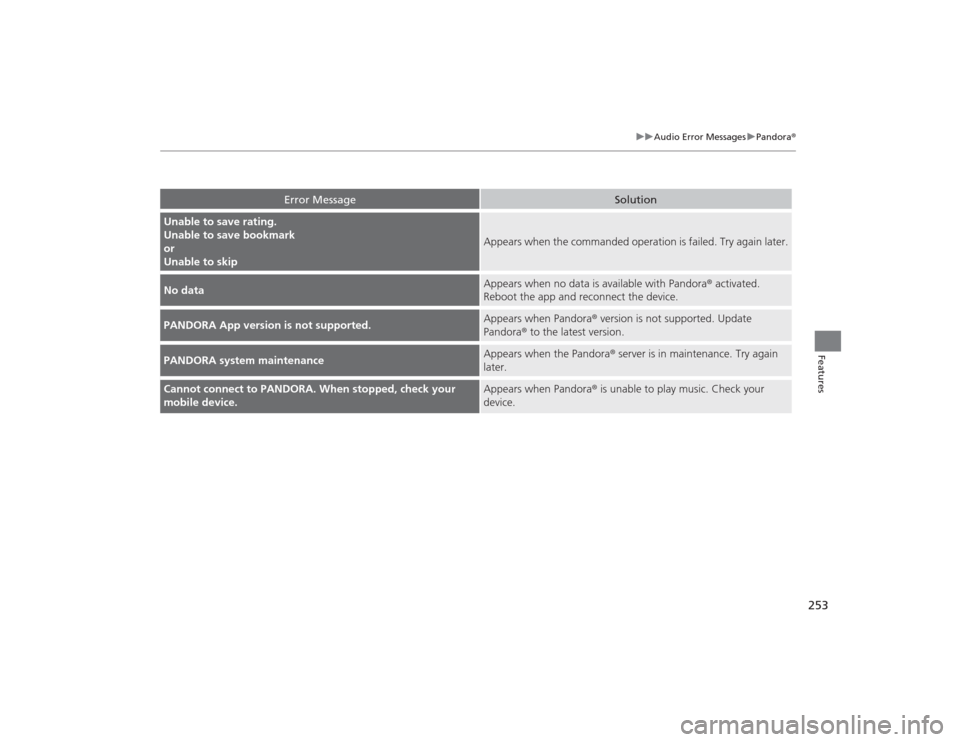
uuAudio Error Messages uPandora ®
Features
Error Message
Solution
Unable to save rating.
Unable to save bookmark
or
Unable to skip
Appears when the commanded operation is failed. Try again later.
No data
Appears when no data is available with Pandora ® activated.
Reboot the app and reconnect the device.
PANDORA App version is not supported.
Appears when Pandora® version is not supported. Update
Pandora ® to the latest version.
PANDORA system maintenance
Appears when the Pandora ® server is in maintenance. Try again
later.
Cannot connect to PANDORA. When stopped, check your
mobile device.
Appears when Pandora® is unable to play music. Check your
device.
Page 263 of 545
262
uuCustomized Features u
Features
Default
Fixed GuidelineDynamic Guideline
Default
Sound
Source Select Popup
Audio
Settings
Maintenance Reset
Maintenance Info.
Preferred IDS Mode
IDS Setup
Camera
Settings
*1
DefaultCamera
Settings
*2
Fixed GuidelineDynamic Guideline
Rear
Camera
Cross Traffic Monitor
*1: Models without cross traffic monitor
*2: Models with cross traffic monitor
See the Navigation System Manual.
Navi
Settings
Key And Remote Unlock ModeKeyless Lock Answer BackSecurity Relock Timer
Auto Door LockAuto Door Unlock
Door
Setup
Cover Art
*3
Connect Bluetooth Audio Device
*3
Bluetooth Device List
*3
*3: May change depending on your currently
selected source.
Page 272 of 545

271
uuCustomized Features u
Continued
Features
*1:Default SettingSetup
Group Customizable Features Description Selectable Settings
Vehicle
Settings Mainte-
nance
Info.
Maintenance Reset
Resets the engine oil life display when you have
performed the maintenance service. —
Default Cancels/Resets all customized items in the
Vehicle Settings
group as default. Default
/OKCamera
Settings
Fixed Guideline
Selects whether the fixed guidelines come on the
rear camera monitor.
On
*1/Off
Dynamic Guideline
Selects whether the dynamic guidelines come on
the rear camera monitor.
On
*1/Off
Default
Cancels/Resets all customized items in the
Camera Settings group as default.
Default/OK
Camera
Settings
Rear
Camera
Fixed Guideline
Selects whether the fixed guidelines come on the
rear camera monitor.
On
*1/Off
Dynamic Guideline
Selects whether the dynamic guidelines come on
the rear camera monitor.
On
*1/Off
Default
Cancels/Resets all customized items in the Rear
Camera group as default.
Default /OK
Cross
Traffic
Monitor
Turns the cross traffic monitor feature on and off.
On
*1/Off
Models
without cross
traffic monitorModels with
cross traffic
monitor
Page 317 of 545

316Driving
Before DrivingDriving PreparationCheck the following items before you start driving.
•Make sure there are no obstructions on the windows, door mirrors, exterior
lights, or other parts of the vehicle.
u Remove any frost, snow, or ice.
u Remove any snow on the roof, as this can slip down and obstruct your field of
vision while driving. If frozen solid, remove ice once it has softened.
u When removing ice from around the wheels, be sure not to damage the wheel
or wheel components.
• Make sure the hood is securely closed.
u If the hood opens while driving, your front view will be blocked.
• Make sure the tires are in good condition.
u Check air pressures, and check for damage and excessive wear.
2 Checking and Maintaining Tires P. 456
•Make sure there are no people or objects behind or around the vehicle.
u There are blind spots from the inside.■
Exterior Checks
1Exterior ChecksNOTICEWhen doors are frozen shut, use warm water around
the door edges to melt any ice. Do not try to force
them open, as this can damage the rubber trim
around the doors. When done, wipe dry to avoid
further freezing.
Do not pour warm water into the key cylinder.
You will be unable to insert the key if the water
freezes in the hole.
Heat from the engine and exhaust can ignite
flammable materials left under the hood, causing a
fire. If you’ve parked your vehicle for an extended
period, inspect and remove any debris that may have
collected, such as dried grass and leaves that have
fallen or have been carried in for use as a nest by a
small animal.
Also check under the hood for leftover flammable
materials after you or someone else has performed
maintenance on your vehicle.
Page 396 of 545

395
uuWhen Driving uTire Pressure Monitoring System (TPMS) - Required Federal Explanation
Driving
Please note that the TP MS is not a substitute for proper tire
maintenance, and it is the driver’s responsibility to maintain
correct tire pressure, even if under-inflation has not reached the
level to trigger illumination of the TPMS low tire pressure telltale.
Your vehicle has also been equipped with a TPMS malfunction
indicator to indicate when the system is not operating properly.
The TPMS malfunction indicator is combined with the low tire
pressure telltale. When the system detects a malfunction, the
telltale will flash for approximately one minute and then remain
continuously illuminated. This sequen ce will continue upon
subsequent vehicle start-ups as long as the malfunction exists.
When the malfunction indicator is illuminated, the system may
not be able to detect or signal low tire pressure as intended.
TPMS malfunctions may occur for a variety of reasons, including
the installation of replacement or alterna te tires or wheels on the
vehicle that prevent the TPMS from functioning properly.
Always check the TPMS malfunction telltale after replacing one or
more tires or wheels on your vehicle to ensure that the
replacement or alternate tires and wheels allow the TPMS to
continue to function properly.
Page 423 of 545

422Driving
Fuel EconomyImproving Fuel EconomyFuel economy depends on several conditions, including driving conditions, your
driving habits, the condition of your vehicle, and loading. Depending on these and
other conditions, you may or may not achieve the rated fuel economy of this vehicle.
You can optimize your fuel economy with proper maintenance of your vehicle.
Always maintain your vehicle in accordance with the messages displayed on the
multi-information display.
•Use the recommended viscosity engine oil, displaying the API Certification Seal.
• Maintain the specified tire pressure.
• Do not load the vehicle with excess cargo.
• Keep your vehicle clean. A buildup of snow or mud on your vehicle’s underside
adds weight and increases wind resistance.■
Maintenance and Fuel Economy
1Improving Fuel Economy
Direct calculation is the recommended method to
determine actual fuel consumed while driving.
In Canada, posted fuel economy numbers are
established following a simulated test. For more
information on how this test is pe rformed, please visit
http://oee.nrcan.gc.ca/
Miles driven Gallons of
fuel Miles per
Gallon
100 L per 100 km
Liters of
fuel Kilometers
driven