2015 Acura TLX trunk
[x] Cancel search: trunkPage 4 of 75

| 1
VISUAL INDEX
TABLE OF
CONTENTS
INDEX
VISUAL INDEX
VOICE COMMAND INDEX
SAFETY
INFORMATION
CLIENT
INFORMATION
INSTRUMENT PANEL
SPECIFICATIONS
VEHICLE
CONTROLS
MAINTENANCE
AUDIO AND
CONNECTIVITY
HANDLING THE UNEXPECTED
BLUETOOTH®
HANDSFREELINK®
DRIVING
ACURALINK®
NAVIGATION
Cruise Control ................................ 85
Adaptive Cruise Control (ACC) with
Low Speed Follow (LSF)* .............. 86
Forward Collision Warning (FCW)
with Pedestrian Detection* .......... 88
Lane Departure Warning (LDW)* ... 89
Lane Keeping Assist System
(LKAS)* ............................................ 90
Collision Mitigation Braking
System™ (CMBS™)* ...................... 91
Road Departure Mitigation (RDM)
System* ........................................... 92
Blind Spot Information (BSI)
System* ........................................... 93
Parking Sensor System* ................ 94
Super Handling-All Wheel Drive
(AWD)* ............................................ 94
Multi-View Rear Camera ............... 95
Cross Traffic Monitor* ................... 96
Refueling ......................................... 97
HANDLING THE UNEXPECTED ...98
Keyless Access Remote Battery
Strength ........................................... 98
Shift Lever Does Not Move* ........ 98
Jump Starting .................................. 99
Overheating ................................... 101
Emergency Engine Stop ............... 102
Emergency Towing ....................... 102
Tire Pressure Monitoring System
(TPMS) ........................................... 103
Tire Repair Kit* ............................. 104Changing a Flat Tire .....................
105
Fuse Locations .............................. 108
MAINTENANCE ............................. 111
Safety Precautions ........................ 111
Maintenance Minder™ ................. 112
Under the Hood ............................. 114
Engine Oil ....................................... 116
Engine Coolant .............................. 118
Window Washer Fluid .................. 119
Checking the Battery .................... 119
Changing Wiper Blades ............... 120
Tire Information ............................ 121
Tire Labeling .................................. 124
DOT Tire Quality Grading ........... 125
Tire Pressure Monitoring System
(TPMS) - Required Federal
Explanation .................................... 127
Testing of Readiness Codes ........ 128
SPECIFICATIONS ......................... 129
CLIENT INFORMATION ............... 131
Frequently Asked Questions/
Troubleshooting ............................ 131
Contact Us .................................... 132
Acura Total Luxury Care Roadside
Assistance ..................................... 133
Warranty Coverages .................... 133
V OICE COMMAND INDEX ......... 134
INDEX ............................................ 140
*if equipped
1 Lights/turn signals p. 32, p. 33
2 Wipers/washers p. 33
3 Cruise control/Adaptive Cruise
Control with Low Speed Follow*
buttons p. 85, p. 86
4 Horn
5 Voice recognition/Bluetooth®
HandsFreeLink® buttons p. 55
6 Audio controls p. 45
7 Instrument panel p. 22
Multi-information display p. 26
8 Right selector wheel
TRIP button p. 26
9 Paddle shifters p. 78, p. 80
10 Advanced Cruise Control (ACC)
Distance button* p. 86
Quickly locate items in the vehicle’s interior.
Steering Wheel and Nearby Controls
Lane Keeping Assist System
(LKAS) button* p. 90
Trunk release button p. 28
Fuel fill door button p. 97
Vehicle Stability Assist (VSA®) OFF
button p. 84
Lane Departure Warning (LDW)*/
Road Departure Mitigation (RDM)
button* p. 89, p. 92
Parking sensor button* p. 94
Collision Mitigation Braking System™
(CMBS™) OFF button* p. 91
Headlight washer button* p. 34
Heated windshield button* p. 34
13 ENGINE START/STOP button p. 76
14 Heated steering wheel* p. 38
VISUAL INDEX
*if equipped
1
1011
27
4
8
13
12
125614
93
11
Page 6 of 75

4 || 5
SAFETY
SAFETY
TABLE OF
CONTENTS
INDEX
VISUAL INDEX
VOICE COMMAND INDEX
SAFETY
INFORMATION
CLIENT
INFORMATION
INSTRUMENT PANEL
SPECIFICATIONS
VEHICLE
CONTROLS
MAINTENANCE
AUDIO AND
CONNECTIVITY
HANDLING THE UNEXPECTED
BLUETOOTH®
HANDSFREELINK®
DRIVING
ACURALINK®
NAVIGATION
Carbon Monoxide Gas
The engine exhaust from this vehicle contains carbon monoxide, a colorless,
odorless, and highly toxic gas. As long as you properly maintain your vehicle and
follow the instructions set forth below, you will not accumulate dangerous levels
of carbon monoxide gas in the vehicle interior.
Have the exhaust system inspected for leaks whenever:
• The exhaust system is making an unusual noise.
• The exhaust system may have been damaged.
• The vehicle is raised for an oil change.
When you operate a vehicle with the trunk open, airflow can pull exhaust gas into
the interior and create a hazardous condition. If you must drive with the trunk
open, open all the windows and set the climate control system as shown below.
1. Select the fresh air mode.
2. Select the
mode.
3. Set the fan speed to high.
4. Set the temperature control to a comfortable setting.
Adjust the climate control system in the same manner if you sit in your parked
vehicle with the engine running.
Carbon monoxide gas is toxic. Breathing it can cause unconsciousness and
even kill you.
Avoid any enclosed areas or activities that expose you to carbon monoxide.
WARNING
An enclosed area such as a garage can quickly fill up with carbon monoxide gas.
Do not run the engine with the garage door closed. Even when the garage door is
open, drive out of the garage immediately after starting the engine.
Seat Belts
A seat belt is your best protection in all types of collisions. Airbags are designed to
supplement seat belts, not replace them. So even though your vehicle is equipped
with airbags, make sure you and your passengers always wear your seat belts and
wear them properly.
Lap/Shoulder Seat BeltsAll five seating positions are equipped with lap/shoulder seat belts with
emergency locking retractors. In normal driving, the retractor lets you move
freely while keeping some tension on the belt. During a collision or sudden stop,
the retractor locks to restrain your body. The front passenger’s and rear seat belts
also have a lockable retractor for use with child seats.
The front seats are equipped with automatic seat belt tensioners to enhance
safety. The tensioners automatically tighten the front seat belts during a
moderate-to-severe front collision, sometimes even if the collision is not severe
enough to inflate the front airbags or the driver’s knee airbag.
Proper Use of Seat BeltsFollow these guidelines for proper use:
• All occupants should sit upright, well back in the seat, and remain in that
position for the duration of the trip. Slouching and leaning reduces the
effectiveness of the belt and can increase the chance of serious injury in a crash.
• Never place the shoulder part of a lap/shoulder seat belt under your arm or
behind your back. This could cause very serious injuries in a crash.
• Two people should never use the same seat belt. If they do, they could be very
seriously injured in a crash.
• Do not put any accessories on the seat belts. Devices intended to improve
comfort or reposition the shoulder part of a seat belt can reduce the protective
capability and increase the chance of serious injury in a crash.
• No one should sit in a seat with an inoperative seat belt or one that does not
appear to be working correctly. Using a seat belt that is not working properly
may not protect the occupant in a crash. Have a dealer check the belt as soon
as possible.
Not wearing a seat belt properly increases the chance of a serious injury or
death in a crash, even though your vehicle has airbags.
Be sure you and your passengers always wear seat belts and wear them
properly.
WARNING
Page 17 of 75
26 || 27
VEHICLE CONTROLS
INSTRUMENT P ANEL
TABLE OF
CONTENTS
INDEX
VISUAL INDEX
VOICE COMMAND INDEX
SAFETY
INFORMATION
CLIENT
INFORMATION
INSTRUMENT PANEL
SPECIFICATIONS
VEHICLE
CONTROLS
MAINTENANCE
AUDIO AND
CONNECTIVITY
HANDLING THE UNEXPECTED
BLUETOOTH®
HANDSFREELINK®
DRIVING
ACURALINK®
NAVIGATION
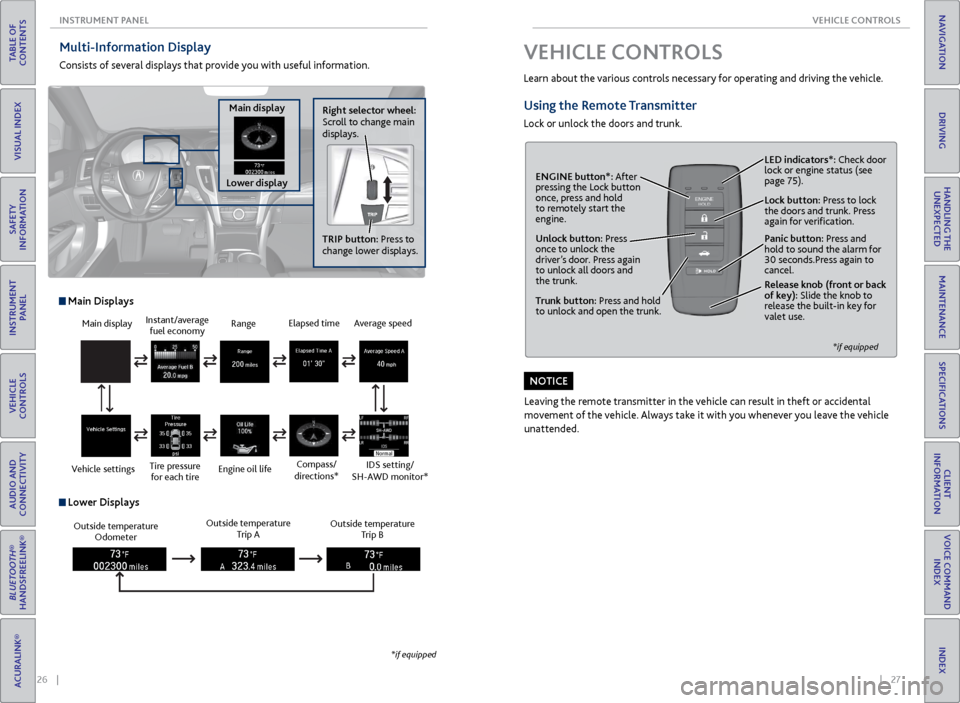
Multi-Information Display
Consists of several displays that provide you with useful information.
Right selector wheel:
Scroll to change main
displays.
Main display
Lower display TRIP button: Press to
change lower displays.
Main display
Vehicle settings Instant/average
fuel economy
Tire pressure for each tire Range
Engine oil life
Main Displays
Outside temperature Odometer Outside temperature
Trip A Outside temperature
Trip B
Lower Displays
Elapsed time
Compass/
directions*Average speed
IDS setting/
SH-AWD monitor*
*if equipped
VEHICLE CONTROLS
Learn about the various controls necessary for operating and driving the vehicle.
Using the Remote Transmitter
Lock or unlock the doors and trunk.
Unlock button: Press
once to unlock the
driver’s door. Press again
to unlock all doors and
the trunk.
Release knob (front or back
of key): Slide the knob to
release the built-in key for
valet use.
*if equipped
Trunk button: Press and hold
to unlock and open the trunk.Lock button: Press to lock
the doors and trunk. Press
again for verification. LED indicators*: Check door
lock or engine status (see
page 75).
Panic button: Press and
hold to sound the alarm for
30 seconds.Press again to
cancel.
ENGINE button*: After
pressing the Lock button
once, press and hold
to remotely start the
engine.
Leaving the remote transmitter in the vehicle can result in theft or accidental
movement of the vehicle. Always take it with you whenever you leave the vehicle
unattended.
NOTICE
Page 18 of 75
28 || 29
VEHICLE CONTROLS
VEHICLE CONTROLS
TABLE OF
CONTENTS
INDEX
VISUAL INDEX
VOICE COMMAND INDEX
SAFETY
INFORMATION
CLIENT
INFORMATION
INSTRUMENT PANEL
SPECIFICATIONS
VEHICLE
CONTROLS
MAINTENANCE
AUDIO AND
CONNECTIVITY
HANDLING THE UNEXPECTED
BLUETOOTH®
HANDSFREELINK®
DRIVING
ACURALINK®
NAVIGATION
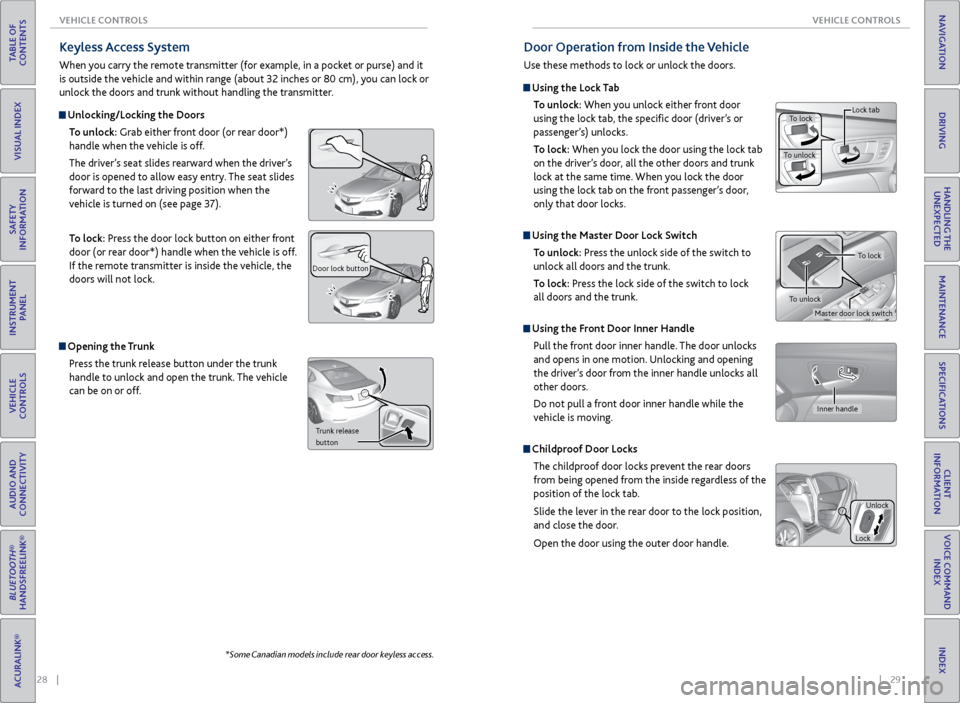
Keyless Access System
When you carry the remote transmitter (for example, in a pocket or purse) and it
is outside the vehicle and within range (about 32 inches or 80 cm), you can lock or
unlock the doors and trunk without handling the transmitter.
Unlocking/Locking the Doors
To unlock: Grab either front door (or rear door*)
handle when the vehicle is off.
The driver’s seat slides rearward when the driver’s
door is opened to allow easy entry. The seat slides
forward to the last driving position when the
vehicle is turned on (see page 37).
To lock: Press the door lock button on either front
door (or rear door*) handle when the vehicle is off.
If the remote transmitter is inside the vehicle, the
doors will not lock.
Door lock button
Opening the Trunk
Press the trunk release button under the trunk
handle to unlock and open the trunk. The vehicle
can be on or off.
Trunk release
button
*Some Canadian models include rear door keyless access.
Door Operation from Inside the Vehicle
Use these methods to lock or unlock the doors.
Using the Lock Tab
To unlock: When you unlock either front door
using the lock tab, the specific door (driver’s or
passenger’s) unlocks.
To lock: When you lock the door using the lock tab
on the driver’s door, all the other doors and trunk
lock at the same time. When you lock the door
using the lock tab on the front passenger’s door,
only that door locks.
Using the Master Door Lock Switch
To unlock: Press the unlock side of the switch to
unlock all doors and the trunk.
To lock: Press the lock side of the switch to lock
all doors and the trunk.
Using the Front Door Inner Handle
Pull the front door inner handle. The door unlocks
and opens in one motion. Unlocking and opening
the driver’s door from the inner handle unlocks all
other doors.
Do not pull a front door inner handle while the
vehicle is moving.
Childproof Door Locks
The childproof door locks prevent the rear doors
from being opened from the inside regardless of the
position of the lock tab.
Slide the lever in the rear door to the lock position,
and close the door.
Open the door using the outer door handle.
To lock
To unlock Lock tab
Inner handle
Unlock
Lock
Master door lock switch
To lock
To unlock
Page 19 of 75
30 || 31
VEHICLE CONTROLS
VEHICLE CONTROLS
TABLE OF
CONTENTS
INDEX
VISUAL INDEX
VOICE COMMAND INDEX
SAFETY
INFORMATION
CLIENT
INFORMATION
INSTRUMENT PANEL
SPECIFICATIONS
VEHICLE
CONTROLS
MAINTENANCE
AUDIO AND
CONNECTIVITY
HANDLING THE UNEXPECTED
BLUETOOTH®
HANDSFREELINK®
DRIVING
ACURALINK®
NAVIGATION
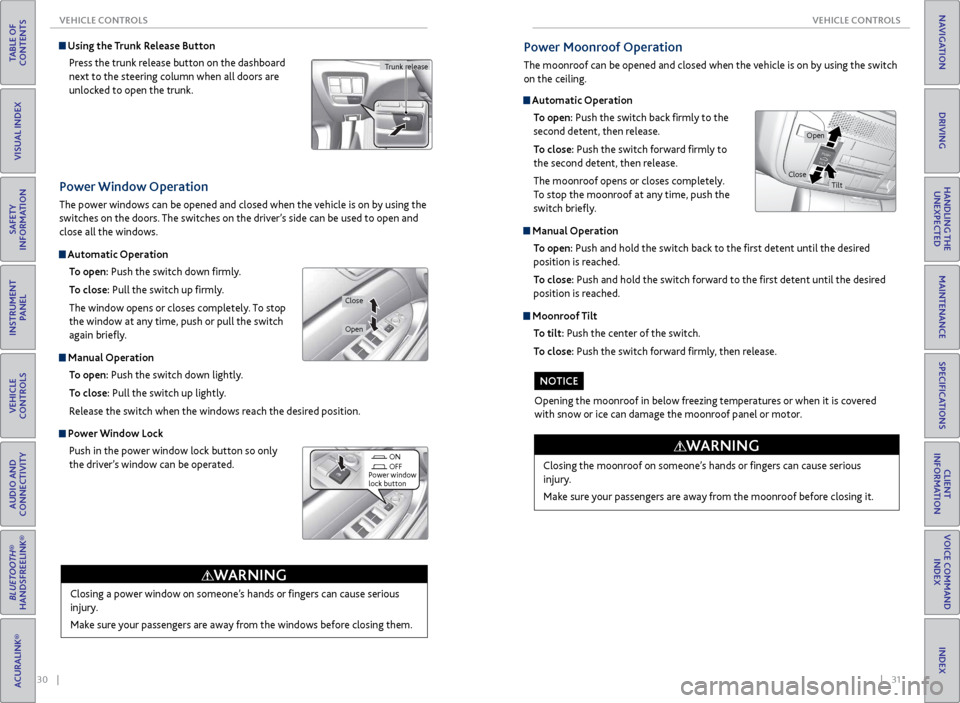
Power Window Operation
The power windows can be opened and closed when the vehicle is on by using the
switches on the doors. The switches on the driver’s side can be used to open and
close all the windows.
Automatic Operation
To open: Push the switch down firmly.
To close: Pull the switch up firmly.
The window opens or closes completely. To stop
the window at any time, push or pull the switch
again briefly.
Manual Operation To open: Push the switch down lightly.
To close: Pull the switch up lightly.
Release the switch when the windows reach the desired position.
Power Window Lock Push in the power window lock button so only
the driver’s window can be operated.
Closing a power window on someone’s hands or fingers can cause serious
injury.
Make sure your passengers are away from the windows before closing them.
WARNING
ON
OFF
Power window
lock button
Open
Close
Using the Trunk Release Button
Press the trunk release button on the dashboard
next to the steering column when all doors are
unlocked to open the trunk.
Trunk release
Automatic Operation To open: Push the switch back firmly to the
second detent, then release.
To close: Push the switch forward firmly to
the second detent, then release.
The moonroof opens or closes completely.
To stop the moonroof at any time, push the
switch briefly.
Manual Operation
To open: Push and hold the switch back to the first detent until the desired
position is reached.
To close: Push and hold the switch forward to the first detent until the desired
position is reached.
Moonroof Tilt
To tilt: Push the center of the switch.
To close: Push the switch forward firmly, then release.
Power Moonroof Operation
The moonroof can be opened and closed when the vehicle is on by using the switch
on the ceiling.
Closing the moonroof on someone’s hands or fingers can cause serious
injury.
Make sure your passengers are away from the moonroof before closing it.
WARNING
Opening the moonroof in below freezing temperatures or when it is covered
with snow or ice can damage the moonroof panel or motor.
NOTICE
Open
CloseTilt
Page 40 of 75

72 || 73
DRIVING
DRIVING
TABLE OF
CONTENTS
INDEX
VISUAL INDEX
VOICE COMMAND INDEX
SAFETY
INFORMATION
CLIENT
INFORMATION
INSTRUMENT PANEL
SPECIFICATIONS
VEHICLE
CONTROLS
MAINTENANCE
AUDIO AND
CONNECTIVITY
HANDLING THE UNEXPECTED
BLUETOOTH®
HANDSFREELINK®
DRIVING
ACURALINK®
NAVIGATION
Maximum Load Limit
Carrying too much cargo or improperly storing it can affect your vehicle’s handling,
stability, stopping distance, and tires, and make it unsafe.
Your vehicle is not designed to tow a trailer. Attempting to do so can void your
vehicle warranties.
The maximum load for your vehicle is 850 lbs (385 kg). See the Tire and Loading
Information label on the driver’s doorjamb.
Label Example
This figure includes the total weight of all occupants, cargo, and
accessories, and the tongue load if you are towing a trailer. Below are the
steps for determining the correct load limit:
1. Locate the statement “The combined weight of occupants and cargo
should never exceed XXX kg or XXX lbs.” on your vehicle’s placard.
2. Determine the combined weight of the driver and passengers that will
be riding in your vehicle.
3. Subtract the combined weight of the driver and passengers from XXX kg
or XXX lbs.
4. The resulting figure equals the available amount of cargo and luggage
load capacity. For example, if the “XXX” amount equals 1,400 lbs. and
there will be five 150 lb. passengers in your vehicle, the amount of
available cargo and luggage load capacity is 650 lbs. (1,400 - 750 (5 x
150) = 650 lbs.)
5. Determine the combined weight of luggage and cargo being loaded on
the vehicle. That weight may not safely exceed the available cargo and
luggage load capacity calculated in step 4.
6. If your vehicle will be towing a trailer, load from your trailer will be
transferred to your vehicle. Consult the Owner’s Manual to determine
how this reduces the available cargo and luggage load capacity of your
vehicle.
Learn about preparation for driving, as well as other features.
DRIVING
If the doors are frozen shut, use warm water around the door edges to melt any
ice. Do not try to force them open, as this can damage the rubber trim around
the doors. When done, wipe dry to avoid further freezing.
NOTICE
Interior Checks
• Store or secure all items on board properly.
• Do not pile items higher than the seat height.
• Do not place anything in the front seat footwells. Secure the floor mats.
• If you have any animals on board, do not let them move freely in the vehicle.
• Securely close and lock all doors and the trunk.
• Adjust your seating position, mirrors, and steering wheel properly.
• Make sure items placed on the floor behind the front seats cannot roll under
the seats.
• Everyone in the vehicle must fasten their seat belt.
Make sure that the indicators in the instrument panel come on when you start
the vehicle, and go off soon after.
In addition:
• During the first 600 miles (1,000 km) of operation, avoid sudden acceleration
or full throttle operation so as to not damage the engine or powertrain.
• Avoid hard braking for the first 200 miles (300 km). You should also follow this
when the brake pads are replaced.
Before Driving
Check the following items before you begin driving.
Exterior Checks
• Make sure there are no obstructions on the windows, door mirrors, exterior
lights, or other parts of the vehicle.
• Remove any frost, snow, or ice.
• Make sure the hood is securely closed.
• Heat from the engine and exhaust can ignite flammable materials left under
the hood, causing a fire. If you’ve parked your vehicle for an extended period,
inspect and remove any debris that may have collected, such as dried grass
and leaves that have fallen or have been carried in for use as a nest by a small
animal. Also check under the hood for leftover flammable materials after you
or someone else has performed maintenance on your vehicle.
• Make sure the tires are in good condition.
• Make sure there are no people or objects behind or around the vehicle.
Page 41 of 75

74 || 75
DRIVING
DRIVING
TABLE OF
CONTENTS
INDEX
VISUAL INDEX
VOICE COMMAND INDEX
SAFETY
INFORMATION
CLIENT
INFORMATION
INSTRUMENT PANEL
SPECIFICATIONS
VEHICLE
CONTROLS
MAINTENANCE
AUDIO AND
CONNECTIVITY
HANDLING THE UNEXPECTED
BLUETOOTH®
HANDSFREELINK®
DRIVING
ACURALINK®
NAVIGATION
Load Limits Example
Example 1
Max load
850 lbs
(385 kg) Passenger weight
150 lbs x 2 = 300 lbs
(68 kg x 2 = 136 kg) Cargo
weight
550 lbs
(249 kg)
Example 2
Max load
850 lbs
(385 kg) Passenger weight
150 lbs x 5 = 750 lbs
(68 kg x 5 = 340 kg) Cargo
weight
100 lbs (45 kg)
Overloading or improper loading can affect handling and stability and cause a
crash in which you can be hurt or killed.
Follow all load limits and other loading guidelines in this manual.
WARNING
In addition, the total weight of the vehicle, all occupants, accessories, cargo, and
trailer tongue load must not exceed the Gross Vehicle Weight Rating (GVWR) or
the Gross Axle Weight Rating (GAWR). Both are on a label on the driver’s doorjamb.
The headlight aim on your vehicle was set by the factory, and does not need to be
adjusted. However, if you regularly carry heavy items in the trunk, have the aiming
readjusted at your dealer or by a qualified technician.Remote Engine Start*
Start your vehicle’s engine using the two-way remote transmitter from extended
distances before you enter the vehicle.
Lock button
ENGINE button: After
pressing the Lock
button, press and hold
to start the engine.Red indicator: Remote
is out of range or
cannot communicate
with the vehicle, or the
engine is stopped.
Amber indicator: Remote
is communicating with
the vehicle.
Green indicator:
Confirms doors are
locked or engine is
running.
Starting the Engine
Press the Lock button, then press and hold the ENGINE button.
The engine runs for up to 10 minutes. To extend the time for another 10 minutes,
repeat the procedure during the initial 10 minutes.
While the engine is running, the climate control system adjusts the interior
temperature, the security system remains on, and lights and accessories remain
off.
Stopping the EnginePress and hold the ENGINE button.
The engine will also stop if it has been running for more than 10 minutes, or if any
door is opened without using the remote transmitter or keyless access.
Carbon monoxide gas is toxic and can rapidly accumulate in closed or even
partly enclosed areas. Breathing it can cause unconsciousness and even kill
you.
Never use the remote engine starter with the vehicle in a garage or other
areas with limited ventilation.
WARNING
*if equipped
Make sure the vehicle is in a safe location when using remote engine start (i.e., a
well ventilated area, away from flammable materials).
Page 56 of 75

104 || 105
HANDLING THE UNEXPECTED
HANDLING THE UNEXPECTED
TABLE OF
CONTENTS
INDEX
VISUAL INDEX
VOICE COMMAND INDEX
SAFETY
INFORMATION
CLIENT
INFORMATION
INSTRUMENT PANEL
SPECIFICATIONS
VEHICLE
CONTROLS
MAINTENANCE
AUDIO AND
CONNECTIVITY
HANDLING THE UNEXPECTED
BLUETOOTH®
HANDSFREELINK®
DRIVING
ACURALINK®
NAVIGATION
Tire Repair Kit*
If a tire has a small puncture, you can use the tire repair kit to temporarily repair it.
The puncture must be smaller than 3/16-inch (4 mm) and not in the tire sidewall.
Go to a dealer to have the full-size tire permanently repaired or replaced.
Before Repairing the Tire
1. Park the vehicle on firm, level, non-slippery surface.
2. Make sure the vehicle is in Park (P), and apply the electric parking brake.
3. Turn on the hazard warning lights, and turn the vehicle off.
Getting Ready to Repair the Tire
1. Open the trunk. Pull up the strap on the trunk
floor lid, and open the lid.
If equipped, turn the knob on the tool case lid
counterclockwise, and remove the cover.
2. Remove the kit.
3. Place the kit face up on flat ground near the
punctured tire and away from traffic. Do not
place the kit on its side.
4. Follow the instructions in the kit to repair the
tire.
Trunk floor
lid strap
Cover Knob
Do not use a puncture-repairing agent other than the one provided in the kit that
came with your vehicle. If a different agent is used, you may permanently damage
the tire pressure sensor.
NOTICE
*if equipped
Changing a Flat Tire
If a tire goes flat while driving, grasp the steering wheel firmly, and brake gradually
to reduce speed. Stop in a safe place. Replace the flat tire with the compact
spare tire*. Go to a dealer as soon as possible to have the full-size tire repaired or
replaced.
Before Changing the Tire1. Park the vehicle on a firm, level, non-slippery surface.
2. Put the vehicle in Park (P), and apply the parking brake.
3. Turn on the hazard warning lights and turn the vehicle off.
Getting Ready to Change the Tire
1. Open the trunk. Open the trunk floor lid.
2. Take the tool case out of the trunk. Take the
jack and wheel nut wrench out of the tool
case.
3. Unscrew the wing bolt, and remove the spacer
cone. Then, remove the spare tire.
4. Place the compact spare tire wheel side up
under the vehicle body, near the tire that
needs to be replaced.
5. Loosen each wheel nut about one turn using
the wheel nut wrench.
Tool case
Spare tire
*if equipped