2015 Acura TLX engine oil
[x] Cancel search: engine oilPage 4 of 75

| 1
VISUAL INDEX
TABLE OF
CONTENTS
INDEX
VISUAL INDEX
VOICE COMMAND INDEX
SAFETY
INFORMATION
CLIENT
INFORMATION
INSTRUMENT PANEL
SPECIFICATIONS
VEHICLE
CONTROLS
MAINTENANCE
AUDIO AND
CONNECTIVITY
HANDLING THE UNEXPECTED
BLUETOOTH®
HANDSFREELINK®
DRIVING
ACURALINK®
NAVIGATION
Cruise Control ................................ 85
Adaptive Cruise Control (ACC) with
Low Speed Follow (LSF)* .............. 86
Forward Collision Warning (FCW)
with Pedestrian Detection* .......... 88
Lane Departure Warning (LDW)* ... 89
Lane Keeping Assist System
(LKAS)* ............................................ 90
Collision Mitigation Braking
System™ (CMBS™)* ...................... 91
Road Departure Mitigation (RDM)
System* ........................................... 92
Blind Spot Information (BSI)
System* ........................................... 93
Parking Sensor System* ................ 94
Super Handling-All Wheel Drive
(AWD)* ............................................ 94
Multi-View Rear Camera ............... 95
Cross Traffic Monitor* ................... 96
Refueling ......................................... 97
HANDLING THE UNEXPECTED ...98
Keyless Access Remote Battery
Strength ........................................... 98
Shift Lever Does Not Move* ........ 98
Jump Starting .................................. 99
Overheating ................................... 101
Emergency Engine Stop ............... 102
Emergency Towing ....................... 102
Tire Pressure Monitoring System
(TPMS) ........................................... 103
Tire Repair Kit* ............................. 104Changing a Flat Tire .....................
105
Fuse Locations .............................. 108
MAINTENANCE ............................. 111
Safety Precautions ........................ 111
Maintenance Minder™ ................. 112
Under the Hood ............................. 114
Engine Oil ....................................... 116
Engine Coolant .............................. 118
Window Washer Fluid .................. 119
Checking the Battery .................... 119
Changing Wiper Blades ............... 120
Tire Information ............................ 121
Tire Labeling .................................. 124
DOT Tire Quality Grading ........... 125
Tire Pressure Monitoring System
(TPMS) - Required Federal
Explanation .................................... 127
Testing of Readiness Codes ........ 128
SPECIFICATIONS ......................... 129
CLIENT INFORMATION ............... 131
Frequently Asked Questions/
Troubleshooting ............................ 131
Contact Us .................................... 132
Acura Total Luxury Care Roadside
Assistance ..................................... 133
Warranty Coverages .................... 133
V OICE COMMAND INDEX ......... 134
INDEX ............................................ 140
*if equipped
1 Lights/turn signals p. 32, p. 33
2 Wipers/washers p. 33
3 Cruise control/Adaptive Cruise
Control with Low Speed Follow*
buttons p. 85, p. 86
4 Horn
5 Voice recognition/Bluetooth®
HandsFreeLink® buttons p. 55
6 Audio controls p. 45
7 Instrument panel p. 22
Multi-information display p. 26
8 Right selector wheel
TRIP button p. 26
9 Paddle shifters p. 78, p. 80
10 Advanced Cruise Control (ACC)
Distance button* p. 86
Quickly locate items in the vehicle’s interior.
Steering Wheel and Nearby Controls
Lane Keeping Assist System
(LKAS) button* p. 90
Trunk release button p. 28
Fuel fill door button p. 97
Vehicle Stability Assist (VSA®) OFF
button p. 84
Lane Departure Warning (LDW)*/
Road Departure Mitigation (RDM)
button* p. 89, p. 92
Parking sensor button* p. 94
Collision Mitigation Braking System™
(CMBS™) OFF button* p. 91
Headlight washer button* p. 34
Heated windshield button* p. 34
13 ENGINE START/STOP button p. 76
14 Heated steering wheel* p. 38
VISUAL INDEX
*if equipped
1
1011
27
4
8
13
12
125614
93
11
Page 6 of 75

4 || 5
SAFETY
SAFETY
TABLE OF
CONTENTS
INDEX
VISUAL INDEX
VOICE COMMAND INDEX
SAFETY
INFORMATION
CLIENT
INFORMATION
INSTRUMENT PANEL
SPECIFICATIONS
VEHICLE
CONTROLS
MAINTENANCE
AUDIO AND
CONNECTIVITY
HANDLING THE UNEXPECTED
BLUETOOTH®
HANDSFREELINK®
DRIVING
ACURALINK®
NAVIGATION
Carbon Monoxide Gas
The engine exhaust from this vehicle contains carbon monoxide, a colorless,
odorless, and highly toxic gas. As long as you properly maintain your vehicle and
follow the instructions set forth below, you will not accumulate dangerous levels
of carbon monoxide gas in the vehicle interior.
Have the exhaust system inspected for leaks whenever:
• The exhaust system is making an unusual noise.
• The exhaust system may have been damaged.
• The vehicle is raised for an oil change.
When you operate a vehicle with the trunk open, airflow can pull exhaust gas into
the interior and create a hazardous condition. If you must drive with the trunk
open, open all the windows and set the climate control system as shown below.
1. Select the fresh air mode.
2. Select the
mode.
3. Set the fan speed to high.
4. Set the temperature control to a comfortable setting.
Adjust the climate control system in the same manner if you sit in your parked
vehicle with the engine running.
Carbon monoxide gas is toxic. Breathing it can cause unconsciousness and
even kill you.
Avoid any enclosed areas or activities that expose you to carbon monoxide.
WARNING
An enclosed area such as a garage can quickly fill up with carbon monoxide gas.
Do not run the engine with the garage door closed. Even when the garage door is
open, drive out of the garage immediately after starting the engine.
Seat Belts
A seat belt is your best protection in all types of collisions. Airbags are designed to
supplement seat belts, not replace them. So even though your vehicle is equipped
with airbags, make sure you and your passengers always wear your seat belts and
wear them properly.
Lap/Shoulder Seat BeltsAll five seating positions are equipped with lap/shoulder seat belts with
emergency locking retractors. In normal driving, the retractor lets you move
freely while keeping some tension on the belt. During a collision or sudden stop,
the retractor locks to restrain your body. The front passenger’s and rear seat belts
also have a lockable retractor for use with child seats.
The front seats are equipped with automatic seat belt tensioners to enhance
safety. The tensioners automatically tighten the front seat belts during a
moderate-to-severe front collision, sometimes even if the collision is not severe
enough to inflate the front airbags or the driver’s knee airbag.
Proper Use of Seat BeltsFollow these guidelines for proper use:
• All occupants should sit upright, well back in the seat, and remain in that
position for the duration of the trip. Slouching and leaning reduces the
effectiveness of the belt and can increase the chance of serious injury in a crash.
• Never place the shoulder part of a lap/shoulder seat belt under your arm or
behind your back. This could cause very serious injuries in a crash.
• Two people should never use the same seat belt. If they do, they could be very
seriously injured in a crash.
• Do not put any accessories on the seat belts. Devices intended to improve
comfort or reposition the shoulder part of a seat belt can reduce the protective
capability and increase the chance of serious injury in a crash.
• No one should sit in a seat with an inoperative seat belt or one that does not
appear to be working correctly. Using a seat belt that is not working properly
may not protect the occupant in a crash. Have a dealer check the belt as soon
as possible.
Not wearing a seat belt properly increases the chance of a serious injury or
death in a crash, even though your vehicle has airbags.
Be sure you and your passengers always wear seat belts and wear them
properly.
WARNING
Page 15 of 75

22 || 23
INSTRUMENT P
ANEL
INSTRUMENT P ANEL
TABLE OF
CONTENTS
INDEX
VISUAL INDEX
VOICE COMMAND INDEX
SAFETY
INFORMATION
CLIENT
INFORMATION
INSTRUMENT PANEL
SPECIFICATIONS
VEHICLE
CONTROLS
MAINTENANCE
AUDIO AND
CONNECTIVITY
HANDLING THE UNEXPECTED
BLUETOOTH®
HANDSFREELINK®
DRIVING
ACURALINK®
NAVIGATION
Indicators briefly appear with each engine start and then go out. Red and amber
indicators are most critical. Blue and green indicators are used for general
information.
Malfunction Indicators
These are the most critical indicators. If they come on and stay lit while driving or
at any other time, there may be a problem. See your dealer if necessary.
Brake system
• Brake fluid is low.
• There is a malfunction in the brake system.
Press the brake pedal lightly to check pedal pressure. If normal, check
the brake fluid level when you stop. If abnormal, take immediate action.
If necessary, downshift the transmission to slow the vehicle using engine
braking. Have your vehicle repaired immediately.
Low oil pressure
Engine oil pressure is low. Stop in a safe place. Open the hood and check
the oil level, and add oil if necessary (see page 117). If the indicator does
not turn off, have your vehicle repaired immediately.
Malfunction indicator lamp (check engine light)
• The emissions control system may have a problem.
• (Blinks) A misfire in the engine’s cylinders is detected. Stop in a safe place,
and wait for the engine to cool down.
Charging system
The battery is not charging. Turn all electrical items off, but do not turn the
vehicle off to prevent further battery discharge. Have your vehicle repaired
immediately.
Precision All Wheel Steer System*
There is a problem with the Precision All Wheel Steer system. Vehicle speed may be limited to 50 mph (80 km/h) or less.
Ca nada
U.S.
INSTRUMENT P
ANEL
Learn about the indicators, gauges, and displays related to driving the vehicle.
ABS (Anti-lock Brake System)
There is a problem with the anti-lock brake system. Your vehicle still has
normal braking ability, but no anti-lock function.
Supplemental Restraint System (SRS)
There is a problem with one of the airbag systems or seat belt tensioners*.
Electric Power Steering (EPS)
There is a problem with the electric power steering system. Stop in a safe
place and restart the engine.
Tire Pressure Monitoring System (TPMS)
(Blinks and stays on) There is a problem with the tire pressure monitoring
system, or a spare tire* is installed.
Keyless Access system
There is a problem with the keyless access system.
Vehicle Stability Assist® (VSA®) system
• There is a problem with the VSA system or hill start assist system.
• (Blinks) VSA is active.
Brake system
There is a problem with automatic brake hold, ACC*, CMBS*, or RDM*.
Avoid high speeds and sudden braking. Your vehicle still has normal braking
ability.
Blind Spot Information (BSI) system*
There is a problem with the BSI system or the sensor is blocked.
Adaptive Cruise Control (ACC) with Low Speed Follow*
There is a problem with the ACC system.
Lane Keeping Assist System (LKAS)*
There is a problem with the LKAS.
Forward Collision Warning (FCW) system */Collision Mitigation Braking
System™ (CMBS™)*
There is a problem with the system, the system is turned off, the
temperature is too high, or the camera is blocked.
Lane Departure Warning (LDW)*/Road Departure Mitigation (RDM)*
system
There is a problem with the system, the temperature is too high, or the
camera is blocked.
Electric parking brake system
There is a problem with the electric parking brake system. Stop in a safe
place and avoid using the parking brake.
Electric parking brake
(Blinks) There is a problem with the electric parking brake system.
U.S.
Canada
Ca nada
U.S.
*if equipped
Page 17 of 75
26 || 27
VEHICLE CONTROLS
INSTRUMENT P ANEL
TABLE OF
CONTENTS
INDEX
VISUAL INDEX
VOICE COMMAND INDEX
SAFETY
INFORMATION
CLIENT
INFORMATION
INSTRUMENT PANEL
SPECIFICATIONS
VEHICLE
CONTROLS
MAINTENANCE
AUDIO AND
CONNECTIVITY
HANDLING THE UNEXPECTED
BLUETOOTH®
HANDSFREELINK®
DRIVING
ACURALINK®
NAVIGATION
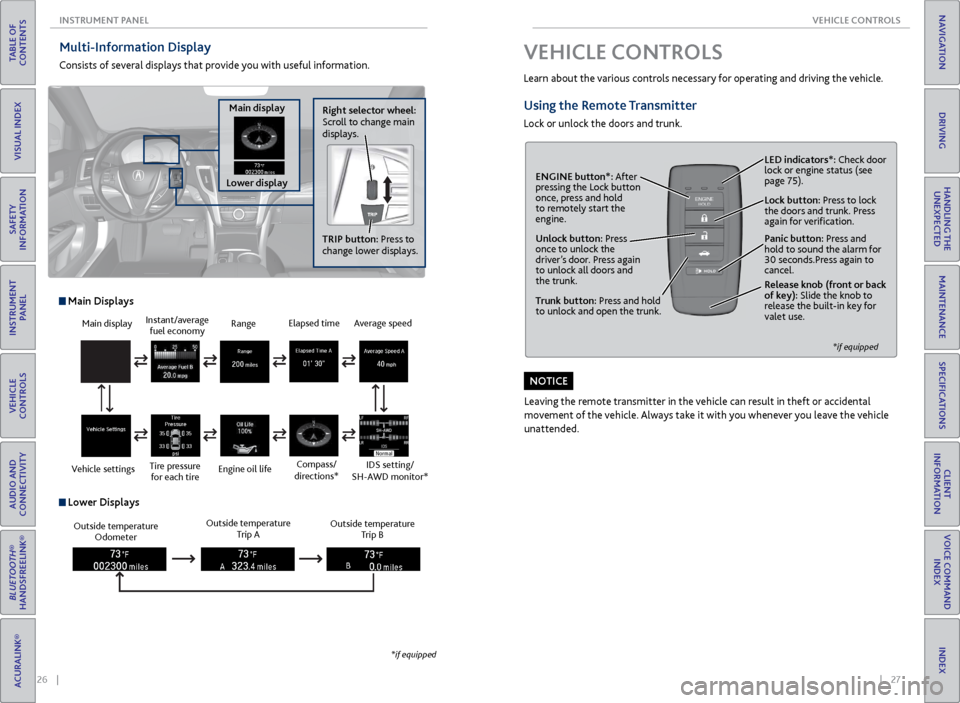
Multi-Information Display
Consists of several displays that provide you with useful information.
Right selector wheel:
Scroll to change main
displays.
Main display
Lower display TRIP button: Press to
change lower displays.
Main display
Vehicle settings Instant/average
fuel economy
Tire pressure for each tire Range
Engine oil life
Main Displays
Outside temperature Odometer Outside temperature
Trip A Outside temperature
Trip B
Lower Displays
Elapsed time
Compass/
directions*Average speed
IDS setting/
SH-AWD monitor*
*if equipped
VEHICLE CONTROLS
Learn about the various controls necessary for operating and driving the vehicle.
Using the Remote Transmitter
Lock or unlock the doors and trunk.
Unlock button: Press
once to unlock the
driver’s door. Press again
to unlock all doors and
the trunk.
Release knob (front or back
of key): Slide the knob to
release the built-in key for
valet use.
*if equipped
Trunk button: Press and hold
to unlock and open the trunk.Lock button: Press to lock
the doors and trunk. Press
again for verification. LED indicators*: Check door
lock or engine status (see
page 75).
Panic button: Press and
hold to sound the alarm for
30 seconds.Press again to
cancel.
ENGINE button*: After
pressing the Lock button
once, press and hold
to remotely start the
engine.
Leaving the remote transmitter in the vehicle can result in theft or accidental
movement of the vehicle. Always take it with you whenever you leave the vehicle
unattended.
NOTICE
Page 58 of 75

108 || 109
HANDLING THE UNEXPECTED
HANDLING THE UNEXPECTED
TABLE OF
CONTENTS
INDEX
VISUAL INDEX
VOICE COMMAND INDEX
SAFETY
INFORMATION
CLIENT
INFORMATION
INSTRUMENT PANEL
SPECIFICATIONS
VEHICLE
CONTROLS
MAINTENANCE
AUDIO AND
CONNECTIVITY
HANDLING THE UNEXPECTED
BLUETOOTH®
HANDSFREELINK®
DRIVING
ACURALINK®
NAVIGATION
Fuse Locations
If any electrical devices are not working, turn off the vehicle and check to see if any
applicable fuse is blown. Fuse locations are shown on the fuse box cover. Locate the
fuse by the fuse number and box cover number.
Engine Compartment Fuse Boxes
Located near the brake fluid reservoir. Push the tabs to open the box.
Circuit ProtectedAmps
1
EPS70 ASub Fuse Bo x*360 AABS/VSA Motor40 AABS/VSA FSR20 AMain Fa n*2, *330 AMain Fuse125 A
2
IG Mai n30 AF/B Mai n60 AF/B Main 260 AHeadlight Main30 AIG Main 230 AStarter Cut 140 AInjector*2, *320 ASub Fan*1
Rear Defroster40 AMain Fa n*130 ASub Fa n*2, *3
Wiper30 AHeater Motor40 A
*1: 4-cylinder model s*2: 6-cylinder models with 2W D*3: 6-cylinder models with AW D
3
Headlight Washer*2, *3(30 A)
Left Electric Parking Brake30 A
Right Electric Parking Brake30 A
SH-AWD*3
4
5
6
7
8S TRLD*1, *27.5 A
9Interior Lights*1, *25 A
10 Headlight Low/High Main 20 A
11Oil Level7.5 A
12 Front Fog*(7.5 A)
13Passenger’s Power Seat
Reclinin g20 A
14 Hazard 15 A
15IGP215 A
16 IG Coil 15 A
17Stop*1, *210 A
Circuit ProtectedAmps
Located near the washer fluid cap. Push the tabs to open the box.
Circuit Protecte dAmps
1Headlight Low Lef t7.5 A
2Headlight Low Right7.5 A
3Headlight High Right7.5 A
4H eadlight High Left 7.5 A
*if equipped
Driver’s Side Interior Fuse Boxes
Located under the dashboard.
Fuse label Fuse box
Circuit ProtectedAmps1A/C7.5
A2DRL7.5 A3ST Motor*(7.5 A)4
5Meter*17.5 AAuto Dimming Mirror*2
6SRS(7.5 A)7Option7.5 A8MISS SO L(15 A)9Fuel Pump20 A
10ABS/VSA*1(7.5 A)Smart*2
11Spare Fuse30 A
18
19Passenger’s Side Door
Unlock10 A
20Driver’s Side Rear Door
Unlock10 A
21Driver’s Side Door Lock(10 A)22Passenger’s Side Door Lock10 A23Driver’s Side Door Unlock(10 A)24SRS10 A25Instrument Panel Lights7.5 A26ACC Key Lock7.5 A
12Wiper7.5 A13ACG15 A
14Accessory Power Socket
(Console Compartment)20 A
15Driver’s Power Seat
Reclinin g20 A
16Moonroo f20 A17AVS/Seat Heaters20 A
Circuit ProtectedAmps
*1: 2WD models*2: AWD models
27Parking Lights7.5 A28Lumbar Suppor t10 A29Right DRL7.5 A30Washer20 A31SMART10 A
32Driver’s Side Power
Window20 A
33Passenger’s Side Power
Window20 A
34Rear Driver’s Side Power
Window20 A
35Rear Passenger’s Side
Power Window20 A
36Driver’s Power Seat Sliding20 A37ACCESSORY7.5 A3839Left DRL7.5 A
40Accessory Power Socket
(Center Pocket )20 A
41Rear Driver’s Side Door
Lock10 A
42Door Lock20 ARear Seat Heater*(15 A)Heated Steering Wheel*(10 A)
*2: AWD models
Circuit Protecte dAmpsA
B
CMeter*27.5 A
DB ack Up*210 AEStop*27.5 A
F Parking Lights*215 AGAudio ACC*27.5 A
Rear Seat Heater*2(15 A)AABS/VSA*27.5 A
BM ICU*27.5 AC
D
ESTRLD*27.5 A
FA udio*220 AGACM*27.5 A
Heated Steering Wheel*2(10 A)
*if equipped
Page 60 of 75

112 || 113
MAINTENANCE
MAINTENANCE
TABLE OF
CONTENTS
INDEX
VISUAL INDEX
VOICE COMMAND INDEX
SAFETY
INFORMATION
CLIENT
INFORMATION
INSTRUMENT PANEL
SPECIFICATIONS
VEHICLE
CONTROLS
MAINTENANCE
AUDIO AND
CONNECTIVITY
HANDLING THE UNEXPECTED
BLUETOOTH®
HANDSFREELINK®
DRIVING
ACURALINK®
NAVIGATION
Maintenance Minder™
Reminds you when indicated maintenance service is due.
When maintenance is due, the system message indicator comes on and the
Maintenance Minder appears on the multi-information display every time you turn
the vehicle on.
Maintenance Minder Service Codes
These codes indicate what services are due on your vehicle.
•
Independent of the Maintenance Minder information, replace the brake fluid
every 3 years.
• Inspect idle speed every 160,000 miles (256,000 km).
• Adjust the valves during services A, B, 1, 2, or 3 if they are noisy.
Roll the right
selector wheel to
change displays. Engine oil life
Service codes
Maintenance Minder
CODEMaintenance Main Items
A Replace engine oi l*1
BReplace engine oi l*1 and oil flter
\fnspect front and re\rar bra\bes
\fnspect tie rod end\rs, steering gearbox,\r and boots
\fnspect suspension \rcomponent s
\fnspect driveshaft b\root s
\fnspect bra\be hoses \rand lines (\fncludin\rg ABS/VSA)
\fnspect all fuid le\rvels and condition\r of f luids
\fnspect exhaust sys\rte m
#
\fnspect fuel lines \rand connections#
Chec\b expiration in\rformation for Tempora\rry Tire
Repair Kit bottl e
*1:I f a message Maintenance Due Now /SERVICE DUE NOW does not appear m\hore than 1\f months
after the display is\h reset\b change the e\hngine oil every year\h.
*\f: If you drive in dus\hty conditions\b repla\hce the air cleaner \helement every 15\b000\h miles (\f4\b000 km) .
*3: If you drive primar\hily in urban areas \hthat have high conce\hntrations of soot \hin the air from ind\hustry and
from diesel-powered\h vehicles\b replace t\hhe dust and pollen f\hlter every 15\b000 mi\hles (\f4\b000 km) .
*4: Driving in mountai\hnous areas at very \hlow vehicle speeds r\hesults in higher tra\hnsmission temperat\hure.
This requires trans\hmission fuid change\hs more frequently t\hhan recommended by \hthe Maintenance
Minder. If you regularly drive your vehicle under these conditions\b have the transmission fuid changed
at 40\b000 miles (64\b0\h00 km)\b then every 3\h0\b000 miles (48\b000 k\hm) .
*5: If you drive regula\hrly in very high temp\heratures (over 110\h°F\b 43°C)\b in very lo\hw temperatures (un\hder
-\f0°F\b -\f9°C)\b replac\he every 60\b000 miles\h/100\b000 km.
*6: 6-cylinder models
CODE Maintenance Sub Items
1 Rotate tires
2 Replace air cleaner\r element
*2
Replace dust and p\rollen flter*3
3Replace transmissio\rn fui d*4
4Replace spar\b plugs\r
Replace timing belt\r and inspect water \rpump*5 *6
\fnspect valve clear\rance
5 Replace engine coo\rlan t
•
•
•
•
•
•
•
•
•
•
•
•
•
\fnspect drive belt•
•
•
•
•
•
*1: If a message Maint\Nenance Due N\fw /SE\bVICE DUE NOW d\fes n\N\ft appear m\fre than 1\N2 m\fnths after the disp\Nlay is reset, chang\Ne the engine \fil ev\Nery year .
#: See inf\frmati\fn \fn ma\Nintenance and emis\Nsi\fns warranty.
*2: If y\fu drive in dust\Ny c\fnditi\fns, replac\Ne the air cleaner el\Nement every 15,000 \Nmiles (24,000 km) .
*3: If y\fu drive primaril\Ny in urban areas tha\Nt have high c\fncent\Nrati\fns \ff s\f\ft in th\Ne air fr\fm industr y
and fr\fm diesel-p\fwe\Nred vehicles, replac\Ne the dust and p\fll\Nen flter every 15,00\N0 miles (24,000 km\N).
*4: Driving in mountai\ynous areas at very \y\fow vehic\fe s\beeds re\ysu\fts in higher tran\ysmission tem\beratur\ye.
This requires trans\ymission fuid change\ys more frequent\fy t\yhan recommended by t\yhe Maintenance
M inder. If you regu\far\fy drive your vehic\fe under these conditions, have the transmission fuid changed
at 40,000 mi\fes (64\y,000 km), then ever\yy 30,000 mi\fes (48,\y000 km).
*5: If you drive regu\fa\yr\fy in very high tem\b\yeratures (over 110\y°F, 43°C), in very \y\fow tem\beratures (u\ynder
-20°F, -29°C), re\b\f\yace every 60,000 mi\y\fes/100,000 km.
*6: 6-cy\finder mode\fs
*7: Driving in mountai\ynous areas at very \y\fow vehic\fe s\beeds re\ysu\fts in higher \feve\y\f of mechanica\f (shea\yr)
stress to fuid. Thi\ys requires diferen\ytia\f fuid changes mo\yre frequent\fy than r\yecommended by th e
M aintenance Minder. I\yf you regu\far\fy driv\ye your vehic\fe under\y these conditions, \yhave the diferentia\y\f
fuid changed at 7,5\y00 mi\fes (12,000 km\y), then every 15,00\y0 mi\fes (24,000 km)\y.
CODEMaintenance Sub Item s
1 \b\ftate tires
2\beplace air cleaner \Nelement*2
\beplace dust and p\f\Nllen flte r*3
Inspect drive belt
3 \beplace transmissi\fn\N fuid*4
4\beplace spark plugs
\beplace timing belt\N and inspect water \Npum p*5, *6
Inspect valve clea\Nrance
5 \beplace engine c\f\fla\Nnt
6\beplace rear differen\Ntial fui d*, *7
U.S. Models
Maintenance, replacement, or repair of emissions control devices and systems
may be done by any automotive repair establishment or individuals using
parts that are certified to EPA standards.
According to state and federal regulations, failure to perform maintenance on the
maintenance main items marked with # will not void your emissions warranties.
However, all maintenance services should be performed in accordance with the
intervals indicated by the multi-information display.
Page 61 of 75

114 || 115
MAINTENANCE
MAINTENANCE
TABLE OF
CONTENTS
INDEX
VISUAL INDEX
VOICE COMMAND INDEX
SAFETY
INFORMATION
CLIENT
INFORMATION
INSTRUMENT PANEL
SPECIFICATIONS
VEHICLE
CONTROLS
MAINTENANCE
AUDIO AND
CONNECTIVITY
HANDLING THE UNEXPECTED
BLUETOOTH®
HANDSFREELINK®
DRIVING
ACURALINK®
NAVIGATION
Opening the Hood
1. Park the vehicle on a level surface, and apply
the electric parking brake.
2. Pull the hood release handle under the lower
left corner of the dashboard.
3. Slide the hood latch lever in the center of the
hood to release the lock mechanism. Open the
hood.
4. Lift the hood up most of the way. The
hydraulic supports lift it up the rest of the way
and hold it up.
When closing the hood, lower it to
approximately 12 inches (30 cm), then press
firmly down with your hands.
Do not open the hood when the wiper arms are raised. The hood will strike the
wipers, and may damage either the hood or the wipers.
Do not open the hood during auto idle stop operation* (see page 83).
NOTICE
Hood release handle
Pull
Lever
*if equipped
Under the Hood
4-cylinder models
Engine oil
fill cap
Engine oil
fill cap Engine oil dipstick (orange)
Engine oil dipstick
(orange)
Washer fluid
(black cap)
Washer fluid
(black cap) Brake fluid
(black cap)
Brake fluid
(black cap)
Engine coolant
reserve tank
Engine coolant
reserve tank Radiator cap
Radiator cap Battery
Battery
6-cylinder models
Page 62 of 75

116 || 117
MAINTENANCE
MAINTENANCE
TABLE OF
CONTENTS
INDEX
VISUAL INDEX
VOICE COMMAND INDEX
SAFETY
INFORMATION
CLIENT
INFORMATION
INSTRUMENT PANEL
SPECIFICATIONS
VEHICLE
CONTROLS
MAINTENANCE
AUDIO AND
CONNECTIVITY
HANDLING THE UNEXPECTED
BLUETOOTH®
HANDSFREELINK®
DRIVING
ACURALINK®
NAVIGATION
Engine Oil
Park the vehicle on level ground, and wait approximately three minutes after
turning the engine off before you check the oil.
Checking the Oil
1. Open the hood (see page 115). Remove the
dipstick (orange loop).
2. Wipe the dipstick with a clean cloth or paper
towel.
3. Insert the dipstick all the way back into its hole.
4. Remove the dipstick again, and check the level. It
should be between the upper and lower marks.
Add oil if necessary.
4-cylinder models
6-cylinder models
4-cylinder models6-cylinder models
Upper
Lower Upper
Lower
Recommended Engine Oil
• Genuine Acura Motor Oil
• Premium-grade 0W-20 detergent oil with an API Certification Seal on the
container
This seal indicates the oil is energy conserving and
that it meets the American Petroleum Institute’s
latest requirements.
Use Genuine Acura Motor Oil or another
commercial engine oil of suitable viscosity for the
ambient temperature as shown.
You may also use synthetic motor oil if it is
labeled with the API Certification Seal and is of the
specified viscosity grade.
Ambient temperature
Do not fill the engine oil above the upper mark. Overfilling the engine oil can
result in leaks and engine damage.
NOTICE
4-cylinder models
Adding Oil 1. Unscrew and remove the engine oil fill cap.
2. Add oil slowly.
3. Reinstall the engine oil fill cap, and tighten it
securely.
4. Wait for three minutes and recheck the engine
oil dipstick.
6-cylinder models
Engine oil fill cap
Engine oil fill cap
Resetting the Engine Oil Life
If you change or replace the vehicle’s engine oil yourself, you must reset the
engine oil life. Use the right selector wheel on the steering wheel to make
selections in the MID.
1. Scroll to Maintenance Info and select it to display the
oil life reset mode.
2. Select Reset. The service code disappears and the oil
life returns to 100%.
Failure to reset the engine oil life after a maintenance service results in the
system showing incorrect maintenance intervals, which can lead to serious
mechanical problems.
NOTICE