2015 Acura TLX AWD
[x] Cancel search: AWDPage 4 of 75

| 1
VISUAL INDEX
TABLE OF
CONTENTS
INDEX
VISUAL INDEX
VOICE COMMAND INDEX
SAFETY
INFORMATION
CLIENT
INFORMATION
INSTRUMENT PANEL
SPECIFICATIONS
VEHICLE
CONTROLS
MAINTENANCE
AUDIO AND
CONNECTIVITY
HANDLING THE UNEXPECTED
BLUETOOTH®
HANDSFREELINK®
DRIVING
ACURALINK®
NAVIGATION
Cruise Control ................................ 85
Adaptive Cruise Control (ACC) with
Low Speed Follow (LSF)* .............. 86
Forward Collision Warning (FCW)
with Pedestrian Detection* .......... 88
Lane Departure Warning (LDW)* ... 89
Lane Keeping Assist System
(LKAS)* ............................................ 90
Collision Mitigation Braking
System™ (CMBS™)* ...................... 91
Road Departure Mitigation (RDM)
System* ........................................... 92
Blind Spot Information (BSI)
System* ........................................... 93
Parking Sensor System* ................ 94
Super Handling-All Wheel Drive
(AWD)* ............................................ 94
Multi-View Rear Camera ............... 95
Cross Traffic Monitor* ................... 96
Refueling ......................................... 97
HANDLING THE UNEXPECTED ...98
Keyless Access Remote Battery
Strength ........................................... 98
Shift Lever Does Not Move* ........ 98
Jump Starting .................................. 99
Overheating ................................... 101
Emergency Engine Stop ............... 102
Emergency Towing ....................... 102
Tire Pressure Monitoring System
(TPMS) ........................................... 103
Tire Repair Kit* ............................. 104Changing a Flat Tire .....................
105
Fuse Locations .............................. 108
MAINTENANCE ............................. 111
Safety Precautions ........................ 111
Maintenance Minder™ ................. 112
Under the Hood ............................. 114
Engine Oil ....................................... 116
Engine Coolant .............................. 118
Window Washer Fluid .................. 119
Checking the Battery .................... 119
Changing Wiper Blades ............... 120
Tire Information ............................ 121
Tire Labeling .................................. 124
DOT Tire Quality Grading ........... 125
Tire Pressure Monitoring System
(TPMS) - Required Federal
Explanation .................................... 127
Testing of Readiness Codes ........ 128
SPECIFICATIONS ......................... 129
CLIENT INFORMATION ............... 131
Frequently Asked Questions/
Troubleshooting ............................ 131
Contact Us .................................... 132
Acura Total Luxury Care Roadside
Assistance ..................................... 133
Warranty Coverages .................... 133
V OICE COMMAND INDEX ......... 134
INDEX ............................................ 140
*if equipped
1 Lights/turn signals p. 32, p. 33
2 Wipers/washers p. 33
3 Cruise control/Adaptive Cruise
Control with Low Speed Follow*
buttons p. 85, p. 86
4 Horn
5 Voice recognition/Bluetooth®
HandsFreeLink® buttons p. 55
6 Audio controls p. 45
7 Instrument panel p. 22
Multi-information display p. 26
8 Right selector wheel
TRIP button p. 26
9 Paddle shifters p. 78, p. 80
10 Advanced Cruise Control (ACC)
Distance button* p. 86
Quickly locate items in the vehicle’s interior.
Steering Wheel and Nearby Controls
Lane Keeping Assist System
(LKAS) button* p. 90
Trunk release button p. 28
Fuel fill door button p. 97
Vehicle Stability Assist (VSA®) OFF
button p. 84
Lane Departure Warning (LDW)*/
Road Departure Mitigation (RDM)
button* p. 89, p. 92
Parking sensor button* p. 94
Collision Mitigation Braking System™
(CMBS™) OFF button* p. 91
Headlight washer button* p. 34
Heated windshield button* p. 34
13 ENGINE START/STOP button p. 76
14 Heated steering wheel* p. 38
VISUAL INDEX
*if equipped
1
1011
27
4
8
13
12
125614
93
11
Page 16 of 75
24 || 25
INSTRUMENT P
ANEL
INSTRUMENT P ANEL
TABLE OF
CONTENTS
INDEX
VISUAL INDEX
VOICE COMMAND INDEX
SAFETY
INFORMATION
CLIENT
INFORMATION
INSTRUMENT PANEL
SPECIFICATIONS
VEHICLE
CONTROLS
MAINTENANCE
AUDIO AND
CONNECTIVITY
HANDLING THE UNEXPECTED
BLUETOOTH®
HANDSFREELINK®
DRIVING
ACURALINK®
NAVIGATION
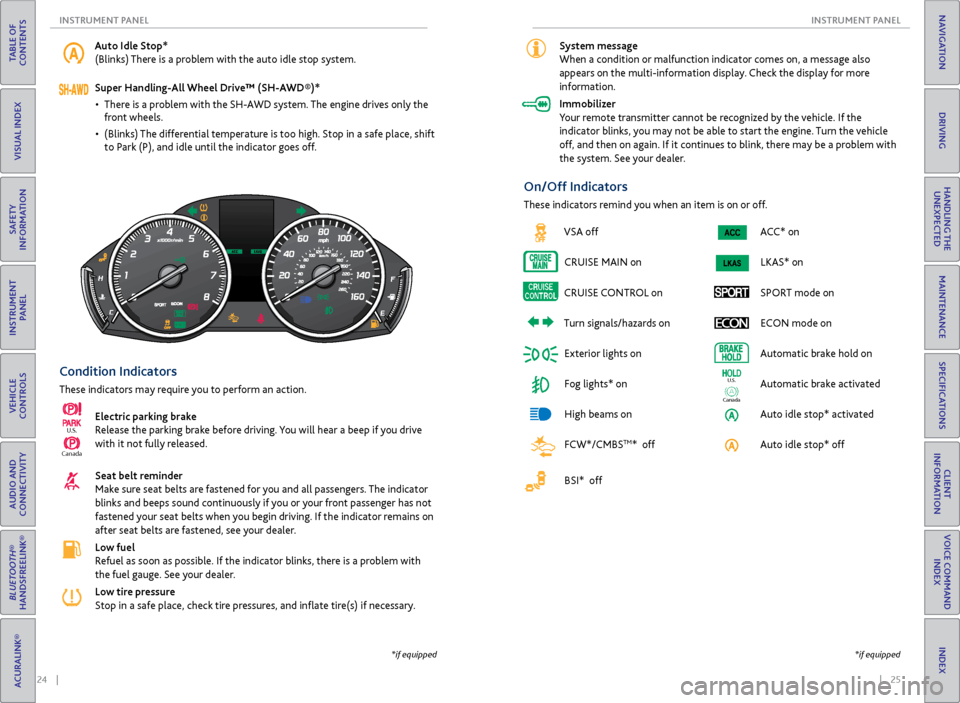
Condition Indicators
These indicators may require you to perform an action.
Electric parking brake
Release the parking brake before driving. You will hear a beep if you drive
with it not fully released.
Seat belt reminder
Make sure seat belts are fastened for you and all passengers. The indicator
blinks and beeps sound continuously if you or your front passenger has not
fastened your seat belts when you begin driving. If the indicator remains on
after seat belts are fastened, see your dealer.
Low fuel
Refuel as soon as possible. If the indicator blinks, there is a problem with
the fuel gauge. See your dealer.
Low tire pressure
Stop in a safe place, check tire pressures, and inflate tire(s) if necessary.
Canada
U.S.
*if equipped
Auto Idle Stop*
(Blinks) There is a problem with the auto idle stop system.
Super Handling-All Wheel Drive™ (SH-AWD®)*
• There is a problem with the SH-AWD system. The engine drives only the
front wheels.
• (Blinks) The differential temperature is too high. Stop in a safe place, shift
to Park (P), and idle until the indicator goes off.
ACC* onLKAS* on
SPORT mode on ECON mode on
Automatic brake hold on
Automatic brake activated
Auto idle stop* activated
Auto idle stop* off
Ca nada
U.S.
On/Off Indicators
These indicators remind you when an item is on or off.
*if equipped
System message
When a condition or malfunction indicator comes on, a message also
appears on the multi-information display. Check the display for more
information.
Immobilizer
Your remote transmitter cannot be recognized by the vehicle. If the
indicator blinks, you may not be able to start the engine. Turn the vehicle
off, and then on again. If it continues to blink, there may be a problem with
the system. See your dealer.
VSA off
CRUISE MAIN on
CRUISE CONTROL on
Turn signals/hazards on Exterior lights on
Fog lights* on
High beams on
FCW*/CMBS
TM* off
BSI* off
Page 17 of 75
26 || 27
VEHICLE CONTROLS
INSTRUMENT P ANEL
TABLE OF
CONTENTS
INDEX
VISUAL INDEX
VOICE COMMAND INDEX
SAFETY
INFORMATION
CLIENT
INFORMATION
INSTRUMENT PANEL
SPECIFICATIONS
VEHICLE
CONTROLS
MAINTENANCE
AUDIO AND
CONNECTIVITY
HANDLING THE UNEXPECTED
BLUETOOTH®
HANDSFREELINK®
DRIVING
ACURALINK®
NAVIGATION
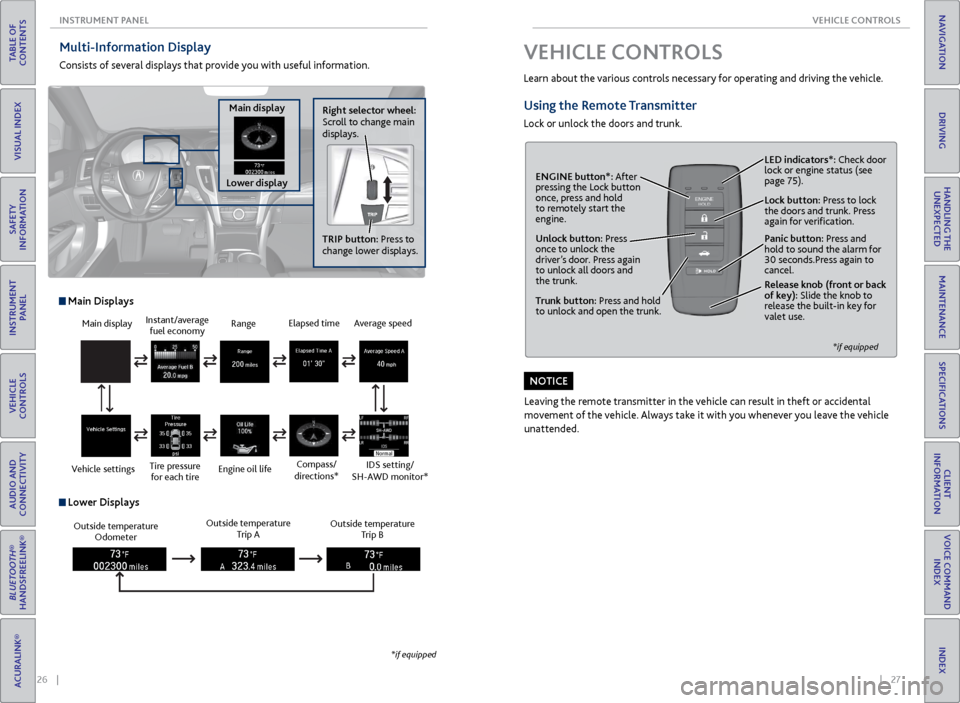
Multi-Information Display
Consists of several displays that provide you with useful information.
Right selector wheel:
Scroll to change main
displays.
Main display
Lower display TRIP button: Press to
change lower displays.
Main display
Vehicle settings Instant/average
fuel economy
Tire pressure for each tire Range
Engine oil life
Main Displays
Outside temperature Odometer Outside temperature
Trip A Outside temperature
Trip B
Lower Displays
Elapsed time
Compass/
directions*Average speed
IDS setting/
SH-AWD monitor*
*if equipped
VEHICLE CONTROLS
Learn about the various controls necessary for operating and driving the vehicle.
Using the Remote Transmitter
Lock or unlock the doors and trunk.
Unlock button: Press
once to unlock the
driver’s door. Press again
to unlock all doors and
the trunk.
Release knob (front or back
of key): Slide the knob to
release the built-in key for
valet use.
*if equipped
Trunk button: Press and hold
to unlock and open the trunk.Lock button: Press to lock
the doors and trunk. Press
again for verification. LED indicators*: Check door
lock or engine status (see
page 75).
Panic button: Press and
hold to sound the alarm for
30 seconds.Press again to
cancel.
ENGINE button*: After
pressing the Lock button
once, press and hold
to remotely start the
engine.
Leaving the remote transmitter in the vehicle can result in theft or accidental
movement of the vehicle. Always take it with you whenever you leave the vehicle
unattended.
NOTICE
Page 46 of 75

84 || 85
DRIVING
DRIVING
TABLE OF
CONTENTS
INDEX
VISUAL INDEX
VOICE COMMAND INDEX
SAFETY
INFORMATION
CLIENT
INFORMATION
INSTRUMENT PANEL
SPECIFICATIONS
VEHICLE
CONTROLS
MAINTENANCE
AUDIO AND
CONNECTIVITY
HANDLING THE UNEXPECTED
BLUETOOTH®
HANDSFREELINK®
DRIVING
ACURALINK®
NAVIGATION
Cruise Control
Maintain a constant vehicle speed without having to keep your foot on the
accelerator pedal. Use cruise control on freeways or open roads where you can
travel at a constant speed with little acceleration or deceleration.
Improper use of the cruise control can lead to a crash.
Use cruise control only when traveling on open highways in good weather.
WARNING
Setting the Vehicle Speed1. Press CRUISE. The CRUISE MAIN indicator
appears.
2. Accelerate to the desired speed (above 25
mph/40 km/h). Press SET/- and take your foot
off the pedal to set the speed. The CRUISE
CONTROL indicator appears.
Adjusting the Vehicle Speed
Press RES/+ to increase or SET/- to decrease speed.
Each time you press the button, the vehicle speed is
increased or decreased by about 1 mph (1.6 km/h).
If you keep the button pressed, the vehicle speed
increases or decreases until you release it.
Canceling Cruise ControlPress CANCEL, CRUISE, or the brake pedal. The
CRUISE CONTROL indicator goes off.
After cruise control has been canceled, you can still
resume the prior set speed by pressing RES/+ while
driving at a speed of at least 25 mph (40 km/h).
Press CRUISE to turn the system off.
CRUISE button
RES/+ button
SET/- button
CANCEL button
Integrated Dynamics System (IDS)
Choose a driving mode for your preference based on road conditions, vehicle speed,
and handling.
Vehicle Stability Assist (VSA®), aka Electronic Stability Control
(ESC) System
Helps to stabilize the vehicle during cornering if the vehicle turns more or less
than what was intended. It assists in maintaining traction on slippery surfaces by
regulating engine output and selectively applying the brakes.
Turning VSA On or OffVSA is turned on every time you turn on the vehicle. If you turn VSA off, your
vehicle has normal braking and cornering ability, but VSA traction and stability
enhancement become less effective.
Press and hold the VSA OFF button until you
hear a beep to turn VSA on or off. The VSA OFF
indicator appears when the system is off.
Traction control stops functioning, which
allows the wheels to spin more freely at low
speed. This can be helpful when trying to free
your vehicle if it is stuck in mud or snow.
VSA OFF
button VSA OFF indicator
The selected mode
briefly appears
in the multi-
information display.
Econ: Maximizes fuel economy.
Normal: Balances fuel economy and sportiness for everyday driving.
Sport: Enhances vehicle response and feel through decreased steering assist and
increased throttle response and SH-AWD* and Precision All Wheel Steer* control.
Sport+: Adds to Sport mode and allows increased performance when using paddle
shifters (see page 78 or 80).
Press IDS to
cycle through
modes.
*if equipped
Page 51 of 75

94 || 95
DRIVING
DRIVING
TABLE OF
CONTENTS
INDEX
VISUAL INDEX
VOICE COMMAND INDEX
SAFETY
INFORMATION
CLIENT
INFORMATION
INSTRUMENT PANEL
SPECIFICATIONS
VEHICLE
CONTROLS
MAINTENANCE
AUDIO AND
CONNECTIVITY
HANDLING THE UNEXPECTED
BLUETOOTH®
HANDSFREELINK®
DRIVING
ACURALINK®
NAVIGATION
Multi-View Rear Camera
When you shift into Reverse (R), a real-time image of the area behind your vehicle
is shown in the display, along with helpful parking guidelines.
The rear camera view is restricted. You cannot see the corner ends of the bumper or what is underneath
the bumper. Its unique lens also makes objects appear closer or farther than they actually are.
Visually confirm that it is safe to drive before backing up. Certain conditions (such as weather, lighting,
and high temperatures) may also restrict the rear view. Do not rely on the rearview display, which does
not give you all information about conditions at the rear of your vehicle.
Wide view Normal view Top down view
Changing Guidelines
1. Press SETTINGS.
2. Select Camera Settings.
3. Select Rear Camera.
4. Select one of the options.
Fixed Guideline: Guidelines appear when you
shift into Reverse. Select On or Off.
Dynamic Guideline: Guidelines move as you turn
the steering wheel. Select On or Off.
5. Press BACK to exit the menu.
Press the
interface dial
to toggle
between
views.
Parking Sensor System*
When the system senses an object when you are parking or backing up, an indicator
appears on the upper display and a series of beeps will sound. As you get closer to
the object, the beep rate increases.
Display indicators
Turning the System On or Off
Press the parking sensor button. A green
indicator light appears on the button when the
system is on.
Parking
sensor
button
*if equipped
When the gear is in D: The vehicle goes into sequential mode momentarily,
and the gear indicator comes on. When you start driving at a constant speed,
sequential mode automatically switches off, and the gear indicator goes off.
When the gear is in D (with SPORT+ mode): The vehicle goes into sequential
mode, and the M (sequential mode) indicator and gear indicator come on.
To cancel this mode, press the IDS button (see page 84) to select a different
mode. When sequential mode is canceled, the M indicator and gear indicator go
off.
Super Handling-All Wheel Drive (SH-AWD)*
Controls and transfers varying amounts of engine torque to each wheel depending
on driving conditions.
SH-AWD helps enhance stability in driving situations involving slippery surfaces,
such as on wet, icy, or snowy roads. The system does not help enhance braking. It is
still your responsibility to drive safely when you steer, accelerate, and apply brakes.
Leave sufficient distance in front of you when braking on slippery surfaces.
Avoid continuously driving on slippery surfaces where a wheel is likely to spin out,
and do not drive if the SH-AWD indicator starts blinking. Driving continuously
under such conditions can damage the system’s torque distribution unit.
NOTICE
Page 58 of 75

108 || 109
HANDLING THE UNEXPECTED
HANDLING THE UNEXPECTED
TABLE OF
CONTENTS
INDEX
VISUAL INDEX
VOICE COMMAND INDEX
SAFETY
INFORMATION
CLIENT
INFORMATION
INSTRUMENT PANEL
SPECIFICATIONS
VEHICLE
CONTROLS
MAINTENANCE
AUDIO AND
CONNECTIVITY
HANDLING THE UNEXPECTED
BLUETOOTH®
HANDSFREELINK®
DRIVING
ACURALINK®
NAVIGATION
Fuse Locations
If any electrical devices are not working, turn off the vehicle and check to see if any
applicable fuse is blown. Fuse locations are shown on the fuse box cover. Locate the
fuse by the fuse number and box cover number.
Engine Compartment Fuse Boxes
Located near the brake fluid reservoir. Push the tabs to open the box.
Circuit ProtectedAmps
1
EPS70 ASub Fuse Bo x*360 AABS/VSA Motor40 AABS/VSA FSR20 AMain Fa n*2, *330 AMain Fuse125 A
2
IG Mai n30 AF/B Mai n60 AF/B Main 260 AHeadlight Main30 AIG Main 230 AStarter Cut 140 AInjector*2, *320 ASub Fan*1
Rear Defroster40 AMain Fa n*130 ASub Fa n*2, *3
Wiper30 AHeater Motor40 A
*1: 4-cylinder model s*2: 6-cylinder models with 2W D*3: 6-cylinder models with AW D
3
Headlight Washer*2, *3(30 A)
Left Electric Parking Brake30 A
Right Electric Parking Brake30 A
SH-AWD*3
4
5
6
7
8S TRLD*1, *27.5 A
9Interior Lights*1, *25 A
10 Headlight Low/High Main 20 A
11Oil Level7.5 A
12 Front Fog*(7.5 A)
13Passenger’s Power Seat
Reclinin g20 A
14 Hazard 15 A
15IGP215 A
16 IG Coil 15 A
17Stop*1, *210 A
Circuit ProtectedAmps
Located near the washer fluid cap. Push the tabs to open the box.
Circuit Protecte dAmps
1Headlight Low Lef t7.5 A
2Headlight Low Right7.5 A
3Headlight High Right7.5 A
4H eadlight High Left 7.5 A
*if equipped
Driver’s Side Interior Fuse Boxes
Located under the dashboard.
Fuse label Fuse box
Circuit ProtectedAmps1A/C7.5
A2DRL7.5 A3ST Motor*(7.5 A)4
5Meter*17.5 AAuto Dimming Mirror*2
6SRS(7.5 A)7Option7.5 A8MISS SO L(15 A)9Fuel Pump20 A
10ABS/VSA*1(7.5 A)Smart*2
11Spare Fuse30 A
18
19Passenger’s Side Door
Unlock10 A
20Driver’s Side Rear Door
Unlock10 A
21Driver’s Side Door Lock(10 A)22Passenger’s Side Door Lock10 A23Driver’s Side Door Unlock(10 A)24SRS10 A25Instrument Panel Lights7.5 A26ACC Key Lock7.5 A
12Wiper7.5 A13ACG15 A
14Accessory Power Socket
(Console Compartment)20 A
15Driver’s Power Seat
Reclinin g20 A
16Moonroo f20 A17AVS/Seat Heaters20 A
Circuit ProtectedAmps
*1: 2WD models*2: AWD models
27Parking Lights7.5 A28Lumbar Suppor t10 A29Right DRL7.5 A30Washer20 A31SMART10 A
32Driver’s Side Power
Window20 A
33Passenger’s Side Power
Window20 A
34Rear Driver’s Side Power
Window20 A
35Rear Passenger’s Side
Power Window20 A
36Driver’s Power Seat Sliding20 A37ACCESSORY7.5 A3839Left DRL7.5 A
40Accessory Power Socket
(Center Pocket )20 A
41Rear Driver’s Side Door
Lock10 A
42Door Lock20 ARear Seat Heater*(15 A)Heated Steering Wheel*(10 A)
*2: AWD models
Circuit Protecte dAmpsA
B
CMeter*27.5 A
DB ack Up*210 AEStop*27.5 A
F Parking Lights*215 AGAudio ACC*27.5 A
Rear Seat Heater*2(15 A)AABS/VSA*27.5 A
BM ICU*27.5 AC
D
ESTRLD*27.5 A
FA udio*220 AGACM*27.5 A
Heated Steering Wheel*2(10 A)
*if equipped
Page 59 of 75

110 || 111
MAINTENANCE
HANDLING THE UNEXPECTED
TABLE OF
CONTENTS
INDEX
VISUAL INDEX
VOICE COMMAND INDEX
SAFETY
INFORMATION
CLIENT
INFORMATION
INSTRUMENT PANEL
SPECIFICATIONS
VEHICLE
CONTROLS
MAINTENANCE
AUDIO AND
CONNECTIVITY
HANDLING THE UNEXPECTED
BLUETOOTH®
HANDSFREELINK®
DRIVING
ACURALINK®
NAVIGATION
Learn about basic maintenance that you can perform on the vehicle yourself, as
well as information about how to best maintain the vehicle.
Safety Precautions
Some of the most important safety precautions are listed below; however,
we cannot warn you of every conceivable hazard that can arise in performing
maintenance. Only you can decide whether or not you should perform a given task.
Maintenance Safety
• To reduce the possibility of fire or explosion, keep cigarettes, sparks, and flames
away from the battery and all fuel-related parts.
• Never leave rags, towels, or other flammable objects under the hood.
• To clean parts, use a commercially available degreaser or parts cleaner, not
gasoline.
• Wear eye protection and protective clothing when working with the battery or
compressed air.
• Do not run the engine in confined spaces where carbon monoxide gas can
accumulate.
Vehicle Safety
• The vehicle must be in a stationary condition, and parked on level ground with
the parking brake set and the engine off.
• Be aware that hot parts can burn you.
• Be aware that moving parts can injure you.
• Do not open the hood during auto idle stop operation* (see page 83).
MAINTENANCE
Improperly maintaining this vehicle or failing to correct a problem before
driving can cause a crash in which you can be seriously hurt or killed.
Always follow the inspection and maintenance recommendations according to
the schedules in this guide.
WARNING
Failure to properly follow maintenance instructions and precautions can cause
you to be seriously hurt or killed.
Always follow the procedures and precautions in this guide.
WARNING
*if equipped
Inspecting and Changing Fuses
1. Turn off the vehicle, including the
headlights and all accessories.
2. Remove the fuse box cover.
3. Check the large fuse in the engine
compartment. If the fuse is blown, use a
Phillips-head screwdriver to remove the
screw and replace the fuse with a new one.
4. Inspect the small fuses in the engine
compartment and the vehicle interior. If
there is a burned out fuse, remove it with
the fuse puller and replace it with a new
one.
Replacing a fuse with one that has a higher rating greatly increases the chances
of damaging the electrical system.
NOTICE
Combined fuse Blown
fuse
Fuse puller
Located inside the driver’s side outer panel. Grasp the bottom edge of the panel
and pull to remove it.
Circuit protected and fuse ratin g
*1
: AWD models
Circuit Protecte dAmps
1P-AWS L(40 A)
2e-pretensioner Right*(20 A)
3e-pretensioner Left*(20 A)
4ACC Radar*(10 A)
5Idle Stop*1(30 A)
6P-AWS R(40 A)
7FR DE-ICE*(15 A)
8Idle Stop*1(30 A)
Fuse label
Fuse box
Outer panel
*if equipped
Page 69 of 75

130 || 131
CLIENT INFORMATION
SPECIFICATIONS
TABLE OF
CONTENTS
INDEX
VISUAL INDEX
VOICE COMMAND INDEX
SAFETY
INFORMATION
CLIENT
INFORMATION
INSTRUMENT PANEL
SPECIFICATIONS
VEHICLE
CONTROLS
MAINTENANCE
AUDIO AND
CONNECTIVITY
HANDLING THE UNEXPECTED
BLUETOOTH®
HANDSFREELINK®
DRIVING
ACURALINK®
NAVIGATION
Learn about information specific to you as an Acura client and how to get help.
Frequently Asked Questions/Troubleshooting
Below are some frequently asked questions and troubleshooting items that you
may have about the vehicle.
Q: How do I set the vehicle clock?
A: For vehicles without navigation, see page 40. For vehicles with navigation, the
time is automatically set using GPS signals.
Q: Why doesn’t the vehicle start when I press the ENGINE START/STOP button?
A: The brake pedal must be pressed to start the engine.
Q: What is the AUTO setting on my headlight lever?
A: When in the AUTO position, the vehicle’s exterior lights will automatically turn
on or off depending on the ambient lighting.
Q: Why won’t the driver’s door unlock when I grab the door handle, even though the
keyless access remote is within range?
A: If you pull the handle too quickly, the system may not have time to confirm the
door is unlocked. Wait to hear a beep to confirm the door is unlocked. If you are
wearing gloves, the system may be slow to respond.
Q: After my battery was disconnected or went dead, the audio system is asking for a
code. Where do I find this?
A: In most cases, you do not need to enter a code. Turn on the vehicle and the audio
system, and press and hold the power button until the system reactivates.
Q: Why can’t I select an item using the interface dial?*
A: To prevent driver distraction, certain items are limited are inoperable while the
vehicle is moving. Use voice commands or pull over to select the items.
Q: Where can I find the vehicle identification number (VIN)?
A: Check the label on the driver’s doorjamb.
Q: Why can’t I operate Pandora through the audio system?
A: Audio may be streaming through Bluetooth® Audio. Make sure Pandora mode
is selected and the phone cable is properly connected to the USB adapter. Some
phones may prompt you to “Allow” a connection.
CLIENT INFORMATION
*if equipped
Vehicle
Engine and Fuel
Light Bulbs
Fluids
Tires
*1: 2WD models
*2: AWD models
ModelAcura TL XNo. of Passengers:
Front
Rear
Total
Weights:Gross Vehicle Weight
Rating U.S.: 4,586 lbs (2,080 kg)*1U.S.: 4,751 lbs (2,155 kg)*2Canada: 2,095 kg*1Canada: 2,170 kg*2Gross Axle Weight
Rating (Front )U.S.: 2,535 lbs (1,150 kg)*1U.S.: 2,579 lbs (1,170 kg)*2Canada: 1,165 kg*1Canada: 1,180 kg*2Gross Axle Weight
Rating (Rear)U.S.: 2,072 lbs (940 kg)*1U.S.: 2,194 lbs (995 kg)*2Canada: 945 kg*1Canada: 1,005 kg*2Air Conditioning:
Refrigerant Type HFC-134a (R-134a)
Charge Quantity 16.7 – 18.5 oz (475 – 525 g)
Lubricant Type ND-OIL 8
2
3
5
Headlights (High/Low Beam )LEDFog Lights*LEDFront Turn Signal Lights
Front Side Marker/Parking Lights LEDSide Turn Signal Lights
(on Door Mirrors)LE D
Brake/Taillights/Rear Side Marker
Light s LE
D
Brake/TaillightsLED
Back-Up Lights
Rear Turn Signal Lights21 W
High-M ount Brake Ligh t
Rear License Plate LightsLED
Puddle Lights * LED
In terior Light s
Front and Rear Map Lights LED
Front and Rear Ambient Lights LED
Vanity Mirror Lights 1.4 W
Center Pocket Light LED
Door Courtesy Light s3.4 W
Console Compartment Light 1.4 W
Glove Box Ligh t1 .4 W
Door Inner Handle Lights LED
Trunk Lights 5 W
21 W
LE D
24
W
(PWY 24 W Amber/Silver)
Brake Flui d
Automatic Transmission Flui dSpecifedAcura Heavy Duty B\krake \fluid DOT \b
SpecifedAcura Automatic Tra\knsmission \flui d
AT\f-TYPE \b. 0
Capacity Change \b.5 US qt (\b.\b)
Engine Oil
Engine Coolan t
Recommended·Genuine Acura Mot\kor Oil 0W-2 0·API Premium-grade\k 0W-20 detergent o\ki l
Capacity Change
4.2 US qt (4.0 )
Change
including
flter 4.5 US qt (4.\b
)
SpecifedAcura Long Life An\ktifreeze/Coolant Ty\kpe2
Ratio 50/50 with distill\ked wate r
Capacity2.2 US gal (8.4 )\k
(change including \kthe remaining
0.19 US gal (0.72 \k) in the reserve \ktank )
Washer Fluid
Tank CapacityU.S.: 2.6 US qt (2\k.5 )
Canada: 5.7 US qt \k(5.4 )
Rear Differential Flui d*
Transfer Assembly Flui d*
SpecifedAcura DPS\f-II
Capacity Change 1.97 US qt (1.86 \k)
Specifed·Acura Hypoid Gear\k Oil HGO-1
·Hypoid gear oil S\kAE 75W-85 or SAE 9 0
(API grade GL4 or \kGL5)
Capacity Change 0.45 US qt (0.4\b )
Engine
Fuel
Displacement212 cu-in (3,471 cm3)
Spark Plugs NGKD ILZKR7B11G
TypeUnleaded premium gasoline, Pump
octane number of 91 or higher
Fuel Tank Capacity 17.2 US gal (65 )
*1:Vehicles with optional spare tire kit
RegularSize225/50R 18 95HPressure
psi (kPa [kgf/cm2])32 (220 [2.2])
Compact
Spar e*1SizeT135/80D17 103M
Pressure
psi (kPa [kgf/cm
2]) 60
(420 [4.2])
Wheel SizeRegular18 x 7 1/2 JCompact Spar e*117 x 4T
*if equipped
6-cylinder models