2015 Acura RLX homelink
[x] Cancel search: homelinkPage 3 of 521

ContentsThis owner’s manual should be considered a permanent part of the
vehicle and should remain with the vehicle when it is sold.
This owner’s manual covers all models of your vehicle. You may find
descriptions of equipment and features that are not on your
particular model.
Images throughout this owner’s manual (including the front cover)
represent features and equipment that are available on some, but
not all, models. Your particular model may not have some of these
features.
This owner’s manual is for vehicles sold in the United States and
Canada.
The information and specifications included in this publication were
in effect at the time of approval for printing. Honda Motor Co., Ltd.
reserves the right, however, to discontinue or change specifications
or design at any time without notice and without incurring any
obligation.
2Safe Driving P. 25For Safe Driving P. 26 Seat Belts P. 30 Airbags P. 372Instrument Panel P. 67Indicators P. 68 Gauges and Multi-Information Display P. 942Controls P. 113Setting the Clock P. 114 Locking and Unlocking the Doors P. 115
Opening and Closing the Moonroof P. 132
Adjusting the Seats P. 1522Features P. 187Audio System P. 188 Audio System Basic Operation P. 193
Customized Features P. 263 HomeLink® Universal Transceiver P. 2842 Driving P. 333Before Driving P. 334 Towing a Trailer P. 339
Multi-View Rear Camera P. 403 Refueling P. 4042Maintenance P. 409Before Performing Maintenance P. 410 Maintenance Minder
TM P. 413
Checking and Maintaining Wiper Blades P. 436
Climate Control System Maintenance P. 450
2 Handling the Unexpected P. 455Tools P. 456 If a Tire Goes Flat P. 457
Overheating P. 481 Indicator, Coming On/Blinking P. 483
When You Cannot Open the Trunk P. 4942 Information P. 497Specifications P. 498 Identification Numbers P. 500
Emissions Testing P. 503 Warranty Coverages P. 505
Page 188 of 521
187
Features
This chapter describes how to operate technology features.
Audio SystemAbout Your Audio System ................ 188
USB Port .......................................... 189
Auxiliary Input Jack .......................... 190
Audio System Theft Protection ......... 191
Audio Remote Controls .................... 192
Audio System Basic Operation ........ 193
On Demand Multi-Use Display
TM....... 194
Audio/Information Screen ................ 202
Adjusting the Sound ........................ 206
Display Setup ................................... 207
Voice Control Operation .................. 208
Playing AM/FM Radio ....................... 216 Playing SiriusXM
® Radio ................... 221
Playing a CD .................................... 224
Playing Hard Disc Drive (HDD) Audio .... 227Playing an iPod ................................ 237
Song By Voice
TM (SBV) ...................... 241
Playing Internet Radio ...................... 245
Playing a USB Flash Drive ................. 248
Playing Bluetooth ® Audio................. 251
Audio Error Messages CD Player ......................................... 253
Hard Disc Drive (HDD) Audio ............ 254
iPod/USB Flash Drive ........................ 255
Pandora ®......................................... 256
Aha
TM Radio ..................................... 258
General Information on the Audio SystemSiriusXM ® Radio Service ................... 259
Recommended CDs ......................... 260Compatible iPod, iPhone, and USB Flash Drives ................................................262Customized Features
............................263
Defaulting All the Settings........................ 282
Deleting all HDD Data .............................. 283HomeLink
® Universal Transceiver
.......284
Bluetooth® HandsFreeLink ®
Using HFL ........................................ 286
HFL Menus ...................................... 288AcuraLink
®*...........................................326
* Not available on all models
Page 285 of 521
284Features
HomeLink® Universal TransceiverThe HomeLink ® Universal Transceiver can be programmed to operate up to three
remote controlled devices around your home, such as garage doors, lighting, or
home security systems.
Refer to the safety information that come with your garage door opener to test that
the safety features are functioning properly. If you do not have the safety
information, contact the manufacturer.
Before programming HomeLink, make sure that people and objects are out of the
way of the garage or gate to prevent potential injury or damage.
When programming a garage door opener, park just outside the garage door’s
path.Training HomeLink
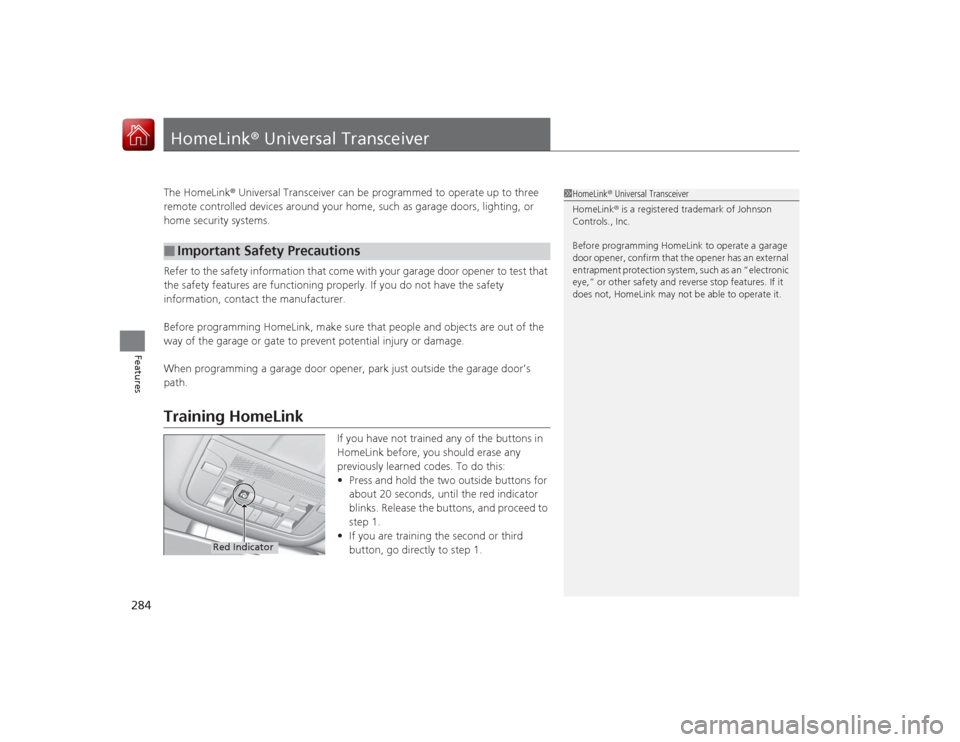
If you have not trained any of the buttons in
HomeLink before, you should erase any
previously learned codes. To do this:
• Press and hold the two outside buttons for
about 20 seconds, until the red indicator
blinks. Release the buttons, and proceed to
step 1.
• If you are training the second or third
button, go directly to step 1.
■
Important Safety Precautions
1HomeLink ® Universal Transceiver
HomeLink® is a registered trademark of Johnson
Controls., Inc.
Before programming HomeLink to operate a garage
door opener, confirm that the opener has an external
entrapment protection system, such as an “electronic
eye,” or other safety and reverse stop features. If it
does not, HomeLink may not be able to operate it.
Red Indicator
Page 286 of 521
285
uuHomeLink ® Universal Transceiver uTraining HomeLink
Features
■
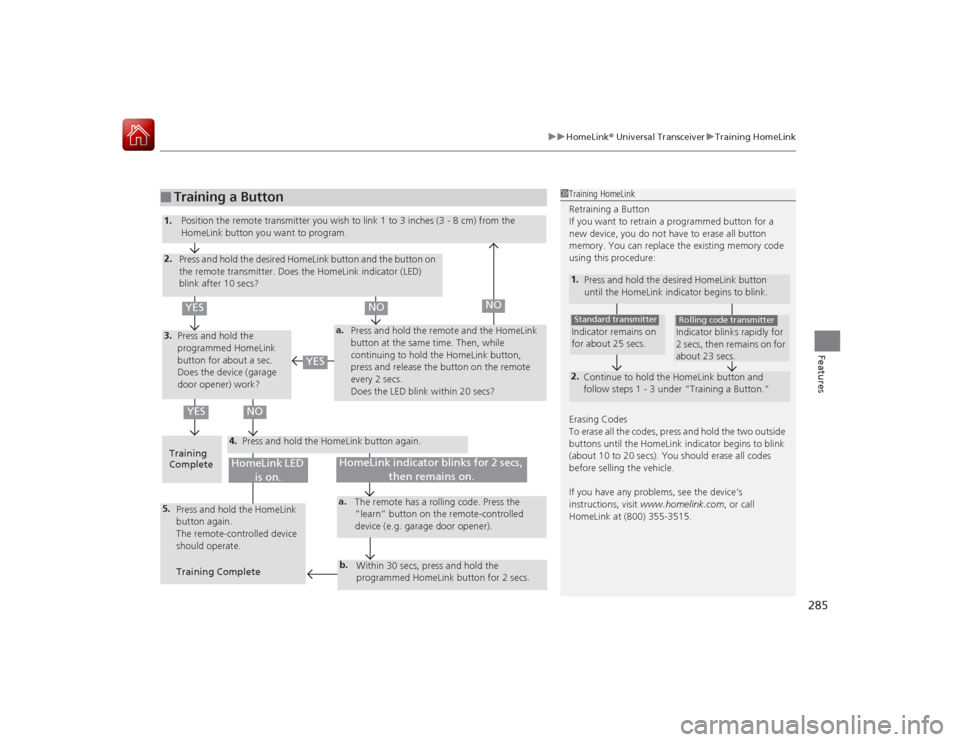
Training a Button
1Training HomeLink
Retraining a Button
If you want to retrain a programmed button for a
new device, you do not have to erase all button
memory. You can replace the existing memory code
using this procedure:1.
Press and hold the desired HomeLink button
until the HomeLink indicator begins to blink.2.
Continue to hold the HomeLink button and
follow steps 1 - 3 under “Training a Button.”Indicator remains on
for about 25 secs.Standard transmitter
Indicator blinks rapidly for
2 secs, then remains on for
about 23 secs.Rolling code transmitter
Erasing Codes
To erase all the codes, press and hold the two outside
buttons until the HomeLink indicator begins to blink
(about 10 to 20 secs). You should erase all codes
before selling the vehicle.
If you have any problems, see the device’s
instructions, visit www.homelink.com , or call
HomeLink at (800) 355-3515.
4.
a.
3.2.5.
a.b.
1. Position the remote transmit ter you wish to link 1 to 3 inches (3 - 8 cm) from the
HomeLink button you want to program.
Press and hold the desired HomeLink button and the button on
the remote transmitter. Does the HomeLink indicator (LED)
blink after 10 secs?
Press and hold the
programmed HomeLink
button for about a sec.
Does the device (garage
door opener) work? Press and hold the remote and the HomeLink
button at the same time. Then, while
continuing to hold the HomeLink button,
press and release the button on the remote
every 2 secs.
Does the LED blink within 20 secs?
Training
Complete Press and hold the HomeLink button again.
Press and hold the HomeLink
button again.
The remote-controlled device
should operate.
Training Complete The remote has a rolling code. Press the
“learn” button on the remote-controlled
device (e.g. garage door opener).
Within 30 secs, press and hold the
programmed HomeLink button for 2 secs.
HomeLink indicator blinks for 2 secs, then remains on.
HomeLink LED is on.
YES
NO
YES
YES
NO
NO
Page 502 of 521

501Information
Devices that Emit Radio WavesThe following products and systems on your vehicle emit radio waves when in operation.Each of the above complies with the appropriate requirements or the required standards of FCC
(Federal Communications Commission) and Industry Canada Standard, described below:As required by the FCC:
This device complies with Part 15 of the FCC rules. Operation is
subject to the following two conditions: (1) This device may not
cause harmful interference, and (2) this device must accept any
interference received, including interference that may cause
undesired operation.
Changes or modifications not expressly approved by the party
responsible for compliance could void the user’s authority to
operate the equipment.This device complies with industry Canada Standard RSS-Gen/210/310. Operation is
subject to the following two conditions: (1) this device may not cause interference,
and (2) this device must accept any interference, including interference that may
cause undesired operation of the device.AcuraLinkAudio SystemBlind Spot Information SystemBluetooth ® AudioBluetooth® HandsFreeLink ®Collision Mitigation Braking System
TM
HomeLink® Universal TransceiverImmobilizer SystemKeyless Access SystemTire Pressure Monitoring System (TPMS)
Page 516 of 521

515Index
Low Fuel Indicator..................................... 73
Range ..................................................... 100
Recommendation............................ 404, 498
Refueling ................................................ 404
Fuel Economy ........................................... 406
Fuel Fill Door ...................................... 18, 405
Fuses ......................................................... 487
Inspecting and Changing ........................ 491
Locations ................................ 487, 489, 490GGasoline (Fuel)
Economy................................................. 406
Gauge ...................................................... 94
Information............................................. 404
Instant Fuel Economy .............................. 100
Low Fuel Indicator..................................... 73
Refueling ................................................ 404
Gauges ........................................................ 94
Gear Shift Lever Positions
Automatic Transmission .......................... 345
Glass (care) ............................................... 454
Glove Box ................................................. 161HHandling the Unexpected ....................... 455
HandsFreeLink ® (HFL) .............................. 286
Auto Answer .......................................... 301 Automatic Import of Cellular Phonebook and
Call History ............................................ 303
Automatic Transferring ............................ 301
Displaying Messages ................................ 321
Editing User Name ................................... 300
HFL Buttons ............................................. 286
HFL Menus .............................................. 288
HFL Status Display ................................... 287
Limitations for Manual Operation ............ 287
Making a Call .......................................... 312
Options During a Call .............................. 318
Phone Setup ............................................ 292
Phonebook Phonetic Modification ........... 307
Receiving a Call ....................................... 317
Receiving a Text Message/E-mail .............. 319
Ring Tone ................................................ 302
Roadside Assistance ................................. 325
Selecting a Mail Account ......................... 320
Speed Dial ............................................... 304
To Create a Security PIN .......................... 299
To Set Up a Text/E-mail Message Options ................................................. 297
Use Contact Photo .................................. 302
Hard Disc Drive (HDD) Audio ................... 227
Hazard Warning Button ............................... 4
Head Restraints ......................................... 155
Headlight Washers ................................... 143
Headlights ................................................. 137
Aiming .................................................... 430
Automatic Operation ............................... 138
Dimming ......................................... 137, 140 Operating................................................ 137
Heated Steering Wheel ............................ 171
Heaters (Seat) ........................... 172, 173, 174
HFL (HandsFreeLink ®)............................... 286
High-Beam Indicator .................................. 77
Hill Start Assist System ............................. 342
HomeLink ® Universal Transceiver ............ 284
IIdentification Numbers ............................ 500
Engine and Transmission ......................... 500
Vehicle Identification ............................... 500
Illumination Control Buttons ................................................... 144
Immobilizer System .................................. 128
Indicator.................................................... 77
Indicators .................................................... 68
Adaptive Cruise Control (ACC) with Low Speed Follow (LSF) ..................................... 81, 353
Anti-lock Brake System (ABS)..................... 74
Automatic Brake Hold ....................... 70, 388
Automatic Brake Hold System ........... 69, 388
Blind Spot Information (BSI) ............... 83, 380
Brake System (Amber) ............................... 70
Brake System (Red) ............................ 68, 484
Charging System ............................... 71, 483
Collision Mitigation Brake System
TM
(CMBS
TM) ................................................. 83
CRUISE CONTROL ............................. 78, 351
CRUISE MAIN .................................... 78, 350