Page 252 of 521
251
uuAudio System Basic Operation uPlaying Bluetooth ® Audio
Continued
Features
Playing Bluetooth ® AudioYour audio system allows you to listen to music from your Bluetooth®-compatible
phone.
This function is available when the phone is paired and connected to the vehicle’s
Bluetooth ® HandsFreeLink ® (HFL) system.2Phone Setup P. 292
1Playing Bluetooth ® Audio
Not all Bluetooth -enabled phones with streaming
audio capabilities are compatible with the system.
For a list of compatible phones:•U.S.: Visit www.acura.com/handsfreelink , or call 1-
888-528-7876.•Canada: Visit www.handsfreelink.ca , or call 1-888-
528-7876.
In some states, it may be illegal to perform some data
device functions while driving.
If more than one phone is paired to the HFL system,
there will be a delay before the system begins to play.
You can control Bluetooth® Audio using voice
commands.
2 Voice Control Operation P. 208
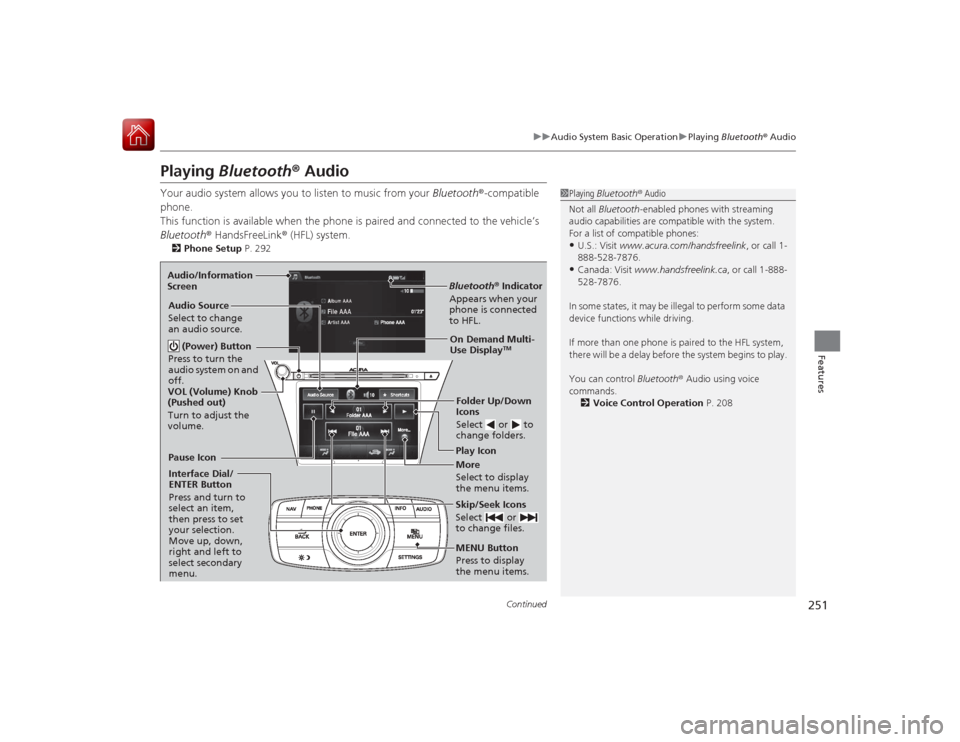
Bluetooth® Indicator
Appears when your
phone is connected
to HFL.Play Icon
Pause Icon
More
Select to display
the menu items.
Audio Source
Select to change
an audio source.
(Power) Button
Press to turn the
audio system on and
off.Interface Dial/
ENTER Button
Press and turn to
select an item,
then press to set
your selection.
Move up, down,
right and left to
select secondary
menu.
Skip/Seek Icons
Select or
to change files.MENU Button
Press to display
the menu items. Folder Up/Down
Icons
Select or to
change folders.On Demand Multi-
Use Display
TM
VOL (Volume) Knob
(Pushed out)
Turn to adjust the
volume.
Audio/Information
Screen
Page 253 of 521
uuAudio System Basic Operation uPlaying Bluetooth ® Audio
252Features
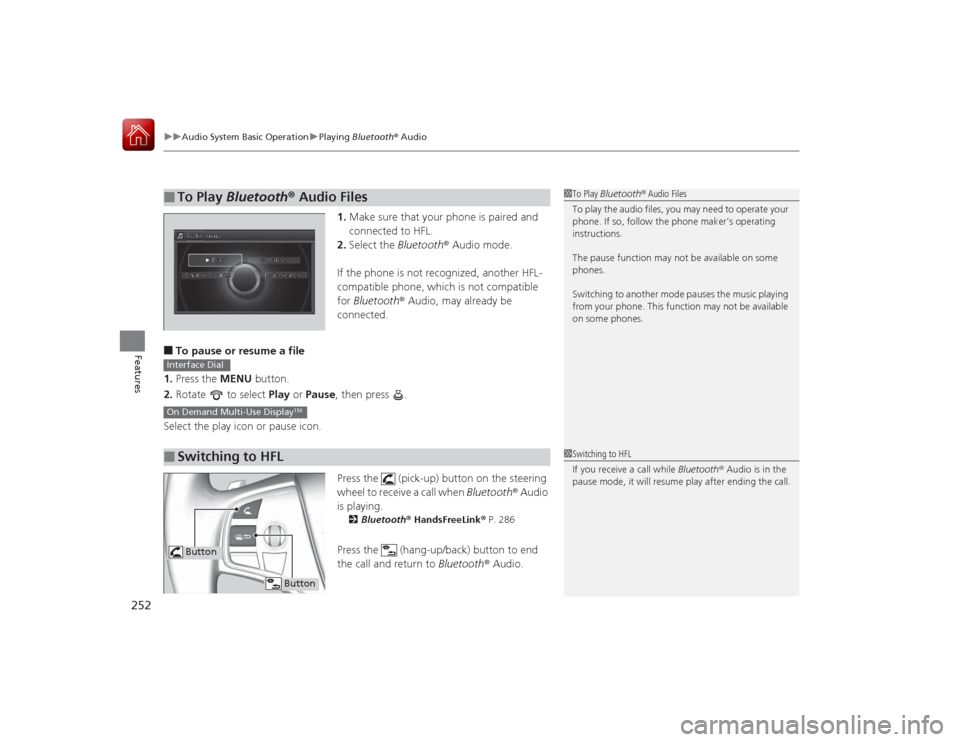
1. Make sure that your phone is paired and
connected to HFL.
2. Select the Bluetooth® Audio mode.
If the phone is not recognized, another HFL-
compatible phone, which is not compatible
for Bluetooth ® Audio, may already be
connected.
■To pause or resume a file
1. Press the MENU button.
2. Rotate to select Play or Pause , then press .
Select the play icon or pause icon.
Press the (pick-up) button on the steering
wheel to receive a call when Bluetooth® Audio
is playing.
2 Bluetooth ® HandsFreeLink ® P. 286Press the (hang-up/back) button to end
the call and return to Bluetooth® Audio.
■
To Play Bluetooth® Audio Files
1To Play Bluetooth ® Audio Files
To play the audio files, you may need to operate your
phone. If so, follow the phone maker’s operating
instructions.
The pause function may not be available on some
phones.
Switching to another mode pauses the music playing
from your phone. This function may not be available
on some phones.
■
Switching to HFLInterface DialOn Demand Multi-Use Display
TM
1 Switching to HFL
If you receive a call while Bluetooth® Audio is in the
pause mode, it will resume play after ending the call.
Button
Button
Page 258 of 521
257
uuAudio Error Messages uPandora ®
Features
Error Message
Solution
Unable to save rating.
Unable to save bookmark
or
Unable to skip
Appears when the commanded operation is failed. Try again later.
No data
Appears when no data is available with Pandora ® activated.
Reboot the app and reconnect the device.
PANDORA Unsupported
Appears when Pandora® version is not supported. Update
Pandora ® to the latest version.
PANDORA system maintenance
Appears when the Pandora ® server is in maintenance. Try again
later.
Cannot connect to PANDORA. When stopped, make sure
PANDORA is running on the phone. For iPhone, set
connection priority to USB and reconnect.
Appears when Pandora® is unable to play music. Check your
device.
Page 259 of 521
258
uuAudio Error Messages uAha
TM Radio
Features
Aha
TM
Radio
If an error occurs while playing Aha
TM Radio, you may see the following error
messages.
If you cannot clear the error message, contact a dealer.
Error Message
Solution
Cannot connect to aha. When stopped, make sure aha is
running on the phone. Fo r iPhone, set connection priority to
USB and reconnect.
Appears when the Aha
TM app is not activated. Check your device.
Incompatible USB Device
Please Check Owner’s Manual
Appears when an incompatible device is c onnected. Disconnect
the device. Then turn the audio system off, and turn it on again.
Do not reconnect the device that caused the error.
U.S. models
Page 263 of 521
262
uuGeneral Information on the Audio System uCompatible iPod, iPhone, and USB Flash Drives
Features
Compatible iPod, iPhone, and USB Flash Drives•Use a recommended USB flash drive of 256 MB or higher.
• Some digital audio players may not be compatible.
• Some USB flash drives (e.g., a device with security lockout) may not work.
• Some software files may not allow for audio play or text data display.
• Some versions of MP3, WMA, or AAC formats may be unsupported.■
iPod and iPhone Model Compatibility
Model
iPod (5th generation)
iPod classic 80GB/160GB (launch in 2007)
iPod classic 120GB (launch in 2008)iPod classic 160GB (launch in 2009)
iPod nano (1st to 7th generation) launch in 2012iPod touch (1st to 5th generation) launch in 2012iPhone 3G/iPhone 3GS/iPhone 4/iPhone 4S/iPhone 5
■
USB Flash Drives
1iPod and iPhone Model Compatibility
This system may not work with all software versions
of these devices.1USB Flash Drives
Files on the USB flash drive are played in their stored
order. This order may be different from the order
displayed on your PC or device.
Page 265 of 521
264
uuCustomized Features u
Features
■Customization flow
Song by Voice
Song by Voice Phonetic ModificationPhonebook Phonetic Modification
Press the SETTINGS button.
Volume
Voice Prompt
Message Auto Reading
Volume
Interface Dial Feedback
Verbal Reminder
BrightnessContrastBlack Level
Bluetooth StatusBluetooth Device ListEdit Pairing Code
Default
Sound/BeepDisplay
System
Settings
Bluetooth
Voice
Recognition
Sync Display Brightness
Sound Volume
Opening
Page 269 of 521
268
uuCustomized Features u
Features
Add Bluetooth
DeviceDisconnect
Default
Phone
Connect Phone
Edit Bluetooth DeviceAdd Bluetooth Device
Bluetooth Device
List
Edit Speed DialAuto TransferAuto AnswerRing Tone
Automatic Phone SyncUse Contact Photo
Default
Default
Enable Text/EmailSelect Account
New Text/Email Alert
Text/Email
Phone
Settings
Page 271 of 521

270
uuCustomized Features u
Features
■List of customizable options
*1:Default Setting Setup
Group Customizable Features Description Selectable SettingsSystem
Settings
Display
Sync Display Brightness
Selects whether the display brightness synchronizes
with the instrument panel brightness.
On
*1/
Off
Brightness
Changes the brightness of the audio/information
screen.
—
Contrast
Changes the contrast of the audio/information screen.
—
Black Level
Changes the black level of the audio/information
screen.
—
Sound/
Beep
Volume
Changes the volume of the audio speakers.
—
Interface Dial Feedback
Sets if and when the system reads aloud a
selection made using the Interface Dial.
On
*1/Off /Auto
Message Auto Reading
Selects whether the system automatically reads
out messages, and, if selected, whether only
when driving.
On /Off /Auto
*1
Verbal Reminder
Turns the verbal reminders on and off.
On
*1/Off
Blue-
tooth
Bluetooth Status
Turns the Bluetooth ® on and off.
On
*1/Off
Bluetooth Device List
Pairs a new phone to HFL, edits and deletes a
paired phone, and creates a security PIN.
2 Phone Setup P. 292
—
Edit Pairing Code
Changes a pairing code.
2To change the pairing code setting P. 294
Random/Fixed
*1


