Page 170 of 521
Continued
169
uuInterior Lights/Interior Convenience Items uInterior Convenience Items
Controls
The cargo hooks in the trunk can be used to
install a net for securing items.
■
Cargo Hooks
1Cargo Hooks
Distribute cargo evenly on the floor of the trunk,
placing the heaviest items on the bottom and as far
forward as possible.
2 Maximum Load Limit P. 337
HookHook
Page 263 of 521
262
uuGeneral Information on the Audio System uCompatible iPod, iPhone, and USB Flash Drives
Features
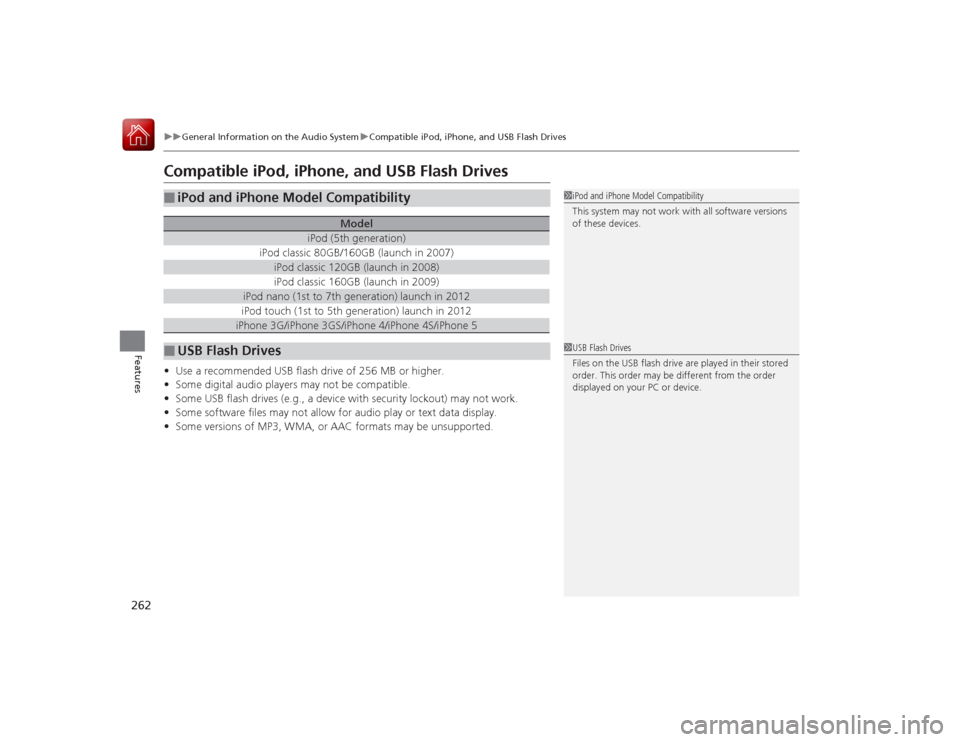
Compatible iPod, iPhone, and USB Flash Drives•Use a recommended USB flash drive of 256 MB or higher.
• Some digital audio players may not be compatible.
• Some USB flash drives (e.g., a device with security lockout) may not work.
• Some software files may not allow for audio play or text data display.
• Some versions of MP3, WMA, or AAC formats may be unsupported.■
iPod and iPhone Model Compatibility
Model
iPod (5th generation)
iPod classic 80GB/160GB (launch in 2007)
iPod classic 120GB (launch in 2008)iPod classic 160GB (launch in 2009)
iPod nano (1st to 7th generation) launch in 2012iPod touch (1st to 5th generation) launch in 2012iPhone 3G/iPhone 3GS/iPhone 4/iPhone 4S/iPhone 5
■
USB Flash Drives
1iPod and iPhone Model Compatibility
This system may not work with all software versions
of these devices.1USB Flash Drives
Files on the USB flash drive are played in their stored
order. This order may be different from the order
displayed on your PC or device.
Page 267 of 521
266
uuCustomized Features u
Features
“Trip A” Reset Timing“Trip B” Reset Timing
Language Selection
Adjust Outside Temp. Display
Forward Collision Warning DistanceACC Forward Vehicle Detect Beep
*
ACC Display Speed Unit
*
Turn by Turn Display
*
Default
Memory Position Link
Door Unlock Mode
Keyless Access Light Flash
Interior Light Dimming TimeHeadlight Auto Off TimerAuto Light Sensitivity
Key And Remote Unlock ModeKeyless Lock Answer BackSecurity Relock Timer
Auto Door LockAuto Door Unlock
Vehicle
Settings
Meter
SetupDriver Assist
System SetupKeyless Access SetupLighting
SetupDoor
Setup
Keyless Access Beep
Lane Keeping Assist Suspend Beep
*
Blind Spot Info
*
Auto Tilt & TelescopicAuto Seatbelt Tension
*
Auto Folding Door Mirror
*
Driving
Position
Setup
* Not available on all models
Page 271 of 521

270
uuCustomized Features u
Features
■List of customizable options
*1:Default Setting Setup
Group Customizable Features Description Selectable SettingsSystem
Settings
Display
Sync Display Brightness
Selects whether the display brightness synchronizes
with the instrument panel brightness.
On
*1/
Off
Brightness
Changes the brightness of the audio/information
screen.
—
Contrast
Changes the contrast of the audio/information screen.
—
Black Level
Changes the black level of the audio/information
screen.
—
Sound/
Beep
Volume
Changes the volume of the audio speakers.
—
Interface Dial Feedback
Sets if and when the system reads aloud a
selection made using the Interface Dial.
On
*1/Off /Auto
Message Auto Reading
Selects whether the system automatically reads
out messages, and, if selected, whether only
when driving.
On /Off /Auto
*1
Verbal Reminder
Turns the verbal reminders on and off.
On
*1/Off
Blue-
tooth
Bluetooth Status
Turns the Bluetooth ® on and off.
On
*1/Off
Bluetooth Device List
Pairs a new phone to HFL, edits and deletes a
paired phone, and creates a security PIN.
2 Phone Setup P. 292
—
Edit Pairing Code
Changes a pairing code.
2To change the pairing code setting P. 294
Random/Fixed
*1
Page 277 of 521

276
uuCustomized Features u
Features
*1:Default SettingSetup
Group Customizable Features Description Selectable Settings
Vehicle
Settings Door
SetupAuto Door Lock
Changes the setting for the automatic locking
feature. With Vehicle Speed
*1/
Shift from P/ Off
Auto Door Unlock Changes the setting for when the doors unlock
automatically. All Doors When
Driver’s Door Opens*1/
All Doors When
Shifted to Park /All
Doors When Ignition
Switched Off /Off
Key And Remote Unlock
Mode Sets up either the driver’s door or all doors to
unlock on the first push of the remote. Driver Door
*1/
All
Doors
Keyless Lock Answer Back LOCK/UNLOCK- The exterior lights flash.
LOCK (2nd push)- The beeper sounds. On
*1/
Off
Security Relock Timer Changes the time it takes for the doors to relock
and the security system to set after you unlock
the vehicle without opening any door. 90seconds/
60seconds/
30seconds
*1
Auto Folding Door Mirror
*
Changes how you can fold the door mirrors.
Auto Fold With
Keyless
*1/Manual Only
Wiper
SetupWiper Action
*
Changes the setting for the automatic
intermittent wipers in the
AUTO position. Rain Sensing
*1/
Intermittent /Speed
Sensitive
Front Wiper Action
*
Changes the setting for the wipers in the INT
position. Speed Sensitive
*1/
Intermittent
* Not available on all models
Page 280 of 521
279
uuCustomized Features u
Continued
Features
*1:Default SettingSetup
Group Customizable Features Description Selectable Settings
Audio
Settings Recording Quality
Selects the quality of the music files recorded to
the HDD.
Standard
*1/
High
HDD Info Displays the HDD capacity. —
Update Gracenote Album Info Updates the Gracenote
® Album Info (Gracenote ®
Media Database) from CD or from USB. Update by CD
*1/
Update by USB
Delete all HDD Data
2 Deleting all HDD Data P. 283
—
Default Cancels/Resets all customized items in the
Audio
Settings group as default. Default
/OK
Phone
Settings
Phone
Connect Phone
Pairs a new phone to HFL, or connects or
disconnects a paired phone.
2 Phone Setup P. 292
—
Bluetooth Device List
Pairs a new phone to HFL, edits or deletes a
paired phone, or creates a security PIN.
2Phone Setup P. 292
—
Edit Speed Dial
Edits, adds or deletes a speed dial entry.
2Phone Setup P. 292
—
CD modeHDD modeCD or HDD modeHDD mode
Page 285 of 521
284Features
HomeLink® Universal TransceiverThe HomeLink ® Universal Transceiver can be programmed to operate up to three
remote controlled devices around your home, such as garage doors, lighting, or
home security systems.
Refer to the safety information that come with your garage door opener to test that
the safety features are functioning properly. If you do not have the safety
information, contact the manufacturer.
Before programming HomeLink, make sure that people and objects are out of the
way of the garage or gate to prevent potential injury or damage.
When programming a garage door opener, park just outside the garage door’s
path.Training HomeLink
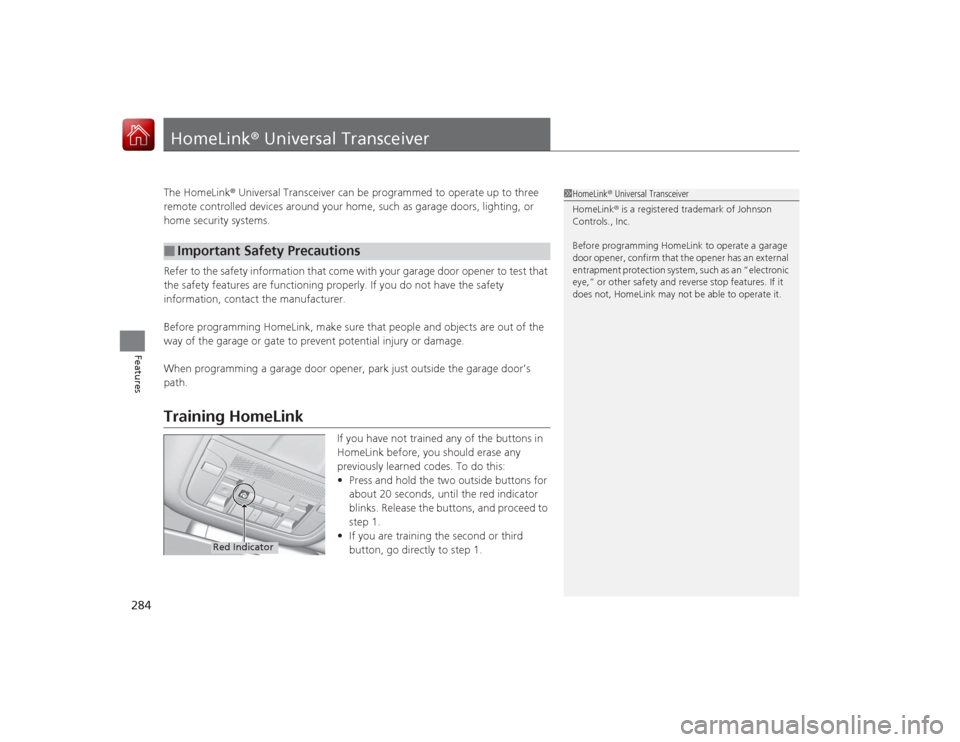
If you have not trained any of the buttons in
HomeLink before, you should erase any
previously learned codes. To do this:
• Press and hold the two outside buttons for
about 20 seconds, until the red indicator
blinks. Release the buttons, and proceed to
step 1.
• If you are training the second or third
button, go directly to step 1.
■
Important Safety Precautions
1HomeLink ® Universal Transceiver
HomeLink® is a registered trademark of Johnson
Controls., Inc.
Before programming HomeLink to operate a garage
door opener, confirm that the opener has an external
entrapment protection system, such as an “electronic
eye,” or other safety and reverse stop features. If it
does not, HomeLink may not be able to operate it.
Red Indicator
Page 289 of 521
288
uuBluetooth ® HandsFreeLink ®u HFL Menus
Features
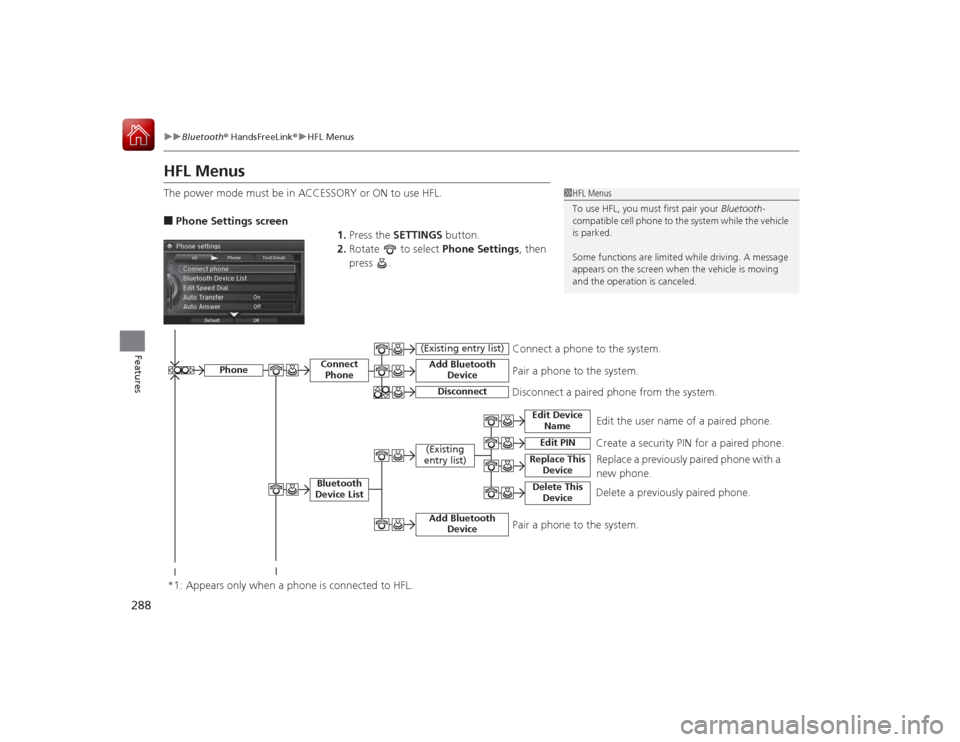
HFL MenusThe power mode must be in ACCESSORY or ON to use HFL.■Phone Settings screen
1.Press the SETTINGS button.
2. Rotate to select Phone Settings, then
press .
1 HFL Menus
To use HFL, you must first pair your Bluetooth-
compatible cell phone to the system while the vehicle
is parked.
Some functions are limit ed while driving. A message
appears on the screen when the vehicle is moving
and the operation is canceled.
Edit the user name of a paired phone.
Phone
Edit Device Name
Connect PhoneBluetooth
Device List
(Existing
entry list)
Replace This Device
Add Bluetooth Device
Disconnect a paired phone from the system.Connect a phone to the system.
*1: Appears only when a phone is connected to HFL.
Disconnect
(Existing entry list)
Pair a phone to the system.
Edit PIN
Create a security PIN for a paired phone. Replace a previously paired phone with a
new phone.
Delete This Device
Delete a previously paired phone.
Add Bluetooth Device
Pair a phone to the system.


