2015 Acura RDX service
[x] Cancel search: servicePage 1 of 365

California Proposition 65 Warning
Event Data Recorders
This vehicle is equipped with an event data recorder (EDR).
The main purpose of an EDR is to record, in certain crash or near
crash-like situations, such as an air bag deployment or hitting a
road obstacle, data that will assi st in understanding how a vehicle’s
systems performed. The EDR is designed to record data related
to vehicle dynamics and safety systems for a short period of
time, typically 30 seconds or le ss. The EDR in this vehicle is
designed to record such data as:
• How various systems in your vehicle were operating;
• Whether or not the driver and passenger safety belts were
buckled/fastened;
• How far (if at all) the driver was depressing the accelerator
and/or brake pedal; and,
• How fast the vehicle was traveling.
These data can help provide a better understanding of the
circumstances in which crashes and injuries occur. NOTE: EDR data
are recorded by your vehicle only if a non-trivial crash situation
occurs; no data are recorded by the EDR under normal driving
conditions and no personal data (e.g., name, gender, age, and
crash location) are recorded. Howe ver, other parties, such as law
enforcement, could combine the EDR data with the type of
personally identifying data routinely acquired during a crash
investigation.
WARNING: This product contains or emits
chemicals known to the state of California to cause
cancer and birth defects or other reproductive
harm.
To read data recorded by an ED R, special equipment is required,
and access to the vehicle or the EDR is needed. In addition to the
vehicle manufacturer, other parties, such as law enforcement, that
have the special equipment, can re ad the information if they have
access to the vehicle or the EDR.
The data belongs to the vehicle ow ner and may not be accessed by
anyone else except as legally requ ired or with the permission of the
vehicle owner.
Service Diagnostic Recorders
This vehicle is equipped with serv ice-related devices that record
information about powertrain perform ance. The data can be used
to verify emissions law requirem ents and/or help technicians
diagnose and solve service problems. It may also be combined with
data from other sources for res earch purposes, but it remains
confidential.
California Perchlorate Contamination Prevention Act
The airbags, seat belt tensioners , and CR type batteries in this
vehicle may contain perchlorate materials - special handling may
apply. See www.dtsc.ca.gov/hazardouswaste/perchlorate/
As you read this manual, you will find information that is preceded
by a symbol. This information is intended to help you avoid
damage to your vehicle, othe r property, or the environment.
NOTICE
Page 4 of 365

Contents
Child Safety P. 52Exhaust Gas Hazard P. 64Safety Labels P. 65
Opening and Closing the Tailgate P. 107 Security System P. 113 Opening and Closing the Windows P. 115
Operating the Switches Around the Steering Wheel P. 119 Adjusting the Mirrors P. 133
Interior Lights/Interior Convenience Items P. 143 Climate Control System P. 152
Audio Error Messages P. 187General Information on the Audio System P. 190
Bluetooth ® HandsFreeLink ® P. 196 Compass* P. 225
Off-Highway Driving Guidelines P. 238 When Driving P. 240 Braking P. 257
Refueling P. 263 Fuel Economy P. 265Accessories and Modifications P. 266
Maintenance Under the Hood P. 275 Replacing Light Bulbs P. 287
Checking and Maintaining Tires P. 301 Battery P. 310 Remote Transmitter Care P. 311
Engine Does Not Start P. 327 Jump Starting P. 330 Shift Lever Does Not Move P. 332
Fuses P. 339 Emergency Towing P. 342When You Cannot Open the Tailgate P. 343
Devices that Emit Radio Waves P. 349 Reporting Safety Defects P. 350
Authorized Manuals P. 355 Client Service Information P. 356
Quick Reference GuideP. 4
Safe DrivingP. 23
Instrument PanelP. 67
ControlsP. 95
FeaturesP. 157
DrivingP. 227
MaintenanceP. 267
Handling the UnexpectedP. 319
InformationP. 345
IndexP. 357
Page 20 of 365

Quick Reference Guide
19
Handling the Unexpected (P 319)
Flat Tire (P 321)
● Park in a safe location and replace the
flat tire with the comp act spare tire in the
cargo area.
Indicators Come On (P 335)
● Identify the indica tor and consult the
owner's manual.
Engine Won't Start (P 327)
● If the battery is dead, jump start using a
booster battery.
Blown Fuse (P 339)
● Check for a blown fuse if an electrical
device does not operate.
Overheating (P 333)
● Park in a safe location. If you do not see
steam under the hood, open the hood,
and let the engine cool down.
Emergency Towing (P 342)
● Call a professional towing service if you
need to tow your vehicle.
Page 52 of 365

51
uuAirbags uAirbag Care
Safe Driving
Airbag Care
You do not need to, and should not, perform any maintenance on or replace any
airbag system components yourself. However, you should have your vehicle
inspected by a dealer in the following situations:
■When the airbags have deployed
If an airbag has inflated, the control unit and other related parts must be replaced.
Similarly, once an automatic seat belt te nsioner has been activated, it must be
replaced.
■When the vehicle has been in a moderate-to-severe collision
Even if the airbags did not infl ate, have your dealer inspect the following: the driver’s
seat position sensor, weight sensors in the passenger’s seat, front seat belt
tensioners, and each seat belt that was worn during the crash.
■Do not remove or modi fy a front seat without consulting a dealer
This would likely disable the driver's seat position sensor or the weight sensors in the
passenger's seat. If it is necessary to remo ve or modify a front seat to accommodate
a person with disabilities, contact an Acur a dealer. For U.S. vehicles, Acura Client
Service at 800-382-2238 and for Canadian vehicles, Acura Client Service at
888-9-ACURA-9.
1 Airbag Care
We recommend against the use of salvaged airbag
system components, including the airbag, tensioners,
sensors, and control unit.
Page 80 of 365
79
uuIndicators uMulti-Information Display Warning and Information Messages
Continued
Instrument Panel
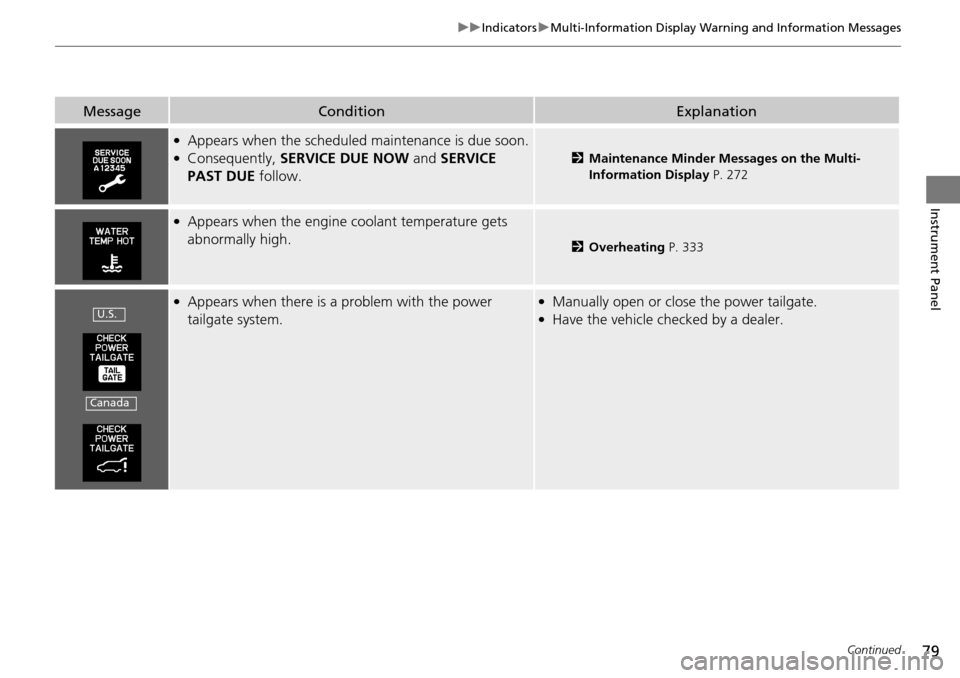
MessageConditionExplanation
●Appears when the scheduled maintenance is due soon.●Consequently, SERVICE DUE NOW and SERVICE
PAST DUE follow.2Maintenance Minder Messages on the Multi-
Information Display P. 272
●Appears when the engine coolant temperature gets
abnormally high.
2Overheating P. 333
●Appears when there is a problem with the power
tailgate system.●Manually open or close the power tailgate.●Have the vehicle checked by a dealer.U.S.
Canada
Page 93 of 365

92
uuGauges and Multi-Information Display uMulti-Information Display
Instrument Panel
*1:Not available on all models
*2: Default SettingSetup Group Customizable Features Description Selectable Settings
DOOR
SETUP AUTO DOOR LOCK
Changes the setting for when the doors
automatically lock. WITH VEH SPD
*2/
SHIFT FROM
(P/ OFF
AUTO DOOR UNLOCK Changes the setting for when the doors
automatically unlock. DRIVER DOOR with SHIFT to
(P*2/ ALL DOORS with SHIFT
to
(P/DRIVER DOOR with
IGN OFF /ALL DOORS with
IGN OFF /OFF
DOOR LOCK MODE Sets up either the driver's door or all doors to unlock
on the first push
of the remote. DRIVER DOOR
*2/
ALL DOOR
KEYLESS LOCK
ACKNOWLEDGMENT LOCK/UNLOCK- The exterior
lights flash. LOCK (2nd
push)- The beeper sounds. ON
*2/
OFF
SECURITY RELOCK TIMER Changes the time it takes for the doors to relock and
the security system to set after you unlock the
vehicle without opening any door. 90 sec/
60 sec/30 sec
*2
POWER
TAILGATE
SETUP
*1
POWER TAILGATE
KEYLESS OPEN MODEChanges the keyless setting for when the power
tailgate opens.ANYTIME*2/WHEN
UNLOCKED
MAINTENA
NCE INFO.Resets/Cancels the engine oil life display when you
have performed the maintenance service. RESET /CANCEL
DEFAULT
ALLCancels/Resets all the customized settings as
default.CANCEL /SET
Page 159 of 365
158
Features
Audio System
About Your Audio System
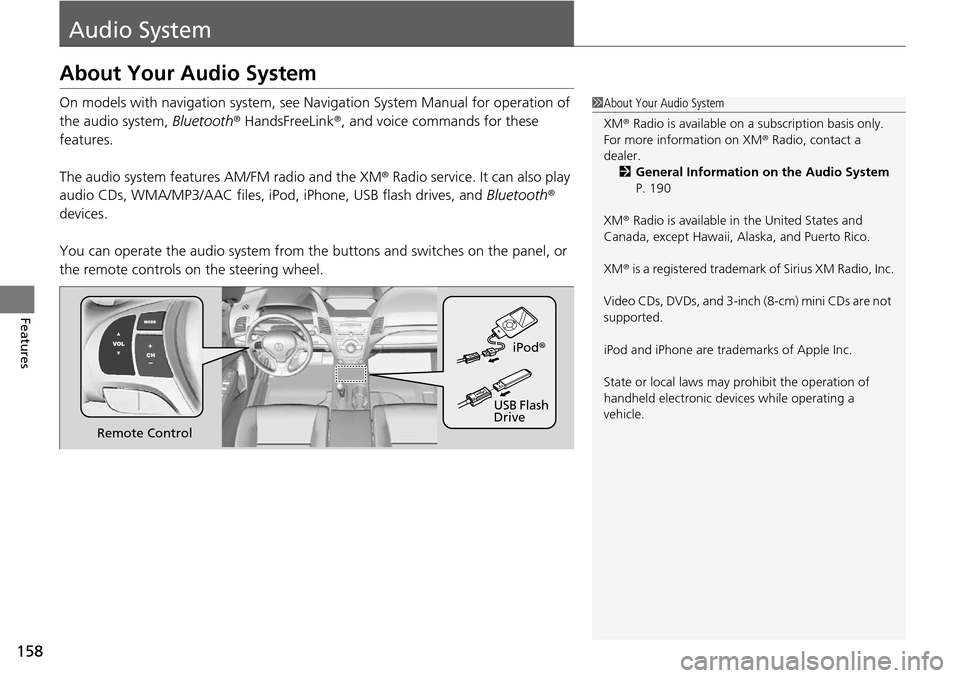
On models with navigation system, see Navigation System Manual for operation of
the audio system, Bluetooth® HandsFreeLink ®, and voice commands for these
features.
The audio system features AM/FM radio and the XM ® Radio service. It can also play
audio CDs, WMA/MP3/AAC files, iP od, iPhone, USB flash drives, and Bluetooth®
devices.
You can operate the audio system from the buttons and switches on the panel, or
the remote controls on the steering wheel.1About Your Audio System
XM ® Radio is available on a subscription basis only.
For more information on XM ® Radio, contact a
dealer.
2 General Information on the Audio System
P. 190
XM ® Radio is available in the United States and
Canada, except Ha waii, Alaska, and Puerto Rico.
XM ® is a registered trademark of Sirius XM Radio, Inc.
Video CDs, DVDs, and 3-inch (8-cm) mini CDs are not
supported.
iPod and iPhone are trademarks of Apple Inc.
State or local laws may pr ohibit the operation of
handheld electronic devices while operating a
vehicle.
Remote Control iPod
®
USB Flash
Drive
Page 179 of 365

uuAudio System Basic Operation uPlaying Pandora ®
178
Features
You can operate some of the Pandora menu items from your vehicle’s audio system.
The available items are:
• Station List (QuickMix is also available)
• Like
• Dislike
• Resume/Pause
• SKIP
• Bookmark this song
• Bookmark this artist
■Operating a menu item
1.Press to display the PANDORA MENU.
2. Rotate to select a menu.
3. Press to display the items on that menu.
■Pandora® Menu1Playing Pandora ®
Pandora ® is a personalized Intern et radio service that
selects music based on an artist, song, or genre a user
enters, and streams what is likely to be of interest.
To use this service in your vehicle, the Pandora ® app
must first be installe d on your iPhone. Visit
www.pandora.com. for more information.
If you cannot operate Pandora ® through the audio
system, it may be streaming through Bluetooth®
Audio. Make sure Pandora ® mode on your audio
system is selected.
1 Pandora ® Menu
Available operating functi ons vary on software
versions. Some functions ma y not be available on the
vehicle's audio system.
If there is a problem, you may see an error message
on the audio/information screen. 2 Pandora ® P. 189
You can skip the song or select Dislike only a
predetermined number of times in an hour.