2015 Acura MDX mirror
[x] Cancel search: mirrorPage 319 of 505

318
uuTowing a Trailer uTowing Preparation
Driving
■Hitches
Read the trailer manufacturer’s instructions, and select the appropriate draw bar for
the height of the trailer you will be towing.■Weight distribution hitches
Your vehicle is designed to tow without the need for a load distributing hitch. If you
wish to use one, please consult your trailer maker for proper installation and set-up.
Improper set-up could degrade the handling, stability, and braking performance of
your vehicle.■Safety chains
Always use safety chains when you tow a trailer. Leave enough slack to allow the
trailer to turn corners easily, but do not allow the chains to drag on the ground.■Sway control
This device can be used if your trailer tends to sway. Your trailer maker can tell you
what kind of sway control you need and how to install it. Improper installation could
degrade the handling and stability of your vehicle.■Automatic transmission cooler
Install an additional ATF (automatic transmission fluid) cooler to help prevent the
transmission from overheating, and damaging. You can get the additional ATF
cooler at a dealer.An additional ATF cooler is required to keep the transmission from overheating when
towing more than 3,500 lbs (1,588 kg). You can get the additional ATF cooler at a dealer.■Trailer mirrors
Many states, provinces and territories require special exterior mirrors when towing a
trailer. Install special mirrors whenever you cannot clearly see behind you, or if the
trailer creates a blind spot.4WD models
Page 328 of 505
Continued
327
uuWhen Driving uStarting the Engine
Driving
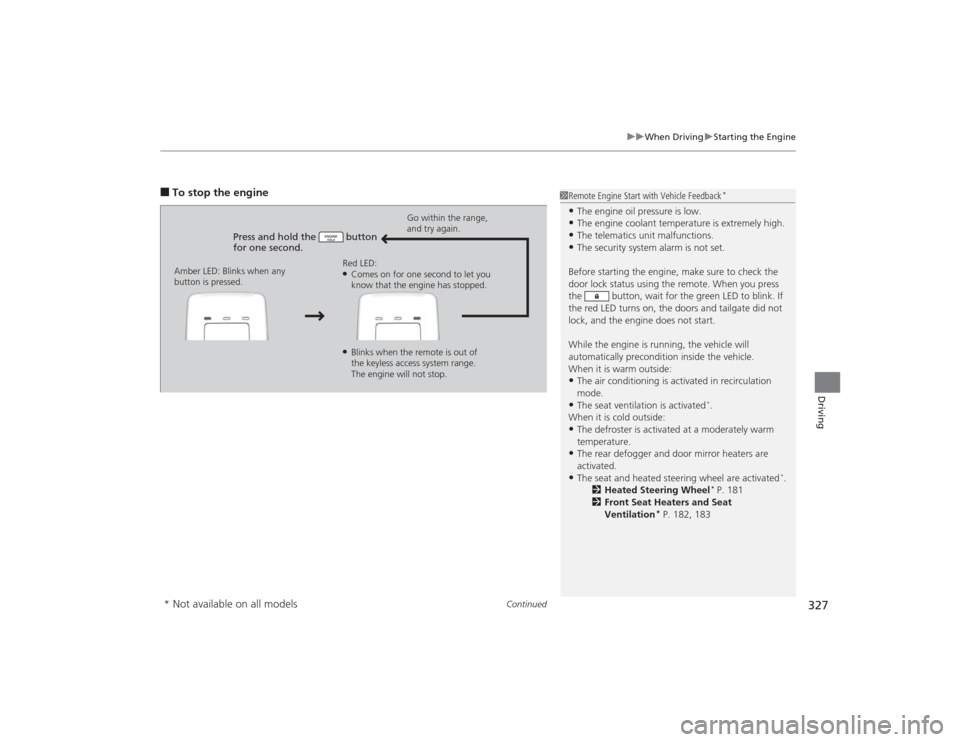
■To stop the engine
Press and hold the button
for one second.
Go within the range,
and try again.
Amber LED: Blinks when any
button is pressed. Red LED:
●Comes on for one second to let you
know that the engine has stopped.●Blinks when the remote is out of
the keyless access system range.
The engine will not stop.
1
Remote Engine Start with Vehicle Feedback
*
•The engine oil pressure is low.•The engine coolant temperature is extremely high.•The telematics unit malfunctions.•The security system alarm is not set.
Before starting the engine, make sure to check the
door lock status using the remote. When you press
the button, wait for the green LED to blink. If
the red LED turns on, the doors and tailgate did not
lock, and the engine does not start.
While the engine is running, the vehicle will
automatically precondition inside the vehicle.
When it is warm outside:•The air conditioning is activated in recirculation
mode.•The seat ventilation is activated
*.
When it is cold outside:
•The defroster is activated at a moderately warm
temperature.•The rear defogger and door mirror heaters are
activated.•The seat and heated steering wheel are activated
*.
2 Heated Steering Wheel
* P. 181
2 Front Seat Heaters and Seat
Ventilation
* P. 182, 183
* Not available on all models
Page 352 of 505

Continued
351
uuWhen Driving uForward Collision Warning (FCW)
*
Driving
1Forward Collision Warning (FCW)
*
Never apply a film or attach any objects to the
windshield that could obstruct the FCW camera’s
field of vision.
Scratches, nicks, and other damage to the windshield
within the FCW camera’s field of vision can cause the
system to operate abnormally. If this occurs, we
recommend that you replace the windshield with a
genuine Acura replacement windshield. Making even
minor repairs withi n the camera’s field of vision or
installing an aftermarket replacement windshield
may also cause the system to operate abnormally.
After replacing the windshield, have a dealer
recalibrate the camera. Proper calibration of the FCW
camera is necessary for the system to operate
properly.
Beep The camera is located
behind the rearview mirror.
The beeper sounds and the BRAKE message
appears in the MID until a possible collision is
avoided.
* Not available on all models
Page 356 of 505

Continued
355
uuWhen Driving uLane Departure Warning (LDW)
*
Driving
The camera is located behind the rearview
mirror.
Press the LDW button to turn the system on
and off. u The indicator in the button comes on
when the system is on.
■
LDW Camera
1LDW Camera
Never apply a film or attach any objects to the
windshield that could obstruct the LDW camera’s
field of vision.
Scratches, nicks, and other damage to the windshield
within the LDW camera’s field of vision can cause the
system to operate abnormally. If this occurs, we
recommend that you replace the windshield with a
genuine Acura replacement windshield. Making even
minor repairs withi n the camera’s field of vision or
installing an aftermarket replacement windshield
may also cause the system to operate abnormally.
After replacing the windshield, have a dealer
recalibrate the camera. Proper calibration of the LDW
camera is necessary for the system to operate properly.
Do not place an object on the top of the instrument
panel. It may reflect onto the windshield and prevent
the system from detecting lane lines properly.
To help reduce the likelihood that high interior
temperatures will cause the camera system to shut off,
when parking, find a shady area or face the front of the
vehicle away from the sun. Also, do not use a reflective
sun shade that can concentrate heat on the camera.
If the Can Not Operate: Camera Too Hot message
appears:•Use the climate control system to cool down the
interior and, if necessary, the defroster mode when
windows are fogged.•Start driving the vehicle to lower the windshield
temperature, which cools down the area around
the LDW camera.
LDW Camera■
LDW On and Off
LDW Button
Indicator
Page 366 of 505

365
uuWhen Driving uBlind Spot Information (BSI) System
*
Continued
Driving
Blind Spot Information (BSI) System
*
Is designed to detect vehicles in specified alert zones adjacent to your vehicle,
particularly in harder to see areas common ly known as “blind spots.”
When the system detects vehicles approaching from behind in adjacent lanes, the
appropriate indicator comes on for a few seconds, providing assistance when you
change lanes.■How the system works
1 Blind Spot Information (BSI) System
*
Important Safety Reminder
Like all assistance systems, BSI has limitations. Over
reliance on BSI may result in a collision.
The system is for your convenience only. Even if an
object is within the alert zone, the following
situations may occur.•The BSI alert indi cator may not come on due to
obstruction (splashes, etc.) even without the Blind
Spot Not Available MID appearing.•The BSI alert indicator may come on even with the
message appearing.
The BSI alert indicator may not come on under the
following conditions:•A vehicle does not stay in the alert zone for more
than two seconds.•A vehicle is parked in a side lane.•The speed difference between your vehicle and the
vehicle you are passing is greater than 6 mph (10
km/h).•An object not detected by the radar sensors
approaches or passes your vehicle.
3
WARNING
Failure to visually confirm that it is safe to
change lanes before doing so may result in
a crash and serious injury or death.
Do not rely only on the blind spot
information system when changing lanes.
Always look in your mirrors, to either side
of your vehicle, and behind you for other
vehicles before changing lanes.
●The shift lever is in
( D.
●Your vehicle speed is
between 20 mph (32 km/h)
and 100 mph (160 km/h)
Alert zone range
A: Approx. 1.6 ft. (0.5 m)
B: Approx. 10 ft. (3 m)
C: Approx. 10 ft. (3 m) Radar Sensors:
underneath the
rear bumper
corners
Alert Zone
A
B
C
* Not available on all models
Page 367 of 505

uuWhen Driving uBlind Spot Information (BSI) System
*
366Driving
■When the system detects a vehicle
1Blind Spot Information (BSI) System
*
You can change the setting for BSI.
2 Customizable Features P. 107
Turn the system off when towing a trailer.
The system may not work properly for the following
reasons:•The added mass tilts the vehicle and changes the
radar coverage.•The trailer itself can be detected by the radar
sensors, causing the BSI alert indicators to come on.
BSI may be adversely affected when:•Objects (guard rails, poles, trees, etc,.) are
detected.•An object that does not reflect radio waves well,
such as a motorcycle, is in the alert zone.•Driving on a curved road.•A vehicle is moving from a far lane to the adjacent
lane.•The system picks up external electrical interference.•The rear bumper or the sensors have been improperly
repaired or the rear bumper has been deformed.•The orientation of the sensors has been changed.•In bad weather (Heavy rain, snow, and fog).
For proper BSI use:•Always keep the rear bumper corner area clean.•Do not cover the rear bumper corner area with
labels or stickers of any kind. •Take your vehicle to a dealer if you need the rear
bumper corner area or the radar sensors to be repaired,
or the rear bumper corner area is strongly impacted.
■Comes on when●A vehicle enters the alert zone from behind
to overtake you with a speed difference of
no more than 31 mph (50 km/h) from your
vehicle.●You pass a vehicle with a speed difference
of no more than 12 mph (20 km/h).
BSI Alert Indicator: Located near the outside
rearview mirror on both sides.■Blinks and the beeper sounds when
You move the turn signal lever in the direction
of the detected vehicle. The beeper sounds
three times. Comes On
Blinks
* Not available on all models
Page 413 of 505

412
uuReplacing Light Bulbs uFront Turn Signal/Front Side Marker/Parking Light Bulbs
Maintenance
Front Turn Signal/Front Side Marker/Parking Light BulbsWhen replacing, use the following bulbs.
1.Remove the holding clips, and pull the inner
fender back.
2. Turn the socket to the left and remove it.
3. Remove the old bulb a nd insert a new bulb.Side Turn Signal/Emergency Indicator Light BulbsDoor mirrors have the side turn lights. Have an authorized Acura dealer inspect and
replace the light assembly.Front Turn Signal/Side Marker/Parking Light: 28/8 W
1Front Turn Signal/Front Side Marker/Parking Light Bulbs
Insert a flat-tip screwdriver, lift and remove the center
pin to remove the clip.
Insert the clip with the center pin raised, and push
until it is flat.
Push until the
pin is flat.
Clip
Inner Fender
Bulb
Socket
Page 439 of 505

438
uuCleaning uExterior Care
Maintenance
Exterior CareDust off the vehicle body after you drive.
Regularly inspect your vehicle for scratches on painted surfaces. A scratch on a
painted surface can result in body rust. If you find a scratch, promptly repair it.
Wash the vehicle regularly. Wash more frequently when driving in the following
conditions:
• If driving on roads with road salt.
• If driving in coastal areas.
• If tar, soot, bird droppings, insects, or tree sap are stuck to painted surfaces.
Fold in the door mirrors.
Make sure to follow the instructions indicated on the automated car wash.
• Keep sufficient distance between the cleaning nozzle and the vehicle body.
• Take particular care around the windows. Standing too close may cause water to
enter the vehicle interior.
• Do not spray high pressure water directly into the engine compartment. Instead,
use low pressure water and a mild detergent. ■
Washing the Vehicle
■
Using an Automated Car Wash
■
Using High Pressure Cleaners
1Washing the Vehicle
Do not spray water into the air intake vents. It can
cause a malfunction.
Air Intake Vents