Page 253 of 505
252
uuCustomized Features u
Features
Default
Fixed GuidelineDynamic Guideline
Default
Sound
Source Select Popup
Cover Art
*1
Connect Bluetooth Audio Device
*1
Bluetooth Device List
*1
Audio
Settings
Maintenance Reset
Maintenance Info.
Power Tailgate Keyless Open ModePower Tailgate Open by Outer Handle
Power
Tailgate Setup
Camera
Settings
Preferred IDS Mode
IDS Setup
Key And Remote Unlock ModeKeyless Lock Answer BackSecurity Relock Timer
Auto Door LockAuto Door Unlock
Door
Setup
*1: May change depending on your currently selected source.
Page 254 of 505
253
uuCustomized Features u
Continued
Features
Add Bluetooth
DeviceDisconnect
Default
Phone
Connect phone
Edit Bluetooth DeviceAdd Bluetooth Device
Bluetooth Device
List
Edit Speed DialAuto TransferAuto AnswerRing Tone
Automatic Phone SyncUse Contact PhotoEnable Text/EmailSelect Account
New Text/Email Alert
Text/Email
Phone
Settings
Info Screen Preference
Clock Format
Clock/Wallpaper TypeClock Adjustment
Clock
DefaultInfo
Settings
Others
Page 256 of 505
255
uuCustomized Features u
Continued
Features
*1:Default SettingSetup
Group Customizable Features Description Selectable SettingsSystem
Settings
Blue-
tooth
Bluetooth Status
Turns the
Bluetooth® on and off.
On
*1/Off
Bluetooth Device List
Pairs a new phone to HFL, edits and deletes a
paired phone, and creates a security PIN.
2 Phone Setup P. 275
—
Edit Pairing Code
Changes a pairing code.
2To change the pairing code setting P. 277
Random/Fixed
*1
Voice
Recog
Voice Prompt
Turns the voice prompt on and off.
Beginner
*1/ Expert
Clock
Clock/
Wallpaper
Type
Clock
Changes the clock display type.
Analog /Digital
*1/
Small Digital /Off
Wallpaper
●Changes the wallpaper type.●Imports an image file for a new wallpaper.●Deletes an imported wallpaper (default
wallpapers can be deleted).2 Wallpaper Setup P. 214
Blank/Galaxy
*1/
Metallic
Clock Adjustment
Adjusts Clock.
2 Clock P. 114
—
Clock Format
Selects the digital clock display from 12H to 24H.
12H
*1/24H
Page 257 of 505
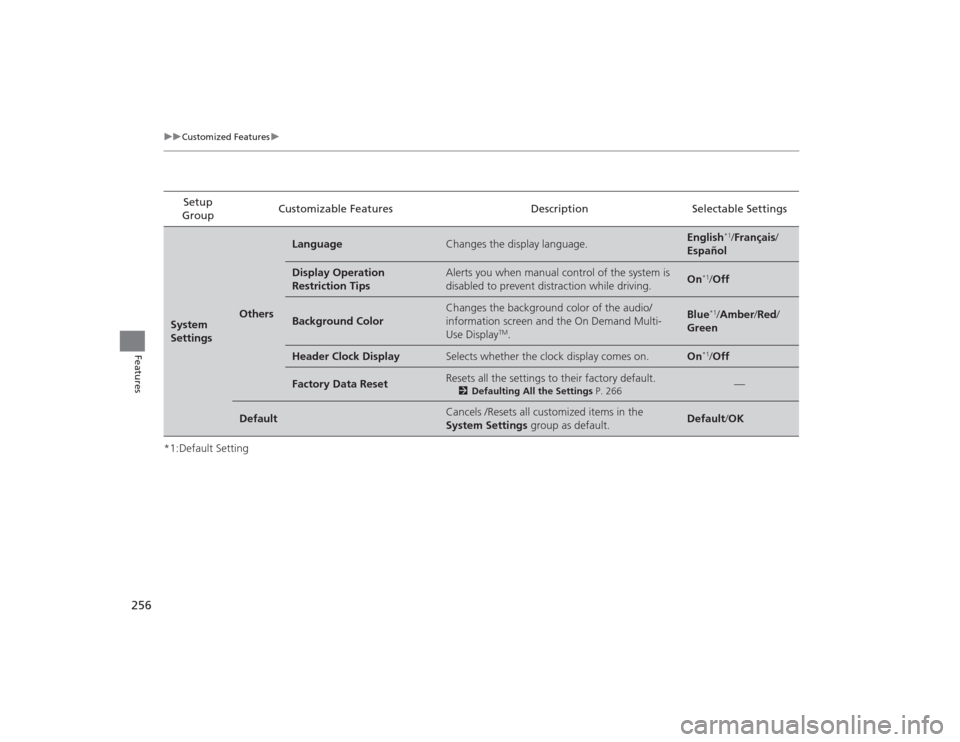
256
uuCustomized Features u
Features
*1:Default SettingSetup
Group Customizable Features Description Selectable SettingsSystem
Settings
Others
Language
Changes the display language.
English
*1/
Français /
Español
Display Operation
Restriction Tips
Alerts you when manual control of the system is
disabled to prevent distraction while driving.
On
*1/ Off
Background Color
Changes the background color of the audio/
information screen and the On Demand Multi-
Use Display
TM.
Blue
*1/Amber /Red/
Green
Header Clock Display
Selects whether the clock display comes on.
On
*1/ Off
Factory Data Reset
Resets all the settings to their factory default.
2 Defaulting All the Settings P. 266
—
Default
Cancels /Resets all customized items in the
System Settings group as default.
Default/OK
Page 259 of 505

258
uuCustomized Features u
Features
*1:Default SettingSetup
Group Customizable Features Description Selectable SettingsVehicle
SettingsMeter
SetupLanguage Selection
Changes the displayed language on the multi-
information display. English
*1/
Français /
Español
Adjust Outside Temp.
Display Adjusts the temperature reading by a few
degrees.
-5°F
~ ±0°F
*1 ~ +5°F
(U.S.)
-3°C
~ ±0°C
*1 ~ +3°C
(Canada)
“Trip A” Reset Timing
Changes the setting of how to reset trip meter A, average
fuel economy A, average speed A, and elapsed time A.
With Refuel/ IGN Off/
Manually Reset
*1
“Trip B” Reset Timing
Changes the setting of how to reset trip meter B, average
fuel economy B, average speed B, and elapsed time B.
With Refuel/ IGN Off/
Manually Reset
*1
Turn by Turn Display
*
Selects whether the turn-by-turn display comes
on during the route guidance. On
*1/
Off
Keyless
Access
Setup Door Unlock Mode
Changes which doors unlock when you grab the
driver’s door handle. Driver Door Only
*1/
All Doors
Keyless Access Light Flash Causes some exterior lights to flash when you
unlock/lock the doors.
On
*1/
Off
Keyless Access Beep Causes the beeper to sound when you unlock/
lock the doors. On*1/
Off
Remote Start System On/
Off
*
Turns the remote engine start feature on and off. Enabled
*1/Disabled
* Not available on all models
Page 261 of 505
260
uuCustomized Features u
Features
*1:Default SettingSetup
Group Customizable Features Description Selectable Settings
Vehicle
Settings Door
SetupAuto Door Lock
Changes the setting for the automatic locking
feature. With Vehicle
Speed
*1/
Shift from P/
Off
Auto Door Unlock Changes the setting for when the doors unlock
automatically. All Doors When
Driver’s Door
Opens*1/
All Doors
When Shifted to
Park /All Doors When
Ignition Switched
Off /Off
Key And Remote Unlock
Mode Sets up either the driver’s door or all doors to
unlock on the first push of the remote or built-in
key. Driver Door
*1/
All
Doors
Keyless Lock Answer Back LOCK/UNLOCK- The exterior lights flash.
LOCK (2nd push)- The beeper sounds.
On
*1/
Off
Security Relock Timer Changes the time it takes for the doors to relock
and the security system to set after you unlock
the vehicle without opening any door. 90seconds/
60seconds/
30seconds
*1
Page 262 of 505

261
uuCustomized Features u
Continued
Features
*1:Default SettingSetup
Group Customizable Features Description Selectable Settings
Vehicle
Settings
Power
Tailgate
Setup
Power Tailgate Keyless
Open Mode Changes the keyless setting for when the power
tailgate opens. Anytime
*1/
When
Unlocked
Power Tailgate Open by
Outer Handle Selects whether to enable the power tailgate
open operation using the tailgate outer handle. Off (Manual Only)
/
On (Power/
Manual)*1
IDS
Setup Preferred IDS Mode Changes the IDS mode setting for when you set
the power mode to ON. Last Used
*1/
Comfort/
Normal /Sport
Mainte-
nance
Info. Maintenance Reset
Resets the engine oil life display when you have
performed the maintenance service.
—
Default Cancels/Resets all customized items in the
Vehicle Settings
group as default. Default
/OK
Camera
Settings
Guide-
lines
Fixed Guideline
Selects whether the fixed guidelines come on the
rear camera monitor.
On
*1/Off
Dynamic Guideline
Selects whether the dynamic guidelines come on
the rear camera monitor.
On
*1/Off
Default
Cancels/Resets all customized items in the
Camera Settings group as default.
Default/OK
Page 266 of 505
265
uuCustomized Features u
Features
*1:Default SettingSetup
Group Customizable Features Description Selectable SettingsInfo
SettingsClock
Clock/
Wallpaper
Type
Clock
See System Settings on P. 254 to P. 256.
Wallpaper
Clock Adjustment
Clock Format
Other Info Screen Preference Selects either of the following to be displayed
when you press the INFO
button.
• Info Top: Some of the available menu items
pop up.
• Info Menu: All available menu items pop up.
• Off: The menu item you selected last time is
displayed. Info Top
/Info
Menu
*1/ Off
Default Cancels/Resets all customized items in the
Info
Settings group as default. Default
/OK