Page 152 of 353
151
uuAudio System Basic Operation uPlaying AM/FM Radio
Continued
Features
Playing AM/FM Radio
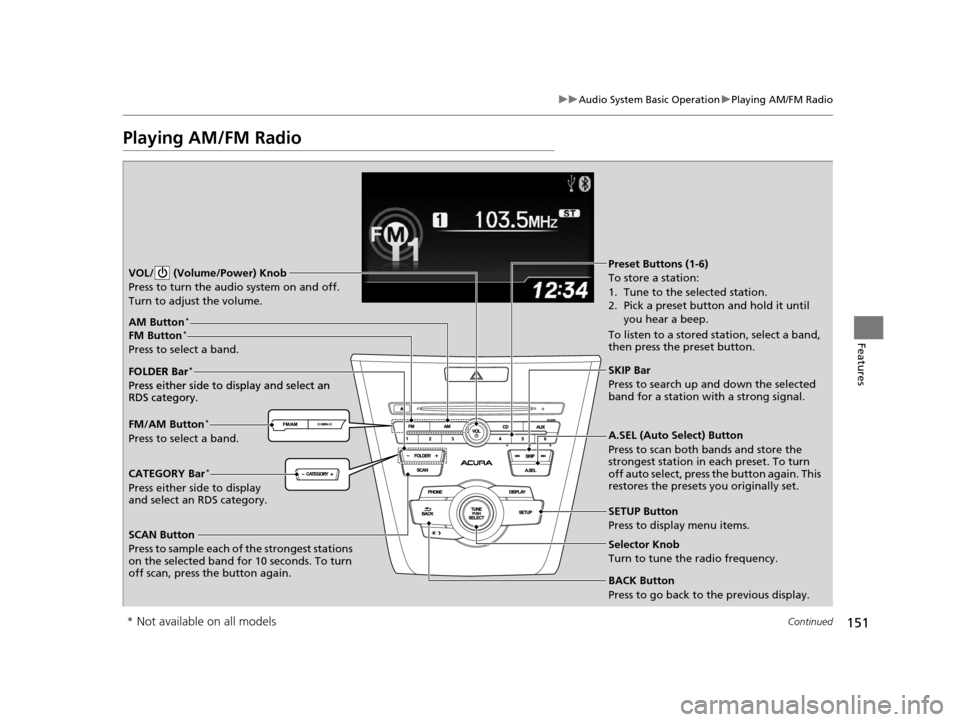
SCAN Button
Press to sample each of the strongest stations
on the selected band for 10 seconds. To turn
off scan, press the button again. VOL/ (Volume/Power) Knob
Press to turn the audi o system on and off.
Turn to adjust the volume.
A.SEL (Auto Select) Button
Press to scan both bands and store the
strongest station in each preset. To turn
off auto select, press the button again. This
restores the presets you originally set.
SETUP Button
Press to display menu items.
Selector Knob
Turn to tune the radio frequency.
CATEGORY Bar*
Press either side to display
and select an RDS category. FM/AM Button
*
Press to select a band. FOLDER Bar
*
Press either side to display and select an
RDS category.
FM Button*
Press to select a band.
AM Button*
BACK Button
Press to go back to the previous display.
SKIP Bar
Press to search up and down the selected
band for a station with a strong signal.
Preset Buttons (1-6)
To store a station:
1. Tune to the selected station.
2. Pick a preset button and hold it until you hear a beep.
To listen to a stored station, select a band,
then press the preset button.
FOLDER Bar
*
Press either side to display and select an
RDS category.
* Not available on all models
15 ACURA ILX-31TX66200.book 151 ページ 2014年3月27日 木曜日 午前10時34分
Page 153 of 353

uuAudio System Basic Operation uPlaying AM/FM Radio
152
Features
Provides text data information related to your selected RDS-capable FM station.
■RDS Information
1.Press the SETUP button and rotate to
select RDS Information .
2. Each time you press , the RDS
Information switches between on and off.
■To find an RDS station from your selected program category
1.Press the FOLDER bar or the CATEGORY
bar to display and select an RDS category.
2. Use SKIP or SCAN to select an RDS station.
■Radio Data System (RDS)
RDS Category
1Playing AM/FM Radio
The ST indicator appears on the display indicating
stereo FM broadcasts.
Stereo reproduction in AM is not available.
Switching the Audio Mode
Press the MODE button on the steering wheel.
2 Audio Remote Controls P. 149
You can store 6 AM stations and 12 FM stations into
the preset button memory. FM1 and FM2 let you
store 6 stations each.
Auto Select function scans and stores up to 6 AM
stations and 12 FM stations with a strong signal into
the preset button memory.
If you do not like the stati ons auto select has stored,
you can manually store your preferred frequencies.
15 ACURA ILX-31TX66200.book 152 ページ 2014年3月27日 木曜日 午前10時34分
Page 154 of 353

153
uuAudio System Basic Operation uPlaying XM ® Radio*
Continued
Features
Playing XM ® Radio*
SCAN Button
Press to sample all channels (in the channel mode),
or channels within a category (in the category
mode). Each sampling contin ues for a few seconds.
Press SCAN again to cancel scanning and continue
listening to the channel. VOL/ (Volume/Power) Knob
Press to turn the audio system on and off.
Turn to adjust the volume.SETUP Button
Press to display menu items.
Selector Knob
Press and turn to select channels.
CATEGORY Bar
Press either side to display and select an XM
®
Radio category. SKIP Bar
Press to skip to the previous or next
channel.
(XM
®) Button
Press to select XM ® Radio.
Preset Buttons (1-6)
To store the channel:
1. Tune to the channel.
2. Pick a preset button and hold it until
you hear a beep.
To listen to a stored channel, select XM,
then press the preset button.
BACK Button
Press to go back to the previous display.
* Not available on all models
15 ACURA ILX-31TX66200.book 153 ページ 2014年3月27日 木曜日 午前10時34分
Page 155 of 353

uuAudio System Basic Operation uPlaying XM ® Radio*
154
Features
1. Press the button to select the XM ® radio band (XM1 or XM2).
2. Press the SETUP button, rotate to select XM Mode, and press . Rotate
to select Channel Mode or Category Mode , then press .
3. Select a channel using the TUNE ( ), SKIP, CATEGORY , SCAN, or Preset
buttons.
1.Press to display a channel list.
2. Rotate to select a channel, then press
.
■To Play the XM ® Radio
■To Select a Channel from a List
1 Playing XM ® Radio*
In the channel mode, all available channels are
selectable. In the categor y mode, you can select a
channel within a ca tegory (Jazz, Rock, Classical, etc.).
You can store 12 XM ® stations in the preset buttons.
XM1 and XM2 let you store 6 stations each.
There may be instances when XM ® Radio does not
broadcast all the data fields (artist name, title). This
does not indicate a problem with your audio system.
* Not available on all models
15 ACURA ILX-31TX66200.book 154 ページ 2014年3月27日 木曜日 午前10時34分
Page 167 of 353

166
uuAudio System Basic Operation uPlaying Bluetooth ® Audio
Features
Playing Bluetooth ® Audio
Your audio system allows you to listen to music from your Bluetooth®-compatible
phone.
This function is available when the phone is paired a nd linked to the vehicle's
Bluetooth ® HandsFreeLink ® (HFL) system.
2 Phone Setup P. 186
1Playing Bluetooth ® Audio
Not all Bluetooth-enabled phones with streaming
audio capabilities are compatible with the system.
For a list of compatible phones:
•U.S.: Visit www.acura.com/handsfreelink , or call 1-
888-528-7876.
•Canada: Visit www.handsfreelink.ca , or call 1-888-
528-7876.
In some states, it may be il legal to perform some data
device functions while driving.
If more than one phone is paired to the HFL system,
there will be a delay before the system begins to play.
BACK Button
Press to go back to the
previous display. SETUP Button
Press to display menu
items.SKIP Bar
Press or to
change files.
AUX Button
Press to
Bluetooth®
Audio.
VOL/
(Volume/Power) Knob
Press to turn the audio
system on and off.
Selector Knob
Turn to change files.
Turn to select an item, then press to
set your selection.
Press to display the device’s name.
Bluetooth Indicator
Comes on when your
phone is connected to
HFL.
Preset 1 Button
Press to switch the mode
between pause and
resume.
15 ACURA ILX-31TX66200.book 166 ページ 2014年3月27日 木曜日 午前10時34分
Page 197 of 353

uuBluetooth ® HandsFreeLink ®u HFL Menus
196
Features
Up to 15 speed dial numbers can be stored per phone.
To store a speed dial number:
1.Press the PHONE button or the button.
2. Rotate to select Phone Setup, then
press .
u Repeat the procedure to select Speed
Dial , then Add New .
3. Rotate to select a place to choose a
number from, then press .
By Phonebook :
u Select a number from the linked cell
phone’s imported phonebook.
By Call History :
u Select a number from the call history.
By Phone Number :
u Input the number manually.
4. When the speed dial is successfully stored,
you are asked to create a voice tag for the
number. Rotate to select Yes or No,
then press .
5. Using the button, fo llow the prompts to
say the name for the speed dial entry.
■Speed Dial1 Speed Dial
You can use the audio preset buttons during a call to
store a speed dial number:
1. Press and hold the desired audio preset button
during a call.
2. The contact information for the active call will be
stored for the corresponding speed dial.
When a voice tag is stored, press the button to
call the number using the voice tag.
15 ACURA ILX-31TX66200.book 196 ページ 2014年3月27日 木曜日 午前10時34分
Page 201 of 353

uuBluetooth ® HandsFreeLink ®u HFL Menus
200
Features
■To make a call using redial
1. Press the PHONE button or the button.
2. Rotate to select Redial, then press .
u Dialing starts automatically.
■To make a call using the call history
Call history is stored by Dialed Calls,
Received Calls , and Missed Calls .
1. Press the PHONE button or the button.
2. Rotate to select Call History, then press
.
3. Rotate to select Dialed Calls , Received
Calls , or Missed Calls, then press .
4. Rotate to select a number, then press
.
u Dialing starts automatically.
■To make a call using a speed dial entry
1. Press the PHONE button or the button.
2. Rotate to select Speed Dial, then press
.
3. Rotate to select a number, then press
.
u Dialing starts automatically.
1To make a call using the call history
The call history disp lays the last 20 dialed, received, or
missed calls.
(Appears only when a phone is connected to HFL.)
1 To make a call using a speed dial entry
On the Phone screen, the first six speed dials on the
list can be directly selected by pressing the
corresponding audio preset buttons (1-6).
Select More Speed Dial Lists to view another paired
phone’s speed dial list.
When a voice tag is stored, press the button to
call the number using the voice tag. 2 Speed Dial P. 196
Any voice-tagged speed dial entry can be dialed by
voice from any screen.
Press the button and follow the prompts.
15 ACURA ILX-31TX66200.book 200 ページ 2014年3月27日 木曜日 午前10時34分
Page 255 of 353
254
uuMaintenance MinderTMuTo Use Maintenance MinderTM
Maintenance
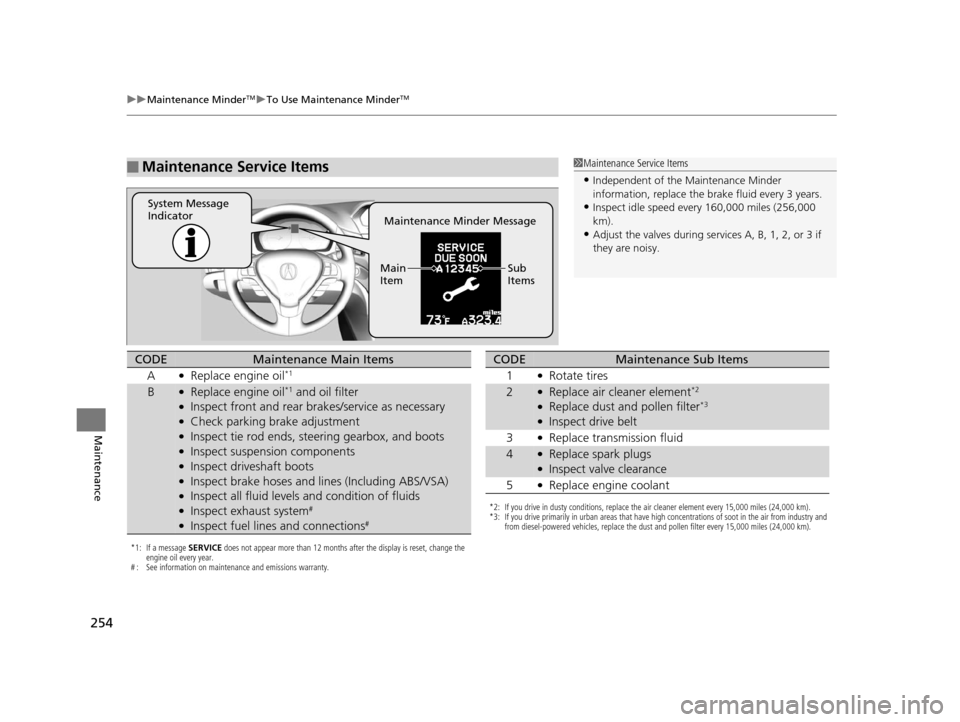
■Maintenance Service Items1Maintenance Service Items
•Independent of the Maintenance Minder
information, replace the brake fluid every 3 years.
•Inspect idle speed every 160,000 miles (256,000
km).
•Adjust the valves during services A, B, 1, 2, or 3 if
they are noisy.Maintenance Minder Message
System Message
Indicator
Sub
Items
Main
Item
*1: If a message
SERVICE does not appear more than 12 months after the display is reset, change the
engine oil every year.
# : See information on maintenance and emissions warranty.
CODEMaintenance Main Items
A
●Replace engine oil*1
B●Replace engine oil*1 and oil filter●Inspect front and rear brakes/service as necessary●Check parking brake adjustment●Inspect tie rod ends, steering gearbox, and boots●Inspect suspension components●Inspect driveshaft boots●Inspect brake hoses and li nes (Including ABS/VSA)●Inspect all fluid levels and condition of fluids●Inspect exhaust system#
●Inspect fuel lines and connections#
*2: If you drive in dusty conditions, replace the air cleaner element every 15,000 miles (24,000 km).
*3: If you drive primarily in urban areas that have high concentrations of soot in the air from industry and
from diesel-powered vehicles, replace the dust and pollen filter every 15,000 miles (24,000 km).
CODEMaintenance Sub Items
1
●Rotate tires
2●Replace air cleaner element*2
●Replace dust and pollen filter*3
●Inspect drive belt
3
●Replace transmission fluid
4●Replace spark plugs●Inspect valve clearance
5
●Replace engine coolant
15 ACURA ILX-31TX66200.book 254 ページ 2014年3月27日 木曜日 午前10時34分