2015.75 VAUXHALL VIVA radio
[x] Cancel search: radioPage 6 of 222
Vauxhall Viva Owner Manual (GMK-Localizing-EU RHD-9231169) - 2016 -
CRC - 5/7/15
In Brief 5
In Brief
Initial Drive Information
Unlocking the Vehicle . . . . . . . . . . . 5
Seat Adjustment . . . . . . . . . . . . . . . . 6
Head Restraint Adjustment . . . . . . 7
Safety Belts . . . . . . . . . . . . . . . . . . . . . 7
Mirror Adjustment . . . . . . . . . . . . . . . 7
Steering Wheel Adjustment . . . . . 8
Instrument Panel Overview . . . . . . 9
Exterior Lighting . . . . . . . . . . . . . . . 11
Horn . . . . . . . . . . . . . . . . . . . . . . . . . . . 12
Windscreen Wiper/Washer . . . . . 13
Climate Controls . . . . . . . . . . . . . . . 14
Transmission . . . . . . . . . . . . . . . . . . 15
Starting the Engine . . . . . . . . . . . . 15
Parking . . . . . . . . . . . . . . . . . . . . . . . . 16
Initial Drive
Information
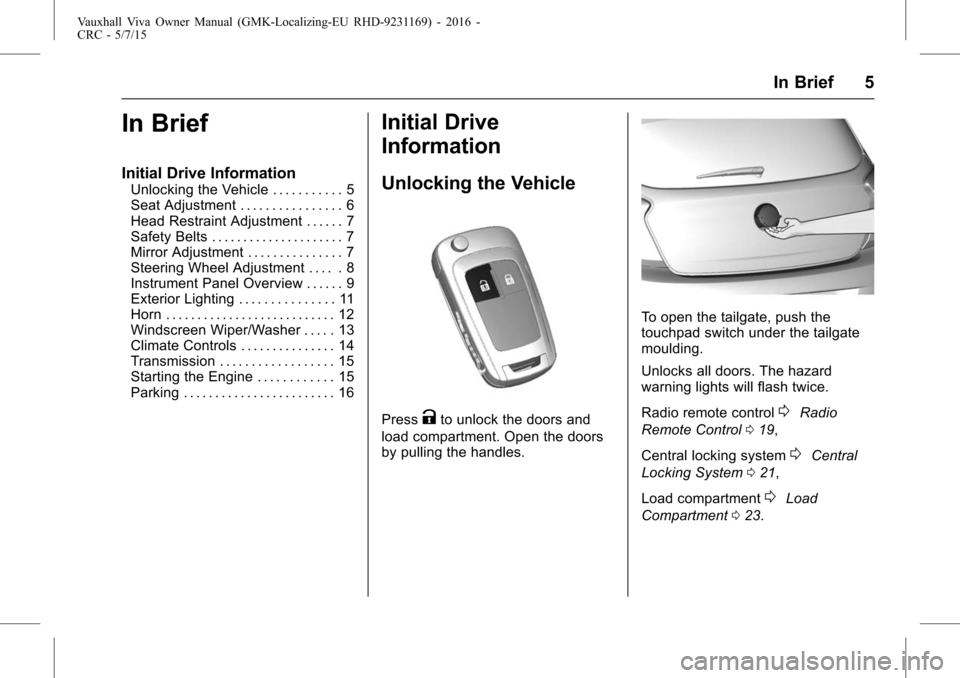
Unlocking the Vehicle
PressKto unlock the doors and
load compartment. Open the doors
by pulling the handles.
To open the tailgate, push the
touchpad switch under the tailgate
moulding.
Unlocks all doors. The hazard
warning lights will flash twice.
Radio remote control
0Radio
Remote Control 019,
Central locking system
0Central
Locking System 021,
Load compartment
0Load
Compartment 023.
Page 17 of 222

Vauxhall Viva Owner Manual (GMK-Localizing-EU RHD-9231169) - 2016 -
CRC - 5/7/15
16 In Brief
Stop-start system
If the vehicle is at a low speed or at
a standstill and certain conditions
are fulfilled, activate an Autostop as
follows:
.depress the clutch pedal
. set the lever in neutral
. release the clutch pedal
An Autostop is indicated by the
needle at the AUTOSTOP position
in the tachometer.
To restart the engine, depress the
clutch pedal again. Stop-start system
0Automatic
Engine Start/Stop Feature 0141.
Parking
{Warning
.
Do not park the vehicle on
an easily ignitable surface.
The high temperature of the
exhaust system could ignite
the surface.
. Always apply handbrake.
Pull switch
Yfor approx.
one second.
. Switch off the engine.
. surface or uphill slope,
engage first gear or set the
selector lever to position P
before removing the ignition
key. On an uphill slope, turn
the front wheels away from
the kerb.
If the vehicle is on a
downhill slope, engage
reverse gear or set the
(Continued)
Warning (Continued)
selector lever to position P
before removing the ignition
key. Turn the front wheels
towards the kerb.
. Remove the ignition key.
Turn the steering wheel until
the steering wheel lock is
felt to engage.
For vehicles with automatic
transmission, the key can
only be removed when the
selector lever is in
position P.
. Close the windows.
. Lock the vehicle with
Qon the
radio remote control.
. Activate the anti-theft alarm
system
0Anti-theft Alarm
System 024.
. The engine cooling fans may run
after the engine has been
switched off
0End-of-Life
Vehicle Recovery 0161.
Page 19 of 222

Vauxhall Viva Owner Manual (GMK-Localizing-EU RHD-9231169) - 2016 -
CRC - 5/7/15
18 Keys, Doors, and Windows
Keys, Doors, and
Windows
Keys and Locks
Keys . . . . . . . . . . . . . . . . . . . . . . . . . . . 18
Car Pass . . . . . . . . . . . . . . . . . . . . . . 19
Radio Remote Control . . . . . . . . . 19
Memorised Settings . . . . . . . . . . . . 20
Central Locking System . . . . . . . 21
Automatic Door Locks . . . . . . . . . 23
Safety Locks . . . . . . . . . . . . . . . . . . . 23
Doors
Load Compartment . . . . . . . . . . . . 23
Vehicle Security
Anti-theft Alarm System . . . . . . . . 24
Immobiliser . . . . . . . . . . . . . . . . . . . . 25
Exterior Mirrors
Convex Mirrors . . . . . . . . . . . . . . . . 26
Power Mirrors . . . . . . . . . . . . . . . . . . 26
Folding Mirrors . . . . . . . . . . . . . . . . . 26
Heated Mirrors . . . . . . . . . . . . . . . . . 26
Interior Mirrors
Manual Rearview Mirror . . . . . . . . 27
Windows
Manual Windows . . . . . . . . . . . . . . 27
Power Windows . . . . . . . . . . . . . . . 27
Heated Rear Window . . . . . . . . . . 29
Sun Visors . . . . . . . . . . . . . . . . . . . . . 29
Roof
Sunroof . . . . . . . . . . . . . . . . . . . . . . . . 29
Keys and Locks
Keys
Replacement keys
The key number is specified on a
detachable tag.
The key number must be quoted
when ordering replacement keys as
it is a component of the immobiliser
system.
Locks
0Exterior Care0195.
Lock cylinders
Designed to free-wheel if they are
forcefully rotated without the correct
key or if the correct key is not fully
inserted. To reset, turn cylinder with
the correct key until its slot is
vertical, remove key and then
re-insert it. If the cylinder still
free-wheels, turn the key through
180° and repeat operation.
Page 20 of 222

Vauxhall Viva Owner Manual (GMK-Localizing-EU RHD-9231169) - 2016 -
CRC - 5/7/15
Keys, Doors, and Windows 19
Key with foldaway key section
Press button to extend.
To fold the key, first press the
button.
Car Pass
The Car Pass contains security
related vehicle data and should
therefore be kept in a safe place.
When the vehicle is taken to a
workshop, this data is required in
order to perform certain operations.
Radio Remote Control
Used to operate:
. central locking system
. anti-theft alarm system
The radio remote control has a
range of approx. 20 metres. It can
be restricted by external influences.
The hazard lights confirm operation.
Handle with care, protect from
moisture and high temperatures and
avoid unnecessary operation.
Fault
If the central locking system cannot
be operated with the radio remote
control, it may be due to the
following:
. Range exceeded,
. Battery voltage too low,
. Frequent, repeated operation of
the remote control while not in
range, which will require
resynchronisation,
. Overload of the central locking
system by operating at frequent
intervals, the power supply is
interrupted for a short time,
. Interference from higher-power
radio waves from other sources.
Unlocking
0Central Locking
System 021.
Radio remote control battery
replacement
Replace the battery as soon as the
range is reduced.
Page 21 of 222

Vauxhall Viva Owner Manual (GMK-Localizing-EU RHD-9231169) - 2016 -
CRC - 5/7/15
20 Keys, Doors, and Windows
Batteries do not belong in
household waste. They must be
disposed of at an appropriate
recycling collection point.
Key with foldaway key section
Extend the key and open the unit.
Replace the battery (battery type
CR 2032), paying attention to the
installation position. Close the unit
and synchronise.
Key with fixed key section
Have the battery replaced by a
workshop.
Radio remote control
synchronisation
After replacing the battery, unlock
the door with the key in the driver's
door lock. The radio remote control
will be synchronised when the
ignition is switched on.
Memorised Settings
Whenever the key is removed from
the ignition switch, the following
settings are automatically
memorised by the key:
.lighting
. infotainment system
. central locking system
. comfort settings
The saved settings are
automatically used the next time the
memorised key is inserted into the
ignition switch and turned to position
1
0Ignition Positions 0139.
A precondition is that
Personalisation by driver is
activated in the personal settings of
the Graphic-Info-Display.
Page 23 of 222

Vauxhall Viva Owner Manual (GMK-Localizing-EU RHD-9231169) - 2016 -
CRC - 5/7/15
22 Keys, Doors, and Windows
Central locking button
Locks or unlocks all doors, the load
compartment from the passenger
compartment.
Press central locking button: the
doors are locked or unlocked.
Fault in radio remote control
system
Unlocking
Manually unlock the driver's door by
turning the key in the lock. Switch
on the ignition and press the central
locking button to unlock all doors,
load compartment.
By switching on the ignition, the
anti-theft locking system is
deactivated
0Anti-theft Alarm
System 024. Locking
Closed all Door, Open the Driver's
Door, press central locking button.
The vehicle is locked.
Close the Driver's door. Manually
lock the driver's door by turning
the key.
Fault in central locking system
Unlocking
Manually unlock the driver's door by
turning the key in the lock. The
other doors can be opened by
Pulling up on the sill button and
pulling the interior handle to release
the latch for other doors. The load
compartment cannot be opened.
To deactivate the anti-theft locking
system, switch on the ignition
0
Anti-theft Alarm System
024.
Page 26 of 222

Vauxhall Viva Owner Manual (GMK-Localizing-EU RHD-9231169) - 2016 -
CRC - 5/7/15
Keys, Doors, and Windows 25
LED flashes quickly : doors, tailgate
or bonnet not completely closed,
or system fault.
Deactivation
Unlocking the vehicle by pressingK
on the radio remote control
deactivates anti-theft alarm system.
Alarm
The alarm can be silenced by
pressing any button of the radio
remote control or by switching on
the ignition.
The anti-theft alarm system can be
deactivated by pressing the
Kor
switching on the ignition.
Auto door lock
If any of the doors is not opened or
the position of Ignition key is not
located in position 1 or position 2
within 3 minutes after unlocking
doors using the transmitter, all the
doors are locked and anti-theft
alarm system is activated
automatically.
Automatic door unlocks
All doors will be automatically
unlocked when the impact is
delivered to impact sensors while
the ignition is position 2.
However, the doors may not be
unlocked if mechanical problems
occur with the door lock system or
battery.
Immobiliser
The system is part of the ignition
switch and checks whether the
vehicle is allowed to be started with
the key being used.
The immobiliser is activated
automatically after the key has been
removed from the ignition switch.
If control indicator
Aflashes when
the ignition is on, there is a fault in
the system; the engine cannot be
started. Switch off the ignition and
then repeat the start attempt. If control indicator
Acontinues
flashing, attempt to start the engine
using the spare key and seek the
assistance of a workshop.
Note: The immobiliser does not
lock the doors. You should always
lock the vehicle after leaving it and
switch on the anti-theft alarm
system
0Central Locking System
0 21, Anti-theft Alarm System 024.
Control indicator
A 0Immobiliser
Light 074.
Page 91 of 222

Vauxhall Viva Owner Manual (GMK-Localizing-EU RHD-9231169) - 2016 -
CRC - 5/7/15
90 Lighting
Lighting Features
Centre Console Lighting
Spotlight incorporated in the interior
lighting comes on when the dipped
beam is switched on.
Entry Lighting
Welcome lighting
The exterior lights, instrument panel
light and interior lights are switched
on for a short time by pressing the
unlocking button
Kon the radio
remote control twice. This function
works only in the dark and facilitates
locating the vehicle.
The lighting switches off
immediately when the ignition key is
turned to position 1
0Ignition
Positions 0139.
Activation or deactivation of this
function can be changed in the
menu Settings in the Info-Display.
Vehicle personalisation
0Vehicle
Personalisation 082. The settings can be saved for the
key being used
0Memorised
Settings 020.
The following lights will additionally
switch on when the driver's door is
opened :
. all switches
. driver Information Centre
Exit Lighting
The following lights illuminate if the
key is removed from the ignition
switch :
.
Interior lights
. Instrument panel light (only
when it is dark)
They will switch off automatically
after a delay. Both lights will be
activated again if the driver's door is
opened.
The exterior lights illuminate the
surrounding area for an adjustable
time after leaving the vehicle.
Switching on
1. Switch off ignition.
2. Remove ignition key.
3. Open driver's door.
4. Pull indicator lever.
5. Close driver's door.
If the driver's door is not closed the
lights switch off after 2 minutes.
Exit lighting is switched off
immediately if the indicator lever is
pulled while the driver's door
is open.