2015.75 VAUXHALL VIVA USB
[x] Cancel search: USBPage 112 of 222

Vauxhall Viva Owner Manual (GMK-Localizing-EU RHD-9231169) - 2016 -
CRC - 5/7/15
Infotainment System 111
Once the product finishes reading
the information on the USB storage
device, it will automatically start
playing.
If a non-readable USB storage
device is connected, an error
message will appear and the
product will automatically switch to
the previously used function or the
FM radio function.
If the USB storage device to be
played is already connected,
repeatedly press MEDIA to select
the USB player.
.It will automatically play from the
previous playing point. .
If there is no device connected,
“No Media Available ”will be
displayed with a DISMISS and
PAIR option on the display
screen.
. The information displayed
includes the file name, folder
name, and ID3 Tag information
saved with the song.
If incorrect ID3 Tag information
(e.g. artist, song title) was added
to MP3 (WMA) files before they
were burnt to a disc, this
information will be displayed as
is by the Infotainment system.
Incorrect ID3 Tag information
cannot be modified or corrected
on the Infotainment system (ID3
Tags can only be corrected on
a PC).
The information for songs
expressed in special symbols or
in unavailable languages may be
displayed as “****”or are not
displayed at all.
Ending USB music files playback
Press RADIO or MEDIA to select
other functions. Selecting playing file
While playing, press
g/dto
select the previous or next file.
Using the Steering wheel audio
remote control, files can be easily
changed by pressing
g/d.
Turn the TUNE dial to move the
desired file in the file list, and then
press MENU to instantly change it.
Fast-forwarding and re-winding
the file
While playing, press and hold
g/
dto rewind or fast-forward through
the song until released.
Once released, the file will begin
playing at normal speed.
Using the USB menu
While playing the file, press MENU
to enter the USB Menu.
Turn the TUNE dial to move to the
desired menu item, and then press
MENU to select the relevant item or
to enter the item's detailed menu.
Page 113 of 222

Vauxhall Viva Owner Manual (GMK-Localizing-EU RHD-9231169) - 2016 -
CRC - 5/7/15
112 Infotainment System
.Folder View: Enter the Folder
View mode, and move to the
previous or next folder.
. Shuffle: Turn the shuffle feature
on or off.
Browsing/indexing device
. Browsing is not supported until
indexing is completed for the
connected device.
. If the browse function is selected
during the indexing process, a
pop-up “Feature not supported
during Indexing Use folder
view to browse contents ”will
display.
. When a single device with
greater than 6,000 songs is
connected, a pop-up “Media
indexing memory full Use
folder view or remove other
device ”will display.
Remove USB
Remove the USB device from the
USB connection terminal.
If the USB device is removed, the
system will display the No
Connection message for each source on the display screen and
keep the current status until the
device is reconnected.
Using the Media transfer protocol
(MTP) menu
Charge Only: Select the charge
option for the MTP device. The MTP
device will be charged, and the
system will show the pop-up
message, when it is connected.
.
The default setting is
Charge Only.
. When the Charge Only option is
selected in the Media Transfer
Protocol (MTP) Setting Menu,
the audio source is not changed
and the connected device is only
charged.
. If you change to USB mode
while charging the device, a
Charge message with charging
activity indicator is shown on the
display screen. In this case, the
system will not start indexing the
files on the device.
. Charging may not be supported
by some MTP devices. Scan Music Folder Only: Select
the Music Folder Scan option for the
MTP device.
The system can display the Artist
Name/Song Name/Elapsed Time
regarding the current song and
access the playlist on the MTP
device.
Scan All Folder: Select the All
Folder scan option for the MTP
device.
.
The device indexing time takes
longer than the setting of Scan
Music Folder Only. It depends on
the smartphone and the files/
folders on the smartphone.
. With some phones featuring
Media Transfer Protocol (MTP),
music search can take a
long time.
. If the phone screen is locked,
you cannot search for music. To
access music on the phone,
unlock the phone screen.
Page 114 of 222

Vauxhall Viva Owner Manual (GMK-Localizing-EU RHD-9231169) - 2016 -
CRC - 5/7/15
Infotainment System 113
iPod player
Connecting iPod player
Connect the iPod device in which
the music files are stored to the
USB connection terminal.
Some iPod/iPhone product models
may not be supported.
Only connect the iPod to this
product with connection cables
supported by iPod products. Other
connection cables cannot be used.
.In some cases, the iPod product
may be damaged, if the ignition
is turned off when it is connected
to the product.
When the iPod product is not
being used, keep it separately
from this product with the car
ignition turned off.
. Once the product finishes
reading the information on the
iPod device, it will play
automatically.
. If a non-readable iPod device is
connected, then the relevant
error message will appear and
the product will automatically switch to the previously used
function or the FM radio
function.
If the iPod device to be played is
already connected, repeatedly press
MEDIA to select the iPod player.
. It will automatically play from the
previously played point.
. The playback functions and the
information display items of the
iPod player used with this
product may be different from
the iPod in terms of play order,
method, and the information
displayed.
Afterwards, the functions to play the
iPod are operated similarly to USB
playback.
Ending iPod playback
To end playback, press RADIO or
MEDIA to select other functions.
Using the iPod menu
While playing the file, press MENU
to enter the Menu iPod.
Page 115 of 222
Vauxhall Viva Owner Manual (GMK-Localizing-EU RHD-9231169) - 2016 -
CRC - 5/7/15
114 Infotainment System
Turn the TUNE dial to move the
desired menu item, and then press
MENU to select the relevant item or
to enter the item's detailed menu.
.Browse “Device Name ”:
Selects a list item in the list of
browse names such as Playlists,
Artists, Albums, Tracks, Genres,
Audio Books, and Composers.
. Shuffle: Turn the shuffle feature
on or off.
Remove iPod
Remove the iPod from the USB
connection terminal.
When the iPod is removed, the
system automatically changes to the
previously used function or the FM
radio.AUX input
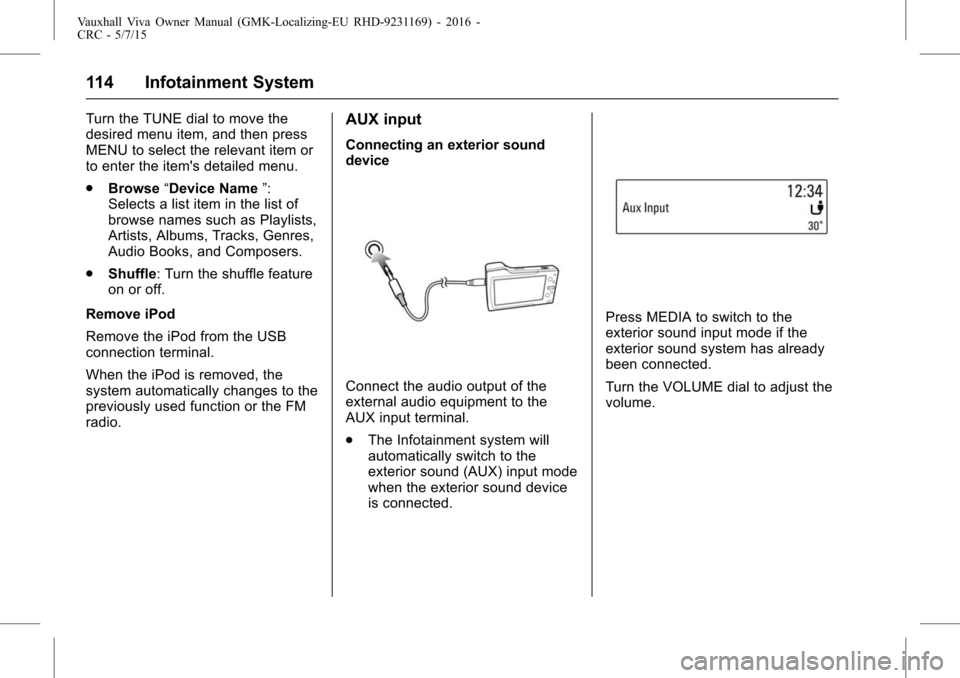
Connecting an exterior sound
device
Connect the audio output of the
external audio equipment to the
AUX input terminal.
. The Infotainment system will
automatically switch to the
exterior sound (AUX) input mode
when the exterior sound device
is connected.
Press MEDIA to switch to the
exterior sound input mode if the
exterior sound system has already
been connected.
Turn the VOLUME dial to adjust the
volume.
Page 121 of 222

Vauxhall Viva Owner Manual (GMK-Localizing-EU RHD-9231169) - 2016 -
CRC - 5/7/15
120 Infotainment System
Repeatedly press MEDIA to select
the Bluetooth Music mode.
.Audio file within the Bluetooth
device will automatically play
once "Bluetooth Music " is
displayed on the display screen.
. If music is not yet playing from
your mobile device after
switching to streaming audio
(Bluetooth Music) mode or after
pressing Play on the mobile
device itself, try to start music
playback by pressing the Play
button again.
While playing, press
g/dto
move to the previous or next track. .
This function only operates with
Bluetooth devices that support
Audio Video Remote Control
Profile (AVRCP) version 1.0 or
above. (Depending on the
Bluetooth device options, some
devices may display Audio
Video Remote Control Profile
(AVRCP) being connected for
the initial connection.)
. If the Bluetooth device is
disconnected while Bluetooth
music is playing, the music will
also stop.
Afterwards, the functions to play
Bluetooth Music are operated
similarly to USB playback.
Using the Bluetooth music menu
While playing, press MENU to enter
the Bluetooth Audio Menu. Turn the
TUNE dial to move to the desired
menu item, and then press MENU to
select the relevant item or to enter
the item's detailed menu. .
Browse “Device Name ”: Select
a list item in the list of browse
names. If the Bluetooth profiles
do not match, the system will
display “Action not supported
by devices ”.
Support Profile version : Audio
Video Remote Control Profile
(AVRCP) 1.4.
. Shuffle: Turn the shuffle feature
on or off.
. Manage Bluetooth devices:
Enter the Phone List menu.
Emergency call
{Warning
Connection setup cannot be
guaranteed in all situations.
For this reason, do not rely
exclusively on a mobile phone
when a vitally important
communication (e.g. a medical
emergency) is concerned.
(Continued)