2015.5 VAUXHALL INSIGNIA radio
[x] Cancel search: radioPage 32 of 331

30Keys, doors and windows
vehicle first when operating with the
touchpad switch or the switch in the
driver's door. Lock the vehicle after
closing.
Central locking system 3 23.
Operation with radio remote control
Press and hold x until the tailgate
starts to open or close.
Operation with the switch in the
driver's door
Press and hold G until the tailgate
starts to open or close.
Operation with switches in the tailgate
To open the tailgate, press the
touchpad switch under the tailgate
moulding until the tailgate starts to
move.
Page 33 of 331

Keys, doors and windows31
To close, press G in the open
tailgate until the tailgate starts to
move.
Stop or change direction of
movement
Pressing x on radio remote control
or G on the tailgate or press on the
touchpad switch whilst the tailgate is
moving will stop the tailgate in the
current position. Pressing x or
G again will reverse the direction of
movement.
Operation modes
The power tailgate has three modes
of operation, which are controlled by
the switch in the driver's door. To
change the mode, turn the switch:
■ Normal mode MAX: Power tailgate
opens to full height.
■ Intermediate mode 3/4: Power
tailgate opens to a reduced height that can be adjusted.
■ Mode Off: Tailgate can only be
operated manually.
Adjust reduced opening height in
intermediate mode
1. Turn operation mode switch to 3/4 .
2. Open power tailgate with any operation switch.
3. Stop movement at the desired height by pressing any operation
switch. If required, manually move
the stopped tailgate to the desired
position.
4. Press and hold the button on the
inside of the open tailgate for
3 seconds.
Page 35 of 331

Keys, doors and windows33
Notice
The operation of the power tailgate
is disabled under low vehicle battery conditions. In this case, the tailgate
may not even by manually operable.
Notice
With the power tailgate disabled and
all doors unlocked, the tailgate can
only be operated manually. In this
event, manually closing the tailgate
requires significantly greater force.
Notice
The installation of certain heavy
accessories onto the tailgate may
affect its ability to remain open.Vehicle security
Anti-theft locking system9 Warning
Do not use the system if there are
people in the vehicle! The doorscannot be unlocked from the
inside.
The system deadlocks all the doors.
All doors must be closed and the
electronic key must not remain in the
vehicle. Otherwise the system cannot
be activated.
If the ignition was on, the driver's door
must be opened and closed once so
that the vehicle can be secured.
Unlocking the vehicle disables the
mechanical anti-theft locking system.
This is not possible with the central
locking button in the passenger
compartment.
Activating
Radio remote control or electronic
key: press e twice within 5 seconds.
Anti-theft alarm system The anti-theft alarm system is
operated in conjunction with the
central locking system.
It monitors: ■ doors, tailgate, bonnet
■ passenger compartment including adjoining load compartment
■ vehicle inclination, e.g. if it is raised
■ ignition
Page 36 of 331

34Keys, doors and windows
ActivationAll doors must be closed and the
electronic key must not remain in the
vehicle. Otherwise the system cannot
be activated.
■ Radio remote control: self- activated 30 seconds after locking
the vehicle by pressing e once.
■ Electronic key system: self- activated 30 seconds after locking
the vehicle by pressing the button
on any exterior door handle.■ Radio remote control or electronic
key: directly by pressing e twice
within 5 seconds.
■ Electronic key system with passive locking enabled: briefly activated
after passive locking occurs.
Notice
Changes to the vehicle interior such
as the use of seat covers, and open windows or sunroof, could impair the
function of passenger compartment
monitoring.
Activation without monitoring of
passenger compartment and
vehicle inclinationSwitch off the monitoring of
passenger compartment and vehicle
inclination when animals are being
left in the vehicle, because of high
volume ultrasonic signals or
movements triggering the alarm. Also switch off when the vehicle is on a
ferry or train.
1. Close tailgate, bonnet, windows and sunroof.
2. Press o. LED in the button o
illuminates for a maximum of
10 minutes.
3. Close the doors.
4. Activate the anti-theft alarm system.
Status message is displayed in the
Driver Information Centre.
Page 37 of 331

Keys, doors and windows35
Status LED
Status LED is integrated in the sensor
on top of the instrument panel.
Status during the first 30 seconds of
anti-theft alarm system activation:
LED illuminates=test, arming delayLED flashes
quickly=doors, tailgate or
bonnet not
completely closed,
or system fault
Status after system is armed:
LED flashes
slowly=system is armedSeek the assistance of a workshop in
the event of faults.
Deactivation
Radio remote control: Unlocking the
vehicle by pressing c deactivates
anti-theft alarm system.
Electronic key system: Unlocking the
vehicle by pressing the button on any
exterior door handle deactivates anti-
theft alarm system.
The system is not deactivated when
unlocking the driver's door with the
key or with the central locking button
in the passenger compartment.
Alarm
When triggered, the alarm horn
sounds and the hazard warning lights
flash simultaneously. The number
and duration of alarm signals are
stipulated by legislation.
The anti-theft alarm system can be
deactivated only by pressing c or by
pressing the switch on the door
handle (electronic key system) or
switching on the ignition.
A triggered alarm, which has not been interrupted by the driver, will be
indicated by the hazard warning
lights. They will flash quickly three
times when the vehicle is unlocked
next time with the radio remote
control. Additionally, a warning
message is displayed in the Driver
Information Centre after switching on
the ignition.
Vehicle messages 3 120.
If the vehicle's battery is to be
disconnected (e.g. for maintenance
work), the alarm siren must be
deactivated as follows: switch the
Page 54 of 331
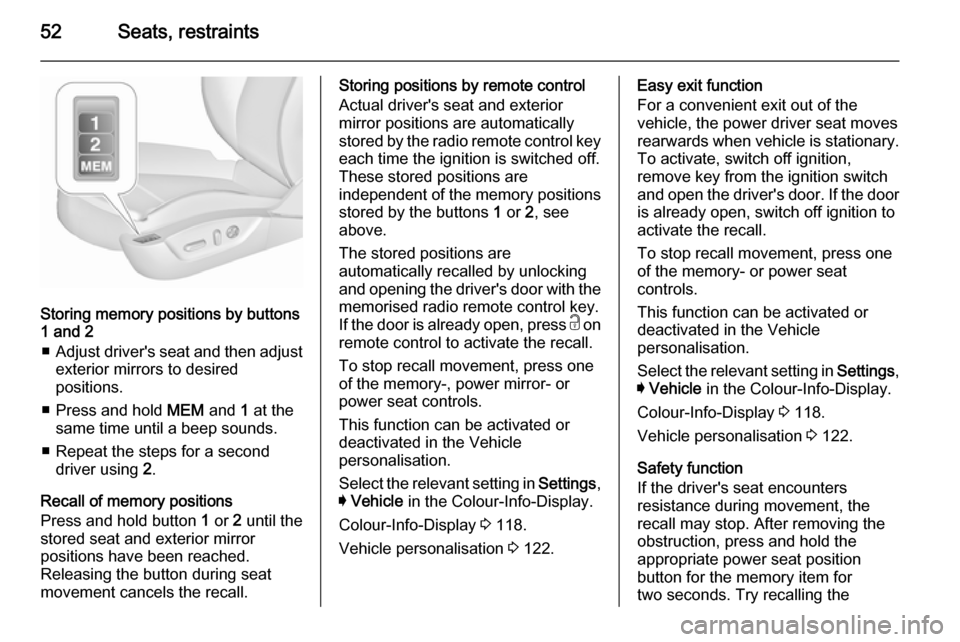
52Seats, restraints
Storing memory positions by buttons
1 and 2
■ Adjust driver's seat and then adjust
exterior mirrors to desired
positions.
■ Press and hold MEM and 1 at the
same time until a beep sounds.
■ Repeat the steps for a second driver using 2.
Recall of memory positions
Press and hold button 1 or 2 until the
stored seat and exterior mirror
positions have been reached.
Releasing the button during seat
movement cancels the recall.
Storing positions by remote control
Actual driver's seat and exterior
mirror positions are automatically
stored by the radio remote control key
each time the ignition is switched off.
These stored positions are
independent of the memory positions
stored by the buttons 1 or 2, see
above.
The stored positions are
automatically recalled by unlocking and opening the driver's door with the
memorised radio remote control key.
If the door is already open, press c on
remote control to activate the recall.
To stop recall movement, press one
of the memory-, power mirror- or
power seat controls.
This function can be activated or
deactivated in the Vehicle
personalisation.
Select the relevant setting in Settings,
I Vehicle in the Colour-Info-Display.
Colour-Info-Display 3 118.
Vehicle personalisation 3 122.Easy exit function
For a convenient exit out of the
vehicle, the power driver seat moves
rearwards when vehicle is stationary. To activate, switch off ignition,
remove key from the ignition switch and open the driver's door. If the door
is already open, switch off ignition to
activate the recall.
To stop recall movement, press one
of the memory- or power seat
controls.
This function can be activated or
deactivated in the Vehicle
personalisation.
Select the relevant setting in Settings,
I Vehicle in the Colour-Info-Display.
Colour-Info-Display 3 118.
Vehicle personalisation 3 122.
Safety function
If the driver's seat encounters
resistance during movement, the
recall may stop. After removing the
obstruction, press and hold the
appropriate power seat position
button for the memory item for
two seconds. Try recalling the
Page 123 of 331

Instruments and controls121
■ driver assistance systems
■ cruise control
■ speed limiter
■ adaptive cruise control
■ forward collision alert
■ collision imminent braking system
■ parking assist systems
■ lighting, bulb replacement
■ adaptive forward lighting
■ wiper/washer system
■ doors, windows
■ side blind spot alert
■ traffic sign assistant
■ lane departure warning
■ load compartment, boot lid
■ radio remote control
■ electronic key system
■ keyless starting
■ seat belts
■ airbag systems
■ engine and transmission
■ tyre pressure
■ diesel particle filter■ vehicle battery status
■ selective catalytic reduction, diesel exhaust fluid (DEF), AdBlue
3 161
Messages in the
Colour-Info-Display
Some important messages may
appear additionally in the
Colour-Info-Display. Press the
multifunction knob to confirm a
message. Some messages only pop- up for a few seconds.
Warning chimes When starting the engine or
whilst driving
Only one warning chime will sound at a time.
The warning chime regarding not
fastened seat belts has priority over
any other warning chime.
■ If seat belt is not fastened.
■ If a door or the tailgate is not fully closed when starting off.■ If a certain speed is exceeded withparking brake applied.
■ If adaptive cruise control deactivates automatically.
■ If approaching a vehicle ahead too closely.
■ If a programmed speed or speed limit is exceeded.
■ If a warning message appears in the Driver Information Centre.
■ If the electronic key is not in the passenger compartment.
■ If the parking assist detects an object.
■ If an unintended lane change occurs.
■ If the diesel particle filter has reached the maximum filling level.
■ If AdBlue needs to be refilled.
When the vehicle is parked and/ or the driver's door is opened ■ When the key is in the ignition switch.
■ With exterior lights on.
■ If the trailer hitch is not engaged.
Page 124 of 331

122Instruments and controls
During an Autostop■ If the driver's door is opened.
Battery voltage When the vehicle battery voltage is
running low, a warning message will
appear in the Driver Information
Centre.
1. Switch off any electrical consumers which are not required
for a safe ride, e.g. seat heating,
heated rear window or other main consumers.
2. Charge the vehicle battery by driving continuously for a while or
by using a charging device.
The warning message will disappear
after the engine has been started
twice without a voltage drop.
If the vehicle battery cannot be
recharged, have the cause of the fault remedied by a workshop.Vehicle personalisation
The vehicle's behaviour can be
personalised by changing the settings in the Colour-Info-Display.
Some of the personal settings for
different drivers can be memorised
individually for each vehicle key.
Memorised settings 3 23.
Depending on vehicle equipment and
country-specific regulations some of
the functions described below might
not be available.
Some functions are only displayed or
active when the engine is running.
Personal settings Following the changing of personal
settings is described via the buttons
below the display. This is valid for
4.2'' as well as 8'' Colour-Info-Display.
Additionally, the 8'' display is operable
as a touchscreen and with the
touchpad between the front seats.
See description 'Colour-Info-Display'
3 118 and the Infotainment system
manual.
With active display, press ;.
Turn MENU to select Settings display
icon.
Press MENU to confirm.
The following settings can be
selected by turning and pressing the multifunction knob:
■ Time and Date
■ Sport Mode
■ Language (Language)
■ Valet Mode
■ Radio
■ Vehicle
■ Bluetooth