2014 VOLVO V60 key
[x] Cancel search: keyPage 158 of 442

||
06 Locks and alarm
06
156* Option/accessory, for more information, see Introduction.
Related information
• Detachable key blade - unlocking doors (p. 156)
• Child safety locks - manual activation (p.169)
• Passenger airbag - activating/deactivat-ing* (p. 30)
Detachable key blade - unlocking doors
The detachable key blade (p. 155) can be used if central locking cannot be activatedwith the remote control key (p. 149), e.g. if thekey's battery has run out. If central locking cannot be activated with the remote control key - e.g. if the batteries aredischarged - then the left-hand front door canbe opened as follows:
1. Unlock the left-hand front door with the
key blade in the door handle's lock cylin- der. For illustration and more information,see Keyless drive* - unlocking with thekey blade (p. 162).
NOTE
When the door has been unlocked using the key blade and is opened, the alarm istriggered.
2. Deactivate the alarm by inserting theremote control key in the ignition switch.
For cars with the Keyless system, see Keyless drive* - unlocking with the key blade(p. 162).
Related information
• Remote control key with key blade (p. 149)
• Remote control key/PCC - replacing thebattery (p. 158)
Privacy locking*
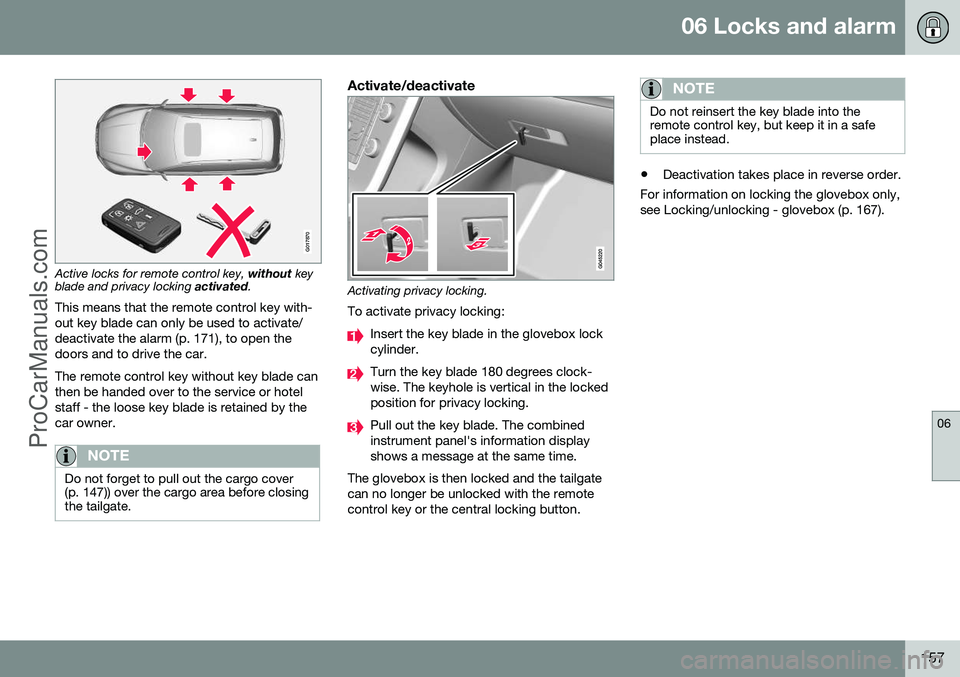
Privacy locking is intended for when the car is left for service, with a hotel parking valet orsimilar. The glovebox is then locked and thetailgate lock is disconnected from the centrallocking - the tailgate cannot be opened witheither the central locking button in the frontdoors or the remote control key (p. 149).
G017869
Active locks for remote control key
with key
blade.
ProCarManuals.com
Page 159 of 442
06 Locks and alarm
06
157
G017870
Active locks for remote control key, without key
blade and privacy locking activated.
This means that the remote control key with- out key blade can only be used to activate/deactivate the alarm (p. 171), to open thedoors and to drive the car. The remote control key without key blade can then be handed over to the service or hotelstaff - the loose key blade is retained by thecar owner.
NOTE
Do not forget to pull out the cargo cover (p. 147)) over the cargo area before closingthe tailgate.
Activate/deactivate
Activating privacy locking.
To activate privacy locking:
Insert the key blade in the glovebox lock cylinder.
Turn the key blade 180 degrees clock- wise. The keyhole is vertical in the lockedposition for privacy locking.
Pull out the key blade. The combined instrument panel's information displayshows a message at the same time.
The glovebox is then locked and the tailgatecan no longer be unlocked with the remotecontrol key or the central locking button.
NOTE
Do not reinsert the key blade into the remote control key, but keep it in a safeplace instead.
• Deactivation takes place in reverse order.
For information on locking the glovebox only, see Locking/unlocking - glovebox (p. 167).
ProCarManuals.co’
Page 160 of 442

06 Locks and alarm
06
158* Option/accessory, for more information, see Introduction.
Remote control key/PCC - replacing the battery
The batteries for the remote control key/PCC can be replaced. The batteries for the remote control key/PCC should be replaced if: • the information symbol in the combined instrument panel illuminates and the dis- play shows
Low battery in remote
control. Please change batteries.
and/or
• the locks repeatedly do not react to sig- nals from the remote control key within20 metres from the car.
Opening
Slide the spring-loaded catch to the
side.
At the same time pull the key blade
straight out backwards.
Insert a 3 mm slot screwdriver in the
hole behind the spring-loaded catch and gently prize the remote control key up.
NOTE
Turn the remote control key over with the buttons facing up, this is to avoid the bat-teries falling out when it is opened.
IMPORTANT
Avoid touching new batteries and their contact surfaces with your fingers as thismay impair their function.
Battery replacementClosely study how the battery/batteries are secured on the inside of the cover,with regard to their ( +) and ( –) sides.
Remove control key (1 battery)1. Carefully prize out the battery.
2. Install a new one with the ( +) side down.
PCC* (2 batteries)1. Carefully prize out the batteries.
2. First install one new one with the ( +) side
up.
3. Position the white plastic tab in between and finally install a second new battery with the ( +) side down.
Battery typeUse batteries with the designation CR2430, 3V - one in the remote control key and two inthe PCC.
ProCarManuals.co’
Page 161 of 442

06 Locks and alarm
06
* Option/accessory, for more information, see Introduction.159
NOTE
Volvo recommends that the batteries to be used in the remote control key/PCC fulfilUN Manual of Test and Criteria, Part III,sub-section 38.3. Batteries fitted in thefactory or replaced by an authorised Volvoworkshop fulfil the above criteria.
Assembly1. Press the remote control key together.
2. Hold the remote control key with the slot
pointed up and lower the key blade into its slot.
3. Lightly press the key blade. You should hear a "click" when the key blade islocked in.
IMPORTANT
Make sure that exhausted batteries are disposed of in a manner which is kind tothe environment.
Related information
• Remote control key with key blade (p. 149)
• Remote control key - functions (p. 151)
Keyless drive*
Keyless drive, only with PCC (p. 153) 2
means
that the car's lock and starting systems can be operated keylessly. The Keyless drive function in the PCC allows the car to be unlocked (p. 161), driven andlocked without the need for a key. You simplyhave to have the PCC with you. The systemmakes it easier and more convenient to openthe car, e.g. when your hands are full. Both of the car's PCCs incorporate the Keyless function. Additional PCCs can beordered, see Remote control key with keyblade (p. 149). The car's electrical system can be set to three different levels - key position 0, I and II
(p. 70) - with the remote control key.
Related information
• Keyless drive* - PCC range (p. 159)
• Keyless drive* - handling the PCC safely (p. 160)
• Keyless drive* - interference to PCC func-tion (p. 160)
Keyless drive* - PCC range
In order to open a door or the tailgate, a PCC must be no more than approx. 1.5 metresfrom the car door handle or tailgate. The person who wishes to lock or unlock a door must have the PCC with him or her. It isnot possible to lock or unlock a door if thePCC is on the opposite side of the car.
The red rings in the above figure indicate the range covered by the system's antennas. If all PCCs are removed from the car when the engine is running or key position
I or II (p.
70) is active, and if all doors are closed, thena warning message is shown in the informa-tion display in the combined instrument paneland an audio reminder signal sounds at thesame time.
2 Personal Car Communicator.
ProCarManuals.co’
Page 162 of 442

||
06 Locks and alarm
06
160* Option/accessory, for more information, see Introduction.
When the PCC has been returned to the car, the warning message goes off and the audi-ble reminder ceases once either/or:
• a door has been opened and closed
• the PCC is inserted into the ignition switch
• the
OK button has been pressed.
Related information
• Keyless drive* (p. 159)
• Keyless drive* - antenna location (p. 163)
Keyless drive* - handling the PCC safely
It is important to handle all remote control keys with great care. If a PCC with keyless function is left in the car, it is deactivated temporarily when the caris locked. This prevents unauthorised entry. However, if someone breaks into the car and finds the PCC, it can be reactivated. It istherefore important to handle all PCCs withgreat care.
IMPORTANT
Never leave a PCC in the car.
Related information
•
Keyless drive* (p. 159)
Keyless drive* - interference to PCC function
Electromagnetic fields and screening can interfere with the Keyless function.
NOTE
Do not place/store the PCC near a mobile phone or metal object - no closer than10-15 cm.
If interference is experienced nonetheless, use the PCC and the key blade as a remotecontrol key, see Remote control key - func-tions (p. 151).
Related information
• Remote control key/PCC - replacing the battery (p. 158)
• Keyless drive* - handling the PCC safely(p. 160)
• Keyless drive* - PCC range (p. 159)
ProCarManuals.co’
Page 163 of 442

06 Locks and alarm
06
* Option/accessory, for more information, see Introduction.161
Keyless drive* - locking
Cars with the Keyless-drive system have a touch-sensitive area on the outer handle ofthe doors and a rubberised button next to thetailgate's rubberised pressure plate for lock-ing/unlocking.
The touch-sensitive area on the outer door han- dles and the rubberised button next to the tail-gate's rubberised pressure plate.
Lock the doors and the tailgate with one long press on any of the door handles' touch-sen-sitive areas or press the smaller of the tail-gate's two rubberised buttons - the lock indi-cator (p. 150) in the windscreen confirms thatlocking has been completed by starting toflash. All doors and the tailgate must be closed before the car can be locked - otherwise thecar is not locked.
NOTE
In cars with automatic gearbox selectors, the gear selector must be set to the P
position; otherwise the car can be neitherlocked nor alarmed.
Related information
• Keyless drive* (p. 159)
• Alarm indicator (p. 172)
Keyless drive* - unlocking
Unlocking takes place when a hand grasps a door handle or the tailgate's rubberised pres-sure plate is actuated - open the door or tail-gate as normal.
NOTE
The door handles normally register a hand that takes hold of the handle, but withthick gloves on or after a very quick handmovement a second attempt may berequired, or with the glove taken off.
Related information
•
Keyless drive* (p. 159)
• Keyless drive* - locking (p. 161)
ProCarManuals.co’
Page 164 of 442

06 Locks and alarm
06
162* Option/accessory, for more information, see Introduction.
Keyless drive* - unlocking with the key blade
If central locking cannot be unlocked with the PCC, e.g. if the batteries are discharged, thenthe left-hand front door can be opened withthe PCC's detachable key blade (see Detach-able key blade - detaching/attaching (p. 155)).
Hole for key blade - to loosen the cover.
To access the lock cylinder, the door handle's plastic cover must be removed - this is alsodone with the key blade:
1. Press the key blade approx. 1 cm straight up into the hole on the underside of the door handle/cover - do not prize.
> The plastic cover loosens automati-cally by means of the torque when the blade is pushed straight up and intothe opening. 2. Then insert the key blade in the lock cyl-
inder and unlock the door.
3. Refit the plastic cover after unlocking.
NOTE
When the driver's door is unlocked using the key blade and is opened, the alarm istriggered. It is switched off by inserting thePCC in the ignition switch, see Alarm -remote control key not working (p. 172).
Related information
• Keyless drive* (p. 159)
• Alarm (p. 171)
Keyless drive* - key memory
The key memory 3
in the PCC means that cer-
tain settings in the car can be individually adapted for different persons. The key memory function is available in com- bination with power seat and power rearviewand door mirrors. Settings for door mirrorsand driver's seat can be saved in the keymemory.
PCC memory functionIf several people each with a PCC approachthe car, then the settings for seat and mirrorsare implemented for the person who opensthe driver's door. After the driver's door has been opened by person A with PCC A but person B withPCC B shall drive, the settings can bechanged as follows:
• Standing by the driver's door, or sitting behind the steering wheel, person Bpresses their PCC's unlock button, seeRemote control key - functions (p. 151).
• Select one of three possible memories forseat adjustment with seat button 1-3, seeSeats, front - electrically operated (p. 73).
• Adjust seat and mirrors manually, seeSeats, front - electrically operated (p. 73)and Door mirrors (p. 94).
3
Only in combination with power driver's seat* and power mirrors.
ProCarManuals.co’
Page 165 of 442

06 Locks and alarm
06
* Option/accessory, for more information, see Introduction.163
Related information
• Keyless drive* (p. 159)
• Remote control key - functions (p. 151)
Keyless drive* - lock settings
Lock settings for the Keyless function can be adapted. Lock settings for the Keyless function can be adapted by indicating in the menu system forMY CAR
which doors are to be unlocked. For
a description of the menu system, see MYCAR (p. 103).
Related information
• Keyless drive* (p. 159)
Keyless drive* - antenna location
The Keyless system has a number of inte- grated antennae located around the car.
Rear bumper, centre
Door handle, left rear
Cargo area, central and furthest in under the floor
Door handle, right rear
Centre console, under the rear section
Centre console, under the front section.
ProCarManuals.co’