2014 VOLVO V60 mirror
[x] Cancel search: mirrorPage 151 of 442

06 Locks and alarm
06
* Option/accessory, for more information, see Introduction.149
Remote control key with key blade
The remote control key is used to start the car and for locking and unlocking. It contains adetachable key blade (p. 155) made of metal.The visible section is available in two versionsso that it is possible to distinguish betweenthe remote control keys. The car is supplied with 2 remote control keys or PCCs* (Personal Car Communicator). Additional remote control keys can be ordered - up to 6 can be programmed andused for the same car.
WARNING
If there are children in the car: Remember to switch off the supply to the power windows and sunroof by removingthe remote control key if the driver leavesthe car.
Remote control key with PCC (p. 153) has increased functionality compared with theremote control key, see PCC* - unique func-tions (p. 153).
Related information
• Remote control key - functions (p. 151)
Remote control key - losing
If you lose a remote control key then a new one can be ordered at a workshop - anauthorised Volvo workshop is recommended. The remaining remote control keys must be taken to the Volvo workshop. The code of themissing remote control key must be erasedfrom the system as a theft prevention meas-ure. The current number of keys registered tothe car can be checked in the menu systemMY CAR
. For a description of the menu sys-
tem, see MY CAR (p. 103).
Related information
• Remote control key - functions (p. 151)
Key memory*
The key memory in the remote control key (p. 149) means that certain settings in the car canbe individually adapted for different people. The key memory function is available in com- bination with power seat and power rearviewand door mirrors. Settings for door mirrors,driver's seat and steering force can be savedin the key memory.
Key memory – door mirrors and driver's
seat
The settings are automatically connected toeach respective remote control key, see Keymemory* in remote control key (p. 74) andAdjustable steering force* (p. 257). Afterlocking with the remote control key the set-ting of the combined instrument panel'stheme is also saved in the key, see MY CAR(p. 103). The function can be activated/deactivated in the menu system MY CAR. For a description
of the menu system, see MY CAR (p. 103). For cars with the Keyless drive function, see Keyless drive* (p. 159).
ProCarManuals.co’
Page 152 of 442
06 Locks and alarm
06
150* Option/accessory, for more information, see Introduction.
Indication locking/unlocking - adjusting
When the car is locked or unlocked using the remote control key (p. 149) the direction indi-cators confirm that locking/unlocking wascorrectly performed.
• Locking - one flash and the door mirrors are folded 1
in.
• Unlocking - two flashes and the door mir-rors are folded 1
out.
After locking the indication is only given if all locks are activated once the doors have beenclosed.
Selecting the functionDifferent options for indicating locking/unlocking with light can be set in the car'smenu system MY CAR. For a description of
the menu system, see MY CAR (p. 103).
Related information
• Keyless drive* (p. 159)
• Lock indicator (p. 150)
• Alarm indicator (p. 172)
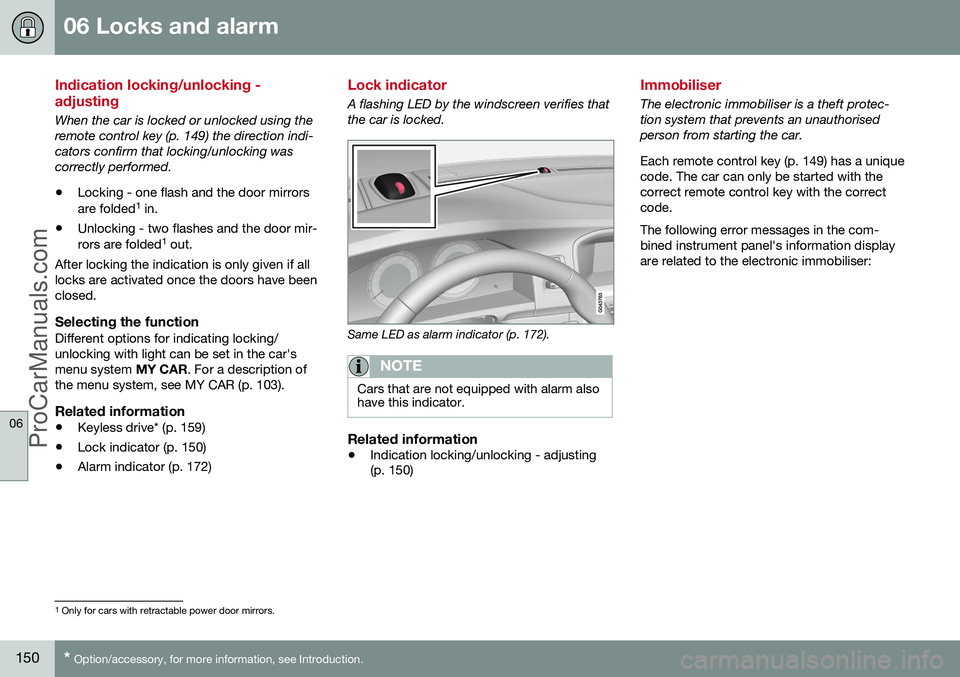
Lock indicator
A flashing LED by the windscreen verifies that the car is locked.
Same LED as alarm indicator (p. 172).
NOTE
Cars that are not equipped with alarm also have this indicator.
Related information
•Indication locking/unlocking - adjusting (p. 150)
Immobiliser
The electronic immobiliser is a theft protec- tion system that prevents an unauthorisedperson from starting the car. Each remote control key (p. 149) has a unique code. The car can only be started with thecorrect remote control key with the correctcode. The following error messages in the com- bined instrument panel's information displayare related to the electronic immobiliser:
1
Only for cars with retractable power door mirrors.
ProCarManuals.co’
Page 164 of 442

06 Locks and alarm
06
162* Option/accessory, for more information, see Introduction.
Keyless drive* - unlocking with the key blade
If central locking cannot be unlocked with the PCC, e.g. if the batteries are discharged, thenthe left-hand front door can be opened withthe PCC's detachable key blade (see Detach-able key blade - detaching/attaching (p. 155)).
Hole for key blade - to loosen the cover.
To access the lock cylinder, the door handle's plastic cover must be removed - this is alsodone with the key blade:
1. Press the key blade approx. 1 cm straight up into the hole on the underside of the door handle/cover - do not prize.
> The plastic cover loosens automati-cally by means of the torque when the blade is pushed straight up and intothe opening. 2. Then insert the key blade in the lock cyl-
inder and unlock the door.
3. Refit the plastic cover after unlocking.
NOTE
When the driver's door is unlocked using the key blade and is opened, the alarm istriggered. It is switched off by inserting thePCC in the ignition switch, see Alarm -remote control key not working (p. 172).
Related information
• Keyless drive* (p. 159)
• Alarm (p. 171)
Keyless drive* - key memory
The key memory 3
in the PCC means that cer-
tain settings in the car can be individually adapted for different persons. The key memory function is available in com- bination with power seat and power rearviewand door mirrors. Settings for door mirrorsand driver's seat can be saved in the keymemory.
PCC memory functionIf several people each with a PCC approachthe car, then the settings for seat and mirrorsare implemented for the person who opensthe driver's door. After the driver's door has been opened by person A with PCC A but person B withPCC B shall drive, the settings can bechanged as follows:
• Standing by the driver's door, or sitting behind the steering wheel, person Bpresses their PCC's unlock button, seeRemote control key - functions (p. 151).
• Select one of three possible memories forseat adjustment with seat button 1-3, seeSeats, front - electrically operated (p. 73).
• Adjust seat and mirrors manually, seeSeats, front - electrically operated (p. 73)and Door mirrors (p. 94).
3
Only in combination with power driver's seat* and power mirrors.
ProCarManuals.co’
Page 247 of 442

07 Driver support
07
}}
245
Light conditionsThe camera image is adjusted automatically according to prevailing light conditions.Because of this, the image may vary slightlyin brightness and quality. Poor light condi-tions can result in a slightly reduced imagequality.
NOTE
Keep the camera lens clear of dirt, snow and ice to ensure optimum function. Thisis particularly important in poor light.
Park assist lines
Examples of how the park assist lines can be dis- played for the driver.The lines on the screen are projected as if they were at ground level behind the car andare directly related to steering wheel move- ment, which shows the driver the path the carwill then take - also when the car is turning.
NOTE
•
When reversing with a trailer which is not connected electrically to the car,the lines on the display show the routethe
car will take - not the trailer.
• The screen shows no lines when atrailer is connected electrically to thecar's electrical system.
• The parking camera is deactivatedautomatically when towing a trailer if aVolvo genuine trailer cable is used.
IMPORTANT
Bear in mind that the screen only shows the area behind the car - pay attention tothe sides and front of the car whenmanoeuvring during reversing.
Boundary lines
The system's different lines 23
.
Boundary line, free reversing zone
"Wheel tracks"
The dashed line (1) frames in a zone up to about 1.5 m back from the bumper. It is alsothe limit of the car's most protruding parts,such as door mirrors and corners - also whenthe car is turning. The wide "wheel tracks" (2) between the side lines indicate where the wheels will roll andcan extend about 3.2 m back from thebumper if no obstacle is in the way.
23 The figure is schematic and does not show the model in question in an accurate way.
ProCarManuals.co’
Page 257 of 442

07 Driver support
07
* Option/accessory, for more information, see Introduction.255
IMPORTANT
Repair of the BLIS and CTA functions' components or repainting the bumpersmust only be performed by a workshop -an authorised Volvo workshop is recom-mended.
Related information
• BLIS* (Blind Spot Information System) (p. 253)
• BLIS - symbols and messages (p. 257)
CTA (Cross Traffic Alert)*
CTA (Cross Traffic Alert) is a driver aid intended to warn about crossing traffic whenthe car is reversing. CTA is a supplement toBLIS (p. 253).
Activate/deactivate CTACTA is activated when the engine is started.This is confirmed by the indicator lamps forBLIS in the door panels flashing once.
On/Off for parking assistance and CTA sensors.
The CTA function can be deactivated with the Parking assistance (p. 240) On/Off button.The BLIS lamp flashes once on activation
WARNING
CTA is a supplementary aid and does not work in all situations. CTA is no substitute for a safe driving style and the use of rearview and door mirrors. CTA can never replace the driver's respon- sibility and attention - it is always the driv-er's responsibility to reverse in a safe man-ner.
When CTA operates
Principle for CTA.CTA supplements the BLIS function by being able to see crossing traffic from the side dur-ing reversing, such as when reversing out of aparking space. CTA is primarily designed to detect vehicles. In favourable conditions, it may also be ableto detect smaller objects, such as cyclistsand pedestrians.
ProCarManuals.co’
Page 354 of 442

10 Maintenance and service
10
352
Climate control system - fault tracing and repair
The air conditioning system must only be serviced and repaired by an authorised work-shop.
Troubleshooting and repairThe air conditioning system contains fluores-cent tracing agents. Use ultraviolet light whenlooking for leaks. Volvo recommends that you contact an authorised Volvo workshop.
WARNING
The air conditioning system contains pres- surised refrigerant R134a. This systemmust only be serviced and repaired by anauthorised workshop.
Related information
•Volvo service programme (p. 340)
Lamp replacement
Lamp replacement can be carried out for bulbs. When replacing LED and Xenon lamps,please refer to a workshop. The bulbs are specified (p. 358). The follow- ing list contains locations of bulbs and otherlight sources that are specialised, such as LED 10
lamps, or are unsuitable for changing
for some other reason, except at a workshop:
• Active Xenon headlamps - ABL (Xenon lamps)
• Daytime running lights/Position/parkinglamps front
• Side marker lamps front
• Cornering lights
• Side direction indicators, door mirrors
• Approach lighting, door mirrors
• Interior lighting apart from Courtesy light-ing front
• Glovebox lighting
• Position/parking lamps rear/Side markerlamps rear
• Brake light.WARNING
On cars with Xenon headlamps, the replacement of Xenon lamps must be car-ried out at a workshop - an authorisedVolvo workshop is recommended. Workingwith Xenon lamps demands extreme cau-tion because the headlamp is equippedwith a high voltage unit.
WARNING
The car's electrical system must be in key position
0 for bulb replacement; see Key
positions - functions at different levels (p.70).
IMPORTANT
Never touch the glass part of the bulbs with your fingers. Grease from your fingersis vaporised by the heat, coating thereflector and then causing damage.
NOTE
If an error message remains after the bro- ken bulb has been replaced then we rec-ommend that you visit an authorised Volvoworkshop.
10 LED (Light Emitting Diode)
ProCarManuals.co’
Page 355 of 442

10 Maintenance and service
10
353
NOTE
Outside lighting such as headlamps, fog lamps and rear lamps may temporarilyhave condensation on the inside of thelens. This is normal, all exterior lighting isdesigned to withstand this. Condensationis normally vented out of the lamp housingwhen the lamp has been switched on for atime.
Related information
•Lamp replacement - headlamps (p. 353)
• Lamp replacement - location of rear lamps (p. 357)
• Lamp replacement - vanity mirror lighting(p. 358)
• Lamp replacement - lighting in cargo area(p. 357)
• Lamp replacement - number plate lighting(p. 357)
Lamp replacement - headlamps
All of the headlamp bulbs are replaced via the engine compartment. First loosen and removethe whole headlamp.
Removing the headlampSet the car's electrical system in key position0
, see Key positions - functions at different
levels (p. 70).
Pull out the headlamp's locking pins.
Release the headlamp by alternately tilt- ing and pulling it out.
IMPORTANT
Do not pull the electrical cable, only the connector.
Detach the headlamp connector by pressing down the clip with your thumb.
At the same time, guide out the connec- tor with your other hand.
5. Lift out the headlamp and place it on a soft surface to avoid scratching the lens.
6. Replace the bulb in question.
Securing the headlamp
ProCarManuals.com
Page 360 of 442

10 Maintenance and service
10
358
Lamp replacement - vanity mirror lighting
The vanity mirror's lamps are fitted inside the lamp lenses.
Removal of lamp lens
1. Insert a screwdriver under the lamp lensand gently prize up the lug on the edge.
2. Carefully detach and lift aside the lamp lens.
3. Use needle-nose pliers to pull the bulb straight out to the side and replace with a new one. Note! - Do not pinch hard withthe pliers. Otherwise the lamp lens couldthen be crushed.
Attaching the lamp lens1. Refit the lamp lens.
2. Press it into place.
Related information
• Lamps - specifications (p. 358)
Lamps - specifications
The specifications apply to bulbs. When replacing LED and Xenon lamps, please referto a workshop.
LightingWAType
Dipped beam, halogen55H7 LL
Main beam, Halo- gen65H9
Extra main beam, ABL65H9
Front direction indicators24PY24W
Courtesy lighting front3T10 Socket
W2.1x9.5d
Glovebox lighting5Socket SV8.5
Length 43 mm
Vanity mirror lighting1,2T5 Socket W2x4.6d
Cargo area light- ing5Socket SV8.5
Length 43 mm
Number plate lighting5C5W LL
Direction indica- tors, rear21PY21W LL
ProCarManuals.co’