2014 VOLVO S80 ESP
[x] Cancel search: ESPPage 264 of 380

06 Infotainment
Cell phone voice control*
06
262* Option/accessory, for more information, see Introduction.
Introduction
The infotainment system's voice control fea- ture 1
enables the driver to voice-activate cer-
tain functions in a Bluetooth ®
-connected cell
phone or the navigation system.
NOTE
• The information in this section applies to using voice commands to operate a Bluetooth
®
-connected cell phone .
See also the section "Bluetooth ®
hands-free connection" beginning on page 253 for detailed informationabout using a cell phone with the vehi-cle's infotainment system.
• The navigation system has a separateuser's guide containing informationabout voice commands for operatingthat system.
Voice commands offer convenience and help avoid distractions so that you can concen-trate on driving and focus your attention onroad and traffic conditions.
WARNING
As the driver, you have full responsibility for operating the vehicle safely and adher-ing to all applicable traffic regulations.
The voice control feature provides access to a number of functions in the Bluetooth ®
hands-free and navigation systems while allowing you to keep your hands on the steer-ing wheel. Input is in dialogue form usingspoken commands from the user and verbalprompts from the system. Voice control uses the same microphone as the Bluetooth ®
hands-free system (see the illustration on page 253) and system prompts are providedthrough the infotainment system's frontspeakers.
Languages
List of languages.
Voice control is not available for all lan- guages. The available languages are indi- cated by the
icon. The language can be
changed in the MY CAR menu system under
MY CARSettingsSystem optionsLanguage.
1
Available in vehicles equipped with the Volvo Navigation System* only
Page 266 of 380

06 Infotainment
Cell phone voice control*
06
264* Option/accessory, for more information, see Introduction.
Voice output volume
Press MY CAR and go to SettingsVoice
settings
Voice output volume. Press OK/
MENU and turn TUNE to raise or lower the
volume. Press EXIT to save the change and
exit the menu.
Using voice commands
The driver initiates a voice command dialogue by pressing the voice control button (see theillustration on page 263). When a dialogue has been initiated, com- monly used commands will be shown in thedisplay. Grayed-out texts or texts in paren-theses are not part of the spoken command. Once you become familiar with the system, you can speed up the command dialogue bybriefly pressing the voice control button toskip prompts from the system. Commands can be given in several ways .
For example, the command "Phone call con- tact" can be spoken as:
• "Phone > Call contact"—say "Phone," wait for a system response, and thencontinue by saying "Call contact."
• "Phone call contact"—give the entirecommand at one time The following is a list of features that can be voice-controlled with a Bluetooth
®
-connected
cell phone.
ShortcutsShortcut commands for using the phone can be found in the MY CAR menu system, under
SettingsVoice settingsVoice
command list
Phone commands and
General commands. See page 193 for more
information on the menu system.
Dialing a numberThe system understands the digits zero to nine. These numbers can be spoken individu-ally, in groups of several digits at a time, orthe entire number can be given at once.Numbers above nine will not be recognized. The following is an example of a voice com- mand dialogue. The system's response mayvary depending on the situation.
The user initiates the dialogue by
saying:
Phone > dial number orPhone dial number
System responseNumber please
User actionBegin saying the digits in the phone number. If you say several digits and pause, the sys-tem will repeat them and prompt you by say-ing "Continue." Continue saying the digits. When you have finished, complete the command by saying"Dial." • You can also change the number by using the commands "Correction" (whichdeletes the last group of digits spoken) or"Delete" (which will erase the entirephone number).
Dialing from a call listThe dialogue below enables you make a call from one of your cell phone's call lists.
The user initiates the dialogue by saying:
Phone > dial from call list orPhone dial from call listContinue by responding to the system's prompts.
Calling a contactThe dialogue below enables you to call thepre-defined contacts in your cell phone. Seethe phone's user's guide if necessary.
Page 267 of 380

06 Infotainment
Cell phone voice control*
06
* Option/accessory, for more information, see Introduction.265
The user initiates the dialogue by saying:
Phone > call contact orPhone call contactContinue by responding to the system's prompts. When calling contacts, keep the following in mind:
• If there are several contacts with similar names, they will be presented in the dis-play in numbered lines and the systemwill prompt you to pick a line number
• If there are more lines in the list than canbe displayed at one time, saying "Down"will enable you to scroll downward in thelist (and saying "up" will take you back upthrough the list).
Dialing voice mailThe dialogue below enables you to call your voice mail to check any messages that youmay have received. Your voice mail phone number must be registered in the Bluetooth ®
function, see page 257.
The user initiates the dialogue by
saying:
Phone > dial voice mail or Phone dial voice mailContinue by responding to the system's prompts.
Page 280 of 380

07 During your trip
Loading
07
278
Use the seat belt to prevent the load from moving.
WARNING
•Always secure the load to help prevent it from moving in the event of suddenbraking.
• Switch off the engine, apply the park-ing brake and put the gear selector inP
when loading and unloading the
vehicle.
The cover on the rear seat armrest/child seat has no hinge. The cover must be removedbefore the ski hatch is used. Removal:
–Open the cover 30 degrees and lift straight up.
Installation:
–Insert the cover in the grooves behind the upholstery and close the cover.
Roof loads
Using load carriersLoad carriers are available as Volvo accesso- ries. Observe the following points when inuse:
• To avoid damaging your vehicle and to achieve maximum safety when driving,we recommend using the load carriersthat Volvo has developed especially foryour vehicle.
• Volvo-approved removable roof racks aredesigned to carry the maximum allowableroof load for this vehicle: 220 lbs (100 kg).For non-Volvo roof racks, check the man-ufacturer's weight limits for the rack.
• Never exceed the rack manufacturer'sweigh limits and never exceed the maxi-mum rated roof load of 220 lbs (100 kg).
• Avoid single-point loads. Distribute loadsevenly.
• Place heavier cargo at the bottom of theload.
• Secure the cargo correctly with appropri-ate tie-down equipment.
• Check periodically that the load carriersand load are properly secured.
• Remember that the vehicle's center ofgravity and handling change when youcarry a load on the roof. •
The vehicle's wind resistance and fuelconsumption will increase with the size ofthe load.
• Drive smoothly. Avoid rapid starts, fastcornering and hard braking.
Page 292 of 380
08 Wheels and tires
General information
08
290
•The tires with the most tread should always be at the rear (to reduce the risk ofskidding).
• Contact a Volvo workshop if you areunsure about the tread depth.
Storing wheels and tiresWhen storing complete wheels (tires mounted on rims), they should be suspended off thefloor or placed on their sides on the floor. Tires not mounted on rims should be stored on their sides or standing upright, but shouldnot be suspended.
CAUTION
Tires should preferably be stored in a cool, dry, dark place, and should never bestored in close proximity to solvents, gaso-line, oils, etc.
WARNING
•The wheel and tire sizes for your Volvo are specified to meet stringent stabilityand handling requirements. Unap-proved wheel/tire size combinationscan negatively affect your vehicle'sstability and handling.
• Any damage caused by installation ofunapproved wheel/tire size combina-tions will not be covered by your newvehicle warranty. Volvo assumes noresponsibility for death, injury, orexpenses that may result from suchinstallations.
Page 301 of 380
08 Wheels and tires
Uniform Tire Quality Grading
08
299
Quality grading information
ALL PASSENGER VEHICLE TIRES MUST CONFORM TO FEDERAL SAFETYREQUIREMENTS IN ADDITION TO THESEGRADES Quality grades can be found, where appli- cable, on the tire sidewall between thetread shoulder and maximum sectionwidth. For example: Treadwear 200 Traction AA Temperature A
TREADWEARThe treadwear grade is a comparative rating based on the wear rate of the tire when tes-ted under controlled conditions on a specifiedgovernment test course. For example, a tiregraded 150 would wear one and one half(1 1/2) times as well on the governmentcourse as a tire graded 100. The relative per-formance of tires depends upon the actualconditions of their use, however, and manydepart significantly from the norm due to var-iation in driving habits, maintenance practicesand differences in road characteristics andclimate.
TRACTIONThe traction grades, from highest to lowest,are AA, A, B, and C, as measured under con-trolled conditions on specified governmenttest surfaces of asphalt and concrete. A tiremarked C may have poor traction perform-ance. The traction grade assigned to this tireis based on braking (straight-ahead) tractiontests and is not a measure of cornering (turn-ing) traction.
WARNING
The traction grade assigned to this tire is based on braking (straight-ahead) tractiontests and is not a measure of cornering(turning) traction.
TEMPERATUREThe temperature grades are A (the highest), B, and C, representing the tire's resistance tothe generation of heat and its ability to dissi-pate heat when tested under controlled con-ditions on a specified indoor laboratory testwheel. Sustained high temperature can causethe material of the tire to degenerate andreduce tire life, and excessive temperaturecan lead to sudden tire failure. The grade Ccorresponds to a minimum level of perform-ance that all passenger vehicle tires mustmeet under the Federal Motor Safety Stand-ard No. 109. Grades B and A represent higherlevels of performance on the laboratory testwheel than the minimum required by law.
WARNING
The temperature grade for this tire is established for a tire that is properly infla-ted and not overloaded. Excessive speed,under-inflation, or excessive loading, eitherseparately or in combination, can causeheat buildup and tire failure.
Page 303 of 380

08 Wheels and tires
Temporary Spare
08
301
Spare tire
The spare tire in your vehicle1
is called a
"Temporary Spare". Recommended tire pressure (see the placard on the B-pillar or on the fuel filler door) shouldbe maintained irrespective of which positionon the vehicle the temporary spare tire isused on. In the event of damage to this tire, a new one can be purchased from your Volvo retailer.
WARNING
Current legislation prohibits the use of the "Temporary Spare" tire other than as atemporary replacement for a puncturedtire. It must be replaced as soon as possi-ble by a standard tire. Road holding andhandling may be affected with the "Tem-porary Spare" in use. Do not exceed50 mph (80 km/h).
CAUTION
The vehicle must not be driven with wheels of different dimensions or with a spare tireother than the one that came with the vehi-cle. The use of different size wheels canseriously damage your car's transmission.
1 Not on models equipped with the Tire sealing system.
Page 305 of 380
08 Wheels and tires
Tire Sealing System*
08
* Option/accessory, for more information, see Introduction.303
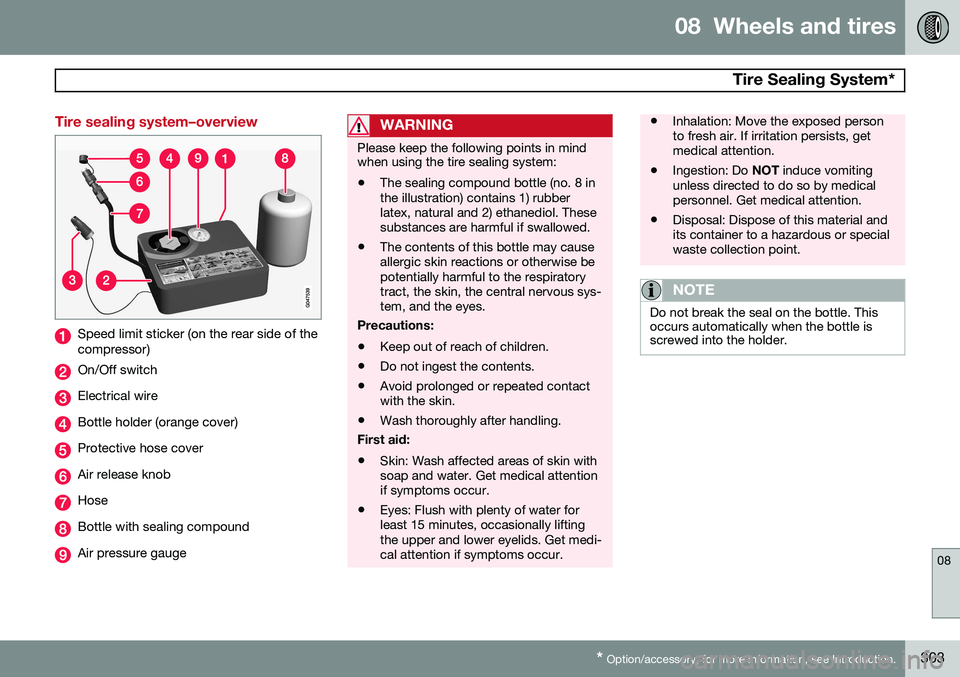
Tire sealing system–overview
Speed limit sticker (on the rear side of the compressor)
On/Off switch
Electrical wire
Bottle holder (orange cover)
Protective hose cover
Air release knob
Hose
Bottle with sealing compound
Air pressure gauge
WARNING
Please keep the following points in mind when using the tire sealing system:
• The sealing compound bottle (no. 8 in the illustration) contains 1) rubberlatex, natural and 2) ethanediol. Thesesubstances are harmful if swallowed.
• The contents of this bottle may causeallergic skin reactions or otherwise bepotentially harmful to the respiratorytract, the skin, the central nervous sys-tem, and the eyes.
Precautions: • Keep out of reach of children.
• Do not ingest the contents.
• Avoid prolonged or repeated contact with the skin.
• Wash thoroughly after handling.
First aid:
• Skin: Wash affected areas of skin withsoap and water. Get medical attentionif symptoms occur.
• Eyes: Flush with plenty of water forleast 15 minutes, occasionally liftingthe upper and lower eyelids. Get medi-cal attention if symptoms occur.
• Inhalation: Move the exposed person to fresh air. If irritation persists, getmedical attention.
• Ingestion: Do
NOT induce vomiting
unless directed to do so by medicalpersonnel. Get medical attention.
• Disposal: Dispose of this material andits container to a hazardous or specialwaste collection point.
NOTE
Do not break the seal on the bottle. This occurs automatically when the bottle isscrewed into the holder.