Page 127 of 418
The auto-dimming feature can be switched on and off with the switch on the inside mirror (2). When auto-dimming is activated, the indicator light (1) is on.
If the ignition is switched on, the sensor (3) automatically darkens the inside mirror depending on the amount of light shining into the vehicle from the rear.
The auto-dimming feature is deactivated when you shift the transmission into reverse or switch on the interior lights or the reading light.
Do not attach external navigation devices to the windshield or in the vicinity of the auto-dimming inside
mirror ⇒ .
WARNING
The illuminated display on an external navigation device can cause the auto-dimming inside mirror to malfunction, which can result in crashes and serious injuries.
x Malfunctions in the auto-dimming function can result in the rearview mirror being unable to evaluate the exact distance of vehicles in the rear or other objects.
If the light striking the sensor is filtered or blocked (such as by a sunshade), the auto-dimming inside mirror will not work properly or may not work at all.
Outside mirrors
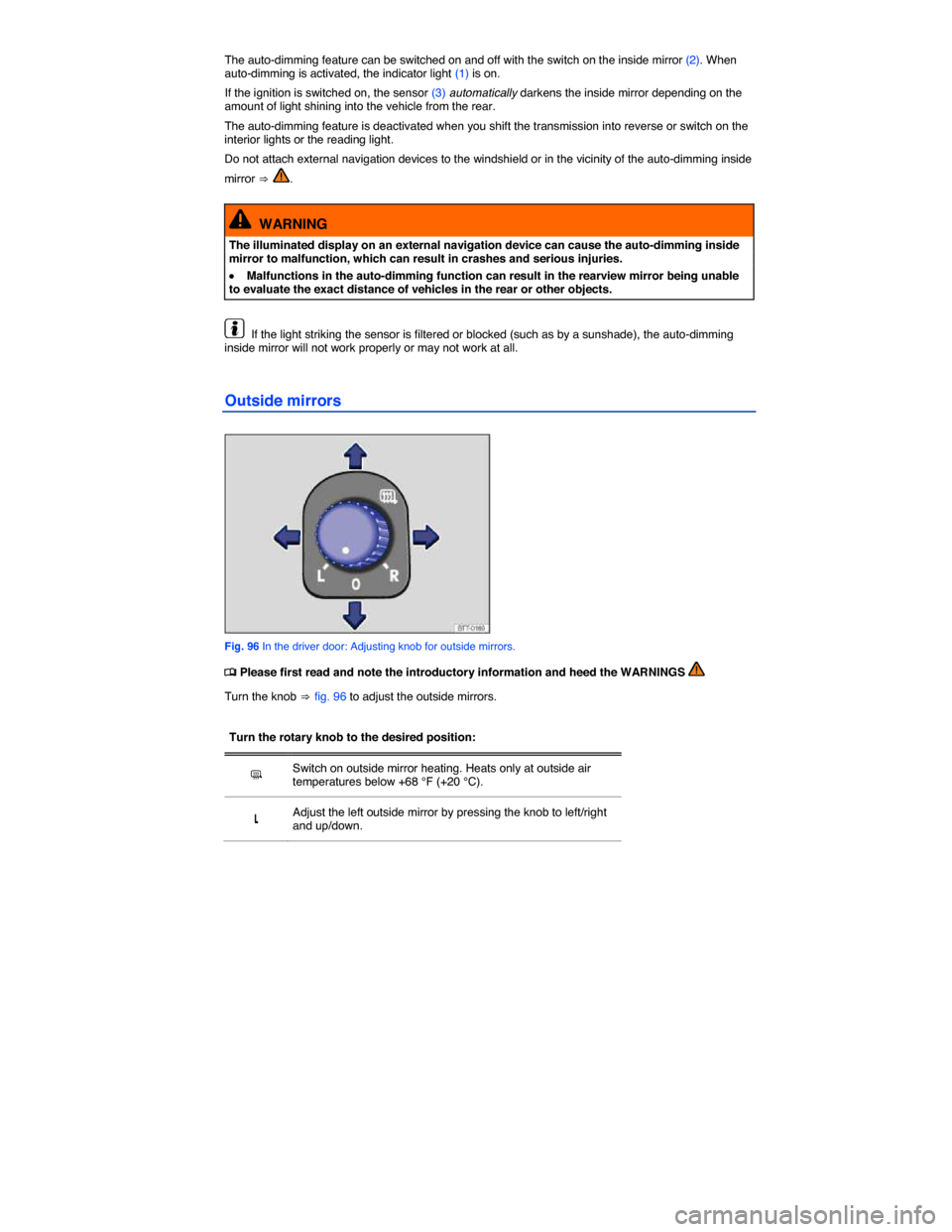
Fig. 96 In the driver door: Adjusting knob for outside mirrors.
Page 182 of 418

Speed restrictions
Winter tires are certified up to a top speed identified by speed rating code letters on the side wall
⇒ Tire labeling.
In some vehicle models it is possible to set a speed warning in the MFI menu in the instrument cluster
display (Multi-Function Indicator - MFI) ⇒ Volkswagen Information System.
Top speed rating and tire inflation pressure for V winter tires depend on the engine installed in your vehicle. Be sure to ask you authorized Volkswagen dealer or authorized Volkswagen Service Facility about the maximum permissible speed and the required tire inflation pressure for the winter tires that you plan to use.
All-wheel drive (4MOTION)
Vehicles with all-wheel drive and standard road wheels have good forward motion and traction even under wintery road conditions. However, Volkswagen recommends installing winter tires or all season tires on all 4 wheels to improve handling as well as braking performance.
If you use snow chains, please read and heed information and directions
WARNING
Driving faster than the maximum speed for which the winter tires on your vehicle were designed can cause sudden tire failure including a blowout and sudden deflation, loss of control, crashes and serious personal injuries.
x Winter tires have a maximum speed rating that may be lower than your vehicle's maximum speed.
x Never drive faster than the maximum speed for which the winter tires installed on your vehicle are rated because tires that are driven faster than their rated speed can fail suddenly.
x Never exceed the maximum load rating for the winter tires installed on your vehicle.
Install summer tires promptly in the spring. Summer tires offer better handling characteristics for temperatures above +45 °F (+7 °C). They are quieter, do not wear as quickly, and reduce fuel consumption.
The Tire Pressure Monitoring System must be recalibrated using the appropriate menu in the MFI whenever you remove and remount or change any wheel or tire on the vehicle, even if the reinstalled or replacement wheels and tires are identical to those that were removed and even if the tire pressure does not change
If necessary, ask your authorized Volkswagen dealer or authorized Volkswagen Service Facility about permissible winter tire dimensions.
Snow chains
Page 244 of 418

Brakes coated with road salt also react slower and need longer stopping distances. If there is salt on the roads and you are not braking regularly, brake carefully and gently from time to time to remove any
salt coating from the brake disks and pads ⇒ .
Brake disc corrosion (rust) and dirt buildup on the brake pads are more likely to occur if the vehicle is not driven much or is driven only for short distances with little braking. If the brakes have not been used and there is some rust on the discs, clean the brake discs and pads once in a while by carefully braking a couple of times while driving at relatively high speed to help clean the brake discs and pads.
Make sure nobody is behind you and that you do not endanger yourself or others ⇒ .
Brake system malfunction
If you brake and find that vehicle doesn't brake nearly as well as it used to (sudden increase in stopping distance), a brake circuit may have failed. The brake warning light "2!+% or H will come on and a message may appear in the instrument cluster display. If you believe the vehicle is safe to drive, immediately take it to the nearest authorized Volkswagen dealer or authorized Volkswagen Service Facility for repair. Drive slowly and very carefully, allow for the longer stopping distance, and be ready to push longer and harder on the brake pedal to slow the vehicle down.
Brake booster
The brake booster works only when the engine is running. It increases the force on the brakes above and beyond the pressure put on the brake pedal by the driver.
If the brake booster is not working, or if the vehicle has to be towed, you will have to push the brake pedal harder to make up for the lack of booster assistance and the resulting longer stopping distance
⇒ .
WARNING
New brake pads do not provide maximum braking performance.
x New brake pads do not have the best stopping power for the first 200 miles (320 km) and must be “broken in”. You can compensate for the slightly reduced braking force by putting more pressure on the brake pedal.
x Drive with extra care while the new brake pads are being broken in. This reduces the risk of collisions and serious personal injuries due to a loss of control over the vehicle.
x Never follow other vehicles too closely or put yourself into other situations that might require sudden, hard braking, especially when the brake pads have not been broken in.
WARNING
Overheated brakes will reduce the vehicle's stopping power and increase stopping distances considerably.
x When driving downhill, the brakes have to work especially hard and heat up quickly.
x Before driving downhill, especially on hills that are long or steep, always reduce speed and shift into lower gear (manual or automatic transmission). This will let the vehicle use engine braking and reduce the load on the brakes. Otherwise, the brake system could overheat and possibly fail. Only use the brakes when you need them to slow the vehicle down more or to stop.
x A damaged front spoiler or a nonstandard spoiler can reduce airflow to the brakes and make them overheat.
Page 259 of 418
NOTICE
x The camera shows only two-dimensional images on the screen. Due to the lack of depth of field, it may be difficult or impossible to identify protruding objects or recesses in the road, for example.
x Things like thin rods, fences, posts, and trees may not be detected by the camera and could damage the vehicle.
Operation
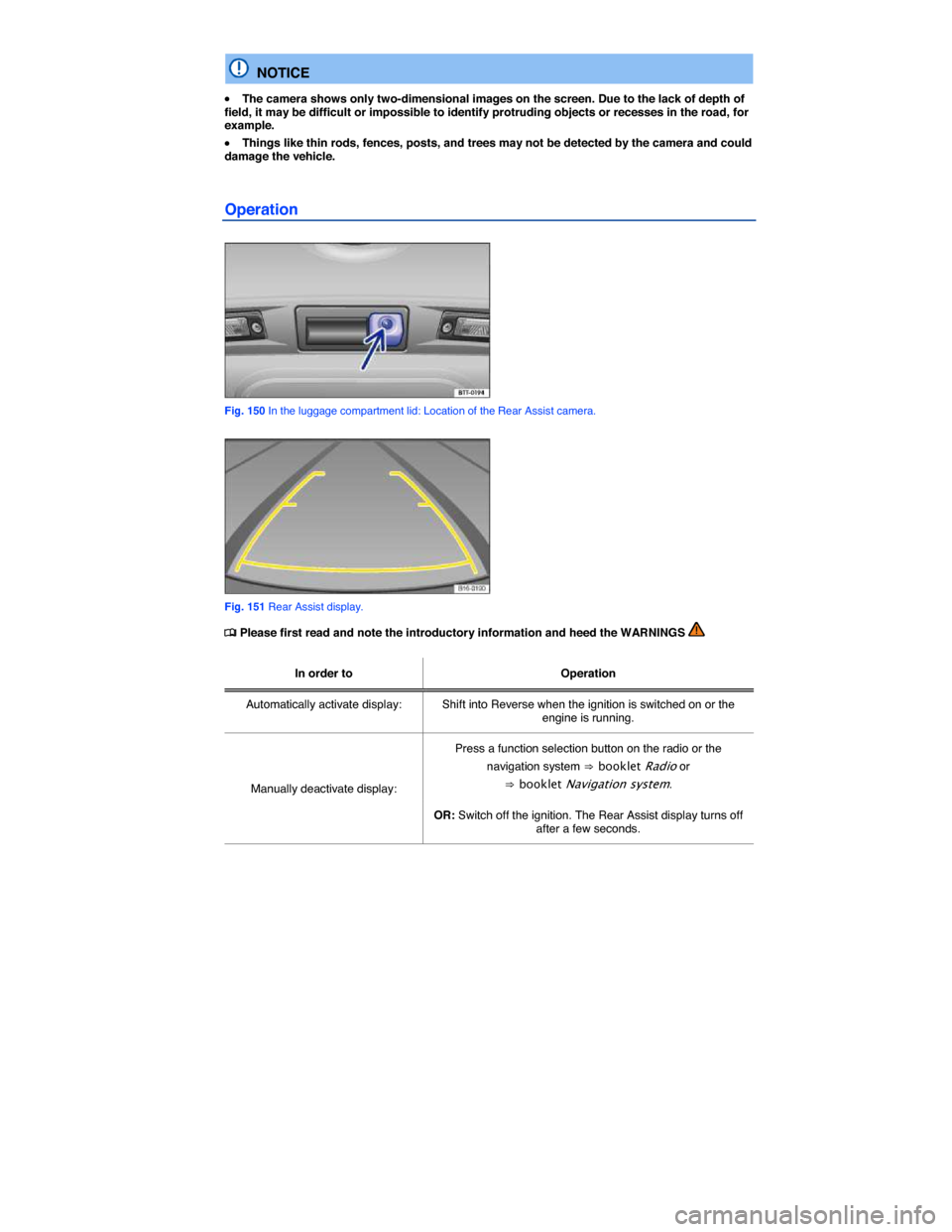
Fig. 150 In the luggage compartment lid: Location of the Rear Assist camera.
Fig. 151 Rear Assist display.
Page 260 of 418

In order to Operation
Switch off display by shifting out of Reverse: The display switches off after about 10 seconds.
Deactivate display by driving forward: Drive forward faster than about 10 mph (15 km/h).
Special considerations
1) Do not use Rear Assist in the following situations:
– When an incorrect or unclear image is displayed, such as when there is poor visibility or the lens is dirty.
– If the area behind the vehicle cannot be seen clearly or completely.
– If the rear of the vehicle is heavily loaded.
– When the luggage compartment lid is open.
– If the driver is not familiar with the system.
– If the position or angle of the camera has changed, such as after a rear-end collision. Have the system checked by an authorized Volkswagen dealer or an authorized Volkswagen Service Facility.
2) Examples of optical distortion by the camera
The Rear Assist camera displays only two-dimensional images. Recesses and protruding objects on the ground or protruding parts on other vehicles are difficult or impossible to identify due to the lack of depth of field.
Objects or another vehicle may seem closer or farther away on the screen than they really are:
– When driving from a level surface onto an upward or downward slope.
– When driving up or down a slope onto a level surface.
– If the rear of the vehicle is heavily loaded.
– When approaching protruding objects. These objects can disappear from the field of view when backing up.
Cleaning the camera lens
Keep the camera lens clean and free of snow and ice:
x Engage the parking brake.
x Switch on the ignition.
x Select the reverse gear.
Page 266 of 418
Button / Knob More information: Climatronic ⇒ fig. 154.
Temperature (1) Left and right sides of the vehicle can be set to different temperatures. Turn the knob to set the temperature. The temperature is displayed on the outer ring.
Page 268 of 418
Climatronic: Changing the temperature unit on the factory-installed Radio or Radio & Navigation system display
For vehicles with a Premium instrument cluster: The inside and outside temperatures can be displayed in either Fahrenheit (F) or Celsius (C). Select Units
Press the !
Page:
< prev 1-8 9-16 17-24