Page 5 of 576

5
1
9 8
7 5 4
3
2
10
6
6-4. Other interior featuresOther interior features ....... 374• Sun visors ..................... 374
• Vanity mirrors................ 374
• Clock ............................. 375
• Outside temperature
display........................... 376
• Power outlets ................ 377
• Armrest ......................... 379
• Assist grips ................... 380
Garage door opener .......... 381
Compass ........................... 387
7-1. Maintenance and care Cleaning and protecting the vehicle exterior .......... 392
Cleaning and protecting the vehicle interior ........... 394
7-2. Maintenance Maintenance requirements ................... 397
General maintenance ........ 399
Emission inspection and maintenance (I/M)
programs ......................... 402
7-3. Do-it-yourself maintenance Do-it-yourself service precautions ..................... 403
Hood.................................. 405
Engine compartment ......... 406
Tires .................................. 417
Tire inflation pressure........ 425
Wheels .............................. 428
Air conditioning filter .......... 431
Wireless remote control battery ............................. 434
Checking and replacing fuses ............................... 436
Light bulbs ......................... 439 8-1. Essential information
Emergency flashers ........... 456
If your vehicle has to be stopped in
an emergency.................. 457
8-2. Steps to take in an emergency
If your vehicle needs to be towed .......................... 458
If you think something is wrong............................... 462
Fuel pump shut off system ............................. 463
If a warning light turns on or a warning buzzer
sounds ............................. 464
If a warning message is displayed (vehicles
with multi-information
display) ............................ 472
If you have a flat tire .......... 475
If the engine will not start ................................. 490
If the shift lever cannot be shifted from P ............. 491
If the vehicle battery is discharged ....................... 493
If your vehicle overheats.... 496
If the vehicle becomes stuck ................................ 498
7Maintenance and care
8When trouble arises
Page 341 of 576

3416-1. Using the air conditioning system
6
Interior features
■Fogging up of the windows
●The windows will easily fog up when the humidity in the vehicle is high.
Turning on will dehumidify the air from the outlets and defog the
windshield effectively.
● If you turn off, the windows may fog up more easily.
● The windows may fog up if the recirculated air mode is used.
■ Outside/recirculated air mode
When driving on dusty roads such as tunnels or in heavy traffic, set the out-
side/recirculated air mode button to the recirculated air mode. This is effective
in preventing outside air from entering the vehicle interior. During cooling
operation, setting the recirculated air mode will also cool the vehicle interior
effectively.
■ When the outside temperature exceeds 75 F (24 C) and air conditioning
system is on
● In order to reduce the air conditioning power consumption, the air condition-
ing system may switch to recirculated air mode automatically. This may also
reduce fuel consumption.
● Recirculated air mode is selected as a default mode when the engine switch
is in the “ON” position.
● It is possible to switch to outside air mode at any time by pressing .
■ When the outside temperature falls to nearly 32 F (0C)
The dehumidification function may not operate even when is
pressed.
■ Air conditioning odors
●During use, various odors from inside and outside the vehicle may enter into
and accumulate in the air conditioning system. This may then cause odor to
be emitted from the vents.
● To reduce potential odors from occurring:
It is recommended that the air conditioning system be set to outside air
mode prior to turning the vehicle off.
■ Air conditioning filter
P. 431
Page 348 of 576
3486-1. Using the air conditioning system
■Using automatic mode
Fan speed is adjusted automatically according to the temperature setting and
the ambient conditions.
Therefore, the fan may stop for a while until warm or cool air is ready to flow
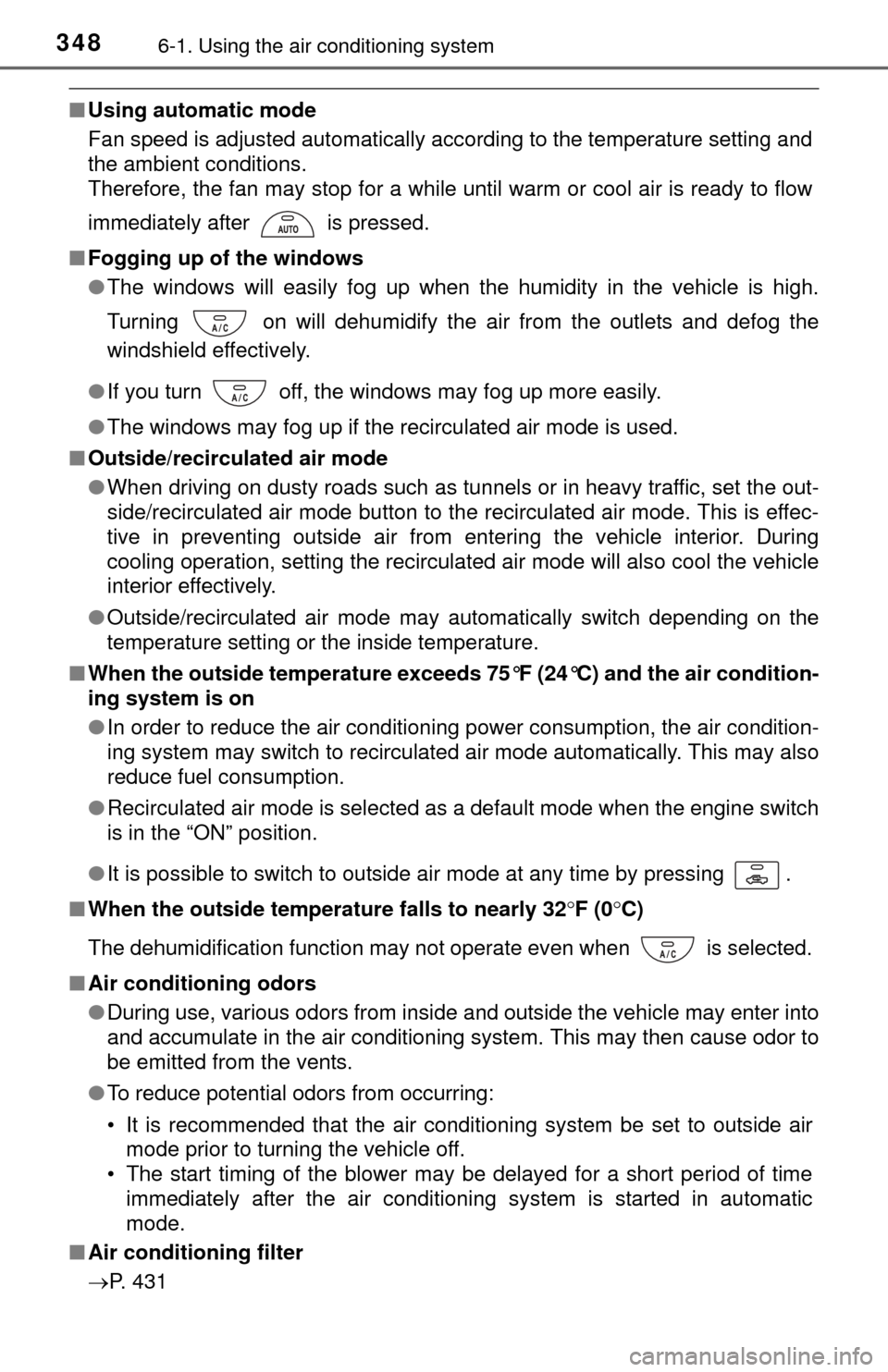
immediately after is pressed.
■ Fogging up of the windows
●The windows will easily fog up when the humidity in the vehicle is high.
Turning on will dehumidify the air from the outlets and defog the
windshield effectively.
● If you turn off, the windows may fog up more easily.
● The windows may fog up if the recirculated air mode is used.
■ Outside/recirculated air mode
●When driving on dusty roads such as tunnels or in heavy traffic, set the out-
side/recirculated air mode button to the recirculated air mode. This is effec-
tive in preventing outside air from entering the vehicle interior. During
cooling operation, setting the recirculated air mode will also cool the vehicle
interior effectively.
● Outside/recirculated air mode may automatically switch depending on the
temperature setting or the inside temperature.
■ When the outside temperature exceeds 75°F (24°C) and the air condition-
ing system is on
●In order to reduce the air conditioning power consumption, the air condition-
ing system may switch to recirculated air mode automatically. This may also
reduce fuel consumption.
● Recirculated air mode is selected as a default mode when the engine switch
is in the “ON” position.
● It is possible to switch to outside air mode at any time by pressing .
■ When the outside temperature falls to nearly 32 F (0C)
The dehumidification function may not operate even when is selected.
■ Air conditioning odors
●During use, various odors from inside and outside the vehicle may enter into
and accumulate in the air conditioning system. This may then cause odor to
be emitted from the vents.
● To reduce potential odors from occurring:
• It is recommended that the air conditioning system be set to outside air
mode prior to turning the vehicle off.
• The start timing of the blower may be delayed for a short period of time
immediately after the air conditioning system is started in automatic
mode.
■ Air conditioning filter
P. 431
Page 391 of 576
391
7Maintenance and care
7-1. Maintenance and careCleaning and protecting the vehicle exterior .......... 392
Cleaning and protecting the vehicle interior ........... 394
7-2. Maintenance Maintenance requirements ................... 397
General maintenance ........ 399
Emission inspection and maintenance (I/M)
programs ......................... 402 7-3. Do-it-yourself maintenance
Do-it-yourself service precautions ..................... 403
Hood ................................. 405
Engine compartment ......... 406
Tires .................................. 417
Tire inflation pressure ....... 425
Wheels .............................. 428
Air conditioning filter.......... 431
Wireless remote control battery ............................. 434
Checking and replacing fuses ............................... 436
Light bulbs......................... 439
Page 404 of 576

4047-3. Do-it-yourself maintenance
CAUTION
The engine compartment contains many mechanisms and fluids that may
move suddenly, become hot, or become electrically energized. To avoid death
or serious injury, observe the following precautions.
■When working on the engine compartment
● Keep hands, clothing and tools away from the moving fan and engine
drive belt.
● Be careful not to touch the engine, radiator, exhaust manifold, etc., right
after driving as they may be hot. Oil and other fluids may also be hot.
● Do not leave anything that may burn easily, such as paper and rags, in the
engine compartment.
● Do not smoke, cause sparks or expose an open flame to fuel or the bat-
tery. Fuel and battery fumes are flammable.
● Be extremely cautious when working on the battery. It contains poisonous
and corrosive sulfuric acid.
■ When working near the electric cooling fan or radiator grille
Be sure the engine switch is off.
With the engine switch in the “ON” position, the electric cooling \
fan may
automatically start to run if the air conditioning is on and/or the coolant tem-
perature is high. ( P. 412)
■ Safety glasses
Wear safety glasses to prevent flying or falling material, fluid spray, etc.,
from getting in your eyes.
NOTICE
■If you remove the air cleaner filter
Driving with the air cleaner filter removed may cause excessive engine wear
due to dirt in the air.
Page 431 of 576
4317-3. Do-it-yourself maintenance
7
Maintenance and care
Air conditioning filter
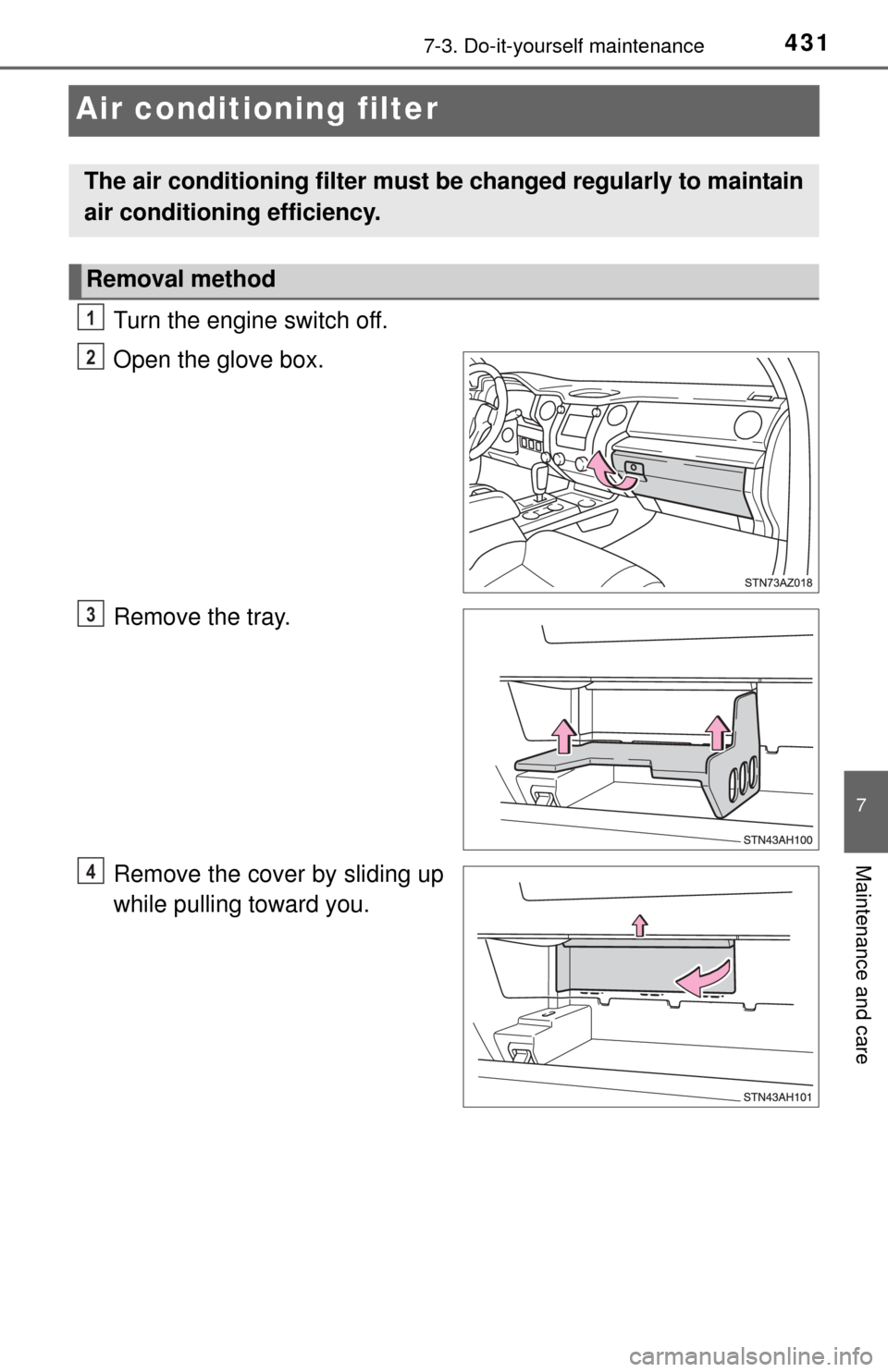
Turn the engine switch off.
Open the glove box.
Remove the tray.
Remove the cover by sliding up
while pulling toward you.
The air conditioning filter must be changed regularly to maintain
air conditioning efficiency.
Removal method
1
2
3
4
Page 432 of 576
4327-3. Do-it-yourself maintenance
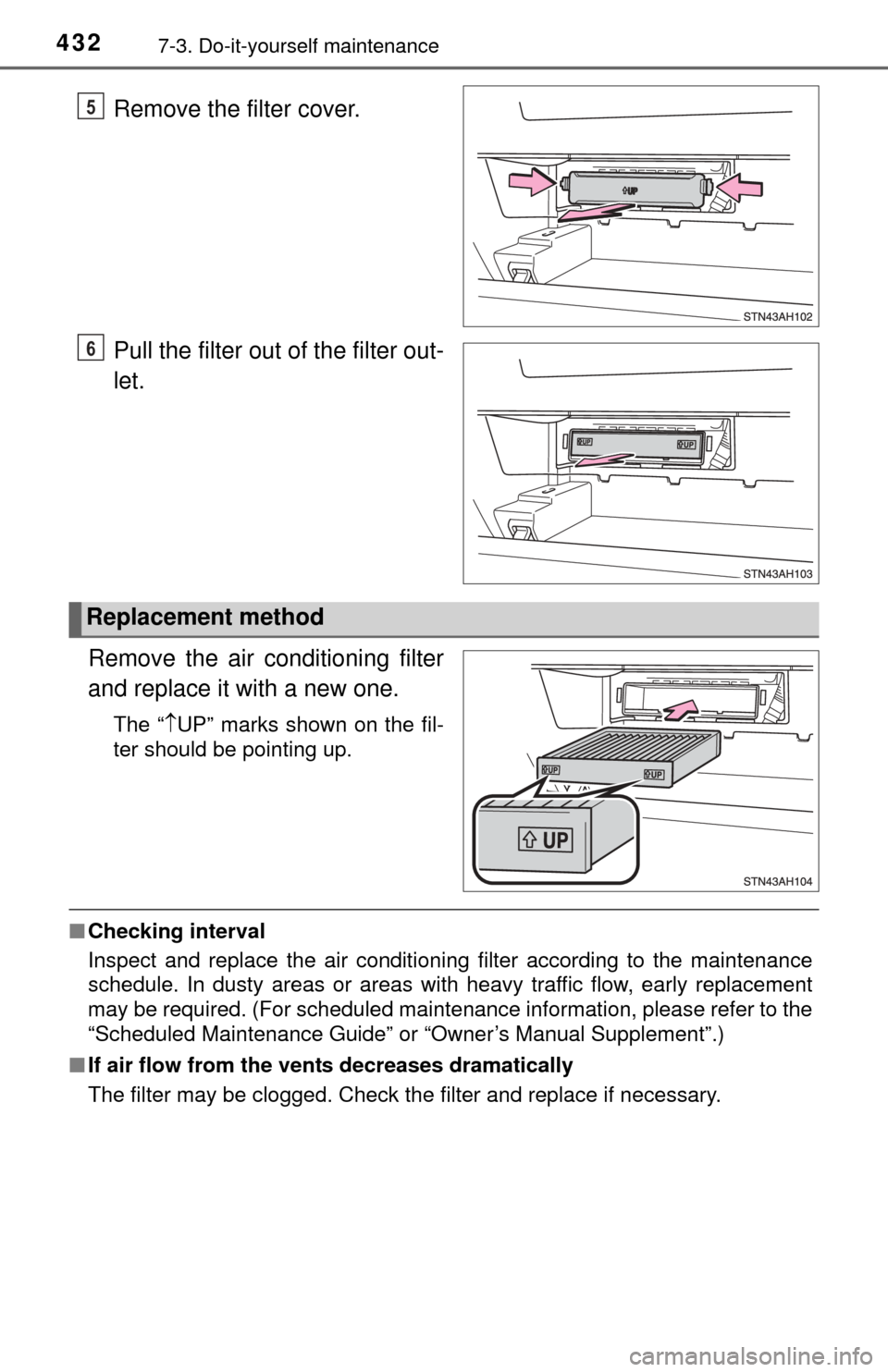
Remove the filter cover.
Pull the filter out of the filter out-
let.
Remove the air conditioning filter
and replace it with a new one.
The “ UP” marks shown on the fil-
ter should be pointing up.
■ Checking interval
Inspect and replace the air conditioning filter according to the maintenance
schedule. In dusty areas or areas with heavy traffic flow, early replacement
may be required. (For scheduled maintenance information, please refer to the
“Scheduled Maintenance Guide” or “Owner’s Manual Supplement”.)
■ If air flow from the vents decreases dramatically
The filter may be clogged. Check the filter and replace if necessary.
5
6
Replacement method
Page 433 of 576
4337-3. Do-it-yourself maintenance
7
Maintenance and care
NOTICE
■When using the ai r conditioning system
Make sure that a filter is always installed.
Using the air conditioning system without a filter may cause damage to the
system.