Page 97 of 576
972. Instrument cluster
2
Instrument cluster
■Returning the previous screen
Press and hold the “DISP” but-
ton after selecting the “EXIT” by
pressing the “DISP” button.
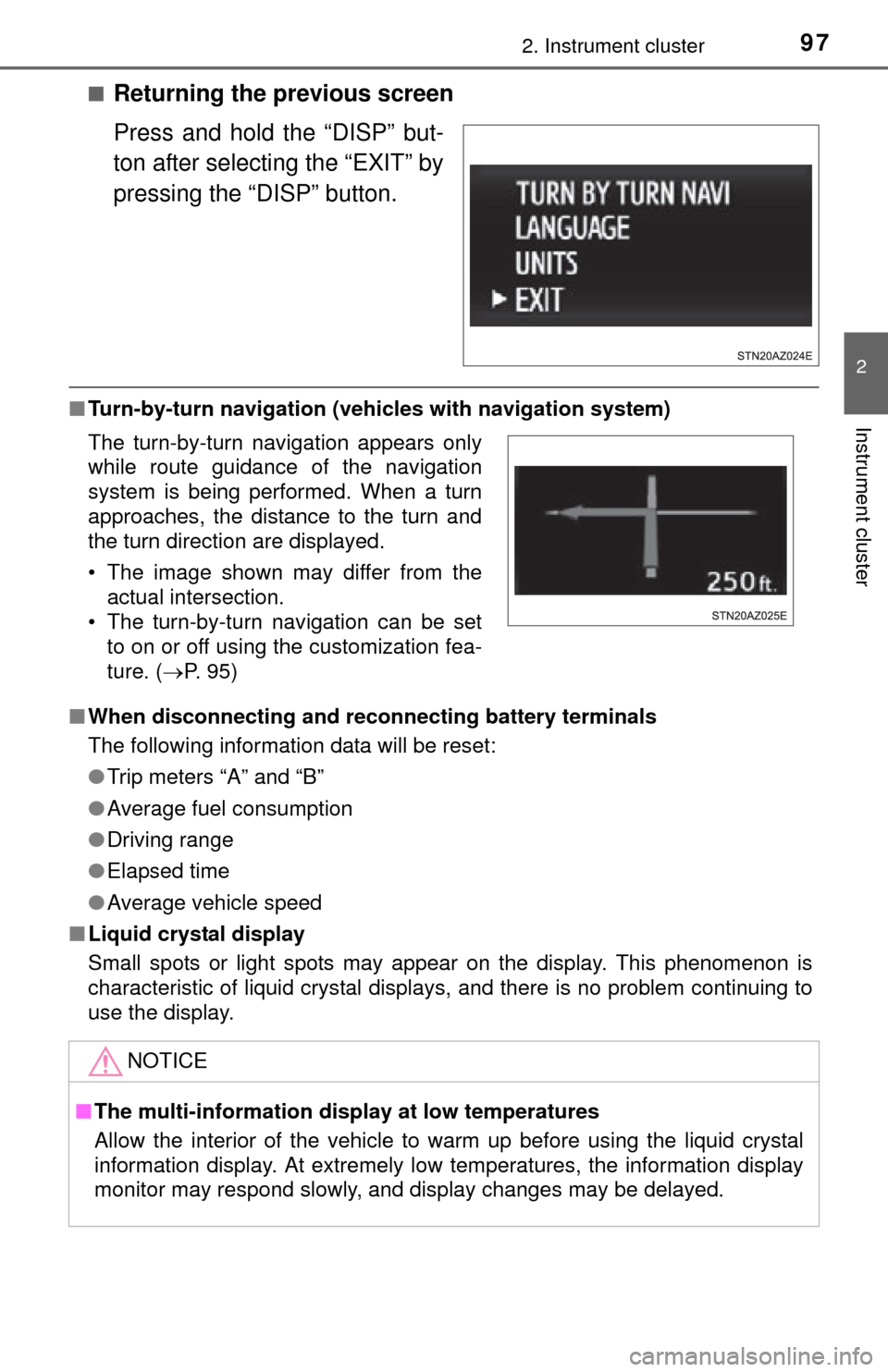
■Turn-by-turn navigation (veh icles with navigation system)
■ When disconnecting and reco nnecting battery terminals
The following information data will be reset:
● Trip meters “A” and “B”
● Average fuel consumption
● Driving range
● Elapsed time
● Average vehicle speed
■ Liquid crystal display
Small spots or light spots may appear on the display. This phenomenon is
characteristic of liquid crystal displays, and there is no problem continuing to
use the display.
The turn-by-turn navigation appears only
while route guidance of the navigation
system is being performed. When a turn
approaches, the distance to the turn and
the turn direction are displayed.
• The image shown may differ from the
actual intersection.
• The turn-by-turn navigation can be set to on or off using the customization fea-
ture. ( P. 95)
NOTICE
■The multi-information disp lay at low temperatures
Allow the interior of the vehicle to warm up before using the liquid crystal
information display. At extremely low temperatures, the information display
monitor may respond slowly, and display changes may be delayed.
Page 103 of 576
1033-2. Opening, closing and locking the doors
3
Operation of each component
◆Wireless remote control (if equipped)
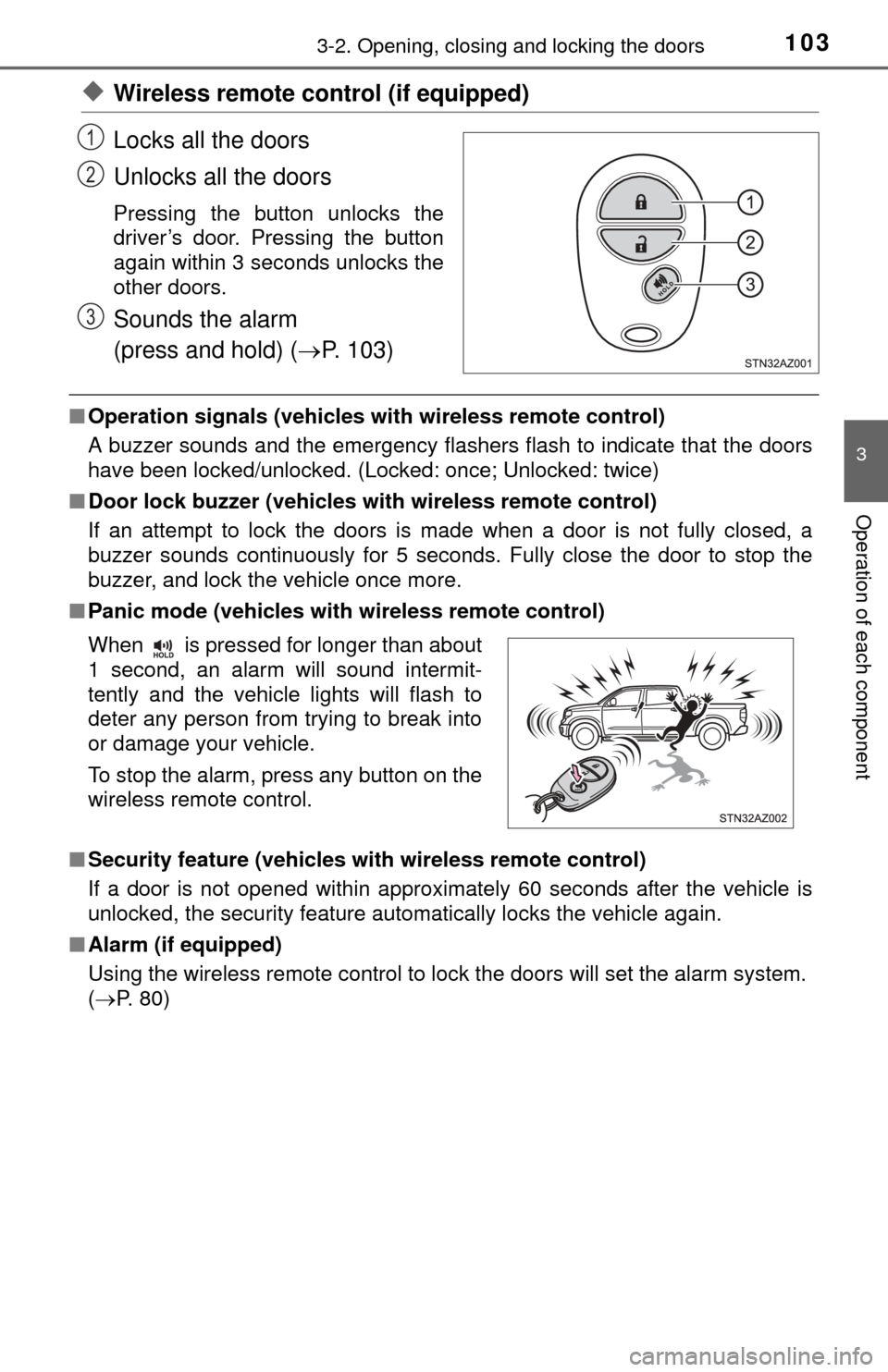
Locks all the doors
Unlocks all the doors
Pressing the button unlocks the
driver’s door. Pressing the button
again within 3 seconds unlocks the
other doors.
Sounds the alarm
(press and hold) (P. 103)
■Operation signals (vehicles with wireless remote control)
A buzzer sounds and the emergency flashers flash to indicate that the doors
have been locked/unlocked. (Locked: once; Unlocked: twice)
■ Door lock buzzer (vehicles with wireless remote control)
If an attempt to lock the doors is made when a door is not fully closed, a
buzzer sounds continuously for 5 seconds. Fully close the door to stop the
buzzer, and lock the vehicle once more.
■ Panic mode (vehicles with wireless remote control)
■ Security feature (vehicles with wireless remote control)
If a door is not opened within approximately 60 seconds after the vehicle is
unlocked, the security feature automatically locks the vehicle again.
■ Alarm (if equipped)
Using the wireless remote control to lock the doors will set the alarm system.
(P. 80)
1
2
3
When is pressed for longer than about
1 second, an alarm will sound intermit-
tently and the vehicle lights will flash to
deter any person from trying to break into
or damage your vehicle.
To stop the alarm, press any button on the
wireless remote control.
Page 120 of 576

1203-3. Adjusting the seats
■To stop the position recall operation part-way through
Perform any of the following:
●Press the “SET” button.
● Press button “1” or “2”.
● Operate any of the seat adjustment switches (only cancels seat position
recall).
● Operate the tilt and telescopic steering control switch (only cancels steering
wheel position recall).
■ Seat positions that can be memorized ( P. 113)
The adjusted positions other than the position adjusted by lumbar support
switch can be recorded.
■ Operating the driving position memory after the key is removed from the
engine switch
Recorded seat positions (except the steering wheel position) can be ac\
tivated
up to 30 seconds after the driver’s door is opened, even if the key is removed
from the engine switch.
■ In order to correctly use the dr iving position memory function
If a seat position is already in the furthest possible position and the seat is
operated in the same direction, the recorded position may be slightly different
when it is recalled.
Page 129 of 576
1293-4. Adjusting the steering wheel and mirrors
3
Operation of each component
Inside rear view mirror
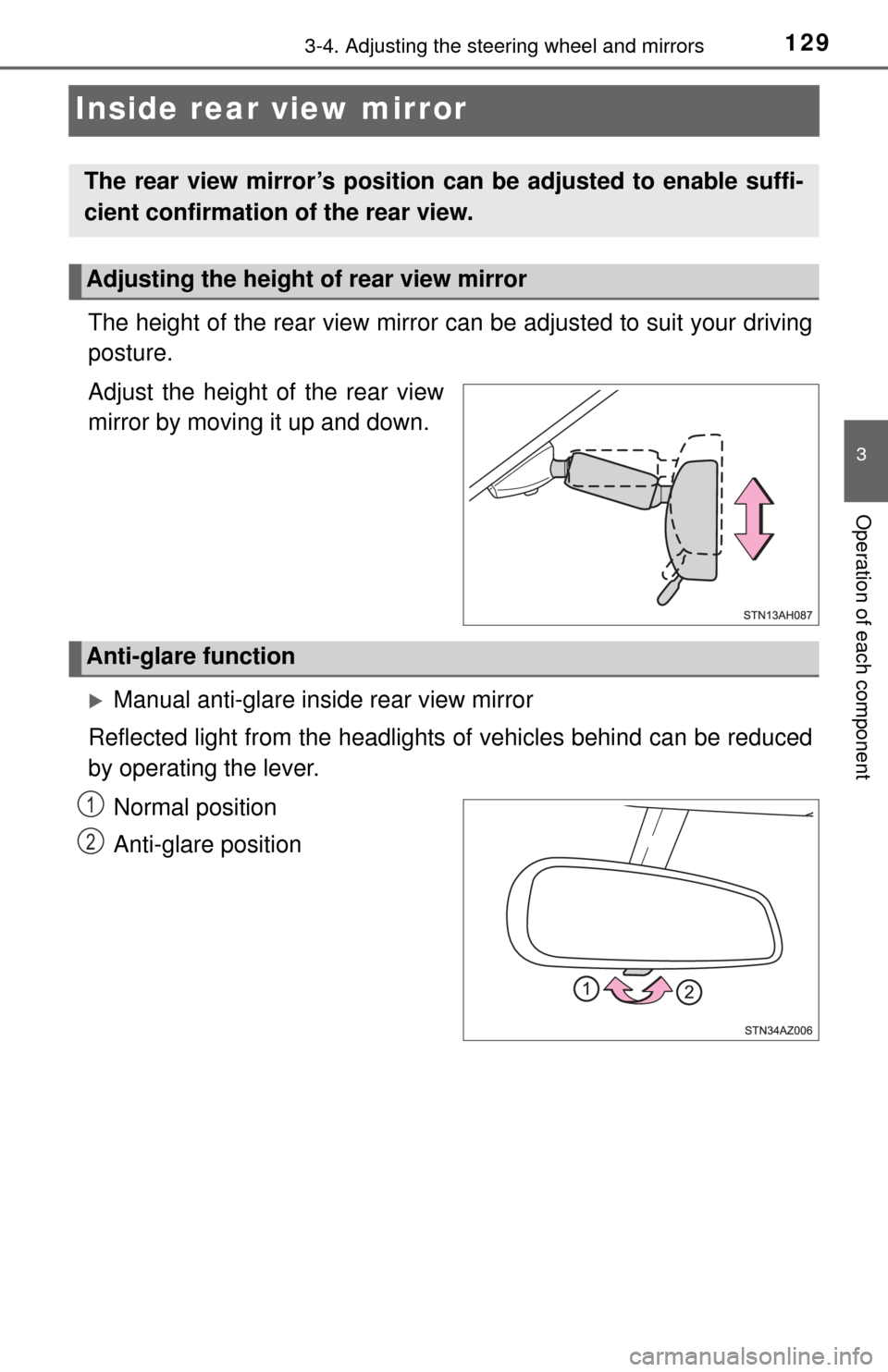
The height of the rear view mirror can be adjusted to suit your driving
posture.
Adjust the height of the rear view
mirror by moving it up and down.
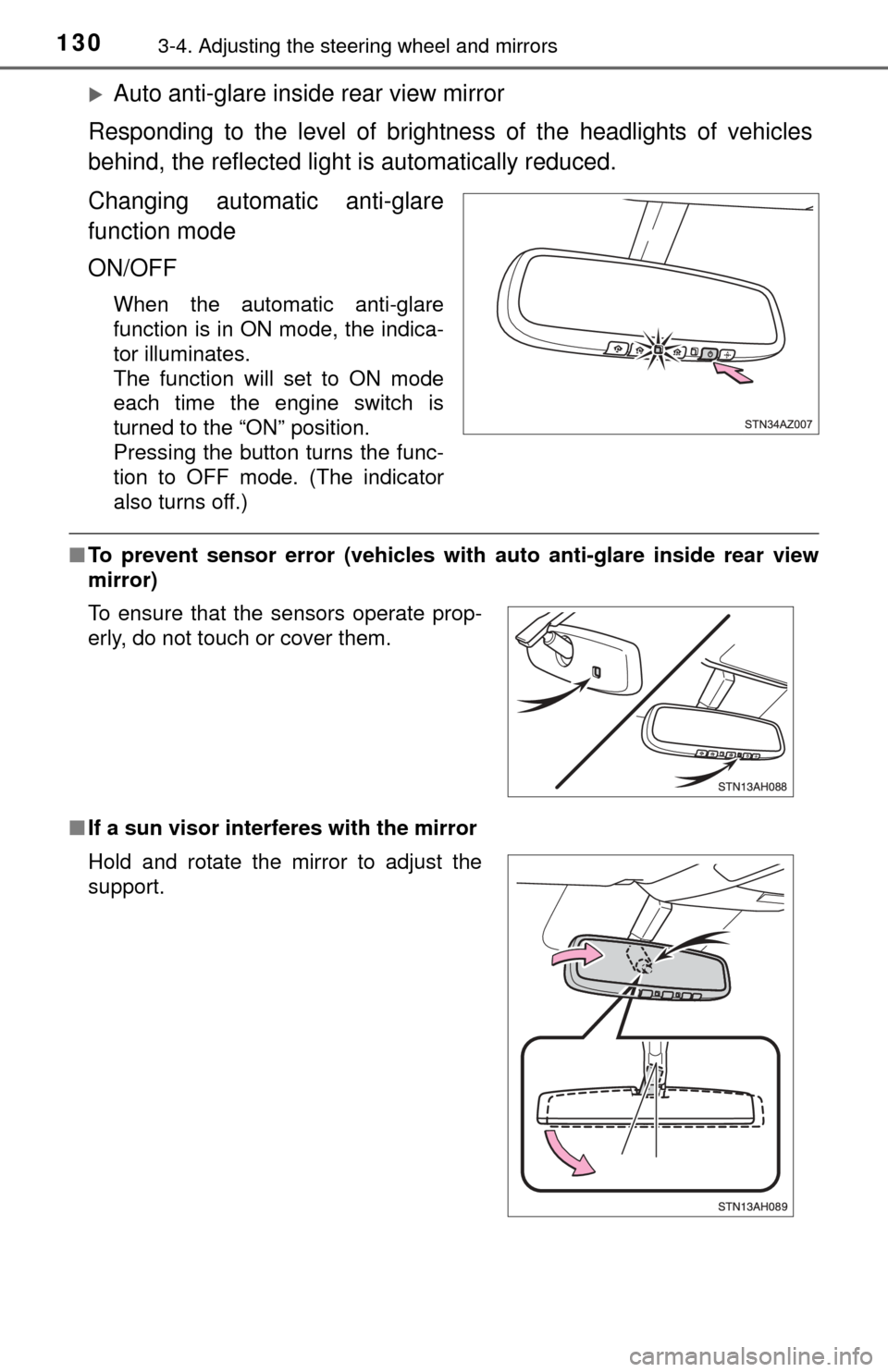
Manual anti-glare inside rear view mirror
Reflected light from the headlights of vehicles behind can be reduced
by operating the lever.
Normal position
Anti-glare position
The rear view mirror’s position can be adjusted to enable suffi-
cient confirmation of the rear view.
Adjusting the height of rear view mirror
Anti-glare function
1
2
Page 130 of 576
1303-4. Adjusting the steering wheel and mirrors
Auto anti-glare inside rear view mirror
Responding to the level of brightness of the headlights of vehicles
behind, the reflected light is automatically reduced.
Changing automatic anti-glare
function mode
ON/OFF
When the automatic anti-glare
function is in ON mode, the indica-
tor illuminates.
The function will set to ON mode
each time the engine switch is
turned to the “ON” position.
Pressing the button turns the func-
tion to OFF mode. (The indicator
also turns off.)
■ To prevent sensor error (vehicles with auto anti-glare inside rear view
mirror)
■ If a sun visor interferes with the mirror
To ensure that the sensors operate prop-
erly, do not touch or cover them.
Hold and rotate the mirror to adjust the
support.
Page 135 of 576

1353-4. Adjusting the steering wheel and mirrors
3
Operation of each component
■Mirror operating conditions (power-adjustable type)
The engine switch is in the “ACC” or “ON” position.
■ When the mirrors are fogg ed up (vehicles with outside rear view mirror
defoggers)
Turn on the mirror defoggers to defog the mirrors. ( P. 338, 345)
■ Automatic adjustment of the mirror angle (vehicles with driving position
memory)
A desired mirror face angle can be entered to memory and recalled automa\
ti-
cally by the driving position memory. ( P. 118)
■ Auto anti-glare function (if equipped)
When the anti-glare inside rear view mirr or is set to automatic mode, the out-
side rear view mirrors will activate in conjunction with the anti-glare inside
rear view mirror to reduce reflected light. ( P. 130)
CAUTION
■Important points while driving
Observe the following precautions while driving.
Failure to do so may result in loss of control of the vehicle and cause an
accident, resulting in death or serious injury.
● Do not adjust the mirrors while driving.
● Do not drive with the mirrors folded.
● Both the driver and passenger side mirrors must be extended and properly
adjusted before driving.
■ When a mirror is moving (power-adjustable type)
To avoid personal injury and mirror malfunction, be careful not to get your
hand caught by the moving mirror.
■ When the mirror defoggers are opera ting (vehicles with outside rear
view mirror defoggers)
Do not touch the rear view mirror surfaces, as they can become very hot
and burn you.
Page 137 of 576

1373-5. Opening, closing the windows and moon roof
3
Operation of each component
■The power windows can be operated when
The engine switch is in the “ON” position.
■ Operating the power windows af ter turning the engine off
The power windows can be operated for approximately 43 seconds after the
engine switch is turned to the “ACC” or “LOCK” position. They cannot, how-
ever, be operated once either front door is opened.
■ Jam protection functi on (type B only)
If an object becomes caught between the window and the window frame, win-
dow travel is stopped and the window is opened slightly.
■ When the power window does not close normally (type B only)
If the jam protection function is operating abnormally and a window cannot be
closed, perform the following operations using the power window switch on
the relevant door.
● After stopping the vehicle, the window can be closed by holding the power
window switch in the one-touch closing position while the engine switch is
turned to the “ON” position.
● If the window still cannot be closed even by carrying out the operation as
explained above, initialize the function by performing the following proce-
dure.
Hold the power window switch in the one-touch closing position. Continue
holding the switch for a further 6 seconds after the window has closed.
Hold the power window switch in the one-touch opening position. Con-
tinue holding the switch for a further 2 seconds after the window has
opened completely.
Hold the power window switch in the one-touch closing position once
again. Continue holding the switch for a further 2 seconds after the win-
dow has closed.
If you release the switch while the window is moving, start again from the
beginning.
If the window continues to close but then re-open slightly even after perform-
ing the above procedure correctly, have the vehicle inspected by your Toyota
dealer.
1
2
3
Page 142 of 576
1423-5. Opening, closing the windows and moon roof
Moon roof
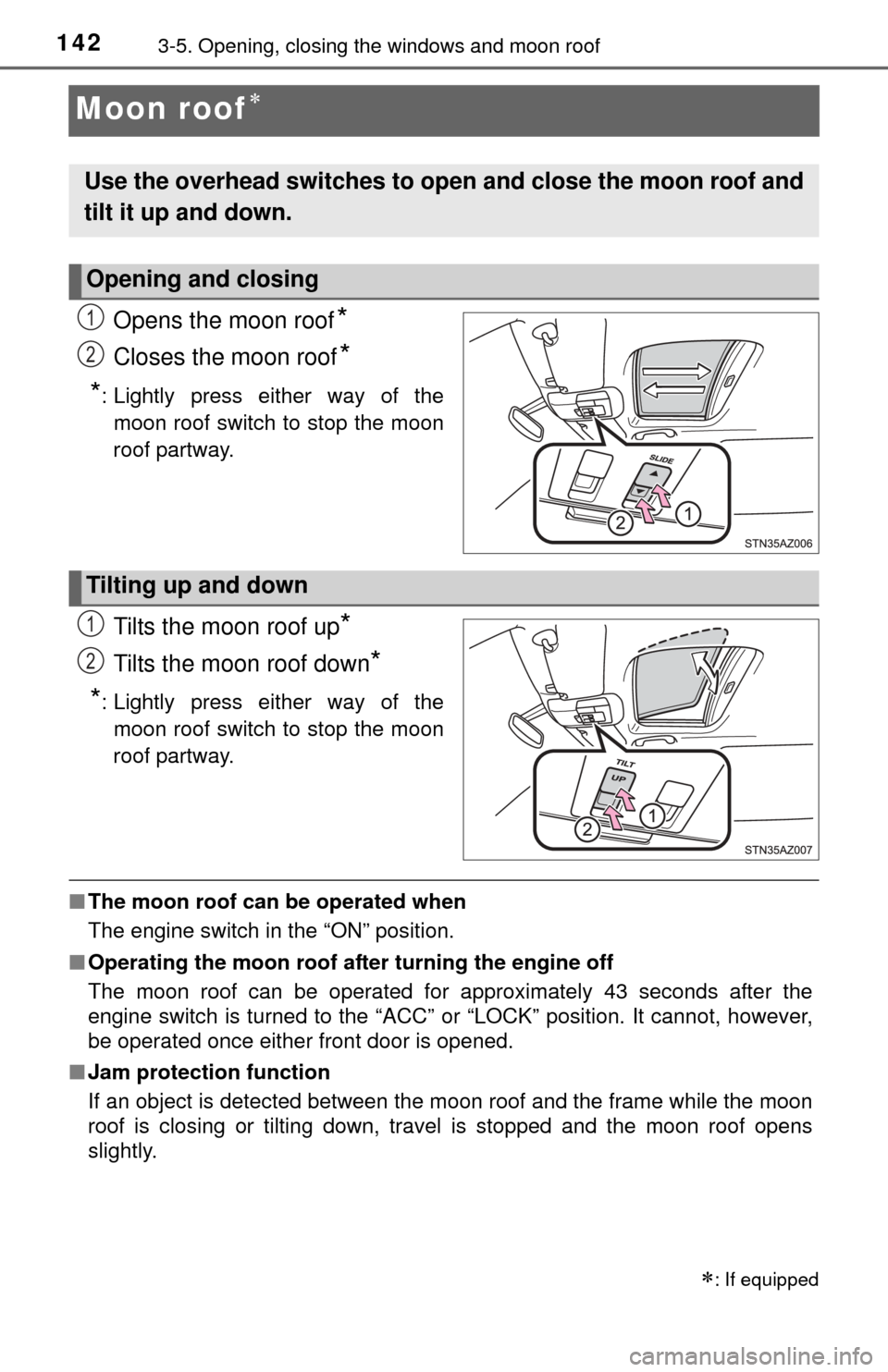
Opens the moon roof*
Closes the moon roof*
*
: Lightly press either way of the moon roof switch to stop the moon
roof partway.
Tilts the moon roof up*
Tilts the moon roof down*
*
: Lightly press either way of the moon roof switch to stop the moon
roof partway.
■ The moon roof can be operated when
The engine switch in the “ON” position.
■ Operating the moon roof af ter turning the engine off
The moon roof can be operated for approximately 43 seconds after the
engine switch is turned to the “ACC” or “LOCK” position. It cannot, howe\
ver,
be operated once either front door is opened.
■ Jam protection function
If an object is detected between the moon roof and the frame while the moon
roof is closing or tilting down, travel is stopped and the moon roof opens
slightly.
: If equipped
Use the overhead switches to ope n and close the moon roof and
tilt it up and down.
Opening and closing
1
2
Tilting up and down
1
2