Page 3 of 872
1
2
3
4
5
6
7
3
SIENNA_OM_OM45483U_(U)
2-1. Driving proceduresDriving the vehicle............... 214
Engine (ignition) switch (vehicles without a smart
key system)....................... 228
Engine (ignition) switch (vehicles with a smart
key system)....................... 231
Automatic transaxle ............ 238
Turn signal lever ................. 243
Parking brake ...................... 244
Horn .................................... 245
2-2. Instrument cluster and information display
Gauges and meters ............ 246
Indicators and warning lights ................................. 249
Multi-information display ..... 256
2-3. Operating the lights and wipers
Headlight switch .................. 270
Automatic High Beam ......... 277
Fog light switch ................... 284
Windshield wipers and washer ....................... 286
Rear window wiper and washer ....................... 294 2-4. Using other driving systems
Cruise control ..................... 297
Dynamic radar cruise control .............................. 302
Intuitive parking assist ........ 318
Rear view monitor system .............................. 325
Driving assist systems ........ 331
Hill-start assist control ........ 337
PCS (Pre-Collision System) ............................ 340
BSM (Blind Spot Monitor) ............................ 348
2-5. Driving information Cargo and luggage ............. 360
Vehicle load limits............... 368
Winter driving tips ............... 369
Trailer towing (with towing package) .......................... 373
Dinghy towing ..................... 393
2When driving
Page 18 of 872
SIENNA_OM_OM45483U_(U)
18
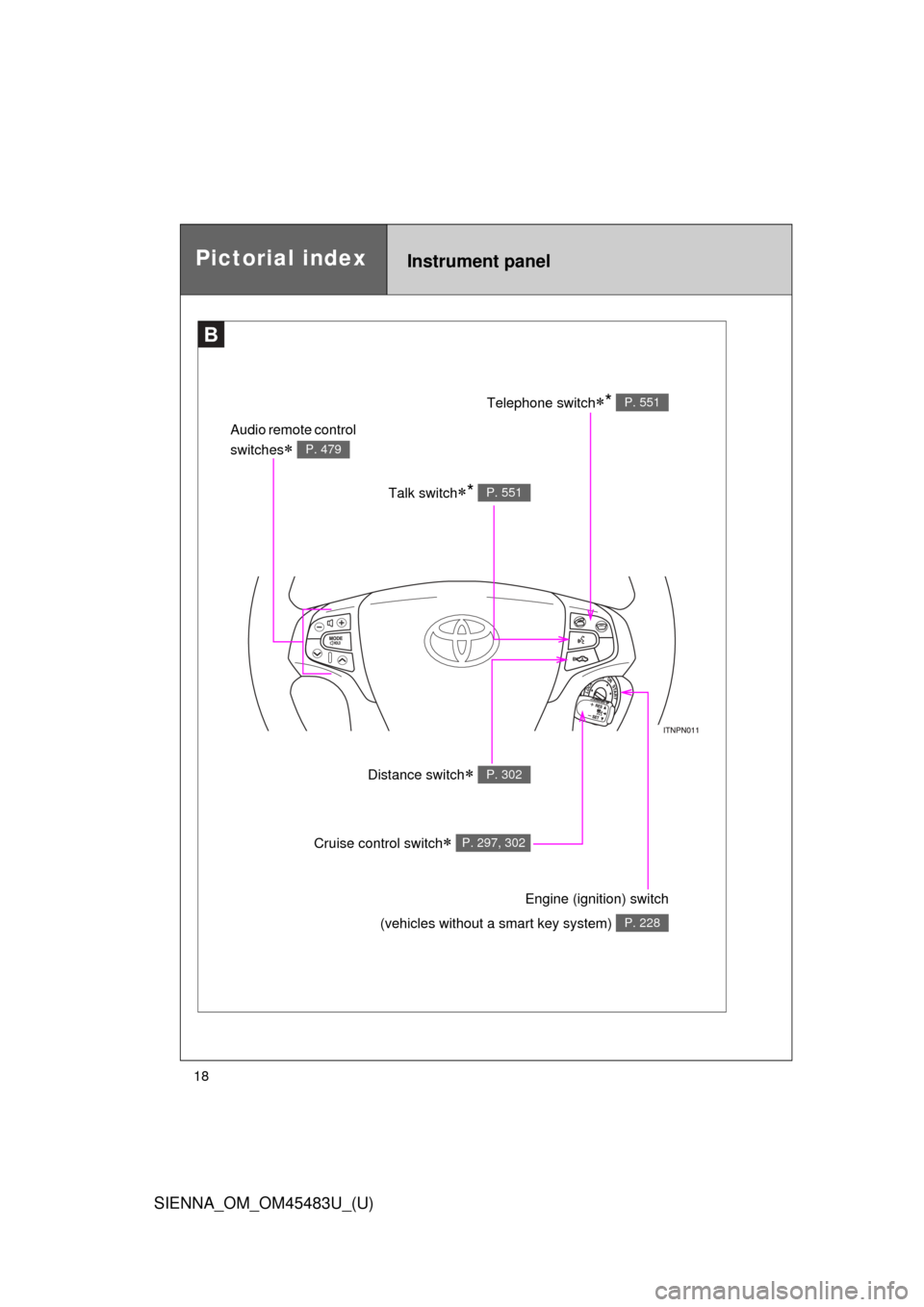
Pictorial indexInstrument panel
B
Talk switch* P. 551
Audio remote control
switches
P. 479
Telephone switch* P. 551
Distance switch P. 302
Engine (ignition) switch
(vehicles without a smart key system)
P. 228
Cruise control switch P. 297, 302
Page 25 of 872
SIENNA_OM_OM45483U_(U)
25
Installation of a mobile two-way radio system
The installation of a mobile two-way radio system in your vehicle could affect
electronic systems such as:
●Multiport fuel injection system/sequential multiport fuel injection system
● Cruise control system
● Anti-lock brake system
● SRS airbag system
● Seat belt pretensioner system
Be sure to check with your Toyota dealer for precautionary measures or spe-
cial instructions regarding installation of a mobile two-way radio system.
Page 213 of 872
When driving2
213
SIENNA_OM_OM45483U_(U)
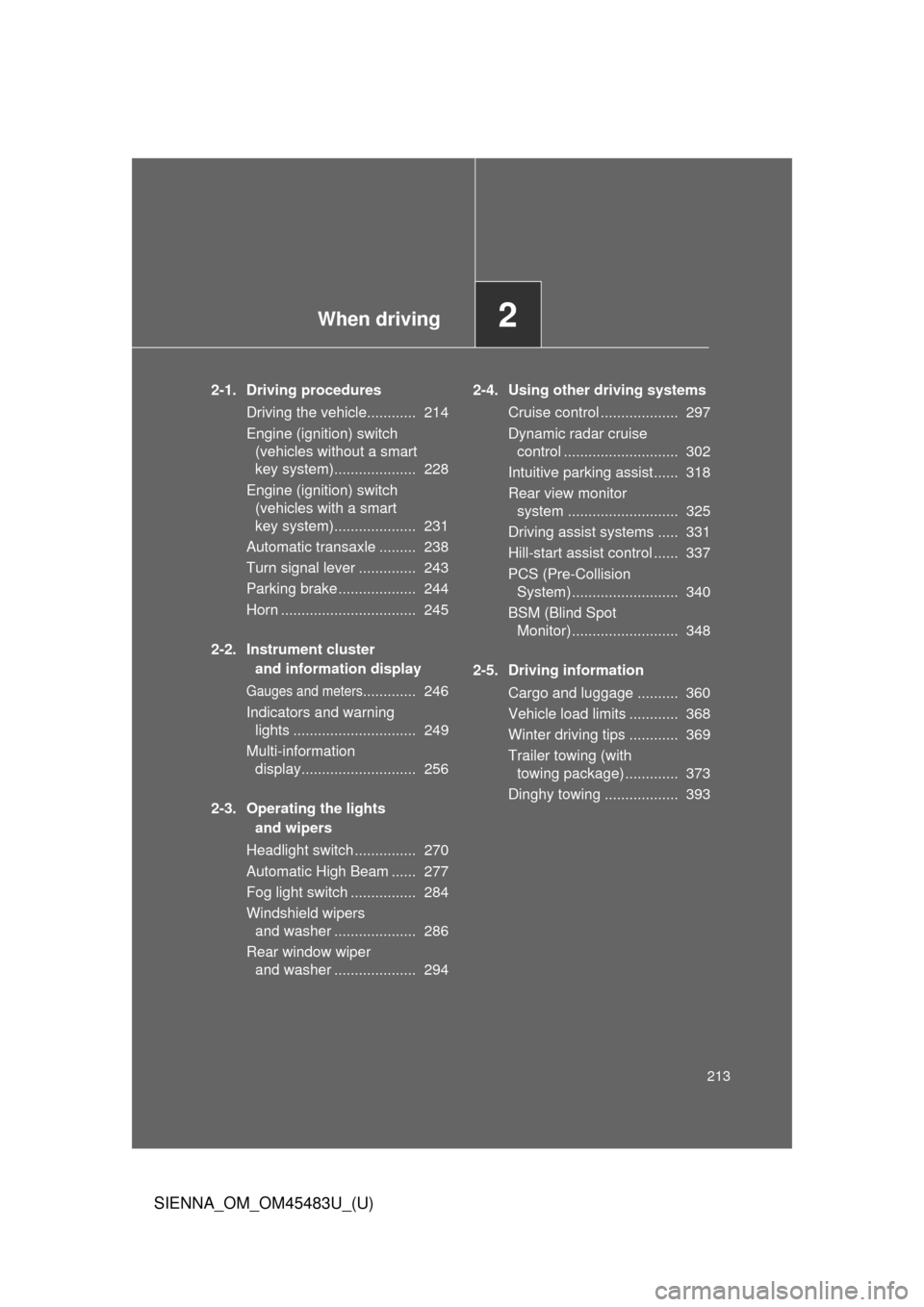
2-1. Driving proceduresDriving the vehicle............ 214
Engine (ignition) switch (vehicles without a smart
key system).................... 228
Engine (ignition) switch (vehicles with a smart
key system).................... 231
Automatic transaxle ......... 238
Turn signal lever .............. 243
Parking brake ................... 244
Horn ................................. 245
2-2. Instrument cluster and information display
Gauges and meters............. 246
Indicators and warning lights .............................. 249
Multi-information display............................ 256
2-3. Operating the lights and wipers
Headlight switch ............... 270
Automatic High Beam ...... 277
Fog light switch ................ 284
Windshield wipers and washer .................... 286
Rear window wiper and washer .................... 294 2-4. Using other driving systems
Cruise control ................... 297
Dynamic radar cruise control ............................ 302
Intuitive parking assist...... 318
Rear view monitor system ........................... 325
Driving assist systems ..... 331
Hill-start assist control ...... 337
PCS (Pre-Collision System).......................... 340
BSM (Blind Spot Monitor).......................... 348
2-5. Driving information Cargo and luggage .......... 360
Vehicle load limits ............ 368
Winter driving tips ............ 369
Trailer towing (with towing package)............. 373
Dinghy towing .................. 393
Page 241 of 872
241
2-1. Driving procedures
2
When driving
SIENNA_OM_OM45483U_(U)
■
Shift ranges and their functions
●Automatically selecting gears between 1 and 6 according to
vehicle speed and driving conditi ons. But, the gear is limited
according to selected shift range.
● You can choose from 6 levels of engine braking force.
● A lower shift range will provide greater engine braking force than
a higher shift range, and the engine speed will also increase.
■S mode
●When the shift range is 5 or lower, holding the shift lever toward “+” sets
the shift range to 6.
● To prevent excessive engine speed, a function was adopted that auto-
matically selects a higher shift range before the engine speed becomes
too high.
● To protect the automatic transaxle, a function is adopted that automati-
cally selects a higher shift range when the fluid temperature is high.
■ When driving with the cruise control or dynamic radar cruise control (if
equipped)
Engine braking will not occur in S mode, even when downshifting to 5 or 4.
( P. 297, 302)
■ If the shift lever cannot be shifted from P
● P. 778
● Vehicles with AUTO ACCESS SEAT : If the AUTO ACCESS SEAT has
not been locked in place after being stowed, the shift lever cannot be
shifted from P.
For details, refer to “AUTO ACCESS SEAT OWNER’S MANUAL”.
Page 251 of 872
251
2-2. Instrument cluster and information display
2
When driving
SIENNA_OM_OM45483U_(U)
■
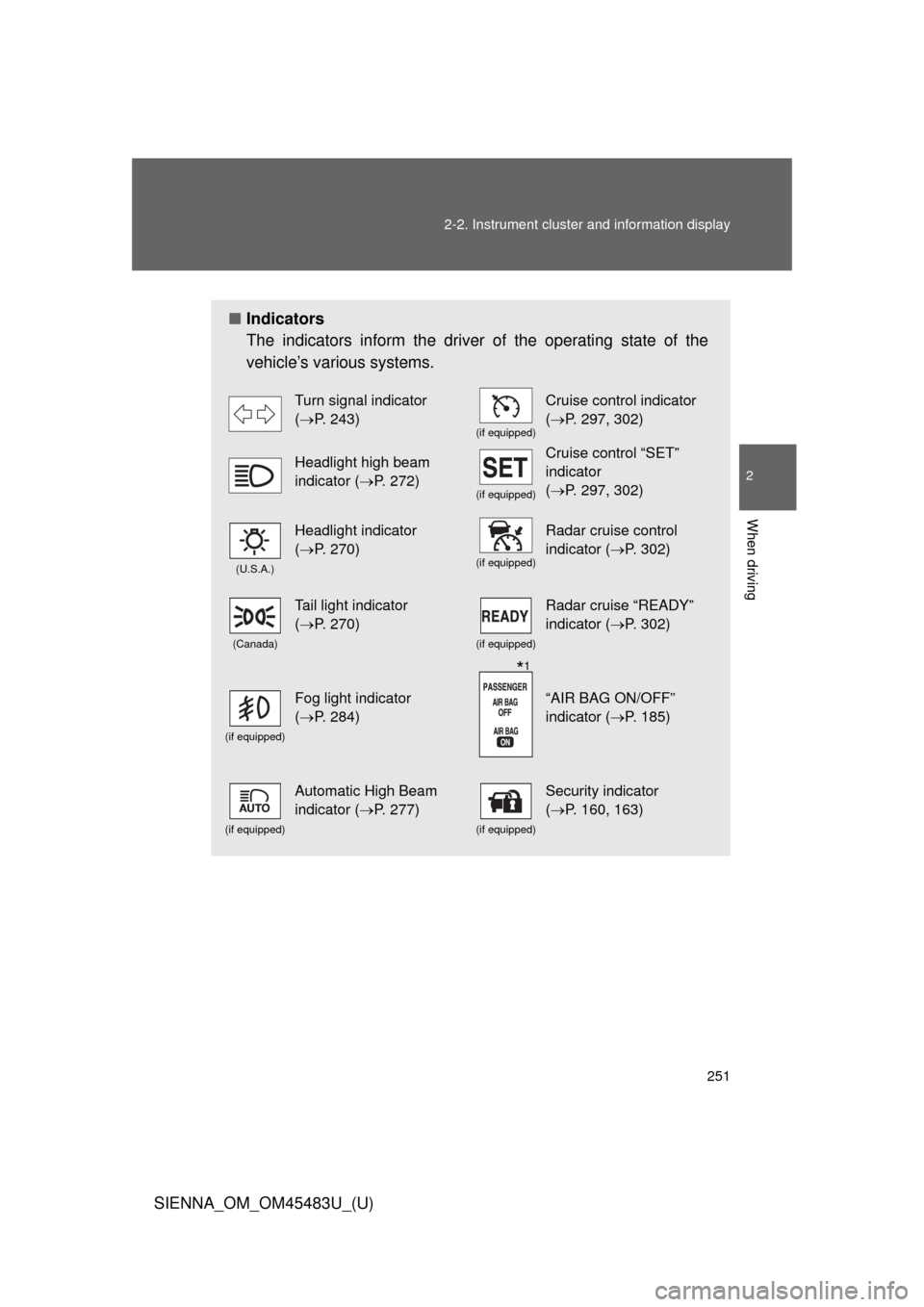
Indicators
The indicators inform the driver of the operating state of the
vehicle’s various systems.
Turn signal indicator
(P. 243)
(if equipped)
Cruise control indicator
(P. 297, 302)
Headlight high beam
indicator ( P. 272)
(if equipped)
Cruise control “SET”
indicator
(P. 297, 302)
(U.S.A.)
Headlight indicator
(P. 270)
(if equipped)
Radar cruise control
indicator (P. 302)
(Canada)
Tail light indicator
(P. 270)
(if equipped)
Radar cruise “READY”
indicator (P. 302)
(if equipped)
Fog light indicator
(P. 284)“AIR BAG ON/OFF”
indicator (P. 185)
(if equipped)
Automatic High Beam
indicator ( P. 277)
(if equipped)
Security indicator
(P. 160, 163)
*1
Page 297 of 872
297
2
When driving
SIENNA_OM_OM45483U_(U)
2-4. Using other driving systems
Cruise control
: If equipped
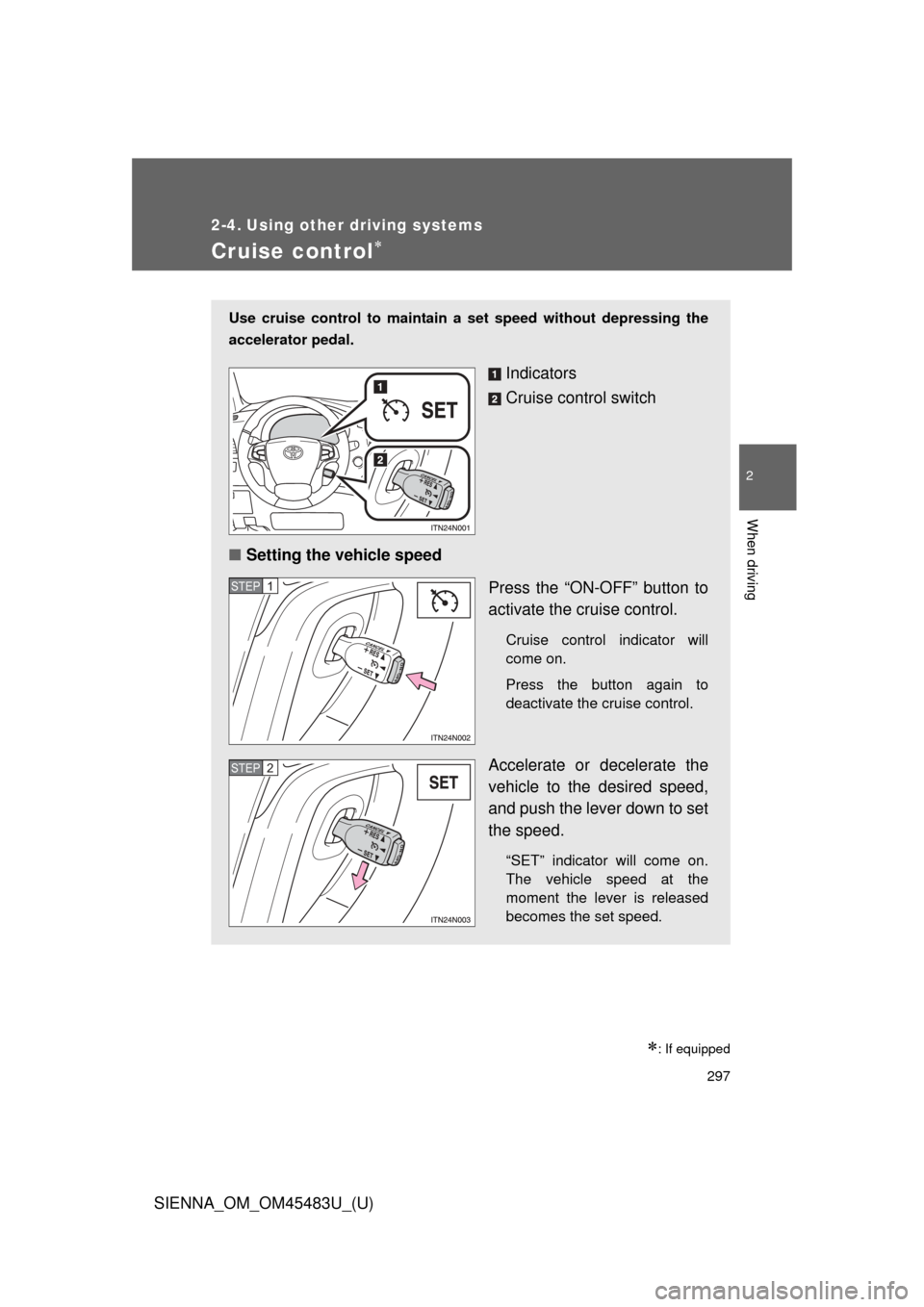
Use cruise control to maintain a set speed without depressing the
accelerator pedal.
Indicators
Cruise control switch
■ Setting the vehicle speed
Press the “ON-OFF” button to
activate the cruise control.
Cruise control indicator will
come on.
Press the button again to
deactivate the cruise control.
Accelerate or decelerate the
vehicle to the desired speed,
and push the lever down to set
the speed.
“SET” indicator will come on.
The vehicle speed at the
moment the lever is released
becomes the set speed.
STEP1
STEP2
Page 300 of 872

300 2-4. Using other driving systems
SIENNA_OM_OM45483U_(U)
■Cruise control can be set when
●The shift lever is in D or more than range 4 of S has been selected.
● Vehicle speed is above approximately 25 mph (40 km/h).
■ Accelerating after setting the vehicle speed
●The vehicle can be accelerated normally. After acceleration, the set
speed resumes.
● Even without canceling the cruise control, the set speed can be
increased by first accelerating the vehicle to the desired speed and then
pushing the lever down to set the new speed.
■ Automatic cruise control cancelation
Cruise control will stop maintaining the vehicle speed in any of the following
situations.
●Actual vehicle speed falls more than approximately 10 mph (16 km/h)
below the preset vehicle speed.
At this time, the memorized set speed is not retained.
● Actual vehicle speed is below approximately 25 mph (40 km/h).
● Enhanced VSC is activated.
■ If the cruise control indicator light flashes
Press the “ON-OFF” button once to deactivate the system, and then press
the button again to reactivate the system.
If the cruise control speed cannot be set or if the cruise control cancels
immediately after being activated, there may be a malfunction in the cruise
control system. Have the vehicle inspected by your Toyota dealer.