Page 405 of 872
405
3-1. Using the air conditioning system
and defogger
3
Interior features
SIENNA_OM_OM45483U_(U)
Using the automatic mode
Press .
The air conditioning system will begin to operate. In outside air or
recirculated air mode, air outlets, fan speed and air conditioning on/
off are automatically adjusted according to the temperature setting.
“AUTO” will be displayed on the multi-information display.
Turn the temperature control dial clockwise (warm) or coun-
terclockwise (cool).
The temperature for the driver and passenger seat can be set sepa-
rately.
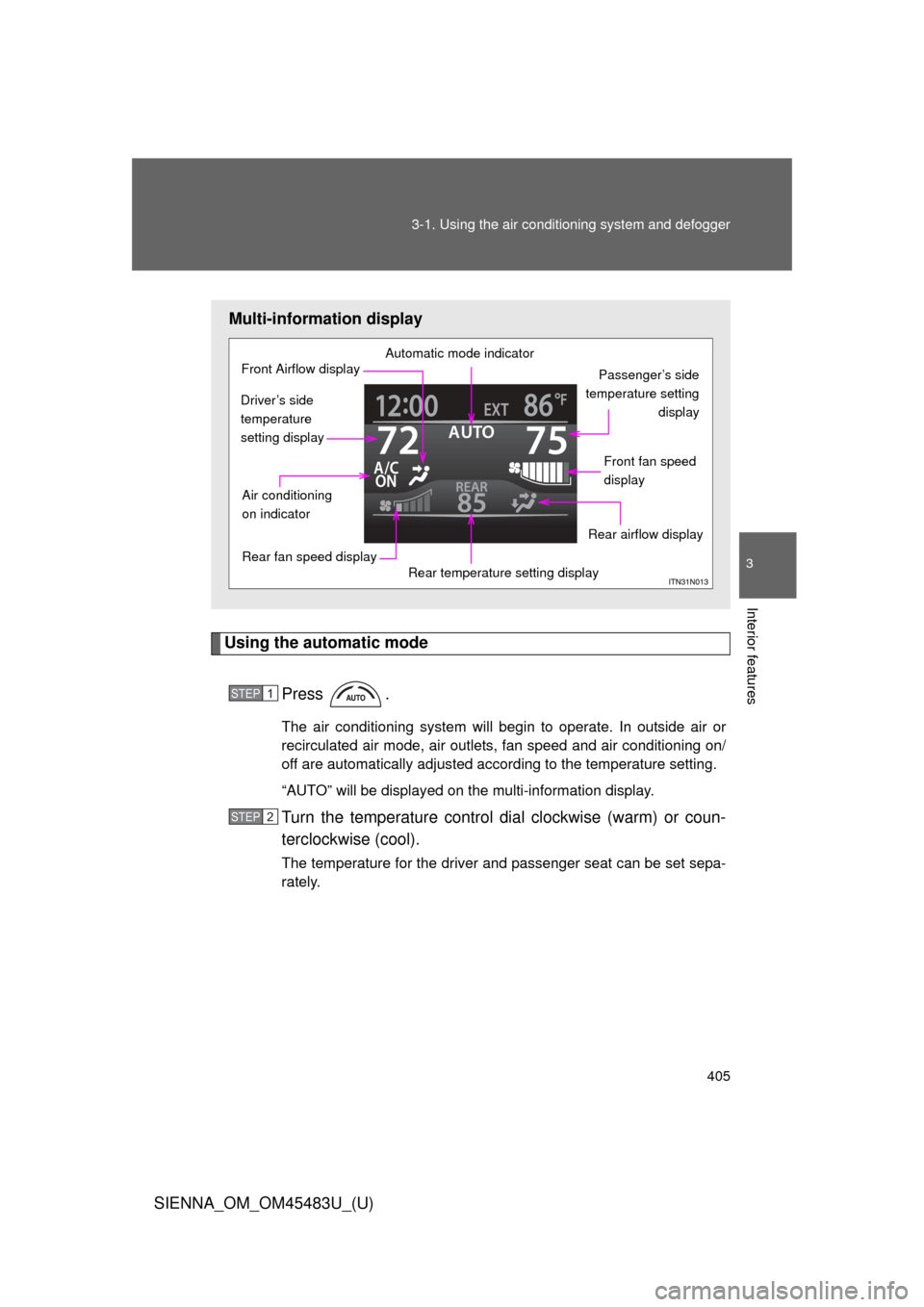
Multi-information display
Automatic mode indicator
Passenger’s side
temperature setting display
Front fan speed
display
Rear airflow display
Rear temperature setting display
Rear fan speed display
Air conditioning
on indicator
Front Airflow display
Driver’s side
temperature
setting display
STEP1
STEP2
Page 406 of 872
406 3-1. Using the air conditioning system and defogger
SIENNA_OM_OM45483U_(U)
Adjusting the settings
■ Adjusting the temperature setting
Turn the temperature control dial clockwise (warm) or counter-
clockwise (cool).
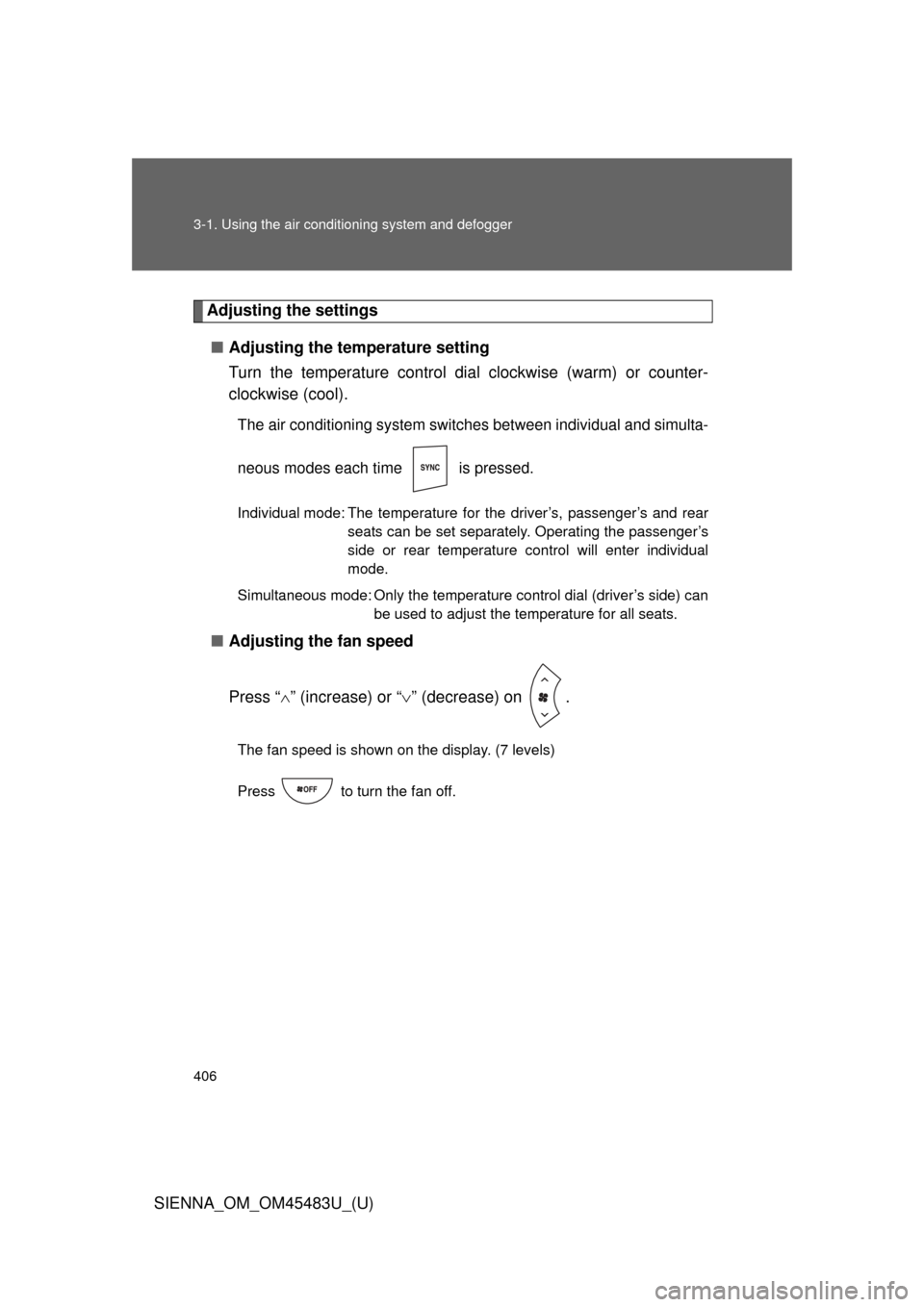
The air conditioning system switch es between individual and simulta-
neous modes each time is pressed.
Individual mode: The temperature for the driver’s, passenger’s and rear seats can be set separately. Operating the passenger’s
side or rear temperature control will enter individual
mode.
Simultaneous mode: Only the temperature control dial (driver’s side) can be used to adjust the temperature for all seats.
■Adjusting the fan speed
Press “ ” (increase) or “ ” (decrease) on .
The fan speed is shown on the display. (7 levels)
Press to turn the fan off.
Page 408 of 872
408 3-1. Using the air conditioning system and defogger
SIENNA_OM_OM45483U_(U)
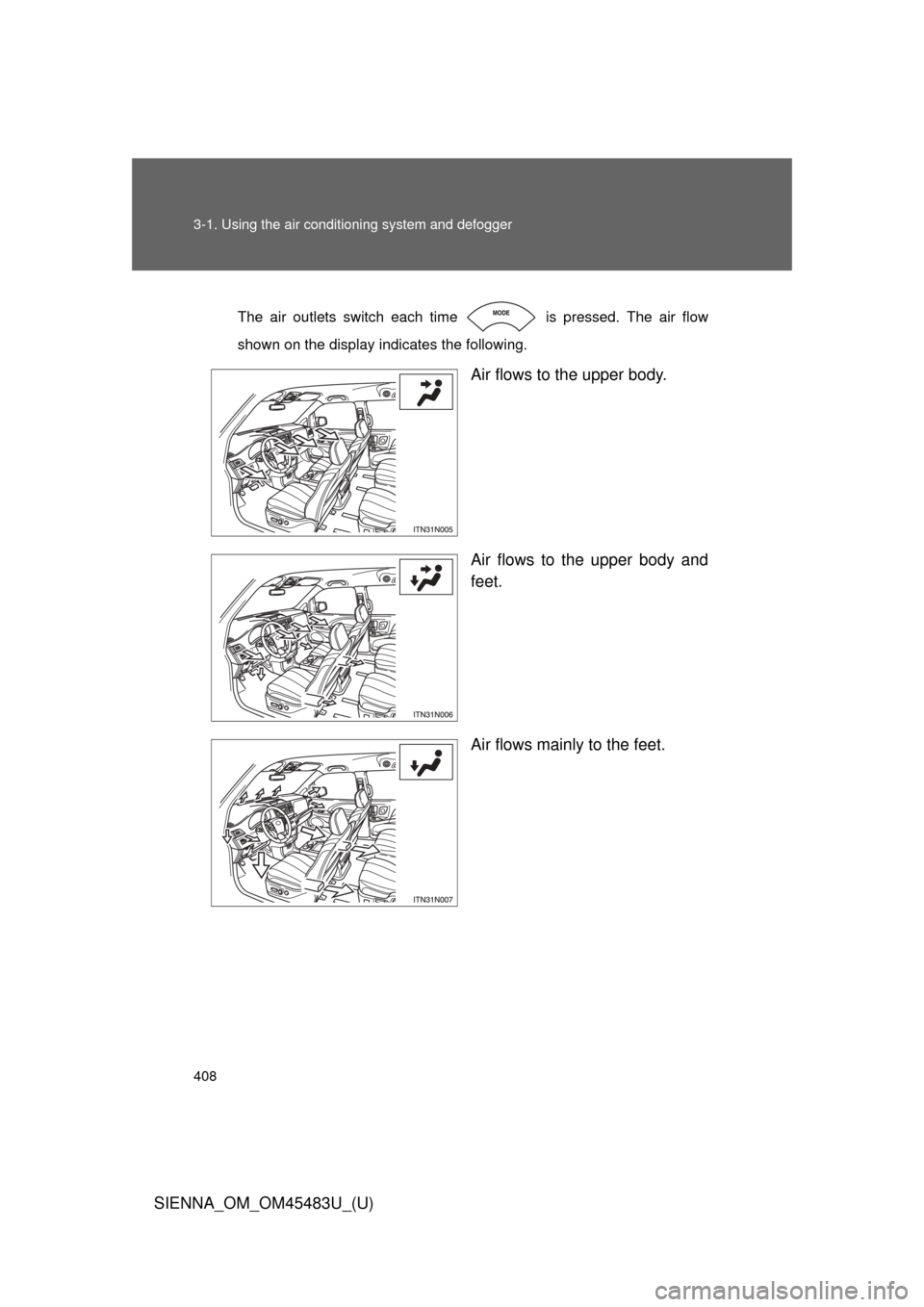
The air outlets switch each time is pressed. The air flow
shown on the display indicates the following.
Air flows to the upper body.
Air flows to the upper body and
feet.
Air flows mainly to the feet.
Page 412 of 872
412 3-1. Using the air conditioning system and defogger
SIENNA_OM_OM45483U_(U)
■Using the automatic mode
Fan speed is adjusted automatically in accordance with the temperature set-
ting and ambient conditions. As a result, the following may occur.
●Immediately after is pressed, the fan may stop for a while until
warm or cool air is ready to flow.
● Cool air may flow to the area around the upper body when the heater is
on.
■ Using the system in recirculated air mode
The windows will fog up more easily if the recirculated air mode is used
■ Switching between outside air and recirculated air modes
Recirculated air mode or outside air mode may be automatically switched in
accordance with the temperature setting and the inside temperature.
■ Window defogger feature
Recirculated air mode may automatically switch to outside air mode in situa-
tions where the windows need to be defogged.
■ Temperature display
The temperature display (English/U.S. Customary System and metric units)
on the trip information display can be changed. ( P. 260)
■ When
is selected for the air outlets used
For your driving comfort, air flowing to the feet may be warmer than air flow-
ing to the upper body depending on the temperature setting.
■ When outside temper ature approaches 32F (0 C)
The air conditioning system may not operate even when is pressed.
Page 413 of 872
413
3-1. Using the air conditioning system
and defogger
3
Interior features
SIENNA_OM_OM45483U_(U)
■When the “A/C ON” in the mu lti-information display flashes
Press
and turn off the air conditioning system before turning it on
once more. There may be a problem in the air conditioning system if the indi-
cator light continues to flash. Turn the air conditioning system off and have it
inspected by your Toyota dealer.
■ Air conditioning odors
●During use, various odors from inside and outside the vehicle may enter
into and accumulate in the air conditioning system. This may then cause
odor to be emitted from the vents.
● To reduce potential odors from occurring:
• It is recommended that the air conditioning system be set to outside air
mode prior to turning the vehicle off.
• The start timing of the blower may be delayed for a short period of time immediately after the air conditioning system is started in automatic
mode.
CAUTION
■ To prevent the windshield from fogging up
Do not use during cool air operation in extremely humid weather. The
difference between the temperature of the outside air and that of the wind-
shield can cause the outer surface of the windshield to fog up, blocking your
vision.
NOTICE
■To prevent battery discharge
Do not leave the air conditioning system on longer than necessary when the
engine is stopped.
Page 417 of 872
417
3-1. Using the air conditioning system and defogger
3
Interior features
SIENNA_OM_OM45483U_(U)
Rear automatic air conditioning system
Using the automatic modePress .
The air conditioning system begins to operate. Air outlets and fan
speed are automatically adjusted according to the temperature set-
ting.
Press “” on to increase the temperature and “ ” to
decrease the temperature.
: If equipped
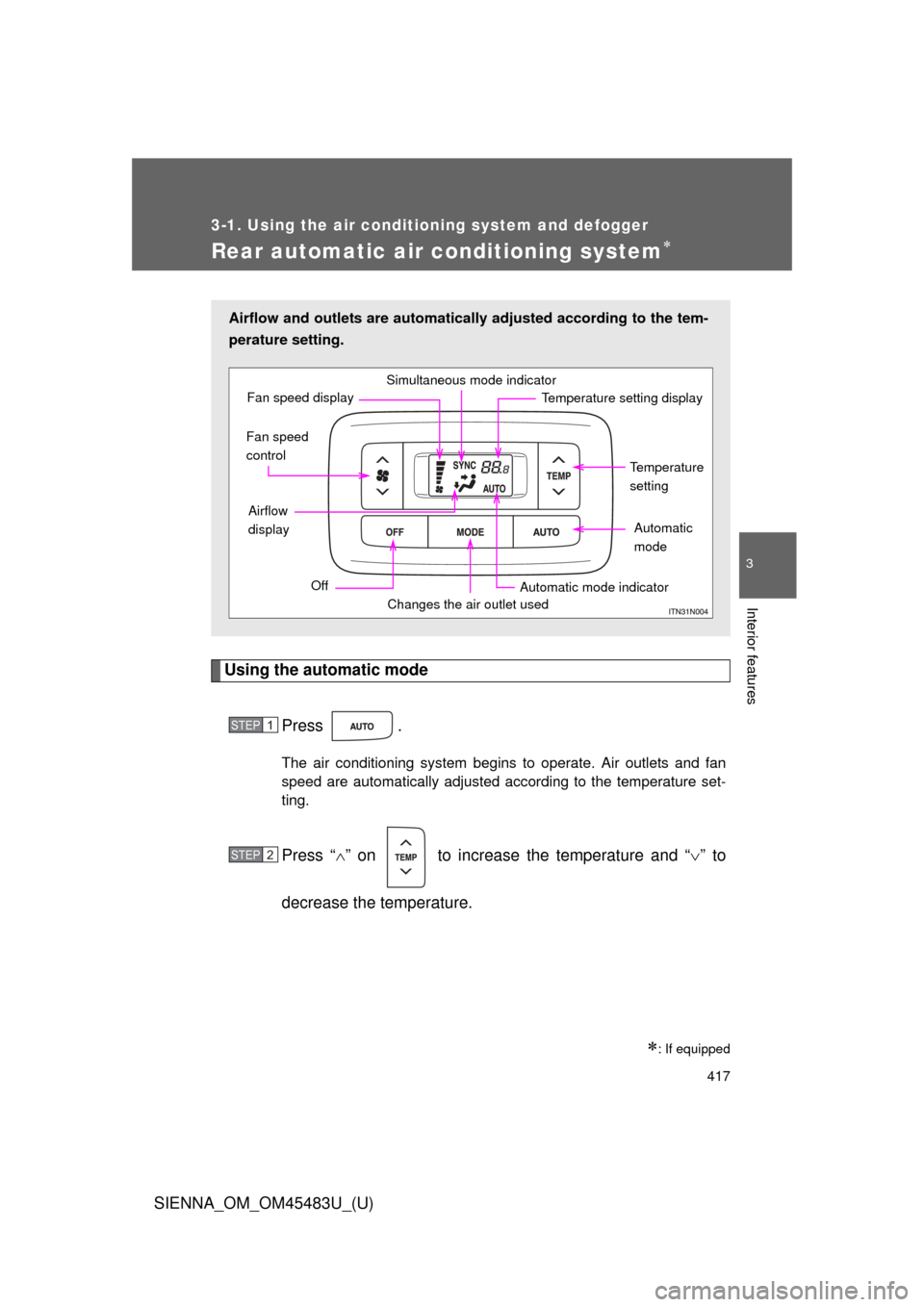
Airflow and outlets are automatica lly adjusted according to the tem-
perature setting.
Simultaneous mode indicator
Temperature setting displayFan speed display
Temperature
setting
Automatic
mode
Automatic mode indicator
Changes the air outlet used
Off
Airflow
display
Fan speed
control
STEP1
STEP2
Page 420 of 872
420 3-1. Using the air conditioning system and defogger
SIENNA_OM_OM45483U_(U)
■Temperature display
The temperature display (English/U.S. Customary System and metric units)
on the trip information display can be changed. ( P. 260)
■ When the front air conditioning s ystem is in simultaneous mode
“SYNC” is shown on the display. The rear air conditioning system controls
will continue to function. ( P. 406)
NOTICE
■To prevent battery discharge
Do not leave the air conditioning system on longer than necessary when the
engine is off.
Page 428 of 872
428
3-2. Using the audio system
SIENNA_OM_OM45483U_(U)
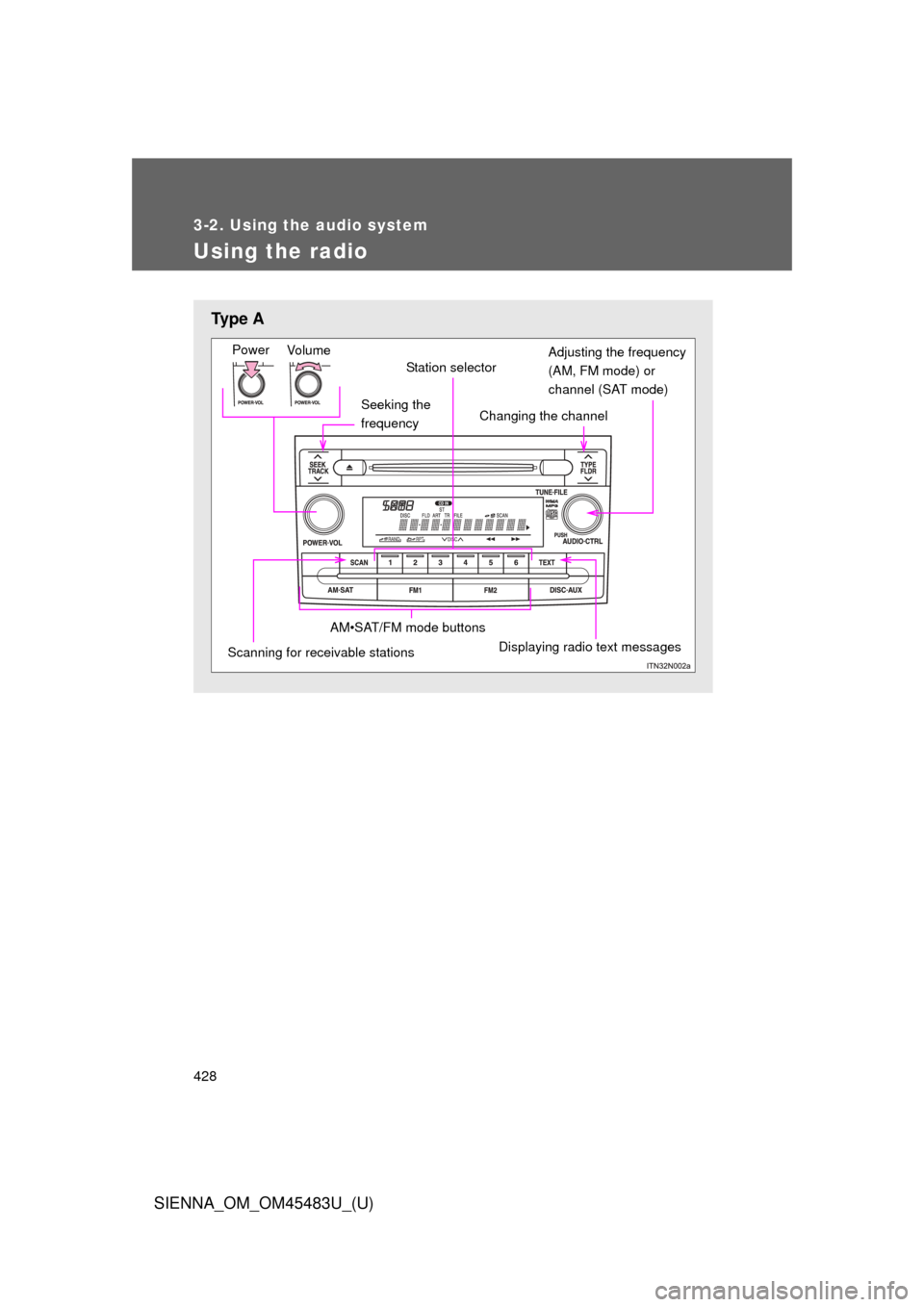
Using the radio
Ty p e A
Seeking the
frequency
Vo lu m e
Power
Station selector
Changing the channel
AM•SAT/FM mode buttons
Scanning for receivable stationsDisplaying radio text messages
Adjusting the frequency
(AM, FM mode) or
channel (SAT mode)