Page 124 of 732
124
RAV4_OM_OM42A04U_(U)
3-2. Opening, closing and locking the doors
Back door
■Door lock switch
P. 1 2 0
■Entry function (if equipped)
P. 1 0 1
■Wireless remote control
P. 1 1 3
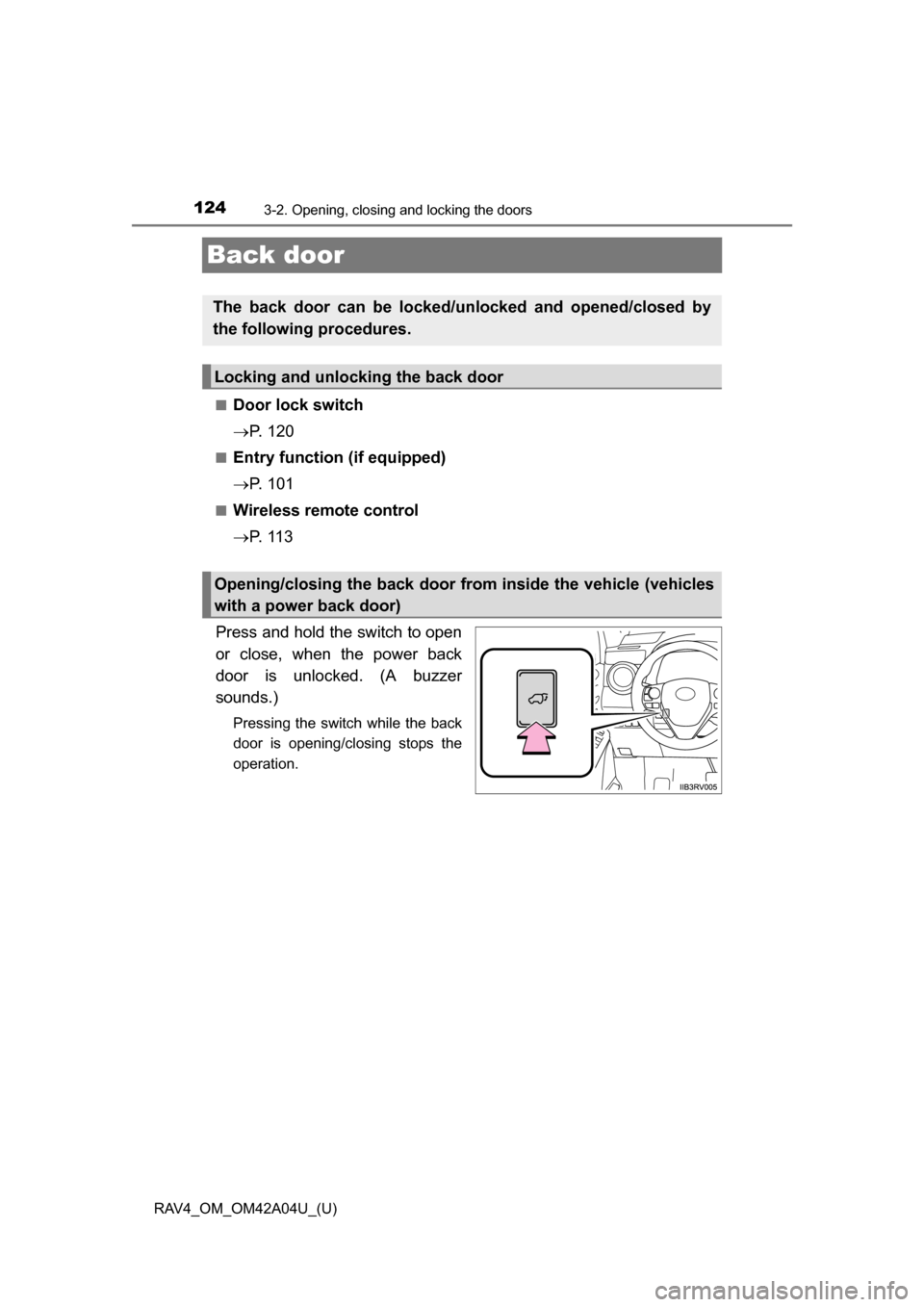
Press and hold the switch to open
or close, when the power back
door is unlocked. (A buzzer
sounds.)
Pressing the switch while the back
door is opening/closing stops the
operation.
The back door can be locked/unl ocked and opened/closed by
the following procedures.
Locking and unlocking the back door
Opening/closing the back door from inside the vehicle (vehicles
with a power back door)
Page 125 of 732
RAV4_OM_OM42A04U_(U)
1253-2. Opening, closing and locking the doors
3
Operation of each component
■Back door opener
Vehicles without a power
back door
Raise the back door while
pressing up the back door
opener switch.
Vehicles with a power back
door
When the back door is
unlocked: Press the back door
opener switch.
When the back door is locked
(vehicles with a smart key sys-
tem): While carrying the elec-
tronic key on your person,
press the back door opener
switch.
Pressing the switch while the
back door is opening/closing
stops the operation.
■
Wireless remote control (vehicles with a power back door)
P. 1 1 3
Pressing the switch closes the
back door automatically. (A
buzzer sounds.)
Pressing the switch while the back
door is opening/closing stops the
operation. Pressing the switch
again will reverse the operation.
Opening the back door from outside the vehicle
Power back door switch (vehicles with a power back door)
Page 144 of 732

144
RAV4_OM_OM42A04U_(U)
3-3. Adjusting the seats
Each electronic key can be registered to recall your preferred driving
position.
■Registering procedure
Record your driving position to button “1” or “2” before performing
the following:
Carry only the key you want to register, and then close the driver’s
door.
If 2 or more keys are in the vehicle, the driving position cannot be
recorded properly.
Check that the shift lever is in P.
Turn the engine switch to IGNITION ON mode.
Recall the driving position that you want to record.
While pressing the recalled
button, press and hold the
door lock switch (either lock
or unlock) until the buzzer
sounds.
If the button could not be regis-
tered, the buzzer sounds contin-
uously for approximately 3
seconds.
■
Recall procedure
Carry the electronic key that has been registered to the driving
position, and then unlock and open the driver’s door using the
smart key system or wi reless remote control.
The driving position will move to the recorded position.
If the driving position is in a position that has already been recorded, the
seat will not move.
Memory recall function (vehicles with a smart key system)
1
2
3
4
Page 360 of 732
360
RAV4_OM_OM42A04U_(U)
5-2. Using the audio system
■When transferring ownership of the vehicle
Be sure to initialize the system to prevent personal data from being improp-
erly accessed. ( P. 381)
■ About Bluetooth
®
■Compatible models
●Bluetooth
® specifications:
Ver. 1.1, or higher (Recommended: Ver. 2.1 + EDR or higher)
● Following Profiles:
• A2DP (Advanced Audio Distribution Profile) Ver. 1.0 or higher (recom-
mended: Ver. 1.2 or higher)
• AVRCP (Audio/Video Remote Control Profile) Ver. 1.0 or higher (recom- mended: Ver. 1.3 or higher)
Portable players must correspond to the above specifications in order to be
connected to the Bluetooth
® audio/phone. However, please note that some
functions may be limited depending on the type of portable player.
● Cellular phone
• HFP (Hands Free Profile) Ver. 1.0 or higher (Recommended: Ver. 1.5)
• OPP (Object Push Profile) Ver. 1.1
• PBAP (Phone Book Access Profile) Ver. 1.0
Bluetooth is a registered trademark of
Bluetooth SIG, Inc.
Page 480 of 732
480
RAV4_OM_OM42A04U_(U)
5-3. Using the audio system (Entune Audio)
■Compatible models
The Bluetooth
® audio system supports portable audio players with the follow-
ing specifications
● Bluetooth
® specifications:
Ver. 2.0, or higher (Recommended: Ver. 3.0+EDR or higher)
● Profiles:
• A2DP (Advanced Audio Distribution Profile) Ver. 1.0, or higher
(Recommended: Ver. 1.2 or higher)
This is a profile to transmit stereo audio or high quality sound to the audio
system.
• AVRCP (Audio/Video Remote Contro l Profile) Ver. 1.0 or higher
(Recommended: Ver. 1.4 or higher)
This is a profile to allow remote control the A/V equipment.
However, please note that some functions may be limited depending on the
type of portable audio player connected.
The hands-free system supports cellular phones with the following specifica-
tions.
● Bluetooth
® specification:
Ver. 2.0 or higher (Recommended: Ver. 3.0+EDR or higher)
● Profiles:
• HFP (Hands Free Profile) Ver. 1.0 or higher (Recommended: Ver. 1.6 or
higher)
This is a profile to allow hands-free phone calls using a cellular phone or
head set. It has outgoing and incoming call functions.
• OPP (Object Push Profile) Ver. 1.1 or higher (Recommended: Ver. 1.2) This is a profile to transfer contact data. When a Bluetooth
® compatible
cellular phone has both PBAP and OPP, OPP cannot be used.
• PBAP (Phone Book Access Profile) Ver. 1.0 or higher (Recommended: Ver. 1.1)
This is a profile to transfer contact data.
• MAP (Message Access Profile) Ver. 1.0 or higher
If the cellular phone does not support HFP, you cannot register it with the
hands-free system. OPP, PBAP or MAP services must be selected individu-
ally.
Page 511 of 732
511
RAV4_OM_OM42A04U_(U)
6Maintenance and care
6-1. Maintenance and careCleaning and protecting the vehicle exterior .......... 512
Cleaning and protecting the vehicle interior ........... 516
6-2. Maintenance Maintenance requirements ................... 520
General maintenance........ 523
Emission inspection and maintenance (I/M)
programs ......................... 527
6-3. Do-it-yourself maintenance Do-it-yourself service precautions ..................... 528
Hood ................................. 533
Positioning a floor jack ...... 535
Engine compartment ......... 537
Tires .................................. 551
Tire inflation pressure ....... 562
Wheels .............................. 565
Air conditioning filter.......... 568
Wireless remote control/electronic
key battery ...................... 570
Checking and replacing fuses ............................... 573
Light bulbs......................... 584
Page 547 of 732

RAV4_OM_OM42A04U_(U)
5476-3. Do-it-yourself maintenance
6
Maintenance and care
■After recharging/reconnecting the ba ttery (vehicles with a smart key sys-
tem)
The engine may not start. Follow the procedure below to initialize the system.
Shift the shift lever to P.
Open and close any of the doors.
Restart the engine.
● Unlocking the doors using the smart key system may not be possible imme-
diately after reconnecting the battery. If this happens, use the wireless
remote control or the mechanical key to lock/unlock the doors.
● Start the engine with the engine switch in ACCESSORY mode. The engine
may not start with the engine switch turned off. However, the engine will
operate normally from the second attempt.
● The engine switch mode is recorded by the vehicle. If the battery is recon-
nected, the vehicle will return the engine switch mode to the status it was in
before the battery was disconnected. Make sure to turn off the engine
before disconnect the battery. Take extra care when connecting the battery
if the engine switch mode prior to discharge is unknown.
If the engine will not start even after multiple attempts, contact your Toyota
dealer.
1
2
3
Page 570 of 732
570
RAV4_OM_OM42A04U_(U)
6-3. Do-it-yourself maintenance
Wireless remote control/electronic key
batter y
●Flathead screwdriver
● Small flathead screwdriver
● Lithium battery CR2016 (vehicles without a smart key system), or
CR2032 (vehicles with a smart key system)
Vehicles without a smart key system
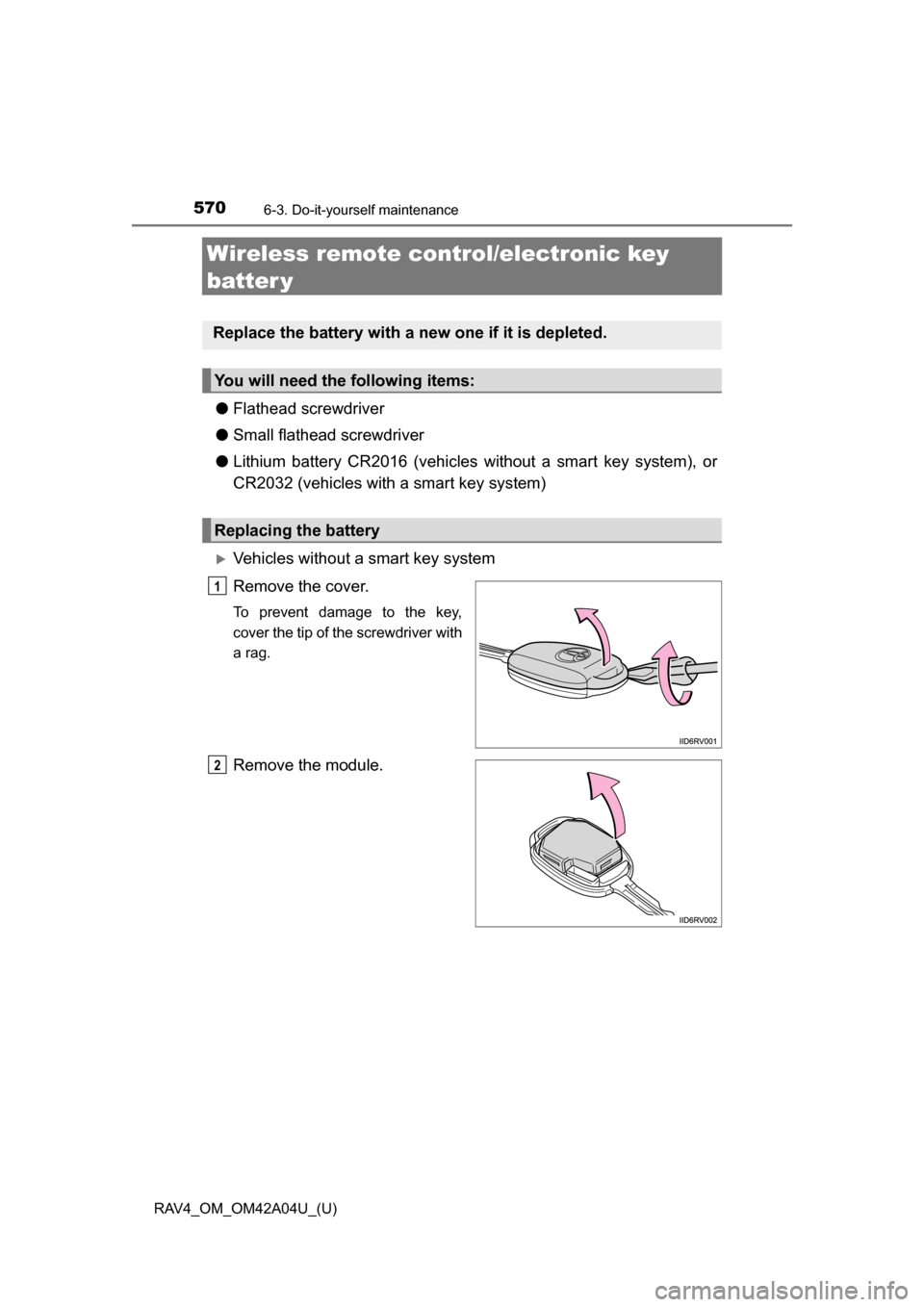
Remove the cover.
To prevent damage to the key,
cover the tip of the screwdriver with
a rag.
Remove the module.
Replace the battery with a new one if it is depleted.
You will need the following items:
Replacing the battery
1
2