Page 521 of 732

RAV4_OM_OM42A04U_(U)
5216-2. Maintenance
6
Maintenance and care
■Repair and replacement
It is recommended that genuine Toyota parts be used for repairs to ensure
performance of each system. If non-Toyota parts are used in replacement or if
a repair shop other than a Toyota dealer performs repairs, confirm the war-
ranty coverage.
■ Reset the maintenance data (U.S.A. only)
After the required maintenance is performed according to the maintenance
schedule, please reset the maintenance data.
To reset the data, follow the procedure described below:
Vehicles without a smart key system
Switch the display to the trip meter A (P. 88) and then turn the engine
switch to the “LOCK” position.
While pressing the “DISP” button ( P. 88), turn the engine switch to the
“ON” position (do not start the engine because reset mode will be can-
celed).
Continue to press and hold the button until the trip meter displays “000000”.
Vehicles with a smart key system
Switch the display to the trip meter A (P. 88) and then turn the engine
switch off.
While pressing the “DISP” button ( P. 88), turn the engine switch to IGNI-
TION ON mode (do not start the engine because reset mode will be can-
celed).
Continue to press and hold the button until the trip meter displays “000000”.
■ Allow inspection and repairs to be performed by a Toyota dealer
●Toyota technicians are well-trained specialists and are kept up to date with
the latest service information. They are well informed about the operations
of all systems on your vehicle.
● Keep a copy of the repair order. It proves that the maintenance that has
been performed is under warranty cove rage. If any problem should arise
while your vehicle is under warranty, your Toyota dealer will promptly take
care of it.
1
2
3
1
2
3
Page 532 of 732
532
RAV4_OM_OM42A04U_(U)
6-3. Do-it-yourself maintenance
CAUTION
■When working near the electric cooling fans or radiator grille
Vehicles without a smart key system
Be sure the engine switch is off. With the engine switch in the “ON” position,
the electric cooling fans may automatically start to run if the air conditioning
is on and/or the coolant temperature is high. ( P. 544)
Vehicles with a smart key system
Be sure the engine switch is off. With the engine switch in IGNITION ON
mode, the electric cooling fans may automatically start to run if the air condi-
tioning is on and/or the coolant temperature is high. ( P. 544)
■ Safety glasses
Wear safety glasses to prevent flying or falling material, fluid spray, etc.
from getting in your eyes.
NOTICE
■If you remove the air cleaner filter
Driving with the air cleaner filter removed may cause excessive engine wear
due to dirt in the air.
Page 547 of 732

RAV4_OM_OM42A04U_(U)
5476-3. Do-it-yourself maintenance
6
Maintenance and care
■After recharging/reconnecting the ba ttery (vehicles with a smart key sys-
tem)
The engine may not start. Follow the procedure below to initialize the system.
Shift the shift lever to P.
Open and close any of the doors.
Restart the engine.
● Unlocking the doors using the smart key system may not be possible imme-
diately after reconnecting the battery. If this happens, use the wireless
remote control or the mechanical key to lock/unlock the doors.
● Start the engine with the engine switch in ACCESSORY mode. The engine
may not start with the engine switch turned off. However, the engine will
operate normally from the second attempt.
● The engine switch mode is recorded by the vehicle. If the battery is recon-
nected, the vehicle will return the engine switch mode to the status it was in
before the battery was disconnected. Make sure to turn off the engine
before disconnect the battery. Take extra care when connecting the battery
if the engine switch mode prior to discharge is unknown.
If the engine will not start even after multiple attempts, contact your Toyota
dealer.
1
2
3
Page 554 of 732

554
RAV4_OM_OM42A04U_(U)
6-3. Do-it-yourself maintenance
■How to initialize the tire pressure warning systemPark the vehicle in a safe place and turn the engine switch to the
“LOCK” position (vehicles without a smart key system) or off
(vehicles with a smart key system).
Initialization cannot be performed while the vehicle is moving.
Adjust the tire inflation pressure to the specified cold tire inflation
pressure level. ( P. 669)
Make sure to adjust the tire pressure to the specified cold tire inflation
pressure level. The tire pressure warning system will operate based on
this pressure level.
Turn the engine switch to the “ON” position (vehicles without a
smart key system) or IGNITION ON mode (vehicles with a smart
key system).
Press and hold the tire pres-
sure warning reset switch
until the tire pressure warn-
ing light blinks slowly 3 times.
Vehicles without a smart key syst em: Wait for a few minutes with
the engine switch in the “ON” position and then turn the engine
switch to the “ACC” or “LOCK” position.
Vehicles with a smart key system: Wait for a few minutes with the
engine switch in IGNITION ON mode and then turn the engine
switch off.
1
2
3
4
5
Page 558 of 732

558
RAV4_OM_OM42A04U_(U)
6-3. Do-it-yourself maintenance
■The initialization operation (vehicles with the tire pressure warning sys-
tem)
●Make sure to carry out initialization after adjusting the tire inflation pressure.
Also, make sure the tires are cold before carrying out initialization or tire
inflation pressure adjustment.
● If you have accidentally turned the engine switch to the “LOCK” position
(vehicles without a smart key system) or off (vehicles with a smart key sys-
tem) during initialization, it is not necessary to press the reset switch again
as initialization will restart automatically when the engine switch has been
turned to the “ON” position (vehicles without a smart key system) or IGNI-
TION ON mode (vehicles with a smart key system) for the next time.
● If you accidentally press the reset switch when initialization is not necessary,
adjust the tire inflation pressure to the specified level when the tires are
cold, and conduct initialization again.
■ When initialization of the tire pressure warning system has failed (if
equipped)
Initialization can be completed in a few minutes. However, in the following
cases, the settings have not been recorded and the system will not operate
properly. If repeated attempts to record tire inflation pressure settings are
unsuccessful, have the vehicle inspected by your Toyota dealer.
● When operating the tire pressure warning reset switch, the tire pressure
warning light does not blink 3 times.
● After driving for a certain period of time since the initialization has been
completed, the warning light comes on after blinking for 1 minute.
■ Tire pressure warning system certification
For vehicles sold in the U.S.A.
TRW Automotive
Tire Pressure Monitoring Sensor
FCC ID: GQ4-51T
This device complies with Part 15 of the FCC Rules. Operation is subject to the
following two conditions: (1) This device may not cause harmful interference, and
(2) This device must accept any interfer ence received, including interference that
may cause undesired operation of this device.
WARNING: Changes or modifications not expressively approved by TRW Auto-
motive U.S. LLC could void the user’s authority to operate the equipment.
Page 568 of 732
568
RAV4_OM_OM42A04U_(U)
6-3. Do-it-yourself maintenance
Air conditioning filter
Vehicles without a smart key system: Turn the engine switch to the
“LOCK” position.
Vehicles with a smart key system: Turn the engine switch off.
Open the glove box. Slide off
the damper.
Push in each side of the glove
box to disconnect the claws.
Remove the filter cover.
The air conditioning filter must be changed regularly to maintain
air conditioning efficiency.
Removal method
1
2
3
4
Page 570 of 732
570
RAV4_OM_OM42A04U_(U)
6-3. Do-it-yourself maintenance
Wireless remote control/electronic key
batter y
●Flathead screwdriver
● Small flathead screwdriver
● Lithium battery CR2016 (vehicles without a smart key system), or
CR2032 (vehicles with a smart key system)
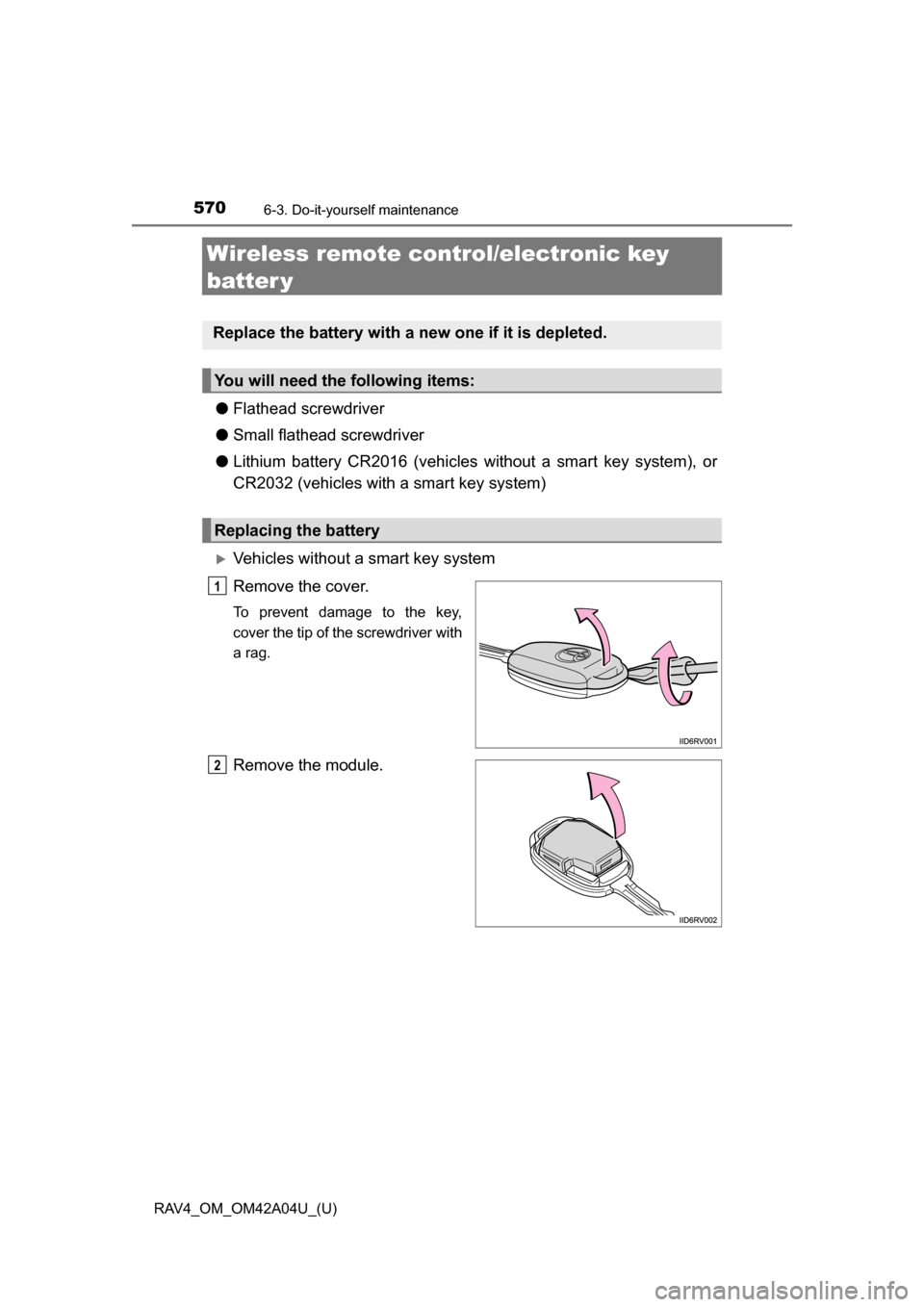
Vehicles without a smart key system
Remove the cover.
To prevent damage to the key,
cover the tip of the screwdriver with
a rag.
Remove the module.
Replace the battery with a new one if it is depleted.
You will need the following items:
Replacing the battery
1
2
Page 571 of 732
RAV4_OM_OM42A04U_(U)
5716-3. Do-it-yourself maintenance
6
Maintenance and care
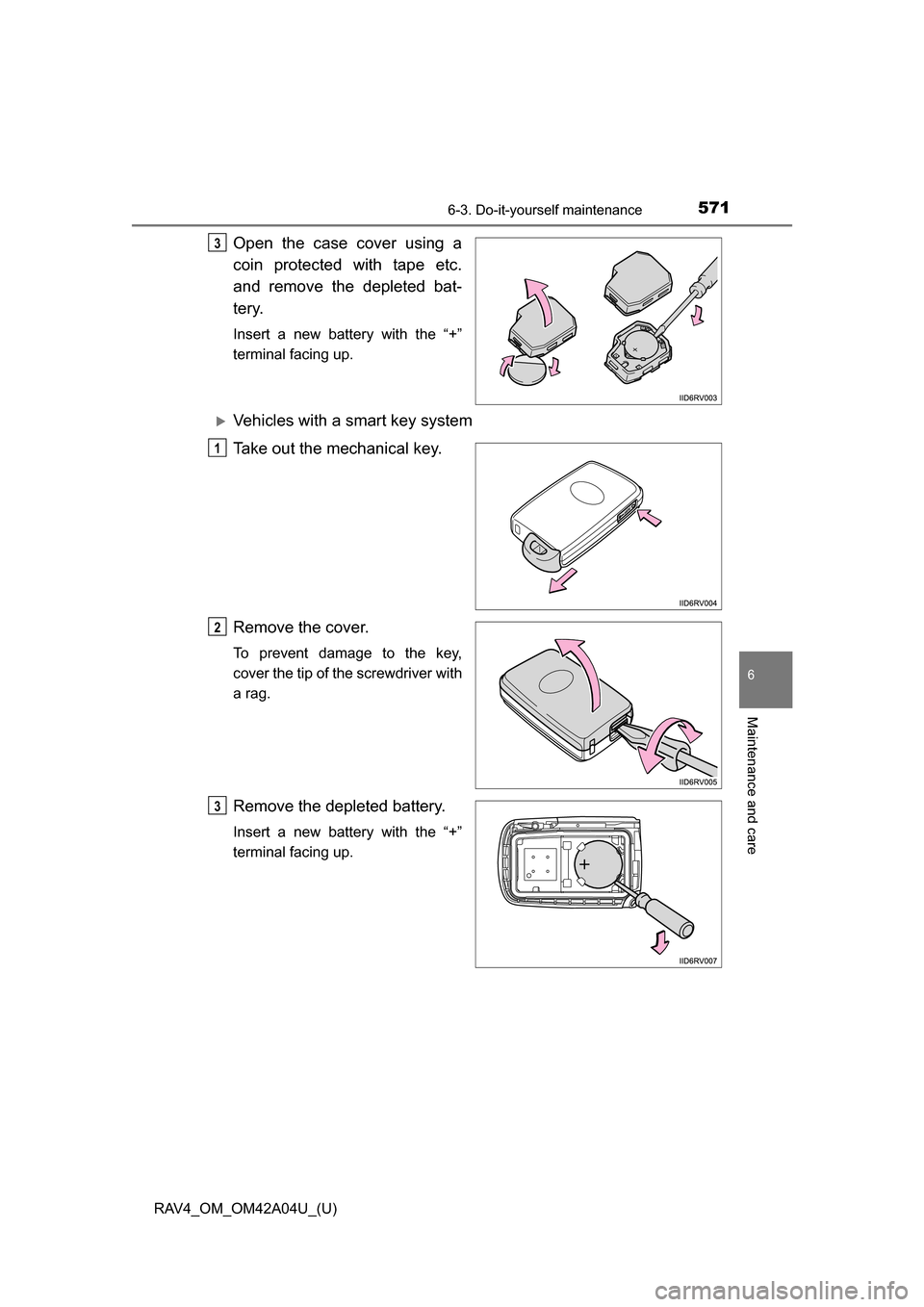
Open the case cover using a
coin protected with tape etc.
and remove the depleted bat-
tery.
Insert a new battery with the “+”
terminal facing up.
Vehicles with a smart key system
Take out the mechanical key.
Remove the cover.
To prevent damage to the key,
cover the tip of the screwdriver with
a rag.
Remove the depleted battery.
Insert a new battery with the “+”
terminal facing up.
3
1
2
3