Page 307 of 724
265
2-2. Instrument cluster
PRIUS PHV_OM_OM47856U_(U)
2
When driving
■Indicators
The indicators inform the driver of the operating state of the
vehicle’s various systems.
Turn signal indicator
(→P. 2 5 6 )
Eco Driving Indicator
Light (→P. 2 7 0 )
(U.S.A.)
Headlight indicator
(→P. 2 9 4 )
“ECO MODE”
indicator (→P. 2 4 9 )
(Canada)
Ta i l l i g h t i n d i c a t o r
(→P. 2 9 4 )
Power mode indicator
(→P. 2 4 9 )
Headlight high beam
indicator (→P. 2 9 7 )(if equipped)
Cruise control indicator
(→P. 3 1 0 , 3 2 2 )
Front fog light indicator
(→P. 3 0 0 )(if equipped)
Radar cruise control
indicator (→P. 3 1 4 )
Security indicator
(→P. 1 8 3 )(if equipped)
“SET” indicator
(→P. 3 1 0 , 3 2 2 )
“READY” indicator
(→P. 2 4 0 )
Slip indicator
(→P. 3 3 1 , 3 3 5 )
EV indicator (→P. 2 7 0 )
(if equipped)
“PCS” warning
(→P. 3 3 8 )
EV drive mode indica-
tor (→P. 3 5 )
Charging timer indicator
(→P. 9 0 )
*1, 2
*1, 3
Page 308 of 724
266
2-2. Instrument cluster
PRIUS PHV_OM_OM47856U_(U)
*1:These lights turn on when the “POWER” switch is turned to the ON
mode to indicate that a system check is being performed. They will
turn off after the hybrid system is on, or after a few seconds. There
may be a malfunction in a system if a light does not come on, or if the
lights do not turn off. Have the vehicle inspected by your Toyota dealer.
*2:The light flashes to indicate that the system is operating.
*3:The light comes on when the system is turned off. The light flashes
faster than usual to indicate that the system is operating.
Shift position indicators
(→P. 2 4 7 )“AIR BAG ON/OFF” indicator
(→P. 2 0 1 )
Page 309 of 724

267
2-2. Instrument cluster
PRIUS PHV_OM_OM47856U_(U)
2
When driving
CAUTION
■If a safety system warning light does not come on
Should a safety system light such as the ABS and SRS airbag warning light
not come on when you start the hybrid system, this could mean that these
systems are not available to help protect you in an accident, which could
result in death or serious injury. Have the vehicle inspected by your Toyota
dealer immediately if this occurs.
■Warning lights
Warning lights inform the driver of malfunctions in any of the
vehicle’s systems. (→P. 5 3 5 )
*1:These lights turn on when the “POWER” switch is turned to ON
mode to indicate that a system check is being performed. They will
turn off after the hybrid system is on, or after a few seconds. There
may be a malfunction in a system if a light does not come on, or if
the lights do not turn off. Have the vehicle inspected by your Toyota
dealer.
*2:The light flashes to indicate a malfunction.
(U.S.A.)(Canada)(U.S.A.)(Canada)(red)(yellow)(if equipped)
(U.S.A.)(Canada)(if equipped)(if equipped)
(if equipped)
*1*1*1*1*1*1*1*1
*1*1*1*1*1, 2*1*2
*2*1*1
Page 312 of 724
270
2-2. Instrument cluster
PRIUS PHV_OM_OM47856U_(U)
Hybrid System Indicator
Hybrid System Indicator displays the hybrid system operating condi-
tion and provides Eco-friendly driving assistance in accordance with
the driving conditions and the acceleration.
■Names and meaning of each icons
When EV Mode
Hybrid battery (traction bat-
tery) status (→P. 5 8 )
EV indicator
The EV indicator comes on when
the vehicle is driven using only
the electric motor (traction motor)
or the gasoline engine is stopped.
Eco Driving Indicator Light
Turns on when the vehicle is
driven in Eco-friendly.When HV Mode
Hybrid System Indicator
Refer to “Reading Hybrid System
Indicator” below.
Average speed*
Average fuel consumption*
Use the displayed average fuel
consumption as a reference.
*:The current amount since the trip
meter was reset will be displayed.
These functions can be reset by
pressing and holding the “TRIP”
button.
EV driving range (→P. 5 8 )
Page 313 of 724
271
2-2. Instrument cluster
PRIUS PHV_OM_OM47856U_(U)
2
When driving
■Reading Hybrid System Indicator
When EV Mode
Charge area
EV driving area
Power area
As shown below, the driving conditions of the vehicle can be con-
firmed by checking the status of the indicator bar.
*1: The images are examples only, and may vary slightly from actual condi-
tions.
*2: If the gasoline engine is operated (for example when driving at high
speeds or using the heater), the EV indicator may turn off even if the bar
is in the EV driving area. (→P. 4 0 )
Multi-information display*1
Charge area:
Shows that energy is being
recovered via the regenera-
tive braking system. (→P. 3 4 )
EV driving area:
Shows that the vehicle is
being powered only by elec-
tric motor
(traction motor).*2
Power area:
Shows that the gasoline
engine is used as auxiliary
power (during full power driv-
ing etc.).
Page 314 of 724
272
2-2. Instrument cluster
PRIUS PHV_OM_OM47856U_(U)
When HV Mode
Charge area
Eco area
Power area
Hybrid Eco area
As shown below, the driving conditions of the vehicle can be con-
firmed by checking the status of the indicator bar.
*1: The images are examples only, and may vary slightly from actual condi-
tions.
*2: The gasoline engine will automatically stop and restart under various
conditions.
Hybrid System Indicator*1
Charge area:
Shows regenerative charging.
(→P. 3 9 )
Hybrid Eco area:
Shows that gasoline engine
power is not being used very
often.*2
Eco area:
Shows that the vehicle is
driven in Eco-friendly.
Power area:
Shows that the driving power
is more than the upper limit of
Eco driving (during full power
driving etc.).
Page 320 of 724
278
2-2. Instrument cluster
PRIUS PHV_OM_OM47856U_(U)
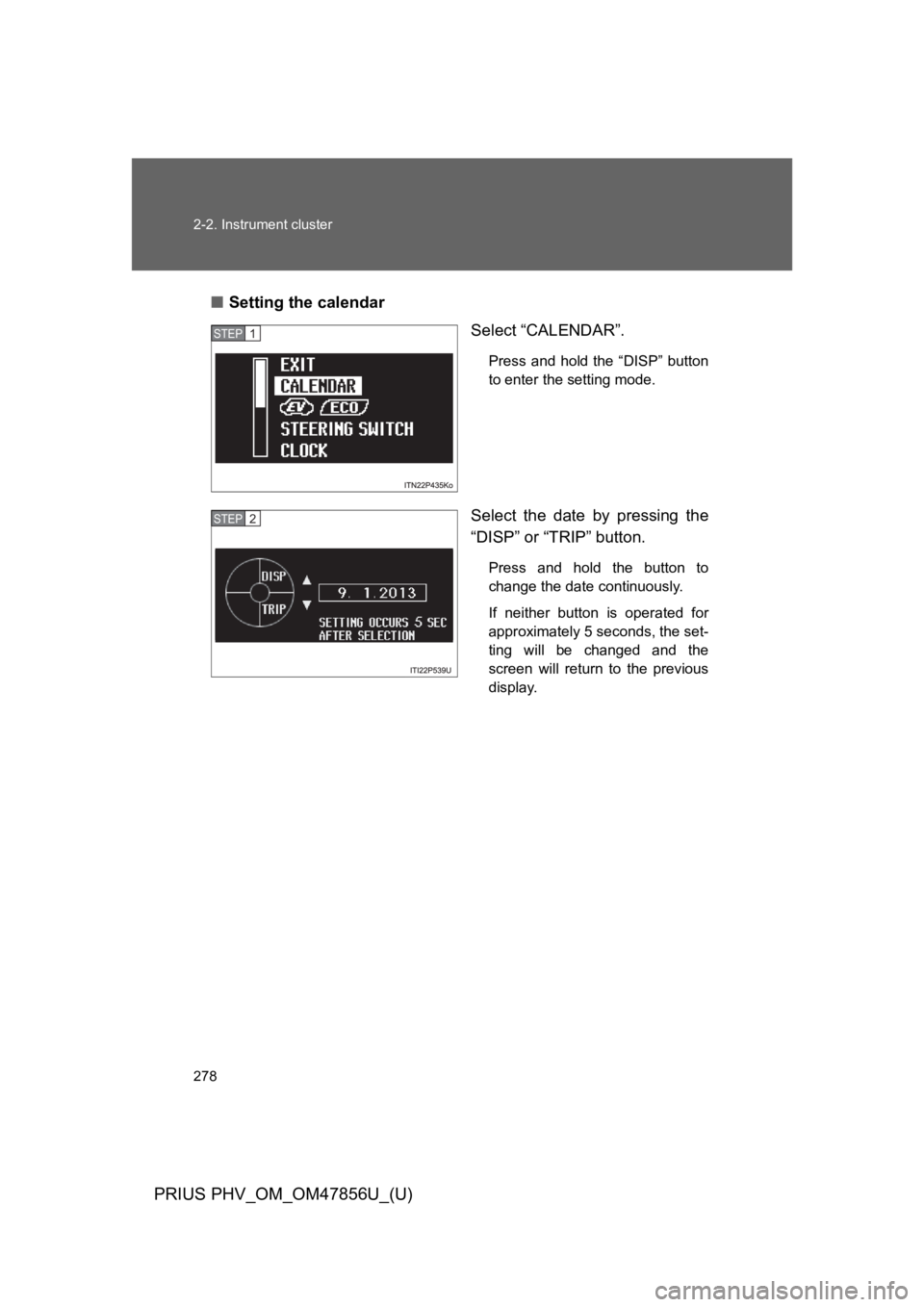
■Setting the calendar
Select “CALENDAR”.
Press and hold the “DISP” button
to enter the setting mode.
Select the date by pressing the
“DISP” or “TRIP” button.
Press and hold the button to
change the date continuously.
If neither button is operated for
approximately 5 seconds, the set-
ting will be changed and the
screen will return to the previous
display.
STEP 1
STEP 2
Page 321 of 724
279
2-2. Instrument cluster
PRIUS PHV_OM_OM47856U_(U)
2
When driving
■Switching the EV indicator and Eco Driving Indicator Light
activated or deactivated
Select “EV/ECO”.
Press and hold the “DISP” button
to enter the setting mode.
Select “ON” or “OFF”.
Press and hold the “DISP” button
to finish setting.
STEP 1
STEP 2