Page 58 of 724
13
PRIUS PHV_OM_OM47856U_(U)
C
Console box P. 389
*:Refer to “DISPLAY AUDIO SYSTEM OWNER’S MANUAL” or “NAVIGATION SYSTEM OWNER’S MANUAL”.
Cup holders P. 390
AUX port/USB port* P. 383
Power outlet P. 397
Page 60 of 724
15
PRIUS PHV_OM_OM47856U_(U)
Pictorial indexInstrument panel
Headlight switch
Turn signal lever
Fog light switch∗
P. 294
P. 256
P. 300
Pre-collision braking off switch∗ P. 338
Parking brake pedal P. 257
Tire pressure warning reset switch P. 481
Windshield wipers and
washer switch
Rear window wiper and
washer switch∗
P. 302
P. 306
Gauges and meters
Multi-information display
P. 259
P. 268
Audio system*2 P. 378
Navigation system*1
SRS driver airbag
Horn
P. 187
P. 258
SRS knee airbag P. 187
Tilt and telescopic steering control lever P. 169
∗:If equipped
*1:Refer to “NAVIGATION SYSTEM OWNER’S MANUAL”.
*2:Refer to “DISPLAY AUDIO SYSTEM OWNER’S MANUAL”.
Page 62 of 724
17
PRIUS PHV_OM_OM47856U_(U)
B
Telephone switches*1, 2
“DISP” button P. 269Audio remote
control switches*1, 2
Cruise control switch∗
Dynamic radar cruise control
switch∗
P. 310
P. 314
Vehicle-to-vehicle distance button∗ P. 314
Talk switch*1, 2
“TRIP” button P. 269, 275
Climate remote control switches P. 371
∗:If equipped
*1:Refer to “NAVIGATION SYSTEM OWNER’S MANUAL”.
*2:Refer to “DISPLAY AUDIO SYSTEM OWNER’S MANUAL”.
Page 95 of 724
52
1-1. Plug-in hybrid system
PRIUS PHV_OM_OM47856U_(U)
Energy monitor/consumption screen
Energy monitor
Displays the flow of energy as it changes in accordance with driving
conditions.
Display Audio system
Press “CAR”.
If the “Consumption” screen is
displayed, touch “Energy”.
Yo u c a n v i e w t h e s ta t u s o f y o u r h ybrid system on the Display Audio
system screen, the navigation system screen or the multi-informa-
tion display.
Display Audio system
screen or navigation system
screen
Multi-information display
Page 104 of 724
61
1-1. Plug-in hybrid system
1
Before driving
PRIUS PHV_OM_OM47856U_(U)
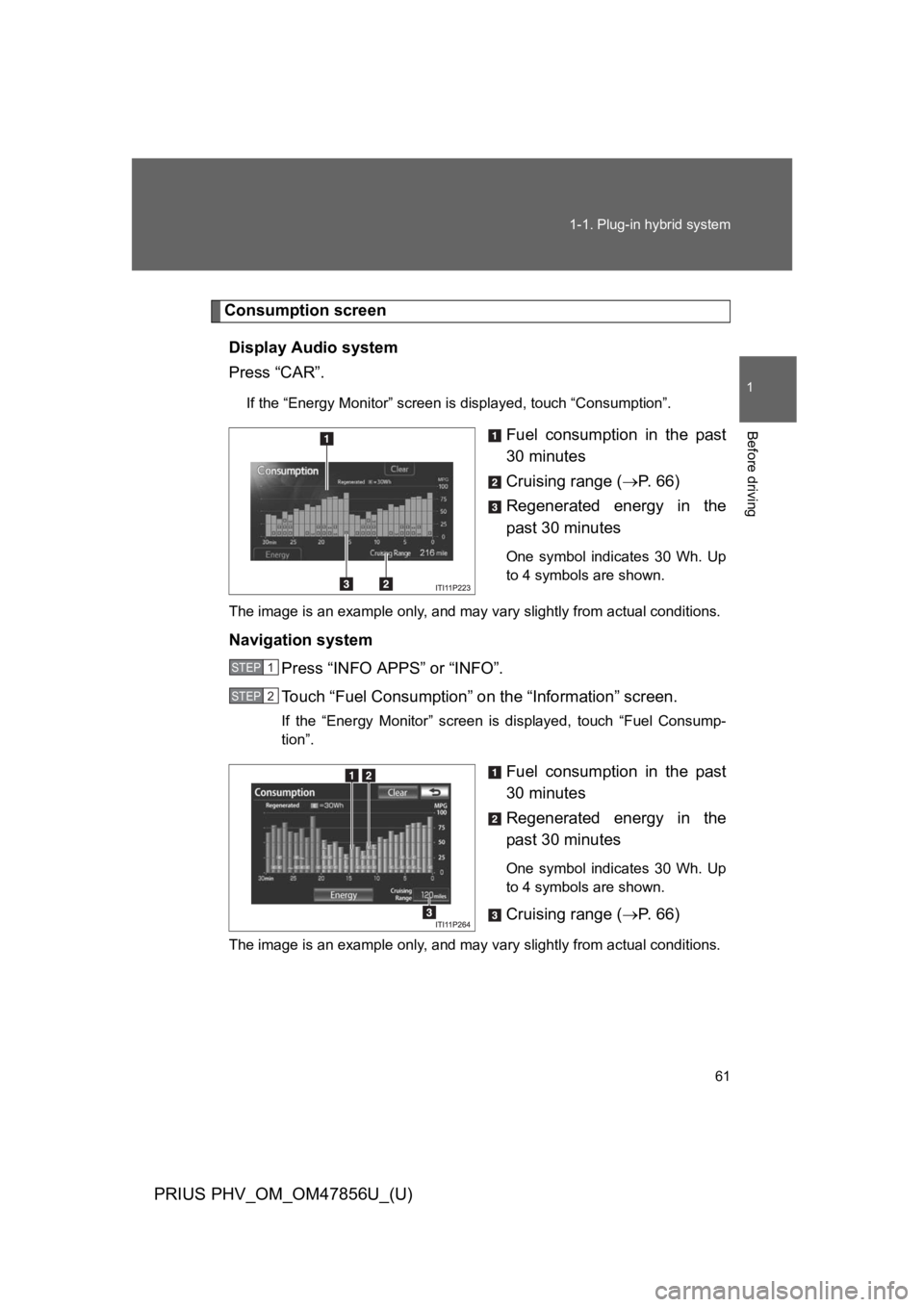
Consumption screen
Display Audio system
Press “CAR”.
If the “Energy Monitor” screen is displayed, touch “Consumption”.
Fuel consumption in the past
30 minutes
Cruising range (→P. 6 6 )
Regenerated energy in the
past 30 minutes
One symbol indicates 30 Wh. Up
to 4 symbols are shown.
The image is an example only, and may vary slightly from actual conditions.
Navigation system
Press “INFO APPS” or “INFO”.
To u c h “ F u e l C o n s u m p t i o n ” o n the “Information” screen.
If the “Energy Monitor” screen is displayed, touch “Fuel Consump-
tion”.
Fuel consumption in the past
30 minutes
Regenerated energy in the
past 30 minutes
One symbol indicates 30 Wh. Up
to 4 symbols are shown.
Cruising range (→P. 6 6 )
The image is an example only, and may vary slightly from actual conditions.
STEP 1
STEP 2
Page 108 of 724

65
1-1. Plug-in hybrid system
1
Before driving
PRIUS PHV_OM_OM47856U_(U)
■Remaining hybrid battery (traction battery) charge display
The remaining charge display of the hybrid battery (traction battery) icon on
the multi-information display switches in accordance with the remaining
charge. (→P. 6 0 )
■Resetting the consumption data
Display Audio system
Selecting “Clear” on the “Consumption” screen will reset the fuel consump-
tion and the regenerated energy for the past 30 minutes.
Selecting “Yes” on the following screen will confirm resetting of all the data.
Navigation system
Selecting “Clear” on the “Consumption” screen will reset the fuel consump-
tion and the regenerated energy for the past 30 minutes.
Selecting “Yes” on the following screen will confirm resetting of all the data.
Multi-information display
If the “POWER” switch is turned OFF, average fuel consumption and regen-
erated energy data will be reset.
■EV driving range display
●When in EV mode or when necessary charge is remaining for EV mode,
the estimated EV driving range can also be confirmed using the Hybrid
System Indicator. (→P. 2 7 0 )
●The distance displayed is computed based on electricity consumption.
As a result, the actual distance that can be driven may differ from that
displayed.
■Resetting the monthly fuel consumption
Press and hold the “TRIP” button while the monthly fuel consumption is dis-
played.
A confirmation message will be displayed.
Press and hold the “TRIP” button to reset the data.
Press the “DISP” button to cancel the reset operation. The screen will return
to the previous display if no buttons are pressed for approximately 10 sec-
onds.
Page 154 of 724

111
1-3. Key information
1
Before driving
PRIUS PHV_OM_OM47856U_(U)
NOTICE
■To p r e v e n t k e y d a m a g e
Observe the following:
●Do not drop the keys, subject them to strong shocks or bend them.
●Do not expose the keys to high temperatures for long periods of time.
●Do not get the keys wet or wash them in an ultrasonic washer etc.
●Do not attach metallic or magnetic materials to the keys or place the keys
close to such materials.
●Do not disassemble the keys.
●Do not attach a sticker or anything else to the surface of the electronic key.
●Do not place the keys near objects that produce magnetic fields, such as
TVs, audio systems and induction cookers, or medical electrical equip-
ment, such as low-frequency therapy equipment.
■Carrying the electronic key on your person
Carry the electronic key 3.9 in. (10 cm) or more away from electric appli-
ances that are turned on. Radio waves emitted from electric appliances
within 3.9 in. (10 cm) of the electronic key may interfere with the key, causing
the key to not function properly.
■In case of a smart key system malfunction or other key-related prob-
lems
Ta k e y o u r v e h i c l e w i t h a l l t h e e l e c t r o n i c k e y s p r o v i d e d w i t h y o u r v e h i c l e t o
your Toyota dealer.
■When a vehicle key is lost
If the key remains lost, the risk of vehicle theft increases significantly. Visit
your Toyota dealer immediately with all remaining electronic keys that was
provided with your vehicle.
Page 166 of 724

123
1-4. Opening, closing and locking the doors
1
Before driving
PRIUS PHV_OM_OM47856U_(U)
■Conditions affecting operation
The smart key system, wireless remote control and immobilizer system use
weak radio waves. In the following situations, the communication between
the electronic key and the vehicle may be affected, preventing the smart key
system, wireless remote control and immobilizer system from operating
properly. (Ways of coping: →P. 5 9 4 )
●When the electronic key battery is depleted
●Near a TV tower, electric power plant, gas station, radio station, large dis-
play, airport or other facility that generates strong radio waves or electri-
cal noise
●When carrying a portable radio, cellular phone, cordless phone or other
wireless communication devices
●When the electronic key is in contact with, or is covered by the following
metallic objects
•Cards to which aluminum foil is attached
•Cigarette boxes that have aluminum foil inside
•Metallic wallets or bags
•Coins
•Hand warmers made of metal
•Media such as CDs and DVDs
●When other wireless key (that emit radio waves) is being used nearby
●When carrying the electronic key together with the following devices that
emit radio waves
•Another vehicle’s electronic key or a wireless key that emits radio
waves
•Personal computers or personal digital assistants (PDAs)
•Digital audio players
•Portable game systems
●If window tint with a metallic content or metallic objects are attached to
the rear window