Page 232 of 640
232 2-2. Instrument cluster
PRIUS_OM_OM47857U_DVD_(U)
ClockThe clock can be adjusted by pressing the buttons. Adjusts the hours.
Adjusts the minutes.
Rounds to the nearest hour.
*
*
: e.g. 1:00 to 1:29 1:00
1:30 to 1:59 2:00
Setting up the displays
Press the “DISP” button until the
“SETTINGS” screen appears.
Calendar will be displayed.
While the vehicle is stopped, press and hold the “DISP” button
until the screen changes.
The selected item will change each time the “DISP” button is
pressed.
STEP 1
STEP 2
Page 233 of 640
233
2-2. Instrument cluster
PRIUS_OM_OM47857U_DVD_(U)
2
When driving
■
Setting the gasoline price
Select “GASOLINE PRICE”.
Press and hold the “DISP” button
to enter the setting mode.
Select gasoline price by pressing
the “DISP” or “TRIP” button.
Press and hold the button to
change the amount continuously.
If neither button is operated for
approximately 5 seconds, the set-
ting will be changed and the
screen will return to the previous
display.
STEP 1
STEP 2
Page 234 of 640
234 2-2. Instrument cluster
PRIUS_OM_OM47857U_DVD_(U)
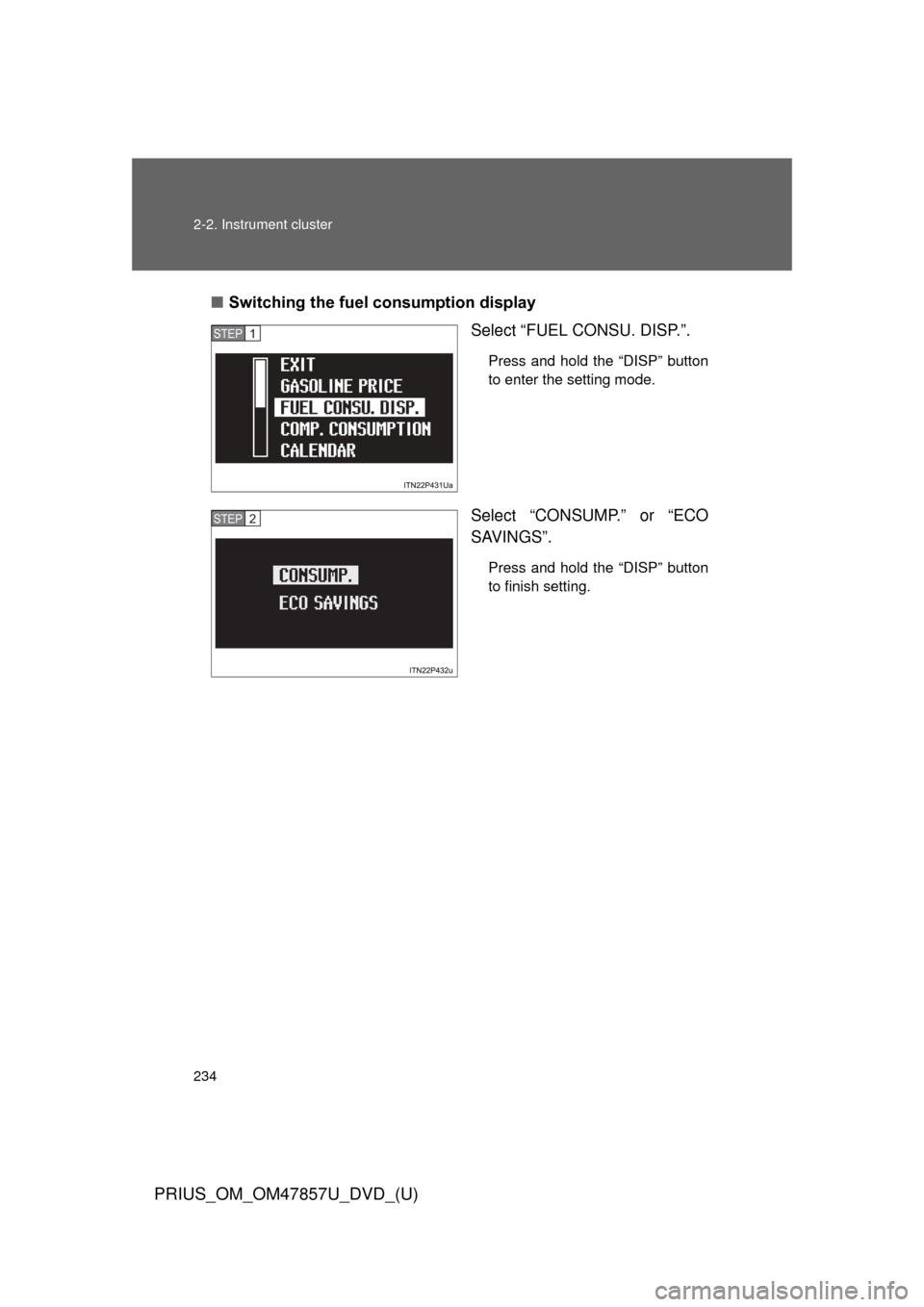
■Switching the fuel consumption display
Select “FUEL CONSU. DISP.”.
Press and hold the “DISP” button
to enter the setting mode.
Select “CONSUMP.” or “ECO
SAVINGS”.
Press and hold the “DISP” button
to finish setting.
STEP 1
STEP 2
Page 235 of 640
235
2-2. Instrument cluster
PRIUS_OM_OM47857U_DVD_(U)
2
When driving
■
Setting the comparison consumption
Select “COMP. CONSUMP-
TION”.
Press and hold the “DISP” button
to enter the setting mode.
Select the comparison consump-
tion by pressing the “DISP” or
“TRIP” button.
Press and hold the button to
change the amount continuously.
If neither button is operated for
approximately 5 seconds, the set-
ting will be changed and the
screen will return to the previous
display.
STEP 1
STEP 2
Page 236 of 640
236 2-2. Instrument cluster
PRIUS_OM_OM47857U_DVD_(U)
■Setting the calendar
Select “CALENDAR”.
Press and hold the “DISP” button
to enter the setting mode.
Select the date by pressing the
“DISP” or “TRIP” button.
Press and hold the button to
change the date continuously.
If neither button is operated for
approximately 5 seconds, the set-
ting will be changed and the
screen will return to the previous
display.
STEP 1
STEP 2
Page 238 of 640
238 2-2. Instrument cluster
PRIUS_OM_OM47857U_DVD_(U)
■Switching the steering switch operation display on/off (if
equipped)
Select “STEERING SWITCH”.
Press and hold the “DISP” button
to enter the setting mode.
Select “ON” or “OFF”.
Press and hold the “DISP” button
to finish setting.
STEP 1
STEP 2
Page 239 of 640
239
2-2. Instrument cluster
PRIUS_OM_OM47857U_DVD_(U)
2
When driving
■
Selecting 12h/24h clock display
Select “CLOCK”.
Press and hold the “DISP” button
to enter the setting mode.
Select “12h” or “24h”.
Press and hold the “DISP” button
to finish setting.
STEP 1
STEP 2
Page 241 of 640
241
2-2. Instrument cluster
PRIUS_OM_OM47857U_DVD_(U)
2
When driving
■
Turning off the multi-information display
Select “SCREEN OFF”.
Press and hold the “DISP” button
to enter the setting mode.
Select “OFF”.
Press and hold the “DISP” button
to turn off the multi-information
display.
To re-display the multi-information
display, press the “DISP” button
to display the “SETTINGS”
screen and follow the same pro-
cedure, selecting “ON” instead of
“OFF”.
■Returning to the previous screen
Select “EXIT” and press and
hold the “DISP” button.
The screen will revert to the
“SETTINGS” screen.
STEP 1
STEP 2