Page 13 of 19
OVERVIEW
FEATURES/OPERATIONS
SAFETY AND EMERGENCY FEATURES
23
22
Crawl control
Crawl control allows travel on extremely rough off-road surfaces at a fixed low
speed without pressing the accelerator or brake pedal.
Refer to the Owner’s Manual for more details.
Speed selection switch
LoHi
Med
PushLo-MedMed-Hi
Speed modes
Cruise control (if equipped)
1 The set speed may also be cancelled by depressing the brake pedal.2 The set speed may be resumed once vehicle speed exceeds 25 mph.
Turning system ON/OFF
Functions
System ON/OFF
RES
SET
CANCEL
Increase speed
Decrease speed
Cancel1
Resume2
Set
Seat heaters and ventilators
Front seats
Push knob to pop the controller out. Turn
clockwise for heater; counterclockwise
for airflow.
Push
Second seats
AUTO
TEMP
OFF TEMP
HI
LO
OFF
HI
LO
OFF
HI
LO
OFF
HI
LOLeft
second seatRight
second seat
OFF
Blows air from the seat
Turns the seat heater on
FEATURES/OPERATIONS
Page 15 of 19
OVERVIEW
FEATURES/OPERATIONS
SAFETY AND EMERGENCY FEATURES
27
26
FEATURES/OPERATIONS
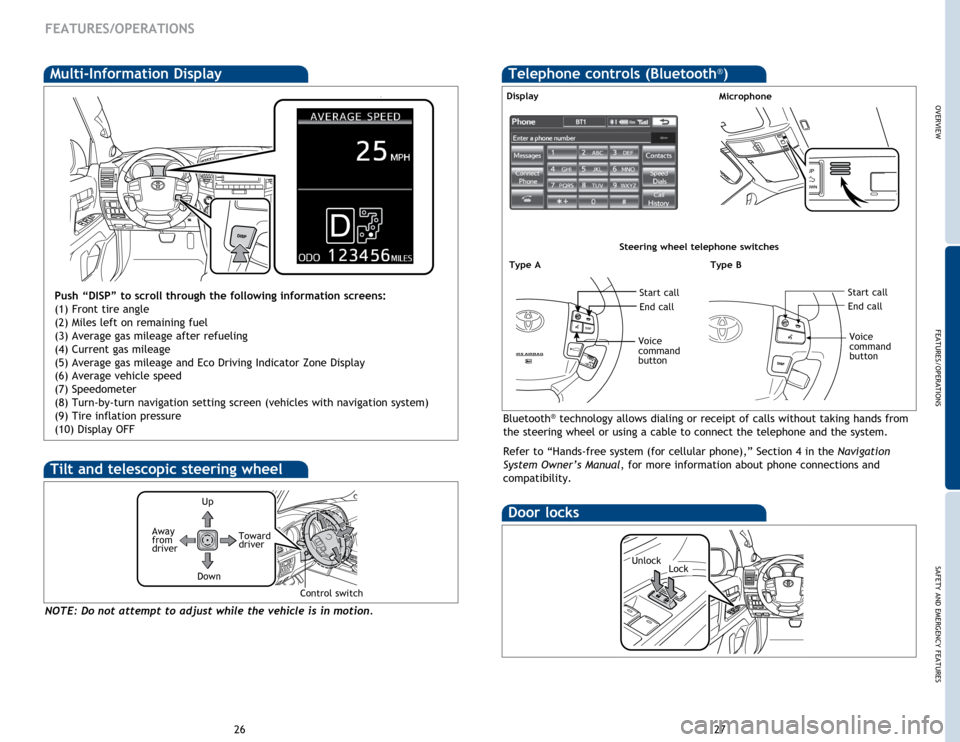
Multi-Information Display
Push “DISP” to scroll through the following information screens:
(1) Front tire angle
(2) Miles left on remaining fuel
(3) Average gas mileage after refueling
(4) Current gas mileage
(5) Average gas mileage and Eco Driving Indicator Zone Display
(6) Average vehicle speed
(7) Speedometer
(8) Turn-by-turn navigation setting screen (vehicles with navigation system)
(9) Tire inflation pressure
(10) Display OFF
Bluetooth® technology allows dialing or receipt of calls without taking hands from
the steering wheel or using a cable to connect the telephone and the system.
Refer to “Hands-free system (for cellular phone),” Section 4 in the Navigation
System Owner’s Manual , for more information about phone connections and
compatibility.
MicrophoneDisplay
Type BType A
Steering wheel telephone switches
Start callStart call
End callEnd call
Voice
command
button
Voice
command
button
Door locks
LockUnlock
Telephone controls (Bluetooth®)
Up
Toward
driver
Down
NOTE: Do not attempt to adjust while the vehicle is in motion.
Tilt and telescopic steering wheel
Away
from
driver
Control switch
Page 17 of 19

31
30
OVERVIEW
FEATURES/OPERATIONS
SAFETY AND EMERGENCY FEATURES
SAFETY AND EMERGENCY FEATURES
If belt is fully extended, then retracted even slightly, it cannot be re-extended
beyond that point, unless fully retracted again. This feature is used to help hold
child restraint systems securely.
To find more information about seat belts, and how to install a child restraint
system, refer to the Owner’s Manual.
Keep as low on
hips as possible
Take up slack
Too high
Seat belts
Push up, or squeeze
lock release to lower
System reset initialization
1. Push and hold “
SET” button
until the
indicator blinks three times.
2. Wait a few minutes to allow
initialization to complete.
Seat belts-Shoulder belt anchor
After adjusting tire pressures, or after tires have been rotated or replaced, turn
the “ENGINE START STOP” switch to ON and press and hold the “
SET” button
until indicator blinks three times. Let the vehicle sit for a few minutes to allow
initialization to complete.
Refer to the load label on the door jamb or the Owner’s Manual for tire inflation
specifications.
If the tire pressure indicator flashes for more than 60 seconds and then remains on,
take the vehicle to your local Toyota dealer.
NOTE: The warning light may come on due to temperature changes or changes
in tire pressure from natural air leakage. If the system has not been initialized
recently, setting the tire pressures to factory specifications should turn off the light.
Tire Pressure Monitoring (warning)
System
Spare tire & tools
Tool location
Removing the spare tire
(1) Remove the cover.
(2) Insert the jack handle extension into the lowering screw.
(3) Lower the spare tire completely to the ground.
Refer to the Owner’s Manual for tire changing and jack positioning procedures.
Spare tire
Moving the lever to the lock position will allow the door to be opened only from
the outside
Rear door
Jack Tool box
Doors-Child safety locks
(1)(2)(3)
Page 18 of 19

33
32
OVERVIEW
FEATURES/OPERATIONS
SAFETY AND EMERGENCY FEATURES
There are two types of Toyota floor mats: carpeted and all-weather. Each vehicle
has model-specific floor mats. Installation is easy.
For safety, follow these steps:
• Only use floor mats designed for your specific model.
• Use only one floor mat at a time, using the retaining hooks to keep the mat in
place.
• Install floor mats right side up.
Floor mat installation
Smart Stop Technology automatically reduces engine power when the accelerator
and brake pedals are pressed simultaneously under certain conditions.
SST engages when the accelerator is depressed first and the brakes are applied
firmly for longer than one-half second at speeds greater than five miles per hour.
SST doesn’t engage if the brake pedal is depressed before the accelerator pedal,
allowing vehicles to start on a steep hill and safely accelerate without rolling
backward.
Smart Stop Technology (SST)
SAFETY AND EMERGENCY FEATURES
Star Safety SystemTM
VSC helps prevent loss of traction during cornering by reducing engine power and
applying brake force to selected wheels.
Toyota’s VSC monitors steering angle and the direction your vehicle is traveling.
When it senses that the front or rear wheels begin to lose traction, VSC reduces
engine power and applies braking to selected wheels. This helps restore traction
and vehicle control.
Vehicle Stability Control (VSC)
Multi Terrain Anti-lock Brake System (ABS)
Brake Assist (BA)
Helps to prevent wheel lock when the brakes are applied suddenly, or if the brakes
are applied while driving on a slippery road surface, or in off-road conditions (such
as rough roads, sand and mud).
Brake Assist is designed to detect sudden or “panic” braking, and then add braking
pressure to decrease the vehicle’s stopping distance. When there’s only a split
second to react, Brake Assist can add additional brake pressure more quickly than
just the driver alone can. Helps to maintain drive power and prevent the 4 wheels from spinning when
starting the vehicle or accelerating on slippery roads.
Active Traction Control (A-TRAC)
Electronic Brake Force Distribution (EBD)
Toyota’s ABS technology has Electronic Brake-force Distribution (EBD) to help
maintain stability and balance when braking. Abrupt stops cause the vehicle to tilt
forward, reducing the braking power of the rear wheels. EBD responds to sudden
stops by redistributing brake force to maximize the braking effectiveness of all
four wheels. All new Toyota vehicles come standard with the Star Safety System
TM, which
combines Vehicle Stability Control (VSC), Traction Control (TRAC), Anti-lock
Braking System (ABS), Electronic Brake-force Distribution (EBD), Brake Assist (BA)
and Smart Stop Technology (SST).
