Page 57 of 724
57
1
Before driving
LC200_OM_OM60L09U_(U)
1-3. Adjustable components (seats, mirrors, steering wheel)
Front seats
Active head restraint
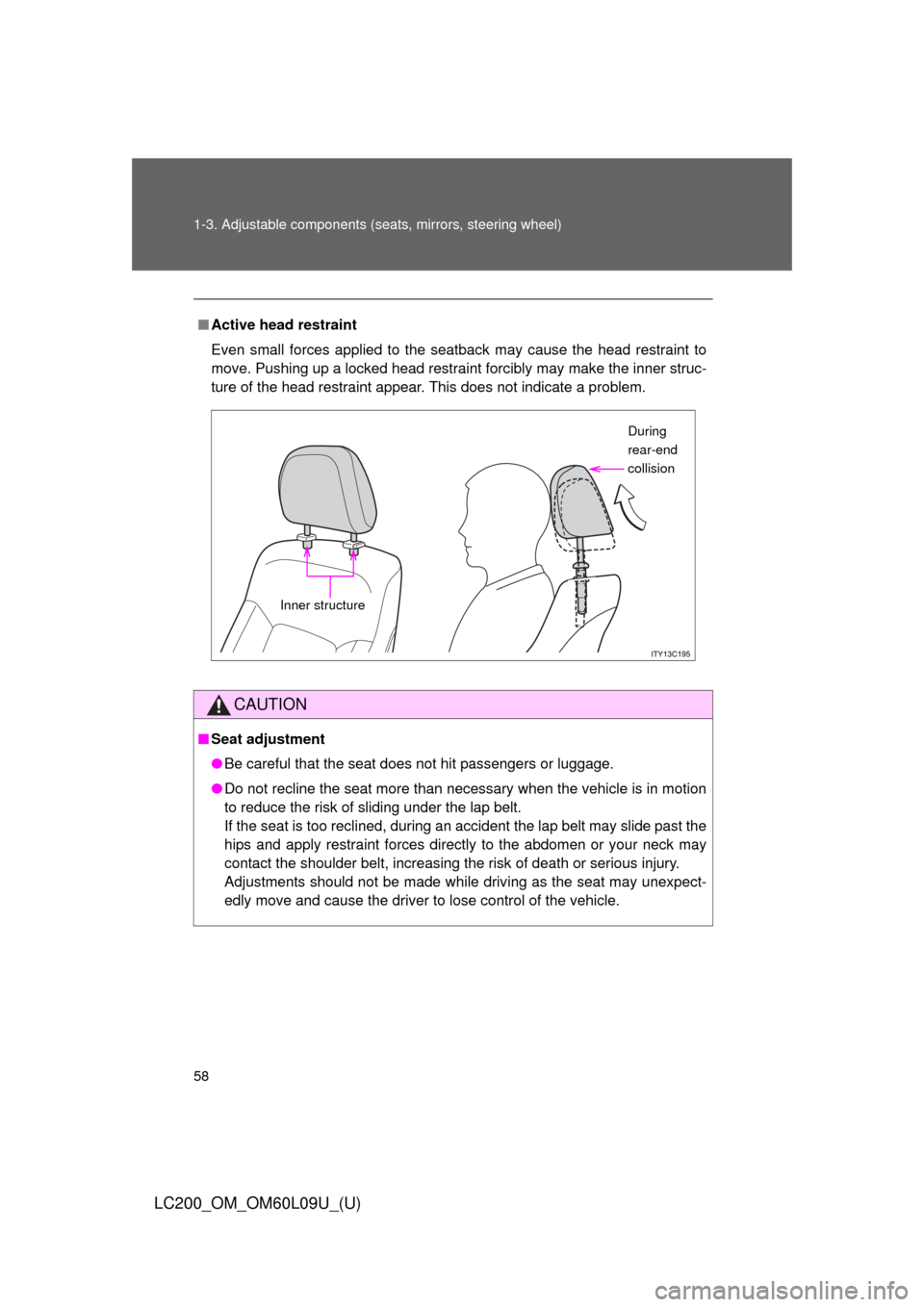
When the occupant’s lower back
presses against the seatback
during a rear-end collision, the
head restraint moves slightly for-
ward and upward to help reduce
the risk of whiplash on the seat
occupant.
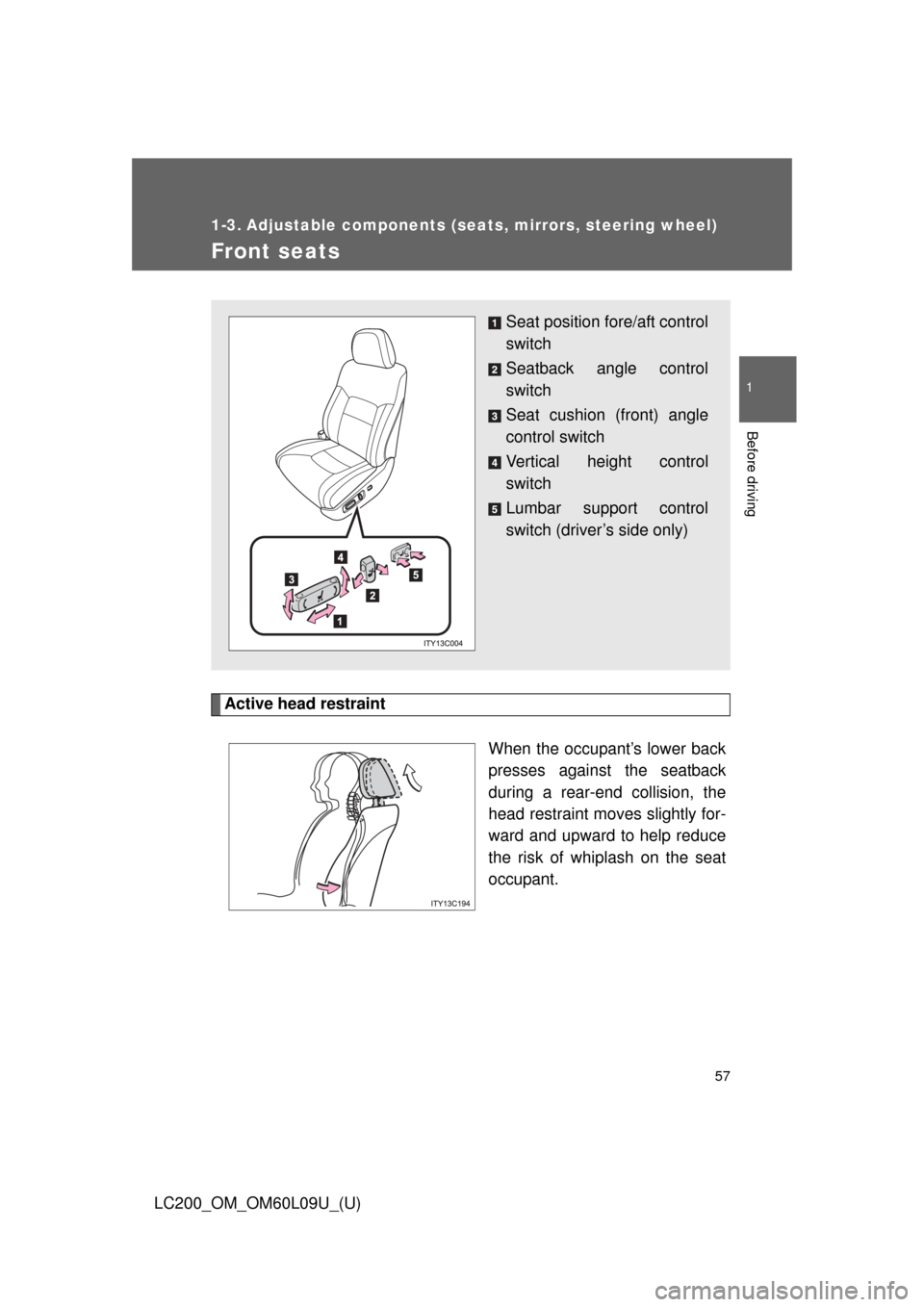
Seat position fore/aft control
switch
Seatback angle control
switch
Seat cushion (front) angle
control switch
Vertical height control
switch
Lumbar support control
switch (driver’s side only)
Page 58 of 724
58 1-3. Adjustable components (seats, mirrors, steering wheel)
LC200_OM_OM60L09U_(U)
■Active head restraint
Even small forces applied to the seatback may cause the head restraint to
move. Pushing up a locked head restraint forcibly may make the inner struc-
ture of the head restraint appear. This does not indicate a problem.
CAUTION
■Seat adjustment
●Be careful that the seat does not hit passengers or luggage.
● Do not recline the seat more than necessary when the vehicle is in motion
to reduce the risk of sliding under the lap belt.
If the seat is too reclined, during an accident the lap belt may slide past the
hips and apply restraint forces directly to the abdomen or your neck may
contact the shoulder belt, increasing the risk of death or serious injury.
Adjustments should not be made while driving as the seat may unexpect-
edly move and cause the driver to lose control of the vehicle.
During
rear-end
collision
Inner structure
Page 242 of 724

242 2-4. Using other driving systems
LC200_OM_OM60L09U_(U)
■The four-wheel drive control switch can be operated when
●The “ENGINE START STOP” switch is in IGNITION ON mode.
● The shift lever is in the “N” position.
● The vehicle is stopped completely.
■ The low speed four-wheel drive indicator light
The indicator light blinks while shifting between “H4” and “L4”.
■ Advice for driving on slippery roads
●If you shift the four-wheel drive control switch to “L4” and the shift lever to
the “2” range of “S” while driving in steep off-road areas, the output of the
brake can be controlled effectively by the Active TRAC, which assists the
driver to control the driving power of 4 wheels.
● Use the “1” range of “S” of the shift lever for maximum power and traction
when your wheels get stuck or when driving down a steep incline.
■ The center differential lock indicator light
The indicator light blinks while locking/unlocking the center differential.
■ The center differential lock/unlock switch can be operated when
●The “ENGINE START STOP” switch is in IGNITION ON mode.
● The vehicle speed is less than 60 mph (100 km/h).
■ Locking/unlocking the center differential
● When the four-wheel drive control switch is in L4 with the center differen-
tial locked, VSC is automatically turned off. (The center differential lock
and VSC OFF indicator lights come on.)
● If the operation is not completed, the center differential lock indicator
blinks. If the indicator light does not turn off when unlocking the center
differential, drive straight ahead while accelerating or decelerating, or
drive in reverse.
● If the center differential lock/unlock is not completed within 5 seconds
while the cruise control system is on, cancel the cruise control system.
Page 253 of 724
253
2-4. Using other
driving systems
2
When driving
LC200_OM_OM60L09U_(U)
■Multi-terrain Select c ontrol starting conditions
When all of the following conditi ons are satisfied, the Multi-ter-
rain Select indicator will come on, the mode select screen will be
displayed on the multi-information display, and Multi-terrain
Select control will begin.
● The four-wheel drive control switch is in “L4”.
● Both Active TRAC and VSC are not off.
● Crawl Control is off.
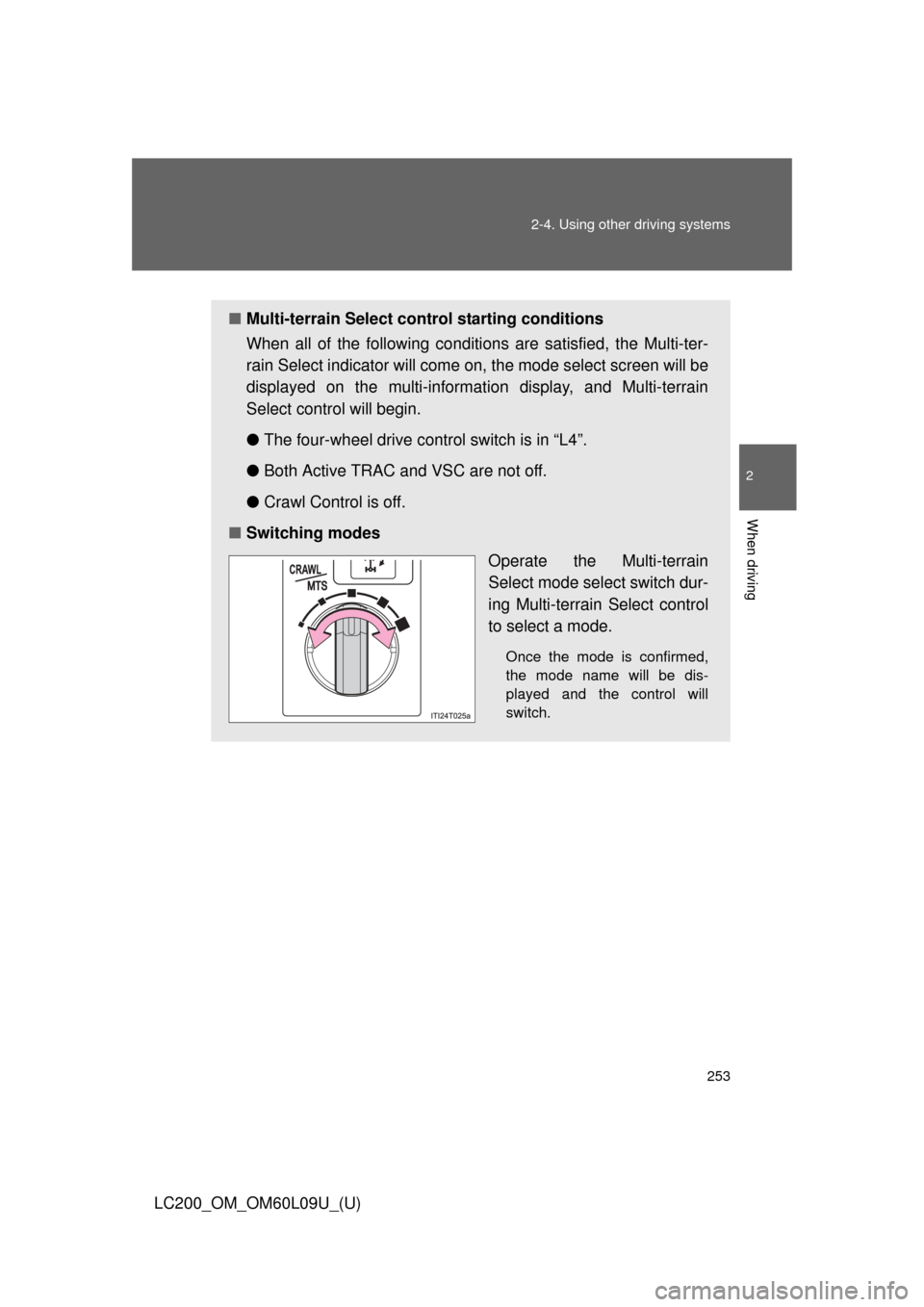
■ Switching modes
Operate the Multi-terrain
Select mode select switch dur-
ing Multi-terrain Select control
to select a mode.
Once the mode is confirmed,
the mode name will be dis-
played and the control will
switch.
Page 255 of 724

■Automatic system cancelation
In the following situations, the Multi-terrain Select indicator will go \
off, and
Multi-terr")
255
2-4. Using other
driving systems
2
When driving
LC200_OM_OM60L09U_(U)
■Automatic system cancelation
In the following situations, the Multi-terrain Select indicator will go \
off, and
Multi-terrain Select will be canceled automatically.
●When the four-wheel drive control switch is in “H4”.
● When Active TRAC and VSC are off.
● When Crawl Control is on.
■ When it is difficult to generate traction
MUD & SAND mode provides the largest amount of tire slippage, followed
by LOOSE ROCK, MOGUL, ROCK & DIRT and ROCK mode.
Drivability can be improved by selecting a mode which provides a smaller
amount of tire slippage than the current mode when the amount of tire slip-
page is large, or conversely selecting a mode which provides a larger
amount of tire slippage than the current mode when the amount of tire slip-
page is small.
■ When the vehicle is stuck
Switching the transfer and differential
For the operation of the following functions, refer to the following pages.
●Four-wheel drive system ( P. 240)
● Center differential lock ( P. 240)
■ When the brake system operates continuously
The brake system may overheat. In this case, a buzzer will sound, either the
“TRAC OFF” will be displayed on the multi-information display, and Multi-ter-
rain Select will be temporarily inoper able. In this event, stop the vehicle
immediately in a safe place, and allow the brake system to cool down suffi-
ciently. (There is no problem with continuing normal driving.)
After a short time, the message on the multi-information display will go off,
and you will be able to use Multi-terrain Select.
■ When there is a malfunction in the system
The slip indicator light will come on. Have the vehicle inspected by your
Toyota dealer immediately.
Page 281 of 724
281
2-4. Using other driving systems
2
When driving
LC200_OM_OM60L09U_(U)
Driving assist systems
To help enhance driving safety and performance, the following sys-
tems operate automatically in res ponse to various driving situations.
Be aware, however, that these systems are supplementary and
should not be relied upon too heavi ly when operating the vehicle.
■Multi Terrain ABS (Anti-lock Brake System)
Helps to prevent wheel lock when the brakes are applied suddenly, or if
the brakes are applied while driving on a slippery road surface, or in off-
road conditions (such as rough roads, sand and mud).
■ Brake assist
Generates an increased level of braking force after the brake pedal is
depressed, when the system detects a panic stop situation.
■VSC (Vehicle Stability Control)
Helps the driver to control skidding when swerving suddenly or turning
on slippery road surfaces.
■Active TRAC (Traction Control)
Helps to maintain drive power and prevent the 4 wheels from spinning
when starting the vehicle or accelerating on slippery roads.
■Hill-start assist control
Helps to prevent the vehicle from rolling backwards when starting on an
incline or slippery slope.
■KDSS (Kinetic Dynamic Suspension System)
KDSS helps to ensure ride comfort and handling response by using a
hydraulic control system to control the suspension stabilizer bars in
response to road surface and driving conditions during cornering or off-
road driving.
■VGRS (Variable Gear Rati o Steering) (if equipped)
Helps to adjust the wheel turning angle in accordance with the vehicle
speed and steering wheel movement.
■PCS (Pre-Collision System) (if equipped)
P. 289
Page 282 of 724
282 2-4. Using other driving systems
LC200_OM_OM60L09U_(U)
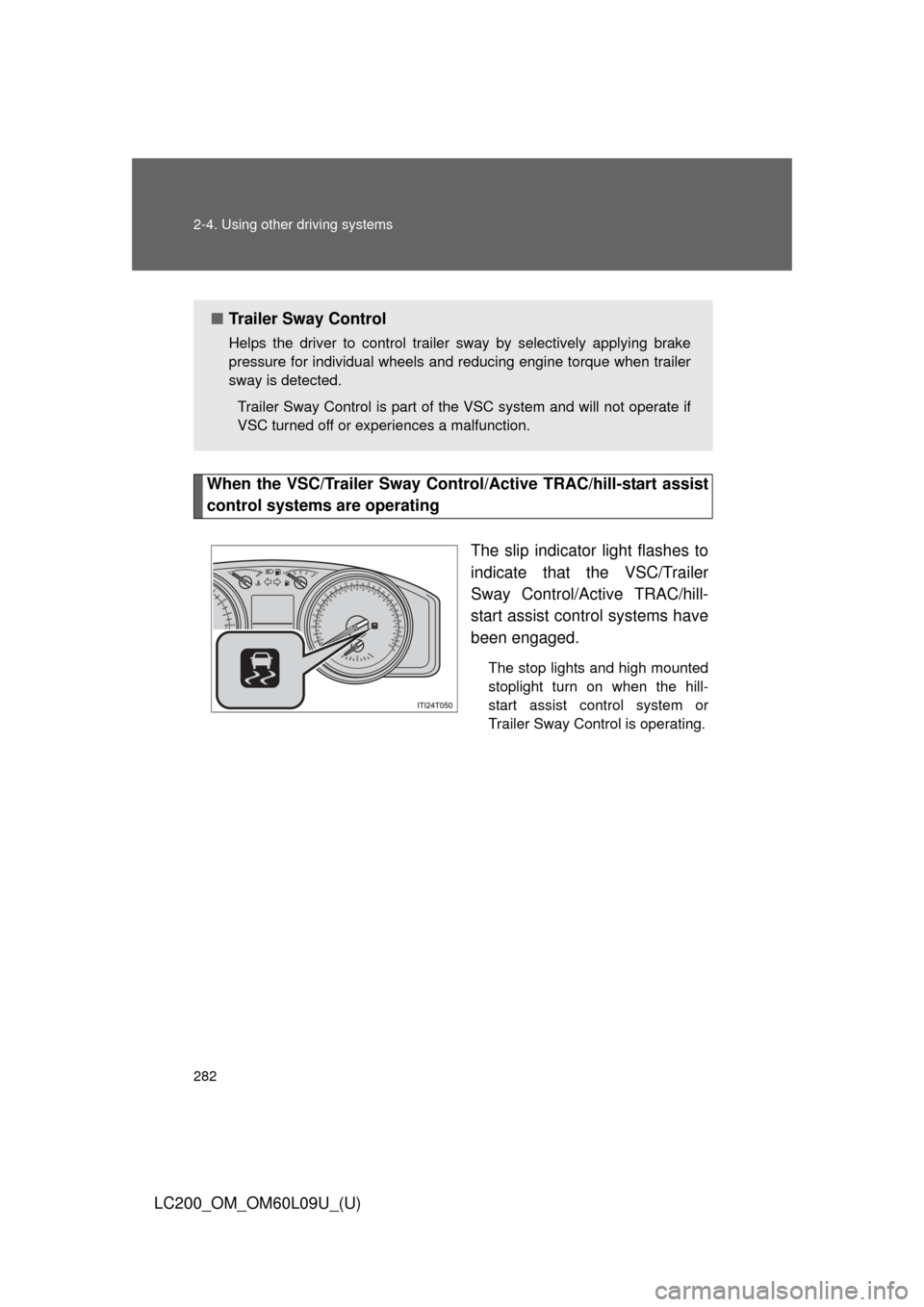
When the VSC/Trailer Sway Control/Active TRAC/hill-start assist
control systems are operating
The slip indicator light flashes to
indicate that the VSC/Trailer
Sway Control/Active TRAC/hill-
start assist control systems have
been engaged.
The stop lights and high mounted
stoplight turn on when the hill-
start assist control system or
Trailer Sway Control is operating.
■Trailer Sway Control
Helps the driver to control trailer sway by selectively applying brake
pressure for individual wheels and reducing engine torque when trailer
sway is detected.
Trailer Sway Control is part of the VSC system and will not operate if
VSC turned off or experiences a malfunction.
Page 283 of 724
283
2-4. Using other
driving systems
2
When driving
LC200_OM_OM60L09U_(U)
To disable Active TRAC and/or VSC and Trailer Sway Control
If the vehicle gets stuck in fresh snow or mud, Active TRAC, VSC and
Trailer Sway Control may reduce power from the engine to the
wheels. You may need to turn the system off to enable you to rock the
vehicle in order to free it.
■ Turning off Active TRAC
Quickly push and release the
button to turn off Active TRAC.
The “TRAC OFF” will be shown
on the multi-information display.
This mode can be used when the
transfer mode is H4.
Push the button again to turn the
system back on.
■Turning off Active TRAC, VS C and Trailer Sway Control
Push and hold the button for
more than 3 seconds while the
vehicle is stopped to turn off
Active TRAC, VSC and Trailer
Sway Control.
The VSC OFF indicator light will
come on and the “TRAC OFF” will
be shown on the multi-information
display.
Push the button again to turn the
system back on.