Page 51 of 724
51
1
1-2. Opening, closing and locking the doors
Before driving
LC200_OM_OM60L09U_(U)
Back door
The back door can be locked/unlocked and opened by the following
procedures.
■Locking and unlocking the back door
Door lock switch
P. 4 6
Entry function
P. 3 2
Wireless remote control
P. 4 4
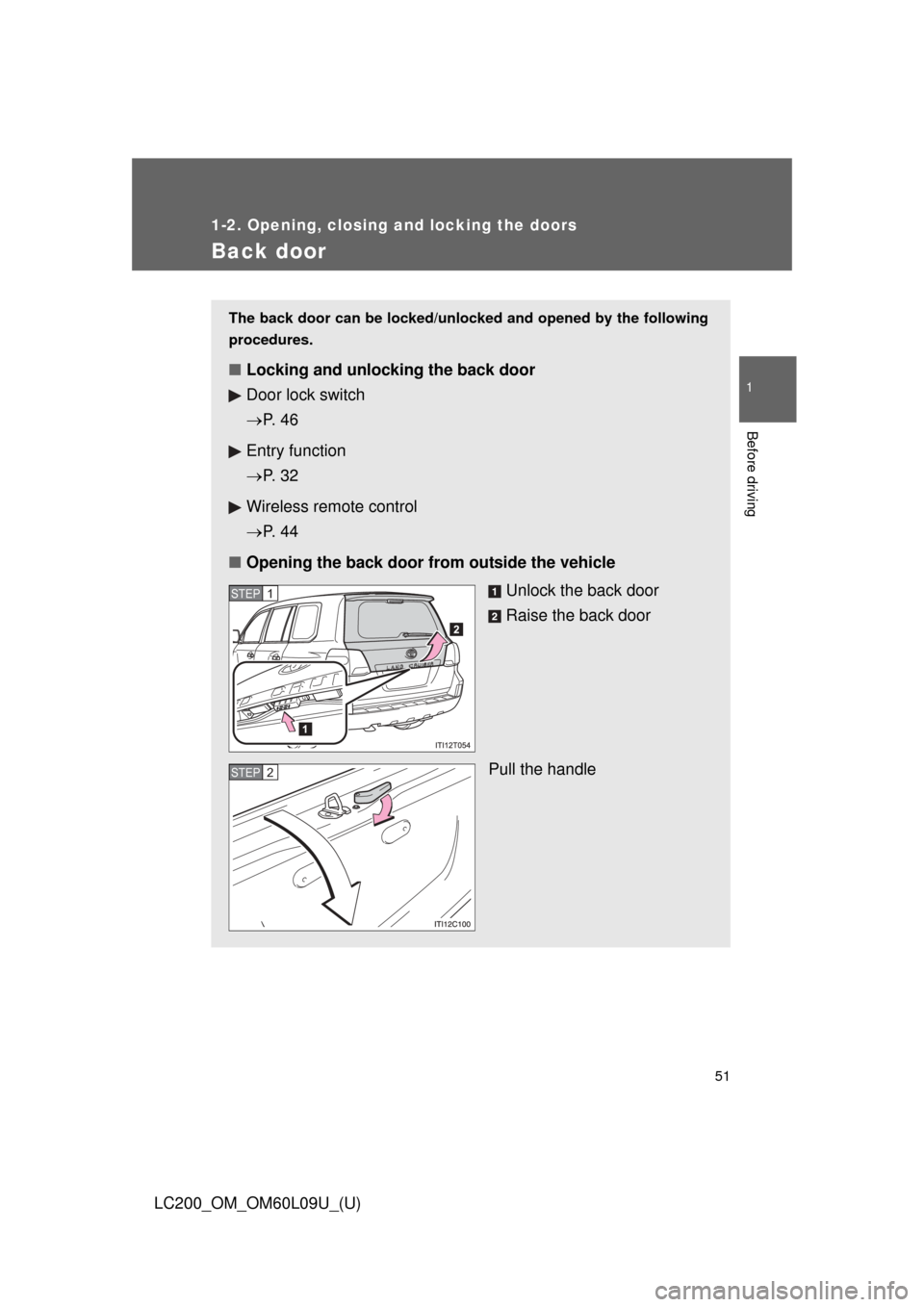
■ Opening the back door from outside the vehicle
Unlock the back door
Raise the back door
Pull the handle
STEP1
STEP2
Page 52 of 724
52 1-2. Opening, closing and locking the doors
LC200_OM_OM60L09U_(U)
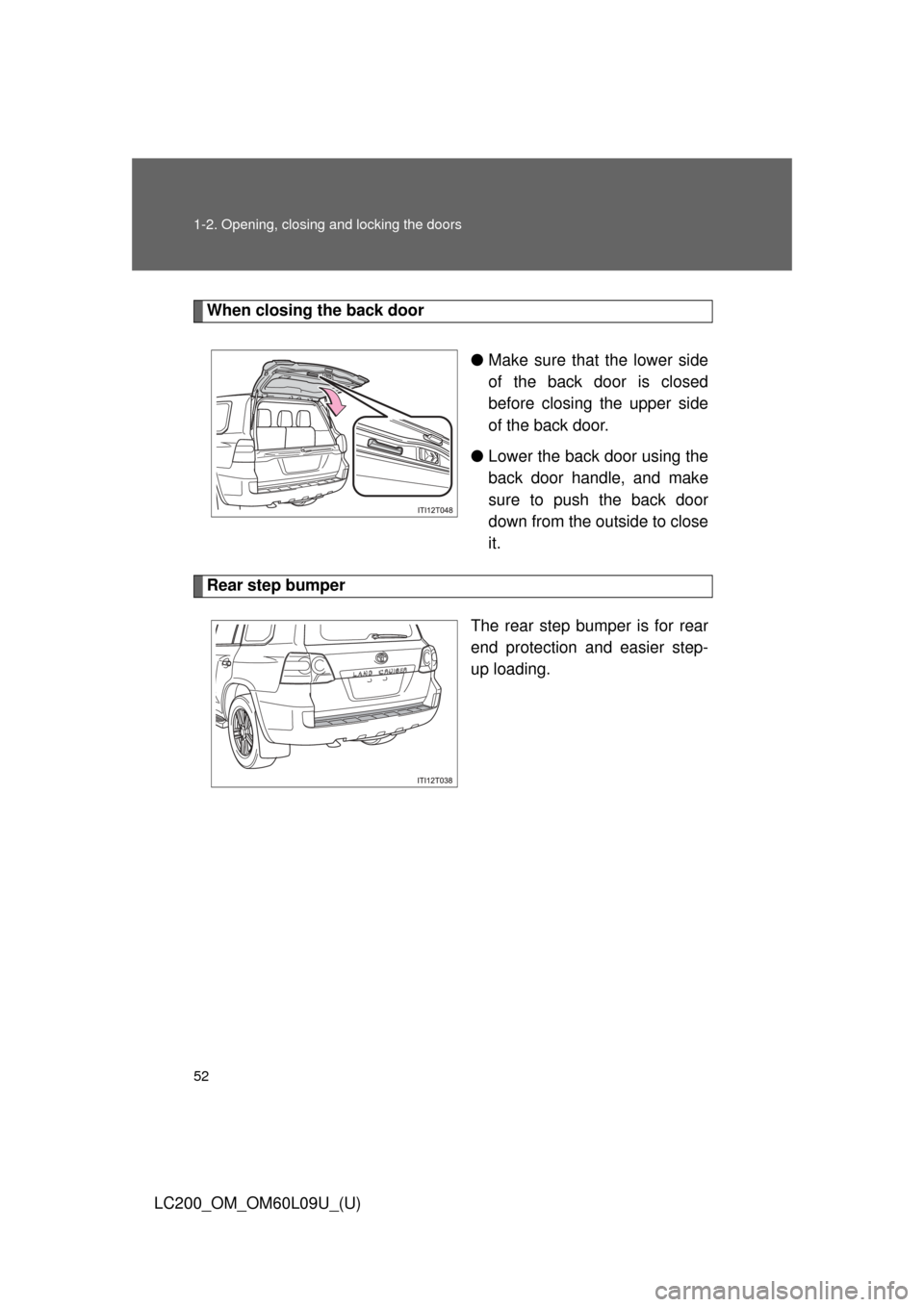
When closing the back door●Make sure that the lower side
of the back door is closed
before closing the upper side
of the back door.
● Lower the back door using the
back door handle, and make
sure to push the back door
down from the outside to close
it.
Rear step bumper
The rear step bumper is for rear
end protection and easier step-
up loading.
Page 53 of 724
53
1-2. Opening, closing and locking the doors
1
Before driving
LC200_OM_OM60L09U_(U)
■
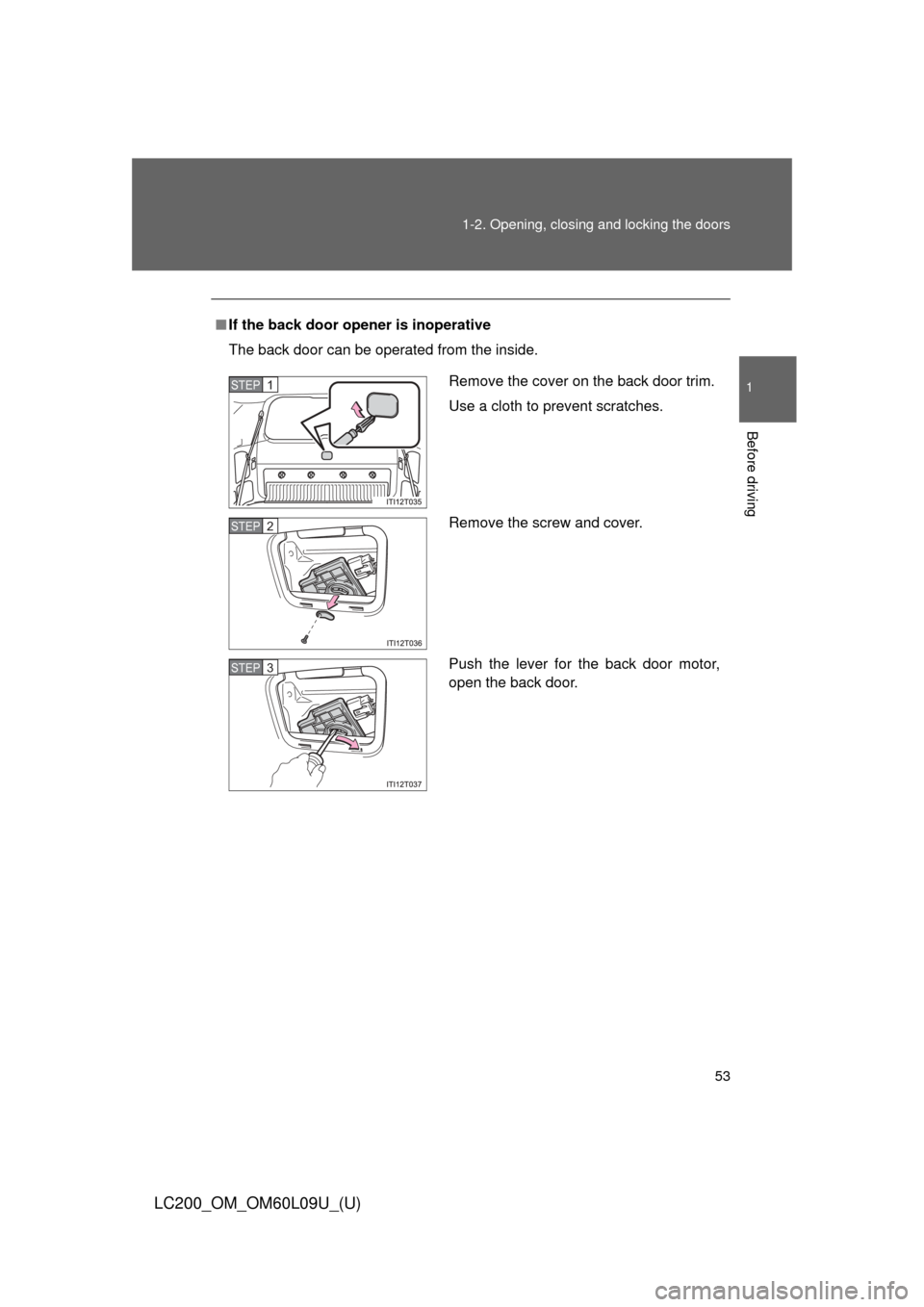
If the back door opener is inoperative
The back door can be operated from the inside.
Remove the cover on the back door trim.
Use a cloth to prevent scratches.
Remove the screw and cover.
Push the lever for the back door motor,
open the back door.STEP1
STEP2
STEP3
Page 54 of 724
54 1-2. Opening, closing and locking the doors
LC200_OM_OM60L09U_(U)
CAUTION
■While driving
●Keep the back door closed while driving.
If the back door is left open, it may hit near-by objects while driving or lug-
gage may be unexpectedly thrown out, causing an accident.
In addition, exhaust gases may enter the vehicle, causing death or a seri-
ous health hazard. Make sure to close the back door before driving.
● Before driving the vehicle, make sure that the back door is fully closed. If
the back door is not fully closed, it may open unexpectedly while driving,
causing an accident.
● Never let anyone sit in the luggage compartment. In the event of sudden
braking or an accident, they are susceptible to death or serious injury.
■ When children are in the vehicle
Observe the following precautions.
Failure to do so may result in death or serious injury.
●Do not allow children to play in the luggage compartment.
If a child is accidentally locked in the luggage compartment, they could
have heat exhaustion or other injuries.
● Do not allow a child to open or close the back door.
Doing so may cause the back door to move unexpectedly, or cause the
child’s hands, head, or neck to be caught by the closing back door.
Page 55 of 724
55
1-2. Opening, closing and locking the doors
1
Before driving
LC200_OM_OM60L09U_(U)
CAUTION
■
Operating the back door
Observe the following precautions.
Failure to do so may cause parts of the body to be caught, resulting in death
or serious injury.
●Remove any heavy loads, such as snow and ice, from the back door
before opening it. Failure to do so may cause the back door suddenly shut
again after it is opened.
● When opening or closing the back door, thoroughly check to make sure
the surrounding area is safe.
● If anyone is in the vicinity, make sure they are safe and let them know that
the back door is about to open or close.
● Use caution when opening or closing the back door in windy weather as it
may move abruptly in strong wind.
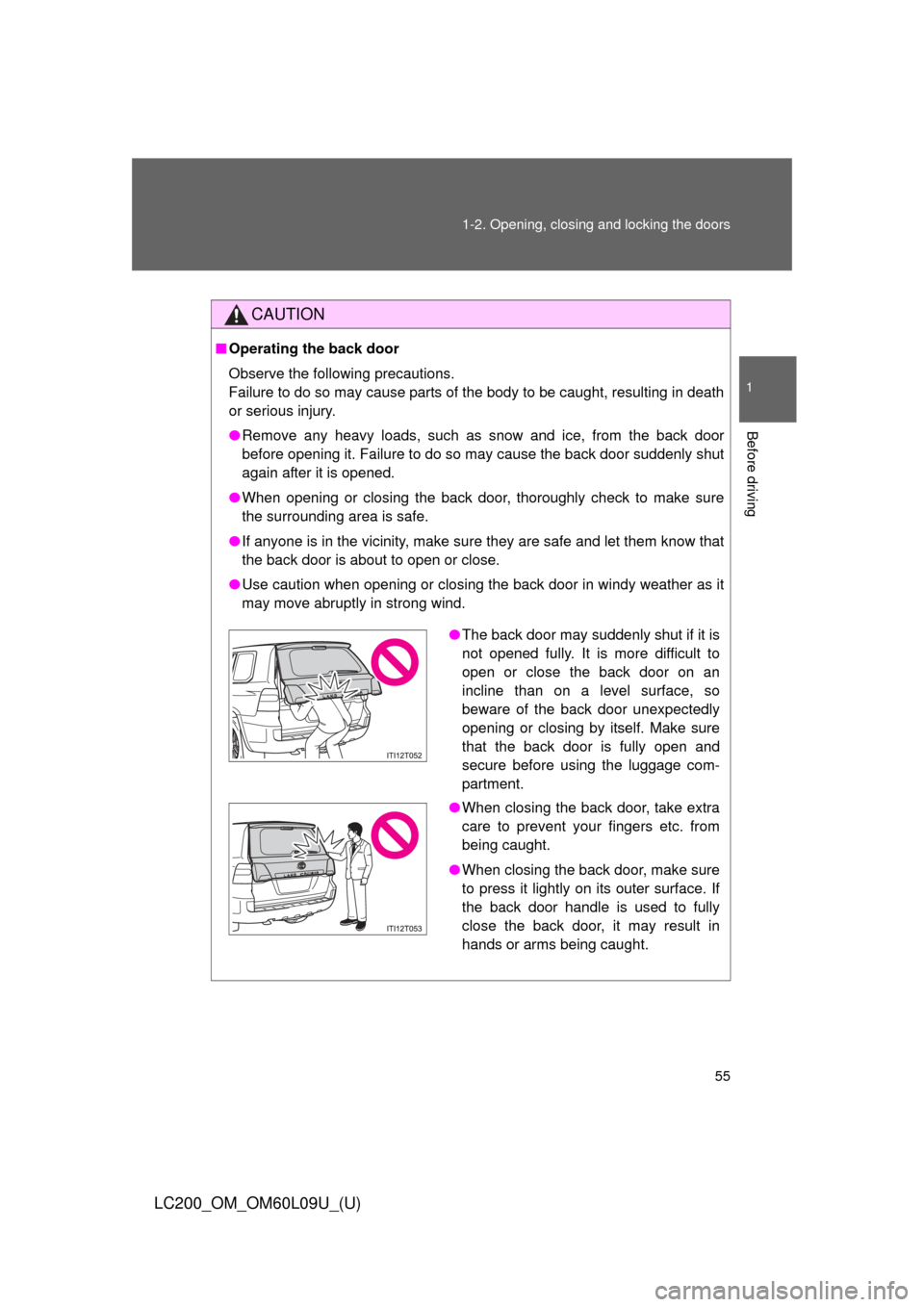
●The back door may suddenly shut if it is
not opened fully. It is more difficult to
open or close the back door on an
incline than on a level surface, so
beware of the back door unexpectedly
opening or closing by itself. Make sure
that the back door is fully open and
secure before using the luggage com-
partment.
● When closing the back door, take extra
care to prevent your fingers etc. from
being caught.
● When closing the back door, make sure
to press it lightly on its outer surface. If
the back door handle is used to fully
close the back door, it may result in
hands or arms being caught.
Page 56 of 724

56 1-2. Opening, closing and locking the doors
LC200_OM_OM60L09U_(U)
CAUTION
●Do not pull on the back door damper stay to close the back door, and do
not hang on the back door damper stay.
Doing so may cause hands to be caught or the back door damper stay to
break, causing an accident.
● If a bicycle carrier or similar heavy object is attached to the back door, it
may suddenly shut again after being opened, causing someone’s hands,
head or neck to be caught and injured. When installing an accessory part
to the back door, using a genuine Toyota part is recommended.
NOTICE
■Back door damper stays
The back door is equipped with damper stays that hold the back door in
place.
Observe the following precautions.
Failure to do so may cause damage to the back door damper stay, resulting
in malfunction.
●Do not attach any foreign objects, such
as stickers, plastic sheets, or adhesives
to the damper stay rod.
● Do not touch the damper stay rod with
gloves or other fabric items.
● Do not attach any accessories other
than genuine Toyota parts to the back
door.
● Do not place your hand on the damper
stay or apply lateral forces to it.
Damper stay
Page 68 of 724
68
1-3. Adjustable components (seats, mirrors, steering wheel)
LC200_OM_OM60L09U_(U)
Driving position memor y system
Your preferred driving position (the position of the driver’s seat,
steering wheel and outside rear view mirrors) can be entered into the
computer’s memory and recalled with the touch of a button. It is also
possible to set this function to activate automatically when the
doors are unlocked.
Three different driving positions can be entered into memory.
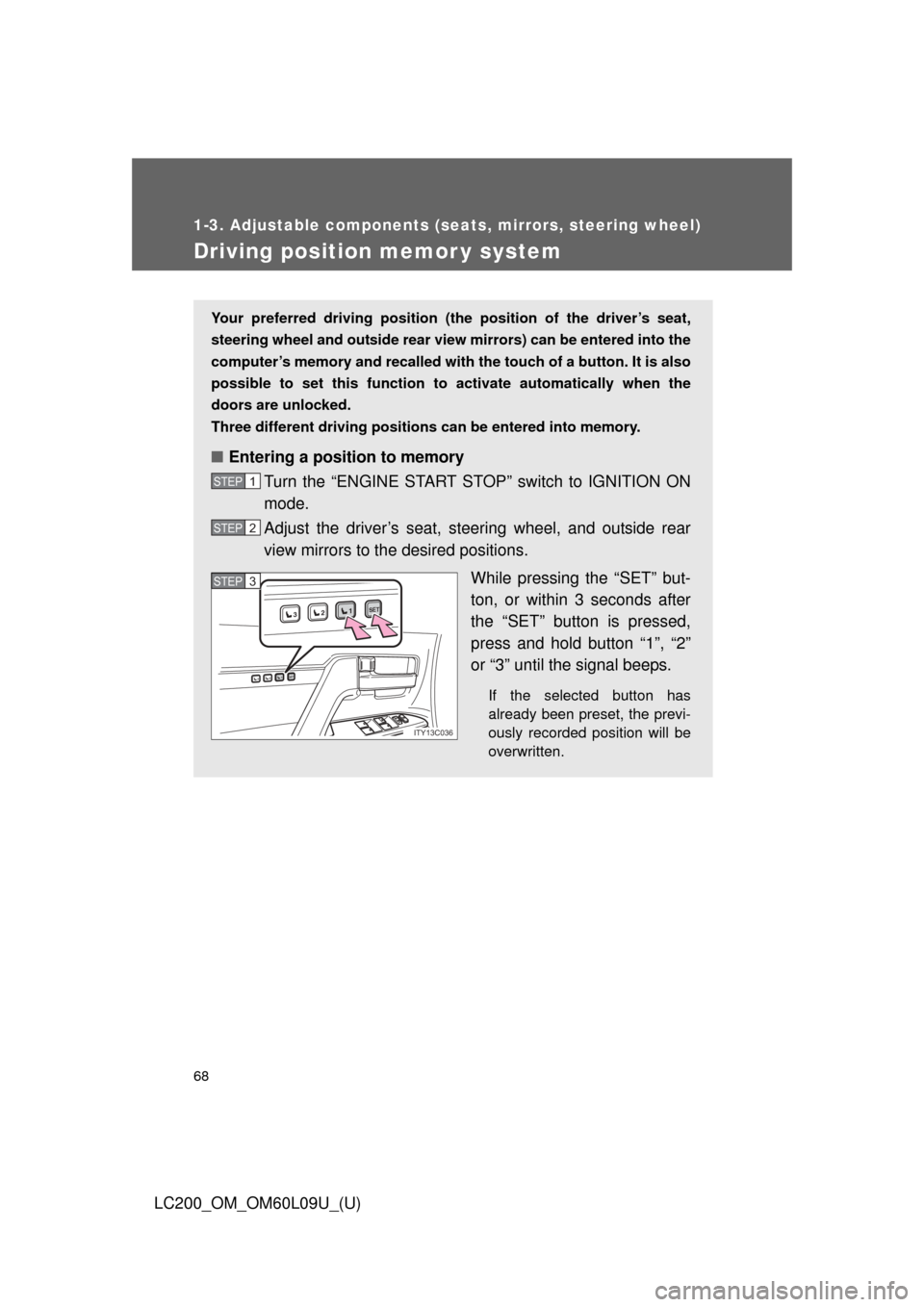
■ Entering a position to memory
Turn the “ENGINE START STOP” switch to IGNITION ON
mode.
Adjust the driver’s seat, steering wheel, and outside rear
view mirrors to the desired positions.
While pressing the “SET” but-
ton, or within 3 seconds after
the “SET” button is pressed,
press and hold button “1”, “2”
or “3” until the signal beeps.
If the selected button has
already been preset, the previ-
ously recorded position will be
overwritten.
STEP1
STEP2
1SET23
1SET23
ITY13C036
STEP3STEP3
Page 69 of 724
69
1-3. Adjustable components (s
eats, mirrors, steering wheel)
1
Before driving
LC200_OM_OM60L09U_(U)
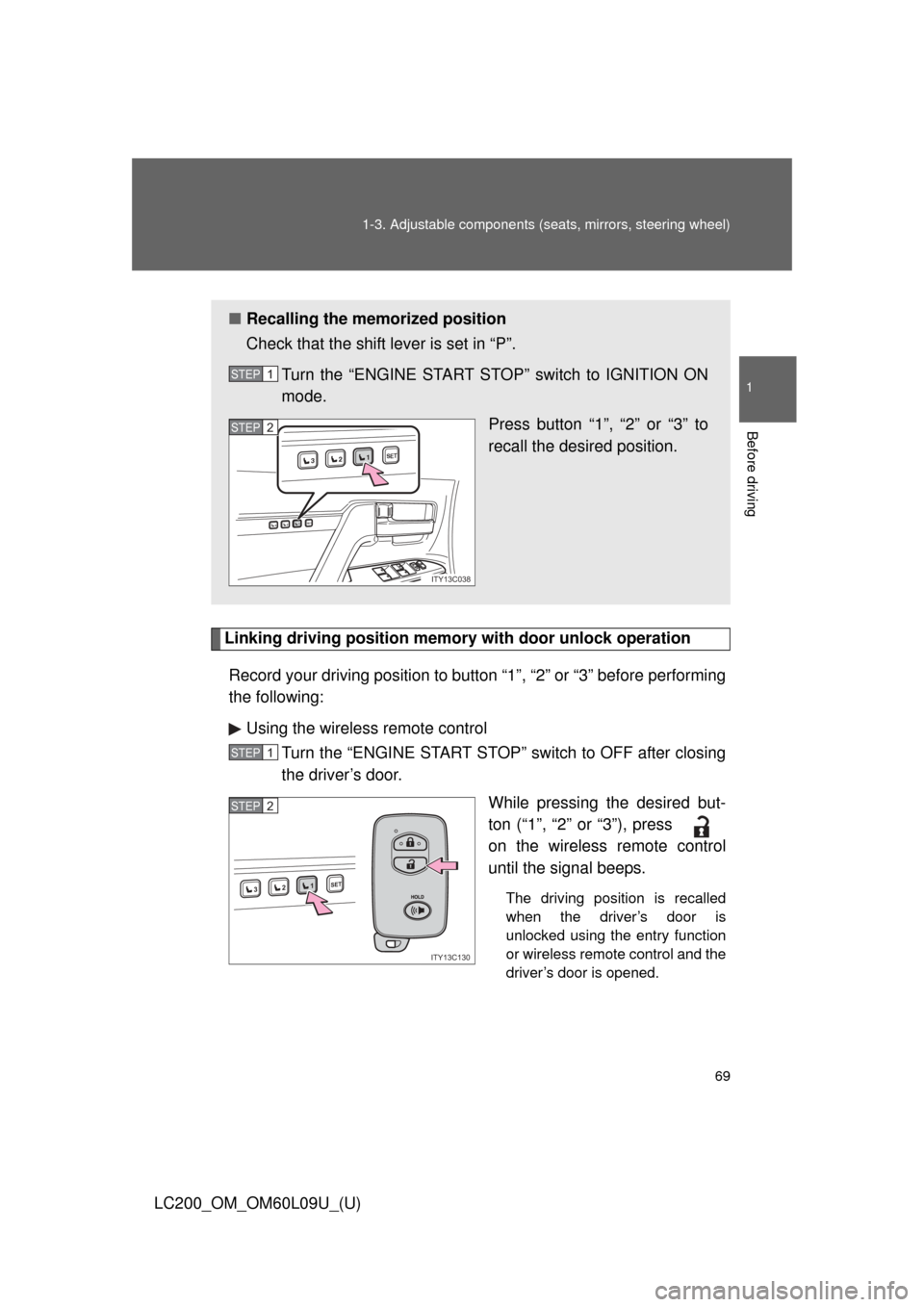
Linking driving position memory with door unlock operation
Record your driving position to button “1”, “2” or “3” before performing
the following: Using the wireless remote control Turn the “ENGINE START STOP” switch to OFF after closing
the driver’s door.
While pressing the desired but-
ton (“1”, “2” or “3”), press
on the wireless remote control
until the signal beeps.
The driving position is recalled
when the driver’s door is
unlocked using the entry function
or wireless remote control and the
driver’s door is opened.
■Recalling the memorized position
Check that the shift lever is set in “P”.
Turn the “ENGINE START STOP” switch to IGNITION ON
mode. Press button “1”, “2” or “3” to
recall the desired position.
STEP1
1SET23
1SET23
ITY13C038
STEP2
STEP1
1SET23
ITY13C130
STEP2