Page 1 of 427
1
L/C200_Navi_OM60L27U_(U)
13.06.03 19:43
1QUICK GUIDE9
2BASIC FUNCTION25
3NAVIGATION SYSTEM 56
4PHONE131
5
AUDIO/VIDEO SYSTEM 190
6
AIR CONDITIONING297
7VOICE COMMAND SYSTEM309
8INFORMATION323
9APPS347
10 PERIPHERAL MONITORING
SYSTEM359
INDEX389
TABLE OF CONTENTS
Page 7 of 427

7
1
2
3
4
5
6
7
8
9
L/C200_Navi_OM60L27U_(U)
13.06.03 19:56
10
1. PHONE OPERATION .................... 132
QUICK REFERENCE .......................... 132
PHONE (HANDS-FREE SYSTEM
FOR CELLULAR PHONE) ................ 134
REGISTER A Bluetooth
® PHONE ....... 138
CALL ON THE Bluetooth® PHONE ..... 142
RECEIVE ON THE Bluetooth®
PHONE ............................................. 149
TALK ON THE Bluetooth
® PHONE ..... 150
Bluetooth® PHONE MESSAGE
FUNCTION........................................ 153
2. SETUP ........................................... 156
PHONE SETTINGS ............................. 156
Bluetooth® SETTINGS ........................ 178
1. AUDIO/VIDEO SYSTEM
OPERATION ................................ 192
QUICK REFERENCE .......................... 192
SOME BASICS .................................... 194
RADIO OPERATION ........................... 201
HD Radio™ TECHNOLOGY
INFORMATION ................................. 204
RADIO OPERATION
(XM Satellite Radio
BROADCAST)................................... 208
RADIO OPERATION
(INTERNET RADIO
BROADCAST)................................... 214
DVD PLAYER OPERATION ................ 215
USB MEMORY OPERATION .............. 236iPod OPERATION................................ 241
Bluetooth
® AUDIO OPERATION ......... 249
VTR OPERATION................................ 258
REAR SEAT ENTERTAINMENT
SYSTEM FEATURES........................ 260
AUDIO/VIDEO REMOTE CONTROLS
(STEERING SWITCHES) .................. 281
AUDIO/VIDEO SYSTEM
OPERATING HINTS.......................... 283
2. SETUP........................................... 293
AUDIO SETTINGS............................... 293
1. AIR CONDITIONING SYSTEM
OPERATION................................ 298
QUICK REFERENCE .......................... 298
SOME BASICS .................................... 300
FRONT AUTOMATIC
AIR CONDITIONING SYSTEM ......... 301
REAR AUTOMATIC
AIR CONDITIONING SYSTEM ......... 308
1. VOICE COMMAND SYSTEM
OPERATION................................ 310
VOICE COMMAND SYSTEM .............. 310
NATURAL SPEECH INFORMATION
(ENGLISH ONLY) ............................. 316
EXPANDED VOICE COMMANDS....... 318
COMMAND LIST ................................. 319
4PHONE
5AUDIO/VIDEO SYSTEM
6AIR CONDITIONING
7VOICE COMMAND SYSTEM
Page 13 of 427
13
1. NAVIGATION OPERATION
1
QUICK GUIDE
L/C200_Navi_OM60L27U_(U)
13.06.03 19:43
Touch “OK”.
Registration of home is complete.
Home can also be registered by touch-
ing “Navigation” on the “Setup” screen.
(See “REGISTERING HOME” on page
99.)
The name, location, phone number and
icon can be changed. (See “EDITING
HOME” on page 100.)
The registered points can be used on
the “Destination” screen. (See “DESTI-
NATION SEARCH BY HOME” on page
59.)
6
Page 15 of 427
15
1. NAVIGATION OPERATION
1
QUICK GUIDE
L/C200_Navi_OM60L27U_(U)
13.06.03 19:43
Touch “OK”.
Registration of preset destinations is
complete.
Preset destinations can also be regis-
tered by touching “Navigation” on the
“Setup” screen. (See “REGISTERING
PRESET DESTINATIONS” on page
101.)
The name, location, phone number and
icon can be changed. (See “EDITING
PRESET DESTINATIONS” on page
102.)
The registered points can be used on
the “Destination” screen. (See “DESTI-
NATION SEARCH BY PRESET DESTI-
NATIONS” on page 59.)
6
Page 19 of 427
19
2. FUNCTION INDEX
1
QUICK GUIDE
L/C200_Navi_OM60L27U_(U)
13.06.03 19:43
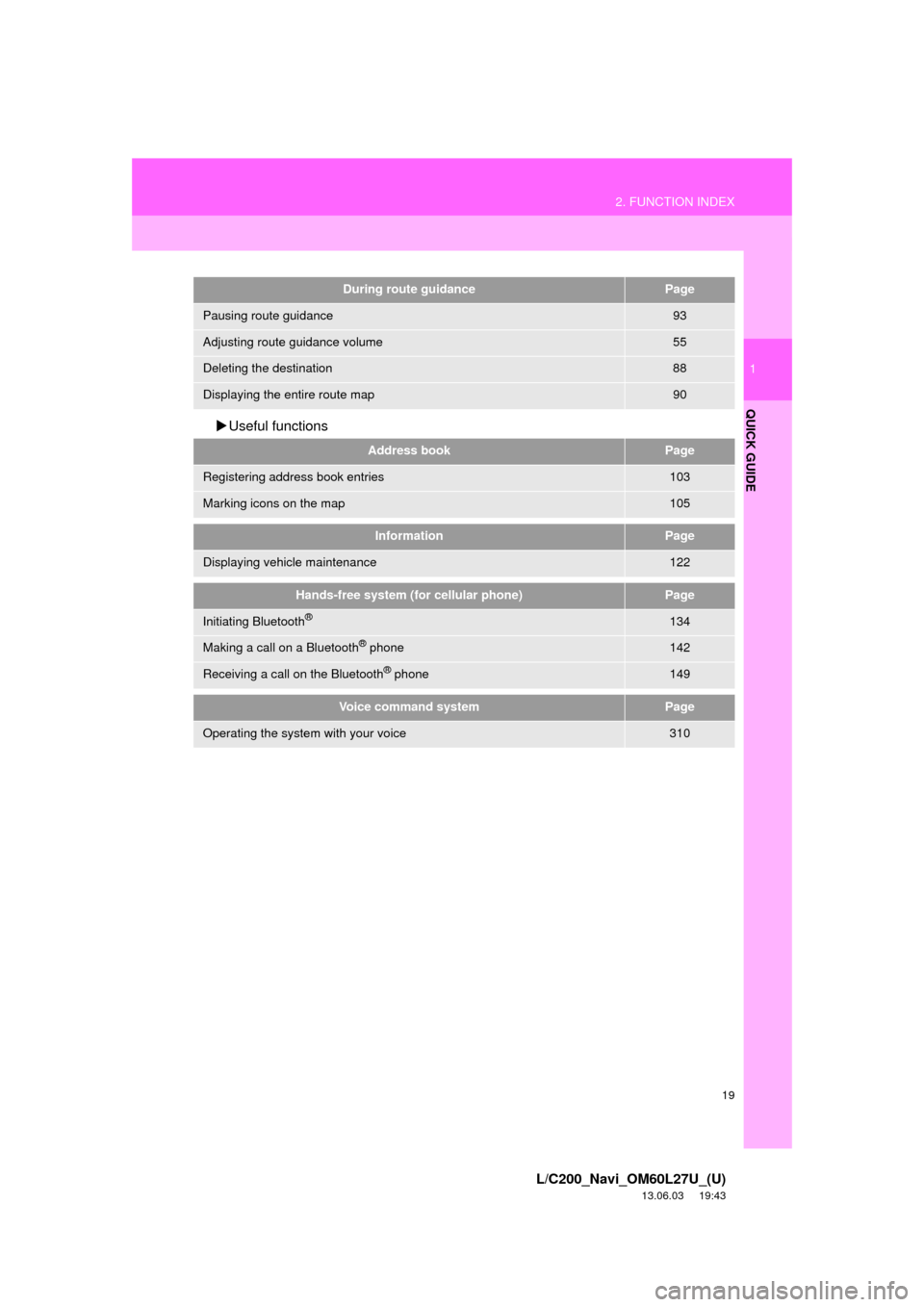
Useful functions
During route guidancePage
Pausing route guidance93
Adjusting route guidance volume55
Deleting the destination88
Displaying the entire route map90
Address bookPage
Registering address book entries103
Marking icons on the map105
InformationPage
Displaying vehicle maintenance122
Hands-free system (for cellular phone)Page
Initiating Bluetooth®134
Making a call on a Bluetooth® phone142
Receiving a call on the Bluetooth® phone149
Voice command systemPage
Operating the system with your voice310
Page 23 of 427
23
3. QUICK REFERENCE
1
QUICK GUIDE
L/C200_Navi_OM60L27U_(U)
13.06.03 19:43
No.NameFunctionPage
“General”Touch to change the selected language, opera-
tion sound, automatic screen change settings,
etc.44
“Voice”Touch to set the voice guidance settings.54
“Navigation”
Touch to set home, preset destinations, address
book, areas to avoid, etc. or to delete previous
destinations.
98
“Display”Touch to adjust the contrast and brightness of the
screens, turn the display off, etc.31
“Vehicle”Touch to set vehicle information such as mainte-
nance information.122
“Other”Touch to set XM Sports, XM Stocks and XM Fuel
Prices.345
“Audio”Touch to set iPod, external video*1 and HD
Radio™ channel settings.293
“Bluetooth*2”Touch to set Bluetooth® phones and Bluetooth®
audio devices.178
“Phone”Touch to set the phone sound, phonebook, mes-
sage settings, etc.156
*1: Vehicles with A/V input port
*2: Bluetooth is a registered trademark of Bluetooth SIG, Inc.
Page 35 of 427

35
1. BASIC INFORMATION BEFORE OPERATION
2
BASIC FUNCTION
L/C200_Navi_OM60L27U_(U)
13.06.03 19:43
To display information about an icon, set
the cursor on it.
■POI INFORMATION
1Touch “Info”.
2Information such as the name, ad-
dress, position and phone number are
displayed.
TO SEE INFORMATION ABOUT
THE ICON WHERE THE
CURSOR IS SET
When the cursor is set on a POI icon,
the name and “Info” are displayed at
the top of the screen.If “Enter ” is touched, the cursor
position will be set as a destination.
If a destination has already been set,
“Go Directly” and “Add to Route” will
be displayed.
“Go Directly”: Touch to delete the ex-
isting destination(s) and set a new one.
“Add to Route”: Touch to add a desti-
nation.
To register this POI as an address book
entry, touch “Mark”. (See “REGISTER-
ING ADDRESS BOOK ENTRIES” on
page 104.)
If is touched, the registered
phone number can be called.
The desired POI can be displayed on
the map screen. (See “DISPLAY POI
ICONS” on page 94.)
Page 36 of 427
36
1. BASIC INFORMATION BEFORE OPERATION
L/C200_Navi_OM60L27U_(U)
13.06.03 19:43
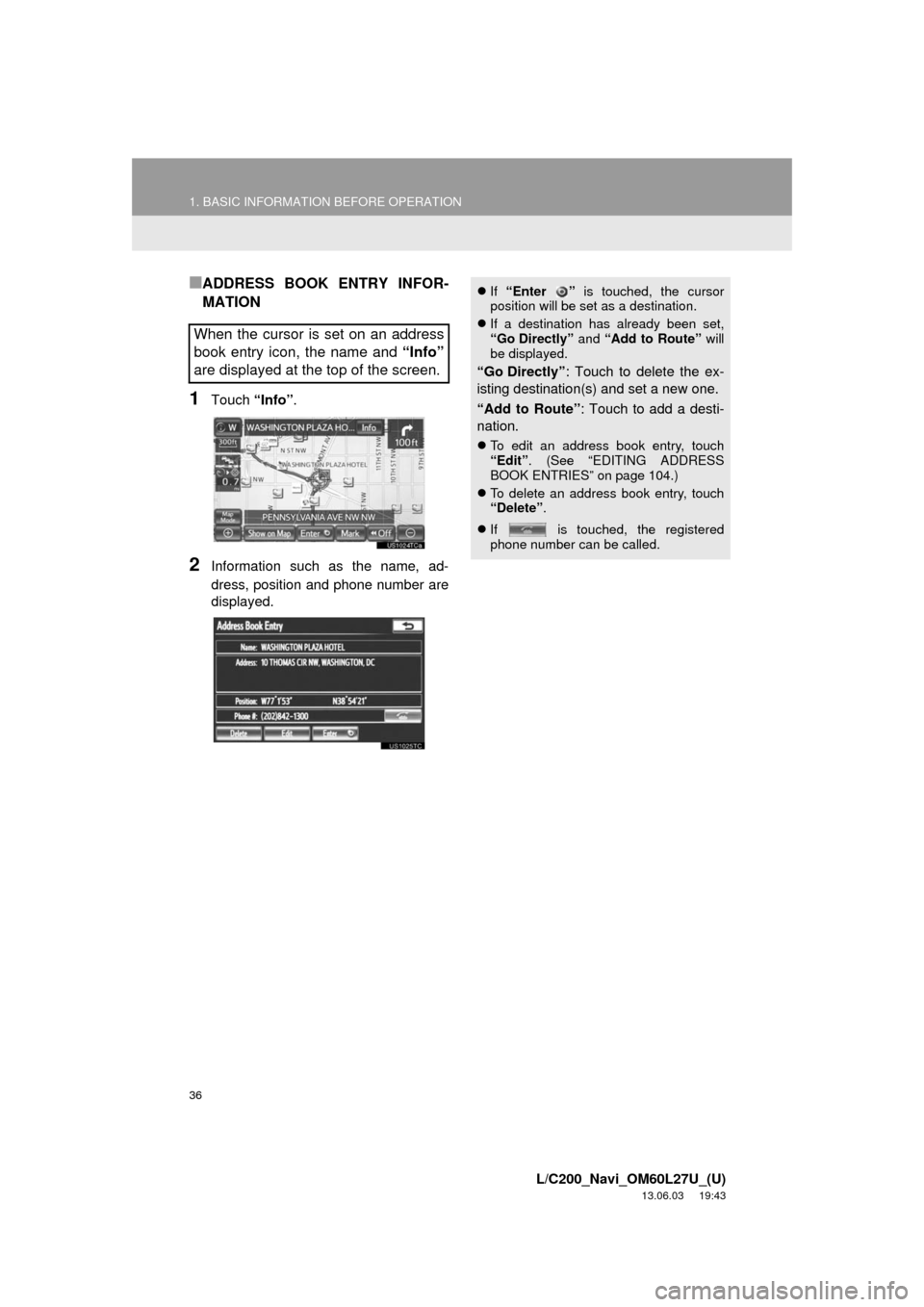
■ADDRESS BOOK ENTRY INFOR-
MATION
1Touch “Info”.
2Information such as the name, ad-
dress, position and phone number are
displayed.
When the cursor is set on an address
book entry icon, the name and “Info”
are displayed at the top of the screen.
If “Enter ” is touched, the cursor
position will be set as a destination.
If a destination has already been set,
“Go Directly” and “Add to Route” will
be displayed.
“Go Directly”: Touch to delete the ex-
isting destination(s) and set a new one.
“Add to Route”: Touch to add a desti-
nation.
To edit an address book entry, touch
“Edit”. (See “EDITING ADDRESS
BOOK ENTRIES” on page 104.)
To delete an address book entry, touch
“Delete”.
If is touched, the registered
phone number can be called.