Page 326 of 712

3264-6. Driving tips
HIGHLANDER_U (OM48A12U)
WARNING
■Driving with snow tires
Observe the following precautions to reduce the risk of accidents.
Failure to do so may result in a loss of vehicle control and cause death or
serious injury.
●Use tires of the size specified.
● Maintain the recommended level of air pressure.
● Do not drive in excess of 75 mph (120 km/h), regardless of the type of
snow tires being used.
● Use snow tires on all, not just some wheels.
■ Driving with tire chains
Observe the following precautions to reduce the risk of accidents.
Failure to do so may result in the vehicle being unable to be driven safely,
and may cause death or serious injury.
●Do not drive in excess of the speed limit specified for the tire chains being
used, or 30 mph (50 km/h), whichever is lower.
● Avoid driving on bumpy road surfaces or over potholes.
● Avoid sudden acceleration, abrupt steering, sudden braking and shifting
operations that cause sudden engine braking.
● Slow down sufficiently before entering a curve to ensure that vehicle con-
trol is maintained.
● Vehicles with LDA (Lane Departure Alert) system: Do not use LDA (Lane
Departure Alert) system.
NOTICE
■Repairing or replacing snow tires
Request repairs or replacement of snow tires from Toyota dealers or legiti-
mate tire retailers.
This is because the removal and attachment of snow tires affects the opera-
tion of the tire pressure warning valves and transmitters.
■ Fitting tire chains
The tire pressure warning valves and transmitters may not function correctly
when tire chains are fitted.
Page 327 of 712
3274-6. Driving tips
4
Driving
HIGHLANDER_U (OM48A12U)
●Specific design characteristics give it a higher center of gravity than
ordinary passenger cars. This vehicle design feature causes this
type of vehicle to be more likely to rollover. And, utility vehicles
have a significantly higher rollover rate than other types of vehicles.
● An advantage of the higher ground clearance is a better view of the
road allowing you to anticipate problems.
● It is not designed for cornering at the same speeds as ordinary pas-
senger cars any more than low-slung sports cars are designed to
perform satisfactorily under off-road conditions. Therefore, sharp
turns at excessive speeds may cause the vehicle to rollover.
Off-road precautions
This vehicle belongs to the utility vehicle class, which has
higher ground clearance and narrower tread in relation to the
height of its center of gravity to make it capable of performing in
a wide variety of off-road applications.
Off-road vehicle feature
WARNING
■Off-road vehicle precautions
Always observe the following precautions to minimize the risk of death, seri-
ous injury or damage to your vehicle:
●In a rollover crash, an unbelted person is significantly more likely to die
than a person wearing a seat belt. T herefore, the driver and all passengers
should fasten their seat belts whenever the vehicle is moving.
● Avoid sharp turns or abrupt maneuvers, if at all possible.
Failure to operate this vehicle correctly may result in loss of control or
vehicle rollover causing death or serious injury.
● Loading cargo on the roof luggage carrier (if equipped) will make the cen-
ter of the vehicle gravity higher. Avoid high speeds, sudden starts, sharp
turns, sudden braking or abrupt maneuvers, otherwise it may result in loss
of control or vehicle rollover due to failure to operate this vehicle correctly.
● Always slow down in gusty crosswinds. Because of its profile and higher
center of gravity, your vehicle is more sensitive to side winds than an ordi-
nary passenger car. Slowing down will allow you to have better control.
● Do not drive horizontally across steep slopes. Driving straight up or
straight down is preferred. Your vehicle (or any similar off-road vehicle)
can tip over sideways much more easily than forward or backward.
Page 329 of 712

3294-6. Driving tips
4
Driving
HIGHLANDER_U (OM48A12U)
WARNING
■Off-road driving precautions
Always observe the following precautions to minimize the risk of death, seri-
ous injury or damage to your vehicle:
●Drive carefully when off the road. Do not take unnecessary risks by driving
in dangerous places.
● Do not grip the steering wheel spokes when driving off-road. A bad bump
could jerk the wheel and injure your hands. Keep both hands and espe-
cially your thumbs on the outside of the rim.
● Always check your brakes for effectiveness immediately after driving in
sand, mud, water or snow.
● After driving through tall grass, mud, rock, sand, rivers, etc., check that
there is no grass, bush, paper, r ags, stone, sand, etc. adhering or trapped
on the underbody. Clear off any such matter from the underbody. If the
vehicle is used with these materials trapped or adhering to the underbody,
a breakdown or fire could occur.
● When driving off-road or in rugged terrain, do not drive at excessive
speeds, jump, make sharp turns, strike objects, etc. This may cause loss
of control or vehicle rollover causing death or serious injury. You are also
risking expensive damage to your vehicle’s suspension and chassis.
Page 335 of 712

3355-1. Basic Operations
5
Audio system
HIGHLANDER_U (OM48A12U)■
Certification (caution)
U.S.A.
FCC ID: ACJ932YEAP01A473W
NOTE:
This device complies with Part 15 of the FCC Rules.
Operation is subject to the following two conditions:
(1) this device may not cause harmful interference, and
(2) this device must accept any interference received, including interference
that may cause undesired operation.
FCC WARNING:
Changes or modifications not expressly approved by the party responsible for
compliance could void the user’s authority to operate the equipment.
Radiofrequency radiation exposure information:
This equipment complies with FCC radiation exposure limits set forth for an
uncontrolled environment.
This equipment should be installed and operated with minimum distance of
7.9 in. (20cm) between the radiator and your body.
This transmitter must not be co-located or operating in conjunction with any
other antenna or transmitter.
U.S.A. and Canada
Part 15 of the FCC Rules
FCC Warning:
Any unauthorized changes or modifications to this equipment will void the
user’s authority to operate this device.
Page 341 of 712
3415-1. Basic Operations
5
Audio system
HIGHLANDER_U (OM48A12U)
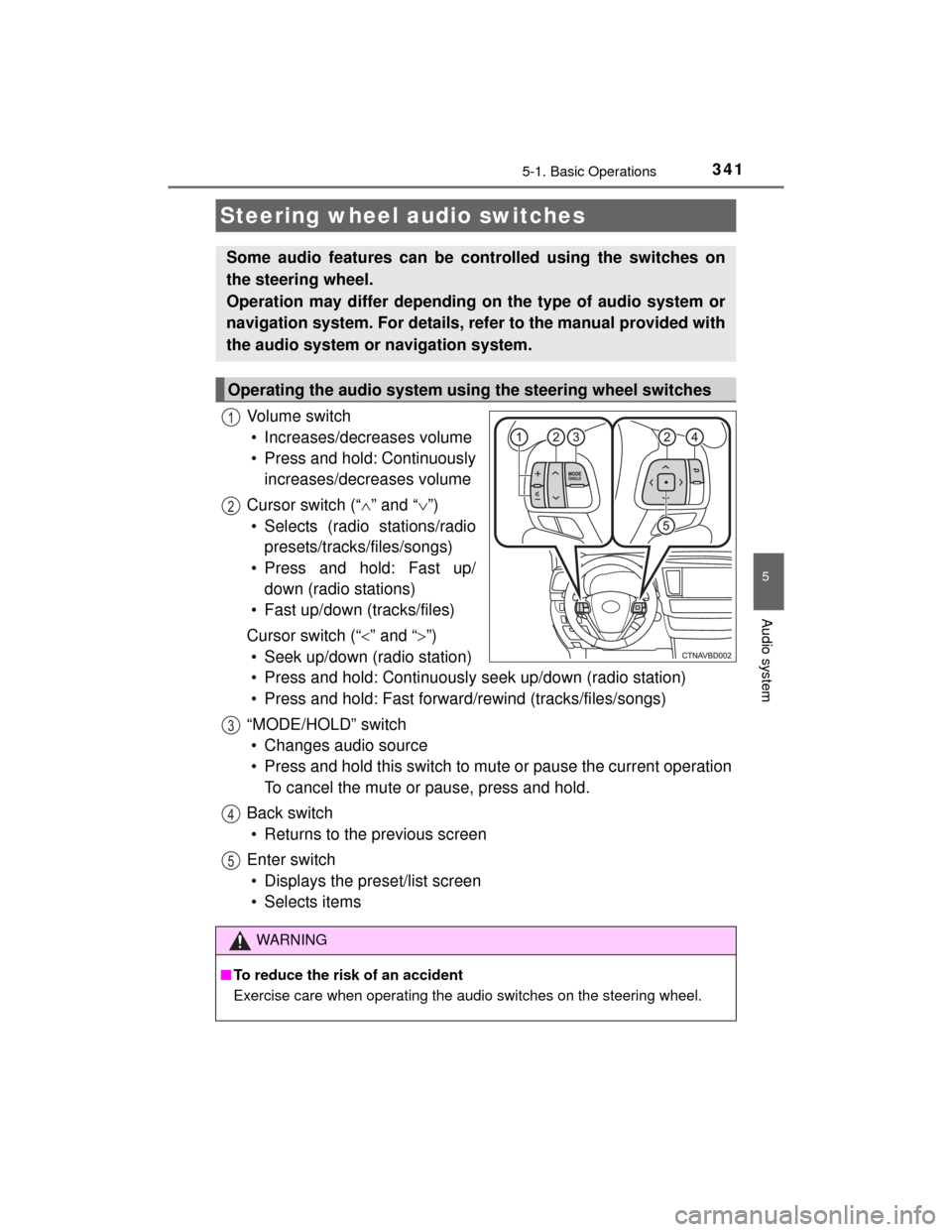
Vol um e s wit ch• Increases/decreases volume
• Press and hold: Continuously increases/decreases volume
Cursor switch (“ ” and “ ”)
• Selects (radio stations/radio presets/tracks/files/songs)
• Press and hold: Fast up/ down (radio stations)
• Fast up/down (tracks/files)
Cursor switch (“ ” and “ ”)
• Seek up/down (radio station)
• Press and hold: Continuously seek up/down (radio station)
• Press and hold: Fast forward/rewind (tracks/files/songs)
“MODE/HOLD” switch • Changes audio source
• Press and hold this switch to mute or pause the current operation To cancel the mute or pause, press and hold.
Back switch • Returns to the previous screen
Enter switch • Displays the preset/list screen
• Selects items
Steering wheel audio switches
Some audio features can be controlled using the switches on
the steering wheel.
Operation may differ depending on the type of audio system or
navigation system. For details, refer to the manual provided with
the audio system or navigation system.
Operating the audio system using the steering wheel switches
1
12
3
4
5
WARNING
■ To reduce the risk of an accident
Exercise care when operating the audio switches on the steering wheel.
Page 342 of 712
3425-1. Basic Operations
HIGHLANDER_U (OM48A12U)■
iPod
Open the cover and connect an
iPod using an iPod cable.
Turn on the power of the iPod if
it is not turned on.
■
USB memory
Open the cover and connect the USB memory device.
Turn on the power of the USB memory device if it is not turned on.
■
Portable audio player
Open the cover and connect the portable audio player.
Turn on the power of the portable audio player if it is not turned on.
AUX Por t/USB Por t
Connect an iPod, USB memory device or portable audio player
to the AUX port/USB port as indicated below. Select “iPod”,
“USB”, “AUX” or “A/V” on the audio source selection screen
and the device can be operated via audio system.
Connecting using the AUX port/USB port
WARNING
■ While driving
Do not connect a device or operate the device controls.
Page 365 of 712

3655-6. Using an external device
5
Audio system
HIGHLANDER_U (OM48A12U)■
Compatible models
The following iPod
®, iPod nano®, iPod classic®, iPod touch® and iPhone®
devices can be used with this system.
●Made for
• iPod touch (5th generation)
• iPod touch (4th generation)
• iPod touch (3rd generation)
• iPod touch (2nd generation)
• iPod touch (1st generation)
• iPod classic
• iPod with video
• iPod nano (7th generation)
• iPod nano (6th generation)
• iPod nano (5th generation)
• iPod nano (4th generation)
• iPod nano (3rd generation)
• iPod nano (2nd generation)
• iPod nano (1st generation)
• iPhone 5
• iPhone 4S
• iPhone 4
• iPhone 3GS
• iPhone 3G
•iPhone
Depending on differences between models or software versions etc., some
models might be incompatible with this system.
WARNING
■ While driving
Do not connect an iPod or operate the controls.
NOTICE
■To prevent damage to the iPod or its terminals
●Do not leave the iPod in the vehicle. The temperature inside the vehicle
may become high, resulting in damage to the iPod.
● Do not push down on or apply unnecessary pressure to the iPod while it is
connected.
● Do not insert foreign objects into the port.
Page 369 of 712

3695-6. Using an external device
5
Audio system
HIGHLANDER_U (OM48A12U)●
MP3, WMA and AAC playback
• When a device containing MP3, WMA and AAC files is connected, all
files in the USB memory device are checked. Once the file check is fin-
ished, the first MP3, WMA and AAC file is played. To make the file check
finish more quickly, we recommend that you do not include any files other
than MP3, WMA and AAC files or create any unnecessary folders.
• When a USB memory device is connected and the audio source is
changed to USB memory mode, the USB memory device will start play-
ing the first file in the first folder. If the same device is removed and
reconnected (and the con- tents have not been changed), the USB mem-
ory device will resume play from the same point in which it was last used.
● Extensions
If the file extensions .mp3, .wma and .m4a are used for files other than
MP3, WMA and AAC files, they will be skipped (not played).
● Playback
• To play MP3 files with steady sound quality, we recommend a fixed bit
rate of at least 128 kbps and a sampling frequency of 44.1 kHz.
• There is a wide variety of freeware and other encoding software for MP3, WMA and AAC files on the market, and depending on the status of the
encoding and the file format, poor sound quality or noise at the start of
playback may result. In some cases, playback may not be possible at all.
• Microsoft, Windows, and Windows Media are the registered trademarks
of Microsoft Corporation in the U.S.A. and other countries.
WARNING
■ While driving
Do not connect a USB memory device or operate the device controls.
NOTICE
■To prevent damage to the USB memory device or its terminals
●Do not leave the USB memory device in the vehicle. The temperature
inside the vehicle may become high, resulting in damage to the USB
memory device.
● Do not push down on or apply unnecessary pressure to the USB memory
device while it is connected.
● Do not insert foreign objects into the port.