Page 187 of 464

187 2-1. Driving procedures
2
When driving
AI-SHIFT
The AI-SHIFT automatically shifts the gear to the suitable position according
to the driver performance and driving conditions.
The AI-SHIFT automatically operates when the shift lever is in the D posi-
tion. (Operating the paddle shift switches or shifting the shift lever to the M
position cancels the function.)
CAUTION
When driving on slippery road surfaces
Be careful of downshifting and sudden acceleration, as this could result in
the vehicle skidding to the side or spinning.
To prevent incorrect operation
Do not attach items such as accessories to the paddle shift switches.
Doing so may unintentionally move the paddle shift switches.
Gear Shift Indicator
The indication of the gear shift indicator is only as a guideline for driving
more fuel-efficiently. The indicator does not inform the driver about the safe
shift operation timing. The driver has the responsibility for suitable shift oper-
ation depending on the traffic conditions or driving conditions (e.g., overtak-
ing or driving on an uphill slope).
This indicator supports the driver to drive more fuel-efficiently. The vehicle
system determines the shift operation timing depending on the driving condi-
tions, and informs the driver by the indicator on the combination meter. For
details, refer to Gear shift indicator.
Page 190 of 464
190 2-1. Driving procedures
CAUTION
Gear Shift Indicator
The indication of the gear shift indicator is only as a guideline for driving
more fuel-efficiently. The indicator does not inform the driver about the safe
shift operation timing. The driver has the responsibility for suitable shift oper-
ation depending on the traffic conditions or driving conditions (e.g., overtak-
ing or driving on an uphill slope).
This indicator supports the driver to drive more fuel-efficiently. The vehicle
system determines the shift operation timing depending on the driving condi-
tions, and informs the driver by the indicator on the combination meter. For
details, refer to Gear shift indicator.
Usually, the gear shift indicator is a guideline for driving more fuel-efficiently,
and it also may operate to prevent a possible stall at a low engine speed.
NOTICE
To prevent damage to the transmission
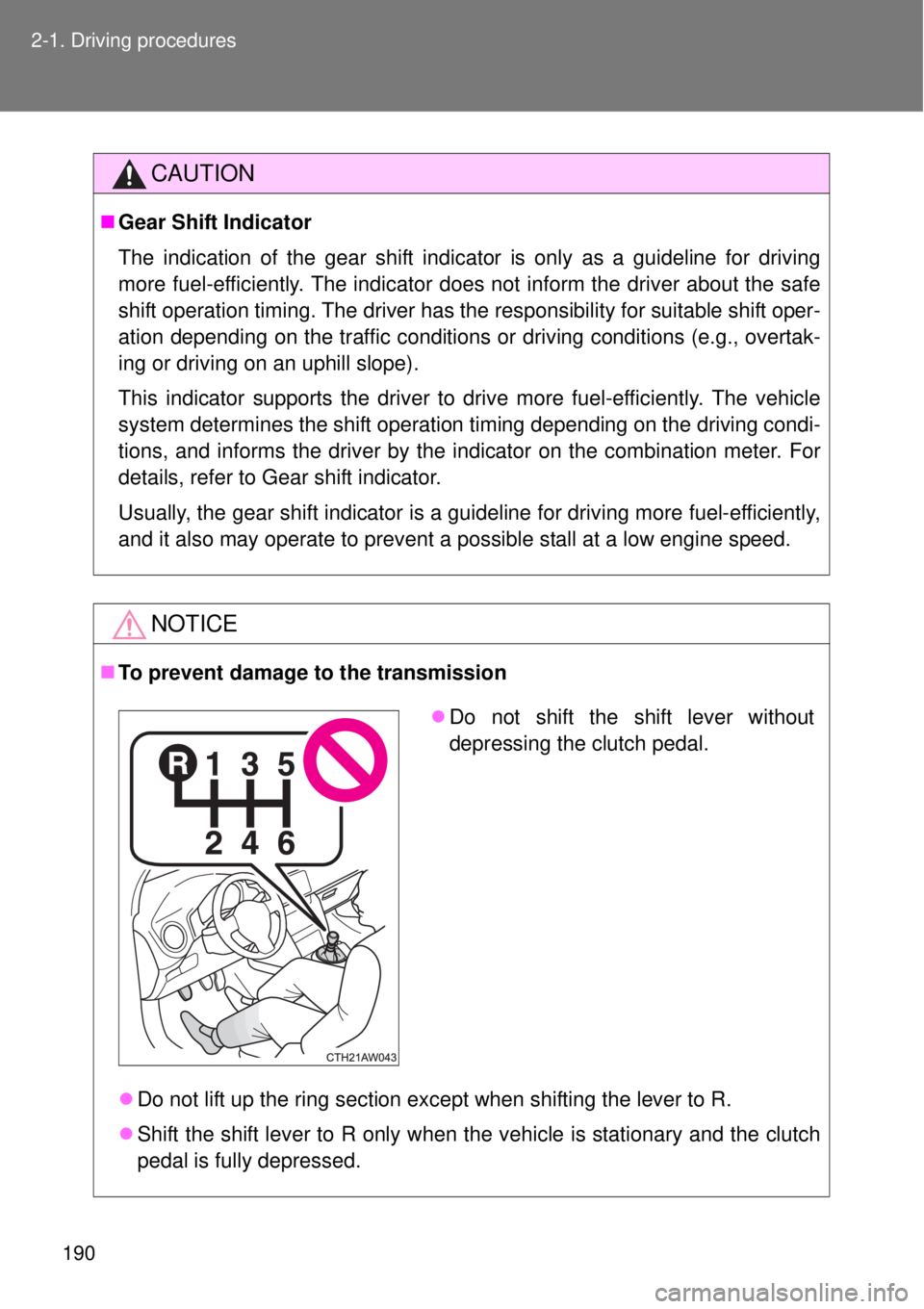
Do not lift up the ring section except when shifting the lever to R.
Shift the shift lever to R only when the vehicle is stationary and the clutch
pedal is fully depressed.
Do not shift the shift lever without
depressing the clutch pedal.
Page 207 of 464
207 2-2. Instrument cluster
2
When driving
The multi-information display operate when
Vehicles without a smart entry & start system
The engine switch is in the “ON” position.
Vehicles with a smart entry & start system
The “ENGINE START STOP” switch is in IGNITION ON mode.
CAUTION
The information display at low temperatures
Allow the interior of the vehicle to warm up before using the liquid crystal
information display. At extremely low temperatures, the information display
monitor may respond slowly, and display changes may be delayed.
For example, there is a lag between the driver's shifting and the new shift
position number appearing on the display. In this case, wait until the display
changes and take care not to downshift again, causing rapid and excessive
engine braking and possibly an accident resulting in death or serious injury.
Page 225 of 464

225
2-4. Using other driving systems
2
When driving
Driving assist systems
When the TRC/VSC systems are operating
The slip indicator light will flash
while the TRC (brake LSD func-
tion)/VSC systems are operat-
ing.
To help enhance driving safety and performance, the following sys-
tems operate automatically in response to various driving situations.
Be aware, however, that these systems are supplementary and
should not be relied upon too heavily when operating the vehicle.
ABS (Anti-lock Brake System)
Helps to prevent wheel lock when the brakes are applied suddenly, or if
the brakes are applied while driving on a slippery road surface
Brake assist
Generates an increased level of braking force after the brake pedal is
depressed when the system detects a panic stop situation
VSC (Vehicle Stability Control)
Helps the driver to control skidding when swerving suddenly or turning
on slippery road surfaces
TRC (Traction Control)
Helps to maintain drive power and prevent the drive wheels from spin-
ning when starting the vehicle or accelerating on slippery roads.
The TRC system is also equipped with the brake LSD function.
EPS (Electric Power Steering)
Employs an electric motor to reduce the amount of effort needed to turn
the steering wheel
Page 230 of 464

230 2-4. Using other driving systems
CAUTION
When the VSC and/or brake LSD function is activated
The slip indicator light flashes. Always drive carefully. Reckless driving may
cause an accident. Exercise particular care when the indicator light flashes.
When the TRC/VSC systems are turned off
Be especially careful and drive at a speed appropriate to the road condi-
tions. As these are the systems to help ensure vehicle stability and driving
force, do not turn the TRC/VSC systems off unless necessary.
Replacing tires
Make sure that all tires are of the specified size, brand, tread pattern and
total load capacity. In addition, make sure that the tires are inflated to the
recommended tire inflation pressure level.
The ABS, TRC and VSC systems will not function correctly if different tires
are installed on the vehicle.
Contact any authorized Toyota dealer or repairer, or another duly qualified
and equipped professional for further information when replacing tires or
wheels.
Handling of tires and suspension
Using tires with any kind of problem or modifying the suspension will affect
the driving assist systems, and may cause a system to malfunction.
Page 276 of 464
276 3-5. Other interior features
CAUTION
Observe the following precautions.
Failure to do so may cause the driver's floor mat to slip, possibly interfering
with the pedals while driving. An unexpectedly high speed may result or it may
become difficult to stop the vehicle, leading to a serious accident, resulting in
death or serious injury.
When installing a floor mat
Do not use floor mats designed for other models or different model year
vehicles, even if they are Toyota Genuine floor mats.
Driver’s seat floor mat: Only use floor mats designed for the driver's seat.
Front: Always install the floor mat securely using the retaining hooks (clips)
provided.
Do not use two or more floor mats on top of each other.
Do not place the floor mat bottom-side up or upside-down.
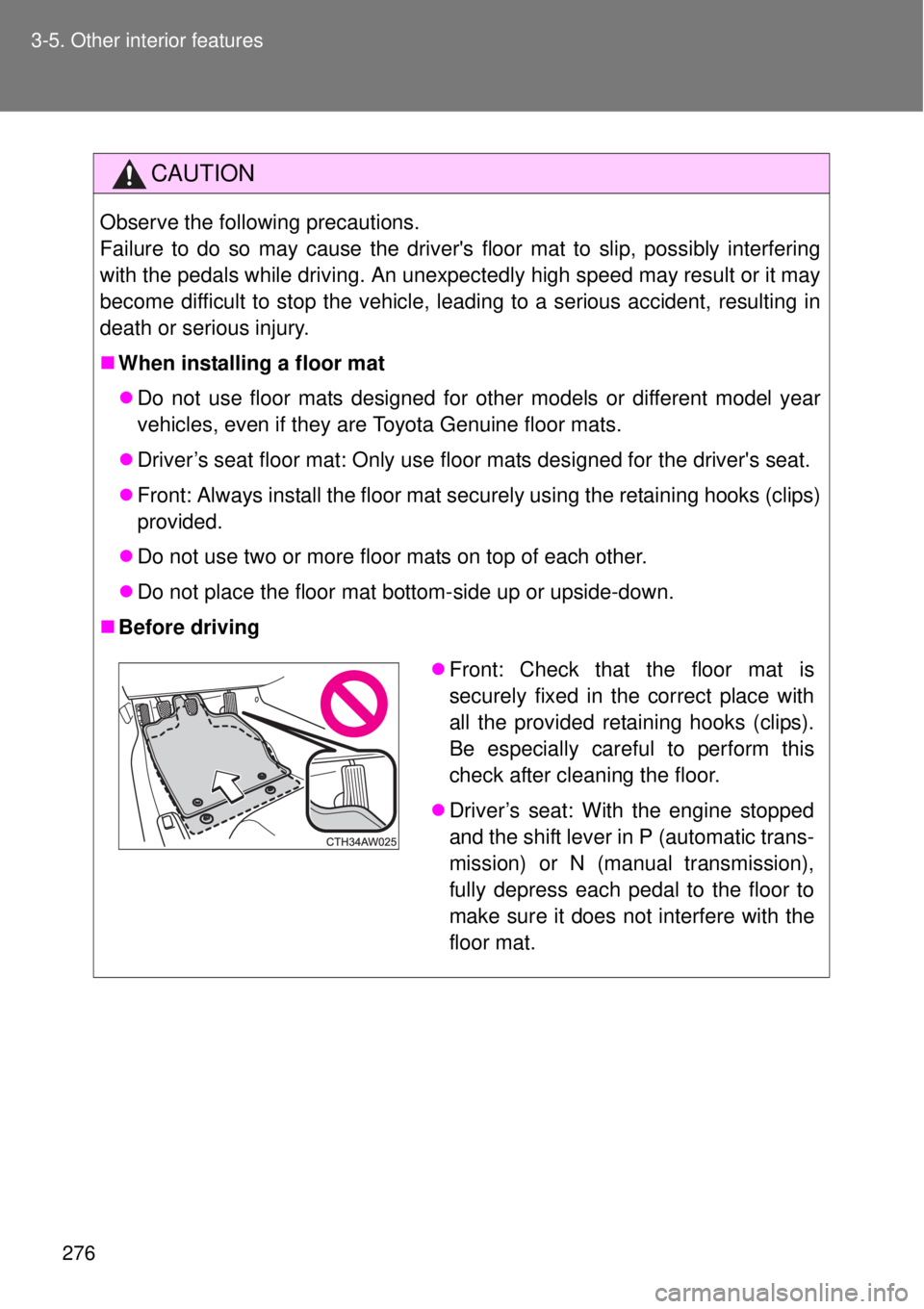
Before driving
Front: Check that the floor mat is
securely fixed in the correct place with
all the provided retaining hooks (clips).
Be especially careful to perform this
check after cleaning the floor.
Driver’s seat: With the engine stopped
and the shift lever in P (automatic trans-
mission) or N (manual transmission),
fully depress each pedal to the floor to
make sure it does not interfere with the
floor mat.
Page 286 of 464

286 4-1. Maintenance and care
Caring for leather areas
Toyota recommends cleaning the interior of the vehicle at least twice a year
to maintain the quality of the vehicle’s interior.
Shampooing the carpets
There are several commercial foaming-type cleaners available. Use a
sponge or brush to apply the foam. Rub in overlapping circles. Do not apply
water. Excellent results are obtained by keeping the carpet as dry as possi-
ble.
Seat belts
Clean with mild soap and lukewarm water using a cloth or sponge. Also
check the belts periodically for excessive wear, fraying or cuts.
CAUTION
Water in the vehicle
Do not splash or spill liquid in the vehicle.
Doing so may cause electrical components etc. to malfunction or catch
fire.
Do not get any of the SRS components or wiring in the vehicle interior wet.
(P. 109)
Electrical malfunction may cause the airbags to deploy or not function
properly, resulting in death or severe injury.
Cleaning the interior (especially instrument panel)
Do not use polish wax or polish cleaner. The instrument panel may reflect off
the windshield, obstructing the driver's view and leading to an accident,
resulting in death or serious injury.
Page 287 of 464

287 4-1. Maintenance and care
4
Maintenance and care
NOTICE
Cleaning detergents
Do not use organic substances such as benzene or gasoline, acidic or
alkaline solutions, dye, bleach or other detergent. Doing so may discolor
the vehicle interior or cause streaks or damage to painted surfaces.
Do not use polish wax or polish cleaner. The instrument panel's or other
interior part’s painted surface may be damaged.
Do not use a chemical agent containing silicone (highly-polymerized sili-
con compound) when cleaning any of the electrical appliances such as the
air conditioning, all switches and their surrounding areas.
If silicon (highly-polymerized silicon compound) contacts these compo-
nents, it may cause the electrical appliances to malfunction.
Preventing damage to leather surfaces
Observe the following precautions to avoid damage to and deterioration of
leather surfaces.
Remove any dust, dirt, sand, oil spots etc. on leather surfaces immedi-
ately.
Do not expose the vehicle to direct sunlight for extended periods of time.
Park the vehicle in the shade, especially during summer.
Do not place items made of vinyl, plastic, or that contain wax on the uphol-
stery, as they may stick to the leather surface if the vehicle interior heats
up significantly.
Water on the floor
Do not wash the vehicle floor with water.
Vehicle systems such as the audio system may be damaged if water comes
into contact with electrical components under the floor of the vehicle, and
may also cause the body to rust.