Page 215 of 612
2154-5. Using the driving support systems
4
Driving
COROLLA_TMMMS_TMMC_U (OM12F00U)
CAUTION
■Replacing tires
Make sure that all tires are of the specified size, brand, tread pattern and
total load capacity. In addition, make sure that the tires are inflated to the
recommended tire inflation pressure level.
The ABS, TRAC and VSC systems will not function correctly if different tires
are installed on the vehicle.
Contact your Toyota dealer for further information when replacing tires or
wheels.
■Handling of tires and the suspension
Using tires with any kind of problem or modifying the suspension will affect
the driving assist systems, and may cause a system to malfunction.
Page 217 of 612

2174-6. Driving tips
4
Driving
COROLLA_TMMMS_TMMC_U (OM12F00U)
Accelerate the vehicle slowly, keep a safe distance between you and
the vehicle ahead, and drive at a reduced speed suitable to road con-
ditions.
Park the vehicle and move the shift lever to P (automatic transmission
or continuously variable transmission), 1 or R (manual transmission)
without setting the parking brake. The parking brake may freeze up,
preventing it from being released. If necessary, block the wheels to
prevent inadvertent sliding or creeping.
Vehicles with 15-inch tires
Use the tire chains of correct size and type.
Use SAE Class “S” type radial tire chains except radial cable chains or
V-bar type chains.
Vehicles with 16-inch and 17-inch tires
Use the correct tire chain size when mounting the snow chains.
Chain size is regulated for each tire size.
Side chain:
0.12 in. (3 mm) in diameter
0.39 in. (10 mm) in width
1.18 in. (30 mm) in length
Cross chain:
0.16 in. (4 mm) in diameter
0.55 in. (14 mm) in width
0.98 in. (25 mm) in length
Regulations regarding the use of tire chains vary depending on loca-
tion and type of road. Always check local regulations before installing
chains.
When driving the vehicle
When parking the vehicle
Selecting tire chains
1
2
3
4
5
6
Regulations on the use of tire chains
Page 218 of 612
2184-6. Driving tips
COROLLA_TMMMS_TMMC_U (OM12F00U)
■Tire chain installation
Observe the following precautions when installing and removing chains:
●Install and remove tire chains in a safe location.
●Install tire chains on the front tires. Do not install tire chains on the rear tires.
●Install tire chains on front tires as tightly as possible. Retighten chains after
driving 1/4 1/2 mile (0.5 1.0 km).
●Install tire chains following the instructions provided with the tire chains.
CAUTION
■Driving with snow tires
Observe the following precautions to reduce the risk of accidents.
Failure to do so may result in a loss of vehicle control and cause death or
serious injury.
●Use tires of the size specified.
●Maintain the recommended level of air pressure.
●Do not drive in excess of 75 mph (120 km/h), regardless of the type of
snow tires being used.
●Use snow tires on all, not just some wheels.
■Driving with tire chains
Observe the following precautions to reduce the risk of accidents.
Failure to do so may result in the vehicle being unable to be driven safely,
and may cause death or serious injury.
●Do not drive in excess of the speed limit specified for the tire chains being
used, or 30 mph (50 km/h), whichever is lower.
●Avoid driving on bumpy road surfaces or over potholes.
●Avoid sudden acceleration, abrupt steering, sudden braking and shifting
operations that cause sudden engine braking.
●Slow down sufficiently before entering a curve to ensure that vehicle con-
trol is maintained.
NOTICE
■Repairing or replacing snow tires (vehicles with a tire pressure warn-
ing system)
Request repairs or replacement of snow tires from Toyota dealers or legiti-
mate tire retailers.
This is because the removal and attachment of snow tires affects the opera-
tion of the tire pressure warning valves and transmitters.
■Fitting tire chains (vehicles with a tire pressure warning system)
The tire pressure warning valves and transmitters may not function correctly
when tire chains are fitted.
Page 219 of 612
219
5Audio system
COROLLA_TMMMS_TMMC_U (OM12F00U)5-1. Basic Operations
Audio system types ........... 222
Steering wheel audio
switches .......................... 226
AUX port/USB port ............ 227
5-2. Using the audio system
Optimal use of the audio
system ............................ 228
5-3. Using the radio
Radio operation................. 230
5-4. Playing audio CDs and
MP3/WMA discs
CD player operation .......... 232
5-5. Using an external device
Listening to an iPod .......... 241
Listening to a USB
memory device ............... 248
Using the AUX port ........... 254
5-6. Using Bluetooth
® devices
Bluetooth®
audio/phone .................... 255
Using the steering wheel
switches .......................... 260
Registering a Bluetooth
®
device ............................. 261
Page 220 of 612

220
COROLLA_TMMMS_TMMC_U (OM12F00U)5-7. “SET UP” menu
Using the “SET UP” menu
(“Bluetooth” menu) .......... 262
Using the “SET UP” menu
(“Phone” menu) ............... 267
5-8. Bluetooth
® Audio
Operating a Bluetooth®
enabled portable
player .............................. 272
5-9. Bluetooth
® Phone
Making a phone call .......... 275
Receiving a phone call ...... 278
Speaking on the phone ..... 279
5-10. Bluetooth
®
Bluetooth®........................ 281
5-11. Basic Operations
(Multimedia system)
Multimedia system ............ 283
Steering wheel audio
switches .......................... 285
USB Port/AUX Port ........... 286
Basic Audio
Operations ...................... 2875-12. Setup
(Multimedia system)
Setup menu....................... 289
General settings ................ 290
Audio settings ................... 292
Display settings ................. 294
Voice settings.................... 295
5-13. Using the Multimedia
system
Selecting the audio
source ............................. 296
List screen operation......... 297
Optimal use of the
multimedia system .......... 299
5-14. Using the radio
(Multimedia system)
Radio operation................. 300
5-15. Playing an audio CD and
MP3/WMA/AAC discs
(Multimedia system)
CD player operation .......... 302
5-16. Using an external device
(Multimedia system)
Listening to an iPod .......... 308
Listening to a USB
memory device ............... 313
Using the AUX port ........... 317
Vehicle information ........... 318
Page 221 of 612

221
5Audio system
COROLLA_TMMMS_TMMC_U (OM12F00U)5-17. Connecting Bluetooth
®
(Multimedia system)
Preparations to
use wireless
communication ................ 320
Registering a Bluetooth
®
audio player for
the first time .................... 324
Registering a Bluetooth
®
phone for the
first time .......................... 325
Registering a Bluetooth
®
device.............................. 326
Connecting a Bluetooth
®
device.............................. 329
Displaying a Bluetooth
®
device details .................. 332
Detailed Bluetooth
®
system settings ............... 334
5-18. Bluetooth
® Audio
(Multimedia system)
Listening to Bluetooth
®
Audio ............................... 3365-19. Bluetooth
® phone
(Multimedia system)
Using a Bluetooth
®
Phone ............................. 338
Making a call ..................... 341
Receiving a call ................. 344
Speaking on the phone ..... 345
Bluetooth
® phone
message function ............ 349
Using the steering
wheel switches ................ 354
Bluetooth
® phone
settings ........................... 355
Contact/Call History
Settings ........................... 357
What to do if...
(Troubleshooting) ............ 367
5-20. Bluetooth
®
(Multimedia system)
Bluetooth
®......................... 371
5-21. Using the voice
command system
(Multimedia system)
Voice command
system ............................ 376
Page 226 of 612
2265-1. Basic Operations
COROLLA_TMMMS_TMMC_U (OM12F00U)
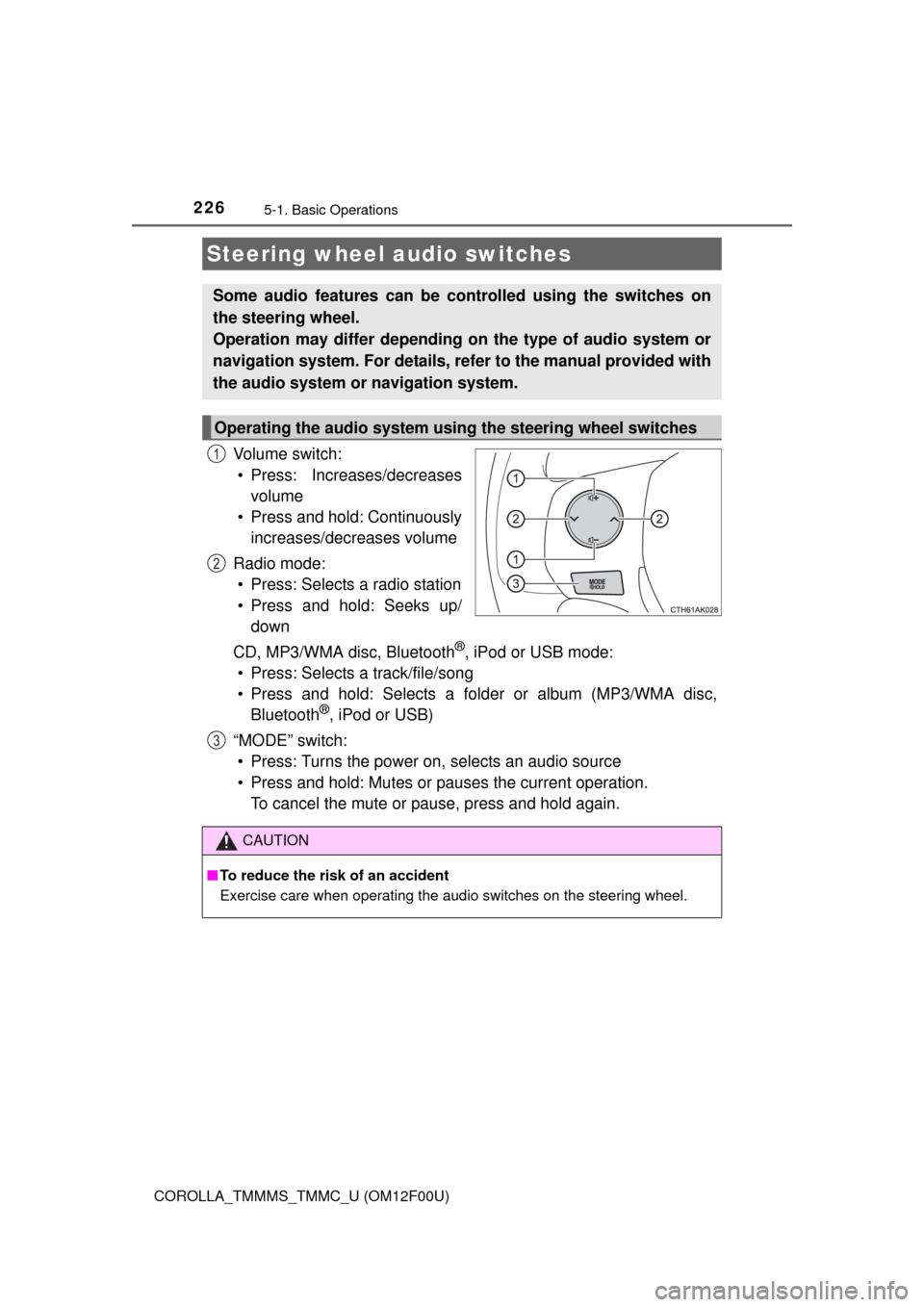
Vo l u m e s w i t c h :
• Press: Increases/decreases
volume
• Press and hold: Continuously
increases/decreases volume
Radio mode:
• Press: Selects a radio station
• Press and hold: Seeks up/
down
CD, MP3/WMA disc, Bluetooth
®, iPod or USB mode:
• Press: Selects a track/file/song
• Press and hold: Selects a folder or album (MP3/WMA disc,
Bluetooth
®, iPod or USB)
“MODE” switch:
• Press: Turns the power on, selects an audio source
• Press and hold: Mutes or pauses the current operation.
To cancel the mute or pause, press and hold again.
Steering wheel audio switches
Some audio features can be controlled using the switches on
the steering wheel.
Operation may differ depending on the type of audio system or
navigation system. For details, refer to the manual provided with
the audio system or navigation system.
Operating the audio system using the steering wheel switches
1
2
3
CAUTION
■To reduce the risk of an accident
Exercise care when operating the audio switches on the steering wheel.
Page 260 of 612
2605-6. Using Bluetooth® devices
COROLLA_TMMMS_TMMC_U (OM12F00U)
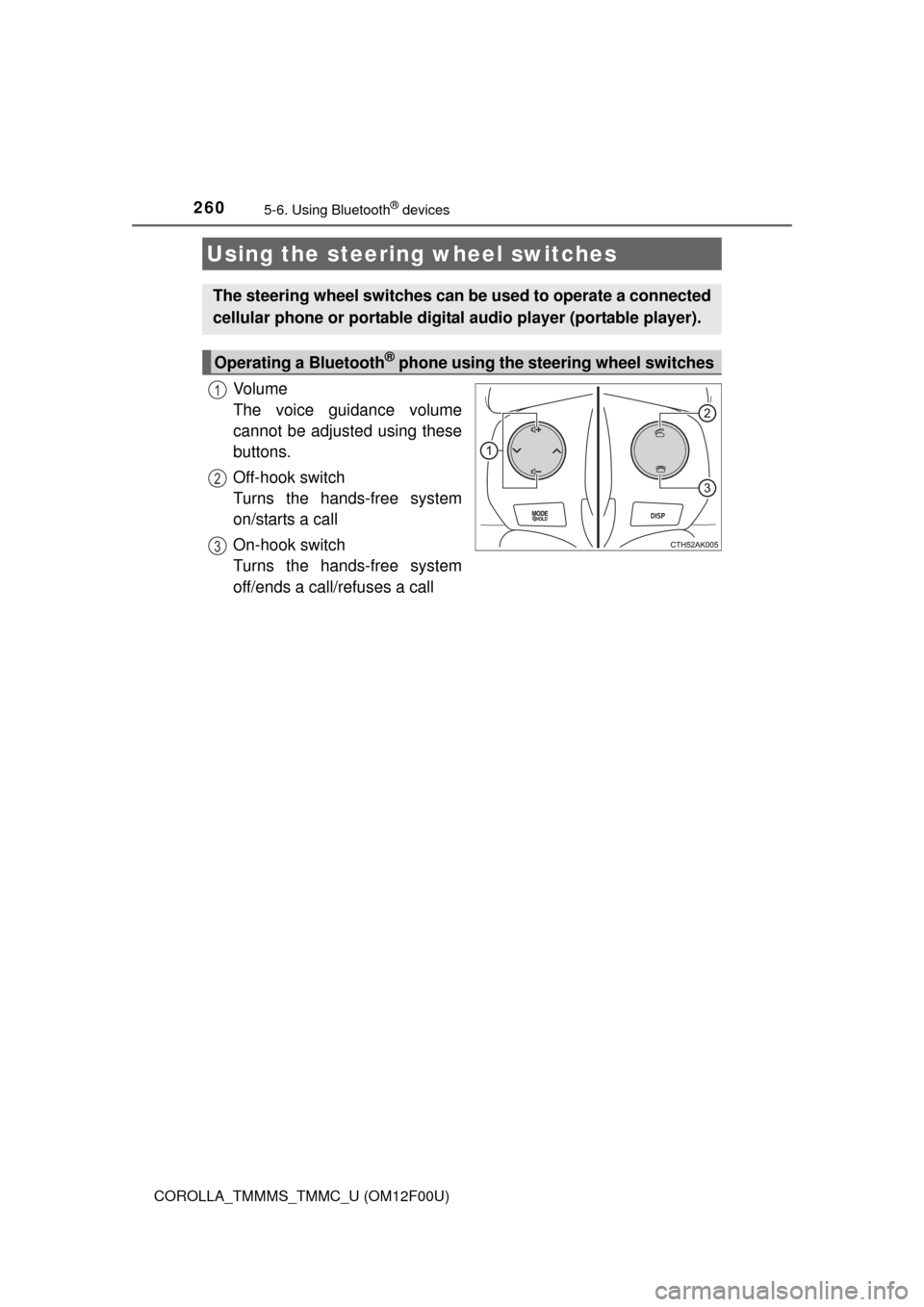
Vo l u m e
The voice guidance volume
cannot be adjusted using these
buttons.
Off-hook switch
Turns the hands-free system
on/starts a call
On-hook switch
Turns the hands-free system
off/ends a call/refuses a call
Using the steering wheel switches
The steering wheel switches can be used to operate a connected
cellular phone or portable digital audio player (portable player).
Operating a Bluetooth® phone using the steering wheel switches
1
2
3