Page 197 of 612
197
4
Driving
COROLLA_TMMMS_TMMC_U (OM12F00U)
4-5. Using the driving support systems
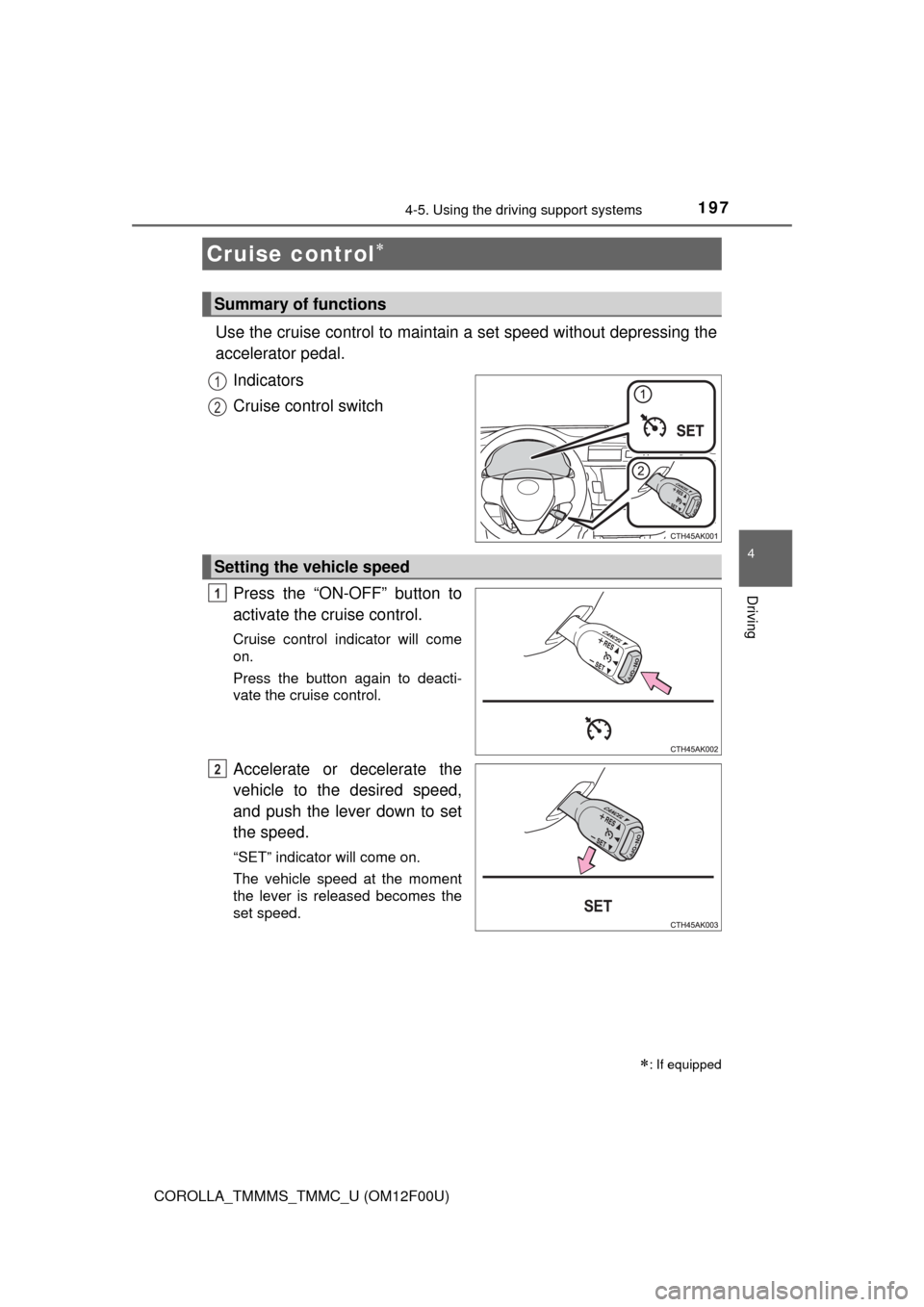
Use the cruise control to maintain a set speed without depressing the
accelerator pedal.
Indicators
Cruise control switch
Press the “ON-OFF” button to
activate the cruise control.
Cruise control indicator will come
on.
Press the button again to deacti-
vate the cruise control.
Accelerate or decelerate the
vehicle to the desired speed,
and push the lever down to set
the speed.
“SET” indicator will come on.
The vehicle speed at the moment
the lever is released becomes the
set speed.
Cruise control
: If equipped
Summary of functions
1
2
Setting the vehicle speed
1
2
Page 199 of 612
1994-5. Using the driving support systems
4
Driving
COROLLA_TMMMS_TMMC_U (OM12F00U)
■Cruise control can be set when
Vehicles with an automatic transmission
●The shift lever is in the D or range 3.
●Vehicle speed is above approximately 25 mph (40 km/h).
Vehicles with a continuously variable transmission (without paddle shift
switches)
●The shift lever is in the D or S.
●Vehicle speed is above approximately 25 mph (40 km/h).
Vehicles with a continuously variable transmission (with paddle shift
switches)
●The shift lever is in the D or range 4 or higher of M has been selected.
●Range 4 or higher has been selected by using the paddle shift.
●Vehicle speed is above approximately 25 mph (40 km/h).
Vehicles with a manual transmission
Vehicle speed is above approximately 25 mph (40 km/h).
■Accelerating after setting the vehicle speed
●The vehicle can be accelerated normally. After acceleration, the set speed
resumes.
●Even without canceling the cruise control, the set speed can be increased
by first accelerating the vehicle to the desired speed and then pushing the
lever down to set the new speed.
■Automatic cruise control cancelation
Cruise control will stop maintaining the vehicle speed in any of the following
situations.
●Actual vehicle speed falls more than approximately 10 mph (16 km/h) below
the preset vehicle speed.
At this time, the memorized set speed is not retained.
●Actual vehicle speed is below approximately 25 mph (40 km/h).
●VSC is activated.
■If the cruise control indicator light comes on in yellow
Press the “ON-OFF” button once to deactivate the system, and then press
the button again to reactivate the system.
If the cruise control speed cannot be set or if the cruise control cancels imme-
diately after being activated, there may be a malfunction in the cruise control
system. Have the vehicle inspected by your Toyota dealer.
Page 200 of 612
2004-5. Using the driving support systems
COROLLA_TMMMS_TMMC_U (OM12F00U)
CAUTION
■To avoid operating the cruise control by mistake
Switch the cruise control off using the “ON-OFF” button when not in use.
■Situations unsuitable for cruise control
Do not use cruise control in any of the following situations.
Doing so may result in loss of control and could cause an accident resulting
in death or serious injury.
●In heavy traffic
●On roads with sharp bends
●On winding roads
●On slippery roads, such as those covered with rain, ice or snow
●On steep hills
Vehicle speed may exceed the set speed when driving down a steep hill.
●During emergency towing
Page 230 of 612
230
COROLLA_TMMMS_TMMC_U (OM12F00U)
5-3. Using the radio
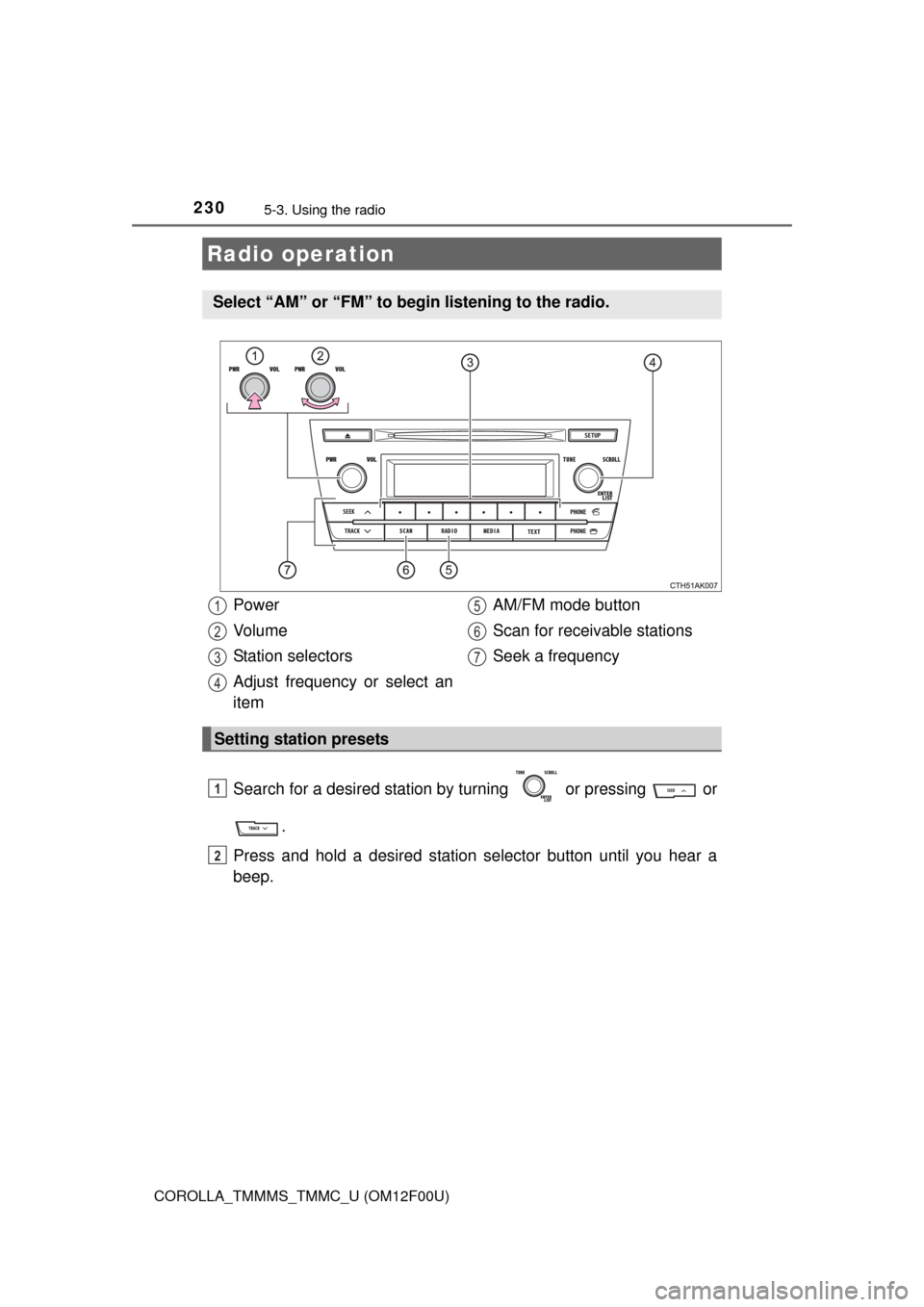
Search for a desired station by turning or pressing or
.
Press and hold a desired station selector button until you hear a
beep.
Radio operation
Select “AM” or “FM” to begin listening to the radio.
Power
Vo l u m e
Station selectors
Adjust frequency or select an
itemAM/FM mode button
Scan for receivable stations
Seek a frequency
Setting station presets
1
2
3
4
5
6
7
1
2
Page 260 of 612
2605-6. Using Bluetooth® devices
COROLLA_TMMMS_TMMC_U (OM12F00U)
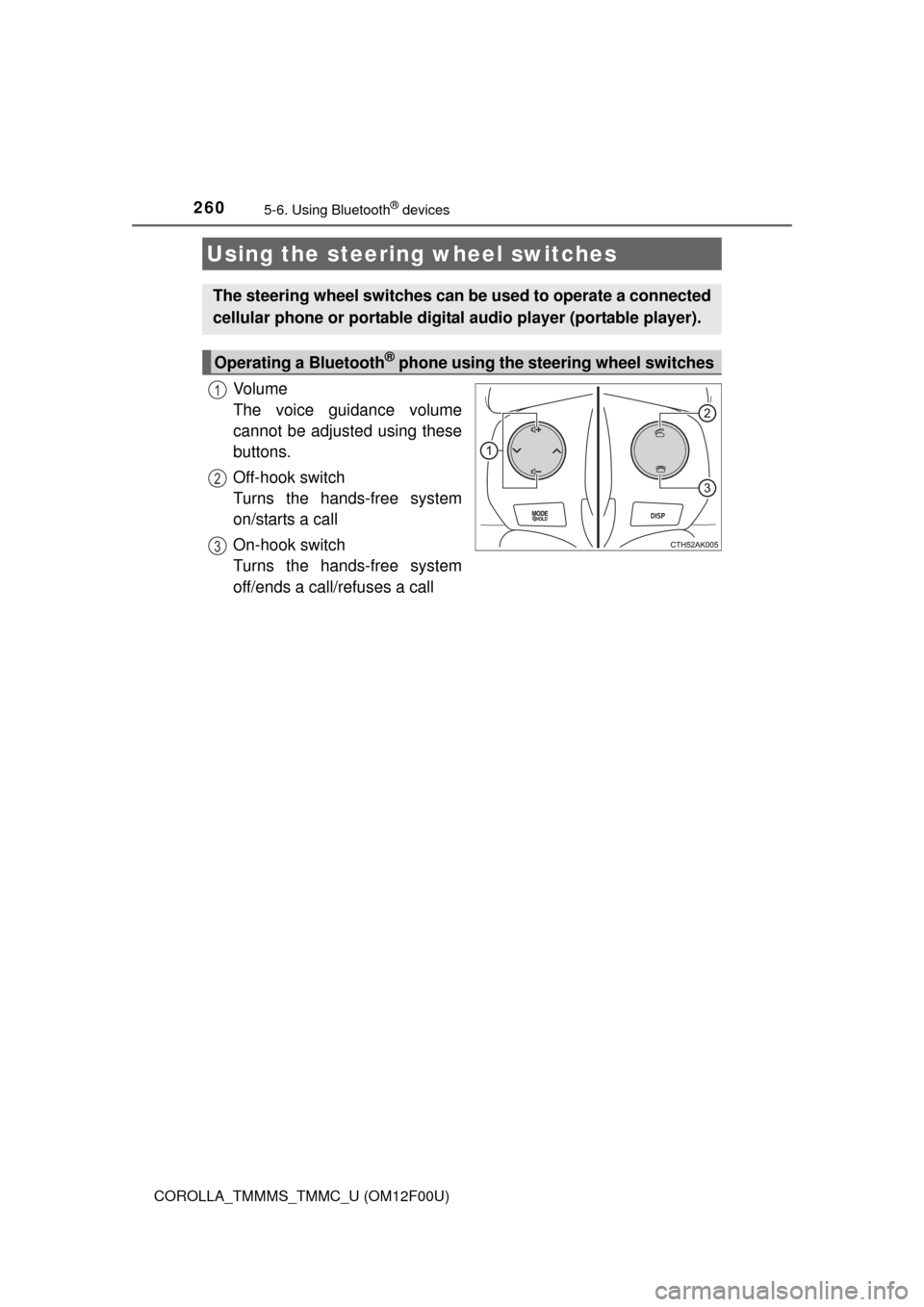
Vo l u m e
The voice guidance volume
cannot be adjusted using these
buttons.
Off-hook switch
Turns the hands-free system
on/starts a call
On-hook switch
Turns the hands-free system
off/ends a call/refuses a call
Using the steering wheel switches
The steering wheel switches can be used to operate a connected
cellular phone or portable digital audio player (portable player).
Operating a Bluetooth® phone using the steering wheel switches
1
2
3
Page 267 of 612
2675-7. “SET UP” menu
5
Interior features
COROLLA_TMMMS_TMMC_U (OM12F00U)
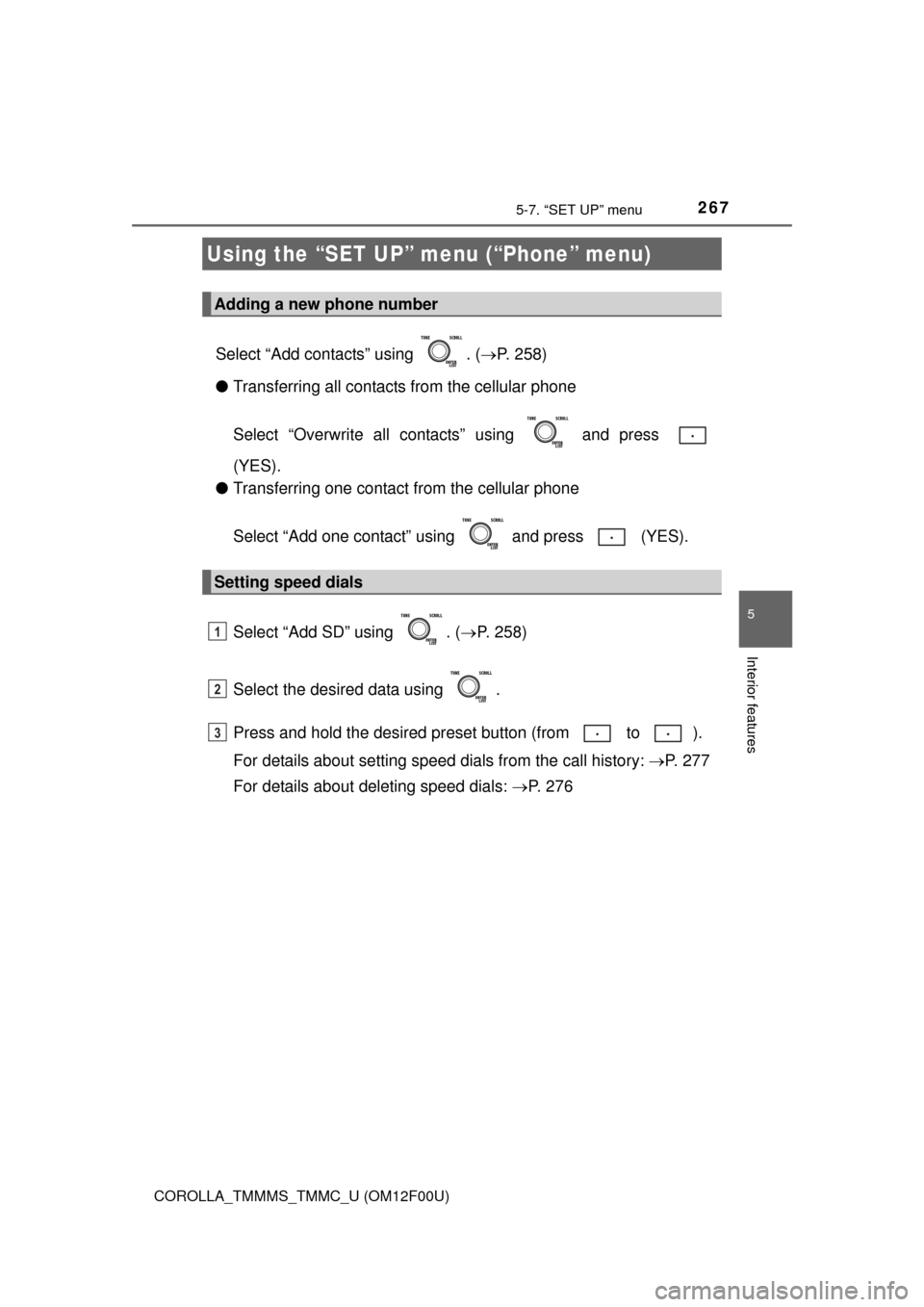
Select “Add contacts” using . (P. 258)
●Transferring all contacts from the cellular phone
Select “Overwrite all contacts” using and press
(YES).
●Transferring one contact from the cellular phone
Select “Add one contact” using and press (YES).
Select “Add SD” using . (P. 258)
Select the desired data using .
Press and hold the desired preset button (from to ).
For details about setting speed dials from the call history: P. 277
For details about deleting speed dials: P. 2 7 6
Using the “SET UP” menu (“Phone” menu)
Adding a new phone number
Setting speed dials
1
2
3
Page 276 of 612
2765-9. Bluetooth® Phone
COROLLA_TMMMS_TMMC_U (OM12F00U)
Select “Phonebook” using .
Select the desired name using and press the off-hook
switch.
By pressing (Add S. Dial) and then one of the speed dial but-
tons (from to ) while the desired name is selected, it can
be registered as a speed dial.
Select “Speed dials” using .
Press the desired preset button (from to ) and press
the off-hook switch.
Select “Dial by number” using .
Enter the phone number and press the off-hook switch.
Dialing by selecting a name
Speed dialing
Dialing by entering the number
1
2
1
2
1
2
Page 277 of 612
2775-9. Bluetooth® Phone
5
Interior features
COROLLA_TMMMS_TMMC_U (OM12F00U)
Select “All calls”, “Missed calls”, “Incoming calls” or “Outgoing calls”
using .
Select the desired number using and press the off-hook
switch.
The following operations can be performed:
●Registering a number as a speed dial
Press (Add S. Dial) and then press and hold the desired pre-
set button (from to ).
●Deleting the selected number
Press (DELETE) and press (YES).
Dialing from call histories
1
2