Page 224 of 612

2245-1. Basic Operations
COROLLA_TMMMS_TMMC_U (OM12F00U)
CAUTION
■Canada
IC: 216J-PTA184
NOTE:
This device complies with Industry Canada license-exempt RSS stan-
dard(s). Operation is subject to the following two conditions:
(1) this device may not cause interference, and
(2) this device must accept any interference, including interference that may
cause undesired operation of the device.
Le présent appareil est conforme aux CNR d'Industrie Canada applicables
aux appareils radio exempts de licence. L'exploitation est autorisée aux
deux conditions suivantes :
(1) l'appareil ne doit pas produire de brouillage, et
(2) l'utilisateur de l'appareil doit accepter tout brouillage radioélectrique
subi, même si le brouillage est susceptible d'en compromettre le fonc-
tionnement.
This radio transmitter (identify the device by certification number, or model
number if Category II) has been approved by Industry Canada to operate
with the antenna types listed below with the maximum permissible gain and
required antenna impedance for each antenna type indicated. Antenna
types not included in this list, having a gain greater than the maximum gain
indicated for that type, are strictly prohibited for use with this device.
Le présent émetteur radio (identifier le dispositif par son numéro de certifi-
cation ou son numéro de modèle s'il fait partie du matériel de catégorie I) a
été approuvé par Industrie Canada pour fonctionner avec les types
d'antenne énumérés ci-dessous et ayant un gain admissible maximal et
l'impédance requise pour chaque type d'antenne. Les types d'antenne non
inclus dans cette liste, ou dont le gain est supérieur au gain maximal
indiqué, sont strictement interdits pour l'exploitation de l'émetteur.
■LASER PRODUCTS
●Do not take this unit apart or attempt to make any changes yourself.
This is an intricate unit that uses a laser pickup to retrieve information from
the surface of compact discs.
The laser is carefully shielded so that its rays remain inside the cabinet.
Therefore, never try to disassemble the player or alter any of its parts
since you may be exposed to laser rays and dangerous voltages.
●This product utilizes a laser.
Use of controls or adjustments or performance of procedures other than
those specified herein may result in hazardous radiation exposure.
Page 226 of 612
2265-1. Basic Operations
COROLLA_TMMMS_TMMC_U (OM12F00U)
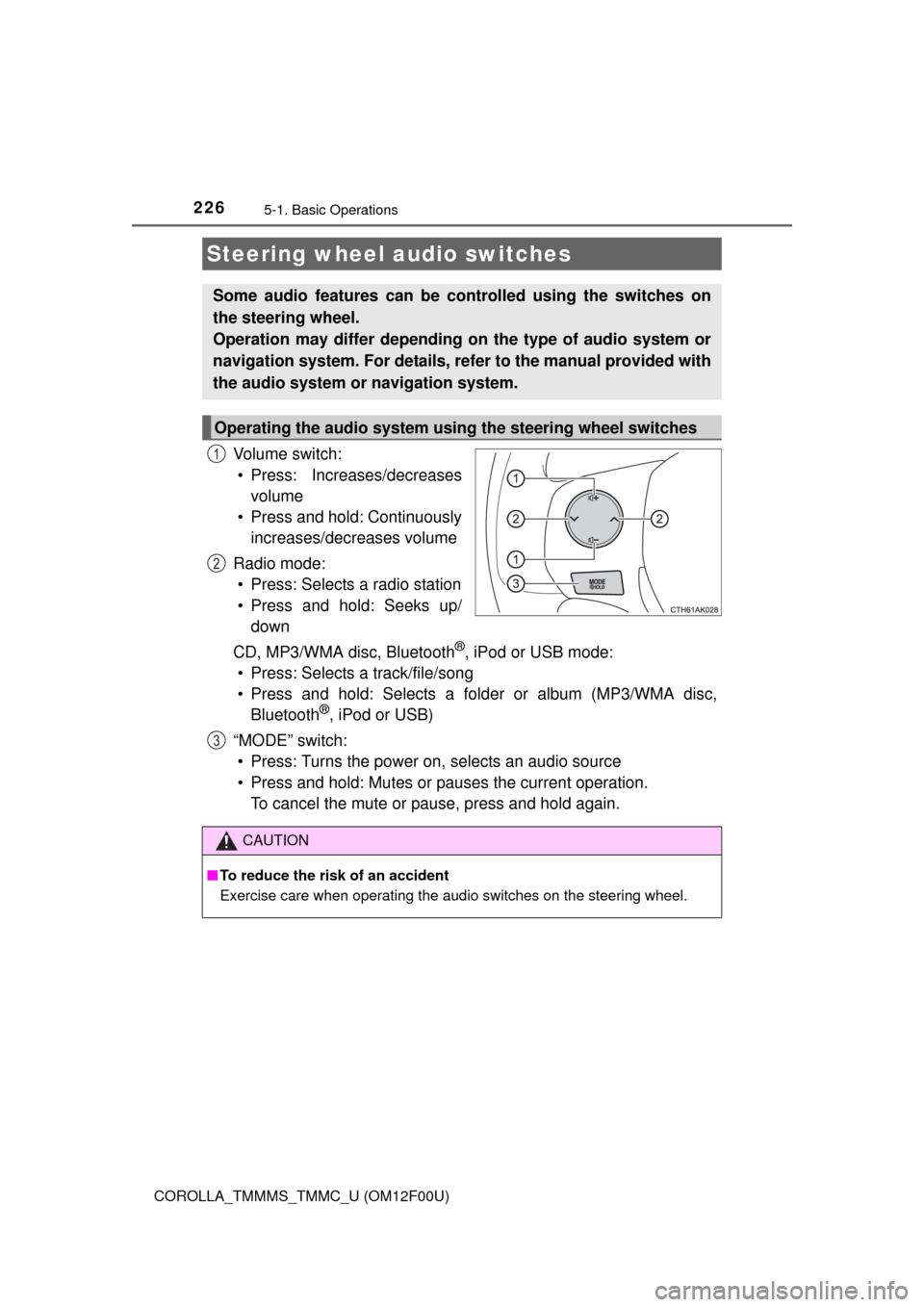
Vo l u m e s w i t c h :
• Press: Increases/decreases
volume
• Press and hold: Continuously
increases/decreases volume
Radio mode:
• Press: Selects a radio station
• Press and hold: Seeks up/
down
CD, MP3/WMA disc, Bluetooth
®, iPod or USB mode:
• Press: Selects a track/file/song
• Press and hold: Selects a folder or album (MP3/WMA disc,
Bluetooth
®, iPod or USB)
“MODE” switch:
• Press: Turns the power on, selects an audio source
• Press and hold: Mutes or pauses the current operation.
To cancel the mute or pause, press and hold again.
Steering wheel audio switches
Some audio features can be controlled using the switches on
the steering wheel.
Operation may differ depending on the type of audio system or
navigation system. For details, refer to the manual provided with
the audio system or navigation system.
Operating the audio system using the steering wheel switches
1
2
3
CAUTION
■To reduce the risk of an accident
Exercise care when operating the audio switches on the steering wheel.
Page 230 of 612
230
COROLLA_TMMMS_TMMC_U (OM12F00U)
5-3. Using the radio
Search for a desired station by turning or pressing or
.
Press and hold a desired station selector button until you hear a
beep.
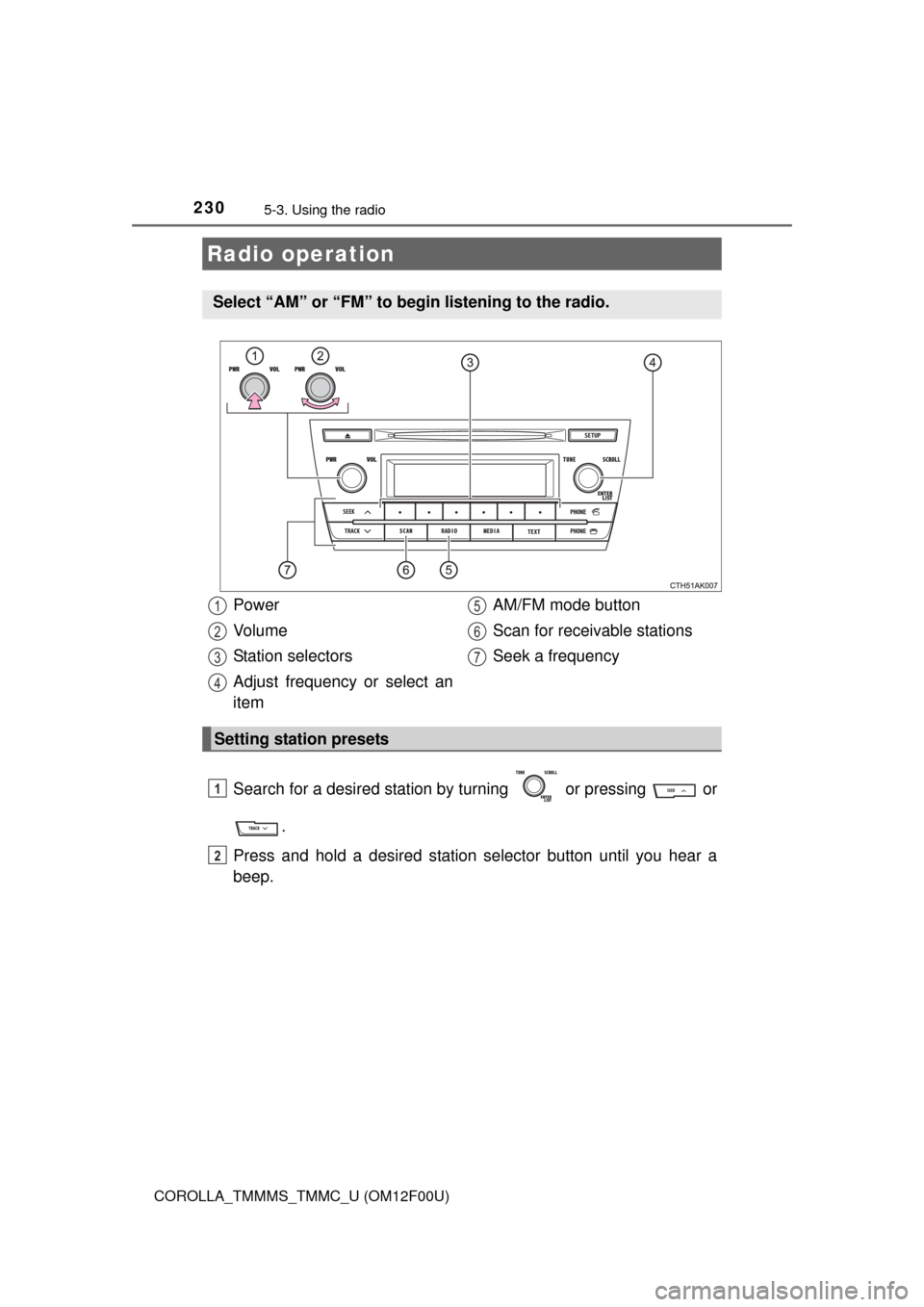
Radio operation
Select “AM” or “FM” to begin listening to the radio.
Power
Vo l u m e
Station selectors
Adjust frequency or select an
itemAM/FM mode button
Scan for receivable stations
Seek a frequency
Setting station presets
1
2
3
4
5
6
7
1
2
Page 231 of 612
2315-3. Using the radio
5
Interior features
COROLLA_TMMMS_TMMC_U (OM12F00U)■
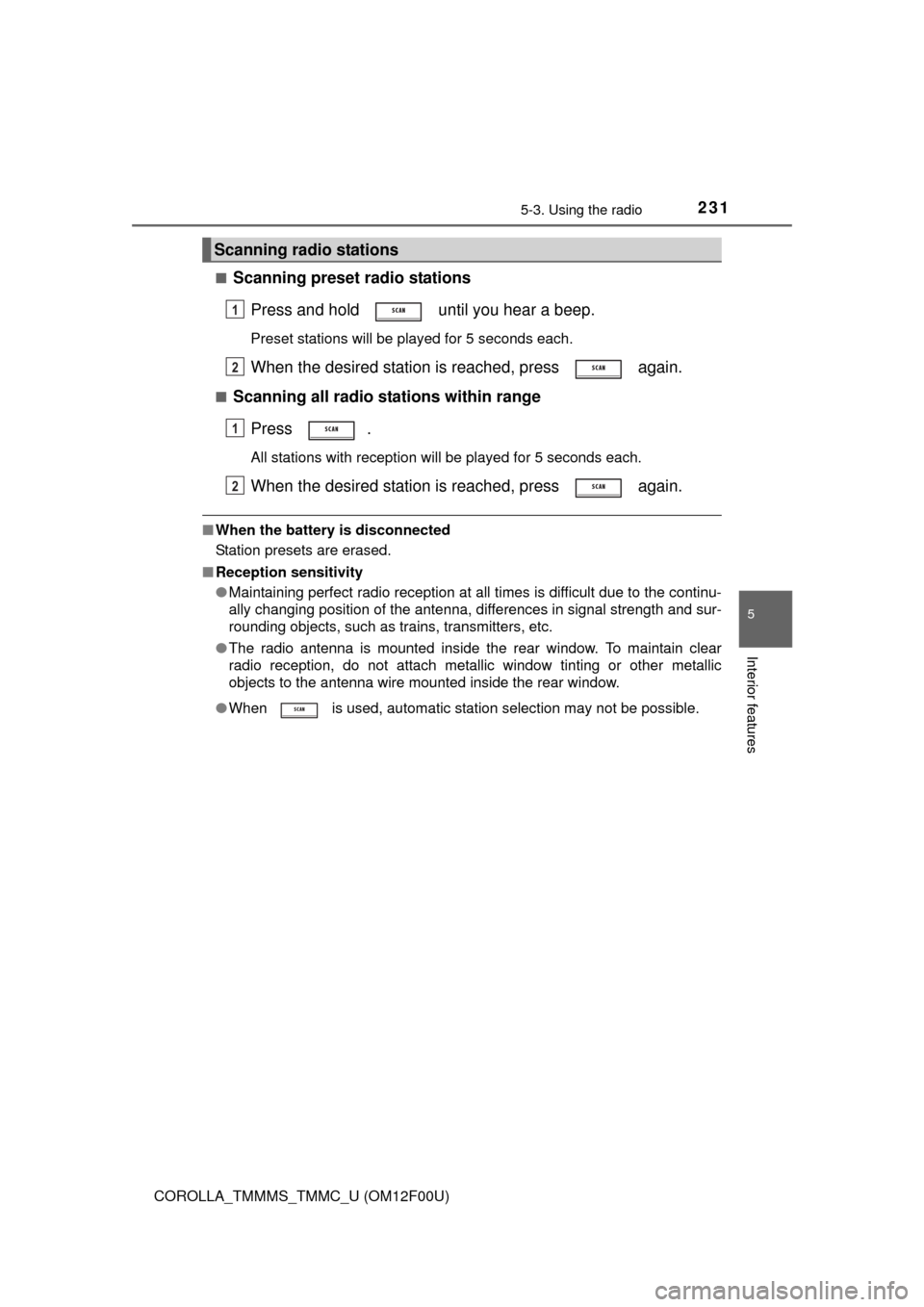
Scanning preset radio stations
Press and hold until you hear a beep.
Preset stations will be played for 5 seconds each.
When the desired station is reached, press again.
■Scanning all radio stations within range
Press .
All stations with reception will be played for 5 seconds each.
When the desired station is reached, press again.
■When the battery is disconnected
Station presets are erased.
■Reception sensitivity
●Maintaining perfect radio reception at all times is difficult due to the continu-
ally changing position of the antenna, differences in signal strength and sur-
rounding objects, such as trains, transmitters, etc.
●The radio antenna is mounted inside the rear window. To maintain clear
radio reception, do not attach metallic window tinting or other metallic
objects to the antenna wire mounted inside the rear window.
●When is used, automatic station selection may not be possible.
Scanning radio stations
1
2
1
2
Page 282 of 612

2825-10. Bluetooth®
COROLLA_TMMMS_TMMC_U (OM12F00U)
CAUTION
■While driving
Do not operate the portable audio player, cellular phone or connect a device
to the Bluetooth
® system.
■Caution regarding interference with electronic devices
●Your audio unit is fitted with Bluetooth
® antennas. People with implanted
pacemakers or cardiac defibrillators should maintain a reasonable dis-
tance between themselves and the Bluetooth
® antennas. The radio waves
may affect the operation of such devices.
●Before using Bluetooth
® devices, users of any electrical medical device
other than implanted pacemakers and implanted cardiac defibrillators
should consult the manufacturer of the device for information about its
operation under the influence of radio waves. Radio waves could have
unexpected effects on the operation of such medical devices.
NOTICE
■When leaving the vehicle
Do not leave your portable audio player or cellular phone in the vehicle. The
inside of the vehicle may become hot, causing damage to the portable
audio player or cellular phone.
Page 285 of 612
2855-11. Basic Operations (Multimedia system)
5
Interior features
COROLLA_TMMMS_TMMC_U (OM12F00U)
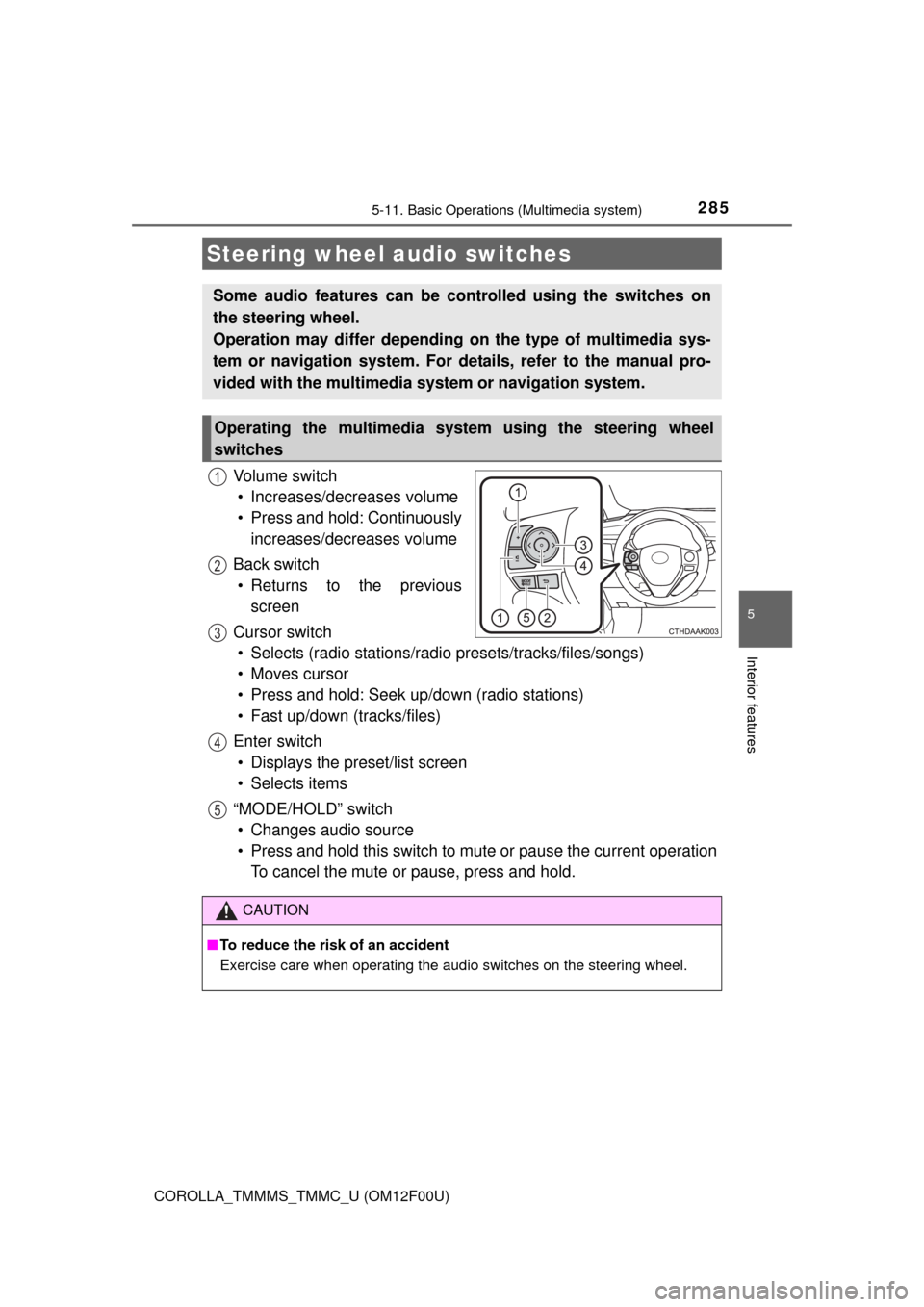
Vo l u m e s w i t c h
• Increases/decreases volume
• Press and hold: Continuously
increases/decreases volume
Back switch
• Returns to the previous
screen
Cursor switch
• Selects (radio stations/radio presets/tracks/files/songs)
• Moves cursor
• Press and hold: Seek up/down (radio stations)
• Fast up/down (tracks/files)
Enter switch
• Displays the preset/list screen
• Selects items
“MODE/HOLD” switch
• Changes audio source
• Press and hold this switch to mute or pause the current operation
To cancel the mute or pause, press and hold.
Steering wheel audio switches
Some audio features can be controlled using the switches on
the steering wheel.
Operation may differ depending on the type of multimedia sys-
tem or navigation system. For details, refer to the manual pro-
vided with the multimedia system or navigation system.
Operating the multimedia system using the steering wheel
switches
1
12
3
4
5
CAUTION
■To reduce the risk of an accident
Exercise care when operating the audio switches on the steering wheel.
Page 287 of 612
2875-11. Basic Operations (Multimedia system)
5
Interior features
COROLLA_TMMMS_TMMC_U (OM12F00U)
Basic Audio Operations
Basic audio operations and functions common to each mode are
explained in this section.
Operating the multimedia system
Press the “” or “” button to
seek up or down for a radio
station, or to access a
desired track or file. Press this knob to turn the mul-
timedia system on and off, and
turn it to adjust the volume.
Press this button
to eject a disc
Press to pause or resume
playing music. Insert a disc into
the disc slot
:Select to pause music.Turn this knob to select radio
station bands, tracks and files.
Also the knob can be used to
select items in the list display. :Select to resume playing music.
Page 292 of 612
2925-12. Setup (Multimedia system)
COROLLA_TMMMS_TMMC_U (OM12F00U)
Press the “SETUP” button.
Select “Audio” on the “Setup” screen.
Number of Radio Presets
Select the number of radio
preset stations.
Display Cover Art on/off
Automatic Sound Levelizer
(P. 293)
Audio settings
Settings are available for adjusting the radio operation, cover
art, etc.
Screen for audio settings
1
2
1
2
3