Page 260 of 612
2605-6. Using Bluetooth® devices
COROLLA_TMMMS_TMMC_U (OM12F00U)
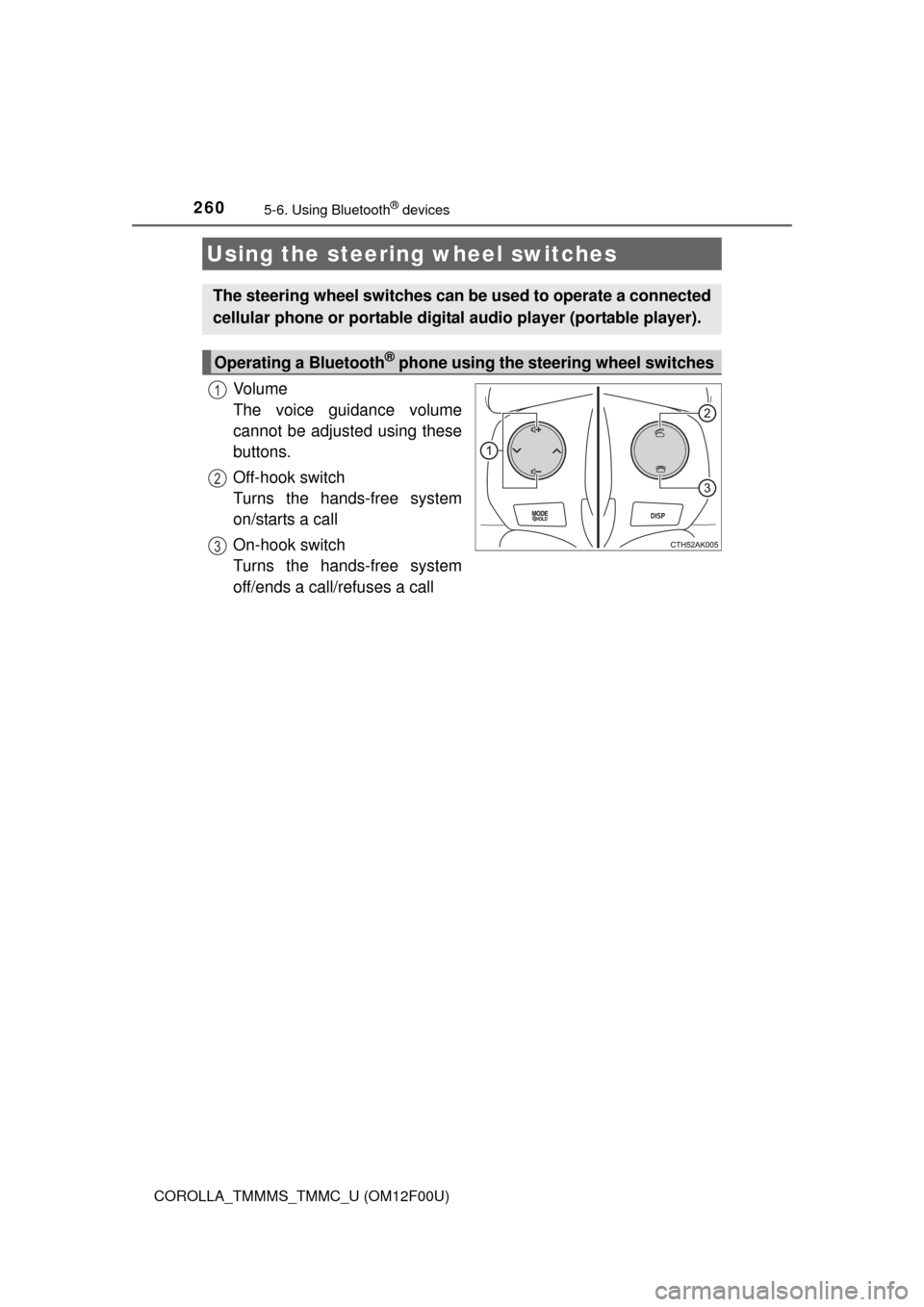
Vo l u m e
The voice guidance volume
cannot be adjusted using these
buttons.
Off-hook switch
Turns the hands-free system
on/starts a call
On-hook switch
Turns the hands-free system
off/ends a call/refuses a call
Using the steering wheel switches
The steering wheel switches can be used to operate a connected
cellular phone or portable digital audio player (portable player).
Operating a Bluetooth® phone using the steering wheel switches
1
2
3
Page 283 of 612
283
5
Interior features
COROLLA_TMMMS_TMMC_U (OM12F00U)5-
11.
Basic Operations (Multimedia system)
Multimedia system
: If equipped
Operations such as listening to audio, using the hands-free
phone, confirming vehicle inform ation and changing multimedia
system settings are started by using the following buttons.
Multimedia system operation buttons
“AUDIO” button
Display the “Select Audio Source”
screen or audio top screen.
( P. 296)
button
Press this button to access the Bluetooth
® hands-free system.
( P. 338)
“CAR” button
Press this button to access the vehicle information system.
(P. 318) “SETUP” button
Press this button to customize
the function settings. (
P. 289)
Page 284 of 612

2845-11. Basic Operations (Multimedia system)
COROLLA_TMMMS_TMMC_U (OM12F00U)
By touching the screen with your finger, you can control the multime-
dia system, etc.
■Drag*
Touch the screen with your finger, and move the screen to the
desired position.
●Scrolling the lists
●Using scroll bar in lists
■Flick*
Touch the screen with your finger and quickly move the screen by
flicking your finger.
●Scrolling the main screen page
●Returning to the menu screen from the sub-menu screen (screen
one level below)
*: The above operations may not be performed on all screens.
■When using the touch screen
●If the screen is cold, the display may be dark, or the system may seem to be
operating slightly slower than normal.
●The screen may seem dark and hard to see when viewed through sun-
glasses. Change your angle of viewing, adjust the display on the “Display
Settings” screen (P. 294) or remove your sunglasses.
Operating the touch screen
NOTICE
■To avoid damaging the touch screen
●To prevent damaging the screen, lightly touch the screen buttons with your
finger.
●Do not use objects other than your finger to touch the screen.
●Wipe off fingerprints using a glass cleaning cloth. Do not use chemical
cleaners to clean the screen, as they may damage the touch screen.
Page 297 of 612
2975-13. Using the Multimedia system
5
Interior features
COROLLA_TMMMS_TMMC_U (OM12F00U)
: Select to scroll to the next
or previous page.
: If appears to the right of
titles, the complete titles are
too long for the display. Select
this button to scroll the title.
Turn the “TUNE/SCROLL” knob to
move the cursor box to select a
desired item from the list, and
press the “TUNE/SCROLL” knob
to play it. The track that is being
played is highlighted.
To return to the top screen, select “Now Playing” on the list screen.
List screen operation
When a list screen is displayed, use the appropriate buttons to
scroll through the list.
How to scroll
Page 464 of 612
4647-3. Do-it-yourself maintenance
COROLLA_TMMMS_TMMC_U (OM12F00U)
●Flathead screwdriver
●Small flathead screwdriver
●Lithium battery CR2016 (vehicles without a smart key system), or
CR2032 (vehicles with a smart key system)
Vehicles without a smart key system
Remove the cover.
To prevent damage to the key,
cover the tip of the screwdriver with
a rag.
To prevent the buttons from being
disassembled, face the button sur-
face downward.
Remove the module.
Wireless remote control/electronic key bat-
ter y
: If equipped
Replace the battery with a new one if it is depleted.
You will need the following items:
Replacing the battery
1
2
Page 574 of 612

5749-2. Customization
COROLLA_TMMMS_TMMC_U (OM12F00U)■
Turn signal lever (P. 182)
*1: After flashing the turn signal lights when turning left or right while this func-
tion is off and the turn signal lever is moved to the first position in the direc-
tion of the flashing light, the turn signal lights can be selected to be flashing
or off.
*2: The turn signal lights will be off if the turn signal lever is moved to the first
position in the direction of flashing light.
■
Automatic light control system* (P. 184)
*: If equipped
FunctionDefault settingCustomized set-
ting
The number of times the
turn signal lights flash
automatically when the
turn signal lever is moved
to the first position during
a lane change
*1
3
5
OO7
Off*2
12
FunctionDefault settingCustomized set-
ting
Light sensor sensitivityLevel 3Level 1 to 5OO
Sensitivity of the ambient
light sensor used for dim-
ming the indicator on the
air conditioning control
buttons.Standard -2 to 2
—O
Sensitivity of the ambient
light sensor used for
brightening the indicator
on the air conditioning
control buttons.Standard -2 to 2
—O
Time elapsed before
headlights automatically
turn off after doors are
closed
30 seconds
Off
OO60 seconds
90 seconds
12