Page 189 of 620
189
2-2. Instrument cluster
2
When driving
■
Warning lights
Warning lights inform the driver of malfunctions in any of the
vehicle’s systems. ( P. 505)
*1: These lights turn on when the engine switch is turned to the “ON”
position (vehicles without a smart key system) or the “ENGINE
START STOP” switch is turned to IGNITION ON mode (vehicles
with a smart key system) to indicate that a system check is being
performed. They will turn off after the engine is started, or after a
few seconds. There may be a malfunction in a system if a light does
not come on, or if the lights do not turn off. Have the vehicle
inspected by your Toyota dealer.
(U.S.A.)(Canada)(U.S.A.)(Canada)(U.S.A.)
(Canada)(U.S.A.)(if equipped)(if equipped)
(if equipped)
Ty p e ATy p e B
*1*1*1*1*1*1*1*1
*1*1*3*1*1*1*4
*1*2
Page 190 of 620
190 2-2. Instrument cluster
CAUTION
■If a safety system warning light does not come on
Should a safety system light such as the ABS or SRS warning light not come
on when you start the engine or remain on even after a few seconds have
passed since the engine was started, this could mean that these systems
are not available to help protect you in an accident, which could result in
death or serious injury. Have the vehicle inspected by your Toyota dealer
immediately if this occurs.
*2: In order to confirm operation, the BSM outside rear view mirror indi-
cators illuminate in the following situations:
• When the “ENGINE START STOP” switch is turned to IGNITION
ON mode while the BSM main switch is set to ON.
• When the BSM main switch is set to ON while the “ENGINE START STOP” switch is in IGNITION ON mode.
If the system is functioning correctly, the BSM outside rear view mir-
ror indicators will turn off after a few seconds.
If the BSM outside rear view mirror indicators do not illuminate or do
not turn off, there may be a malfunction with the system.
If this occurs, have the vehicle inspected by your Toyota dealer.
*3: The light comes on in yellow to indicate a malfunction.
*4: The light flashes in yellow to indicate a malfunction. The light flashes quickly in green to indicate that the steering lock has not
been released.
Page 192 of 620
192 2-3. Operating the lights and wipers
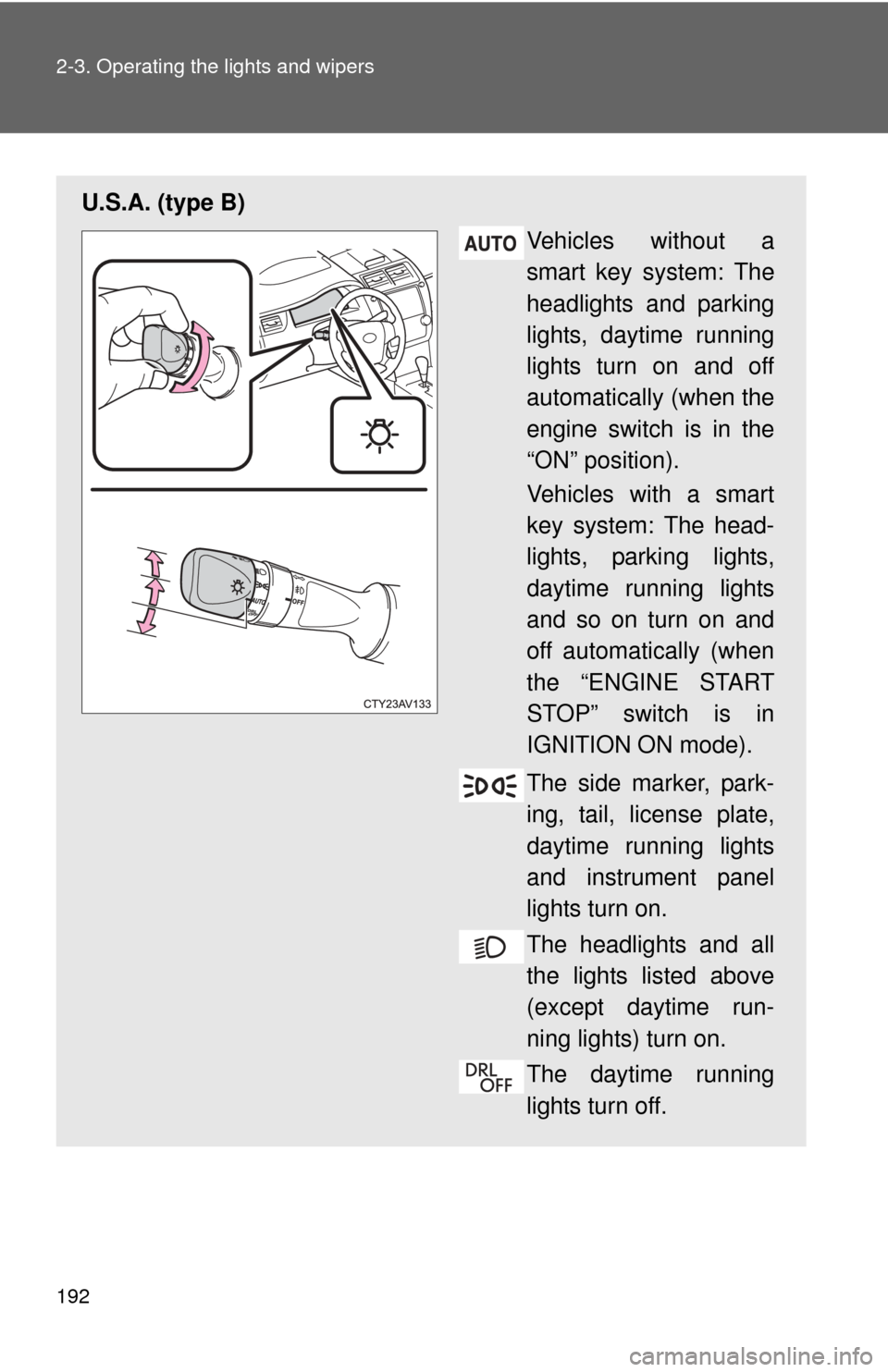
U.S.A. (type B)Vehicles without a
smart key system: The
headlights and parking
lights, daytime running
lights turn on and off
automatically (when the
engine switch is in the
“ON” position).
Vehicles with a smart
key system: The head-
lights, parking lights,
daytime running lights
and so on turn on and
off automatically (when
the “ENGINE START
STOP” switch is in
IGNITION ON mode).
The side marker, park-
ing, tail, license plate,
daytime running lights
and instrument panel
lights turn on.
The headlights and all
the lights listed above
(except daytime run-
ning lights) turn on.
The daytime running
lights turn off.
Page 193 of 620
193
2-3. Operating the lights and wipers
2
When driving
Canada
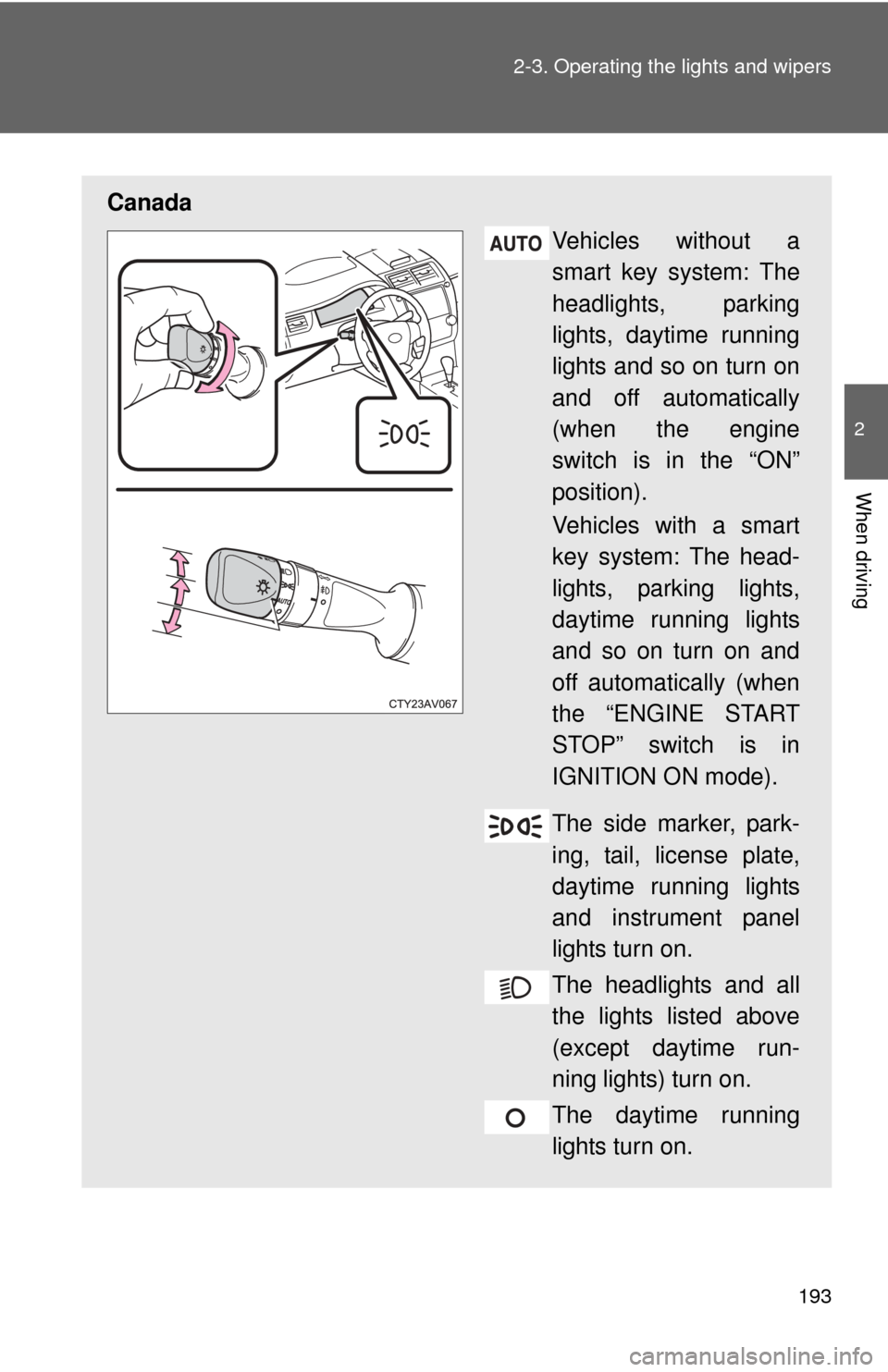
Vehicles without a
smart key system: The
headlights, parking
lights, daytime running
lights and so on turn on
and off automatically
(when the engine
switch is in the “ON”
position).
Vehicles with a smart
key system: The head-
lights, parking lights,
daytime running lights
and so on turn on and
off automatically (when
the “ENGINE START
STOP” switch is in
IGNITION ON mode).
The side marker, park-
ing, tail, license plate,
daytime running lights
and instrument panel
lights turn on.
The headlights and all
the lights listed above
(except daytime run-
ning lights) turn on.
The daytime running
lights turn on.
Page 197 of 620

197
2-3. Operating the lights and wipers
2
When driving
■
Light reminder buzzer (except when the light switch is in )
Vehicles without a smart key system
A buzzer sounds when the engine switch is turned “OFF” or to “ACC” posi-
tion and the driver's door is opened with the key removed from the engin\
e
switch while the lights are turned on.
Vehicles with a smart key system
A buzzer sounds when the “ENGINE START STOP” switch is turned off or
turned to ACCESSORY mode and the driver's door is opened while the
lights are turned on.
■ Battery-saving function
In order to prevent the vehicle battery from discharging, if the headlights
and/or tail lights are on when the engine switch is turned to the “LOCK” posi-
tion (vehicles without a smart key system) or when the “ENGINE START
STOP” switch is turned off (vehicles with a smart key system) the battery
saving function will operate and automatically turn off all the lights after
approximately 20 minutes.
When the engine switch is turned to the “ON” position (vehicles without a
smart key system) or when the “ENGINE START STOP” switch is turned to
IGNITION ON mode (vehicles with a smart key system), the battery-saving
function will be disabled.
When any of the following are performed, the battery-saving function is can-
celed once and then reactivated. All the lights will turn off automatically 20
minutes after the battery-saving function has been reactivated:
●When the headlight switch is operated
● When a door is opened or closed
■ Customization that can be co nfigured at Toyota dealer
Settings (e.g. light sensor sensitivity) can be changed.
(Customizable features P. 581)
NOTICE
■To prevent battery discharge
Do not leave the lights on longer than necessary when the engine is not run-
ning.
Page 203 of 620
203
2-3. Operating the lights and wipers
2
When driving
■
The windshield wiper and washers can be operated when
Vehicles without a smart key system: The engine switch is in the “ON” posi-
tion.
Vehicles with a smart key system: The “ENGINE START STOP” switch is in
IGNITION ON mode.
■ If no windshield washer fluid sprays
Check that the washer nozzles are not blocked if there is washer fluid in the
windshield washer fluid reservoir.
Increases the intermittent
windshield wiper frequency
Decreases the intermittent
windshield wiper frequency
Washer/wiper dual opera-
tion
The wipers will automatically
operate a couple of times after
the washer squirts.
Page 253 of 620
253
3-1. Using the air conditioning system and defogger
3
Interior features
Rear window and outside rear view mirror defoggers
■The defoggers can be operated when
Vehicles without a smart key system
The engine switch is in the “ON” position.
Vehicles with a smart key system
The “ENGINE START STOP” switch is in IGNITION ON mode.
■ The outside rear view mirr or defoggers (if equipped)
Turning the rear window defogger on will turn the outside rear view mirror
defoggers on.
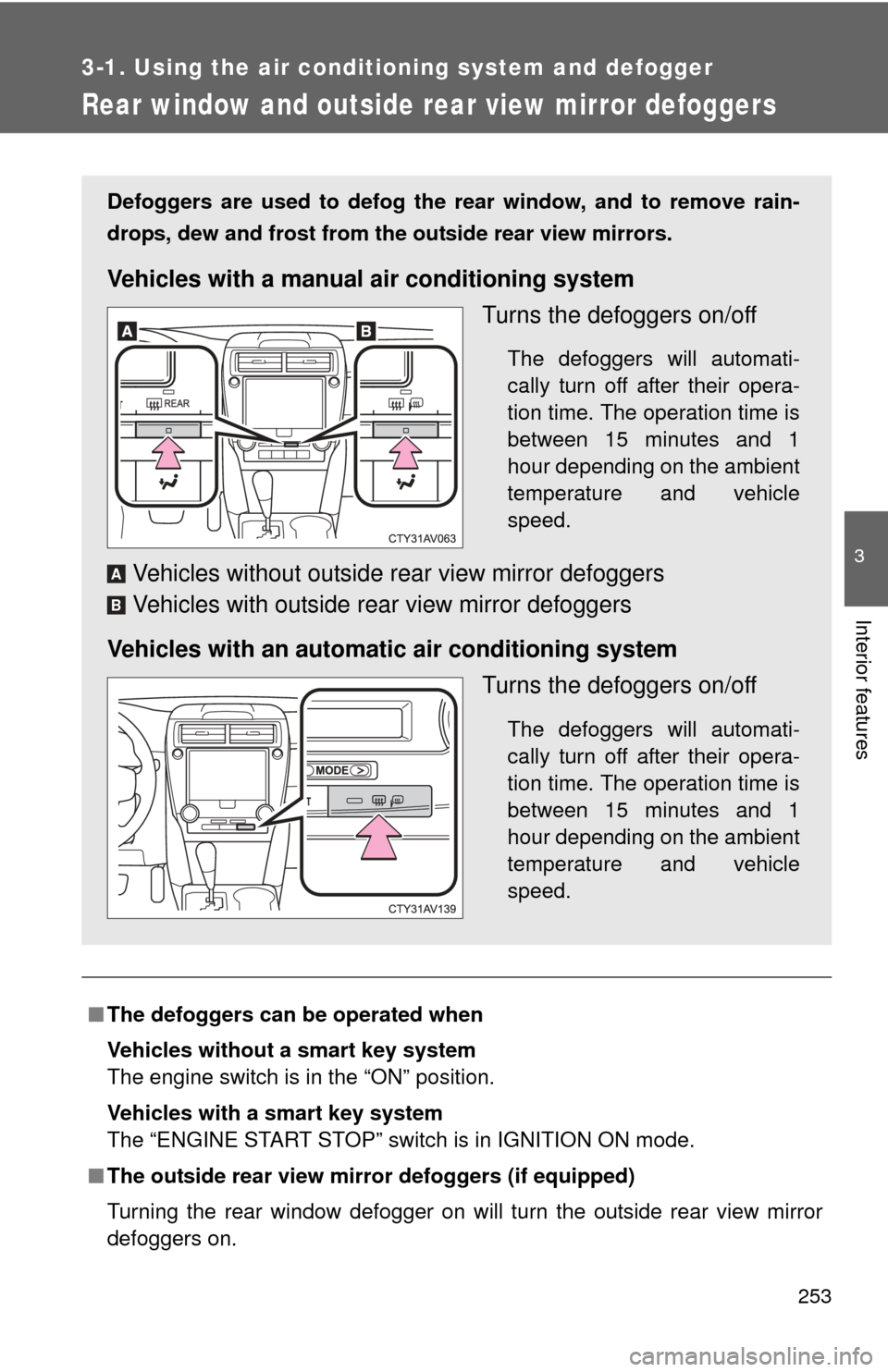
Defoggers are used to defog the rear window, and to remove rain-
drops, dew and frost from the outside rear view mirrors.
Vehicles with a manual air conditioning system
Turns the defoggers on/off
The defoggers will automati-
cally turn off after their opera-
tion time. The operation time is
between 15 minutes and 1
hour depending on the ambient
temperature and vehicle
speed.
Vehicles without outside rear view mirror defoggers
Vehicles with outside rear view mirror defoggers
Vehicles with an automatic air conditioning system Turns the defoggers on/off
The defoggers will automati-
cally turn off after their opera-
tion time. The operation time is
between 15 minutes and 1
hour depending on the ambient
temperature and vehicle
speed.
A
B
Page 310 of 620

310 3-2. Using the audio system
Auto connectionTo turn auto connection mode on, set “Bluetooth* Power” to on.
( P. 314)
When you register a phone, auto connection will be activated. Always
set it to this mode and leave the Bluetooth
® phone in a place where a
connection can be established.
Vehicles with a smart key system
When the “ENGINE START STOP” switch is turned to ACCESSORY or
IGNITION ON mode, the system will search for a nearby cellular phone
you have registered.
Vehicles without a smart key system
When the engine switch is turned to “ACC” or “ON” mode, the system will
search for a nearby cellular phone you have registered.
Next, the system automatically connects with the most recent of the
phones connected to in the past. Then, the connection result is displayed.
Manual connection
When auto connection has failed or “Bluetooth* Power” is turned off,
you must connect the Bluetooth
® device manually.
*: Bluetooth is a registered trademark of Bluetooth SIG, Inc.
Follow the steps in “Connecting a Bluetooth® device” from
“STEP 1”. ( P. 309)
Connecting a Bluetooth® audio player
Registering an additional device Select “Select Devi ce” on the Bluetooth
® audio control
screen.
For more information: P. 3 0 6
STEP1
STEP1
STEP2